Tag: Microsoft

  • Hands-On Nvidia RTX Spark Surface Laptop Ultra Reveals New USB-C Port

    Hands-On Nvidia RTX Spark Surface Laptop Ultra Reveals New USB-C Port

    Key Takeaway

    – Early hands-on reports suggest the Surface Laptop Ultra could be one of Microsoft’s most impressive laptops yet.
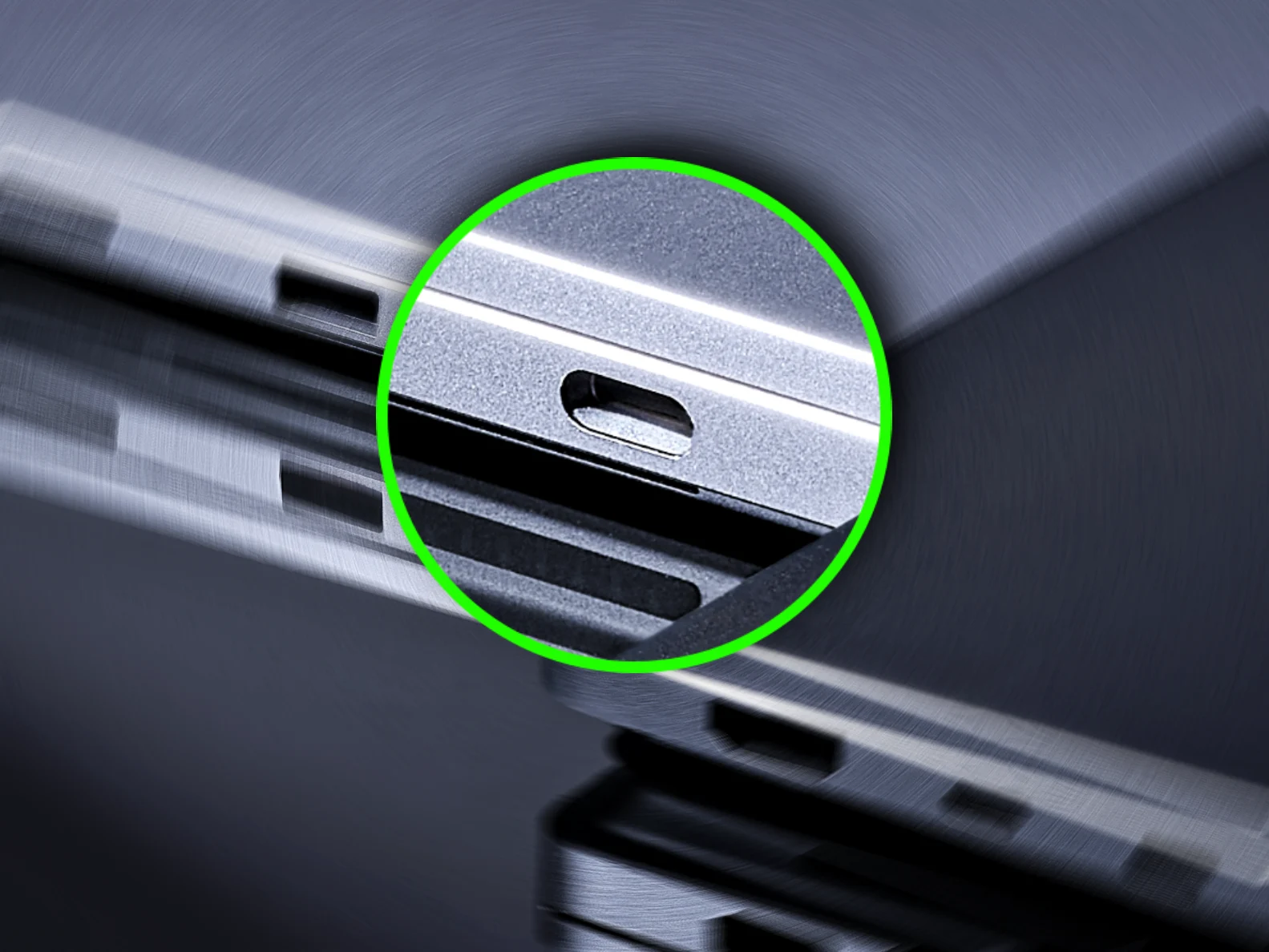
    – A unique, oversized USB-C port on the right side has been confirmed by Microsoft to be intentionally different from the other ports.
    – Cables feel “looser” in this port, sparking speculation about a proprietary magnetic USB-C cable or adapter.
    – The oversized port is not for high-wattage power delivery, as other RTX Spark laptops do not share this modification.
    – The mysterious port may introduce magnetic breakaway charging, directly competing with Apple’s MagSafe on the M5 MacBook Pro.


    Surface Laptop Ultra’s Mysterious Oversized USB-C Port

    Microsofts upcoming Surface Laptop Ultra is already generating significant buzz, with early hands-on reports suggesting it could be one of the most impressive laptops the company has ever produced. Beyond its high-end performance, driven by Nvidia’s RTX Spark platform, a mysterious hardware detail has caught the attention of enthusiasts, and thats the unique, oversized USB-C port on the right side of the Surface Laptop Ultra.

    Hardware Difference Confirmed by Microsoft

    During his hands-on time with the Surface Laptop Ultra (and communication with Microsofts reps), tech reporter Zac Bowden has found out that the USB-C port on the right side of the laptop does indeed stand out. Unlike the other USB-C ports (on the left), this specific connector is physically different, a fact Microsoft has reportedly confirmed.

    In discussions on social media, Bowden addressed the various speculation regarding the ports design, by saying the hardware design and ports on the device are final (as per Microsoft). Apparantly, the reps have acknowledged the port is different for a specific reason, though they are withholding details until later this year.

    Looser Cable Fit and Potential Magnetic Adapter

    Addressing theories that the port might just feature a simple chamfer for aesthetics, the reporter (again) pointed out that the other USB-C ports do not share this design. He noted that cables feel “looser” in this specific port, fueling speculation that Microsoft may be planning a proprietary, magnetic USB-C cable designed to attach more securely. Or perhaps an adaptor, which plugs into the oversized USB-C port and allows for a new version of the magnetic Surface Connect plug from prior Surface laptops.

    Distinct from Other RTX Spark Laptops

    According to the report, the oversized port isnt an implementation similar to proprietary high-wattage power delivery found in other notebooks. He says that other laptops utilizing the RTX Spark platform have not modified their USB-C ports for charging purposes, further distinguishing the Surface Laptop Ultra as having “something a little extra going on”.

    Potential Competition with Apple’s MagSafe

    As Microsoft prepares to pull the curtain back on the Surface Laptop Ultra later this fall, the nature of this mysterious port remains one of the most intriguing “unknowns” in the world of new RTX Spark laptops. If it does indeed introduce a magnetic breakaway feature to the standard USB-C interface, it could mark a significant evolution in charging convenience for pro-grade hardware.

    Of course, the Surface Laptop Ultra is going to compete directly with Apples M5 MacBook Pro, which does indeed offer MagSafe charging as an added feature.

    Microsoft, WindowsCentral, Zack Bowden
  • Microsoft unveils Android AI device with Qualcomm, 5G to rival iPhone

    Microsoft unveils Android AI device with Qualcomm, 5G to rival iPhone

    Key Takeaway

    – Microsoft’s Project Solara introduces a “chip-to-cloud” platform for AI agent-first experiences, moving beyond traditional app-based smartphones.
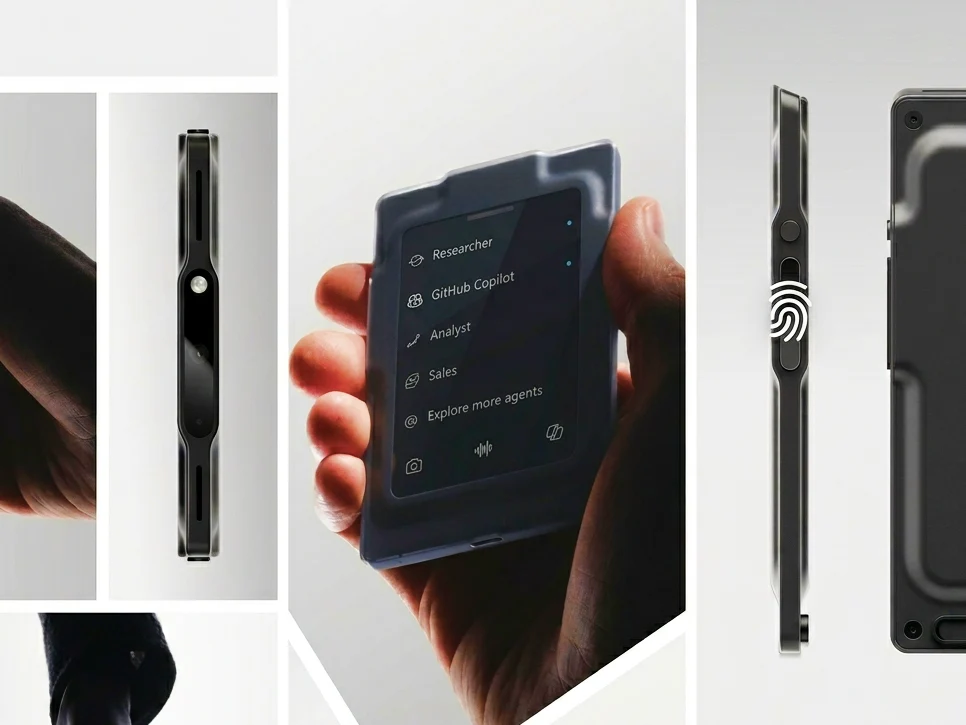
    – The key hardware is a wearable “badge” with an always-connected, agent-centric UI, designed to replace the app grid on current phones.
    – The device uses an Android-based OS (Microsoft Device Ecosystem Platform) tailored for active AI agents, not conventional app launchers.
    – Microsoft is internally testing the badge and smart display among hundreds of employees, with plans for enterprise pilots in healthcare, retail, hospitality, and more.
    – Purpose-built, lightweight hardware is seen as essential for reaching true “agent-first” potential, with AI generating UIs instead of requiring native apps for every form factor.


    Project Solara Unveiled at Computex 2026

    At Computex 2026, Microsoft has officially unveiled Project Solara, an ambitious new “chip-to-cloud” platform designed to shift the focus of computing from the apps we use on our phones to AI agent-first experiences that do things for you (and instead of you). While the company revealed a stationary desk-based smart display concept that looks like a smart speaker/display combo, the real standout announcement is a portable wearable device, that hints at a future where the smartphone as we know it might be rendered obsolete. And despite the fact that Microsoft doesn’t call the device a “phone”, it sure has all of the hardware and software to do what your iPhone 17 Pro or Galaxy S26 Ultra can do.

    The Badge Hardware and Agent-Centric UI

    The badge, a crucial hardware element of Project Solara, is not just a digital ID (which is what it looks like) but a dedicated, always-connected interface for AI agents, says Microsoft. Currently designed for frontline and information workers, this wearable replaces the traditional app-based grid (that we know from phones) with a streamlined, agent-centric UI. Reportedly utilizing an Android-based OS for the device (specifically the Microsoft Device Ecosystem Platform), Microsoft says that the current “app-launcher” smartphone paradigm may be too cumbersome for the era of active AI agents.

    Internal Testing and Enterprise Pilots

    It’s important to note that even though they are still in their concept stage, the company is testing the badge and smart display devices internally among hundreds of employees, hoping to quickly move the wearable phone/computer from a concept to mainstream adoption. Having started internal testing, Microsoft prepares to begin enterprise pilot testing in the healthcare, retail, hospitality, financial services, legal, industrial, and field services. In related news, Qualcomm’s CEO said that “resistance is futile”, when it comes to adopting agentic AI-based devices and operating systems like the ones part of Project Solara.

    Strategic Timing and Competition with OpenAI

    Meanwhile, the timing of Project Solara likely isn’t a coincidence. With rumors swirling that OpenAI is fast-tracking its own AI-focused smartphone for a potential early 2027 launch, Microsoft is likely trying to position itself to be the dominant platform provider for this next hardware cycle. In case you’re wondering why today’s flagship smartphones can’t serve the same purpose as Microsoft and OpenAI’s upcoming AI agent phones/devices, the answer might be in the “stack”, according to Microsoft. While traditional phones rely on apps (as we know them), the company thinks that to truly reach “agent-first” potential, devices must be purpose-built, lightweight, and specialized for AI.

    Lowering Barriers for Hardware Ecosystem

    By lowering the barrier to entry for specialized hardware, using AI to handle UI generation rather than requiring developers to build native apps for every new form factor, Microsoft aims to make the hardware ecosystem as fluid as the software. All in all, whether Project Solara and the badge/phone/computer device (or its successor) can sucessfully disrupt the iPhone/Android space remains to be seen, but the message seems clear. The next battleground for AI might not be taking place in your browsers but in your pockets.

    Sources
  • Corporations Curb AI Use Over High Token Costs

    Key Takeaway

    – Encouraging unlimited AI usage (“tokenmaxxing”) is proving to be an expensive failure, with companies like Microsoft and Uber now actively limiting it.
    – Major tech firms like Meta and Amazon have removed internal AI usage leaderboards, signalling a shift away from incentivizing maximum AI consumption.
    – Unchecked AI spending can lead to catastrophic costs, such as a single client accidentally spending $500 million in one month.
    – Corporate AI adoption often fails to turn a profit or improve productivity, with 95% of public deployments failing to meet performance or financial goals.


    Not long ago, headlines were abound concerning a move from executives to encourage that AI used as much as possible to improve productivity, often while also cutting employees. The most infamous example of that mentality at work was from Nvidia CEO Jensen Huang, who stated that he’d be deeply alarmed if Nvidia engineers were not burning half their $500K salary in AI tokens to get the job done. He even went so far as to compare it to a chip designer using paper and pencil instead of CAD.

    The Costly Reality of Tokenmaxxing

    Here in reality, it turns out that’s an egregiously expensive way to run a business even when you fire employees to pay for it, and megacorporations like Microsoft, Uber, Meta, and Amazon are reining in the excess of “tokenmaxxing.” While the first two are more directly limiting AI usage (with Microsoft canceling most of its Claude Code licenses and Uber operations chief Andrew Macdonald stating it’s “getting harder to justify” AI spending,) the latter two haven’t outright stated AI is too expensive or that they’re reining it in. What we have seen in response to leaks of internal AI token usage leaderboard leaks is that those leaderboards have been taken down, meaning tokenmaxxing is no longer being encouraged at those companies.

    Accidental Spending and Mixed Results

    It’s more than just Big Tech, as well. Per Gizmodo, an anonymous AI consultant informed Axios that one of its clients had accidentally spent half a billion USD in a single month by failing to limit Claude usage for its employees. We’ve also seen at best mixed reports of AI usage actually improving productivity: a report from OpenAI only indicates productivity improvements by “an hour a day” and an MIT study of 350 public deployments indicates that 95% of them fail to turn a profit or achieve performance goals.

    A Turn in the Corporate Conversation

    It’s an interesting turn for the conversation regarding AI in the enterprise, and indeed one that heavily contradicts the words of zealots who profit from its adoption at the expense of existing workers. Especially at the corporate level, AI is not free.

    Sources
  • Microsoft faces security backlash over Nightmare Eclipse

    Microsoft faces security backlash over Nightmare Eclipse

    Key Takeaway

    – Three unpatched Windows zero-days (YellowKey, GreenPlasma, MiniPlasma) pose active risks and need immediate mitigation.
    – Microsoft’s threat of criminal prosecution against the researcher has backfired, drawing sharp criticism from the security community.
    – The researcher claims Microsoft deleted their bug report account, disputing the company’s narrative of irresponsible disclosure.
    – Microsoft previously hired a researcher (SandboxEscaper) who published zero-day code without warning, contradicting its current hardline stance.
    – Administrators should apply Defender Engine version 1.1.26040.8 for RedSun/UnDefend and configure TPM+PIN to block YellowKey’s physical extraction route.


    Microsoft Threatens Security Researcher Over Zero-Day Flaws

    The software giant has been facing a massive backslash from the security community after it publicly threatend to seek criminal charges againt a researcher who disclosed six Windows zero-day vulnerabilities. This dispute has quickly turned into a full-scale backlash, with many experts criticizing Microsoft’s approach to handling the situation. Nightmare Eclipse, the researcher in question, published weaponized proof-of-concept code without coordinating with Microsoft.

    Vulnerabilities and Their Current Status

    Between early April and mid-May 2026, the researcher published exploit code for six Windows flaws, three of which—BlueHammer, RedSun, and UnDefend—have been exploited in real-world attacks. The remaining vulnerabilities, known as YellowKey, GreenPlasma, and MiniPlasma, have not yet been patched by the company. Microsoft has accused the researcher of bypassing coordinated disclosure standards and described the disclosures as “never justifiable” in a blog post published on May 28. The company warned it’s Digital Crimes Unit would pursue cases against anyone enabling criminal activity through exploit code.

    • BlueHammer: Exploited in live attacks
    • RedSun: Exploited, but Defender Engine version 1.1.26040.8 or later protects against it
    • UnDefend: Exploited, covered by latest Defender updates
    • YellowKey: Unpatched, requires manual editing of offline WinRE registry
    • GreenPlasma: Unpatched, active risk for administrators
    • MiniPlasma: Unpatched, threat of escalation to remote code execution

    The Researcher’s Side of the Story

    Nightmare Eclipse disputes Microsoft’s version of events, claming the company deleted the Security Response Center account used to file the original bug reports. “You literally deleted the Microsoft account I used to report bugs to you with, and I got zero pennies from doing so,” the researcher wrote. The security industry has largely sided with the researcher, with Katie Moussouris, who pioneered bug bounty programs at Microsoft, publicly criticizing the company’s blog post on Bluesky. She argued that invoking “responsible disclosure” was the first problem and that adding a prosecution threat would push researchers away from trusting Microsoft.

    Industry Reactions and Precedent

    Kevin Beaumont, a former Microsoft security engineer, described the situation as “a dumpster fire of their own making.” He noted that Microsoft previously hired SandboxEscaper after she published zero-day exploit code without warning, behavior the company now describes as criminal. Nightmare Eclipse was banned from GitHub around May 23 and GitLab on May 26-27, and now publishes from a personal blog. A July 14 exploit release targeting July’s Patch Tuesday remains a threat, with warnings of escalation to remote code execution vulnerabilities.

    Recommended Actions for Administrators

    Administrators should treat YellowKey, GreenPlasma, and MiniPlasma as active risks. For YellowKey, Microsoft’s mitigation requires manually editing the offline WinRE registry hive and stripping autofstx.exe from the BootExecute value. A TPM+PIN pre-boot configuration cuts off the physical extraction route entirely. Defender Engine version 1.1.26040.8 or later handles RedSun and UnDefend, and that update should not wait for a scheduled maintenance window.

  • Xbox Game Pass: Five Games Leaving This Month

    Xbox Game Pass: Five Games Leaving This Month

    Key Takeaway

    – Five games will leave Xbox Game Pass on May 31, so they won’t be accessible via the service after that date.
    – Games commonly rotate off 6–18 months after joining, though some depart earlier due to licensing or publisher deals.
    – Members can purchase these leaving titles at a discount to keep them permanently in their library.


    Microsoft keeps expanding Xbox Game Pass with new titles each month

    Microsoft continues to expand Xbox Game Pass with new titles every month. Recently, the company added 10 new games to the service, and before that, subscribers got access to another 13 titles across console, PC, and cloud. However, while new games continue joining the library, some older titles are also preparing to leave the service this month.

    Five games leaving Game Pass on May 31

    According to Microsoft, the following five games will officially leave Xbox Game Pass later this month on May 31. Once removed, subscribers will no longer be able to access them through the service unless they purchase the games separately.

    Rotation and licensing impact on catalog

    This is something Xbox Game Pass users have become familiar with over the years. Microsoft regularly rotates games in and out of the subscription catalog. In most cases, a game stays on the service anywhere between six and 18 months after being added. However, some games can leave much earlier depending on licensing agreements and publisher deals.

    Discounted opportunities before removal

    Thankfully, Xbox Game Pass members can grab these titles at discounted prices before they leave the platform. This way, you can permanently add them to your library at a lower price if you want to continue playing after removal.

    Sources
  • Vintage 7 blends Windows 7 and Windows 10 IoT you’ll love

    Vintage 7 blends Windows 7 and Windows 10 IoT you’ll love

    Key Takeaway

    – Classic 7 rebinds a Windows 10 IoT LTSC base to resemble Windows 7, offering a lightweight, ad-free experience with continued security updates through Oct 2032.
    – It requires minimal hardware (as low as 2 GB RAM and 1 GHz CPU) and does not require activation to function.
    – Using unofficial sources to install Classic 7 carries risks, including potential nefarious changes from developers.
    – Potential for improved performance in some games or as a weekend VM project, though results vary.


    Windows 11 may still be chasing some fancier bells and whistles, but many folks are itching for a simpler era where things felt less cluttered. The current OS landscape is noisy, and some corners of the community long for the days when things seemed more straightforward and less monetized. The nostalgia is strong, and the appeal of a leaner system persists across different user groups.

    Classic 7: a leaner path with security updates

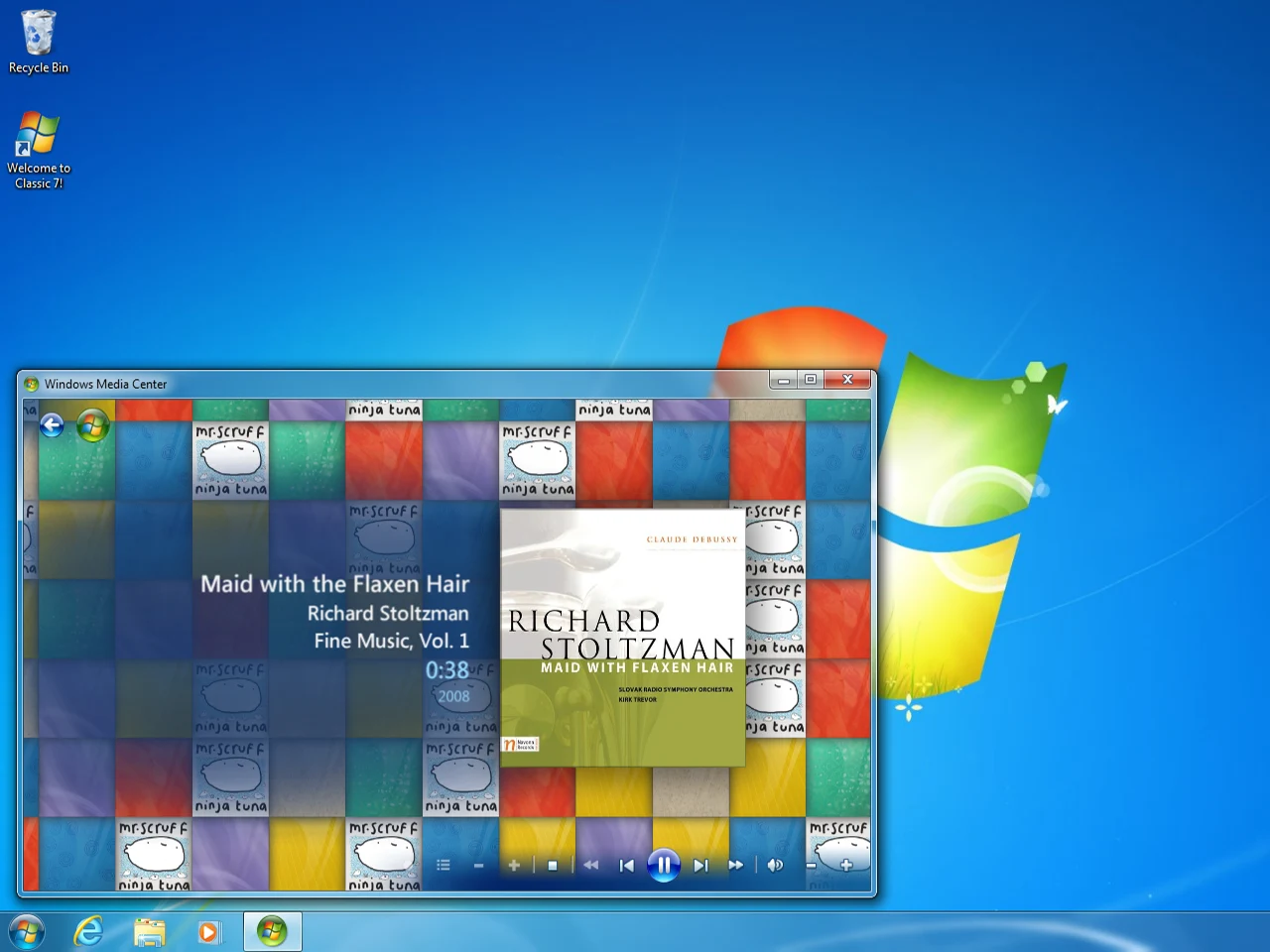
    Enter Classic 7, a project that aims to resurrect the feel of earlier Windows while still receiving ongoing security updates. This setup is built on Windows 10 IoT (IoT Enterprise LTSC 2021), a pared-down edition that trims away features like the Xbox Game Bar, excessive advertising, and Microsoft Edge. It targets embedded devices and falls into a low-resource category, with a modest requirement of 2 GB RAM and a 1 GHz processor, which explains its “embedded” heritage in its naming.

    Security and licensing realities

    Since Windows 10 IoT is tailored toward industrial and retail contexts, it continues to receive security updates through October 2032. Licensing remains something you would need to sort on your own, but for testing purposes, it can run without activation. This reality makes it a possible, if unofficial, gateway to experimenting with a Windows 7-like desktop experience on modern hardware.

    It’s important to note that obtaining the primary operating system from unofficial sources carries inherent risks. Implementing the Windows 7 desktop environment on a more current OS requires substantial modification, and the trust you place in the developers of Classic 7 to avoid nefarious changes is significant. The project exists in a gray area where caution is advised and user discretion is essential.

    Performance and usability implications

    There are anecdotal whispers that this approach may even yield better performance in some games, though results will understandably vary. Some users view it as a fun weekend project to explore in a virtual machine and test whether Windows 7 nostalgia holds up under modern hardware, offering a different flavor of experimentation than a standard upgrade path.

    Official purchasing paths and price points

    For those who prefer a fully official route, Windows 11 is occasionally listed with price points around typical consumer market prices, including figures comparable to retail promotions. When weighing options, consider what you value most: authenticity and support versus experimentation and lightweight configurations. The decision rests with the user, who must evaluate their own requirements and risk tolerance.


  • Microsoft launches cheaper Surface Laptop later this year

    Microsoft launches cheaper Surface Laptop later this year

    Key Takeaway

    – Three new Surface PCs based on Intel Panther Lake: Surface Laptop 8 (optional Core Ultra X7 368H with Arc B390), Surface Pro 12 (up to Core Ultra 7 366H), and updated Surface Laptop 13-inch (Core Ultra 5 325; starts at $1,499 with 16 GB RAM; up to 24 GB RAM; 25% brighter display vs. predecessor).
    – A cheaper Surface Laptop variant is coming to the 13-inch model, with 8 GB RAM, launching later this year at $1,299 (not a standalone Surface Laptop SE).


    Microsoft released three new Surface PCs today. All based around Intel’s Panther Lake platform, the Surface Laptop 8 is the most powerful of the three thanks to its optional Core Ultra X7 368H processor and its Arc B390 graphics.

    In this paragraph the writer shifts tone and uses a more casual cadence, aiming to describe the lineup with a focus on performance hardware. The Surface Laptop 8 purportedly leads the trio, boasting an optional Core Ultra X7 368H chip paired with Arc B390 graphics. While the prose tries to capture excitement, it also sweeps in a few specs that readers may glance over quickly, like the Panther Lake branding and the idea of being the top spec option, leaving other models slightly in the background.

    Next up is the Surface Pro 12, which Microsoft offers with up to the Core Ultra 7 366H.

    The next paragraph changes voice, leaning into a brisk, report-like delivery that highlights the Pro 12’s flexibility. It mentions the Core Ultra 7 366H as a maximum configuration, hinting at performance but not dwelling on the broader ecosystem. The writing keeps a practical edge, underscoring the product tier while keeping the prose grounded with a few nearly technical phrases that a general reader can skim.

    Additionally, Microsoft has updated the smaller Surface Laptop 13-inch with the Core Ultra 5 325. For the time being, the new Surface Laptop 13-inch starts at $1,499 with 16 GB of RAM.

    This paragraph switches to a more promotional style, delivering concrete price and memory figures to anchor expectations. The 13-inch model is pitched with a Core Ultra 5 325, a starting price of $1,499, and a 16 GB RAM baseline. The tone attempts to balance enthusiasm with clear numeric details, while the sentence structure wobbles slightly to keep the reader attentive across a longer thought, giving a sense of the pricing landscape without overloading the reader with too many numbers at once.

    Considerably more expensive than its predecessor, the new Surface Laptop also distinguishes itself from its Snapdragon-based sibling with a 25% brighter display and up to 24 GB of RAM.

    In this paragraph, the style veers toward evaluative commentary, contrasting the new Laptop with its predecessor and with a Snapdragon sibling. It asserts a brighter display by about 25% and RAM capacity up to 24 GB. The sentence construction attempts to weave in comparative metrics while preserving a narrative flow that helps readers gauge the upgrade without becoming a hard spec list, though it still relies on specific figures to anchor the claim.

    In a blog post, Microsoft clarifies that a cheaper Surface Laptop is coming too. However, this will not be a dedicated device like the Surface Laptop SE before it. Instead, Microsoft will be updating the Surface Laptop 13-inch with a cheaper variant.

    The structure here adopts an explanatory voice, explaining that a more affordable option is on the horizon but clarifying it won’t be a standalone device. The paragraph uses careful qualifiers to describe how the cheaper variant will come as an update to the existing 13-inch model, maintaining a balanced, informative tone that seeks to temper expectations while delivering the essential plan.

    Specifically, the company plans to start selling a configuration with a mere 8 GB of RAM. While this follows in the footsteps of the MacBook Neo, its pricing does not.

    The writing shifts to a slightly contrarian angle, noting the 8 GB RAM SKU and drawing a comparison to a rival model. It hints that the pricing diverges from the implied affordability path, suggesting tension between capacity and price. The sentence structure emphasizes the anomaly, nudging readers to question whether the strategy makes sense in the current market context.

    Inexplicably, Microsoft will sell this 8 GB model for $1,299, making it over 100% more expensive than the MacBook Neo (curr. $589 on Amazon). Microsoft will begin selling the Surface Laptop 13-inch ‘later this year’ with 8 GB of RAM. Please see our launch article for more details.

    Here the tone becomes skeptical and slightly incredulous, presenting a stark price delta versus a rival model. The paragraph weaves in a quip about the timing and references an external launch article for more context, while keeping the core price figure intact and the necessary timeline hint confined to a forecast rather than a confirmed date.

    Microsoft

    Concluding in a concise, almost minimal fashion, this paragraph presents a simple sign-off style that lightly trails off. The single word acts as a closing tag, leaving the reader with a crisp reminder of the brand and the topic, while avoiding any overly final statements, thereby inviting readers to seek more information elsewhere if they wish.


    Sources

  • Microsoft Surface Laptop 8 Debuts with Up to 64GB RAM and Arc B390 Graphics

    Microsoft Surface Laptop 8 Debuts with Up to 64GB RAM and Arc B390 Graphics

    Key Takeaway

    – Surface Laptop 8 updates: Lunar Lake → Panther Lake processors, up to Core Ultra X7 368H with Arc B390 iGPU, and 64 GB RAM options.
    – Display: 13.8″ or 15″ IPS PixelSense Flow with up to 120 Hz, resolution up to 3270×2180 (262 PPI); no OLED option.
    – Privacy screen: Integrated privacy feature (toggle via F1) on most models, but not available with 5G modem configurations.
    – Ports: Retains Surface Connect port and microSD card reader on the 15″ model.
    – Pricing: Starts at $1,949.99 (privacy screen variants from $2,549.99).


    Microsoft has finally updated its Surface Laptop series with eighth-generation models. Arriving right on schedule, the new Surface Laptop 8 replaces Lunar Lake versions of the Surface Laptop 7 rather than their Snapdragon-powered counterparts (curr. $1,199 on Amazon).

    Display specs and features

    Contrary to rumours, the Surface Laptop 8 has not launched with an optional OLED display. Instead, the new Surface Laptop continues to be available with 13.8-inch and 15-inch IPS ‘PixelSense Flow’ displays that deliver up to a 120 Hz refresh rate. Incidentally, Microsoft has increased the latter’s resolution to 3,270 x 2,180, which results in pixel density increasing from 201 PPI to 262 PPI.

    Privacy screen and ports

    Also, Microsoft has included integrated privacy screen technology, which can be activated by pressing the F1 key. Unfortunately, this display technology is unavailable on Surface Laptop 8 units configured with 5G modems. Setting that aside, all Surface Laptop 8 models retain Microsoft’s Surface Connect port, as well as a microSD card reader for its 15-inch model.

    Processors and performance

    Arguably, the only other major upgrade between the ‘for Business’ versions of the Surface Laptop 7 and Surface Laptop 8 is the transition from Lunar Lake to Panther Lake processors. Specifically, Microsoft’s new laptops will be available with up to the Core Ultra X7 368H, which brings Intel’s powerful Arc B390 iGPU to the table.

    Pricing and configuration

    The Surface Laptop 8 starts at $1,949.99 and can be configured with up to 64 GB of RAM. Meanwhile, privacy screen variants start at $2,549.99 in the US. Please see Microsoft’s website for more details.


    Sources

  • Windows 11 Taskbar Customizations Return from Windows 10 Release

    Windows 11 Taskbar Customizations Return from Windows 10 Release

    Key Takeaway

    – Taskbar can be moved to any screen edge (top, bottom, left, right) with adaptive icon alignment (centered or left/top depending on orientation).
    – A smaller taskbar option reduces height and icon size to save vertical space, with changes applying immediately.
    – System flyouts and Start/Search placement adjust to match the taskbar position (e.g., Start opens from the top if the bar is at the top).
    – Improved window handling on a vertical taskbar (Never combine with labels on so each window shows separately).

    Microsoft is bringing back a few taskbar customization options in Windows 11 Insider builds, restoring some of the flexibility that was removed when the OS first launched. The update mainly focuses on giving users more control over layout and making the taskbar feel more consistent across different display setups.

    New side placement and alignment options

    One of the biggest changes is simple but long requested: the taskbar can now be moved to any side of the screen — top, bottom, left, or right. Icon alignment also adapts depending on where the taskbar is placed: centered or left-aligned on horizontal layouts, and centered or top-aligned on vertical ones. The wording here shifts with the placement, and users will notice the alignment tempts to stay logical across orientations, which is a relief for those who juggle multiple monitors in varied orientations.

    Compact taskbar mode for limited spaces

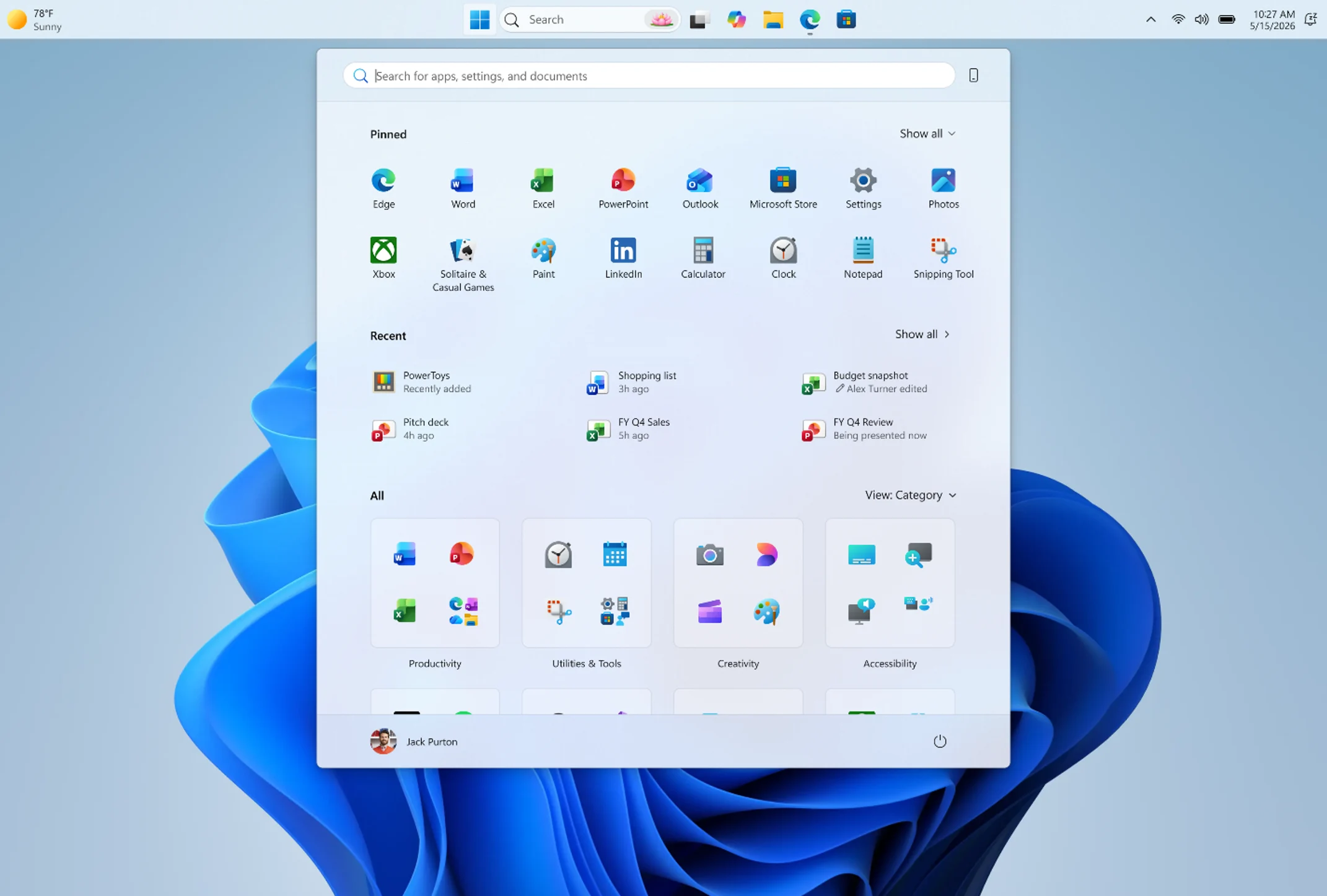
    Microsoft is also introducing a smaller taskbar option aimed at setups where screen space is limited. Windows 11 originally made the taskbar taller to accommodate new states, features, and improved touch targets, but that extra height can feel unnecessary on compact displays. With the new setting enabled, users get a reduced taskbar height, smaller icons, and a bit more vertical workspace for apps. The change applies immediately without requiring a restart or sign-out, and it is currently rolling out in the Experimental channel via Settings > Personalization > Taskbar > Taskbar behaviors.

    System flyouts adjust to taskbar position

    System flyouts like Start and Search are also being adjusted to match taskbar placement. So if the taskbar is moved to the top of the screen, the Start menu will open from there as well, instead of still appearing from the bottom. This consistency helps apearence and usability, especially when switching from one monitor to another with different orientations in a working session.

    Window handling improves with vertical taskbar

    Microsoft is also improving window handling when using a vertical taskbar. With “Never combine” enabled and labels turned on, each open app window is shown separately with its own label, which makes it easier to tell multiple windows apart at a glance. The changes are currently limited to Insider builds, but they clearly point toward a more flexible taskbar experience returning to Windows 11 after years of user requests.


    Sources

  • Microsoft May Lack Xbox Consoles for GTA 6 Launch Due to High Memory Prices

    Microsoft May Lack Xbox Consoles for GTA 6 Launch Due to High Memory Prices

    Key Takeaway

    1. The upcoming GTA 6 release is expected to significantly boost console sales, particularly benefiting PlayStation, due to limited Xbox inventory caused by memory shortages.
    2. Microsoft’s focus on high profit margins has hindered Xbox console production, making it difficult to meet demand and allowing competitors like Sony to strengthen their market lead.
    3. Despite manufacturing constraints, millions of Xbox Series X|S units are still projected to sell, with potential long-term opportunities for Microsoft through future projects like Project Helix.

    GTA 6 Release Date and Console Market Impact

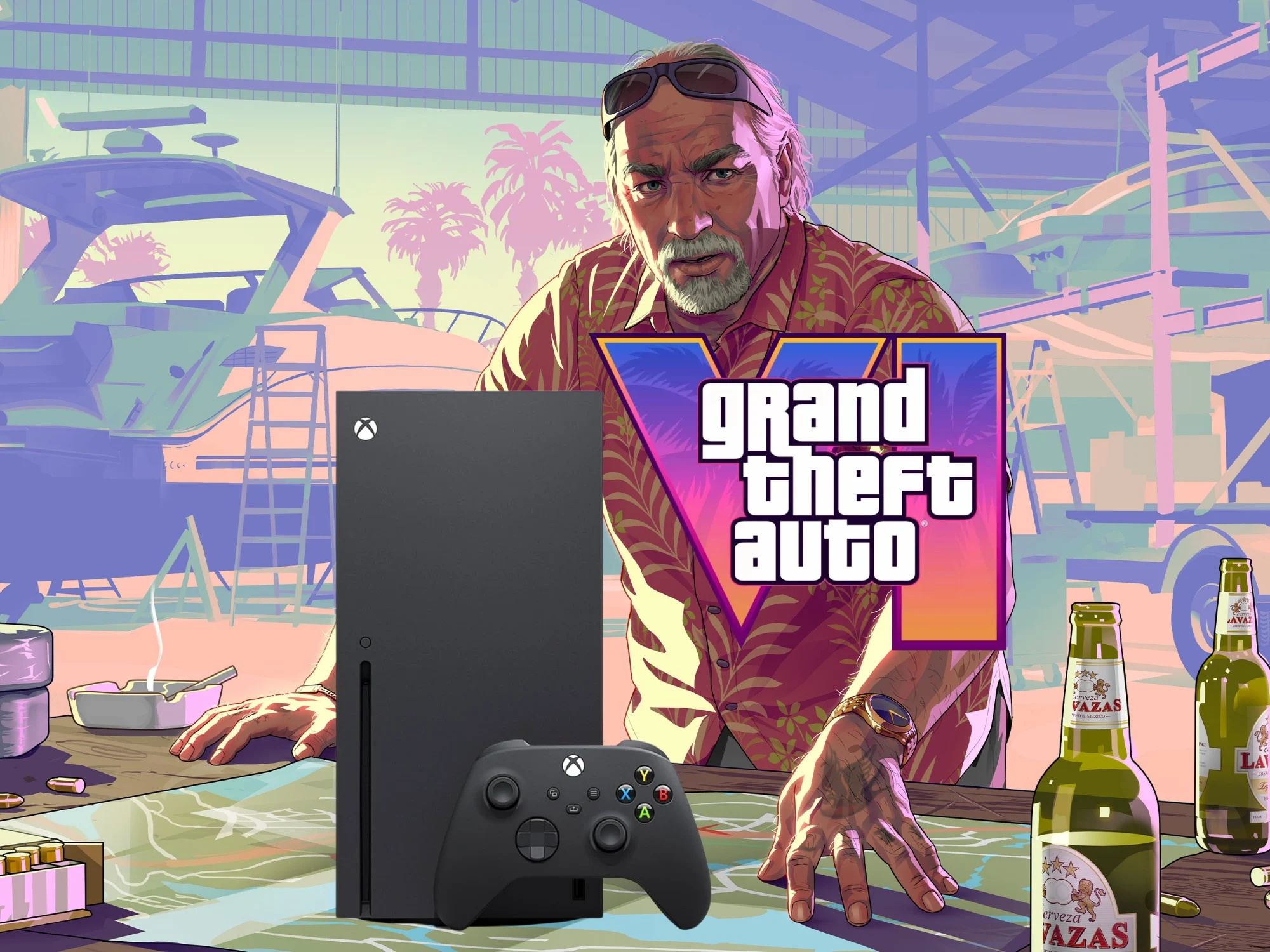
    Even after price hikes, the anticipation for the GTA 6 release is expected to give a big boost to sales of gaming consoles. The project from Rockstar Games presents a real chance for Microsoft to benefit from their renewed focus on hardware sales. But, a big problem is the current memory shortage which might cause a shortage of Xbox Series X|S units, making it hard for consumers to get them.

    Manufacturing Challenges and Market Dynamics

    In an article from Windows Central, Jez Corden talks about how Microsoft aimed for an almost impossible 30% profit margin. Because of this goal, Xbox console sales took a hit. Corden points out that even though buyers still show interest in the PS5 alternative, it is becoming harder to find these consoles at stores, especially in countries like Japan where they are more scarce.

    Future Outlook for Gaming Consoles

    The company decided that the hardware wasn’t profitable enough to keep pushing. Now, with the GTA 6 launch approaching, they might be regretting not focusing more on the console side. Even with new leadership under Asha Sharma, the high costs of memory chips make it very difficult to increase stock levels of the Xbox Series X|S.

    Competition and Market Share

    According to Corden, rival companies like Sony are more prepared for the ongoing chip shortage because they secured memory supplies early on. PlayStation and others have already bought enough memory, thinking ahead, instead of focusing on short-term goals. This short-term mindset has left Xbox at a disadvantage, likely helping PS5 to grow its sales lead in November. Rumors also suggest Rockstar may have exclusive marketing deals with Sony, and special PS5 or PS5 Pro packages featuring GTA 6 might be released soon.

    Platform Dominance and Future Possibilities

    Without confirmation of GTA 6 for PC or Switch 2, the PS5 seems set to be the primary platform for the game. Some industry experts, like Bloomberg’s Jason Schreier, even call it ‘almost like a PlayStation Exclusive.’ Polygon also mentioned that in a podcast, Schreier stated that ‘Xbox is almost a non-factor’ when it comes to the game’s success.

    Looking Ahead: Opportunities for Microsoft

    Despite the memory shortage limiting how many Xbox consoles can be produced, Schreier predicts millions of Xbox Series X|S copies could still be sold. Microsoft might also leverage another chance with Project Helix expected in 2027. By then, a Windows version of GTA 6 might be available, though whether it will work smoothly with the console-PC hybrid remains uncertain.