Category: Software

  • GIMP 3.0 Update Nears Release as Team Fixes Last Bugs

    GIMP 3.0 Update Nears Release as Team Fixes Last Bugs

    It seems that those excited for GIMP 3.0 won’t have to wait much longer, especially after a recent update from one of the official maintainers on X. According to @zemarmot, the team behind GIMP 3.0 has only eight bug reports remaining out of a total of 350, indicating they are close to releasing the first release candidate (RC1).

    Nearing the Finish Line

    This update suggests that there are just a handful of bugs left to fix before the official version is launched, meaning we could expect the GIMP 3.0 Release Candidate 1 in just a few weeks. Based on a recent development update from the GIMP 3.0 team, it appears they have been busy not only with new features but also addressing various bugs, some of which have lingered since GIMP 2.10.

    Exciting New Features

    We have previously discussed the many new features coming to GIMP, and some key highlights include improvements in technical areas like color management, enhancements in scripting capabilities, updates to libraries, the GIMP API, and the graphical interface for plugin creation. Additionally, there have been major updates to GIMP’s documentation, a new design library, and a revamped user interface, all aimed at making the image editor more accessible for beginners.

    If your looking to dive into digital art, you might want to check out a Huion Kamvas Pro 13 pen display, which is currently priced at $299 on Amazon.

    Final Thoughts

    In summary, GIMP 3.0 is shaping up to be a significant upgrade, with the team making noticeable efforts to improve user experience and functionality. With the release candidate on the horizon, it’s an exciting time for both new and existing users of this powerful image editing tool.

  • Windows 24H2 Update: Removing Recall Breaks File Explorer

    Windows 24H2 Update: Removing Recall Breaks File Explorer

    When Microsoft revealed its AI-driven Recall feature, designed to create a searchable timeline of your desktop activities, there was a huge reaction from privacy advocates and tech enthusiasts online. Although the initial release of Recall was delayed, Microsoft appears to have made it quite challenging to use the modern features of Windows File Explorer on a PC without involving Recall. YouTuber Chris Titus Tech, who conducted tests and in-depth analysis on the new Windows 11 24H2 update, noted that while it is possible to turn off Recall, doing so in a user-friendly manner also turns off the modern Windows File Explorer.

    Discoveries from Testing

    The YouTuber and software developer, recognized for his content on optimizing Windows and his automated tool for the same, found out during his tests that Recall is now a required part of Windows File Explorer. Titus’s tool, MicroWin, can eliminate Recall, but this action results in losing all the user-friendly features added in recent Windows updates. Essentially, this reverts the program back to something resembling its Windows 7 version (though with a few slightly newer icons), which includes losing dark mode and the File Explorer tabs.

    A Partial Solution

    Titus managed to uncover a workaround that disables Recall rather than removing it completely, which thankfully seems to hold up after restarts. However, currently, there’s no way to completely eliminate Recall without impacting the File Explorer interface. When Microsoft initially postponed the Recall launch due to privacy concerns, they mentioned that the feature would be opt-in when it finally rolled out widely. Yet, this does not appear to be the case in the 24H2 update. For those who use this utility or don’t mind having Recall activated, it may not be a significant issue, but it does signal that Microsoft is fully committed to incorporating Recall and AI features into Windows in future updates.

    Alternatives and Tools

    Another individual on GitHub highlighted that Microsoft’s DISM could be utilized to turn off the Recall service without affecting File Explorer. However, Titus noted that this behavior seems to vary, as his tests showed that the File Explorer’s appearance still changed after a restart. Regardless of this inconsistency, it’s doubtful that average Windows users will even know what DISM is, let alone how to operate it, showcasing Microsoft’s intent to rely on command-line tools for managing a controversial feature.

    For those considering switching from Windows, the Lenovo ThinkPad E16 Gen 2 is an excellent option for running Linux effectively, and it is priced starting at $685.20 in Lenovo’s US store.

  • Ubuntu 24.10 Oracular Oriole: New Kernel, GNOME 47, Enhanced Security

    Ubuntu 24.10 Oracular Oriole: New Kernel, GNOME 47, Enhanced Security

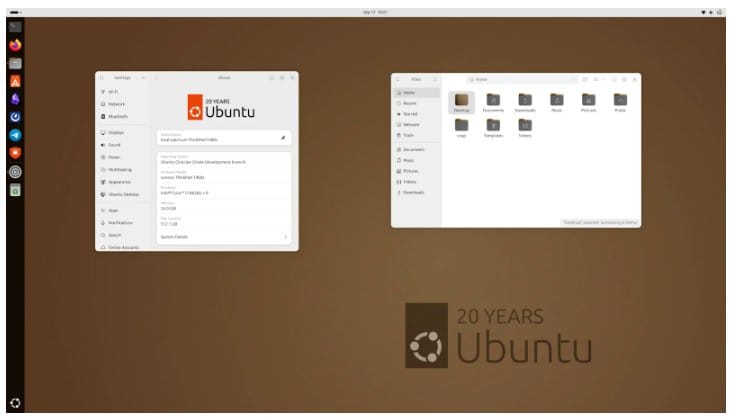
    Available from yesterday, Ubuntu 24.10 “sets a fresh pace for providing the latest upstream kernel and toolchains,” stated Canonical’s CEO Mark Shuttleworth. Named “Oracular Oriole,” this new version marks an anniversary, as it is just nine days away from the 20th birthday of this operating system. For those who may not recall, Ubuntu 4.10 “Warty Warthog” was released on October 20, 2004, being the first version of this Debian-based distribution.

    New Features and Improvements

    Even though it’s an interim release, Ubuntu 24.10 introduces several new features and enhancements, among which are the following:

    The variety of available editions remains as diverse as ever, all of which can be found on this page. Besides the Cloud, Core, Server, and Desktop options, there are many flavors worth mentioning, including Edubuntu, Kubuntu, Lubuntu, Cinnamon, Budgie, Kylin, MATE, Studio, Unity, and Xubuntu. If you’re in the market for budget-friendly hardware to run any of these, consider the BOSGAME mini PC equipped with an Intel Processor N95 and 16/512 GB, priced at $199 without discounts (currently, there’s a $10 coupon plus a 5% discount available).

    Exploring the Variants

    The new Ubuntu 24.10 offers a lot for users looking for an updated experience. The features combined with a rich selection of flavors make it an appealing choice for a wide range of users, from casual to more advanced ones. Ubuntu continues to evolve, pushing boundaries and providing tools that cater to various needs.

    For those interested in using the new operating system, the easy access to various editions ensures that everyone can find a suitable version for their requirements. Whether you’re a developer, a gamer, or just someone who loves to explore, this release promises to deliver a modern experience while honoring the rich history of Ubuntu.

  • TikTok Faces Lawsuits from US States Over Minor Safety Concerns

    TikTok Faces Lawsuits from US States Over Minor Safety Concerns

    Attorneys general from more than a dozen U.S. states, plus the District of Columbia, have taken legal action against TikTok. These lawsuits argue that the app is harming the mental well-being of young users by making it highly addictive. Moreover, they assert that TikTok’s algorithm curates content that aligns with users’ preferences, resulting in excessive screen time and contributing to mental health issues such as anxiety, depression, and concerns about body image.

    National Investigation Leads to Lawsuits

    The legal complaints are a result of a nationwide inquiry that began in 2022, claiming that TikTok’s design promotes harmful actions, particularly among kids, via features like infinite scrolling and compulsive notifications. The lawsuits further claim that TikTok’s live-streaming option can lead to the exploitation of minors, with some describing the platform as a "virtual strip club."

    Concerns Over Age Restrictions

    Although TikTok has rules against children under 13 signing up, it has faced criticism for age limits that can be easily ignored, allowing young users to encounter adult content. States such as New York and New Jersey have highlighted the risks associated with the app’s challenges and its addictive nature, urging for measures to protect children from further damage.

    The Associated Press reports…

  • Gnoppix 24.10: Lightweight Debian-Based Live Linux Distro Release

    Gnoppix 24.10: Lightweight Debian-Based Live Linux Distro Release

    Initially created between 2002 and 2004, Gnoppix Linux made a comeback in 2021 when its creator joined Canonical, leading to a close relationship with Ubuntu. This revived version still relies on Debian, just like it did back in the early 2000s. Currently, Gnoppix is offered in a free Core edition, along with a Pro edition that includes additional features. Recently, it was updated to version 24.10, which includes several modifications.

    Pre-installed Applications

    The latest Gnoppix release comes with LibreOffice already installed, along with important applications like Firefox, VLC, and Thunderbird. The new or updated system components in version 24.10 include Linux kernel version 6.1.106, systemd 252.30, samba 4.17.12, openssl 3.0.14d, and openjdk 17.0.12u1. At this moment, there’s no information regarding the release of the Pro version labeled 24.10, so those interested can only download the Core edition for the time being.

    Differences Between Editions

    In contrast to the Pro version, the Gnoppix Core edition lacks advanced AI capabilities and doesn’t have exclusive apps and features. Some of these missing items are Gnoppix IPTV, Gnoppix Connect, development support, Gnoppix Advantage Productivity, support for bundled installations, dedicated infrastructure for 1 GBps updates and downloads, CEIV and HSCSC compliance, and access to AI APIs. Anyone curious about the benefits of the Pro edition can visit the comparison and details page. It’s also worth mentioning that there is a special membership level available for developers.

    Useful Resources for Users

    Since Gnoppix is built on Debian, users might find the book "Mastering Debian Linux: From Beginner to Advanced" quite beneficial. This book can be accessed for free with Kindle Unlimited, priced at $5.90 for the digital version, and $18.90 for the paperback format, making it quite accessible for those looking to deepen their knowledge.

  • iOS 18 VoiceOver Bug Exposes Passwords, Raises Security Issues

    iOS 18 VoiceOver Bug Exposes Passwords, Raises Security Issues

    After a major glitch in iOS 18 recently led to iPhone users losing their chat histories, another issue has emerged where iPhones and iPads read stored passwords aloud. This glitch is linked to the VoiceOver feature, designed to assist those with visual impairments. Affected devices include the iPhone XS and newer models, alongside various iPads like the iPad Pro and iPad Air.

    Cause of the Issue

    This issue stems from a bug within the password app that was rolled out with several new features in iOS 18 and iPadOS 18. The app is meant to gather all saved passwords in one location, giving users an easy and secure way to manage their login details.

    Update and Fixes

    Apple quickly responded to this bug by launching the iOS 18.0.1 update on October 3, which fixed the problem. They also patched another security flaw that allowed audio recordings to occur without the microphone indicator lighting up on the latest iPhone 16 models.

    User Opinions on Updates

    In discussions on Reddit, users are weighing whether it’s better to update to iOS 18 at this point or to wait for further updates, considering the high likelihood of bugs. While many Redditors accept that software issues often follow major updates, some prefer to hold off on upgrading for now.

    Image source: Apple / Apple Developer

  • Xiaomi Smartphones to Detect Hidden Cameras for Traveler Privacy

    Xiaomi Smartphones to Detect Hidden Cameras for Traveler Privacy

    Platforms like Airbnb have gained immense popularity, and it’s easy to see why. These websites allow travelers to reserve vacation rentals or rooms in prime locations at quite affordable prices. However, there have been alarming reports regarding the presence of hidden surveillance cameras in some of these rentals. Even though Airbnb’s terms strictly forbid such monitoring devices, not every landlord seems to follow these rules. Depending on where they are placed, these concealed cameras can intrude upon the most private moments of a person’s life, and secretly recording someone can be a crime. There are several methods to detect these cameras, and now Xiaomi plans to include a feature for this purpose in its operating system.

    Detection Solution

    Xiaomi has developed a program that helps find hidden cameras by analyzing active WiFi connections. The goal is to identify any suspicious devices that might be spying. However, it’s important to note that the smartphone might not effectively pinpoint the exact location of these devices. Additionally, this feature won’t necessarily find all hidden cameras, as it only detects those connected to WiFi. Tiny, battery-operated cameras often lack WiFi connectivity and may rely solely on memory cards, which complicates the detection process even further. One potential method to identify these devices is by using a night vision capability to scan for the infrared signals emitted by hidden cameras. It’s still uncertain which devices will be able to run Xiaomi’s software, but notably, it doesn’t require any special hardware.

    Future of Privacy

    Xiaomi’s initiative indicates a significant step toward enhancing privacy for users of rental platforms. As travelers become more aware of the potential risks associated with hidden surveillance, such tools could provide a sense of security. The need for such technology highlights the ongoing challenges in maintaining privacy in shared living spaces. With the rise of smart technology, the importance of safeguarding personal space cannot be overstated. The introduction of these features by companies like Xiaomi may pave the way for broader adoption of privacy measures in the industry.

    XiaomiTime, photo from Jakub Żerdzicki via Unsplash

  • CheckMag: Is Hosting Your Own YouTube Frontend Worth It?

    CheckMag: Is Hosting Your Own YouTube Frontend Worth It?

    There are several projects that have emerged over time allowing you to set up your own YouTube front end. These range from options that can be deployed in a Docker container to those compatible with your preferred operating system. If you own a NAS like the 4 Bay UGREEN (Available on Amazon.com) or use solutions like TrueNas, Unraid, or even a Windows machine, you have various possibilities for self-hosting your personal YouTube interface.

    Invidious Overview

    Invidious is likely one of the more recognized YouTube front ends, and it has certainly caught Google’s eye. This project can be hosted in a Docker container, but many public servers are maintained by the Invidious community as well. It allows users to subscribe to channels, read comments from Reddit, download videos, and even reroute embedded YouTube videos to your hosted instance using a browser extension.

    When it functions properly, it performs excellently. There are also applications available for both iOS and Android, enabling you to access your hosted server and watch videos through an app. However, the container necessitates frequent restarts, and some videos show a message stating “The media could not be loaded,” which often leads to a fair amount of troubleshooting to resolve. The FAQ section of Invidious even hints at giving up and just watching the video on YouTube in certain cases.

    Exploring ViewTube

    Like Invidious, ViewTube operates within a container. According to the official wiki, installing ViewTube also requires two additional containers: MongoDB and Redis. While running three containers for your own YouTube front end might seem excessive, there is an all-in-one container created by mvanduijker available on GitHub. You can also opt for ViewTube’s own hosted instance.

    After installation, ViewTube offers a similar, yet arguably more aesthetically pleasing interface than Invidious. Video playback is smooth, and the platform provides trending and suggested videos based on your viewing habits. You can still redirect embedded videos to your hosted interface, and aside from a brief low-resolution buffer at the beginning, the content loads quickly and in high quality.

    Where ViewTube fell short, at least for me, was the search feature, which seemed to work intermittently at the beginning of a session before failing. Like Invidious, you can import your YouTube subscriptions, so there are workarounds, but for spontaneous searches, it was nearly ineffective.

    FreeTube’s Unique Approach

    FreeTube differs from the other options mentioned as it can run as a standalone application on any desired machine, whether it’s Windows, macOS, or Linux. It can also be deployed in a Docker container, with a prebuilt container available for Unraid. However, unlike the others, the FreeTube container effectively operates the Linux app within a virtual machine, which introduces latency when connecting through VNC, making it less viable.

    That said, when running natively on an operating system, the app has a clean interface and is the most reliable of the three regarding searching and watching videos. It also allows redirects from embedded content through the (now deprecated) FreeTube redirect browser extension. However, this lacks the flexibility of viewing content across different devices on your home network, as you are restricted to the machine where it’s installed.

    Conclusion

    Each of these solutions has its drawbacks. None encountered any major app-breaking issues, but all three options are not particularly straightforward.

    Whether it’s the time spent fixing Invidious, the challenges with ViewTube’s search function or imported subscriptions, or being limited to a single device with FreeTube, the time investment may not be worth the results.

    With dedicated applications offering YouTube front ends like NewPipe or Louis Rossman’s GrayJay app, it becomes difficult to rationalize the time and effort needed to host such a service on your own.

    The existence of these options is a testament to the open-source community, but for those wishing to escape YouTube’s tracking, there might be simpler and less time-consuming alternatives.

    Invidious on GitHub, ViewTube, FreeTube.


    Image 1
    Image 1
    Image 1
  • Blue Checkmark Coming to Google Search Results Soon

    Blue Checkmark Coming to Google Search Results Soon

    Google is trying to simplify the way people find businesses online. They are testing a new feature that will add blue verification checkmarks next to business names in search results.

    Similar to Social Media Icons

    This checkmark is akin to the icons we see on social media platforms like Instagram or X (which was previously known as Twitter). When users hover over the checkmark, a message appears saying, “This icon is being shown because Google’s signals suggest that this business is what it says it is.” Yet, there is also a disclaimer stating “Google can’t guarantee the reliability of this business or its products.”

    Experimental Phase of Checkmarks

    Currently, this feature is in the testing stage and isn’t widely accessible. We haven’t spotted the checkmark in search results yet, but reports indicate it will mostly show up next to prominent and established businesses, especially in fields such as technology, fashion, and automotive. Brands like Meta, Nike, Amazon, Apple, and Samsung are among those that may display this verification badge.

    In a statement about the trial, a Google spokesperson told The Verge, “We regularly experiment with features that help shoppers identify trustworthy businesses online, and we are currently running a small experiment showing checkmarks next to certain businesses on Google.”

    Future of the Checkmark Feature

    It’s not clear if this test will evolve into a permanent feature. However, its potential usefulness is evident, especially considering the number of fraudulent businesses aimed at stealing personal information.

    Additionally, it remains uncertain if the checkmarks will only apply to official businesses or if Google intends to include smaller local ones as well. If they do broaden the scope, this feature could be highly beneficial since users often click on suspicious links when searching for lesser-known brands.

    Google has not detailed how they identify safe links, but they did confirm to The Verge that the process includes, at the very least, some manual verification.


    Image 1
  • Samsung Brings Tizen OS to Open-Source RISC-V Architecture

    Samsung Brings Tizen OS to Open-Source RISC-V Architecture

    Samsung has adapted the Tizen OS for the open-source RISC-V CPU architecture. This move allows developers to get closer to launching Tizen smart devices that utilize royalty-free CPUs.

    Understanding CPU Architectures

    Typical CPU architectures found in computers and smart devices from major companies like Apple, AMD, ARM, and Intel are burdened with numerous patents that restrict royalty-free, open-source usage. Companies that produce compatible CPUs are required to pay licensing fees, which raise the overall costs of smart devices. This system also obstructs the ability for others to create their own versions freely. In contrast, the RISC-V royalty-free open-source architecture removes these licensing fees and development barriers.

    For readers interested in exploring RISC-V software development without spending much, the Raspberry Pi Pico 2 is available for purchase on Amazon.

    Samsung’s Engagement with RISC-V

    In 2023, Samsung became part of the RISE (RISC-V Software Ecosystem) project to help enhance the RISC-V software landscape. The announcement regarding Tizen OS for RISC-V was made on October 4 during Samsung’s annual Developer Conference (SDC). Additionally, the company revealed that it has also ported Flutter, an open-source UI framework created by Google, to Tizen OS on RISC-V. A developer SDK for Tizen OS is anticipated to be released in 2026.

    Highlights from the Samsung Developer Conference

    On October 4, 2024, Samsung Electronics held its yearly Developer Conference (SDC) at the San Jose McEnery Convention Center. This event marked ten years of teamwork and advancement with developers, during which the company outlined its goal of delivering a more tailored and secure experience through the latest multi-device AI technologies under the theme “AI for All.”

    With approximately 3,000 developers, partners, and media present, Jong-Hee (JH) Han, Vice Chairman, CEO and Head of Device eXperience (DX) Division at Samsung Electronics, stated, “We have continued our journey of innovation with our many developers and partners for the last ten years,” emphasizing the need for open collaboration to enhance competitiveness and foster mutual growth in the current AI-driven landscape.

    Future Vision and Commitment

    JH provided more insights into the company’s dedication to utilizing AI technology for improved security, enhanced personalization, better family care experiences, and new opportunities in the B2B sector. “Samsung Electronics will keep pushing AI technology to a point where it automatically recognizes each user—based on their voice and location—creating a more personalized interaction,” he clarified. “These initiatives will lead to more convenient and secure experiences across multiple devices by utilizing Samsung’s AI-driven software, platform innovations, and security technologies.”

    Moreover, the company disclosed plans to unify the software experience across its primary product lines—including mobile devices, televisions, and home appliances—under the banner of One UI in the following year. By ensuring a unified product experience and committing to software updates for as long as seven years, Samsung aims to drive continued innovation for its customers.

    To fulfill its vision of AI for All, Samsung will also focus on creating AI solutions for good, enabling innovators to harness new technologies to tackle societal challenges and build a better future for the next generations.