Key Takeaways
1. Display Limitations: The 8-inch square screen is impressive but impractical for most media, which is typically widescreen.
2. App Compatibility: Many apps do not utilize the extra screen space effectively, making the experience similar to using a regular smartphone.
3. Performance Drawbacks: The Google Tensor G5 processor struggles with demanding tasks, affecting overall performance for heavier applications and games.
4. Camera Usability: While using the rear cameras for selfies sounds appealing, the method is inconvenient and less practical than using a regular phone.
5. Value for Money: The high cost of foldables like the Pixel 10 Pro Fold does not seem to justify the extra features, leading to questions about their overall value.
It took me a long time to finally get into foldables, mainly because I was worried about how tough they are. But when the Pixel 10 Pro Fold came out with an IP68 rating for dust and water resistance, I thought, why not? Now, after using it for 3 months, I wouldn’t say foldables are a total flop, yet I find it hard to see why they cost so much and what you really gain with the extra screen size.
Display Experience
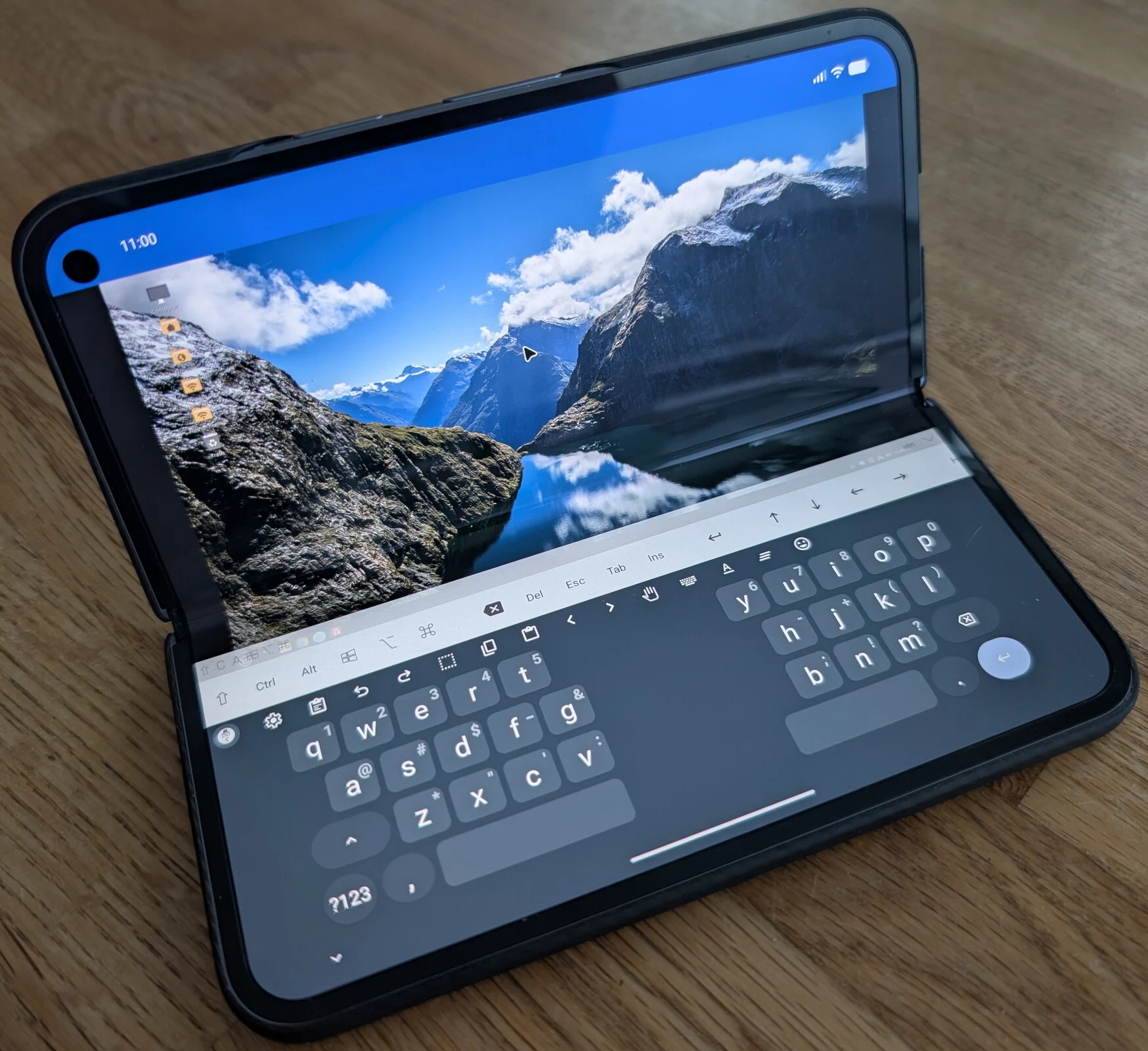
Having an 8-inch screen on paper looked super cool. Unfolding a foldable for the first time and seeing that large internal display is really impressive, especially if you’re used to regular phones, even the bigger models. But I didn’t realize just how unpractical a square screen can be. The main thing you do with it is watch media. Whether it’s YouTube or Netflix, modern media is widescreen by nature. Sure, it feels immersive on the internal display, but honestly, it’s hardly bigger than a regular smartphone.
Browsing and Apps
The extra screen space is great for web browsing, and some websites fit nicely on the foldable screen. However, many sites don’t adjust well, leaving big empty areas beside the text. Plus, apart from a few Google apps, not many take advantage of the additional screen area. You might see more content at once or have a larger window, but for most apps, it feels almost the same as using a regular phone.
When I imagined running apps next to each other, it seemed like a fantastic idea. But after 3 months of usage, I hardly ever do it. When I need to copy something between apps, there’s hardly any speed difference compared to using the regular task switcher. In fact, it often takes longer to set up two apps side by side.
Remote Access and Resolution
One reason I chose a foldable was for the extra screen space while managing remote computers via Remote Desktop or VNC. I have to admit, it does have an advantage here. But since most PCs have widescreen displays, you face the same issue as with videos unless you adjust your host machine to 5:4 or 4:3 aspect ratios. When you do that, the experience is excellent, and you can make full use of the foldable’s square screen. The catch is that every time you connect from another machine, you’ll need to revert to the traditional widescreen settings.
Naturally, these drawbacks aren’t exclusive to the Pixel Fold series; they apply to just about any square foldable. It does make you think how Google had the ideal foldable design with the original Pixel Fold (available on Amazon), but then they seemed to cave to pressure from Samsung. This might also explain why Samsung is developing a Galaxy Z Fold Wide alongside the classic Galaxy Tri-Fold.
Performance Issues
Google isn’t typically known for having top-notch in-house processors (like Tensor), but the G5 in the Pixel 10 series is pretty bad. For everyday tasks such as browsing and switching between apps, it works fine and is good on battery, but for anything even slightly demanding, get ready to be disappointed.
I didn’t buy the Pixel 10 Pro Fold specifically for emulation, but the big screen does make it decent for some 3DS emulation. This is something I never tried on regular phones due to the limited space needed to show both screens of the 3DS side by side.
Emulation Performance
The Pixel 10 Pro Fold can handle lighter games at the native resolution of the 3DS (400 x 240), like New Super Mario Bros 2 and Super Mario 3D Land (just barely), but forget about anything more demanding, especially at 2x resolution or higher. With Donkey Kong Country Returns 3D, the Tensor G5 struggled to even hit double digits, maxing out around 15 FPS at 1x resolution.
The Pixel 10 Pro Fold doesn’t have the same camera setup as its non-foldable counterparts, despite having “Pro” in its name. That’s a compromise, but honestly, it’s not as big of a deal as you might think. Even with the smaller sensors, my experience shows the cameras are mostly comparable, particularly the zoom, which was a big concern for me before I decided to buy it.
Selfie Functionality
One of the main reasons I was interested was using the rear cameras as selfie cameras when the device is opened. While that sounds great in theory, it’s almost completely impractical in real life. It took me a few weeks to figure out what I call the “devil horns” grip. This is basically the only way to hold the phone and snap a selfie at the same time, which kind of reduces the risk of dropping an $1800 device.
Though it works, there are a few seconds needed to get a solid grip, and this method is definitely not as convenient as a regular phone, even if the photo quality is way better. The chance to use the ultrawide camera for selfies is definitely a plus. However, don’t even think about taking landscape selfies with your right hand. Unless you have really stretchy thumbs, reaching the shutter button is nearly impossible.
All of these experiences are just my personal take, and yours might be completely different based on how you use your phone. But when foldable phones are priced almost double that of regular ones (or even more, like the Tri-Fold), they don’t seem to deliver double the value. The extra screen, while nice, doesn’t really offer much added value in practical use, and the less said about the Tensor G5, the better.
Source:
Link