Author: GizNews

  • Windows 11 Release Preview: Copilot in Excel & Security Patches

    Windows 11 Release Preview: Copilot in Excel & Security Patches

    Key Takeaway

    – Three Release Preview builds released (24H2 and 25H2 via KB5089573; 26H1 via KB5089570), with 26H1 targeting AI PCs.
    – GA timelines: 24H2/25H2 could reach general availability as early as June 2026; 26H1 aimed for late Q3 2026 (back-to-school cycle).
    – Security fixes baked in: CVE-2026-1127 (kernel elevation) and CVE-2026-1139 (Windows graphics RCE).
    – AI/enterprise feature gains: Shared LE Audio, multi-app camera support, improved NPU task management, Copilot in Excel (offline via local models), Windows AI Studio toolkit, and new admin Group Policy objects.
    – Known issue: VPN connections may fail to reconnect after waking from sleep; manual toggle workaround.

    Microsoft pushed three new Windows 11 Release Preview builds today, May 14, giving Insiders an early look at what is likely to ship to all users in the coming months. The updates cover Windows 11 versions 24H2 and 25H2 via KB5089573, pushing both to Build 26100.8514 and 26200.8514, respectively, alongside a separate build for the upcoming Windows 11 version 26H1 via KB5089570, which targets next-generation AI PCs with strict hardware requirements. The cadence and labeling of these builds remains a little puzzling to testers, yet the core objective is straightforward: test, stabilize, and prep for broader deployment windows ahead, with feedback guiding final tweaks.

    Release Preview Build Overview

    Release Preview builds are typically the final code before a feature update ships to all users. Microsoft sources indicate that 24H2 and 25H2 could reach general availability as early as June 2026, while 26H1 is on track for a late-third-quarter launch timed to the back-to-school PC refresh cycle. The 26H1 build has specific hardware requirements: devices must have an NPU capable of at least 40 TOPS, 16 GB of RAM, and a minimum of 256 GB of NVMe storage. For enterprise customers this means planning ahead with compatible hardware in mind.

    AI Features and Security

    The release preview builds integrate fixes for two zero-day vulnerabilities from the May 2026 Patch Tuesday: CVE-2026-1127, a kernel elevation of privilege flaw, and CVE-2026-1139, a remote code execution vulnerability in the Windows graphics component. Both are fully baked into the cumulative update and will be part of the final public release. KB5089573 also introduces Shared LE Audio, enabling a single audio stream to be broadcast to multiple Bluetooth devices simultaneously. Multi-app camera support arrives as well, allowing two applications to access the same camera input at the same time, a change that addresses a longstanding limitation for users running video calls and recording software in parallel. NPU task management improvements are included across all three builds, helping Windows better distribute AI workloads between the CPU and the neural processing unit on Copilot+ devices.

    Copilot in Excel and Enterprise Readiness

    Copilot in Excel is now live in all three Release Preview builds, letting users generate formulas, pivot tables, and data visualisations by typing natural language questions directly into a taskbar pane while working in a spreadsheet. The feature requires a Microsoft 365 subscription but runs on locally cached language models, so it works without an internet connection. The Windows AI Studio toolkit, previously limited to the Dev channel, also ships with these builds, providing developers with pre-trained models for image classification, sentiment analysis, and text summarisation that run exclusively on the NPU. All three builds introduce new Group Policy Objects that give IT administrators direct control over AI features. Admins can disable or restrict Copilot integrations, manage which applications can access the NPU, and set policies for how AI agents interact with the taskbar. Microsoft describes these GPOs as part of a broader effort to make AI features enterprise-ready before the builds go to general availability. Insiders enrolled in the Release Preview channel can pull today’s updates through Windows Update immediately. A known issue affects VPN software on some configurations, with connections failing to re-establish automatically after waking from sleep, requiring a manual toggle.

    Sources
  • GuliKit TMR Joysticks Fix Switch 2 Joy-Con Drift

    GuliKit TMR Joysticks Fix Switch 2 Joy-Con Drift

    Key Takeaway

    – Nintendo Switch 2 Joy-Con 2 uses traditional analog potentiometer joysticks that can drift with wear.
    – GuliKit TMR Joystick uses electromagnetic sensing (contactless) for drift-free, smoother control and is designed for easy solderless installation in Joy-Con 2.
    – Pair price: $19.99/€19.99/£16.99; available on Amazon US/UK/DE (some other locales show listings but are unavailable).
    – iFixit provides replacement guides (video and written) and sells the GuliKit TMR Joystick for $24.99, plus a $29.99 tools bundle.

    While the Nintendo Switch 2’s Joy-Con 2 controllers boast new features, they still use traditional analog potentiometer joysticks. And unlike Hall Effect or TMR joysticks, they are likely to suffer from stick drift after wearing. While, you can simply purchase a third-party controller, you can also simply swap the joysticks for a better one, such as a GuliKit TMR joysticks.

    GuliKit TMR Joystick Overview

    The GuliKit TMR joystick uses electromagnetic sensing for smoother and precise control, a approach that feels almost futuristic, yet you can sense its advantages in practice. It also has a contactless design, so there’s no physical wear, and thus no possibility of stick drift. It is also designed to be easily installed into your Joy-Con 2 controller as there’s no need for soldering, which saves time and nerves.

    Pricing & Availability

    Priced at $19.99/€19.99/£16.99 for a pair (left and right thumbsticks), the GuliKit TMR Joystick for Joy-Con 2 is available to buy now. It is listed by retailers in the US, UK, and DE. There are also listings for the thumbsticks on local retailer websites for France, Italy, and Spain, but they are currently listed as unavailable. Those in the Netherlands can also pick it up on their local retailer website.

    Guides & Accessories

    The folks at iFixit have released a video detailing how to replace the old thumbsticks on the Joy-Con 2 with GuliKit’s. There’s a written guide for those who prefer text over video. iFixit also sells the GuliKit TMR Joystick for Joy-Con 2, although it’s more expensive at $24.99. They also have a $29.99 bundle that includes the pair of joysticks and the tools you need for the replacement.

  • Seiko Prospex Limited Edition Divers in Seiko Blue

    Seiko Prospex Limited Edition Divers in Seiko Blue

    Key Takeaway

    – Seiko marks its 145th anniversary with two limited-edition dive watches: Prospex HBB001 and HBC005.
    – Seiko Blue dominates the design, with a dual-tone bezel on the HBB001 and blue accents on the HBC005’s unidirectional bezel and seconds hand against a silver-white dial.
    – HBC005 is the premium model: Caliber 6R55, 72-hour power reserve, 40mm case, 300 m WR, inspired by Seiko’s 1965 first diver’s watch.
    – HBB001 is slightly larger at 41.7mm, Caliber 4R35, ~41-hour PR, 200 m WR, and about $800 cheaper than the HBC005.
    – Both watches go on sale in June across the US, Japan, UK, Australia, and Europe.

    Seiko is turning 145 this year, and the company is celebrating this milestone by launching a slew of special edition watches across its Prospex, Astron, and Presage lineups. We have already seen the Astron HAB004 Anniversary edition and the likes of Prospex Speedtimer SRQ059 and King Seiko SJE121. Now, the Japanese watchmaker has announced two new limited edition dive watches: the Prospex HBB001 and Prospex HBC005.

    Seiko milestone anniversaries

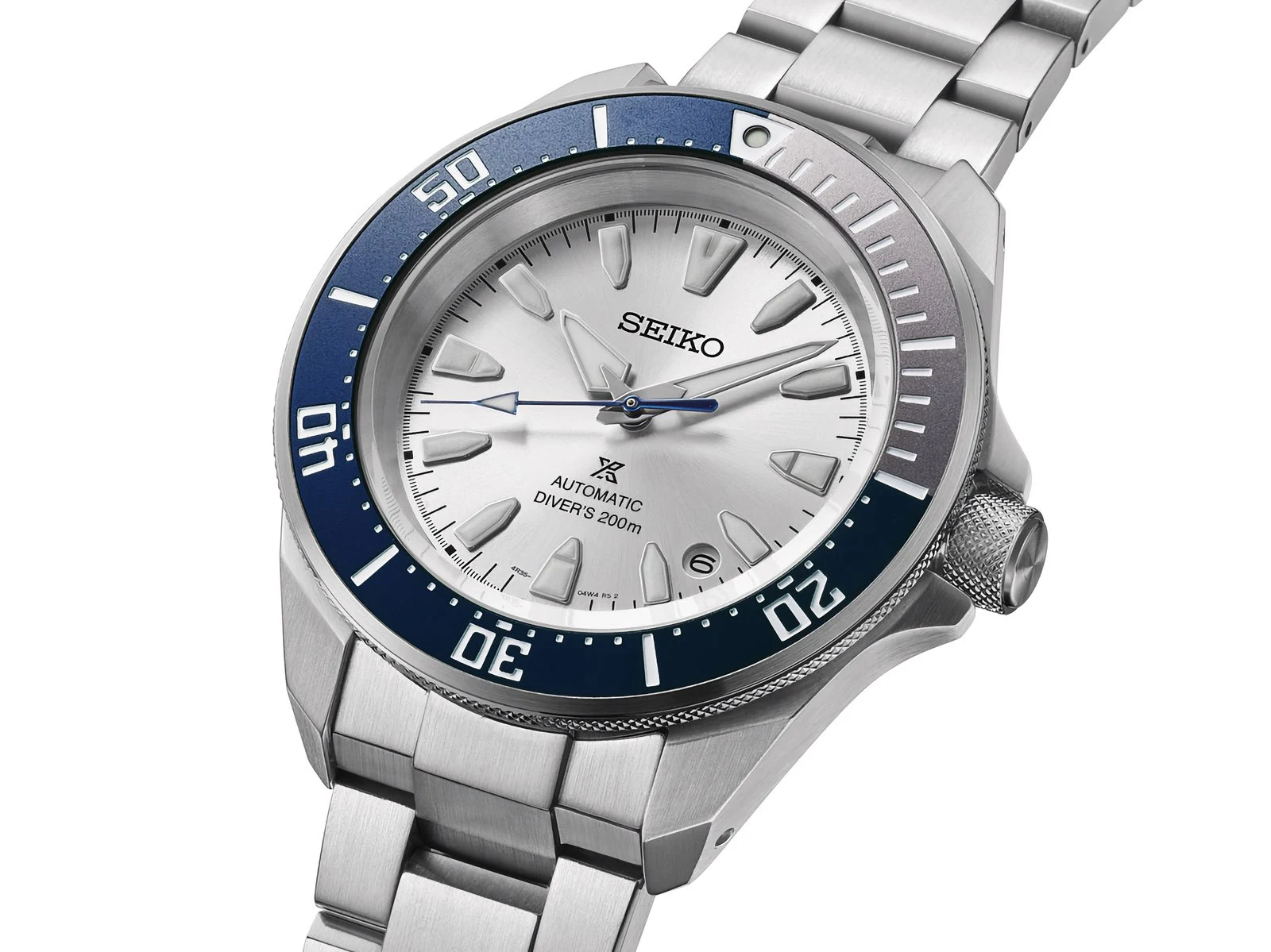
    Both of these models are incredibly clean, but the real star of the show here is Seiko Blue. It’s a signature, deep blue hue that’s been baked into the brand’s identity since the 1960s. On the HBB001, it makes for a super fun dual-tone rotating bezel. On the HBC005, that same blue hits the unidirectional bezel and seconds hand, creating a brilliant contrast against a crisp, silver-white dial.

    Blue allure and bezel details

    The Seiko HBC005 is the more premium and powerfull of the duo, featuring a Caliber 6R55 automatic movement that delivers an impressive 72-hour power reserve. Its 40mm stainless steel case draws inspiration from Japan’s very first diver’s watch released in 1965, embodying an iconic yet compact style. Being a dive watch, the HBC005 also offers 300 meters of water resistance.

    Mechanical powerhouses

    The Prospex HBB001, on the other hand, features a slightly larger 41.7mm stainless steel case. It’s powered by the Caliber 4R35 automatic movement, boasting an approximate 41-hour power reserve. Its 200 meters of water resistance is a step down from the HBC005, but then again, the HBB001 is also roughly $800 cheaper.

    Pricing and market release

    The Seiko Prospex HBC005 and HBB001 are scheduled to go on sale in the US, Japan, the UK, Australia, and Europe in June. The pricing in various markets is as follows: Seiko (1) (2)

    Sources
  • ASUS launches refreshed ROG NUC gaming mini PC at premium price

    ASUS launches refreshed ROG NUC gaming mini PC at premium price

    Key Takeaway

    – 2026 ROG NUC 15 uses Intel Core Ultra 200HX Plus CPU while the GPU remains unchanged from the last generation.
    – Design gets bolder branding with “For Those Who Dare” and introduces a patented removable stand that cradles the chassis.
    – Core specs stay high-end (DDR5 RAM, PCIe 5.0 storage, silent cooling) with WiFi 7 and Bluetooth 5.4.
    – Front IO features 2 USB-A ports and 1 USB-C; rear IO details are not fully disclosed in the article.
    – China pricing starts at CNY 29,999 (~$4,421) with a white variant at CNY 30,999 (~$4,569); global launch details TBD.

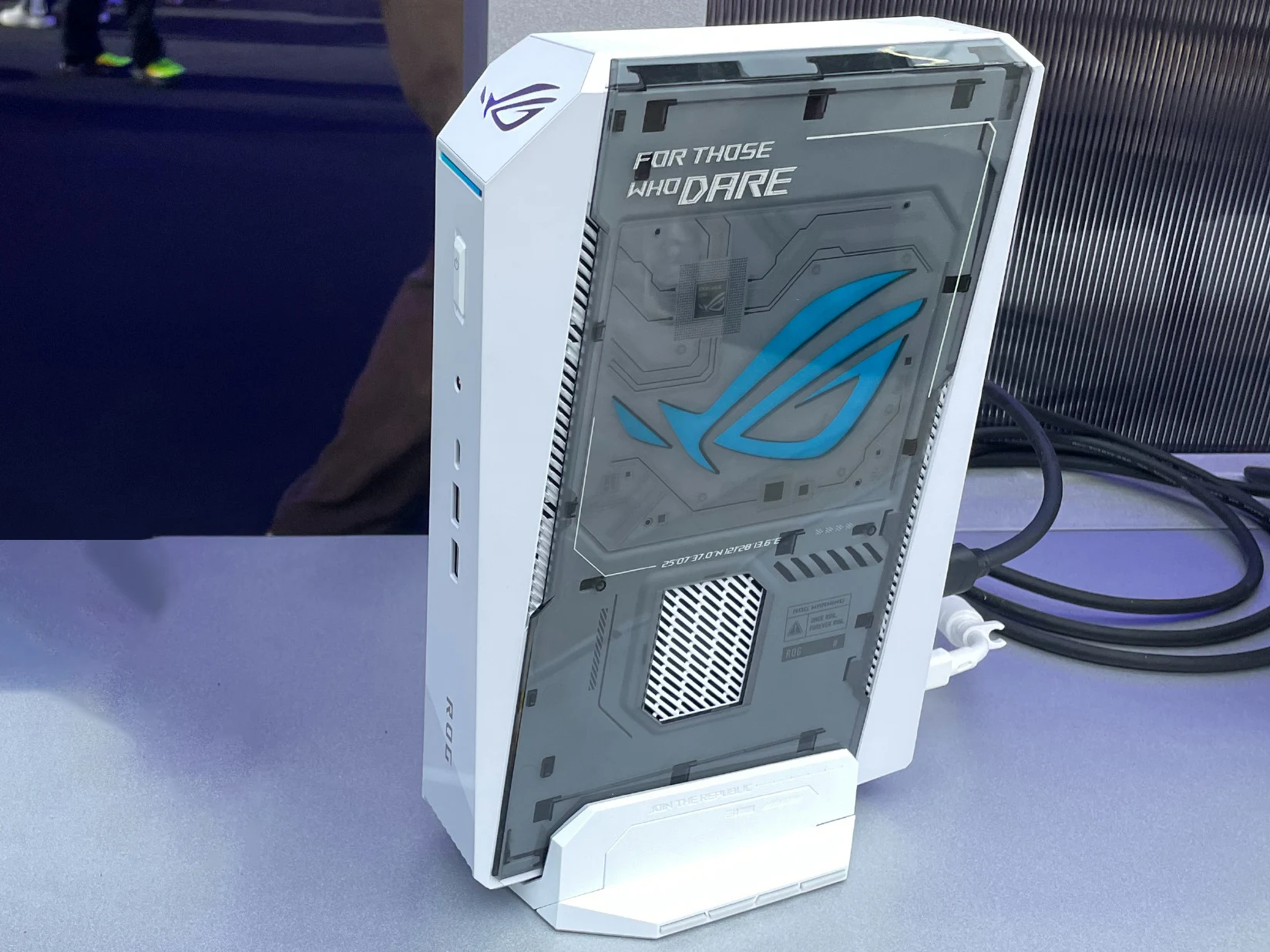
    Asus has launched the successor to the 2025 ROG NUC 15, and as we speculated, the main difference is that the Intel Core Ultra 200HX Plus series powers the gaming mini PC. The GPU department hasn’t seen an upgrade. The design changes include more prominent For Those Who Dare and ROG branding, plus a patented removable stand cradling the chassis instead of a screw-on fit.

    Design and branding updates

    Beyond these cosmetic changes, the rest of the system specs appear to be the same as the last-gen ROG NUC 15. DDR5 RAM and PCIe 5.0 storage stand out as the high-speed backbone, while the cooling remains notably quiet. Wireless connectivity includes WiFi 7 and Bluetooth 5.4, and the overall chassis is engineered to house these elements with minimal fan noise.

    Performance and ports

    Port-wise, Asus highlights the rich configuration of the 2026 ROG NUC. The front appears to have two USB Type-A and one USB-C, while the back features the following: In China, the refreshed ROG NUC mini PC starts at CNY 29,999, which is around $4,421. There’s a new white version available, costing CNY 30,999, about $4,569. The top-end option curr. $3,399 remains as a benchmark for the model lineage.

    Pricing and availability

    In China, the refreshed ROG NUC mini PC starts at CNY 29,999, which is around $4,421. There’s a new white version available, costing CNY 30,999, about $4,569. Asus has yet to share details on the available configurations and plans for the global launch. No firm date was given for a worldwide rollout, but fans hope for a formal announcement soon.

    Final thoughts

    Overall, the 2026 ROG NUC balances a strong core with bold styling and practical upgrades like the removable stand. The absence of an GPU upgrade this time around is noticeable, yet the presence of DDR5 RAM, PCIe 5.0 storage, and WiFi 7 keep it competitive in a crowded market. The real question remains the price and availability worldwide.


    Sources

  • Sigma BF Teardown: Inside the tiny full-frame camera

    Sigma BF Teardown: Inside the tiny full-frame camera

    Key Takeaway

    – Sigma BF costs about $2,199 on Amazon and stands out with a minimalist aluminum unibody, a large touchscreen, touch-sensitive buttons, and a small OLED secondary display.
    – Kolari’s teardown shows an aluminum chassis, a rubber bottom cover with ten screws, and a rear display glued into the body that can be removed with heat.
    – Disassembly is time-consuming, requiring removal of many small boards, ribbon cables, and screws before reaching the mainboard and full-frame sensor.
    – DIY repairs are limited by Sigma not offering end-user spare parts, despite the dense, space-efficient interior design.

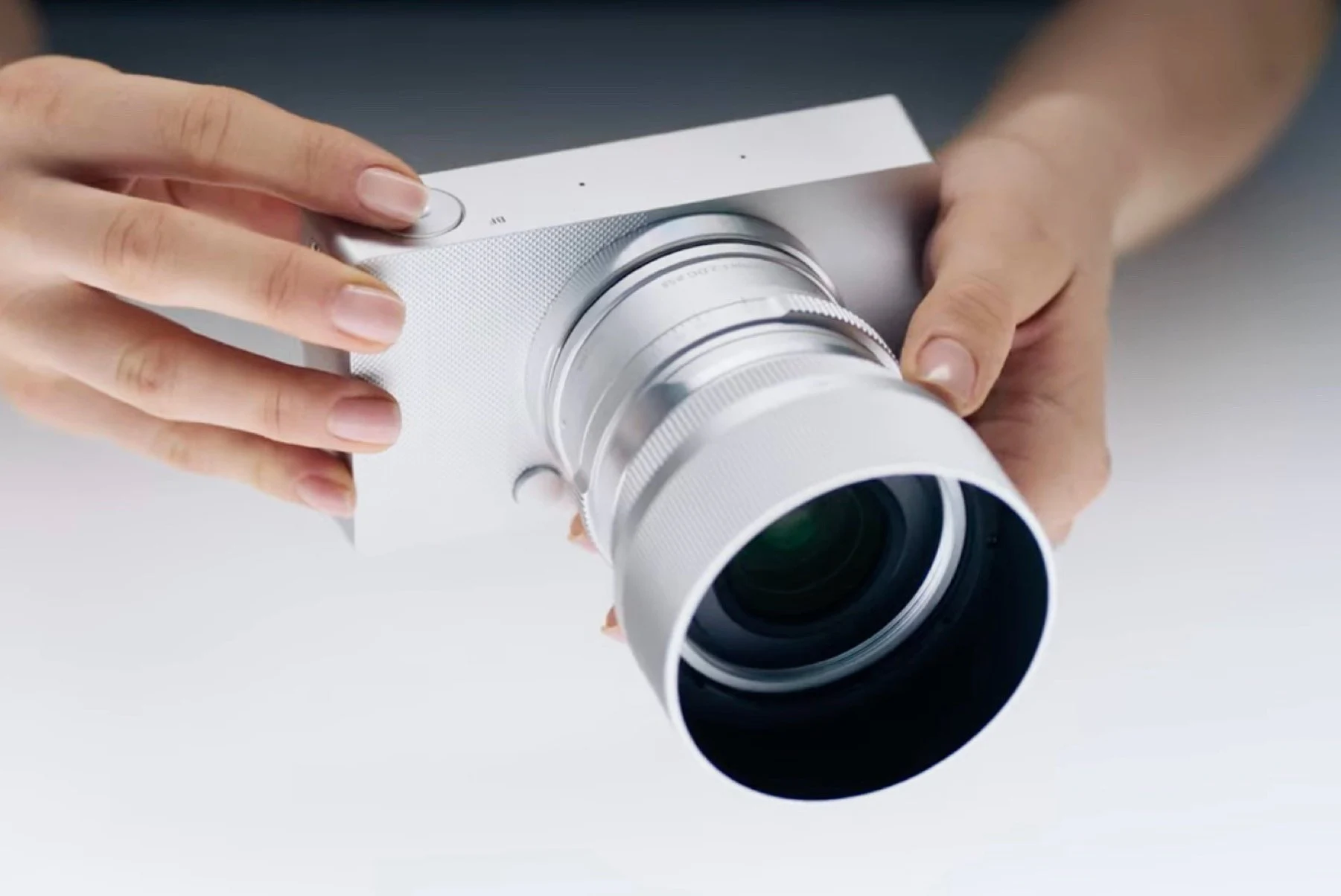
    The Sigma BF ($2,199) differs from competitors like the Panasonic Lumix S9 mainly due to its minimalist aluminum unibody housing. With a large touchscreen, touch-sensitive buttons and a small OLED secondary display that shows settings, the Sigma BF’s operation and design is unlike any other camera on the market.

    Unconventional Build

    Kolari, which specializes in infrared conversions, shows what the camera’s inner workings look like in the teardown video embedded below. While the chassis is milled from a block of aluminum, there is a rubber cover on the bottom, under which a total of ten screws can be found. Once all these screws have been loosened and a cable disconnected, the rear display can be removed.

    Internal View

    This is glued into the body in a similar way to a smartphone, but if the adhesive is heated with a hot air dryer, the screen can be removed without any major problems. To disassemble the camera further, numerous small boards, ribbon cables and screws has to be removed before the mainboard and ultimately the full-frame sensor can be taken out of the housing.

    Disassembly Nuances

    This is not particularly complicated, but it is time-consuming. Yet, in order to repair the camera by yourself, Sigma would have to offer spare parts, which are not currently sold directly to end users. The multi-layered construction of the interior shows that Sigma has used every millimeter in the housing effectively.


    Sources

  • Windows 11 Release Preview: Copilot in Excel and Security Patches

    Windows 11 Release Preview: Copilot in Excel and Security Patches

    Key Takeaway

    – Microsoft released three Release Preview builds (24H2/25H2 via KB5089573; 26H1 via KB5089570) with Build 26100.8514 and 26200.8514.
    – Timeline: 24H2/25H2 could GA as early as June 2026; 26H1 expected in late Q3 2026 (back-to-school cycle).
    – 26H1 hardware requirements: NPU ≥ 40 TOPS, 16 GB RAM, 256 GB NVMe.
    – Notable features: Shared LE Audio, multi-app camera support, improved NPU task management, Copilot in Excel with offline local models, Windows AI Studio toolkit for developers.
    – Enterprise controls and issues: New Group Policy Objects to manage AI features; VPN may fail to reconnect after sleep (manual toggle required).

    Microsoft pushed three new Windows 11 Release Preview builds today, May 14, giving Insiders an early look at what is likely to ship to all users in the coming months.

    Release Preview details

    The updates cover Windows 11 versions 24H2 and 25H2 via KB5089573, pushing both to Build 26100.8514 and 26200.8514, respectively, alongside a separate build for the upcoming Windows 11 version 26H1 via KB5089570.

    Final code status

    Release Preview builds are typically the final code before a feature update ships to all users. Microsoft sources indicate that 24H2 and 25H2 could reach general availability as early as June 2026, while 26H1 is on track for a late-third-quarter launch timed to the back-to-school PC refresh cycle. The 26H1 build has specific hardware requirements: devices must have an NPU capable of at least 40 TOPS, 16 GB of RAM, and a minimum of 256 GB of NVMe storage.

    Security fixes and vulnerabilities

    The release preview builds integrate fixes for two zero-day vulnerabilities from the May 2026 Patch Tuesday: CVE-2026-1127, a kernel elevation of privilege flaw, and CVE-2026-1139, a remote code execution vulnerability in the Windows graphics component. Both are fully baked into the cumulative update and will be part of the final public release.

    KB5089573 features

    KB5089573 also introduces Shared LE Audio, enabling a single audio stream to be broadcast to multiple Bluetooth devices simultaneously. Multi-app camera support arrives as well, allowing two applications to access the same camera input at the same time, a change that addresses a longstanding limitation for users running video calls and recording software in parallel. NPU task management improvements are included across all three builds, helping Windows better distribute AI workloads between the CPU and the neural processing unit on Copilot+ devices.

    Copilot in Excel and AI Studio

    Copilot in Excel is now live in all three Release Preview builds, letting users generate formulas, pivot tables, and data visualisations by typing natural language questions directly into a taskbar pane while working in a spreadsheet. The feature requires a Microsoft 365 subscription but runs on locally cached language models, so it works without an internet connection. The Windows AI Studio toolkit, previously limited to the Dev channel, also ships with these builds, providing developers with pre-trained models for image classification, sentiment analysis, and text summarisation that run exclusively on the NPU.

    Enterprise controls

    All three builds introduce new Group Policy Objects that give IT administrators direct control over AI features. Admins can disable or restrict Copilot integrations, manage which applications can access the NPU, and set policies for how AI agents interact with the taskbar. Microsoft describes these GPOs as part of a broader effort to make AI features enterprise-ready before the builds go to general availability. Insiders enrolled in the Release Preview channel can pull today’s updates through Windows Update immediately. A known issue affects VPN software on some configurations, with connections failing to re-establish automatically after waking from sleep, requiring a manual toggle.
     

    Sources
  • GuliKit TMR Joysticks for Switch 2 Joy-Con 2 Drift Fix

    GuliKit TMR Joysticks for Switch 2 Joy-Con 2 Drift Fix

    Key Takeaway

    – The GuliKit TMR joystick uses electromagnetic sensing and a contactless design to provide smoother control and eliminate stick drift compared to traditional potentiometer joysticks on Joy-Con 2.
    – It’s designed for easy, no-soldering installation in Joy-Con 2.
    – Price and availability: $19.99/€19.99/£16.99 per pair; sold on Amazon US/UK/DE (regional availability may vary).
    – iFixit offers a replacement guide/video and sells the joystick for $24.99, plus a $29.99 tool bundle.

    While the Nintendo Switch 2’s Joy-Con 2 controllers boast new features, they still use traditional analog potentiometer joysticks. And unlike Hall Effect or TMR joysticks, they are likely to suffer from stick drift after wearing. While you can simply purchase a third-party controller, you can also simply swap the joysticks for a better one, such as a GuliKit TMR joystick.

    Enhancements meet legacy tech

    The GuliKit TMR joystick uses electromagnetic sensing for smoother and precise control. It also has a contactless design, so there’s no physical wear, and thus no possibility of stick drift. It is also designed to be easily installed into your Joy-Con 2 controller as there’s no need for soldering.

    Specs and install ease

    Priced at $19.99/€19.99/£16.99 for a pair (left and right thumbsticks), the GuliKit TMR Joystick for Joy-Con 2 is available to buy now. It is offered by several retailers in the US, UK, and Germany. There are also listings on local retailer sites for France, Italy, and Spain, but they are currently listed as unavailable. People in the Netherlands can also pick it up from their local retailer.

    Availability and extras

    The folks at iFixit have released a video detailing how to replace the old thumbsticks on the Joy-Con 2 with GuliKit’s. There’s a written guide for those who prefer text over video. iFixit also sells the GuliKit TMR Joystick for Joy-Con 2, although it’s more expensive at $24.99. They also have a $29.99 bundle that includes the pair of joysticks and the tools you need for the replacement.

  • Krafted Power Bank Looks Like a Laptop, Quadruples Battery Life

    Krafted Power Bank Looks Like a Laptop, Quadruples Battery Life

    Key Takeaway

    – Replaceable four 5,000 mAh cells (labeled 20,000 mAh, ~72 Wh); real-world capacity depends on voltage and efficiency; roughly two MacBook Neo charges, about one 14″ MacBook Pro, 3–4 laptop charges unclear.
    – Compact laptop-shaped aluminum pack (27 × 19 × 1.28 cm) that can sit under a laptop during use and fits in a normal laptop bag.
    – Ports: two USB-C up to 65W (laptops) and one USB-A 18W; full recharge in ~2 hours with a 45W charger.
    – Kickstarter crowdfunding with Early Bird price $139; worldwide shipping; taxes/duties/shipping extra; potential risks of delays or defects.

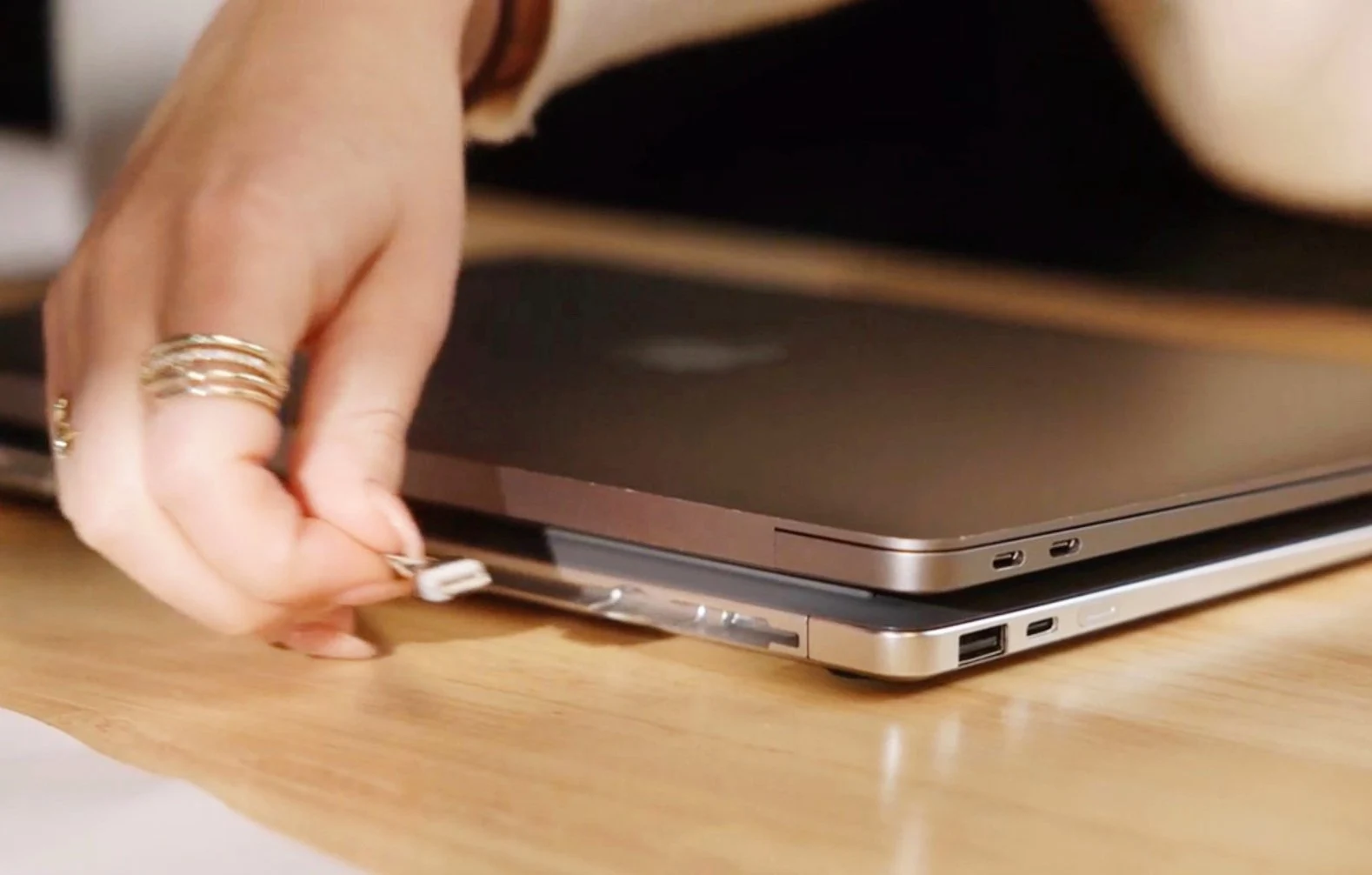
    Krafted Edge packs four 5,000 mAh battery cells into an aluminum body that measures 27 x 19 x 1.28 centimeters, making it slightly more compact than an Apple MacBook Neo ($589). Thanks to its shape, which is almost exactly the same as that of a laptop, Krafted Edge can be placed comfortable under the laptop during operation and fits into a conventional laptop bag during transportation.

    Design and build

    The four battery cells can be replaced by the user so that the power bank dont have to be disposed of when the batteries reach the end of their service life. However, the manufacturer’s marketing regarding capacity should be viewed with caution. Krafted Edge has a capacity of 20,000 mAh, and without information on the voltage, the capacity can only be estimated to a limited extent. However, the power bank should hold around 72 Wh, similar to the Nitecore NB20000 Gen 3.

    • Four battery cells of 5,000 mAh each
    • Aluminum body, dimensions 27 x 19 x 1.28 cm
    • Nominal capacity about 20,000 mAh (~72 Wh)
    • Two USB-C ports up to 65 W, plus a USB-A port at 18 W
    • Fully charge in about two hours with a 45 W charger

    Even with perfect efficiency, this is just enough to charge a MacBook Neo twice; a 14-inch MacBook Pro can barely be fully charged once. It is unclear how Krafted achieves the advertised three to four full laptop charges. Even the four smartphone charges are only realistic for smartphones with a smaller battery, such as the Apple iPhone 17. Krafted Edge has two USB-C ports that can charge laptops with up to 65 watts, as well as a USB-A port with an output of 18 watts. The power bank can be fully charged in two hours using a 45 watt charger.

    Performance and crowdfunding

    The Krafted Edge Power Bank is currently being funded on Kickstarter and can be pre-ordered at the Early Bird price of $139, with delivery expected to begin in July. The manufacturer delivers worldwide, but the price does not include import sales tax, customs duties and shipping costs. Krafted is already an established accessories manufacturer, but when supporting crowdfunding campaigns there is always a risk that products will be delivered late or with defects.


    Sources

  • Seiko Prospex Limited Edition Divers with Seiko Blue Accents

    Seiko Prospex Limited Edition Divers with Seiko Blue Accents

    Key Takeaway

    – Seiko unveils two limited-edition Prospex dive watches for its 145th anniversary: HBB001 and HBC005, both featuring the signature Seiko Blue.
    – HBC005: premium 40mm stainless steel case, Caliber 6R55, 72-hour power reserve, 300m water resistance, inspired by Seiko’s 1965 first diver.
    – HBB001: larger 41.7mm stainless steel case, Caliber 4R35, ~41-hour power reserve, 200m water resistance, dual-tone rotating bezel, about $800 cheaper than the HBC005.
    – Availability in June across US, Japan, UK, Australia, and Europe; pricing varies by market.

    Seiko hits 145 this year, and marks it by rolling out a batch of special edition watches across Prospex, Astron, and Presage lineups. We’ve already seen the Astron HAB004 Anniversary edition and the likes of Prospex Speedtimer SRQ059 and King Seiko SJE121. Now, the Japanese maker has announced two fresh limited edition dive watches: the Prospex HBB001 and the Prospex HBC005.

    Anniversary lineup

    Seiko is rolling out these two divers with a clean look, but the real star of the show is “Seiko Blue.” It’s a signature deep blue hue baked into the brand’s identity since the 1960s. On the HBB001, it provides a fun dual-tone rotating bezel. On the HBC005, that same blue hits the unidirectional bezel and seconds hand, creating a brilliant contrast against a crisp, silver-white dial.

    Seiko Blue details

    The HBC005 is the more premium and powerful of the two, sporting a Caliber 6R55 automatic movement that delivers a respectable 72-hour power reserve. Its 40mm stainless steel case nods to Japan’s very first diver’s watch released in 1965, keeping an iconic yet compact vibe. Being a dive watch, the HBC005 also offers 300 meters of water resistance.

    Performance and dimensions

    By comparison, the Prospex HBB001 wears a slightly bigger 41.7mm stainless steel case. It runs on the Caliber 4R35 automatic movement, with about a 41-hour power reserve. Its 200 meters water resistance sits a notch lower than the HBC005, and yet the HBB001 lands roughly $800 cheaper.

    The Seiko Prospex HBC005 and HBB001 are slated to go on sale in the US, Japan, the UK, Australia, and Europe in June. Pricing across markets are as follows:


    Sources
  • Asus Launches Refreshed ROG NUC Gaming Mini PC at a High Price

    Asus Launches Refreshed ROG NUC Gaming Mini PC at a High Price

    Key Takeaway

    – CPU upgrade: Intel Core Ultra 200HX Plus powers the 2026 ROG NUC 15; GPU remains unchanged from the last generation.
    – Design update: bolder “For Those Who Dare”/ROG branding and a patented removable stand that cradles the chassis.
    – Specs and connectivity: DDR5 RAM, PCIe 5.0 storage, silent cooling, WiFi 7, Bluetooth 5.4; front ports include 2x USB-A and 1x USB-C.
    – Availability and pricing: China starts at CNY 29,999 (~$4,421) with a white version at CNY 30,999 (~$4,569); global configurations and launch details not disclosed.

    Asus has launched the successor to the 2025 ROG NUC 15, and as we previously speculated, the main difference is that the recently released Intel Core Ultra 200HX Plus series powers the gaming mini PC. The GPU department, however, hasn’t seen an upgrade.

    Overview

    The design has also seen a notable change, with the 2026 ROG NUC coming with more prominent “For Those Who Dare” and ROG branding. Beyond these two, Asus notes that the brand-new mini PC comes with a patented removable stand that cradles the chassis rather than just a screw-on fit.

    Design updates

    Other than these, the rest of the system specs appear to be the same as the last-gen ROG NUC 15 (top-end option curr. around $3,399).

    Specifications snapshot

    Among the highlights are DDR5 RAM and PCIe 5.0 storage, both promising high-speed performance. The system is equipped with a silent cooling setup, and there are WiFi 7 and Bluetooth 5.4 for wireless connectivity.

    Key features

    Port-wise, Asus highlights the rich configuration of the 2026 ROG NUC. The front appears to have two USB Type-A and one USB-C, while the back features the following:

    Ports and layout

    In China, the refreshed ROG NUC mini PC starts at CNY 29,999, which is around $4,421. There’s a new white version available, costing CNY 30,999, about $4,569.

    Pricing in China

    Asus has yet to share details on the available configurations and plans for the global launch.


    Sources