
Key Takeaways
1. Game Availability: Capcom’s Resident Evil Requiem is released for PC and consoles, but Mac users are still waiting for an official macOS version.
2. Performance on Older Apple Silicon: Older Apple Silicon chips (M1 and M2) struggle with the game, often crashing due to lack of hardware mesh shader support.
3. Positive Results on Newer Devices: On the M3 Max MacBook Pro, the game runs at about 70 FPS at 1080p with default settings, demonstrating good performance without upscaling.
4. Enhanced Indoor Performance: Indoor scenes show improved performance, achieving 73-75 FPS, and better results are seen at 1440p with MetalFX Quality upscaling.
5. Affordable Device Performance: The budget-friendly MacBook Air with the M4 chip can run the game at 60 FPS with lower settings and upscaling adjustments, showcasing playable performance on less powerful hardware.
Capcom’s Resident Evil Requiem has now been released for PC and consoles, and we’ve also seen how it performs on Linux. However, Mac users are still in anticipation of an official macOS version. Despite this, testing from Andrew Tsai’s YouTube channel reveals that the game can actually run on Apple Silicon devices with CrossOver 26, offering playable performance on the latest chips.
Performance on Older Chips
Testing indicates that older Apple Silicon chips like the M1 and M2 struggle with Resident Evil Requiem, crashing during startup. The tester proposes that this might be due to the absence of hardware mesh shader support, a crucial feature that the game seems to need quite a lot.
Better Results on Newer Machines
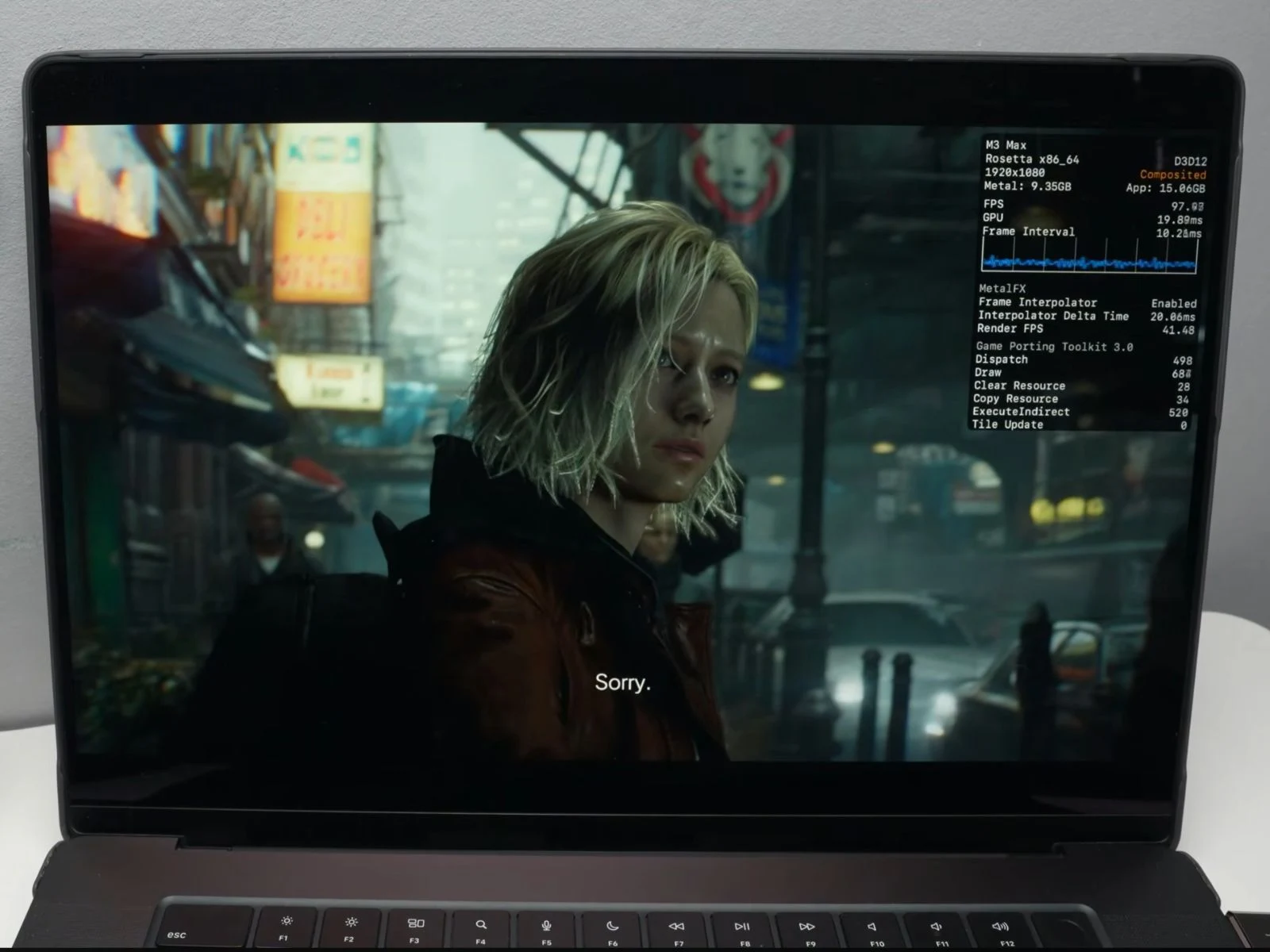
For newer devices, results are much more encouraging. The game was tested on an M3 Max MacBook Pro equipped with 48 GB of unified memory and a 40-core GPU through CrossOver 26. At native 1080p with default graphics settings, MetalFX turned off and frame generation disabled, the system maintained approximately 70 FPS in an open street area, demonstrating that the hardware can manage the game without relying on upscaling techniques. The overlay indicates the title operates through Apple’s Game Porting Toolkit layer with around 14 ms frame times, while consuming about 10.5 GB of GPU memory.
Indoor Performance and Upscaling Tests
When it comes to indoor scenes, the performance is even more impressive, reaching about 73-75 FPS, with frame times sitting near 13-14 ms.
In a different test at 1440p using MetalFX Quality upscaling, the game runs at roughly 50 FPS, with frame times close to 19-20 ms. MetalFX is set to Quality, rendering internally at 1708 × 960 before scaling to 2560 × 1440, while frame generation remains turned off. The overlay also shows GPU memory usage of around 11.2 GB and application memory at about 17.2 GB.
Enhanced Performance with Frame Generation
Activating frame generation delivers a noticeable boost in performance. In the same 1440p MetalFX Quality setting, the game runs at approximately 87 FPS, with frame times around 11-12 ms. The overlay also indicates a render FPS of about 34-35 FPS, meaning the actual rendered frames are lower and frame generation effectively increases the displayed frame rate. GPU memory usage increases slightly to around 13.1 GB, while application memory reaches about 19.3 GB.
Running on More Affordable Devices
On the more budget-friendly MacBook Air with the M4 chip, the game can still function with some tweaks. The game was adjusted to 1080p with the lowest graphics settings, while enabling MetalFX Ultra Performance upscaling and frame generation. Under these conditions, the game achieves around 60 FPS, with frame times near 16 ms. The overlay also shows a render FPS of approximately 31-32 FPS, suggesting that frame generation helps elevate the final frame rate. GPU memory usage is around 5.3 GB, while application memory is about 9.1 GB.
Andrew also illustrates the complete process of setting up CrossOver 26 and running the game on a Mac, so be sure to check out the full video linked below for additional details.
Source:
Link
Leave a Reply