Category: Software

  • Netflix Sues Broadcom Over Virtual Machine Patent Infringement

    Netflix Sues Broadcom Over Virtual Machine Patent Infringement

    Netflix has taken legal action against Broadcom and VMware in a district court in California, claiming that they have violated its virtual machine (VM) patents. The lawsuit concerns five specific patents: the 424 patent, 707 patent, 891 patent, 893 patent, and 122 patent. These patents involve technology connected to CPU utilization in VMs and the establishment of VMs on physical hardware.

    Accusations and Responsibilities

    In its legal filing, Netflix states that Broadcom should be held responsible for all patent violations, given that VMware operates as a subsidiary of Broadcom. The complaint further asserts that VMware gained its standing in the market by “using technological advancements made by others.” Netflix is focusing on the cloud services offered by VMware, including those on AWS, Azure, Alibaba Cloud, Google Cloud, Oracle, IBM, and other products or services that are based on “vSphere.”

    Legal Demands and Future Battles

    Netflix is seeking the court to “grant damages” for the infringement, either from Broadcom alone or jointly with VMware, along with any applicable interest. Notably, Broadcom purchased VMware for a staggering $69 billion in November of the previous year. Additionally, Netflix and Broadcom are set to clash again in June 2025 regarding a separate case where Netflix has accused Broadcom of infringing its video streaming patents.

    Source: Link

  • Japan’s Antitrust Case May Find Google Guilty of Competition Violations

    Japan’s Antitrust Case May Find Google Guilty of Competition Violations

    Nikkei Asia has reported that Japan’s Fair Trade Commission plans to find Google guilty of violating the country’s antimonopoly regulations. The regulatory body has concluded that Google’s agreements with smartphone makers “unfairly limit competition” in the search industry.

    Unfair Contracts

    According to the watchdog, Google’s contracts contain conditions for the installation of its Search app and Chrome browser on Android devices, which could stifle competition in both the search and browser markets. Google is currently confronting multiple antimonopoly lawsuits globally, including in the United States.

    Legal Actions in the US

    Last month, the US government proposed that Google divest its Chrome and Android platforms in order to eliminate the company’s monopolistic influence on the search engine market. This proposal requires Google to sell Chrome and allow third-party access to its search engine at a minimal cost. The trial is set to occur in April 2025.

    Investigations in India

    In India, the Competition Commission is looking into Google following complaints from Winzo, a local real-money gaming company. Winzo claims that Google has exploited its dominant market position to disadvantage real-money gaming apps.

    Source: Link

  • Windows 10 Support Ends in 2025: Upgrade to ChromeOS Flex Now

    The end of Windows 10 support is coming soon in October 2025, allowing users some time to decide on their next steps. Many computers from the last 5-6 years, particularly those with Intel Core 8000 or AMD Ryzen 3000 processors, should be eligible for a free upgrade to Windows 11. For PCs or laptops that can’t be upgraded due to outdated hardware or if there’s no upgrade planned, users can either switch to a different operating system or delay the end of support for a maximum of three years by paying an annual fee. If they choose the latter, Microsoft will keep providing security updates.

    Options for Users

    While it’s technically possible to install Windows 11 on computers that don’t meet Microsoft’s minimum requirements, the experience may be far from smooth. Updates and error-free performance are not guaranteed, making this option quite impractical.

    Linux distributions like Ubuntu, Fedora, and Mint, as well as ChromeOS Flex, are viable alternatives to consider. We’ll focus on ChromeOS Flex. We tested it on a decade-old Lenovo ThinkPad L540, which recently underwent a retrofitting process (the article is in German, but readers can use translation tools in their browsers).

    Features of ChromeOS

    ChromeOS is a streamlined operating system from Google, primarily designed for cloud services and applications, especially Google’s own (like Docs, Sheets, and Gmail). Over time, support for native and Android apps has been introduced, broadening its functionality. However, ChromeOS Flex is a more limited version that doesn’t support Android apps. On the bright side, Google offers it at no cost.

    Typically, ChromeOS comes installed on Chromebooks, Chromeboxes, or Chromebases, but ChromeOS Flex is meant for installation on existing hardware. This lightweight OS can breathe new life into older computers, although it doesn’t fully replicate the Windows 10 experience.

    Installation Process

    According to Google, “ChromeOS Flex is designed to support the most common PCs and Macs from the last decade, but it is only officially supported on certified models.” While there’s a large list of certified devices, non-certified ones aren’t automatically ruled out. Users can test compatibility by running the ChromeOS Flex installation medium without needing to install it. Note that ChromeOS Flex supports only x64 hardware, while the full ChromeOS accommodates ARM architecture.

    Our test device, the ThinkPad L540, isn’t on the certified list, but its 14-inch counterpart, the ThinkPad L440, shares the same platform. This means that all hardware in the L540 is supported, including a recently added LTE modem.

    The ChromeOS Flex image comes in a ZIP folder (no need to unpack), which can be written to a USB stick (minimum 8 GB) using the “Rufus” tool to create a bootable drive. Alternatively, Google offers the Chromebook Recovery Utility, which is an extension for the Chrome browser, not a standalone app.

    Booting and Installation

    To use the USB stick, insert it into the target computer, power it on, access the boot menu (by pressing F12 for the ThinkPad L540), and start the system from the USB. If this fails, disabling Secure Boot in the BIOS settings may help. The USB can be utilized for direct installation or as a live system without installation. In either case, an internet connection and a Google account are necessary.

    Important: During installation, the entire hard drive of the target computer will be wiped clean. Therefore, running another operating system alongside it is not an option.


  • YouTuber Exposes Honey’s Deceptive Affiliate Practices

    YouTuber Exposes Honey’s Deceptive Affiliate Practices

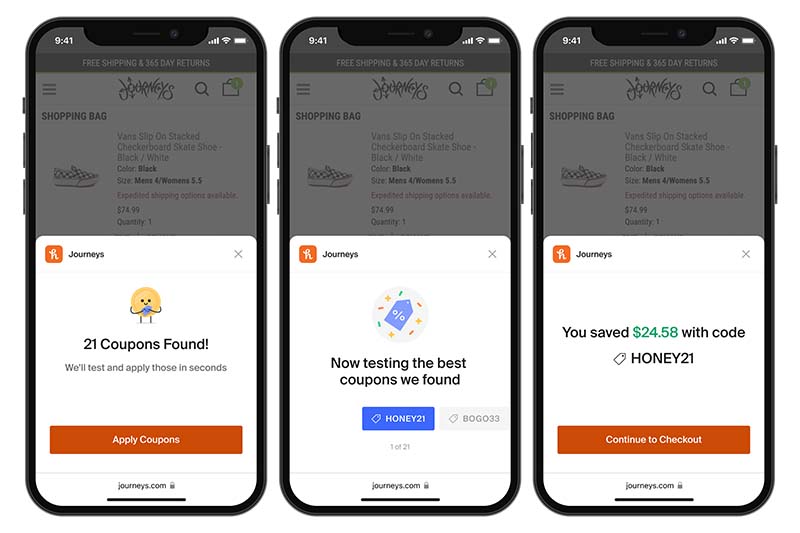
    YouTuber MegaLag has uncovered serious issues with Honey, a well-known browser extension backed by big names like Linus Tech Tips, MKBHD, and MrBeast, and owned by PayPal. Honey claims to help users find the best coupon codes online, but evidence suggests this might not be entirely true. Some partner stores can direct Honey to display only certain discount codes.

    The Problem with Discount Codes

    In an example provided by MegaLag, if a retailer has a discount code that offers a 30% reduction on a specific item alongside another code that provides just 5%, Honey will only show the less advantageous code. This goes against Honey’s promise of helping users save money. Worse still, Honey appears to undermine the very creators who endorse it.

    How Honey Affects Creators

    Many users may have noticed that Honey typically activates right before the checkout process. While searching for discount codes, Honey replaces any affiliate cookies with its own. This action effectively robs the creators you support of their affiliate earnings, even if you don’t finalize the purchase right away.

    Watch the Full Video

    The video dives deeper into how this whole operation unfolds, and we suggest watching it in its entirety. It’s the first part of a three-part series, and MegaLag has stated he will expose more inconsistencies with the service in future videos.

  • Beware: Fake Google Calendar Invites Are the Latest Phishing Scam

    Beware: Fake Google Calendar Invites Are the Latest Phishing Scam

    Fake Google Calendar invites that look like they’re from real sources are the latest trick used by scammers to collect personal info. By cleverly changing the email headers, these messages appear to come from official companies or acquaintances of the victim. While the attacks can take various forms, they all share a common element: a Google Calendar invite. Clicking on the link usually leads victims to a site designed to gather personal details, which the scammers can use to carry out further attacks or even request sensitive financial data directly.

    Rise in Attack Frequency

    Researchers have noted that these kinds of attacks have increased in recent weeks. Around 4,000 emails of this type have been sent to unsuspecting targets over a four-week span, impersonating more than 300 different brands. Email scanning tools found in services like Gmail and Microsoft Outlook started to detect these attacks at some point, prompting criminals to adapt their strategies. Now, the fake links might direct users to pages using Google Forms or Google Drawings, and may even feature a phony ReCaptcha screen. Ultimately, the goal is still to mislead the victim, who trusts the message’s supposed sender, into providing sensitive information that the attackers can exploit later.

    Recommendations for Users

    After being informed about this scheme, Google recommended that users take advantage of Gmail’s filtering rules and the "known senders" setting. These measures can help stop potential victims from accessing harmful emails in the first place. Until a more complete security solution is developed, the best defense is to stay alert and only click on links from trusted contacts or those that were expected to arrive.

    Check Point | Dark Reading

    Source: Link

  • Google Chrome Launches On-Device AI Scam Detection for Privacy

    Google Chrome Launches On-Device AI Scam Detection for Privacy

    Google has introduced a fresh AI scam-detection tool in the newest Chrome Canary version. Named “Client Side Detection Brand and Intent for Scam Detection,” this feature employs a large language model located on your device to examine webpages on Windows, Mac, and Linux systems.

    On-Device Analysis

    This approach means that all processing happens directly on your computer, ensuring that your browsing information remains private and isn’t sent to external servers. It’s quite similar to the “scareware blocker” recently released by Microsoft Edge, but Chrome’s feature will be automatically activated when it officially rolls out.

    Rising Online Threats

    This security enhancement comes at a time when online dangers are increasing. Microsoft’s Digital Defense Report highlights that cybercriminals and even state actors launch over 600 million attacks each day. Earlier this year, Chrome began alerting users about suspicious downloads with a new full-page warning.

    Beyond Security Features

    However, Chrome’s AI capabilities extend beyond just providing security. For example, a new “Store reviews” function collects and summarizes ratings from sites like Trustpilot. To try out the new scam detection feature, users need to download the latest Canary version and enable the appropriate option in chrome://flags.

    Microsoft’s Concerns

    In other news, Microsoft reported that the Russian hacking group Nobelium managed to breach its corporate network and accessed the email accounts of top executives for approximately a month. This incident led Microsoft CEO Satya Nadella to stress that security remains the company’s top priority.

    Source: Link

  • Buying Used Windows Keys on Kinguin: It Works with a Caveat

    Buying Used Windows Keys on Kinguin: It Works with a Caveat

    While G2A and Kinguin are mainly for gamers wanting to buy games at lower prices than Steam, they also offer other software, like Microsoft Windows. For example, you can get Windows 8.1 Home for about $19 on Kinguin, and Windows 7 Home Premium is listed at just $11. This might seem unbelievable, but it makes sense since Windows 7 hasn’t been updated since 2020, unless you are a business that pays Microsoft a lot of money for support, and Windows 8.1 isn’t very popular.

    Old PCs and Software Keys

    A lot of these keys likely come from old computers that are no longer useful for most people in late 2024 and early 2025. These computers are often bought in bulk, often from big companies, to retrieve the keys and maybe even reuse some parts.

    Buying Windows 10 and 11 Keys

    Both websites also offer keys for Windows 10 and 11, including those that allow updates for Windows 10 after 2025. However, it is less clear where these keys originate from. They might have been obtained directly from Microsoft at full price, potentially using stolen credit card information.

    Unlike many other sites nowadays, Kinguin lets you shop without creating an account, which is a nice feature. You only need to enter your email to get to the checkout.

    Surprises at Checkout

    However, shoppers might be shocked when they reach the checkout page. The total shows around 90 lei ($19) instead of the original 52 lei ($11). It seems Kinguin’s service fee wasn’t included in the price displayed at first.

    Oops!

    Once payment is made, the customer receives an email with a link. Clicking this link leads to a page showing the key, and you just have to click "Claim."

    Issues with Activation

    The activation servers for Windows 7 don’t seem to work like they used to anymore. If you enter the 25-digit code from Kinguin and press Activate, an error will pop up on the screen.

    Now, you need to grab your phone and call Microsoft using one of the numbers shown on the screen. The toll-free numbers don’t seem to work. However, calling the UK number +442031474930 worked perfectly. Be ready to spend at least 5 minutes carefully reading out 72 digits to the Microsoft assistant, one by one. After that, you will receive a text with 48 digits. Enter these into the form on your screen, and finally, you will have your Windows 7 activated at last.


    Image 1
    Image 1
    Image 1
    Image 1
    Image 1
  • Philips Hue Launches Update for 8K Play HDMI Sync Box

    Philips Hue Launches Update for 8K Play HDMI Sync Box

    An update has been released for both the Philips Hue Play HDMI sync box 8K and the Philips Hue Play HDMI sync box 4K. The new firmware version 2.4.2 is the first update for the 8K version, which was introduced in October.

    Key Changes for the 8K Model

    The changelog for the 8K sync box highlights three main adjustments. Firstly, a new ARC bypass mode has been added, which users can toggle on or off through the app. This feature allows for the use of Music mode across various configurations. Secondly, version 2.4.2 guarantees that the signal remains stable no matter the sync box’s status. Lastly, there’s a resolution for a problem that sometimes affects HDMI signals at 120Hz.

    Updates for the 4K Model

    In contrast, the Philips Hue Play HDMI sync box 4K only received some “general bug fixes and improvements.” This particular model was last refreshed in April, when an update addressed the passthrough mode issue for Vizio M7 TVs. The firmware version 2.4.2 will be automatically rolled out to users of both the Philips Hue Play HDMI sync box 8K and the Philips Hue Play HDMI sync box 4K (currently $247.75 on Amazon). To see if automatic updates are enabled, navigate to the Philips Hue app > Settings > Software update.

    Philips Hue, Hueblog.com

    Source: Link


    Image 1
  • Home Assistant 2024.12 Released: New Features and Improvements

    Home Assistant 2024.12 Released: New Features and Improvements

    Home Assistant has rolled out update 2024.12, marking its latest monthly version for the open-source smart home automation platform. This update introduces a variety of new functionalities and enhancements for its users.

    Scene Editor Enhancements

    The change log reveals that the scene editor has seen significant improvements with the addition of two new modes: review mode and edit mode. In review mode, users can inspect and modify settings without triggering the scene. On the other hand, edit mode functions like the previous version, automatically activating the scene so users can view their modifications instantly. New integrations have also been added for Acaia coffee scales, Music Assistant, and Sky Remote. Furthermore, there’s now a download snapshot button, durations are shown in a timer format, and several new units of measurement have been introduced.

    Upcoming Features and Patch Releases

    Moreover, Home Assistant hinted at exciting new voice control features, set to be revealed during a live stream on YouTube scheduled for December 19th. The complete change log can be accessed on the Home Assistant website. There have been three follow-up patch releases, with the latest being version 2024.12.3, which includes various bug fixes.

    Source: Link


    Image 1
  • EU Probes TikTok for Potential Election Interference in Romania

    EU Probes TikTok for Potential Election Interference in Romania

    The European Union (EU) has initiated a second probe into TikTok, suspecting potential breaches of the Digital Services Act (DSA) in Romania, according to a statement from the European Commission.

    Initial Investigation

    Earlier this year, in February, the EU began looking into the controversial Chinese social media app for alleged DSA violations. These issues include the safeguarding of minors, transparency in advertising, accessibility of data for researchers, and the management of risks associated with addictive design and harmful content.

    Focus Areas of the Inquiry

    The Commission plans to zero in on two main aspects: first, it will analyze TikTok’s recommendation algorithms for any possible manipulative practices; second, it will investigate paid political ads and content featured on the app. The goal is to determine if TikTok has taken adequate steps to address risks associated with specific regional and linguistic characteristics during national elections.

    Basis for the Investigation

    The Commission’s decision to launch an investigation stems from "declassified intelligence reports" provided by Romanian officials, along with additional inquiries from outside sources. Furthermore, the EU has mandated TikTok to retain and safeguard data related to the Romanian elections, which are set to take place from November 24, 2024, to March 31, 2025.

    Source: Link