Author: GizNews

  • NASA Artemis II Lunar Flyby High-Res Images Collection

    NASA Artemis II Lunar Flyby High-Res Images Collection

    Key Takeaway

    1. The Artemis II lunar flyby provided high-resolution images of the Moon’s far side, captured using a combination of onboard external cameras, handheld Nikon D5 DSLR cameras, and an iPhone 17 Pro Max.
    2. The crew was specifically trained to photograph lunar landmarks with zoom lenses, enhancing documentation and training for future crewed missions.
    3. The images showcase detailed crater features and Earth views, with lighting conditions at low sun angles increasing surface texture visibility and depth perception.
    4. The photography served primarily for mission documentation and training, representing an advancement in high-res coverage compared to past Apollo missions.

    Gallery of lunar images from Artemis II is now available

    NASA just revealed a whole bunch of really high-quality images from the Artemis II lunar flyby, taken during the crew’s close circle around the Moon’s backside. This set included shots showing detailed crater areas, the famous Earthrise, and even a solar eclipse from deep space. The pictures are pretty stunning, showing the Moon in incredible detail.

    How they took these pictures?

    The cool thing about this isn’t just what was taken but how. The crew used a mix of handheld and onboard camera gear. Inside their Orion spacecraft, astronauts had Nikon D5 DSLR cameras with a variety of zoom lenses. These aren’t the latest tech, but they’re tough, reliable, and resistant to space radiation. The astronauts used these cameras for both wide shots of the crew area and close-ups of the Moon through the windows. NASA trained them to capture important lunar landmarks specifically with their zoom lenses, which helped a lot in getting those sharp images.

    External & personal camera gear used on Artemis II

    Meanwhile, the Orion spacecraft itself is fitted with a bunch of external cameras for engineering, navigation, and documentation. Though NASA hasn’t said every camera model used during Artemis II, previous missions had arrays of mounted cameras. They captured external views and aided in navigation. Interestingly, NASA confirmed that astronauts also used personal devices like an iPhone 17 Pro Max, which during the mission was $1,319 (renewed), for casual shots, selfies, and social media style videos. These informal images add a more personal touch to the gallery and help document the experience more casually.

    Details & visual characteristics of the images

    With no atmosphere in space, the shadows in images are super sharp, contrast is high, and surface textures look very crisp—especially near the terminator (the line between day and night on the Moon). The shots of the far side are especially detailed because they were taken at low sun angles, making crater rims and ridges appear with more depth and clarity. These lighting conditions helped bring out the details that wouldn’t be as visible under direct sunlight.

    Purpose and significance of the lunar photography

    Primarily, Artemis II was a test flight and not specifically a scientific imaging mission. The photos taken are mainly useful for documentation and training, especially for future crewed landings on the Moon. However, the mission also provided a level of high-resolution coverage that previous Apollo missions couldn’t achieve back then. Now, it’s possible to view and download all these impressive images, offering a new perspective on lunar flybys for everyone interested in space exploration.



    Sources

  • Snap selects Qualcomm for 2026 AR glasses technology

    Snap selects Qualcomm for 2026 AR glasses technology

    Key Takeaway

    1. Snap’s Specs will use Qualcomm Snapdragon XR chips for future models, enhancing on-device computing and AI capabilities.
    2. The partnership signals a focused push toward launching consumer AR glasses later in 2026.
    3. Snap is restructuring to position Specs as a standalone AR platform, aiming for more user-centric and private experiences.
    4. The collaboration builds on an existing relationship, with Qualcomm chips already powering previous Spectacles generations.

    Snap joins forces with Qualcomm for upcoming AR glasses

    Snap has expanded its partnership with Qualcomm, planning to bring out its standalone augmented reality glasses later in 2026. The company announced on April 10, 2026, that their XR subsidiary, Specs Inc., will use Qualcomm’s Snapdragon XR system-on-chip platforms in future versions of Specs.

    Strategic Collaboration Details

    The partnership between Specs Inc. and Qualcomm Technologies is a multi-year plan, aiming to integrate Qualcomm’s Snapdragon XR chips into the on-device computing of upcoming Specs devices. This collaboration is not new, as Qualcomm chips have already powered previous Spectacles. The new deal mainly extends an existing relationship, focusing on AI, graphics, and multiuser digital experiences. This helps Snap to stay aligned with current tech trends and improve the specs of their upcoming AR glasses.

    Consumer Launch and Future Plans

    Snap has confirmed that Specs will be available to consumers later this year. An earlier statement from June 2025 indicated a release window in 2026 for their lighter, more consumer-oriented device. These new specs are designed as transparent smart glasses aiming to overlay digital content into the real world instead of relying on typical phone screens. This approach emphasizes immersion and seamless integration with daily life, positioning Snap to attract mainstream users.

    Restructuring and Strategic Vision

    Despite challenges earlier this year, Snap is continuing to push forward with its AR project. On January 28, 2026, Snap formally set up Specs Inc. as a separate, wholly owned subsidiary. This move allows better focus and partnerships, paving the way for a smoother public launch of Specs later this year. This restructuring is meant to give the company more operational flexibility in developing their AR ecosystem.

    Goals for the Specs Platform

    Snap’s ultimate goal is to make Specs a standalone AR platform, not just an experimental gadget. The glasses are intended to recognize what users see and hear, support natural voice and gesture controls, and process more data locally for faster operation and better privacy. This strategic aim positions Snap to compete more directly with other tech giants like Meta, Google, Samsung, and Apple, all of whom are investing in wearable AR technology.

  • Fostex Launches TH810 and TH818 Premium Over-Ear Headphones

    Fostex Launches TH810 and TH818 Premium Over-Ear Headphones

    Key Takeaway

    1. Fostex announces the TH810 (closed-back) and TH818 (open-back) premium headphones, using acacia wood housings and identical components to higher-end models.
    2. Both models feature a 50mm BioDyna driver with advanced design for refined bass performance, a frequency response of 12.5 Hz to 40 kHz, and are suitable for high-power amplification.
    3. The headphones are lightweight (13.6 oz.), utilizing magnesium alloy, natural sheepskin padding, and silk protein synthetic leather for comfort and durability.
    4. Shipping begins in late April 2026, with pricing expected to start around $1,000.

    Introducing the New Fostex Headphones

    The company Fostex has revealed a fresh take on their premium headphone lineup. They are launching two new models: the TH810, which is a closed-back design, and the TH818, an open-back version. What makes these significant is they share the same internal components as the higher-end TH910 and TH919, but for the housing, they switch to a more affordable material—acacia wood—rather than the traditional Japanese-lacquered maple decorated with silver foil patterns, making it more accessible yet maintaining quality.

    Technical Specs and Audio Quality

    The core of these headphones is the 50mm BioDyna driver. It has been thoughtfully redesigned to include a new voice coil and driver surround, aiming to give cleaner bass sounds with fewer artifacts and muddiness, as Fostex claims. They boast an impressive frequency response from 12.5 Hz to a whopping 40,000 Hz, which covers almost all audible spectrum. The impedance is set at 25 ohms, with a high sensitivity rating of 100 dB/mW. These headphones are mount for high-power amplifiers and can be driven with inputs as high as 1,800 mW through a 3.5 mm oxygen-free copper cable, which is included with the purchase.

    Design and Comfort

    To reduce weight without sacrificing durability, Fostex opted for a magnesium alloy frame, making the headphones about 20% lighter than their predecessors. Now weighing only 13.6 ounces or approximately 385 grams, they are easier to wear for extended periods. The headband is padded with natural sheepskin for a soft feel, and the ear cushions use silk protein synthetic leather combined with dual-density urethane foam — a comfort layer designed to prevent fatigue and enhance the listening experience.

    Availability and Pricing

    Expect to see the Fostex TH810 and TH818 at authorized distributors across the globe along with their official store. These models are set to start shipping towards the end of April 2026. Price details haven’t been officially announced yet but are speculated to fall around the $1,000 mark. This price point aims to reflect their premium feature set and audio profile, appealing to serious audiophiles and professional users alike.


  • Casio G-Shock GA-2100 Nissan GT-R Watch Leaked Before Japan Release

    Casio G-Shock GA-2100 Nissan GT-R Watch Leaked Before Japan Release

    Key Takeaway

    1. A new Casio G-Shock x Nissan GT-R collaboration watch has leaked, likely based on the GA-2100 platform.
    2. The design features a stealth-like dark finish, GT-R logo on the dial, and red accents, with a standard GA-2100 layout.
    3. The release is expected in Japan next month, but official details and pricing remain unconfirmed.
    4. This collaboration continues the history of G-Shock and Nissan GT-R partnerships, primarily in Japan-only releases.
    5. The watch is anticipated to be highly sought after among GT-R fans and GA-2100 collectors.

    Exciting News for G-Shock and Nissan Fans

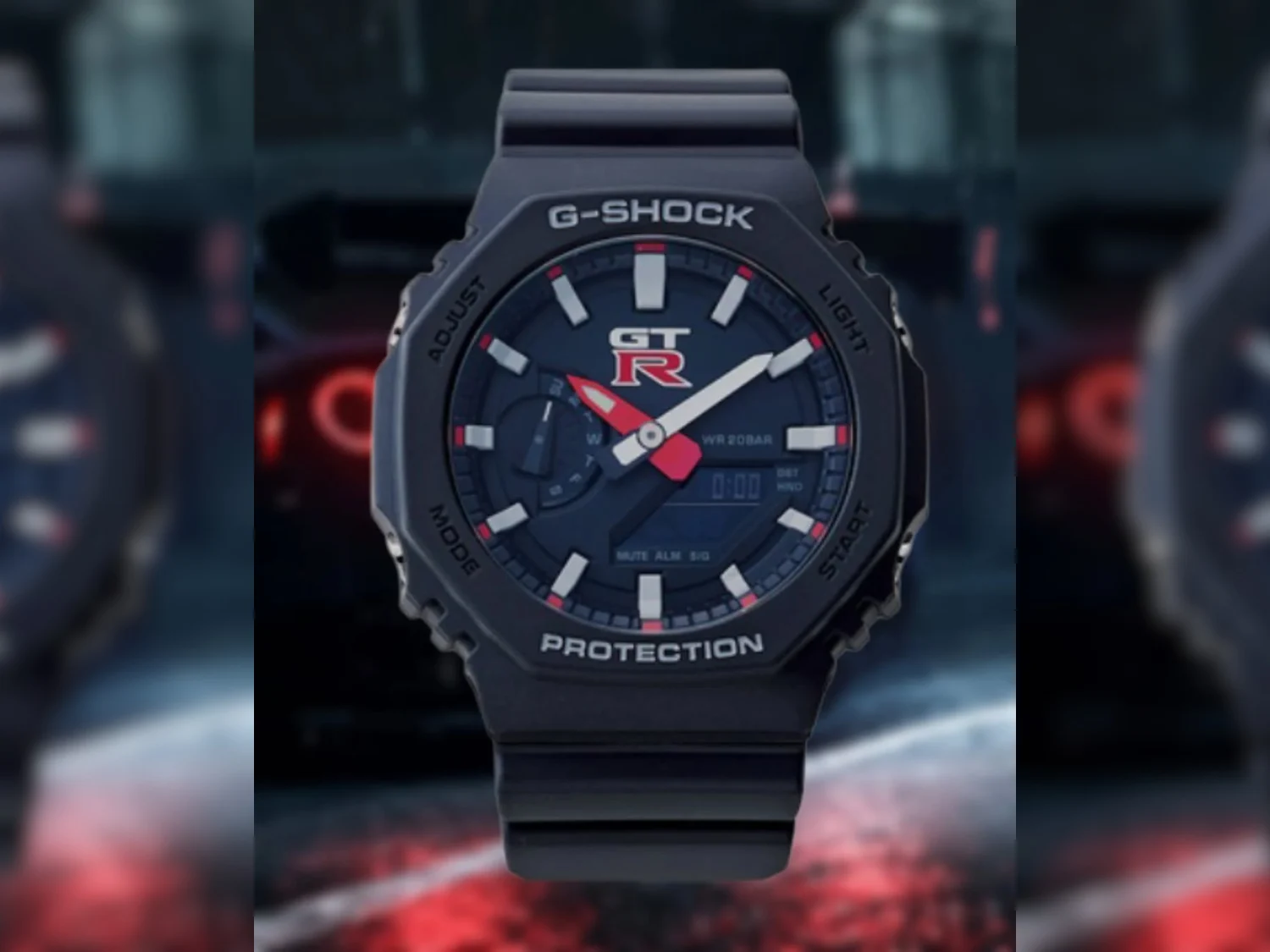
    There’s an upcoming collaboration between Casio’s G-Shock line and Nissan’s iconic GT-R, which has just been teased online thanks to a post made by @geesgshock on Instagram. This project is supposed to be released sometime next month in Japan. The design seems to be based on the popular GA-2100 series, but official details are still not out yet. Fans are eagerly awaitin for more info about this unique timepiece.

    Design and Aesthetic Features

    The leaked photos show a watch with a case that resembles the GA-2100, but it’s finished in a dark, almost stealth black color that gives it a very sleek look. The dial stands out with the GT-R logo placed right at the center instead of Casio’s usual branding. Small red accents can be seen on the seconds hand and the hour markers, adding a sporty touch to the overall design. The layout keeps the familiar GA-2100 analog-digital style, making it recognizable yet exclusive. However, there are no details on the watch’s technical specifications or how much it will cost when it officially launches.

    Historical Collaboration Context

    Over the years, Casio and Nissan have teamed up multiple times, especially around the GT-R brand. They have produced various limited edition G-Shock watches with the Nissan GT-R logo, though many of these collaborations were only available in Japan. These earlier models are a bit hard to track down now and are often considered collector’s items. The recent leak suggests this new project continues the tradition of merging automotive passion with style, now focusing on the widely popular GA-2100 platform, which has been used in countless collaboration models in the past.

    What to Expect and How the Market Might React

    This leak is still pretty early, so all details are not yet confirmed, but if this release is true, it will definitely attract a lot of attention. Among GT-R lovers and G-Shock collectors, especially those interested in the GA-2100 series, this watch might become a must-have item. Given its Japan-only presumed availability, any availability outside of Japan could make it even more sought after and possibly increase its resale value. Fans should keep an eye out for official announcements soon to learn all the specifics about this exciting collaboration.

    Sources
  • Cookie Run Kingdom Act 2 Launch Scheduled for May 2026

    Cookie Run Kingdom Act 2 Launch Scheduled for May 2026

    Key Takeaway

    1. CookieRun: Kingdom Act 2 is scheduled for launch in May 2026, featuring a major escalation in the game’s story, involving a multi-timeline war.
    2. The update will alter the story progression cadence from every four weeks to a two-week cycle, increasing the frequency of new content.
    3. The upcoming chapter will expand the game’s conflict, moving beyond the current regional storyline towards a broader, more intense narrative scope.


    CookieRun: Kingdom Act 2 Announcement

    Upcoming Major Update for CookieRun: Kingdom

    Devsisters has announced that the second act of CookieRun: Kingdom will be launched in May 2026. They describes this new chapter as bringing the game into its most intense and biggest conflict to date. The storyline will take a darker turn as it explores a shattered world where chaos ensues.

    Storyline and Gameplay Changes

    The new act is gonna start after a massive event destroys the world’s timeline, leading to a war that effects different timelines. This means we’ll see characters and worlds collide in ways we’ve never seen before. Devsisters wants to up the stakes by making it a bigger escalation for the players, pushing the game’s boundaries further into a multi-layered story.

    Updated Release Schedule

    Once Act 2 kicks in, the frequency of story releases gonna change too. Instead of new main story chapters every four weeks, players will now get updates every two weeks, making the story progression faster and more exciting. Fans can expect a quicker pace of new content coming their way.

    Context From Previous Updates

    This new chapter follows the game’s recent anniversary storyline, specifically the February 12 update about Episode 14: The Convergence of Fates. During that update, it was explained that the Cookie Alliance was approaching the Beast-Yeast continent to face Dark Enchantress Cookie. That event was part of a three-step story arc celebrating the game’s anniversary.

    What to Expect in the Next Chapter

    Considering the current storyline progress, Act 2 will act as the next big step rather than a side story. The official news hints that the conflict will become broader in scope, expanding beyond the current regional battles. It is likely that new elements and characters will be introduced, making the epic even greater.

    Missing Details and Focus

    So far, no official date in May has been declared, nor has there been a gameplay trailer or list of new playable Cookies for the update. However, recent announcements have highlighted collaborations like the ongoing KPop Demon Hunters event, live until May 6, which might hint at future content previews.

    Summary of What’s Coming

    • Launch in May 2026
    • Story about fractured timelines and multi-war themes
    • Increased update pace from four to two weeks
    • No official trailer yet

    Fans are eagerly awaiting more details but can anticipate that the next big chapter will significantly change the game’s universe and gameplay dynamic.


    Sources
  • Upcoming Metro Game Teased for State of Play Announcement | What to Expect

    Upcoming Metro Game Teased for State of Play Announcement | What to Expect

    Key Takeaway

    1. A new mainline Metro game is expected to be announced soon, potentially as early as next week.
    2. The upcoming title is believed to be a direct sequel to Metro Exodus, possibly set in Moscow.
    3. The game may incorporate elements from a canceled open-world Metro project, including a full open-world design.

    New Metro Game Rumors and Expectations

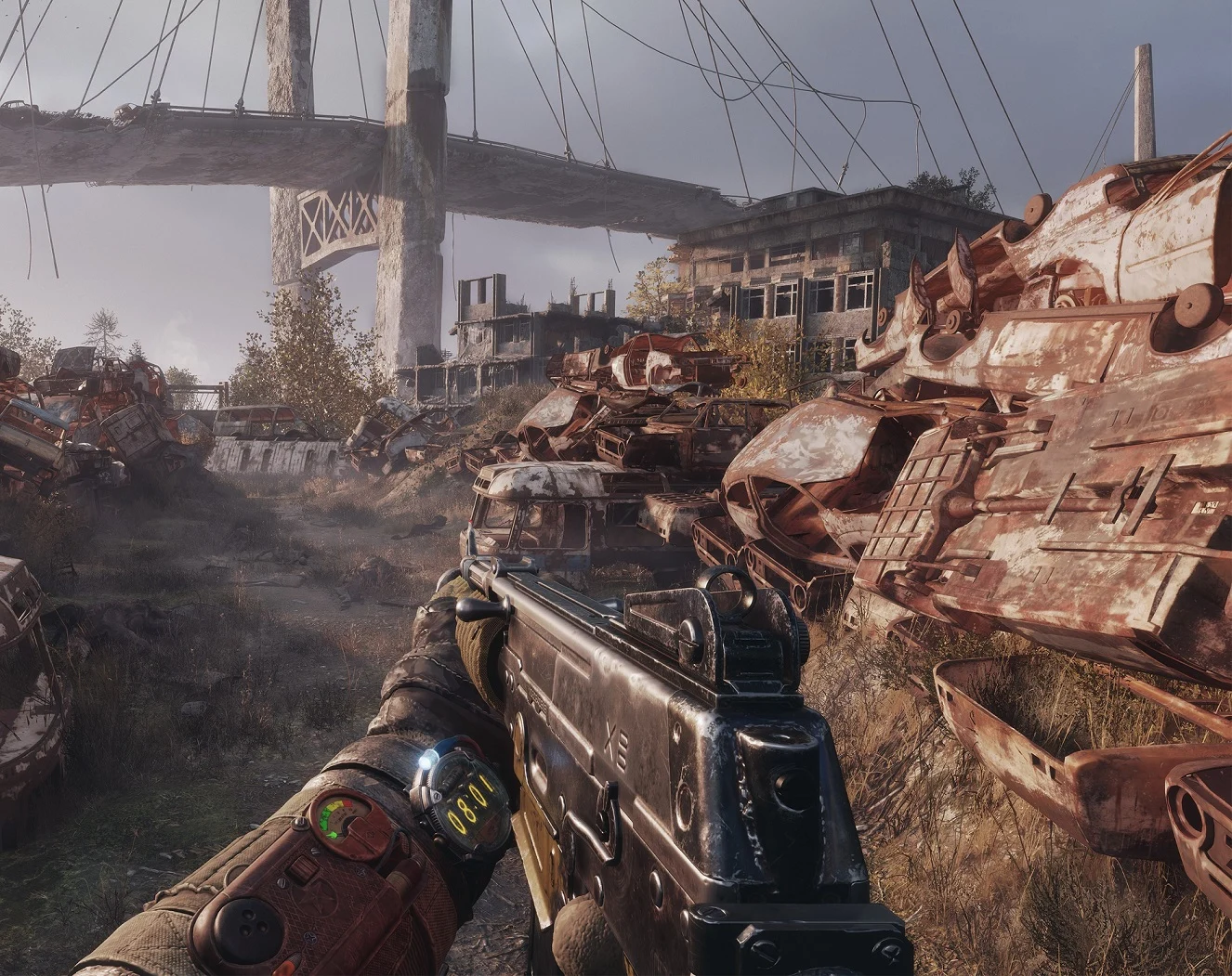
    There have been some exciting whispers that after seven long years without a new mainline Metro game, the series might be making a comeback soon. Even though nothing official has been announced, sources close to the project suggest that 4A Games, the studio behind the franchise, could be gearing up to reveal their next project in the near future. Fans are eagerly awaiting official confirmation, but leaks and hints are fueling anticipation for what’s to come.

    Potential Announcement and Release Timeline

    According to information shared on X by @AlexandreNGamr, a new Metro game might be unveiled next week. Interestingly, this timeframe seems to line up with Sony’s upcoming State of Play event, anticipated around April 16, which could serve as the perfect platform for such a reveal. The timing is certainly intriguing, and many are speculating that an official announcement could coincide with this event.

    What We Know About the Possible Game

    The next Metro installment is most likely to be the fourth main entry in the series, building upon the stories of Metro 2033, Metro Last Light, and Metro Exodus. There’s also a VR title called Metro Awakening expected to release in 2024, but it’s not considered a core part of the main storyline. Rumors indicate that the new game would be a direct sequel to Metro Exodus, possibly revisiting the Moscow metro area and continuing the narrative from the previous game.

    Previous Leaks and Possible Inspirations

    A recent leak has shed some light on a former project that was reportedly canceled. This leaked file seems to relate to a now-scrapped Metro game developed around 2023, which was said to feature a vast open world, taking the semi-open approach seen in Metro Exodus even further. The protagonist named Hunter, along with side characters Bourbon and Khan, appeared in these early plans. While the project was ultimately shelved, it’s possible that elements of this open-world concept might influence the upcoming release.

    What to Expect Moving Forward

    All signs point to more detailed information being released next week, which could clarify many of these rumors. However, considering the development timelines of previous titles like Last Light and Exodus, it’s unlikely the new game will be ready before 2028. This delay could mean that it will be among the earliest titles available for the PlayStation 6 console, making it a highly anticipated launch title.

    Sources
  • UL Solutions Reports Benchmark Cheating in RedMagic 11 Pro Series

    UL Solutions Reports Benchmark Cheating in RedMagic 11 Pro Series

    Key Takeaway

    1. UL Solutions delisted the RedMagic 11 Pro series due to violation of platform rules, specifically related to thermal limits and performance manipulation during benchmarking.
    2. The phones automatically switched to a high-performance “Diablo” mode during certain benchmark runs, resulting in artificially inflated scores by up to 24%.
    3. Nubia disputes the allegations, claiming their performance profiles are meant to give users more control, but did not clarify if automatic mode changes occur during benchmarks.
    4. These practices of optimizing for benchmarks and ignoring thermal constraints are common among various brands, though they can lead to device instability and overheating.

    UL Solutions Remove RedMagic 11 Pro from Rankings

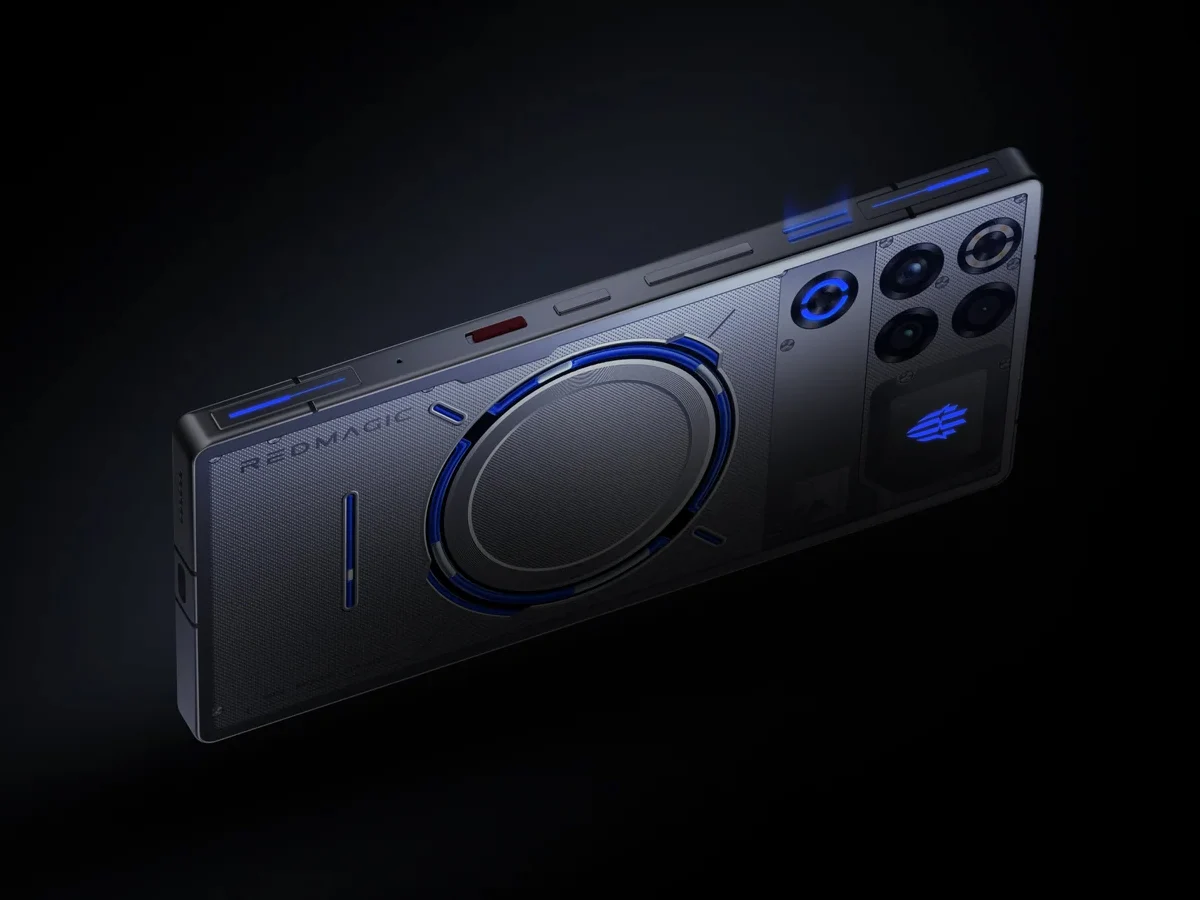
    UL Solutions has recently taken down the RedMagic 11 Pro gaming phones from their benchmarking lists because they found out that these phones broke their rules and guidelines. The main problem was that the devices were said to be “cheating,” but in reality, they were just ignoring heat limits to get the best possible performance from their hardware.

    Performance Tests Show Discrepancies

    While it might look like they was cheating, the hardware itself can actually reach those high scores. UL Solutions defend their decision by sharing results from their own testing. They tested the RedMagic 11 Pro with two different versions of the 3DMark benchmark software. One of these versions is known to the public, but the other version has been renamed and is not recognized by the gaming phone itself.

    In the test using the public version, UL Solutions discovered the RedMagic 11 Pro would automatically run in a high-performance mode called “Diablo” mode. But when they ran using the other version, which the phone doesn’t recognize as a benchmarking app, the device stayed in normal mode. This caused a notable difference: in the high-performance mode, the phone scored about 24% higher in the benchmark.

    Nubia’s Response and User Concerns

    The company behind RedMagic, Nubia, issued a statement trying to justify their phones, but it didn’t quite work. In an email to Android Authority, Nubia said that its performance configurations aren’t “unethical” and are meant to give users more control over how their phones perform. But they didn’t mention that the phone automatically switches to high-performance when it detects benchmarking tools.

    Many users also reported issues with stability when using the highest performance modes—crashes, overheating, and other problems—like those caused by external cooling fans costing around $54.23 on TradingShenzhen. This highlights that pushing devices to maximum limits can sometimes have serious drawbacks, especially in terms of overheating and instability.

    Similar Practices in Other Brands

    This isn’t something completely unique to Nubia or RedMagic phones. Other brands such as Huawei, Oppo, and MediaTek have also been found to ignore thermal and power guidelines when their phones detect benchmarks or intensive workloads. This kind of behavior isn’t unusual in the smartphone business and often sparks debates about fairness and device safety in performance testing.


    Sources

  • Director Confirms Phantom Blade Zero Does Not Use Generative AI

    Director Confirms Phantom Blade Zero Does Not Use Generative AI

    Key Takeaway

    1. The development team emphasizes that Phantom Blade Zero was created entirely by human artists, without using AI technology.
    2. All character models, maps, and visual assets were handcrafted, including hand-drawn maps and physical replicas of weapons for realism.
    3. The game’s combat mechanics were motion-captured by martial artists and experts, highlighting a focus on authenticity and human craftsmanship.
    4. The company prioritizes human artistry and cultural authenticity over automation, aiming for a deeply proud and passionate creative process.

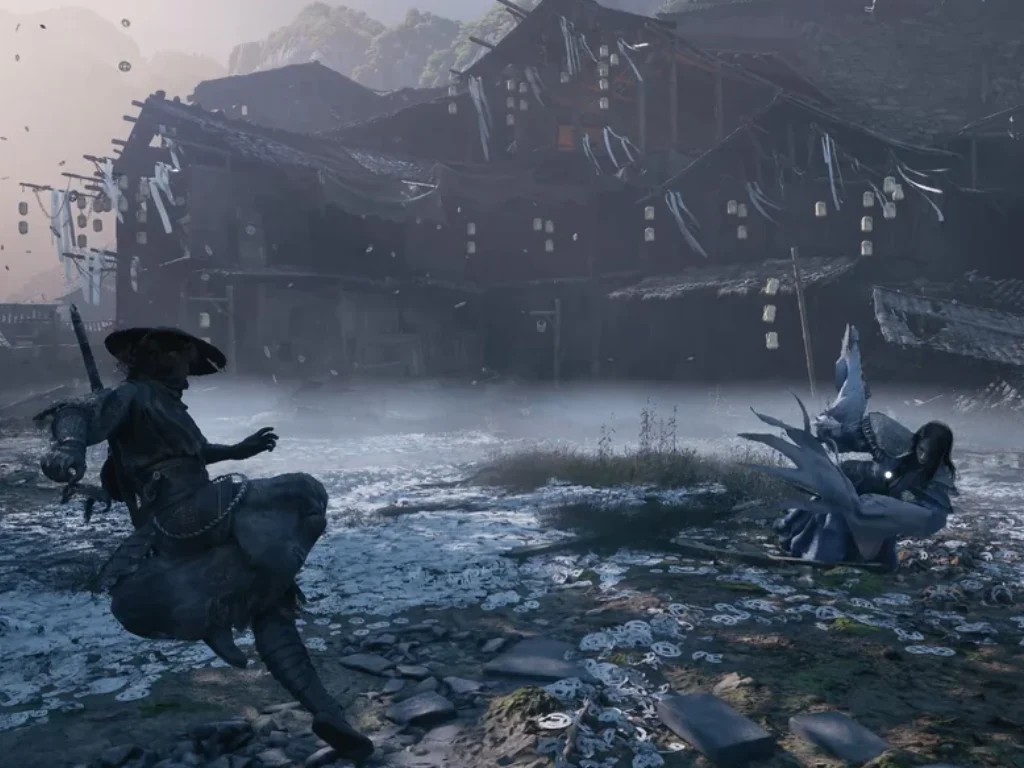
    Phantom Blade Zero nears its worldwide launch date of September 9, 2026, with much anticipation. However, Liang, the CEO of S-Game and the game’s creative mind, emphasizes that the game is essentially a work of human effort, not driven by latest algorithms. He shared this insight through a detailed message on social media, highlighting that their team has put a lot of love and dedication into the project, avoiding the use of AI technologies altogether.

    Dedicated Craftsmanship Over AI

    Liang told followers on X, “Phantom Blade Zero is ringing in its final development days and we are throwing everything we got into perfecting each part of the game. There’s no shortcuts here, just pure hard work.” His words show his pride in traditional methods, asserting that their team’s craftsmanship was central. Despite the rise of AI in game development, he made clear that S-Game refuses to rely on it, stating that “every art, every model, and every voice was made by real humans, not machines.”

    From Reality to Art

    The game’s characters are based on actual people. Models started with 3D scans of real actors, bringing a sense of authenticity. Voice recordings in both Chinese and English were performed by professional actors and directors, then animated by the team to match lip movements perfectly. This hands-on process underscores their commitment to quality and realism, staying true to human skill instead of computer-generated content.

    Authentic Details and Cultural Inspiration

    • The maps in the game were hand-drawn with traditional Chinese brushes on Xuan paper by talented young artists from the Central Academy of Fine Arts.
    • Ancient Chinese weapon designs served as inspiration, with real swordsmiths creating physical replicas to help animators understand weight and technique.
    • Martial arts moves were captured through motion capture performed by experienced fighters, kung fu masters, and lion dancers, emphasizing authentic movement.
    • Scan trips around China to study historic places in Fujian, Zhejiang, and Beijing contributed to the unique “Kungfupunk” style, blending tradition and modernity.

    Liang closed his message with a heartfelt statement on the importance of human creativity, expressing his belief that “art created by people isn’t just a tool for creating value, it *is* the value.” Instead of just assembling a team of developers, S-Game strives to foster passion and pride among everyone working on the game, making it a true expression of human effort and dedication.

    Sources
  • Ultra-Rare Punch-Out ROM with Missing Fighters & Major Differences from NES Version

    Ultra-Rare Punch-Out ROM with Missing Fighters & Major Differences from NES Version

    Key Takeaway

    1. An extremely rare early prototype of Nintendo’s Mike Tyson’s Punch-Out!! has emerged, featuring unique differences from the retail version, including game content and cartridge makeup.
    2. The prototype employs stamped mask ROMs, unlike typical prototypes that use rewritable EPROM chips, raising questions about its purpose and authenticity.
    3. There are notable gameplay differences, such as arcade fighters appearing in the intro and the presence of two mysterious, unreleased fighters, Rockyhead and Mongol Khan.

    Rare Find of Nintendo’s 1987 Prototype

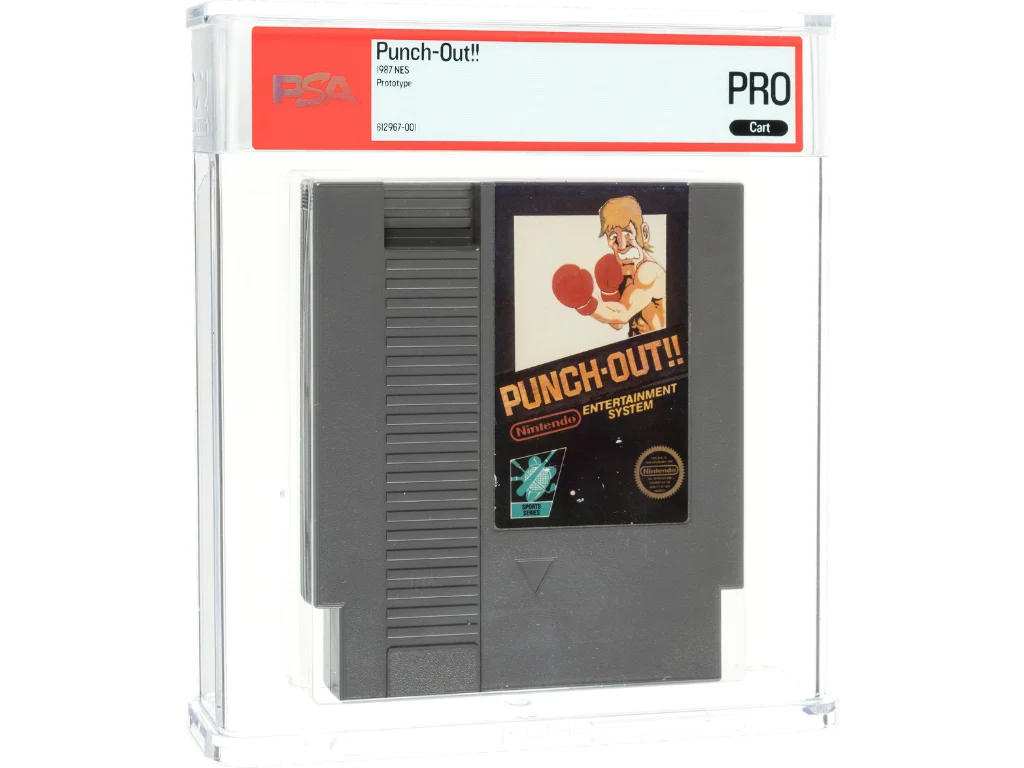
    An incredibly rare early version of Nintendo’s famous Mike Tyson’s Punch-Out!! from 1987 just surfaced on the internet, and it is a totally functioning game but without sound. This pre-release version of the game has been dumped online for public to explore and enjoy, offering some notable differences from the final retail edition of the NES game.

    Insight from the Video Game History Foundation

    The VGHF recently examined the prototype cartridge in a detailed video. Frank Cifaldi, the founder and head of VGHF, has dedicated nearly thirty years to studying NES prototypes and was quite astonished. He said, “I’ve never seen anything like this,” after inspecting the cartridge’s internals. The prototype sports a sticker with a fake label matching Nintendo of America’s early NES packaging aesthetics from the mid-’80s.

    Unique Storage and Design Aspects

    The game data resides on stamped mask ROMs, which are permanent chips typically found in retail cartridges and marked with manufacturing dates. Usually, early prototypes used rewritable EPROMs, making this example unusual. Though Cifaldi mentioned these ROMs might be mock-ups, he was puzzled as to why a development version of Punch-Out!! would be assembled with these components.

    Major Differences in Game Content

    Unlike most NES prototypes that closely resemble final versions, this build shows significant early differences. The intro credits show fighters from the 1984 arcade Punch-Out!!, like Piston Hurricane and Pizza Pasta—characters replaced or removed in the retail version. Piston Hurricane was renamed Piston Honda, and Pizza Pasta was cut out from the North American version. Soda Popinski appears under his arcade name Vodka Drunkenski, likely a change for marketing purposes.

    Unseen Characters and Hidden Content

    Two mysterious fighters called Rockyhead and Mongol Khan appear in the game, but they’ve never been seen in any official release of Punch-Out!!. The playable roster in the prototype is limited to four opponents: Glass Joe, Bald Bull, King Hippo, and Don Flamenco. Other fighters like Von Kaiser and Great Tiger are present only in the game’s code and can be revealed via debugging, but they are not accessible to fight.

    The Cartridge’s Journey and Public Release

    This rare prototype console cartridge has an interesting history; it was found at a garage sale by a former Nintendo of America employee. It later received PSA certification and was auctioned by Heritage Auctions for $45,000. Many believed the game was kept hidden in private collections, but the lucky purchaser chose to upload the ROM online, allowing the Video Game History Foundation to analyze it thoroughly.

    Sources
  • Framework CEO Warns AI Boom Could End Personal Computing as We Know It

    Framework CEO Warns AI Boom Could End Personal Computing as We Know It

    Key Takeaway

    1. Nirav Patel warns that personal computing could become obsolete due to AI-driven industry practices and rising component costs.
    2. Framework has pioneered repairable, upgradable laptops to empower users and challenge industry norms.
    3. Despite industry shifts, Patel emphasizes the importance of user ownership and control over their devices, vowing to continue advocating for it.

    Tech Industry Warns of Potential End to Personal Computing

    Basically, the founder of Framework, Nirav Patel, is warning the tech world that our beloved personal computers might be heading to an end soon, like he said it in his recent blog post. He shared his concern about how big corporations are making it harder for us to keep and upgrade our devices. The announcement for his Next Gen Event, held in San Francisco on April 21, 2026, was part of his effort to send a message to the industry.

    Framework’s Mission for Repairable Tech

    • Framework has worked hard to build laptops that are repairable, upgradeable, and customizable.
    • Patel emphasizes that these kinds of computers last longer and give power back to users.
    • He thinks that repairability is slowly becoming more common, even among big brands like Apple.

    Challenges and Concerns About the Future

    This is where Patel’s tone turns a bit darker. He mentions that his company’s goal to fix the broken tech industry isn’t quite finished. Despite positive signs, he warns about a possible bleak future where personal computers might become extinct. In his words, the industry is changing in a way that could turn into a “winner-takes-all” situation with AI and server farms gobbling up resources, making PC parts more expensive and less accessible for regular people.

    Rising Costs and Industry Trends

    He points out that prices for RAM, SSDs, HDDs, and chips are climbing so high that most regular consumers can’t afford to upgrade or buy new components anymore. His critical view is that the tech industry is pushing us towards owning less and leasing more, like a self-driving car that handles everything but leaves us with less control. This shift makes the traditional PC feel less like a tool for independence and more like a service that you depend on but can’t truly own.

    Ongoing Fight for Ownership and Control

    Even with his warning, Patel isn’t giving up on the dream of upgradable and repairable computers. Instead, he describes his message as a manifesto—an ongoing pledge to fight for devices that belong to us at a fundamental level. His commitment is to keep building hardware that people can truly own, whether that means installing their preferred OS, modifying hardware as they see fit, or keeping their data locally instead of on distant cloud services.

    Hope for Digital Freedom

    • Patel insists that as long as there’s even one person desiring control over their computing devices, his company will be there to build it.
    • This includes owning and customizing hardware, as well as maintaining data privacy.
    • He ends with a call for persistent effort to ensure a future where digital ownership remains possible for everyone.

    So, despite the grim outlook painted by Patel, his message is clear: the fight for open, repairable, and owner-controlled technology continues. He believes that the spirit of independence in computing must be preserved, even if the industry tries to shift towards centralized, leased solutions.

    Sources