Tag: Gaming Performance

  • RTX 5090 Laptop GPU vs RTX 4090: 25-Game Benchmark Results

    RTX 5090 Laptop GPU vs RTX 4090: 25-Game Benchmark Results

    Key Takeaways

    1. The RTX 5090 laptop GPU shows a 20% performance advantage over the RTX 4090 in synthetic tests but doesn’t translate to significant gaming performance gains.

    2. In a broader gaming context, both the RTX 5090 and RTX 4090 perform similarly, with only slight advantages in some cases.

    3. At lower resolutions like 1080p, CPU performance impacts GPU performance analysis, complicating comparisons between models.

    4. The performance gap at 1440p and 4K is minimal, with the RTX 5090 only showing a 0.6% and 3% increase over the RTX 4090, respectively.

    5. Key advantages of the RTX 5090 include 24 GB VRAM, improved efficiency, and DLSS Multi-Frame Generation, but the RTX 4090 may be a better investment for most users.


    We did an analysis of the RTX 5090 and RTX 5080 laptop GPUs, and it shows these boards offer a solid performance advantage over their previous generation models in synthetic tests. For example, the RTX 5090 laptop outperformed the RTX 4090 laptop by as much as 20% in the 3DMark test suite. Nevertheless, this synthetic performance does not effectively translate into gaming performance, especially for the RTX 5090.

    Performance in Gaming

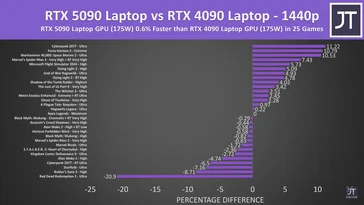
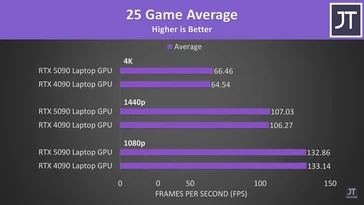
    Although the RTX 5090 laptop was 20% quicker than the RTX 4090 laptop for some individual games like Cyberpunk 2077 2.2 Phantom Liberty during our tests, it appears that the new GPU does not hold any edge over the RTX 4090 when evaluated in a broader context. The 25-game benchmark from Jarrod’sTech indicates that the RTX 5090 laptop and the RTX 4090 laptop perform largely on par.

    Importance of Resolution

    Before diving into the actual performance details, it’s worth noting that we have not considered the 1080p results. At lower resolutions, such as 1080p, CPU performance plays a bigger role, which complicates the process of determining the precise GPU performance.

    When tested at 1440p, the RTX 5090 laptop GPU only manages to be a slight 0.6% faster than the RTX 4090 laptop GPU. This includes the notably poor performance of the RTX 5090 laptop in Red Dead Redemption 2. Even if we ignore the Red Dead Redemption 2 score, the RTX 5090 laptop shows a meager 1.6% lead over the RTX 4090 laptop GPU.

    4K Performance Insights

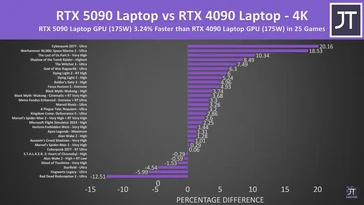
    The gap in gaming performance between the RTX 5090 laptop and the RTX 4090 laptop isn’t significantly better at 4K. Both GPUs perform quite similarly, with JT’s testing revealing only a 3% increase in performance for the RTX 5090 laptop GPU. This is with the Red Dead Redemption 2 results included. However, removing Red Dead Redemption 2 from the equation doesn’t improve things for the RTX 5090 laptop.

    When looking at frame rates, the RTX 5090 laptop GPU averages 66 FPS across the 25 games tested at 4K, while the RTX 4090 laptop is nearly the same at 64.5 FPS. The results at 1440p also reflect this trend, with the RTX 5090 laptop GPU and the RTX 4090 laptop GPU averaging 107 and 106 FPS, respectively.

    Final Thoughts

    Ultimately, the RTX 5090 laptop GPU’s advantages are limited to its 24 GB VRAM, improved efficiency, and DLSS Multi-Frame Generation (MFG). However, it’s doubtful that anyone spending over $3,000 or $4,000 on a premium gaming laptop will prioritize efficiency. Buyers of high-end gaming laptops expect top-tier performance.

    Thus, if you don’t plan to use MFG and have no need for 24 GB of VRAM, the previous generation RTX 4090 gaming laptops are evidently a better investment.

    Source:
    Link

  • MediaTek Dimensity 9400e: Flagship Chipset for Budget Phones

    Key Takeaways

    1. MediaTek launched the Dimensity 9400e chipset, targeting sub-premium devices, alongside the Dimensity 9400 and 9400+.
    2. The Dimensity 9400e is built on TSMC’s 4nm process and features a 4+4 core setup with Cortex-X4 and Cortex-A720 cores.
    3. It includes advanced features like Adaptive Gaming Technology (MAGT 2.0), Frame Rate Converter (MFRC 2.0+), and support for AI models through the NeuroPilot SDK.
    4. The chipset offers high connectivity speeds, achieving sub-6GHz 4CC-CA downloads of up to 7 Gbps and Wi-Fi 7 speeds of 7.3 Gbps.
    5. The Dimensity 9400e is closely related to the previous Dimensity 9300+ and shares similarities with Qualcomm’s Snapdragon 8s Gen 4 and Snapdragon 8 Gen 3.


    MediaTek has unveiled its latest chipset, the Dimensity 9400e. This new addition joins the Dimensity 9400 and Dimensity 9400+ in MediaTek’s top-tier lineup for the year. However, it is designed specifically for sub-premium devices, with some expected to launch later this month.

    Technical Specifications

    The Dimensity 9400e stands out from its siblings as it is manufactured using TSMC’s 4nm process. It boasts a unique 4+4 core setup, which includes four Cortex-X4 cores (one running at 3.4 GHz and three at 2.85 GHz) and four Cortex-A720 cores that can reach speeds of up to 2.0 GHz. On the graphics side, it features ARM’s Immortalis-G720 MP12.

    Additional Features

    Among the additional features of the Dimensity 9400e are MediaTek’s Adaptive Gaming Technology (MAGT 2.0), MediaTek Frame Rate Converter (MFRC 2.0+), and the latest NeuroPilot SDK for running DeepSeek-R1-Distill LLM models directly on devices. These advancements promise improved gaming and AI capabilities. In terms of connectivity, the Dimensity 9400e is reported to achieve sub-6GHz 4CC-CA download speeds of up to 7 Gbps and Wi-Fi 7 speeds up to 7.3 Gbps.

    Comparison with Previous Models

    The Dimensity 9400e is closely related to last year’s Dimensity 9300+, which powered the Xiaomi 14T Pro (available on Amazon). Its relationship with the Dimensity 9400 and Dimensity 9400+ parallels that of Qualcomm’s Snapdragon 8s Gen 4 and Snapdragon 8 Gen 3. Both chipsets have the same core configuration, Immortalis GPU, and similar network specifications.

    Source:
    Link

  • RTX 5060 Ti 8GB vs 16GB: 30% Lower 1% Lows & 18% Slower Frames

    RTX 5060 Ti 8GB vs 16GB: 30% Lower 1% Lows & 18% Slower Frames

    Key Takeaways

    1. Insufficient VRAM: The RTX 5060 Ti 8 GB is criticized for having only 8 GB of VRAM, making it difficult to justify its price over $300 in 2025.

    2. Lack of Reviews: There are few reviews available for the RTX 5060 Ti 8 GB, with major tech reviewers also not covering it extensively.

    3. Performance Discrepancies: Tests show that the RTX 5060 Ti 8 GB performs significantly worse than its 16 GB counterpart, especially in demanding games and scenarios.

    4. Frame Generation Limitations: The RTX 5060 Ti 8 GB struggles with 4x Frame Generation, leading to lower performance compared to the 16 GB version, particularly in VRAM-intensive scenarios.

    5. Suitable for Less Demanding Games: While it may perform adequately in less demanding games, the RTX 5060 Ti 8 GB falls short in newer titles that require more VRAM, mirroring trends from previous generations.


    The RTX 5060 Ti 8 GB is found lacking in various ways. It’s hard to justify a GPU priced over $300 with only 8 GB of VRAM in 2025. Additionally, there’s a lack of reviews for the RTX 5060 Ti 8 GB, not just from us but also from well-known tech reviewers like Linus Tech Tips and Hardware Unboxed.

    Lack of Coverage

    It appears that Nvidia might not want the media to talk about the RTX 5060 Ti 8 GB. What could be the reason behind this? Perhaps it’s related to how the RTX 5060 Ti 8 GB performs compared to its 16 GB counterpart.

    According to some tests shared by a Chinese reviewer on bilibili, the RTX 5060 Ti 8 GB doesn’t only have half the VRAM of the RTX 5060 Ti 16 GB; it’s also shown to be slower in key situations.

    Performance Comparisons

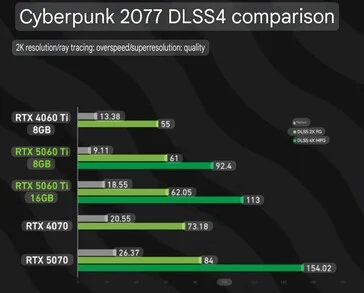
    In a DLSS 4 performance test in Cyberpunk 2077, the RTX 5060 Ti 16 GB and the RTX 5060 Ti 8 GB recorded around 18.5 and 9.1 FPS, respectively, at 2K resolution with ray tracing and other settings maxed out. The DLSS was set to “Quality” with no Frame Generation applied.

    When 2x Frame Generation is used, it supposedly removes this huge 200% performance gap, with the RTX 5060 Ti 8 GB and RTX 5060 Ti 16 GB hitting 61 and 62 FPS, respectively. However, the situation shifts significantly when 4x Frame Generation is introduced.

    With 4x Frame Generation, the RTX 5060 Ti 16 GB outperforms the RTX 5060 Ti 8 GB by 22%, achieving frame rates of 113 compared to 92.4. This makes sense since generating three more frames for each “real” frame demands that the GPU processes more data in its VRAM.

    VRAM Limitations

    This means that the 4X Frame Generation, which Nvidia has been promoting heavily, seems to underperform when the VRAM is restricted to 8 GB. This raises further questions about the necessity of the RTX 5060 Ti 8 GB.

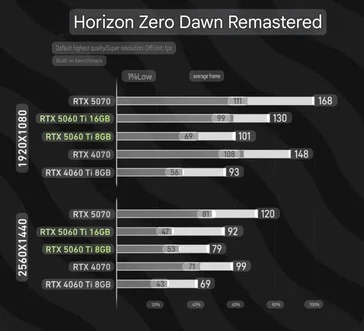
    Moreover, the RTX 5060 Ti 8 GB struggles in games that require more VRAM. For instance, Horizon Zero Dawn Remastered (HZD Remastered) has official system requirements suggesting it ideally needs 16 GB of VRAM.

    Given this, it’s not surprising that the RTX 5060 Ti 16 GB is about 29% faster in average FPS at 1080p and 16% faster at 1440p. What’s notable is that the 1% lows at 1080p for the RTX 5060 Ti 8 GB are 30% lower. Thus, HZD Remastered should run more smoothly on the RTX 5060 Ti 16 GB.

    Suitable for Less Demanding Games

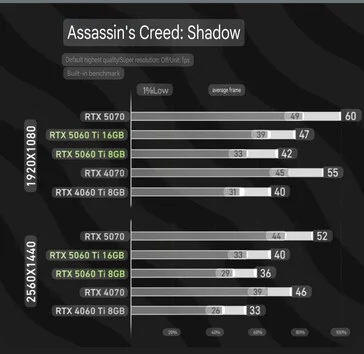
    On the bright side, the RTX 5060 Ti 8 GB is likely fine for games that don’t need more than 8 GB of VRAM. For example, in Assassin’s Creed: Shadows, it performs nearly the same as the RTX 5060 Ti 16 GB. For 1080p/60 FPS, Ubisoft recommends the RTX 3060 Ti 8 GB in the official system requirements, so it’s no surprise that the game runs just as well on both the 8 GB and 16 GB versions of the RTX 5060 Ti.

    In summary, the situation mirrors last generation’s trends: Games that require more VRAM will perform significantly worse on the RTX 5060 Ti 8 GB compared to the RTX 5060 Ti 16 GB. The performance gap is also present with 4x Frame Generation. It’s puzzling that mid-range cards with only 8 GB of VRAM still exist in 2025, especially since the newest AAA titles are very demanding and upcoming games are expected to follow suit.

    Source:
    Link


  • MSI Claw Boosts Performance with Latest Intel Driver Update

    MSI Claw Boosts Performance with Latest Intel Driver Update

    Key Takeaways

    1. MSI launched the Polar Tempest Edition of the Claw 8 AI+ with enhanced storage and a new color choice.
    2. The new Intel Graphics Driver 32.0.101.6734 targets integrated graphics for 11th to 14th Gen Core processors, boosting performance for gaming handhelds.
    3. Key improvements include power management optimization for Intel Core Ultra 200V gaming handhelds, improving efficiency and frame pacing.
    4. Early reports indicate significant gaming performance boosts for Claw 7 AI+ and Claw 8 AI+ at around 17 W power levels.
    5. The older Meteor Lake-based Claw 7 A1M will not receive the performance improvements from this driver update.


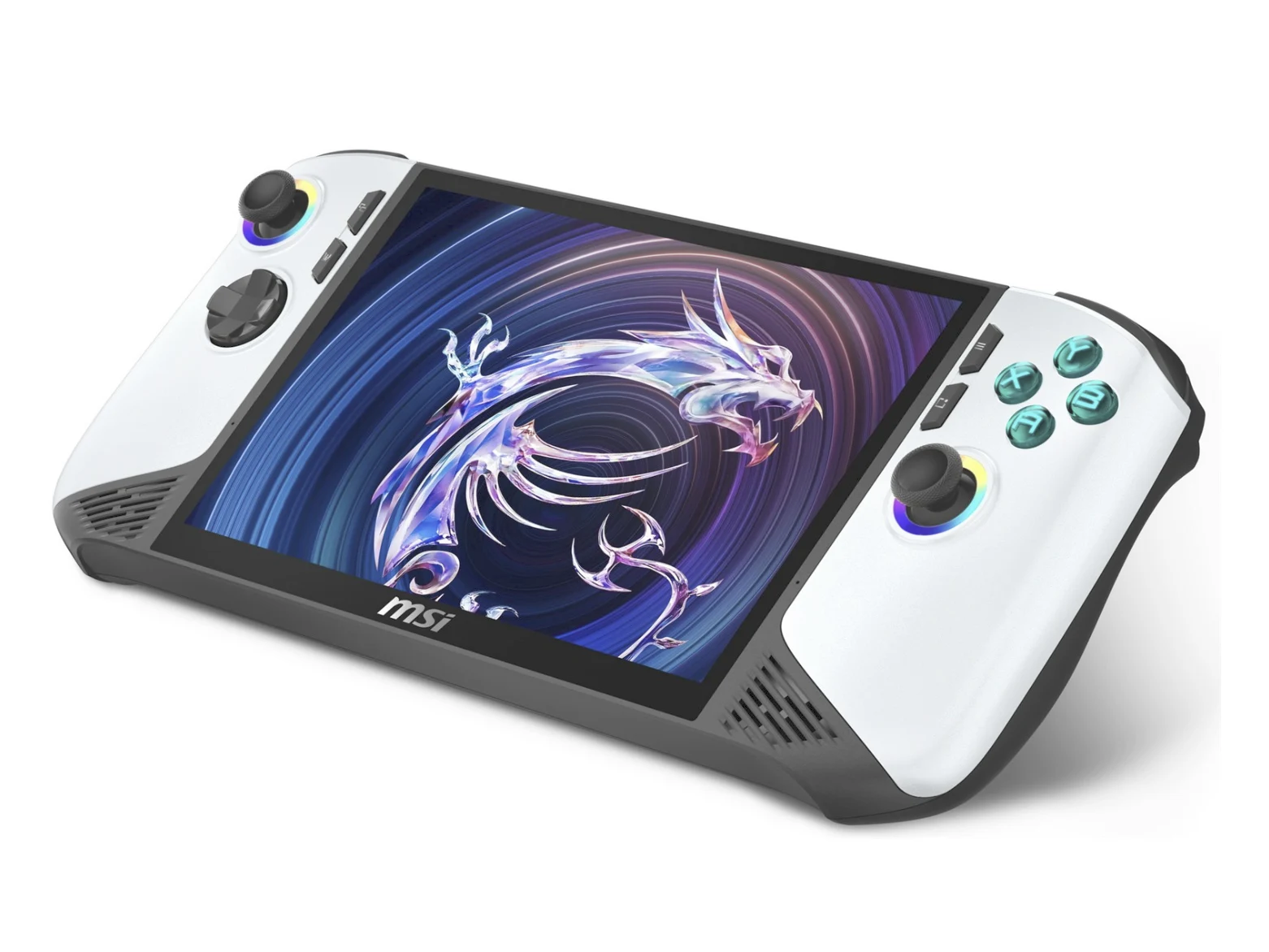
    MSI has unveiled an updated version of the Claw 8 AI+, introducing enhanced storage and a new color choice. The Polar Tempest Edition will match the performance of the existing Claw 8 AI+, but its launch is paired with new drivers specifically designed to boost performance for gaming handhelds.

    Driver Update Focus

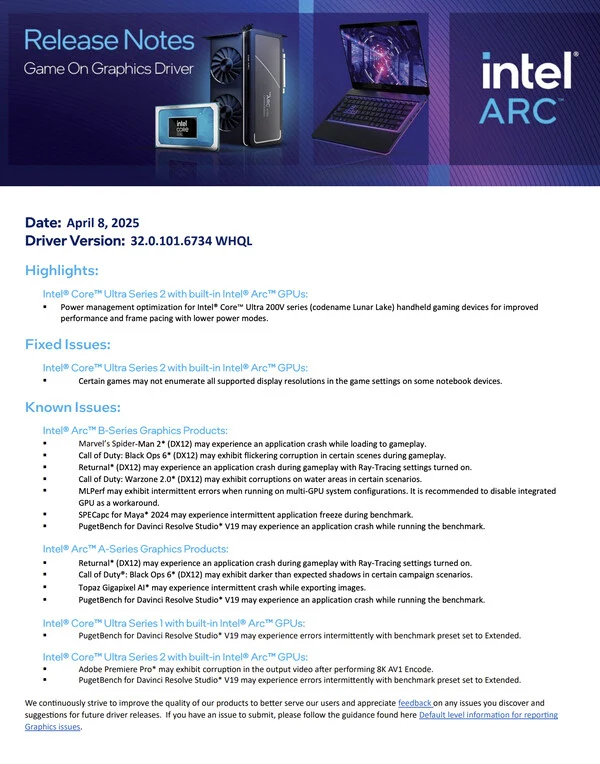
    The new Intel Graphics Driver 32.0.101.6734 is aimed at integrated graphics within 11th to 14th Gen Core processors, including the newer Arrow Lake, Lunar Lake, and Meteor Lake processors in the Core Ultra series. Additionally, this update is claimed to enhance the performance of Arc and Iris Xe graphics cards across multiple areas.

    Key Improvements

    The standout feature of this month’s driver release from Intel is the ‘power management optimisation’ for Intel Core Ultra 200V gaming handheld devices, which currently includes the Claw 7 AI+ and Claw 8 AI+. Both devices should now provide better frame pacing and operate more efficiently in lower power modes compared to previous driver versions.

    Performance Boost

    Early reports suggest that Graphics Driver 32.0.101.6734 greatly enhances gaming performance on the Claw 7 AI+ and Claw 8 AI+ when running at power levels around 17 W. Sadly, this means that the older Meteor Lake-based Claw 7 A1M (currently priced at $454 – used on Amazon) won’t see these improvements. For more technical details, refer to Intel’s release notes for Graphics Driver 32.0.101.6734 and check their website.

    Source:
    Link


  • Asus ROG Zephyrus G16 RTX 5090 Slower than Older RTX 4090 Laptops

    Asus ROG Zephyrus G16 RTX 5090 Slower than Older RTX 4090 Laptops

    Key Takeaways

    1. Initial laptops with GeForce RTX 5090 aim for high TGP values of 160 W or more, showcasing peak performance.
    2. The Asus ROG Zephyrus G16 GU605CX has a lower TGP of 120 W, positioning it as a midrange RTX 5090 alternative.
    3. The 120 W RTX 5090 in the Zephyrus lags 25-30% behind the 175 W RTX 5090 in the SCHENKER Neo 16.
    4. In gaming scenarios, RTX 4090 laptops outperform the Zephyrus by 5-35% in popular games without DLSS enhancements.
    5. The Zephyrus 16 is slimmer, lighter, and more stylish, but its lower power limit affects GPU performance, affecting cost vs. performance trade-offs.


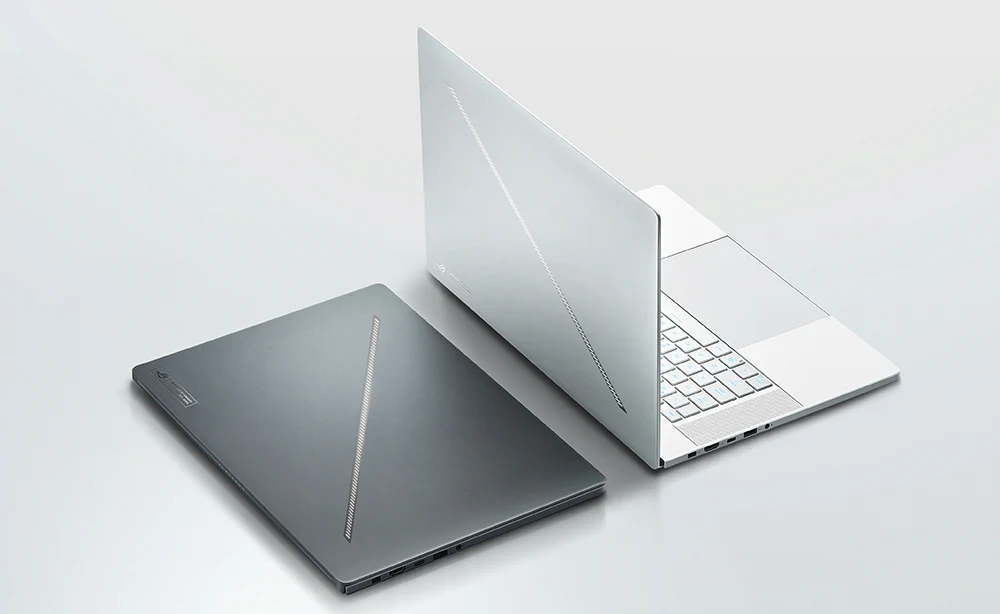
    Some of the initial laptops featuring GeForce RTX 5090 graphics are aiming for high thermal design power (TGP) values of 160 W or more, showcasing the peak performance of the mobile GPU. In contrast, the new Asus ROG Zephyrus G16 GU605CX sets its sights on a lower TGP of just 120 W, positioning itself as a “midrange” RTX 5090 alternative. Even though it remains a solid gaming laptop, its graphics performance is noticeably affected, leading to a situation where many RTX 4090 laptops can actually outpace the Asus.

    Performance Comparison

    In our latest review of the Zephyrus model, along with the accompanying graphs, it’s clear that the 120 W RTX 5090 in the 16-inch Asus lags about 25 to 30 percent behind the 175 W RTX 5090 found in the 16-inch SCHENKER Neo 16. This performance gap is so significant that even average RTX 4090 laptops in our database can exceed the Zephyrus by as much as 10 percent based on 3DMark tests.

    Gaming Experience

    The situation worsens when diving into real gaming scenarios, as the mobile RTX 4090 proves to outperform the RTX 5090-equipped Zephyrus by even larger margins, even at 1080p resolutions. Popular games such as Final Fantasy XV, Baldur’s Gate 3, Cyberpunk 2077, Monster Hunter Wilds, and Assassin’s Creed Shadows can run anywhere from 5 to 35 percent faster on older RTX 4090 laptops when compared to the newer Zephyrus, without the aid of DLSS enhancements.

    It’s important to point out that the new Zephyrus 16 is more slender, lighter, and more stylish than many other 16-inch gaming laptops, which required a tighter power limit for the GPU. Whether this trade-off is worth it in terms of cost versus performance ultimately rests on the buyer’s preferences.

  • Nintendo Switch 2: Game Developer Reveals Graphics Features

    Nintendo Switch 2: Game Developer Reveals Graphics Features

    Key Takeaways

    1. The Nintendo Switch 2 features significant hardware improvements over the previous model, enhancing graphics and performance.
    2. Civilization VII is confirmed for the Nintendo Switch 2, alongside other platforms, and is set to launch on June 5.
    3. The game performs similarly to a mid-level gaming PC, according to Dennis Shirk, the executive producer.
    4. The new console offers “10x the graphics performance” compared to the original Nintendo Switch, according to Nvidia.
    5. Players can transfer their existing Civilization VII game to the Switch 2 but must purchase an upgrade to access new features.


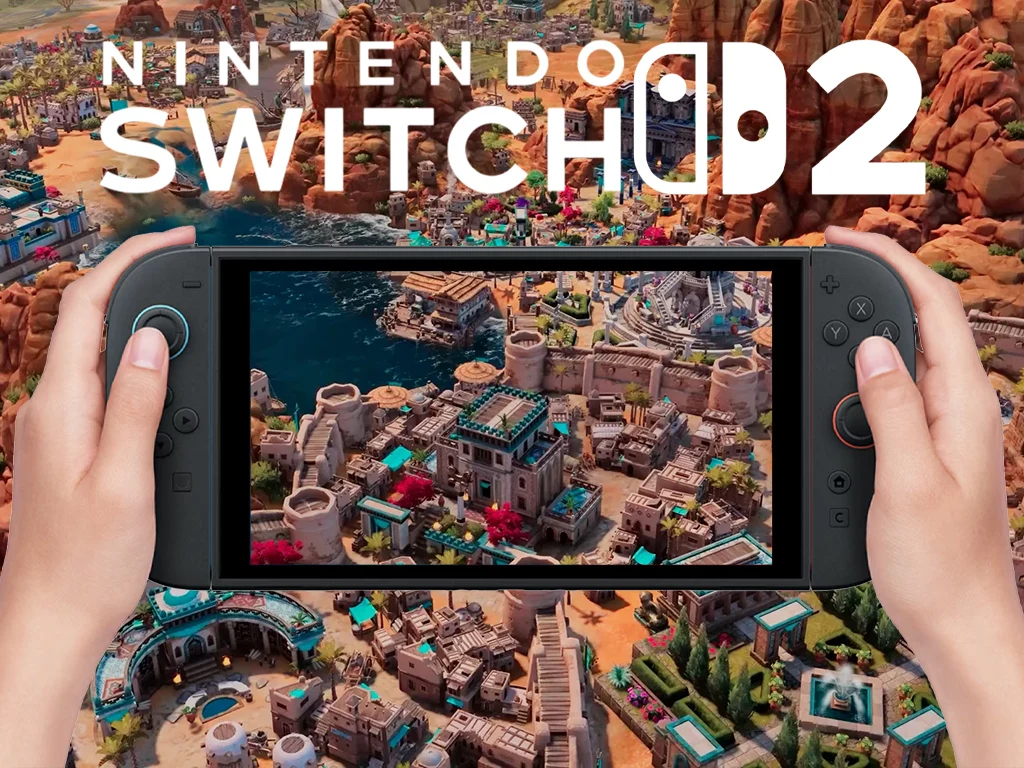
    Nintendo’s Switch 2 boasts several hardware improvements compared to the previous model, and the team behind Civilization 7 has lauded its graphics capabilities. Dennis Shirk, the executive producer of the game, specifically mentioned that its performance is similar to that of a mid-level gaming PC.

    Confirmed Titles

    Civilization VII is just one of the many titles confirmed for the Nintendo Switch 2. The game launched on various platforms, including Windows, PlayStation 4 and 5, Xbox One, Xbox Series X/S, macOS, Steam Deck, and the older Nintendo handheld on February 11, 2025. The developers have expressed satisfaction with how well the game performs on the Switch 2.

    Impressive Performance

    In a chat with Stephen Totilo from Game File, Dennis Shirk noted that the game runs smoothly like it does on a “mid-tier PC,” thanks to the console’s ample power. This statement follows Nvidia’s assertion that the Nintendo Switch 2 can achieve “10x the graphics performance” of its first-generation counterpart.

    Enhanced Experience

    The original Civilization 7 port for the Nintendo Switch received a mixed bag of reviews due to the limited hardware capabilities of the device. Many players reported avoiding larger maps just to have a somewhat playable experience on the older console.

    However, with the developer’s positive feedback on the graphical prowess of the Nintendo Switch 2, players can expect a significantly improved experience with the new hardware. For those who haven’t heard, Sid Meier’s Civilization VII is set to arrive on Nintendo’s latest console on June 5. Players who own the existing Switch version (available on Amazon) will be able to transfer their game to the Switch 2, although they will need to purchase an upgrade to access the new features.

    Source:
    Link

  • Asus Launches WiFi 7 Gaming Router with Nine 2.5G Ports

    Asus Launches WiFi 7 Gaming Router with Nine 2.5G Ports

    Key Takeaways

    1. The ROG Strix GS7 Magic Box is a WiFi 7 gaming router priced at 1,999 yuan (around $280) and available for pre-order in China.
    2. It features nine 2.5G Ethernet ports, including two gaming ports that prioritize game traffic, and a “Gaming SSID” mode for optimizing wireless connections.
    3. The router is powered by a 1.8GHz MediaTek Filogic AI CPU and 2GB of DDR4 RAM, supporting high-performance gaming, streaming, and multitasking.
    4. It offers dual-band speeds up to 7200Mbps, utilizing 4096-QAM modulation and Multi-Link Operation (MLO) for reduced latency and improved stability.
    5. Enhanced features include AI-driven gaming optimization, AiProtection for security, advanced cooling technology, and compatibility with the ROG Eco-System and AiMesh for easy network expansion.


    Asus has introduced its latest ROG Strix GS7 Magic Box, a top-tier WiFi 7 gaming router designed for ultra-fast connections and minimal lag during gameplay. The router is priced at 1,999 yuan (around $280) and is currently available for pre-order in China.

    ROG Strix GS7 Router Features

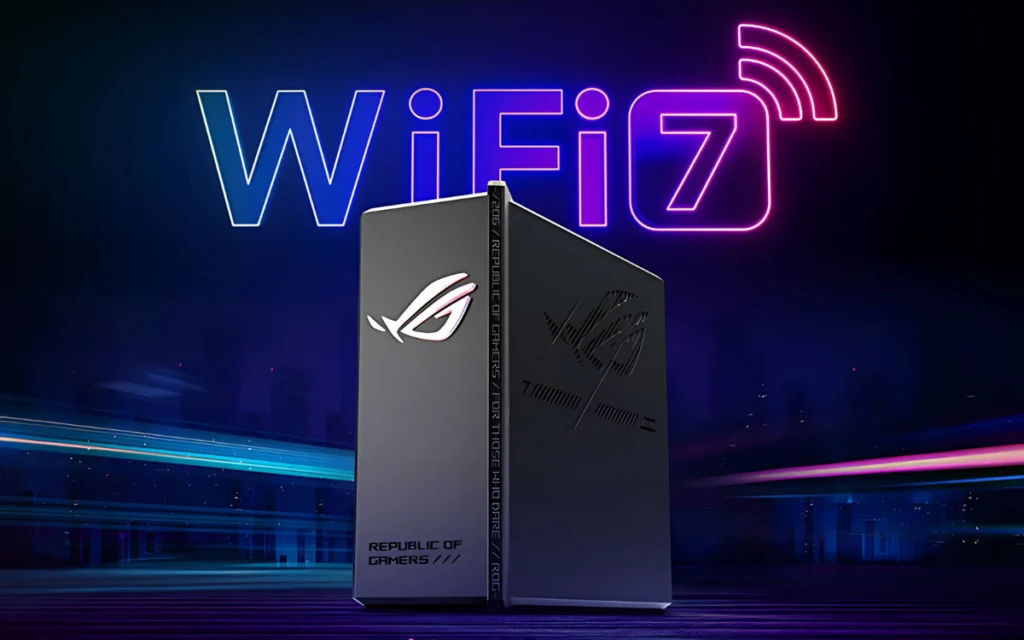
    The ROG Strix GS7 Magic Box showcases a striking, angular design complete with an RGB-lit ROG logo and a stylish decorative film that adds to its gamer look. More than just its eye-catching appearance, this router is engineered for high-performance gaming.

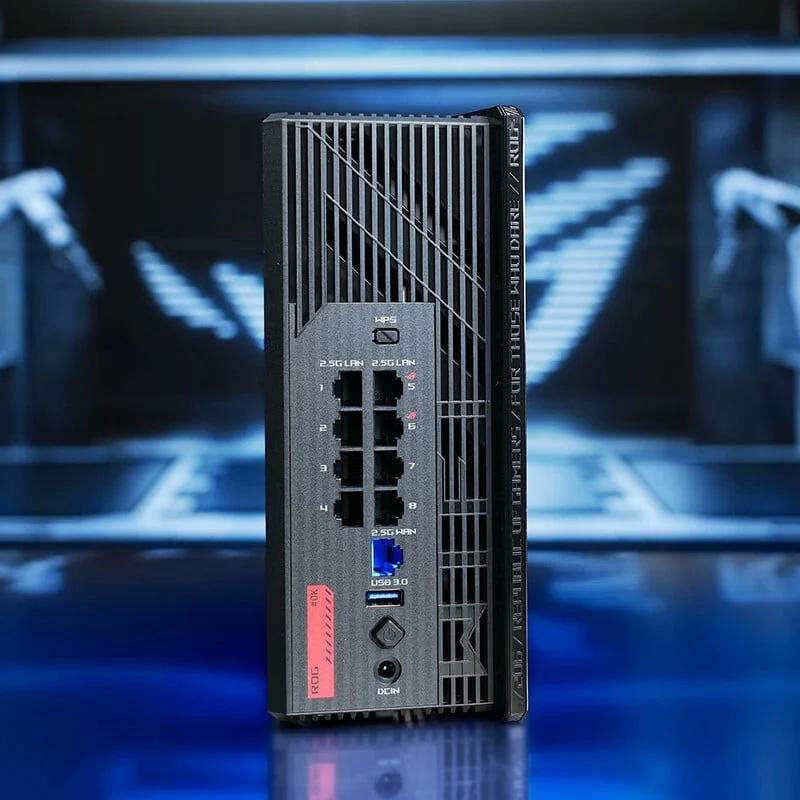
    Equipped with nine 2.5G Ethernet ports, it includes two special gaming ports (LAN5 and LAN6) that give priority to game traffic, helping to cut down on lag and maintain stable connections. For those who prefer wireless gaming, it has a “Gaming SSID” mode that identifies gaming devices and optimizes bandwidth to ensure a smooth experience.

    Powerful Internal Components

    At its core, the router is powered by a 1.8GHz MediaTek Filogic AI CPU along with 2GB of DDR4 RAM, providing seamless gaming, streaming, and multitasking capabilities. Its advanced eight-antenna system, featuring multi-angle PCB antennas and RichWave FEM chips, boosts signal stability, while the 5GHz antennas are designed with a 4T5R configuration for enhanced reception and reduced interference.

    Optimized for WiFi 7, the GS7 Magic Box offers dual-band speeds soaring up to 7200Mbps—5764Mbps on the 5GHz band and 1376Mbps on the 2.4GHz band. It employs 4096-QAM modulation, which increases speeds by 20% compared to WiFi 6, and includes Multi-Link Operation (MLO) for simultaneous data transmission across different bands, lowering latency and improving stability.

    Enhanced Gaming and Security Features

    Additionally, the router boasts AI-driven gaming optimization with a three-stage acceleration system that minimizes latency and packet loss. It is compatible with the ROG Eco-System, which prioritizes Asus ROG devices, and mobile gamers can activate low-latency mode through the Asus router app for a more responsive experience.

    In terms of security, the device comes with AiProtection for real-time threat detection. Furthermore, it is designed with advanced cooling technology, featuring a nano-carbon-coated heatsink and aluminum chassis, supports up to three SSIDs, and is compatible with AiMesh for easy expansion.


  • AMD Ryzen 9 9950X3D Benchmark Results vs Non-X3D Chips

    AMD Ryzen 9 9950X3D Benchmark Results vs Non-X3D Chips

    Key Takeaways

    1. The AMD Ryzen 9 9950X3D is set to release on March 12, with reviews under embargo until March 11.
    2. Benchmarks indicate the Ryzen 9 9950X3D outperforms the Ryzen 9 7950X3D in productivity tests, showing a 17% advantage in Cinebench multicore tests.
    3. The Ryzen 9 9950X3D has a slight edge over the Ryzen 9 9950X in single-core tests, with only a 3.5% difference.
    4. In gaming performance, the Ryzen 9 7950X3D may still outperform the 9950X3D in some benchmarks, showing a close competition.
    5. The Ryzen 9 7950X3D remains a strong contender in gaming despite the introduction of the 9950X3D.


    The AMD Ryzen 9 9950X3D is expected to be released on March 12, with reviews reportedly under embargo until March 11. Even though the release is over two weeks away, a set of benchmarks seems to have been published prematurely, showcasing some strong productivity results from the Ryzen 9 9950X3D.

    Benchmarks and Performance

    According to the benchmarks shared by PCBuild on Facebook (now deleted), the performance leaks we mentioned earlier this week appear to be quite accurate. The Bulgarian hardware retailer and system builder apparently tested the Ryzen 9 9950X3D using Cinebench R23 and PCMark Time Spy. The average scores indicate it outperforms the Ryzen 9 7950X3D in both tests, although the advantage in gaming performance isn’t that substantial.

    Detailed Comparisons

    When we look at the benchmark images compared to our own tests and database, the 9950X3D surpasses the 7950X3D by nearly 17% in Cinebench multicore tests. On the other hand, the Ryzen 9 9950X (currently priced at $559.75 on Amazon) is not too far behind, lagging by about 3.7% in Cinebench R23. In the single-core tests of Cinebench R23, the difference between the Ryzen 9 9950X3D and the standard 9950X is just 72 points, or 3.5%. The 9950X3D notably leads the 7950X3D by around 11%.

    Gaming Performance Insights

    However, gaming benchmarks tell a different tale. In comparison with previous results from our testing, the 3DMark Time Spy CPU scores show that the older Ryzen 9 7950X3D actually outperforms the Zen 5 9950X3D in one of the leaked benchmarks, leading by 3.7%. Another Time Spy result from the leak shows a maximum CPU score of 17,234 points, suggesting the Ryzen 9 9950X3D edges out the 7950X3D by a mere 118 points—a very slight margin.

    These two benchmark results alone don’t give a full view of gaming performance, which can differ widely depending on the game. However, they do hint at what we might expect when the Ryzen 9 9950X3D launches in March. It also suggests that the AMD Ryzen 9 7950X3D (currently priced at $740 on Amazon) is likely to remain a strong competitor in gaming, despite AMD’s adjustments to the 3D V-Cache specifications and design.

    Source:
    Link

  • iQOO Arena Launches in Delhi: Experience Neo 10R’s 90 FPS Gaming

    iQOO Arena Launches in Delhi: Experience Neo 10R’s 90 FPS Gaming

    Key Takeaways

    1. iQOO has launched its first temporary store, iQOO Arena, in New Delhi from February 21 to February 23, 2025.
    2. Attendees can preview the iQOO Neo 10R, which features a Snapdragon 8s Gen 3 processor and offers 90 FPS gameplay for up to five hours.
    3. The iQOO Arena includes interactive gaming zones and showcases the Neo 10R’s capabilities, emphasizing the brand’s focus on high-performance devices for gamers.
    4. Customers can reserve the iQOO 13 at the pop-up store and receive complimentary TWS earbuds for online purchases, along with opportunities for student prizes.
    5. The event aims to enhance customer engagement and showcase the innovative features of the Neo 10R before its official launch on March 11.


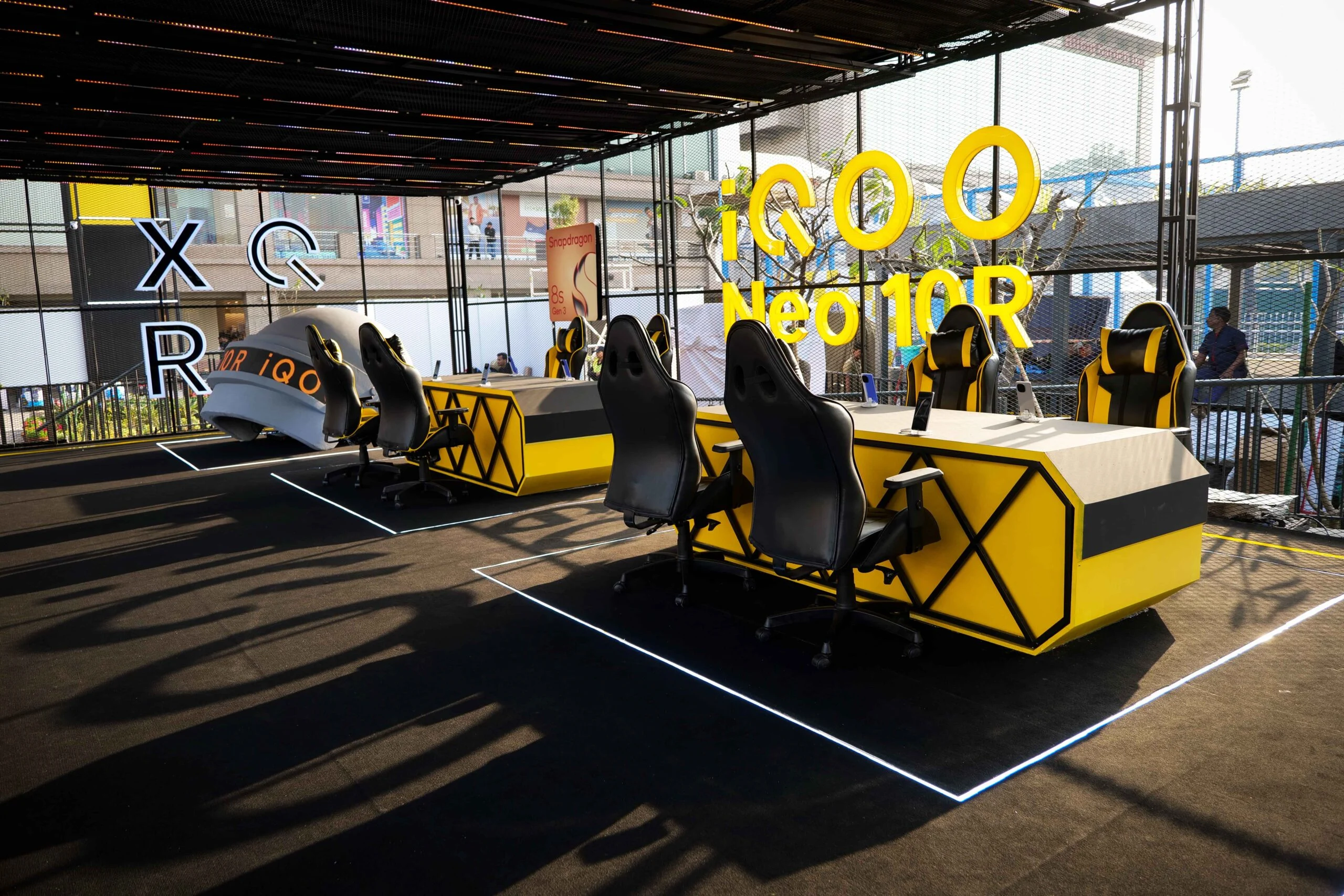
    iQOO has launched its first temporary store, named iQOO Arena, in India, located at Select City Walk Mall, Saket, New Delhi. This store will be open from February 21 until February 23, 2025, operating between 11 AM and 7 PM. Attendees have a chance to get a sneak peek at the iQOO Neo 10R before its official release on March 11, experiencing its impressive gaming capabilities.

    A Unique Gaming Experience

    The pop-up store provides an interactive experience through various gaming zones, showcasing the Neo 10R’s impressive ability to maintain 90 FPS gameplay for up to five hours. Equipped with a Snapdragon 8s Gen 3 processor, the phone comes with a 6400mAh battery and 80W Flashcharge, promising effective performance for extended gaming sessions. It will be available in two colors: Moonknight Titanium and the exclusive Indian shade, Raging Blue.

    Exciting Launch Events

    Nipun Marya, the CEO of iQOO, expressed, “As we get closer to the launch of the iQOO Neo 10R, we are excited to offer our customers a special preview. Our first-ever iQOO Arena allows direct interaction with young gamers looking for high-performance devices. We are confident that the Neo 10R’s performance will surpass their expectations.”

    In addition to the Neo 10R, the iQOO Arena features the iQOO 13. Customers can reserve the iQOO 13 at the pop-up, and those who shop online will receive complimentary TWS earbuds. Additionally, students can sign up for the iQOO Students Programme to have a chance at special prizes.

    Engage and Explore

    Visitors can evaluate the device’s performance in real-life situations and discover new techniques to improve their gaming experiences. The iQOO Arena emphasizes the brand’s dedication to innovation, performance, and customer interaction.

    The event offers an insider look at the Neo 10R’s top features before its official debut, attracting mobile gamers and technology fans alike. With live demonstrations of its high-FPS performance, iQOO aims to strengthen its standing as a brand focused on performance.


  • GeForce RTX 5090 Beats RTX 4090 by 37% in Blender Benchmark

    GeForce RTX 5090 Beats RTX 4090 by 37% in Blender Benchmark

    The new GeForce RTX 5090 gaming GPU has just been launched, and it promises to deliver remarkable improvements in gaming performance thanks to its AI-powered frame generation features. The discussion about Nvidia’s use of AI technology to achieve these enhancements continues, but the performance upgrades that the RTX 5090 and other Blackwell gaming GPUs offer to render artists seem to be quite impressive. This is supported by a recent listing on Blender Open Data.

    Performance Benchmarks

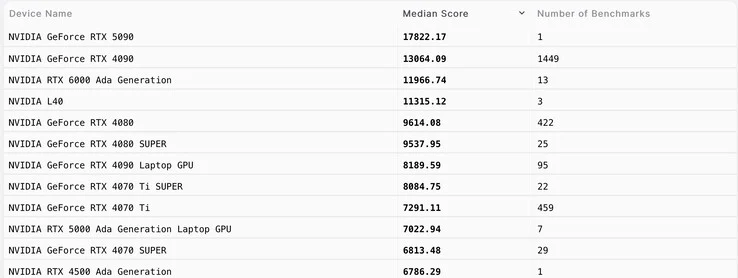
    We have a clear insight into how the Nvidia GeForce RTX 5090 performs in Geekbench’s OpenCL and Vulkan benchmarks. The Blackwell flagship GPU shows a significant lead over its predecessor, with increases of up to 37% in OpenCL and 16% in Vulkan. While these enhancements aren’t revolutionary, the data we have so far indicates a solid generational boost in raw performance. Furthermore, according to the earlier mentioned Blender Open Data listing, the RTX 5090 demonstrates a notable speed advantage over the GeForce RTX 4090, particularly when using the Nvidia OptiX rendering engine.

    Impressive Scores on Blender

    When tested on Blender 3.6.0, the GeForce RTX 4090 achieved a median score of 13,000 points. In stark contrast, the RTX 5090 excelled with a remarkable score of 17,800 points, signifying an approximate 37% performance increase. This improvement can be attributed to the additional 33% RT cores present in the Blackwell card, which are evidently making a difference in this ray-traced rendering evaluation. However, it’s important to note that we currently have only one result for the RTX 5090, meaning its median score may fluctuate as more benchmark data becomes available on Open Data, allowing for a more accurate comparison between these two flagship models.

    Purchase Information

    If you’re interested, you can find the impressive 34-inch Samsung G8 OLED gaming monitor available for purchase on Amazon.

    Blender Open Data | A special acknowledgment to our forum member LL for bringing attention to this entry | Teaser background image by engin akyurt via Unsplash.

    Source:
    Link