Tag: Android 16

  • Android 16 Redesign Teased as New Clock App Images Leak

    Android 16 Redesign Teased as New Clock App Images Leak

    Key Takeaways

    1. Android and iOS are becoming more distinct as they approach the release of Android 16 and iOS 19.
    2. Apple is rumored to introduce rounded app icons and new user interface features in iOS 19.
    3. Google is implementing a ‘Material 3 Expressive’ design for Android 16, based on extensive user studies.
    4. The redesign of the Clock app in Android 16 reflects Google’s latest design guidelines but is not as radical as previous concepts.
    5. Android 16 is expected to be available for devices powered by Google Tensor, starting from the Pixel 6.


    In the past few years, the looks of Android and iOS have started to look more similar. But as we get closer to the launch of Android 16 and iOS 19 later this year, these two operating systems are expected to stand apart even more. Apple hasn’t formally announced any specifics about its upcoming iPhone OS yet, but rumors suggest that they’re planning to add rounded app icons and new user interface features, among other updates.

    Google’s Design Tweaks

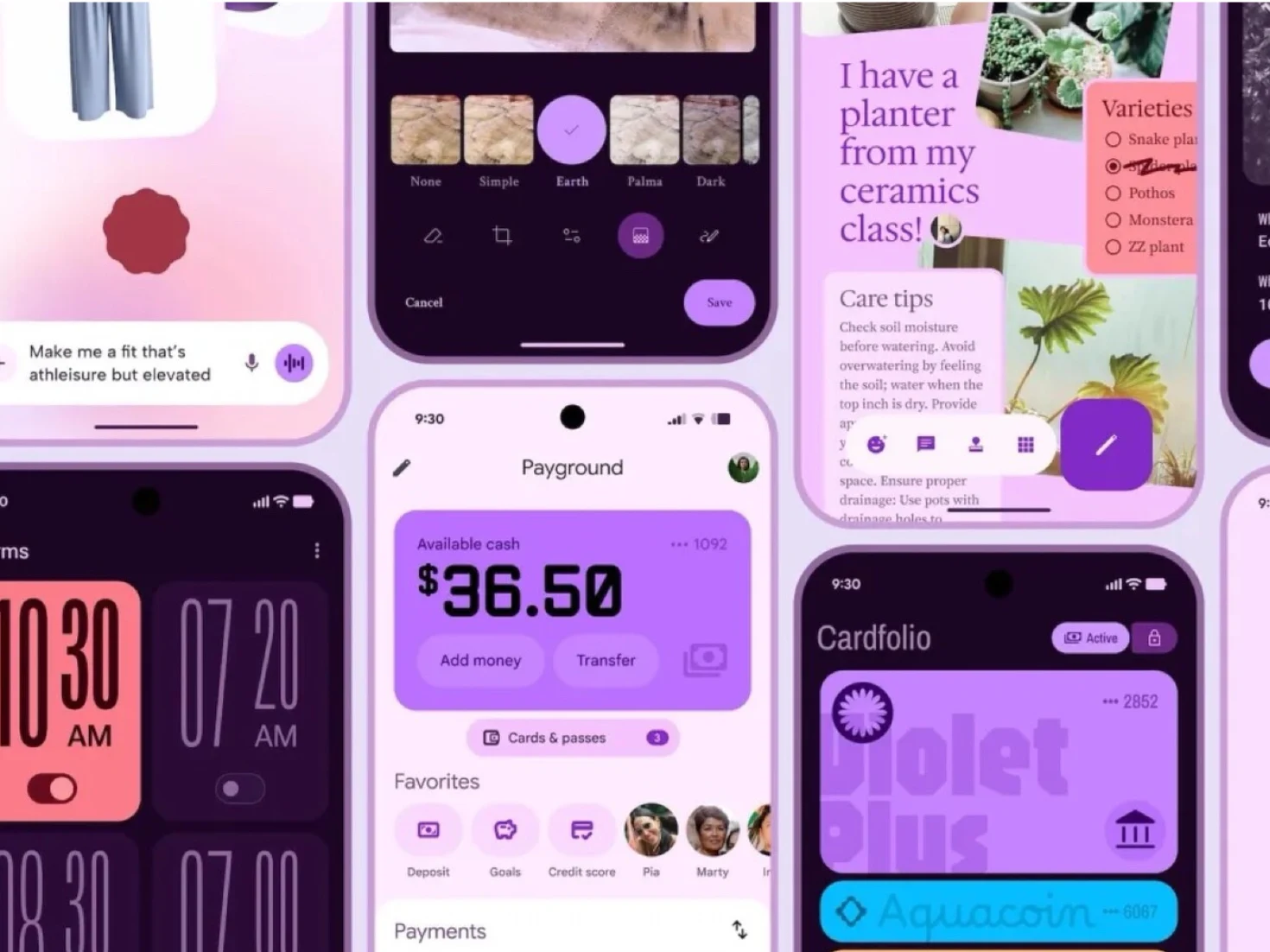
    On the flip side, Google has offered a sneak peek at some of the design changes coming with Android 16, which is anticipated to be released this season. Although the details were shared online prematurely, Google’s ‘Material 3 Expressive’ design approach is based on 46 studies involving over 18,000 participants. It seems that the more playful aesthetic of Android is not just for looks, but also aims to enhance user experience.

    Future Changes in Android

    It’s important to note that the Material 3 Expressive design might not fully represent what Android 16 will ultimately look like. However, this year’s operating system is likely to incorporate aspects of Google’s latest design approach in certain areas. For instance, Google has revamped the Clock app for Android 16 using the Material 3 Expressive guidelines. In reality, though, the redesign is not as radical as some of Google’s earlier concepts. Currently, all devices powered by Google Tensor, starting from the Pixel 6, are expected to get Android 16 (priced at $299.99 on Amazon).

    Source:
    Link

  • Google’s Version of Samsung Dex: First Look at New Features

    Google’s Version of Samsung Dex: First Look at New Features

    Key Takeaways

    1. Google is developing a desktop mode for Pixel devices, inspired by Samsung DeX.
    2. Android 15 introduced a developer preview of “desktop windowing” features for the Pixel Tablet.
    3. Android 16 refined these features, allowing a desktop-like experience with a taskbar and split-screen functionality.
    4. Users can access a quick menu for settings like Wi-Fi and Bluetooth while using the desktop interface.
    5. The desktop feature is still in development and may not be included in the stable release of Android 16.


    Samsung DeX has been a key highlight of Samsung smartphones for a while. It allows users to transform their mobile device into a desktop-like experience. Now, it looks like Google is inspired by this idea. Since the release of Android 14, they’ve been quietly developing their own desktop mode specifically for Pixel devices.

    Android 15 and Desktop Features

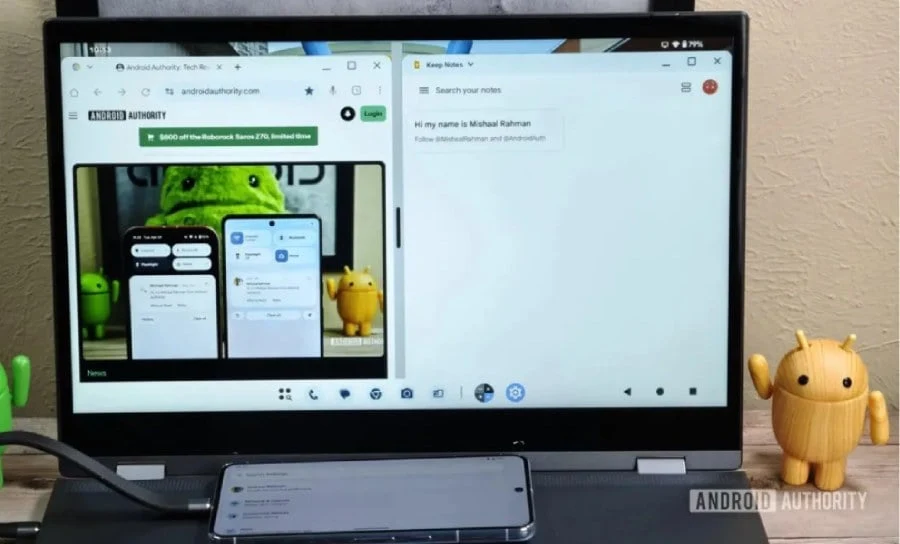
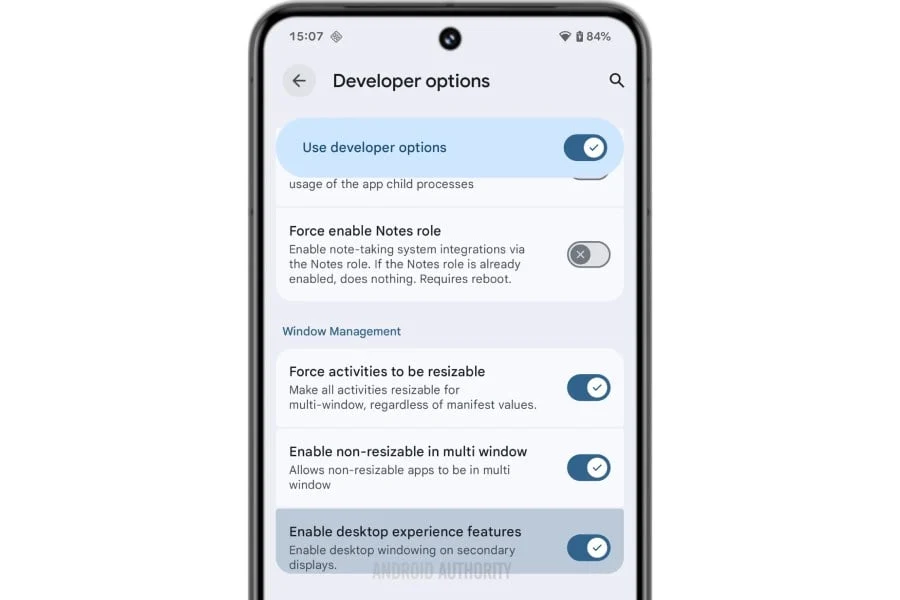
    With the launch of Android 15, Google introduced a developer preview of a “desktop windowing” feature aimed at the Pixel Tablet. By the time Android 16 came around, this feature had undergone significant refinement and is now referred to as “Enable desktop experience features.” Thanks to Mishaal Rahman from Android Authority, we have an early glimpse at how this feature operates in real life.

    Functionality of Android 16

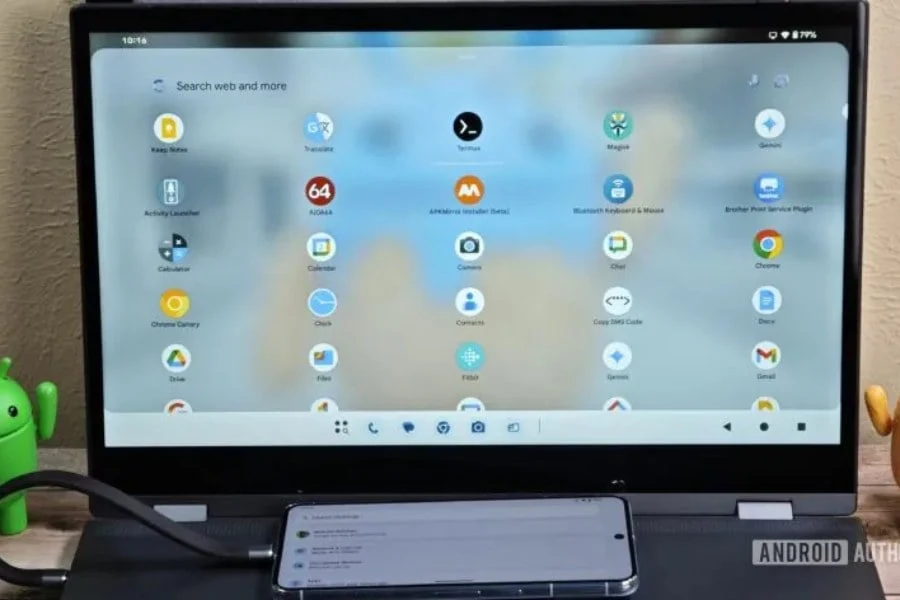
    Rahman successfully got the desktop feature to work on a Pixel 8 Pro linked to a laptop. The interface resembles a traditional desktop layout with a taskbar at the bottom that includes a three-button navigation system on the right side. The taskbar displays recently used apps, and users can open multiple apps in a split-screen format, much like standard PCs.

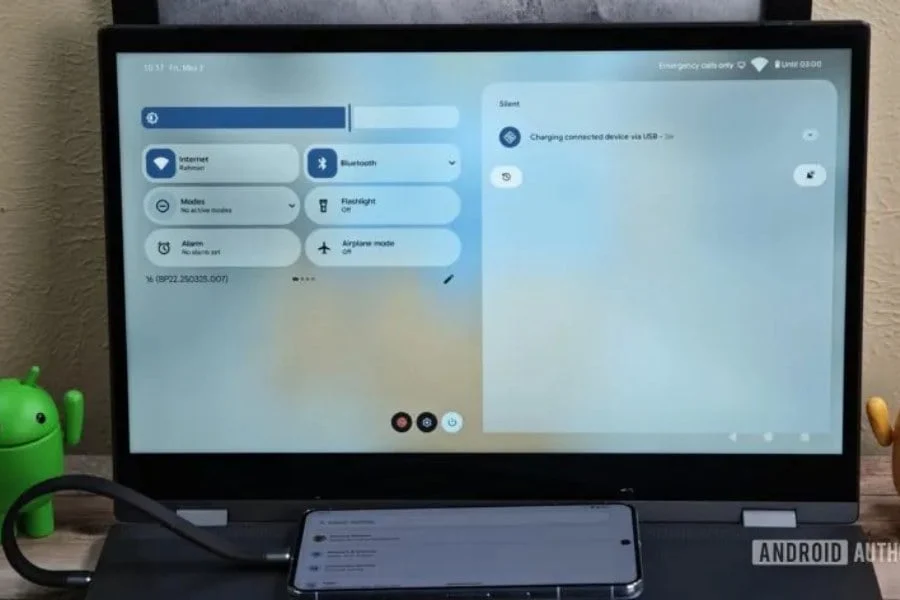
    Pulling down from the top reveals a quick access menu. This menu includes common toggles for Wi-Fi and Bluetooth, along with the ability to add or remove options. The battery icon is located at the upper right corner of the home screen, while the time sits on the top left. This design is very much akin to what you would expect from a desktop-style UI, which seems to be the main intention. Importantly, you can still operate your phone while the desktop window is open.

    Still in Development

    While the feature appears to be functional, it is important to note that it is not yet complete. Rahman mentions that it remains a work in progress and “most likely won’t be available in the upcoming stable release of Android 16.” Instead, it may debut in one of the quarterly updates for Android 16, according to his insights.

    Source:
    Link


  • One UI 8 Rollout May Start Next Month, Slower Than One UI 7

    One UI 8 Rollout May Start Next Month, Slower Than One UI 7

    Key Takeaways

    1. One UI 8, based on Android 16, is currently in internal testing with a beta program expected to start in June 2025.
    2. The official launch is anticipated to coincide with the Galaxy Z Fold 7 and Flip 7, likely in July 2025.
    3. One UI 8 is expected to be an incremental update to One UI 7.1, featuring improvements like smoother animations and AI-generated video summaries.
    4. Initial availability will focus on the Galaxy S25 and foldable devices, with older models receiving the update later.
    5. Samsung aims to streamline its update process with One UI 8, addressing previous delays experienced with One UI 7.


    Samsung’s One UI 8, which is built on Android 16, is currently undergoing internal testing. A leak from @tarunvats33 on X indicates that the beta program could kick off as soon as June 2025. This new interface is expected to launch with the Galaxy Z Fold 7 and Flip 7 by July, likely feeling more like an incremental update to One UI 7.1 rather than a complete redesign.

    Fast-Tracking the Release

    The rollout of One UI 7 encountered several delays, but Samsung is acting quickly with One UI 8. Internal versions being tested on the Galaxy Z Flip 6 and S25 Ultra suggest a potential release in July or August 2025, probably coinciding with Samsung’s next generation of foldable devices. The One UI 8 beta is anticipated to begin in June, allowing users of devices like the S25 and Z Fold 6 to try out the update early, helping to resolve any issues over the following months.

    Anticipation and Features

    Samsung is not providing much information about the beta launch, which is typical for them—official announcements usually come just days before the actual release. While One UI 8, powered by Android 16, may not introduce significant changes, it appears to be an enhanced version of One UI 7.1, featuring subtle improvements like smoother animations and AI-generated video summaries. This accelerated timeline skips a standalone 7.1 release, aiming to streamline Samsung’s update process following the challenges with One UI 7.

    Device Prioritization

    Users can expect One UI 8 to be available first on the S25 and foldable devices, with older models getting the update later. Although it may not drastically change the user experience, the early beta and impending launch demonstrate Samsung’s eagerness to keep pace with Android 16. Whether it will impress like the revamped Quick Panel from One UI 7 or merely refine existing features remains to be seen. The beta in June is set to reveal more details.

    Source:
    Link


  • Android 16 Leak Unveils New Design for Google Pixel 9 Pro

    Key Takeaways

    1. Google launched the public beta version of Android 16 in January, with the final version expected in June.
    2. Major updates and features will be revealed at the Google I/O event on May 20th and 21st.
    3. Android 16 will allow users to customize app icon shapes, offering options like rectangular and circular designs.
    4. The system settings app is getting a redesign with vibrant icons and clearer section separations.
    5. Enhancements to the volume slider and lock screen display are coming, along with updated quick settings and menu bar icons.


    Google has already launched the initial public beta version of Android 16 in January, with the final version of this mobile operating system anticipated to arrive in June. The beta was mainly focused on establishing the technical groundwork, but it didn’t introduce significant visual alterations. Major updates are expected to be revealed during the upcoming Google I/O event scheduled for May 20th and 21st.

    Hidden Features Discovered

    Nevertheless, Android Authority has apparently uncovered several concealed design modifications in the fourth beta version of Android 16. It’s still uncertain whether Google will actually include all of these alterations mentioned below, and it’s possible that certain features may be exclusive to Google’s custom launcher available on the Pixel 9 Pro (priced from $799 on Amazon) and other Pixel devices.

    Changes to App Icons and Settings

    One of the most striking modifications is the customizable shape of app icons on the Android 16 home screen. Users could soon have the option to select from rectangular, circular, and three other shapes, as illustrated in the screenshot below.

    The system settings application is also undergoing a significant redesign, featuring vibrant icons, clearer separations among various sections, and a new design for the sliders.

    Volume Slider and Lock Screen Tweaks

    In addition, Google is enhancing the volume slider design and making adjustments to how the time and date are displayed on the lock screen. The blurred wallpaper will now be visible in the background when users enter their passcode.

    Android 16 is set to introduce new quick settings, maintaining the same layout but with a refreshed appearance. Moreover, Google is reportedly planning to update some icons in the menu bar. Since the official release of Android 16 is still over a month away, it’s reasonable to believe that the new OS update will include additional changes and features not yet revealed.

    Source:
    Link

  • Samsung Devices Eligible for One UI 8 Update List

    Key Takeaways

    1. One UI 8 is in development, with no specific details or eligible devices announced yet by Samsung.
    2. Eligible devices for One UI 8 include various models from the Galaxy S, Z, Tab, A, M, F, and XCover series.
    3. Samsung aims to release One UI 8 without minor updates like One UI 7.1, focusing on restoring its reputation for timely updates.
    4. The Galaxy Z Fold 7 and Flip 7 are expected to launch with One UI 8 pre-installed around July or early August 2025.
    5. Android 16 is anticipated to release earlier than previous years, likely by June 2025, affecting Samsung’s preparation timeline for One UI 8.


    One UI 7 has not yet made it to many Galaxy devices that qualify for this significant update. The rollout has been quite underwhelming until now, but this won’t be the case with the upcoming upgrade, One UI 8, as its development is already in progress. Meanwhile, Google is gearing up for a quicker release of Android 16, which is anticipated to come sooner than the operating system releases seen in recent years.

    Samsung’s Next Steps

    Details about One UI 8 are still not publicly available. Samsung has not disclosed which Galaxy smartphones and tablets will receive this upcoming major upgrade. Therefore, we have based our list of One UI 8 eligible devices on the current software update policy. Check the list below to see if your Galaxy device qualifies for the next big upgrade.

    Eligible Devices for One UI 8

    Galaxy S series
    – Galaxy S25
    – Galaxy S25+
    – Galaxy S25 Ultra
    – Galaxy S24
    – Galaxy S24+
    – Galaxy S24 Ultra
    – Galaxy S24 FE
    – Galaxy S23
    – Galaxy S23+
    – Galaxy S23 Ultra
    – Galaxy S23 FE
    – Galaxy S22
    – Galaxy S22+
    – Galaxy S22 Ultra
    – Galaxy S21 FE

    Galaxy Z series
    – Galaxy Z Fold Special Edition
    – Galaxy Z Fold 6
    – Galaxy Z Fold 5
    – Galaxy Z Flip 6
    – Galaxy Z Flip 5
    – Galaxy Z Fold 4
    – Galaxy Z Flip 4

    Galaxy Tab series
    – Galaxy Tab S10+
    – Galaxy Tab S10 Ultra
    – Galaxy Tab S10 FE
    – Galaxy Tab S10 FE+
    – Galaxy Tab S9 FE
    – Galaxy Tab S9 FE+
    – Galaxy Tab S9 (Wi-Fi/5G)
    – Galaxy Tab S9+ (Wi-Fi/5G)
    – Galaxy Tab S9 Ultra (Wi-Fi/5G)
    – Galaxy Tab S8 (Wi-Fi/5G)
    – Galaxy Tab S8+ (Wi-Fi/5G)
    – Galaxy Tab S8 Ultra (Wi-Fi/5G)
    – Galaxy Tab A9
    – Galaxy Tab A9+

    Galaxy A series
    – Galaxy A73
    – Galaxy A56
    – Galaxy A55
    – Galaxy A54
    – Galaxy A53
    – Galaxy A36
    – Galaxy A35
    – Galaxy A34
    – Galaxy A33
    – Galaxy A25
    – Galaxy A24
    – Galaxy A23
    – Galaxy A15 (LTE/5G)
    – Galaxy A14 (LTE/5G)
    – Galaxy A16 (LTE/5G)
    – Galaxy A06

    Galaxy M series
    – Galaxy M56
    – Galaxy M55s
    – Galaxy M55
    – Galaxy M54
    – Galaxy M34
    – Galaxy M53
    – Galaxy M33
    – Galaxy M16
    – Galaxy M15
    – Galaxy M06

    Galaxy F series
    – Galaxy F55
    – Galaxy F54
    – Galaxy F34
    – Galaxy F16
    – Galaxy F15
    – Galaxy F06

    Galaxy XCover series
    – Galaxy XCover 7
    – Galaxy XCover 7 Pro

    This list isn’t final. We will update it as soon as the official list is released.

    Anticipated Release Date

    Samsung aims to avoid the delay seen with the One UI 7 launch. Reports indicate that the company has chosen to bypass minor updates like One UI 7.1 and 7.1.1 and will instead go straight to One UI 8. This strategy should help restore the brand’s reputation for providing reliable and timely updates, which it has built over many years. Although Samsung hasn’t announced a specific release date for One UI 8, reports suggest that the new Galaxy Z Fold 7 and Flip 7 will launch with One UI 8 pre-installed. These devices are expected to debut around July or early August 2025.

    Google has confirmed that Android 16 will be out in the second quarter, likely by June 2025. Some sources claim it may even be released in early May. Regardless, Android 16 is set to arrive earlier than operating system releases in recent years, which will give Samsung and other Android manufacturers less time to prepare. The beta program for One UI 8 is anticipated to start around July 2025, but take this with caution, as recent events with Samsung haven’t been too promising.

  • Android 16 Release Date, Eligible Devices, and Features Guide

    Android 16 Release Date, Eligible Devices, and Features Guide

    Key Takeaways

    1. Release Date: Android 16 is set to launch in the second quarter of 2025, likely by June, making it the earliest Android version release in recent years.

    2. Device Compatibility: The beta version of Android 16 is currently available for select Pixel and non-Pixel devices, with a wider range of devices expected to support it upon official release.

    3. Key Features: Notable features include progress-centric notifications, an enhanced photo picker, predictive back improvements, better adaptive refresh rate support, and richer haptic feedback.

    4. Camera and Video Enhancements: Android 16 offers improved camera controls, hybrid auto-exposure models, and the Advanced Professional Video (APV) codec for high-quality video recording.

    5. Privacy Improvements: The update includes enhancements to Health Connect and the Privacy Sandbox, focusing on user privacy and data protection in mobile advertising.


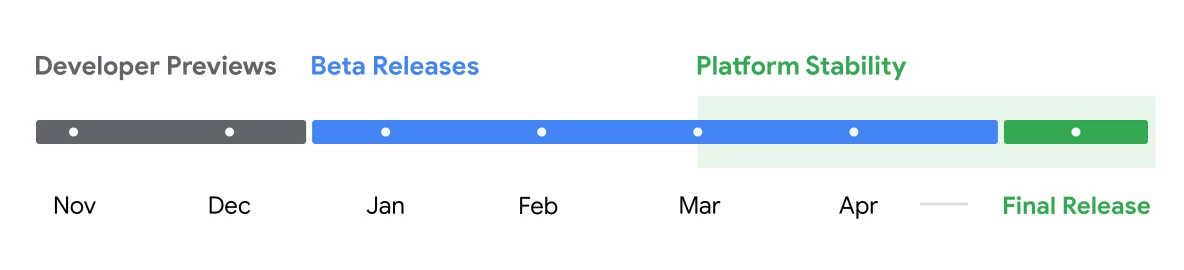
    Android 15 may still be coming for many Android smartphones, but Google is already hard at work on Android 16. The new operating system has now reached its platform stability stage, indicating that we are getting closer to its official launch.

    Developer Previews and Beta Versions

    Google has rolled out two developer previews of Android 16, along with a few beta versions. These beta releases provide us with a sneak peek at what Google has planned for Android 16 ahead of its public launch. Below is a summary of all the details we have about Android 16, which includes the release timeline, compatible devices, and exciting new features.

    Release Date of Android 16

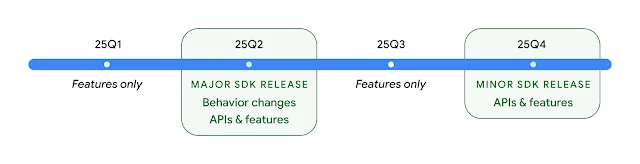
    Google has announced that Android 16 will be launched in the second quarter of 2025. Sameer Samat, President of the Android Ecosystem (via Android Police), noted that everything is proceeding as planned. This means Android 16 should be officially available by June 2025, although there are speculations about a possible earlier launch in May.

    This would make Android 16 the earliest Android version to be released in a while. Usually, Google unveils the latest Android version in August or later, but Android 16 is set to arrive at least a month earlier. Additionally, Google has indicated there will be a minor release in the fourth quarter of 2025, but it’s uncertain whether it will be called Android 16.1 or something different.

    Devices That Can Run Android 16

    Currently, the Android 16 beta can be accessed on several Pixel and non-Pixel devices. Here’s the complete list:

    – Pixel 9
    – Pixel 9 Pro
    – Pixel 9 Pro XL
    – Pixel 9 Pro Fold
    – Pixel 8
    – Pixel 8 Pro
    – Pixel 8a
    – Pixel 7
    – Pixel 7 Pro
    – Pixel 7a
    – Pixel 6
    – Pixel 6 Pro
    – Pixel 6a
    – Pixel Fold
    – Pixel Tablet
    – Xiaomi 15
    – Xiaomi 14T Pro
    – OnePlus 13

    If you possess any of these phones or tablets, you can experiment with Android 16 right now by downloading the beta version. Keep in mind that beta releases often have bugs and might not function perfectly.

    The list above is limited, but when the stable version launches, it will be available for a wider range of Android devices. We will update our website once manufacturers announce their official Android 16 upgrade lists.

    Exciting New Features in Android 16

    1. Progress-centric Notifications
    Android 16 brings a fresh type of notifications that allows users to keep track of important ongoing activities like rideshare, delivery, and navigation. This is somewhat similar to iOS’s Live Activities, but with some distinctions. Google prioritizes these notifications on the lock screen, making them more visible.

    The progress-centric notifications, also referred to as Live Updates, are also integrated with the status bar and always-on display. As reported by Android Authority, they appear as a chip in the status bar, and during that time, all other notifications are hidden. Tapping on the chip reveals detailed information in a pop-up.

    2. Enhanced Photo Picker
    The photo picker has been a valuable privacy feature in Android, allowing users to share specific photos and videos instead of their whole library. Android 16 improves this functionality by enabling searches across cloud media providers directly within the photo picker.

    Google has introduced new APIs that allow apps to incorporate the photo picker seamlessly into their interfaces, making media selection feel like an integral part of the app rather than a separate overlay.

    3. Predictive Back Improvements
    This feature gives users a glimpse of the screen they will return to before completing the back navigation. Android 16 adds predictive back support to three-button navigation, allowing users to long-press the back button for a screen preview.

    4. Better Adaptive Refresh Rate Support
    This feature lets the display refresh rate on compatible devices adjust according to the content being displayed. This helps to lower power consumption and eliminates the need for manual refresh rate adjustments. Although adaptive refresh rates were first introduced in Android 15, Android 16 simplifies their use for developers.

    5. Richer Haptics
    With Android 16, Google is providing app developers greater control over haptic feedback on Android devices. New haptic APIs enable apps to define the amplitude and frequency of haptic effects.

    More refined haptics can enhance gaming experiences with dynamic vibrations for actions like explosions and collisions. Phone manufacturers can also use this to create unique vibration patterns for different notifications (e.g., texts, calls, alarms), making it simpler for users to recognize alerts without looking at their screens.

    6. Camera Enhancements
    Android 16 introduces new hybrid auto-exposure models that give users manual control over certain exposure aspects while letting the auto-exposure algorithm manage the rest. This offers significantly more flexibility than the current system, which requires either full manual control or complete reliance on auto-exposure.

    The new OS also brings support for fine color temperature and tint adjustments, catering to professional video recording applications. Below are examples of how photos appear after applying various color temperature and tint modifications.

    ![image]

    With improved night mode scene detection, third-party apps can better identify low-light conditions and switch to night mode for better photo capture, assuming the device supports it. Android 16 also expands HDR capabilities by adding support for UltraHDR images in the HEIC file format, with Google also working on AVIF support for UltraHDR in the stable release.

    7. Advanced Professional Video
    Android 16 introduces the Advanced Professional Video (APV) codec tailored for high-quality professional video recording and post-production.

    Google states that the APV codec has several features, including:
    – Perceptually lossless video quality, which is close to raw video quality
    – Low complexity and high throughput intra-frame-only coding to better support editing
    – High bit-rate range support for 2K, 4K, and 8K content, enabled by a lightweight entropy coding method
    – Frame tiling for immersive content and allowing parallel encoding and decoding
    – Support for various chroma sampling formats and bit-depths
    – Capability for multiple decoding and re-encoding without significant visual quality loss
    – Support for multi-view video and auxiliary video like depth and alpha
    – Compatibility with HDR10/10+ and user-defined metadata

    8. Health Connect Updates
    Google is refreshing Health Connect with a new data type that adheres to WHO guidelines for moderate and vigorous activity. Each record will now include the start time, end time, and intensity of the activity.

    9. Privacy Sandbox Enhancements
    Android 16 features the updated version of Privacy Sandbox, fostering a more privacy-focused ecosystem for mobile advertisement and measurement. The aim is to safeguard user privacy by limiting intrusive tracking methods while still allowing businesses to display relevant ads and evaluate their effectiveness.

  • Galaxy Z Fold 7 Appears on GeekBench with One UI 8 and Android 16

    Galaxy Z Fold 7 Appears on GeekBench with One UI 8 and Android 16

    Key Takeaways

    1. Samsung’s 7th-generation foldables are expected to launch around July or August 2023.
    2. The Galaxy Z Fold 6 and Z Fold 7 are confirmed to run on Android 16 with One UI 8.0.
    3. One UI 8.0 is anticipated to feature third-party lock screen widget support, new multitasking options, and enhanced external display management.
    4. The Galaxy Z Fold 7 is powered by a Qualcomm Snapdragon 8 Elite processor, suggesting strong performance.
    5. Specific details on display or camera improvements for the Z Fold 7 are not yet available, but upcoming updates are expected.


    Samsung’s 7th-generation foldables have been in the news for some time and are anticipated to be released around July or August this year. Although Samsung did not meet expectations with the Android 15 launch, One UI 8 is currently in the works and seems to be linked to the new foldables.

    Galaxy Z Fold 6

    The book-style foldable has shown up on GeekBench, indicating that it is built on Android 16. Just to remind you, the Galaxy Z Fold 6 and Z Fold 5 were launched with Android 14 and Android 13, respectively.

    Galaxy Z Fold 7 Appears on GeekBench

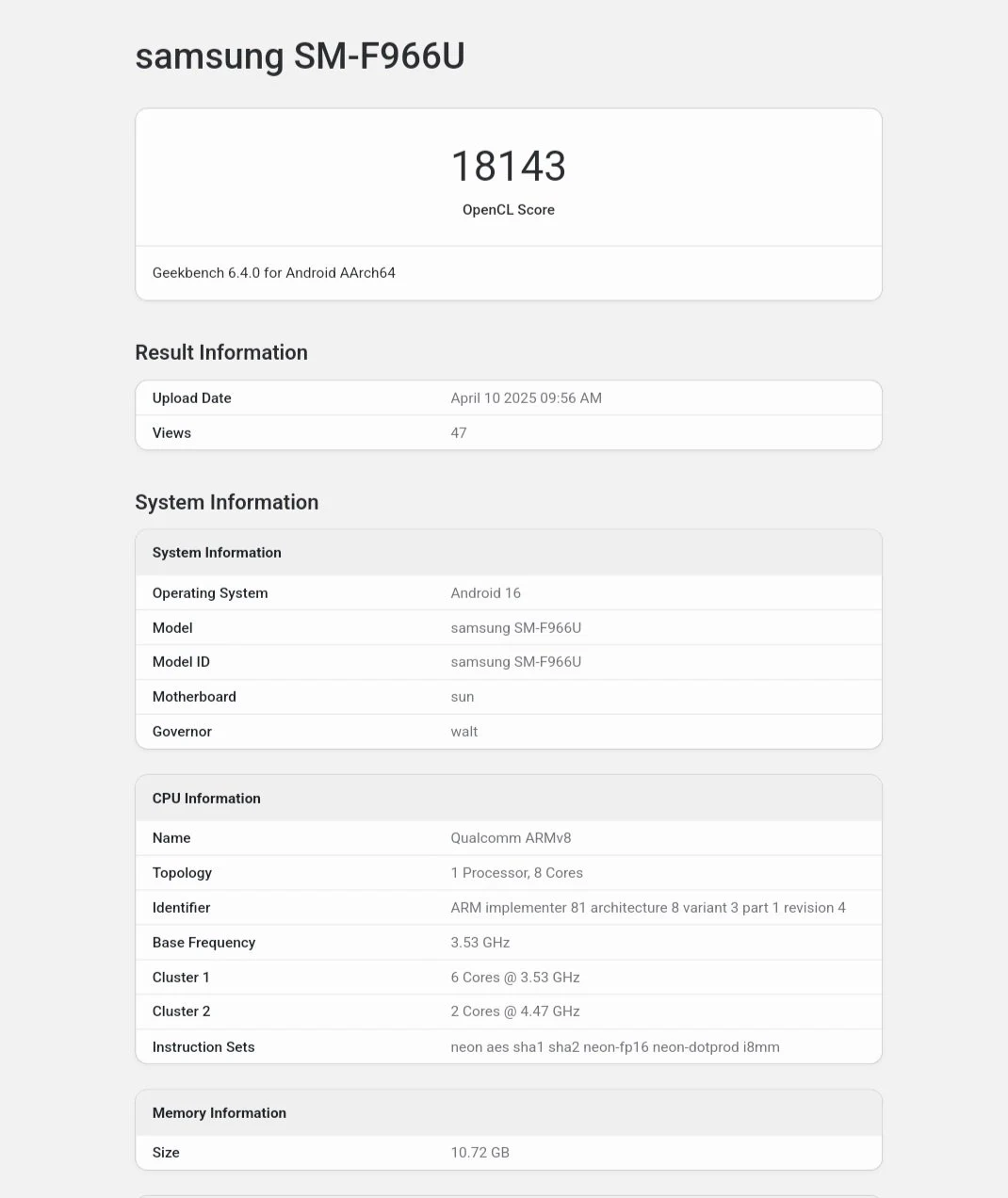
    The book-style foldable, identified by the model number SM-F966U—previously associated with the Galaxy Z Fold 7—has been spotted on Geekbench, as noted by tipster Tarun Vats. This listing validates that it operates on Android 16 with One UI 8.0. With a typical release in July, One UI 8.0 is only a couple of months away, indicating that Samsung is on track for its summer launch.

    This early benchmark also suggests a significant enhancement in software experience. Sadly, details about new features and improvements in One UI 8 are limited. According to a previous leak, the upcoming version of One UI is expected to introduce third-party lock screen widget support, new multitasking options, and improved external display management with Samsung DeX.

    Hardware Insights

    In terms of hardware, the Z Fold 7 is driven by a Qualcomm processor with the “sun” motherboard codename, which strongly points to the Snapdragon 8 Elite. The CPU clock speeds are similar to those of the S25 Ultra’s “For Galaxy” branded Snapdragon 8 Elite chip.

    While specific details regarding display or camera enhancements are not yet available, the emphasis on Android 16 and a top-tier chipset suggests a competitive advantage. Galaxy enthusiasts should keep an eye out for more updates as we get closer to the launch.

    Source:
    Link


  • Android 16 Beta Now Available for These Devices

    Android 16 Beta Now Available for These Devices

    Key Takeaways

    1. Android 16 is in testing since November 2024, with a public beta available from January 2025.
    2. Only select Google Pixel devices, along with Xiaomi and OnePlus models, can participate in the beta testing.
    3. Users should be cautious as early versions may have bugs and could risk bricking devices; it’s advised not to install on main phones.
    4. New features include Live Updates for high-priority notifications, an expanded photo picker for cloud media, and support for health records in Health Connect.
    5. The stable version of Android 16 is expected to be released in Q2 2025, marking an earlier launch than previous Android updates.


    While a lot of Android brands are finishing their Android 15 updates, Google is already pushing forward with Android 16. This marks the earliest release of an Android OS in a long time.

    Testing and Early Access

    Android 16 has been in the testing phase since November 2024, when Google launched the first Developer Preview. The public beta version became available in January 2025. Initially, only Google Pixel devices could participate in this testing, but now other brands like Xiaomi and OnePlus are also part of the early access program, letting a few users explore Android 16 before it officially rolls out.

    Here’s a list of devices that can join the Android 16 beta testing:

    Google Pixel:
    – Pixel 9
    – Pixel 9 Pro
    – Pixel 9 Pro XL
    – Pixel 9 Pro Fold
    – Pixel 8
    – Pixel 8 Pro
    – Pixel 8a
    – Pixel 7
    – Pixel 7 Pro
    – Pixel 7a
    – Pixel 6
    – Pixel 6 Pro
    – Pixel 6a

    Xiaomi:
    – Xiaomi 15
    – Xiaomi 14T Pro

    OnePlus:
    – OnePlus 13

    Caution for Users

    These early versions are mainly for developers and expert users. If you aren’t comfortable with installing custom ROMs, it’s better to steer clear of these. Installing them could risk bricking your device. Moreover, these builds come with known bugs, and more issues could remain hidden. It’s highly recommended not to flash beta versions on your main phone.

    Exciting Features Ahead

    One significant feature in Android 16 is Live Updates, which will be clearly visible on the lock screen and status bar to avoid getting lost among other notifications. This is reminiscent of Live Activities on iOS, but Google’s version focuses on high-priority notifications for things like navigation, food delivery, and ride-sharing.

    The photo picker has been a fantastic privacy improvement in Android, limiting apps’ access to your entire media library when uploading images or videos. Now, in Android 16, this feature will expand, allowing users to search from cloud media providers within the photo picker.

    Google is also testing support for certain health records in Health Connect, which might be included in the final version. Additionally, the new OS will introduce Adaptive Refresh Rate (ARR), helping to save battery by adjusting the screen refresh rate based on usage.

    Arrival and Stability

    Android 16 will feature deeper integration with Gemini AI, though specific details remain undisclosed. Lock screen widgets are set to return for the first time since Android 5.0 Lollipop in 2014. Android 16 brings many small yet practical changes, making it an exciting update overall.

    The platform stability milestone for Android 16 has already been achieved, and the stable version is set to be released in Q2 2025, before the end of June. This is earlier than most previous Android OS launches, which usually come out in August or later.

  • Xiaomi May Allow Smartphone SoC Overclocking with Android 16

    Xiaomi May Allow Smartphone SoC Overclocking with Android 16

    Key Takeaways

    1. Xiaomi may introduce overclocking features for CPUs and GPUs in Android 16.
    2. Users can adjust parameters like voltage and frequency, but there’s a maximum limit for safety.
    3. A “Chip performance dashboard” will likely facilitate access to these features without needing a rooted phone.
    4. Users can optimize performance or underclock for better battery life, but caution is advised for inexperienced users.
    5. These features may debut with Xiaomi’s in-house SoC, potentially limiting Qualcomm’s influence on user modifications.


    While PCs and laptops allows users some flexibility in adjusting their hardware, doing the same on smartphones is much more complex. Xiaomi might change this with Android 16, if the latest information from Kacper Skrzypek is included in the final version.

    Potential Overclocking Features

    Xiaomi could allow users to overclock their CPU and GPU. It appears that some adjustable parameters may include voltage and frequency. However, you can’t just crank it up as much as you want because there’s a limit to how high you can go. After setting the parameters, the device will restart to check if it can actually handle the new settings.

    If it can’t, the settings will go back to the original defaults. These options are likely to be located in a new “Chip performance dashboard.” Until now, accessing these features generally needed a rooted phone, so it would be great if that requirement is removed.

    Fine-Tuning Performance

    This should ideally allow tech enthusiasts to optimize their smartphones even more and gain better performance when required. On the flip side, underclocking the SoC for enhanced battery life will also be available. But if you’re not experienced with over/underclocking, it’s wise to leave these settings alone.

    There’s a strong possibility that this feature could launch with Xiaomi’s long-anticipated in-house SoC, as Qualcomm may not be thrilled about users tinkering with clocks and possibly damaging their phones in the process.

  • Xiaomi 15 and 14T Pro Launch Android 16 Developer Preview Program

    Xiaomi 15 and 14T Pro Launch Android 16 Developer Preview Program

    Key Takeaways

    1. Xiaomi has launched a global beta preview for the HyperOS 2 update based on Android 16.
    2. The Xiaomi 15 and Xiaomi 14T Pro are the first devices to receive this beta preview.
    3. Users can install the beta version without needing an unlocked bootloader.
    4. To install, devices must be running the latest version of HyperOS, and ROMs must be downloaded from provided links.
    5. The beta versions may contain bugs, so users should proceed with caution during installation.


    While certain OEMs are still facing challenges with the rollout of Android 15, Xiaomi is already focusing on the future with Android 16, as the company has launched its Developer Preview program for the HyperOS 2 update.

    Beta Preview Launched

    Official sources have confirmed that Xiaomi has started its global beta preview for the HyperOS 2 update, which is based on Android 16. The Xiaomi 15 and Xiaomi 14T Pro are at the forefront of this initiative. Public versions of the software have been made available for both devices; although these versions are primarily for developers, adventurous users can install them without needing an unlocked bootloader.

    Installation Process

    To install these updates, users must have their devices running the most recent version of HyperOS. The necessary ROMs can be downloaded from the provided links in the sources section. After downloading, the ROM package will undergo verification, and then the installation can begin. While this process is fairly simple, it’s important to note that these are beta versions and may contain several bugs—proceed with caution.

    Source:
    Link