

Key Takeaways
1. The Makera Carvera and Carvera Air target the “CNC from zero” market but come with high prices; the Carvera Air costs $2,897, while the new Makera Z1 is significantly cheaper at $799 with early reservations.
2. The Makera Z1 is promoted as a strong alternative to 3D printing, capable of producing robust parts and offering respectable specifications for beginners.
3. The Z1 features a cutting area of 200 × 200 mm and a 150 W spindle with speeds up to 13,000 RPM, allowing for quick tool changes with its collet system.
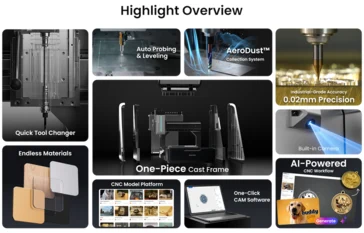
4. Unlike the Carvera Air, the Z1 has an integrated AeroDust collection system for effective chip removal and cooling without needing an external air supply.
5. The Z1 can cut various materials, including woods, plastics, and non-ferrous metals, with upgrade options available for enhanced functionality through a 4th-axis kit and compatibility with new Makera CAM software.
The Makera Carvera and Carvera Air are designed to serve a niche in the “CNC from zero” category, boasting impressive specifications in a compact CNC machine that aims to be as user-friendly as a typical 3D printer. However, both models come with a hefty price tag. The more affordable Carvera Air is listed at $2,897 on Amazon, which includes a 4-axis kit. Meanwhile, the new Makera Z1, the latest addition to Makera’s desktop CNC lineup, reduces the cost significantly—half the price—while still offering respectable specs and some new features that could make it appealing for beginners interested in CNC technology.
A New Approach to CNC Cutting
Makera promotes the Z1 CNC as a viable substitute for 3D printing, emphasizing its ability to create more robust parts suitable for everyday use. This capability is comparable to what can be produced by some of the finest 3D printers we’ve assessed. While Makera hasn’t fully rolled out the Z1 yet, they are accepting reservations with a $39 refundable deposit that secures a $400 discount for early birds, lowering the price from the manufacturer’s suggested retail price of $1,199 to just $799. Those who reserve will likely see their Z1 shipped by January 2025.
Cutting Area and Specifications
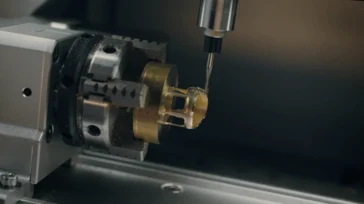
When choosing a CNC machine, the cutting area is a key factor to consider. The Makera Z1 provides nearly the same cutting area as the Carvera Air, measuring 200 × 200 mm and standing 100 mm tall. It is equipped with a 150 W spindle that can reach speeds of 13,000 RPM, as well as a custom ⅛-inch collet, which can also accommodate optional ¼-inch, 6 mm, and 4 mm collets. The collet system allows for quick tool changes, a feature that has been beneficial in our ongoing evaluation of the Carvera Air.
Integrated Features
In contrast to the Carvera Air, which relies on an external air supply and vacuum for chip removal and spindle cooling, the Makera Z1 incorporates an AeroDust collection system. This system cools the spindle while effectively collecting chips and dust. Unlike the Carvera Air, there’s no additional air supply required.
Despite having a slightly smaller cutting area than typical 3D printers, the Z1 offers a reasonable work space at its price point, especially with added conveniences like a cast aluminum frame, linear rails, and built-in support for various CAM software. It also features an enclosed lid that significantly reduces noise and dust, making it a more practical choice for makers living in apartments.
Material Compatibility
The Makera Z1 is capable of cutting various materials, including both hard and soft woods, MDF, several types of plastics, FR4, fiberglass composites, and metals such as aluminum, brass, bronze, and copper, among other non-ferrous options. However, it’s important to note that Makera recommends taking extra care when cutting metals, advising users to proceed slowly.
Upgrade Options
Also, buyers can opt for a 4th-axis kit and a 5 W module, both of which are the same systems found in the Carvera Air and the full-featured Carvera CNC. This allows users to make upgrades that will enhance their machine’s functionality. Additionally, the Z1 is compatible with the newly updated Makera CAM software, which is set to rebrand as Makera Studio. Users can control the machine through the Makera App (previously known as Makera Controller), available on Windows, Linux, macOS, iOS, and Android.
Source:
Link

Leave a Reply