Category: Software

  • Roborock App Update Enhances Features for Robot Vacuum Users

    Roborock App Update Enhances Features for Robot Vacuum Users

    Roborock has made some enhancements to its iOS app, now at version 4.40.02. This new version has been released globally, adding various upgrades to the company’s smart robot vacuum lineup.

    Improvements in Performance

    According to the change log for version 4.40.02, setting up a Roborock robot vacuum is now quicker, with a reduced memory usage and overall performance boosts. Additionally, the process for connecting to networks has been made simpler. For users with older models that were launched between 2019 and 2022, Roborock claims that the app has been optimized for a “better operational experience,” although no specifics were given. This update impacts users of models such as the Roborock S7 MaxV Ultra robot vacuum (current price $759.99 for the Renewed model on Amazon).

    User-Friendly Features

    Moreover, all models now benefit from updated 3D map visuals and a revamped map homepage, aiming for a clearer overview and easier editing. For full release notes, you can refer to the information below. The Roborock app for iOS version 4.40.02 is now available for download from the Apple App Store. Meanwhile, the Android version of the Roborock app is still at version 4.38.04, and it is uncertain when these new features will be rolled out for Android users.

    Accessing the Update

    For those looking to upgrade, simply head to the Apple App Store to get the latest version of the Roborock app. As for Android users, they will have to wait for more updates on when they can access these improvements.

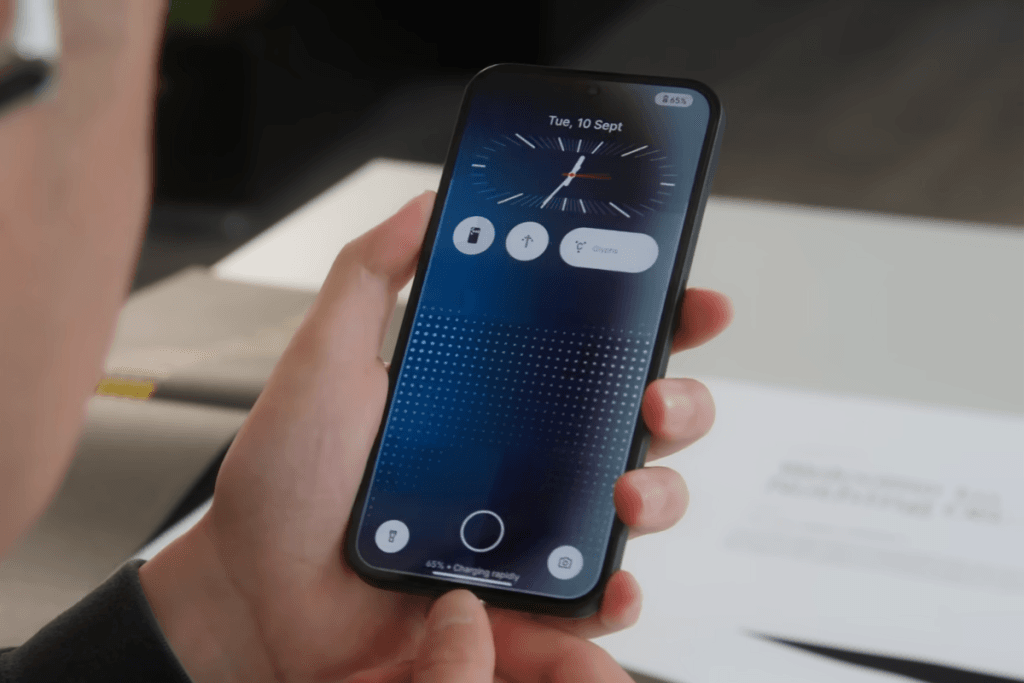

    Image 1
  • Nothing CEO Teases AI-Driven OS to Compete with Android and iOS

    Nothing CEO Teases AI-Driven OS to Compete with Android and iOS

    Nothing’s founder and CEO, Carl Pei, has shared insights into the company’s ambitions for future software, particularly focusing on Nothing OS and its deeper integration of AI. Pei pointed out that smartphones play a crucial role in how people connect and access information, but he also highlighted the current dominance of Google and Apple in the market. "We’re thinking about how we maneuver here,” Pei stated, indicating that Nothing aims to innovate by developing an operating system designed to enhance user experience.

    A Small Player in a Big Game

    Despite his vision, Nothing is still a small entity in the smartphone market when stacked against giants like Apple and Google. Pei mentioned that putting all efforts into creating a fully independent OS might not be the smartest move. Instead, he intends to weave advanced AI into Nothing OS, utilizing models from larger tech firms to improve its features. Although Pei did not go into detail, his remarks suggest that Nothing OS could see substantial upgrades, potentially changing how users engage with their devices.

    Personalization through AI

    Pei believes that AI has made the process of developing operating systems easier, allowing for levels of personalization that other platforms haven’t achieved yet. He ruled out the option of building the OS completely from scratch, prioritizing user experience over core technical elements. He stressed the idea that smartphones could become smarter by harnessing the vast amounts of data they gather.

    You shouldn’t call it the AI operating system though.

    While Pei did not confirm whether additional funding would be pursued for this initiative, he mentioned that Nothing could continue on its own if needed. He made it clear that AI will be important, but it won’t be the main focus. "We shouldn’t call it the AI operating system,” he clarified, adding that real success would depend on "who can create the best market fit” and offer a captivating user experience.

    HarmonyOS Next: A New Frontier

    In a related note, Huawei has introduced HarmonyOS Next, a brand-new operating system designed to break away from the conventional Android framework. Unlike earlier versions of HarmonyOS, which could run Android apps, HarmonyOS Next is constructed from scratch, boasting its own application ecosystem and improved privacy features that Huawei hopes will ensure its independence. This OS, developed to navigate geopolitical challenges, aims to provide a seamless experience across multiple devices in Huawei’s ecosystem.

  • Samsung One UI 7 Leak: New Features Before Beta Release

    Samsung One UI 7 Leak: New Features Before Beta Release

    At the SDC event, Samsung revealed that One UI 7 will officially launch alongside the Galaxy S25 series. However, the beta program is set to kick off by late 2024. Although the company hasn’t provided a precise schedule, well-known leaker Ice Universe suggests that the beta will begin in November.

    New Features on the Horizon

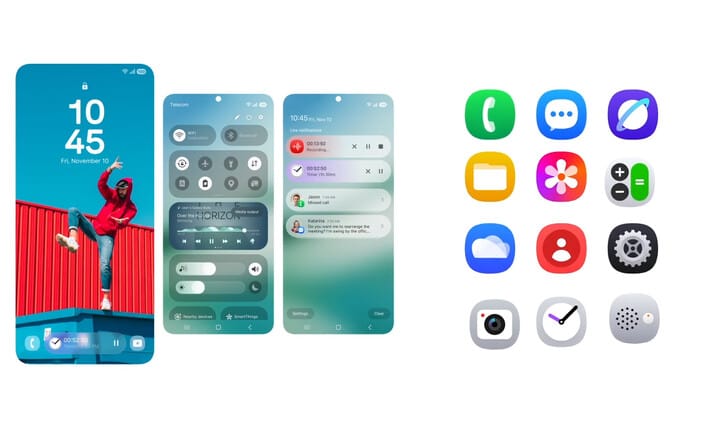
    Before this beta arrives, a recent leak has highlighted some of the new features expected in this update. According to Android Headlines, Samsung is set to introduce redesigned icons that will appear more modern compared to those in One UI 6.

    Enhanced Lock Screen and Notifications

    The leak also indicates a revamped lock screen that includes various elements such as live widgets, timers, and playback controls. This aligns with previous reports suggesting a separate notification panel, which should simplify notification management and quick toggles access.

    Additional Upgrades

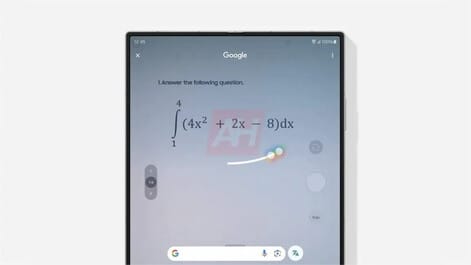
    But that’s not all the leak covers. It also mentions that Samsung will incorporate the new homework help feature of Circle to Search. This feature, introduced at this year’s Google I/O event, will assist users in solving homework problems on One UI 7.

    Furthermore, the leak reveals that One UI 7 will provide improved health insights through Energy Score along with parental monitoring features via Parental Controls. Additionally, users can expect a comprehensive suite of upgrades for photo-editing tools, including AI-driven portrait restyling and AI-generated effects to enhance images for social media.

    Compatibility Across Devices

    Regarding compatibility, One UI 7 is anticipated to be available on various Samsung smartphones. This includes numerous mid-range models and several recent flagship devices (512 GB Galaxy S24 Ultra currently priced at $1,150.25 on Amazon).


    Image 1
    Image 1
    Image 1
  • Quick Share for iPhone and Mac: Upcoming Expansion by Google

    Quick Share for iPhone and Mac: Upcoming Expansion by Google

    Sharing files between Android and iPhones may soon be simpler. Android specialist Mishaal Rahman has discovered a hint that suggests Google might be working on bringing its Quick Share file-sharing feature to iOS and macOS.

    Quick Share’s Popularity

    Quick Share is already well-liked among users of Android devices, Chromebooks, and Windows computers, as it allows for easy file transfers over a secure local network. However, the lack of this feature on Apple’s platforms has been a major issue for users who navigate between both operating systems.

    API Update Indicates Potential Expansion

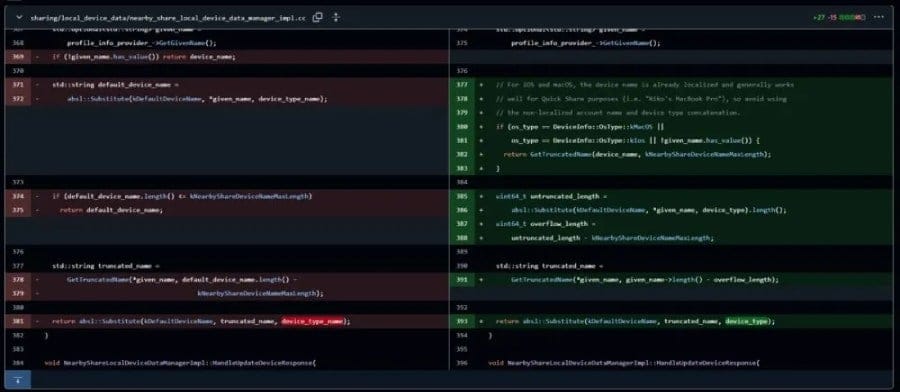
    This situation could change shortly. Quick Share, which was formerly known as Nearby Share, relies on Google’s Nearby Connections API, a peer-to-peer networking system. This open-source API is accessible on GitHub, enabling users to monitor any updates Google makes to it. As per Rahman, a recent bug fix in the API suggests that an iOS version could be on the way.

    A note in Google’s Nearby repository discusses how the app identifies device names, specifically for iOS and macOS. It mentions, “For iOS and macOS, the device name is already localized and generally works well for Quick Share purposes… avoid using the non-localized account name and device type concatenation.”

    Speculation Around Integration Challenges

    While this statement doesn’t verify the existence of a Quick Share app for iOS or macOS, it does raise questions. Google might be setting the stage for future growth or could even be crafting a solid plan for merging with Apple devices. However, merging Quick Share into Apple’s tightly regulated environment could present hurdles. Google may encounter challenges with the App Store’s rules and Apple’s rigorous privacy standards. It’s still unclear if Google will aim for a standalone app or incorporate Quick Share into existing services like Google Drive or Chrome.

    Although seamless file sharing might appear straightforward, if Quick Share is implemented, it could provide a fast and easy way to transfer files across different platforms, bypassing less convenient methods like cloud storage. Historically, Google has been more open to cross-platform collaboration compared to Apple. If a connection between these two technology leaders is established, it’s likely that Google will take the forefront.

    OnePlus Takes a Step Forward

    Interestingly, OnePlus has already initiated actions in this direction. Their newest software update, OxygenOS 15, features a “Share with iPhone” option through a specific iOS app. While Rahman mentions that some users are reluctant to download yet another app, the ease of transferring files between Android and iPhone could outweigh this hesitation.

    Ultimately, only time will tell if Google officially introduces Quick Share to iOS and macOS. Even though the change in code brings some hope, it’s prudent to keep expectations in check until there’s an official statement.

  • qBittorrent Resolves 14-Year-Old Security Vulnerability

    qBittorrent Resolves 14-Year-Old Security Vulnerability

    qBittorrent, a well-known file sharing application that has existed since 2006, has been accepting almost any SSL certificate for domains and addresses in its DownloadManager for over 14 years. Recently, this vulnerability has been fixed. The commit that opened up this security issue was made in April 2010, and it was quite straightforward; it merely altered the default setting of SSL verification from enabled to disabled. This change eliminated annoying security warnings that could frustrate users trying to download content from untrusted sources. As of October 28, 2024, with the release of version 5.0.1, the default setting has been switched back to enabled. It’s important to mention that qBittorrent did not provide any explanation for this adjustment and did not inform users in any notable way, apart from the regular patch notes that come with new updates.

    Understanding SSL Certificates

    SSL certificates serve as security tokens that perform two main functions; they confirm that the web traffic source is legitimate and enable the encryption of data transmitted over that connection. Since BitTorrent is primarily a peer-to-peer file transfer protocol, it’s logical to think that users might receive safe files from personal servers or even their home computers, which may not have valid SSL certificates. With the verification check turned off, users could interact with and download files from these sources without complications.

    Risks of Disabled SSL Verification

    However, the downside is that not having an SSL certificate, or accepting a fake one, allows virtually any web traffic source from any server to impersonate the actual site the user intends to access. This poses a risk of hijacking traffic, potentially enabling malicious users to steal data from either the host or user systems and even inject harmful code. Such man-in-the-middle attacks can bypass many standard security measures, including firewalls, which usually protect users from threats.

    The option that determines whether the application will accept connections without validating the SSL certificate remains available to users. Those willing to take the chance can simply disable it. The average user who plugs in and plays with the app is not expected to explore the settings beforehand or understand how SSL certificates function and the dangers associated with keeping this setting disabled, making this change a positive step for improving app security.

    qBittorrent | Bleeping Computer | Sharp Security

  • Apple Tests New Blood Sugar Monitoring Features in Secret App

    Apple Tests New Blood Sugar Monitoring Features in Secret App

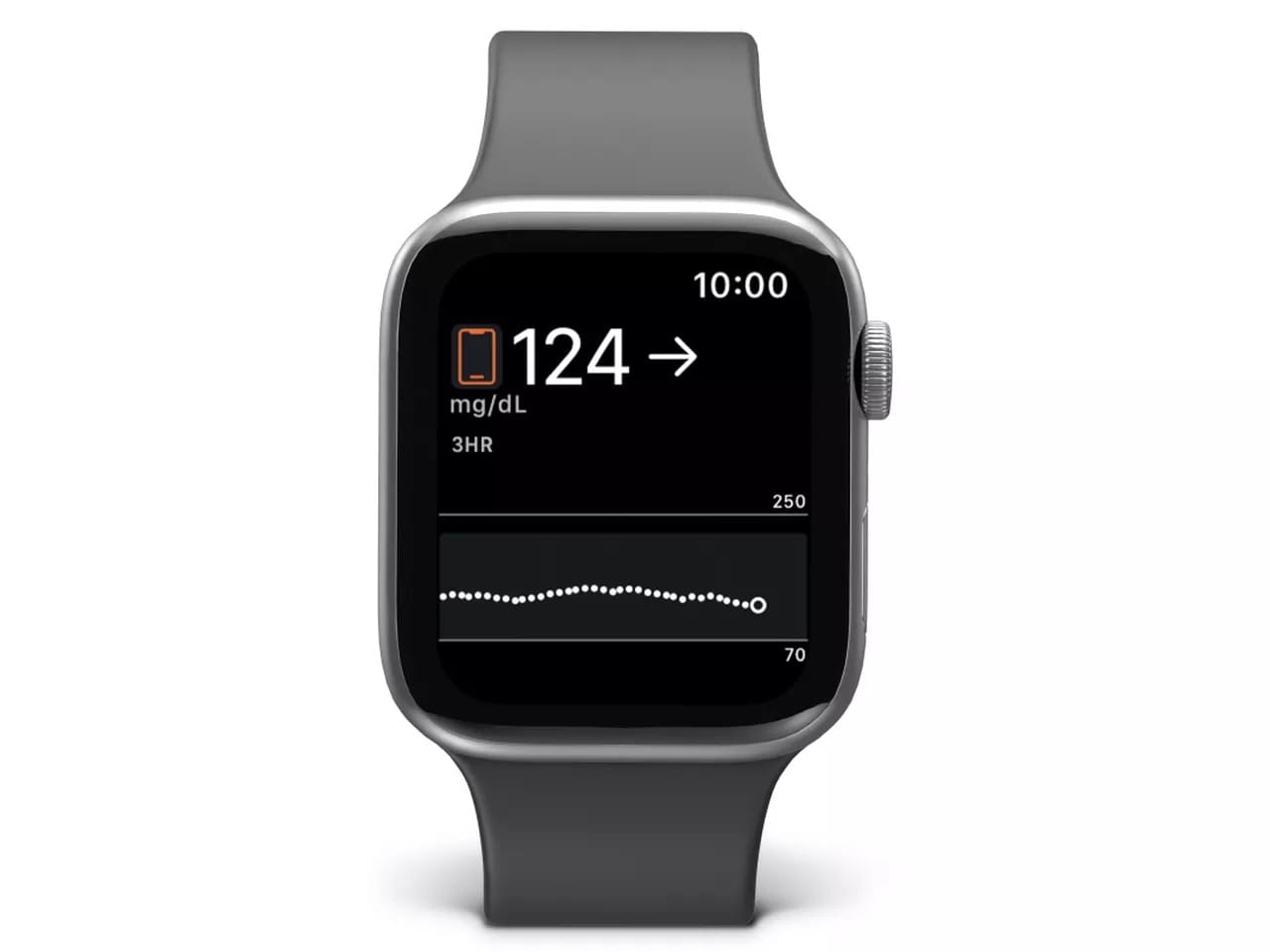
    Apple has been quietly working on new features for blood glucose monitoring. They have tested two tools through an app that lets users track what they eat and record changes in their blood sugar levels, which are measured using conventional devices. Users of the Apple Watch can monitor their blood sugar levels with compatible devices like the new Dexcom G7 CGM.

    Focusing on Prediabetes

    This new app from Apple is reportedly aimed at individuals with prediabetes—those with elevated blood sugar levels who are at risk for Type 2 diabetes. By keeping track of these two key data points, users can learn how various foods impact their blood sugar. According to a report by Mark Gurman in his Power On newsletter for Bloomberg, Apple has been testing this app throughout the year, but the testing phase has now ended. A limited group of Apple employees was allowed to use the tools after a blood test verified their prediabetic condition.

    No Public Release Planned

    It seems that Apple does not intend to launch this app for the general public; it was mainly a research project, aiming to find ideas for future user tools. It’s unclear if a meal logging feature might eventually make its way into the Apple Health app as a result of this testing. Additionally, there does not appear to be any connection between this study and the non-invasive blood sugar monitoring device that Apple is developing.

  • Android 16 Launch Date Set for Q2 2025, Says Google

    Android 16 Launch Date Set for Q2 2025, Says Google

    This year, Android 15 launched later than previous versions. Rather than coming out in the third quarter, the latest Android started its rollout to compatible devices just over a week ago. In 2025, Google plans to shift away from the Q3 timeline for Android 16, opting instead for an earlier release in Q2!

    Details from the Android Developers Blog

    The information was shared in an official announcement on the Android Developers Blog, which revealed that there will be two Android updates in 2025. The first update will be a major version in Q2, followed by a minor update in Q4. The main reason for moving the major release to an earlier date is to sync with the launch schedules of devices throughout the Android platform, allowing a wider range of devices to receive the significant update sooner.

    Manufacturer Launch Timings

    This change seems logical, as many manufacturers typically plan their new device launches for Q3, often extending into Q4, yet they often release their phones with an outdated version of Android. Google itself experienced this issue this year when the Pixel 9 (priced at $899 on Amazon) came with Android 14 instead of the latest Android 15.

    Upcoming Features and Changes

    The Android update planned for the fourth quarter of 2025 will include feature enhancements, optimizations, bug fixes, and new APIs for developers, all following the major update in Q2. However, there won’t be any changes that would impact apps’ behaviors. From this description, it sounds like we might see a revival of the Android Jelly Bean days, where versions had decimal points. Therefore, the Q4 update could resemble Android 16.1.

    With this new schedule, the testing phase for Android 16, codenamed Baklava, will start sooner than initially anticipated, and users with compatible devices should be on the lookout for developer previews coming soon.

  • Philips Hue App Update Introduces New Features for iOS Users

    Philips Hue App Update Introduces New Features for iOS Users

    More updates have come to the Philips Hue app for iOS. The new version 5.29.0, released on October 29th, introduces widget-based controls along with two fresh features for the brand’s smart security cameras, including the Secure Desktop Wired (curr. $170.19 at Amazon).

    Privacy Enhancements

    According to the release notes for Philips Hue app version 5.29.0, the snapshot image from the security camera is now blurred while waiting for connection. The company claims this change is meant to improve privacy. Furthermore, the strength of the camera’s Wi-Fi signal can now be seen in the Security Center snapshot. This feature was previously added to the live view in the 5.26.0 update that came out in September.

    New Widget Features

    You can also utilize an iOS widget to set timers or activate a Mimic presence automation. This automation will automatically turn your smart lights on and off in certain rooms at appropriate intervals, which can help keep intruders away when you are not home. The Philips Hue app version 5.29.0 is available for download from the Apple App Store. Meanwhile, the Google Play Store is still offering the older version 5.28.0, and it is not clear when or if version 5.29.0 will be released for Android users.

    Apple App Store, Google Play Store


    Image 1
  • Xiaomi HyperOS 2 Global Release Schedule Leaked Details

    Xiaomi HyperOS 2 Global Release Schedule Leaked Details

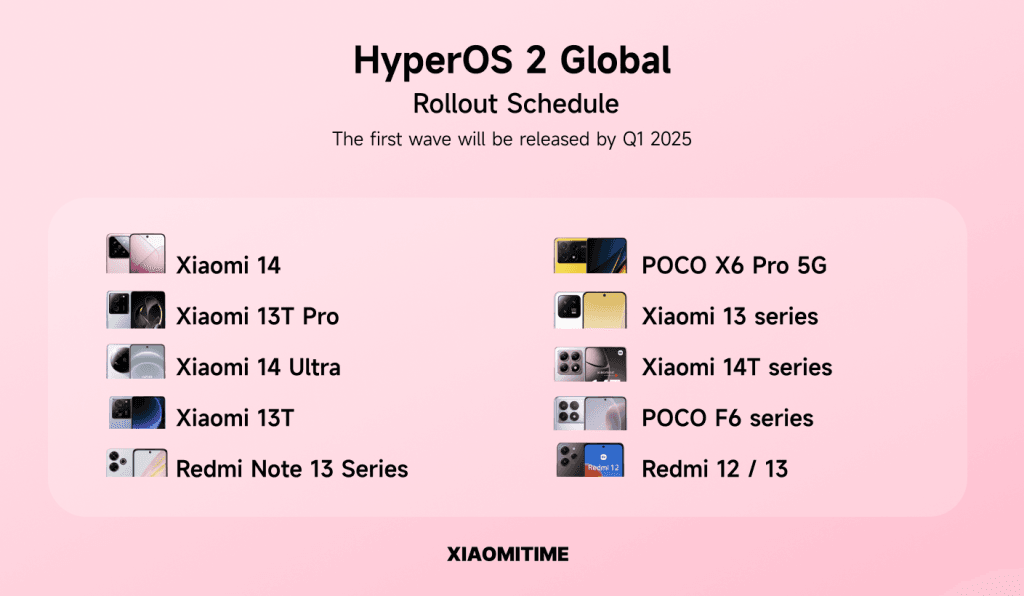
    XiaomiTime has revealed the rollout plan for the HyperOS 2 Global. This updated user interface aims to provide enhanced performance, an intuitive user experience, and advanced optimizations for devices. The rollout of HyperOS 2 Global will commence for select smartphones in the fourth quarter of 2024, with more devices to follow in the first quarter of 2025. Staying true to Xiaomi’s innovative vision, this update is set to deliver an experience brimming with cutting-edge features for its users.

    Key Devices Receiving the Update

    The Xiaomi 14 and Xiaomi 13T Pro are among the flagship devices that will receive the HyperOS 2 Global update in Q4 2024. These premium models will be the first to experience Xiaomi’s most sophisticated software, promising users the speed and smoothness of HyperOS 2. With the integration of Android 15 in HyperOS 2, these devices are expected to deliver top-notch performance through seamless software and hardware collaboration.

    Additional Models in Q1 2025

    In the first quarter of 2025, the HyperOS 2 Global will also be available for several other models, including the Xiaomi 14 Ultra, Xiaomi 14T Series, Xiaomi 13 / 13 Pro / 13 Ultra, Xiaomi 13T, as well as POCO F6 / F6 Pro, POCO X6 Pro 5G, and the Redmi Note 13 series (4G, Pro 5G, Pro+ 5G), along with Redmi 13 and Redmi 12. This extensive list underscores Xiaomi’s dedication to rapidly deploying innovative updates across a diverse array of products. The update is optimized for both flagship and mid-range devices, thus catering to a broader audience.

    Innovations and Improvements

    HyperOS 2 Global brings a host of new features. Notably, its enhanced Control Center allows for quicker and more customizable daily operations. Additionally, AI-enhanced camera functionalities have been fine-tuned for impressive photo and video quality, particularly on Xiaomi’s high-end offerings. These improvements ensure that devices operate more smoothly and effectively during everyday use.

    Furthermore, better battery management and resource optimizations are standout features of HyperOS 2 Global. This new operating system promises extended battery life and improved performance, giving users the ability to use their devices for longer periods without interruptions. With this user interface, Xiaomi aims to bolster its competitiveness in the market by making a bold statement on the software front.

  • OxygenOS 15 Open Beta for OnePlus 12: How to Apply Now

    OxygenOS 15 Open Beta for OnePlus 12: How to Apply Now

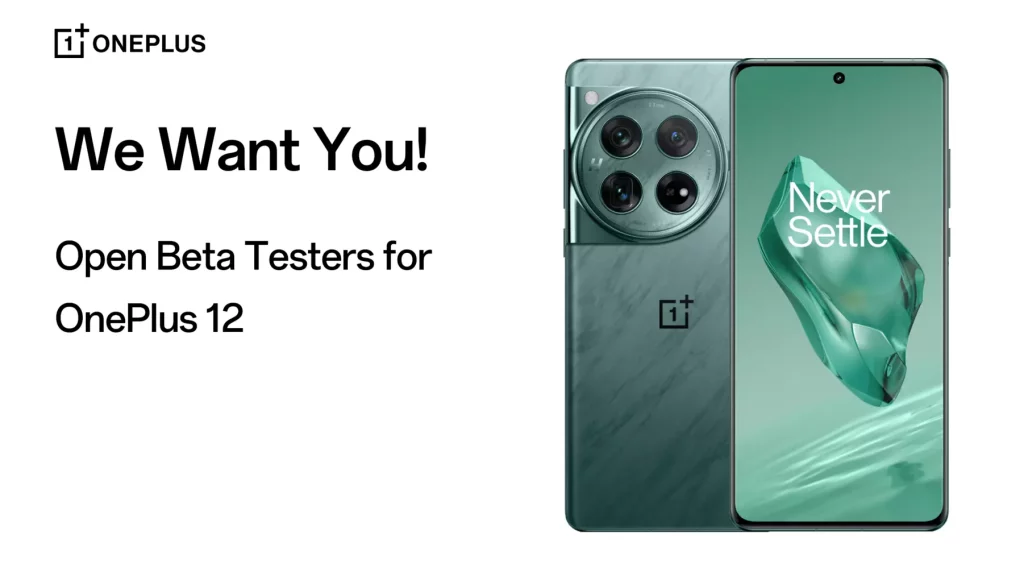
    OnePlus has introduced the OxygenOS 15 Open Beta program based on Android 15 for its flagship device, the OnePlus 12. This initiative invites early adopters to explore new features and enhancements that are on the horizon. However, since it’s a beta version, users might face some stability challenges and bugs during their experience.

    What to Expect from the Open Beta

    The Open Beta gives OnePlus 12 users a chance to test out fresh software functionalities before they officially launch, making it a great way to get a sneak peek at upcoming innovations. Nonetheless, since this is a beta version, it may come with some instabilities, leading to issues like hiccups in performance, limitations with app compatibility, and unexpected crashes.

    To participate in the beta program, OnePlus 12 users must have the software version CPH2573_14.0.0.850(EX01) installed. The steps to enroll are easy:

    1. Navigate to Settings > Software Update.
    2. Click the icon in the upper-right corner.
    3. Choose “Beta program” > “Release candidate, update now.”

    It’s important to keep in mind that the program has a cap on the number of participants, and spots will fill up on a first-come, first-served basis.

    Pros and Cons of Joining

    While having early access to new features sounds thrilling, users must also consider the risks involved. Beta versions such as OxygenOS 15 often lack the stability of official releases, which means users could run into problems like overheating, slower operation, and app failures.

    OnePlus recommends that users back up their crucial data before enrolling in the beta. If any problems arise, there’s an option to revert to the stable version, but this process is more complex than a typical update. It involves manually installing a separate package, which will erase all data on the device.

    Is the Open Beta Suitable for You?

    Deciding to join the Open Beta program relies on individual preferences and requirements. Those who enjoy testing new features and providing feedback to developers may find this beta to be a compelling opportunity. On the other hand, users who depend on a reliably stable device for everyday tasks might want to hold out for the official release.

    Ultimately, the choice to engage with the OxygenOS 15 Open Beta program lies in the hands of each OnePlus 12 user. If you choose to dive in, you can look forward to 7 exciting features awaiting you in the beta program.