Category: Computers

  • ZX06 Launches: Affordable Mini PC with Intel Twin Lake CPU

    ZX06 Launches: Affordable Mini PC with Intel Twin Lake CPU

    Key Takeaways

    1. The Intel ZX06 mini PC features the new Intel N150 CPU from the Twin Lake series, offering slight performance improvements over the N100.
    2. It includes 12 GB of LPDDR5 RAM and supports a 1 TB 2242 SSD, which is a common specification among Twin Lake mini PCs.
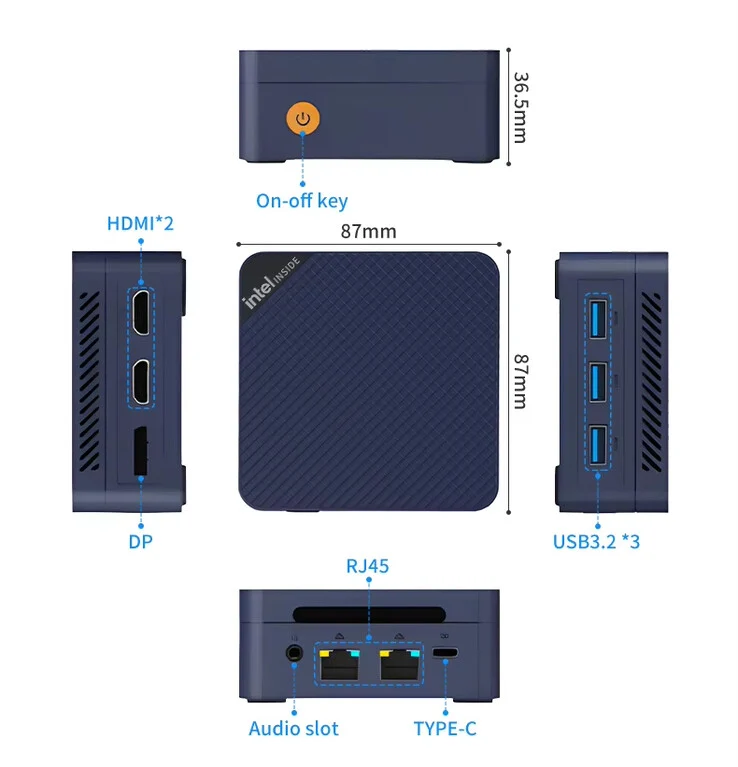
    3. The compact design of the ZX06 measures 36.5 mm in height and 87 mm in length and width, making it easy to fit in various workspaces.
    4. Connectivity options include WiFi 5 and Bluetooth 5.1, along with multiple ports despite its small size.
    5. Pricing starts at $129 for the base model, with the highest configuration priced at $178, making it an affordable choice for an Intel N150 setup.


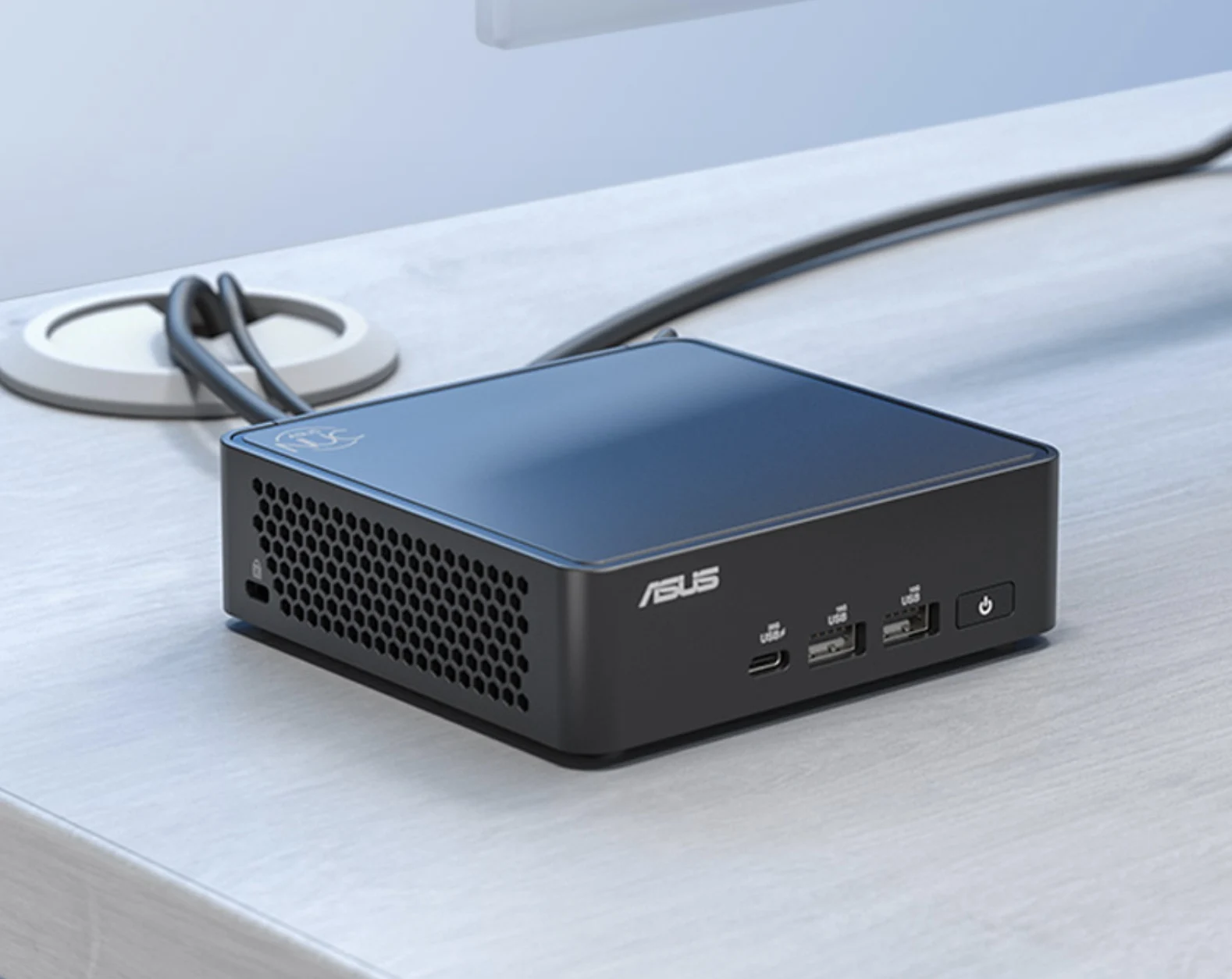
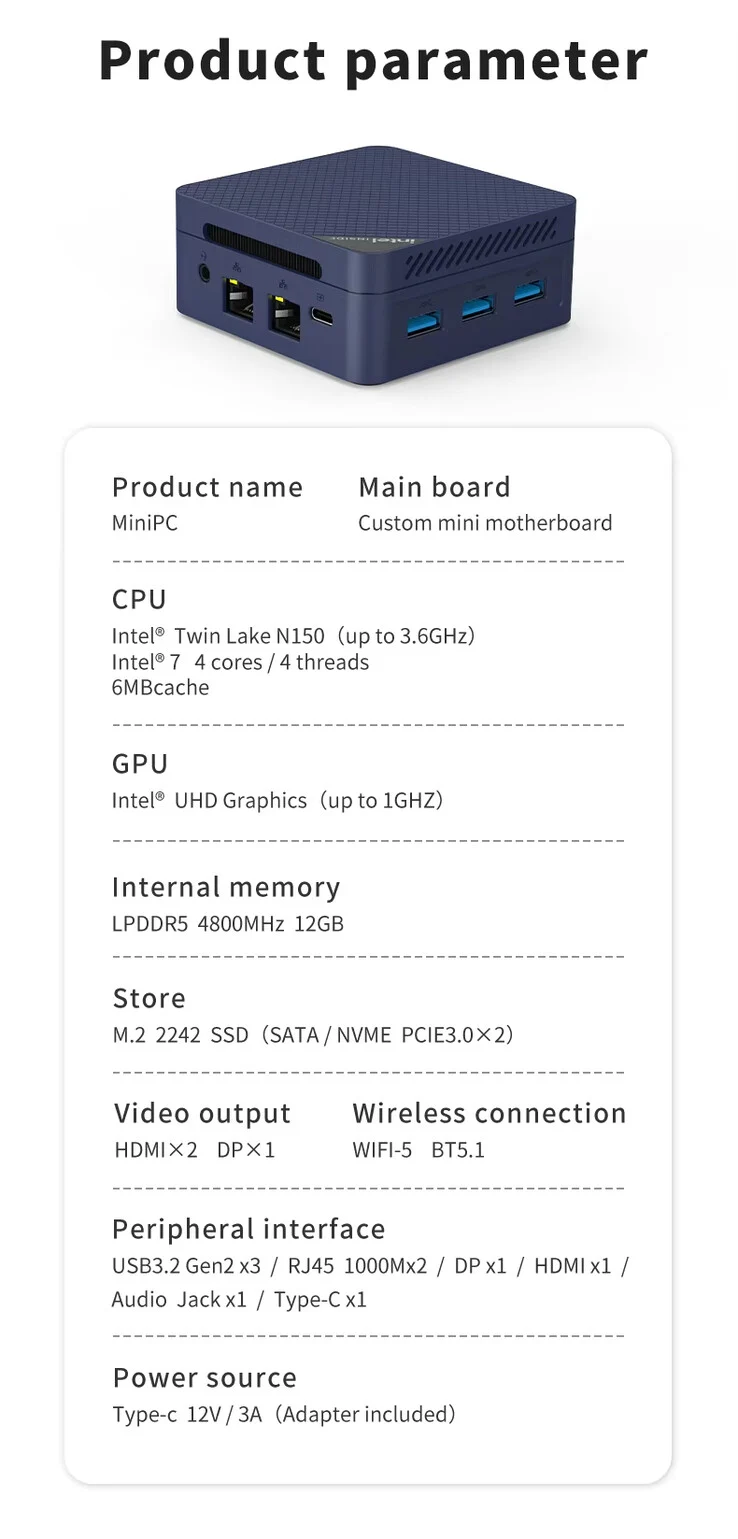
    Recently, several Intel Twin Lake mini PCs have hit the market, and the ZX06 is among them. It has been seen on AliExpress, and it’s not surprising that it lacks a brand name. However, from its design and specifications, this mini PC looks like a replica of Beelink’s S13.

    Specs Overview

    The ZX06 features the Intel N150, which is a fresh CPU from the Twin Lake series. Essentially, it’s a slightly enhanced version of the N100, leading to a minimal performance improvement. The main distinction lies in the clock speed, which makes the N150 a bit better than its predecessor.

    Memory and Storage

    Inside the ZX06, you’ll find 12 GB of LPDDR5 RAM, and it supports a 1 TB 2242 SSD (currently priced at $94.99 on Amazon for the Corsair MP600). Again, these specifications do not set this system apart from other Twin Lake mini PCs already on the market. It does, however, have a compact design.

    Dimensions and Connectivity

    According to the promotional info on AliExpress, this mini PC stands at 36.5 mm high and measures 87 mm in length and width. This should make it simple to fit the ZX06 into most workspaces. In terms of connectivity, despite its small size, it comes with a good number of ports, including:

    For wireless options, it includes WiFi 5 and Bluetooth 5.1. As for pricing, the mini PC starts at $129, which is quite affordable for an Intel N150 setup. The highest configuration, which comes with 1 TB of storage, is available for $178 on AliExpress.

    Source:
    Link


  • AMD Ryzen 7 9800X3D Melts Inside Redditor’s Motherboard

    AMD Ryzen 7 9800X3D Melts Inside Redditor’s Motherboard

    Key Takeaways

    1. A Reddit user reported their Ryzen 7 9800X3D CPU was completely charred while installed on an Asrock Nova 870E motherboard.
    2. The failure occurred during low usage, specifically while streaming content online, raising concerns about the CPU’s reliability.
    3. This incident marks the first documented failure of the Ryzen 7 9800X3D on Reddit, following previous issues with the Ryzen 7 7800X3D.
    4. The cause of the failure remains unclear, with speculation about incorrect mounting and the user’s RAM being overclocked.
    5. Gamers Nexus is interested in examining the motherboard to investigate the incident further, as they previously replicated failures in controlled conditions.


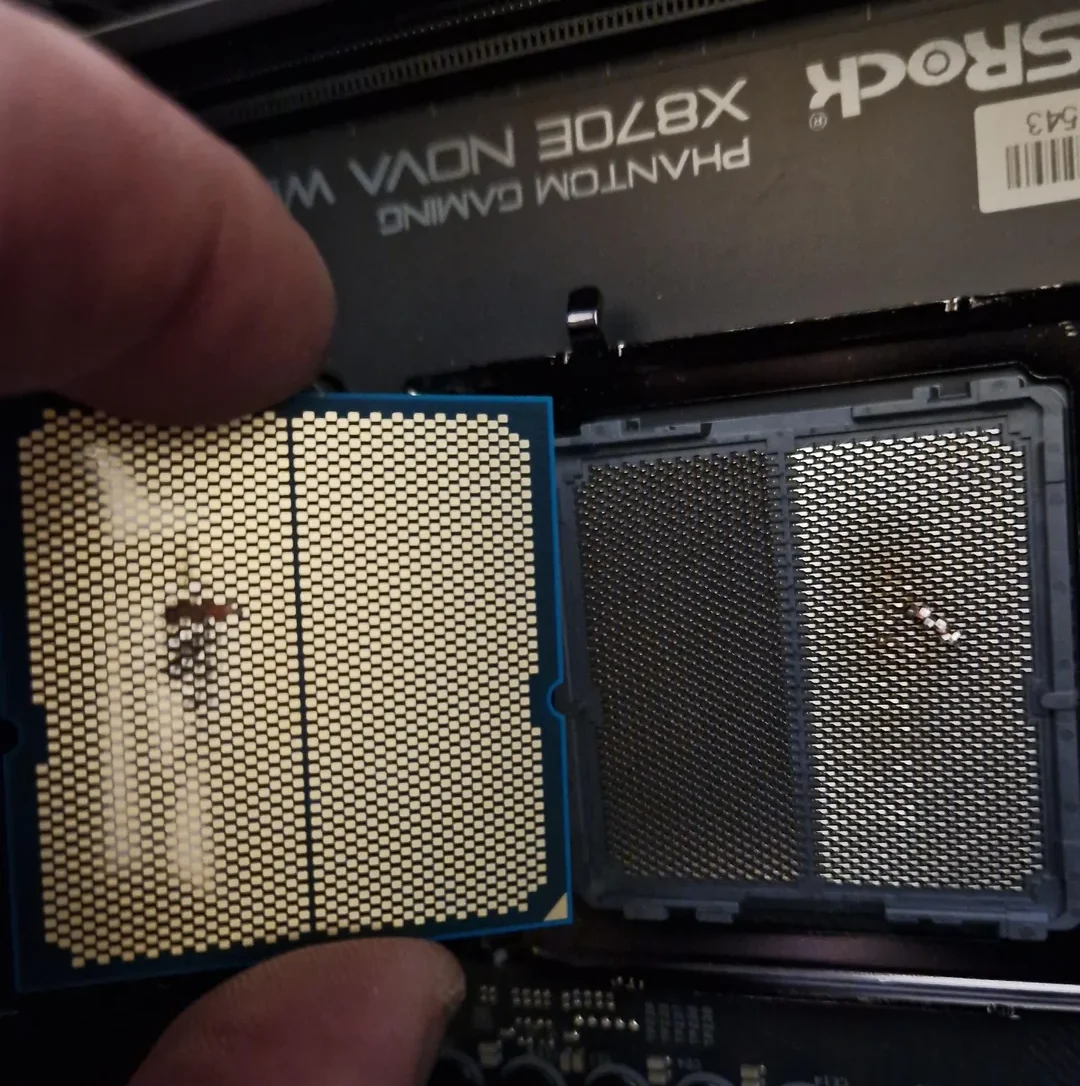
    If you thought RTX 5090s were the only ones having issues, now we hear about CPUs igniting in their sockets. A disappointed Reddit user found their brand new Ryzen 7 9800X3D completely charred. This CPU was installed on an Asrock Nova 870E motherboard, operating at standard speeds, with RAM that was overclocked. The strange thing? The user was not even putting much load on the processor.

    Unexpected Shutdown

    Reportedly, the user was just streaming content online when the CPU suddenly failed. For now, we have to trust their account. This isn’t the first time we’ve seen such incidents; similar problems occurred with the Ryzen 7 7800X3D, leading to significant criticism of Asus due to their faulty BIOS updates. In this case, though, it’s an Asrock motherboard, and this is actually the first documented case of a Ryzen 7 9800X3D failure on Reddit.

    Lack of Clarity

    It’s still too soon to know if this issue was caused by incorrect mounting. The user has already sent their 9800X3D to a local shop, making it hard to pinpoint the cause now. However, Gamers Nexus has reached out to the original poster and expressed interest in purchasing the motherboard for further examination. Previously, they were able to replicate an exploding 7800X3D in controlled lab conditions, and one can only wish that this does not happen again.

    Source:
    Link

  • Radxa Rock 5T: A Powerful Raspberry Pi 5 SBC Alternative with 32GB RAM

    Radxa Rock 5T: A Powerful Raspberry Pi 5 SBC Alternative with 32GB RAM

    Key Takeaways

    1. The Rock 5T measures 3.23 x 4.33 inches and is a compact single-board computer with versatile applications.
    2. It features two M.2 slots for SSDs, pre-installed eMMC storage, and an onboard microSD card slot.
    3. The device offers 4 to 32GB of LPDDR5 RAM and is powered by the Rockchip RK3588 SoC with impressive processing capabilities.
    4. It supports multiple display options, including dual HDMI ports for 4K/8K output, DisplayPort via USB Type-C, and can connect to three monitors simultaneously.
    5. The Rock 5T includes advanced connectivity options like Wi-Fi 6, Bluetooth 5.2, and two 2.5GbE ports, along with camera and sensor connections via MIPI-CSI.


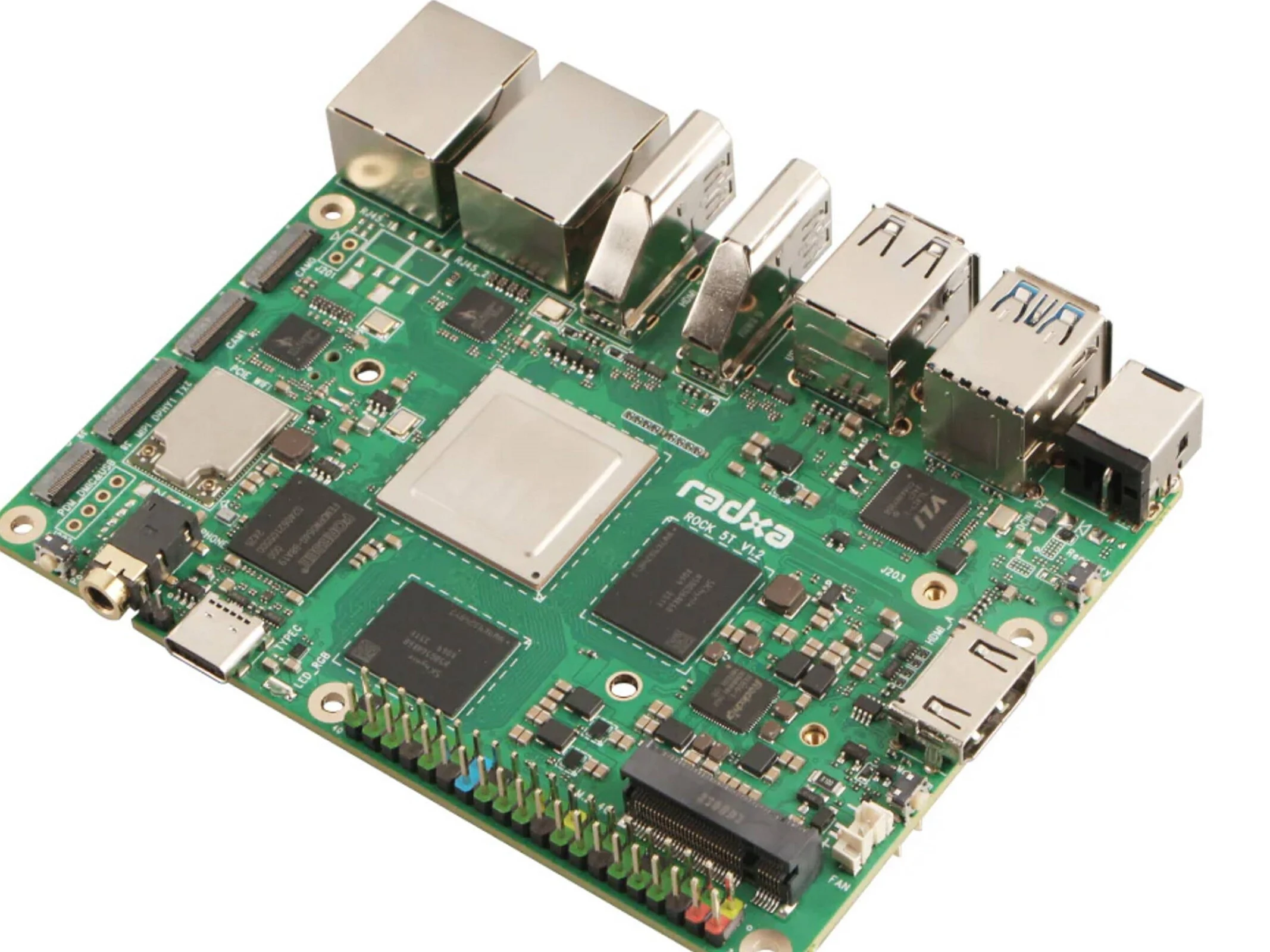
    The Rock 5T is a latest single-board computer that brings the functionalities of the Rock 5 ITX in a smaller size, measuring only 3.23 x 4.33 inches. This device is really well-equipped for an SBC and can be applied in a variety of scenarios.

    M.2 Slots and Storage Options

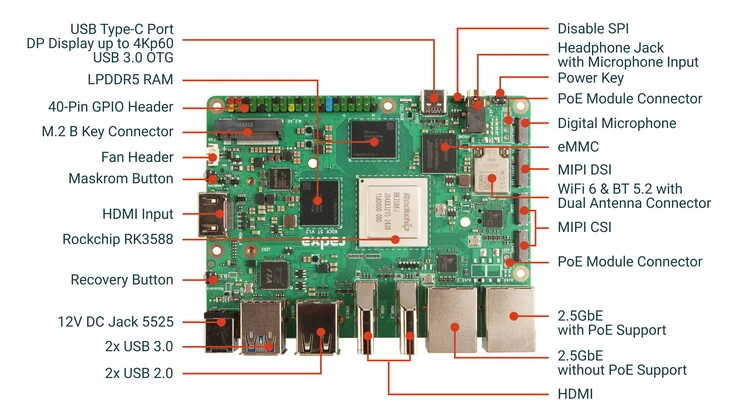
    This competitor to Raspberry Pi 5 features two M.2 slots, each linked with two PCIe 3.0 lanes, which is pretty rare for an SBC. These slots allow for two SSDs, but the Rock 5T comes with pre-installed eMMC storage depending on the model variant. Additionally, there’s an onboard microSD card slot.

    RAM and Processing Power

    The small device has 4 to 32GB of LPDDR5 RAM, based on the configuration you choose. It runs on the Rockchip RK3588 SoC, which has four Cortex-A76 and Cortex-A55 cores. The built-in NPU can deliver performance of up to 6 TOPS.

    Display and Connectivity Features

    You can connect external displays through two HDMI ports that support resolutions of 4K and even 8K. Additionally, there’s DisplayPort via USB Type-C and an MIPI-DSI interface available, with the latter supporting Full-HD screens at up to 60Hz. In total, the Rock 5T can connect to three monitors and also provides an HDMI input.

    For accessories or external storage, there are two USB 3.2 Gen 1 Type-A ports. In terms of wireless capabilities, it supports Wi-Fi 6 and Bluetooth 5.2. Furthermore, the alternative to the Raspberry Pi 5 can also connect to networks through two 2.5GbE ports that support PoE.

    Camera and Sensor Connections

    You can attach cameras via MIPI-CSI, and as is typical, there’s a pin header for linking sensors and actuators. Arace Tech is currently offering the 16GB RAM version of the new Radxa Rock 5T for about $140. Sadly, the commercial version that features the Rockchip RK3588J, Wi-Fi 6E, and Bluetooth 5.3 is not available at this time.

    Source:
    Link


  • Asus NUC 15 Pro: Mini PC with Intel Core Ultra 7 and 96GB RAM

    Asus NUC 15 Pro: Mini PC with Intel Core Ultra 7 and 96GB RAM

    Key Takeaways

    1. Asus is expanding its mini PC range with the new NUC 15 Pro, but pricing and availability details are not yet released.
    2. The NUC 15 Pro features powerful specifications, including Arrow Lake-H and Raptor Lake-U/H CPUs, with a maximum of 96 GB DDR5-6400 memory.
    3. Storage options include support for up to 4 TB SSD with multiple M.2 slots, but the system lacks discrete graphics.
    4. Connectivity is robust, offering various ports, including dual HDMI 2.0, Thunderbolt 4, USB-A, USB-C, and 2.5G ethernet, along with Bluetooth 5.4 and WiFi 7.
    5. The NUC 15 Pro is available in both tall and slim designs, but its value will depend on the final pricing once announced.


    Mini PCs have become really popular in recent years. Asus is clearly interested in this market, as shown by their growing range of NUC mini PCs. Recently, they announced the NUC 15 Pro, but they haven’t shared any information about pricing or when it will be available yet.

    Powerful Specifications

    The new Asus NUC 15 Pro lineup runs on Arrow Lake-H and Raptor Lake-U/H CPUs. The most powerful option is the Core Ultra 7 255H CPU, which can be combined with up to 96 GB of DDR5-6400 memory. On the flip side, the more basic models with Core 3, 5, and 7 come with slightly slower DDR5-5600 memory. For those needing storage, the NUC 15 Pro offers an M.2 2280 and an M.2 2242 slot, supporting up to 4 TB of SSD storage. Like its older sibling, the NUC 14 Pro (currently priced at $909 on Amazon), this system does not feature discrete graphics, but the integrated Arc 140T iGPU in the high-end model should handle light tasks quite well.

    Connectivity Options

    The selection of ports is quite good, featuring dual HDMI 2.0, dual Thunderbolt 4, three USB-A 3.2 Gen 2, a USB-C 3.2 Gen 2×2, USB 2.0, audio jacks, and a 2.5G ethernet port. For wireless needs, it includes Bluetooth 5.4 and WiFi 7. The Asus NUC 15 Pro mini PC comes in both tall and slim designs, although there don’t appear to be any technical differences between them. Overall, since pricing is still unknown, it’s hard to say how much value the NUC 15 Pro will offer. Given the features it has, it will likely come with a higher price when set up with decent specifications.

    Final Thoughts

    Asus’s commitment to the mini PC market is clear, as seen by the recent announcements. TechPowerUp has highlighted this trend, showcasing how manufacturers are evolving in this space. The NUC 15 Pro is shaping up to be a solid option, but consumers will have to wait a little longer to find out how much it will cost and when it will hit the shelves.

    Source:
    Link


  • Rosatom Plasma Engine May Slash Mars Travel Time to 60 Days

    Rosatom Plasma Engine May Slash Mars Travel Time to 60 Days

    Key Takeaways

    1. Rosatom has developed a plasma electric rocket engine that significantly improves spacecraft propulsion with a thrust of at least six newtons and a specific impulse of about 100 km/s (62 miles/s).

    2. The engine operates in a pulse-periodic mode with an average power output of around 300 kilowatts, potentially reducing Mars mission travel times from one year to 30-60 days.

    3. The technology uses a magnetic plasma accelerator to accelerate charged particles, achieving speeds much higher than traditional chemical rockets.

    4. Future testing will occur in a large vacuum chamber designed to mimic deep space conditions, ensuring the engine’s performance and reliability.

    5. This plasma engine is expected to be the primary propulsion system for interplanetary journeys and space tugs, while traditional chemical rockets will continue to handle liftoff into orbit.


    Russia’s State Atomic Energy Corporation, known as Rosatom, has unveiled a laboratory prototype of a plasma electric rocket engine that represents a significant advancement in spacecraft propulsion. Created as part of Russia’s expansive nuclear research initiative, the new engine produces a thrust of at least six newtons and has a specific impulse of approximately 100 kilometers per second (62 miles per second).

    Engine Performance

    Operating in a pulse-periodic mode, this engine maintains an average power output of around 300 kilowatts. Alexey Voronov, the First Deputy Director General for Science at the Rosatom Research Institute in Troitsk, suggests that this technology could significantly reduce travel times for missions to Mars—from the current one-year duration down to between 30 and 60 days. This reduction would also minimize astronauts’ exposure to harmful cosmic radiation.

    Innovative Design

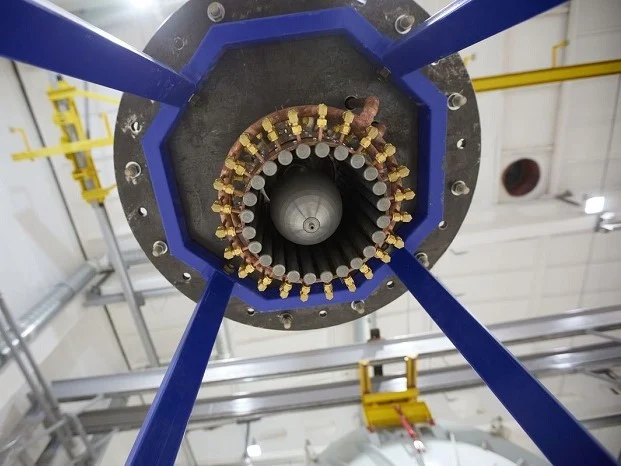
    The core of this advancement is a magnetic plasma accelerator that accelerates charged particles to speeds nearing 100 km/s (62 miles/s). This is a considerable upgrade from the 4.5 km/s (2.8 miles/s) speeds typical of standard chemical rockets. Junior researcher Egor Biriulin notes that thrust is generated through an electric propulsion system that incorporates two electrodes. When high voltage is applied, it causes the charged particles to generate a magnetic field, which pushes the engine forward.

    Future Testing

    Tests are set to take place at a cutting-edge facility in Troitsk, featuring a vacuum chamber that spans four meters wide and 14 meters long. This chamber is equipped with high-performance vacuum pumps and advanced heat removal systems designed to replicate the conditions found in deep space.

    One of the standout features of this plasma engine is its remarkable efficiency: the plasma does not need extensive heating, which helps prevent overheating of the engine components. Although traditional chemical rockets are expected to continue managing liftoff into orbit, this plasma engine is poised to take over for interplanetary journeys, potentially serving as the primary propulsion system for future space tugs that transport cargo between planets.

    Source:
    Link

  • Melted RTX 5090 Power Connector Due to Circuit Design Flaw

    Melted RTX 5090 Power Connector Due to Circuit Design Flaw

    Key Takeaways

    1. A user experienced a dead RTX 5090, initially thought to be user error due to third-party cables.
    2. Der8auer investigated and found severe burns on both connectors and cable shielding, indicating a serious issue.
    3. One cable was pushing nearly 260 Watts (22 Amperes) through a single wire, far exceeding the recommended 5-6 Amperes.
    4. Thermal images revealed a hot spot over 100 degrees near the PSU, suggesting potential for cable failure under extreme conditions.
    5. Caution is advised with power setups for the RTX 5090, and it’s too early to blame the hardware without further investigation from Nvidia.


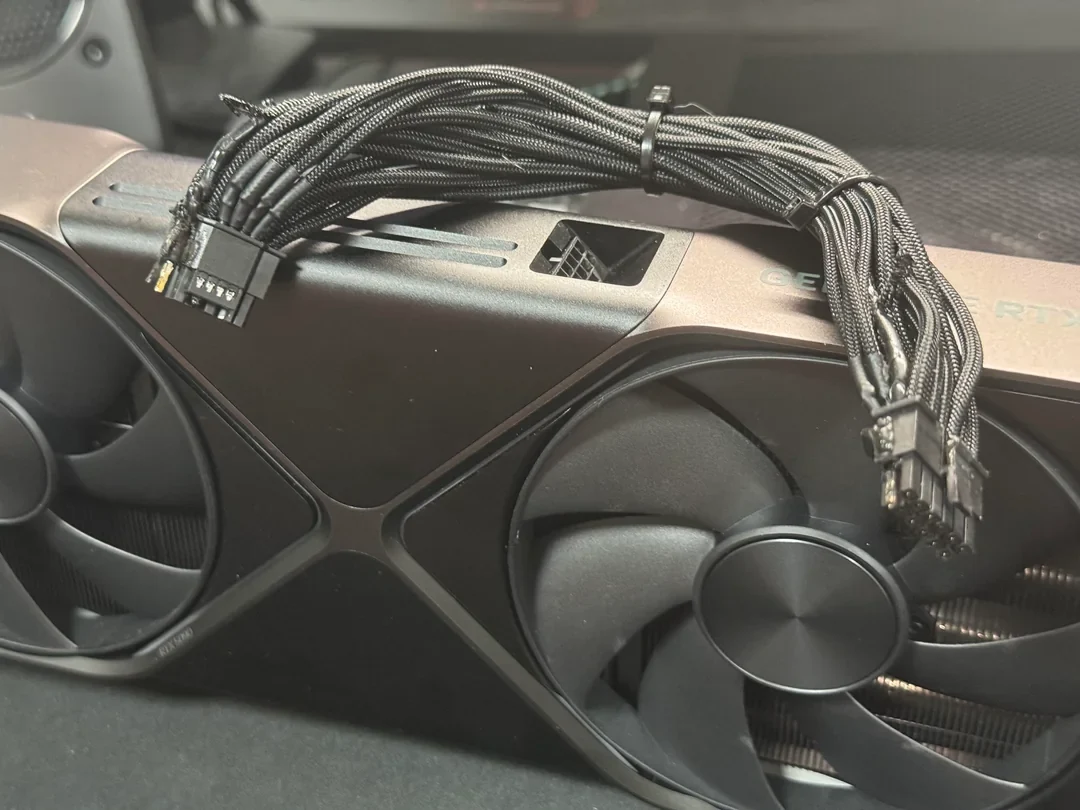
    Getting an RTX 5090 turned out to be quite a challenge, and for the few lucky ones who did get their hands on one, there was an unfortunate incident where a user ended up with an extremely costly piece of junk. Recently, on Reddit, one user shared their troubles with a dead RTX 5090, and many thought it was just a case of user fault since they were utilizing a third-party cable.

    A Deeper Investigation

    However, Der8auer connected with the user to check out the damaged GPU and its cables. His findings tell a completely different story. In a video he shared, you can see that both sides of the connectors were entirely burnt. The cable’s shielding also suffered burns from the intense current flowing through it. Notably, this issue occurred with just one wire on the 12V-2×6 cable, suggesting that it carried more current than the others.

    Shocking Power Draw

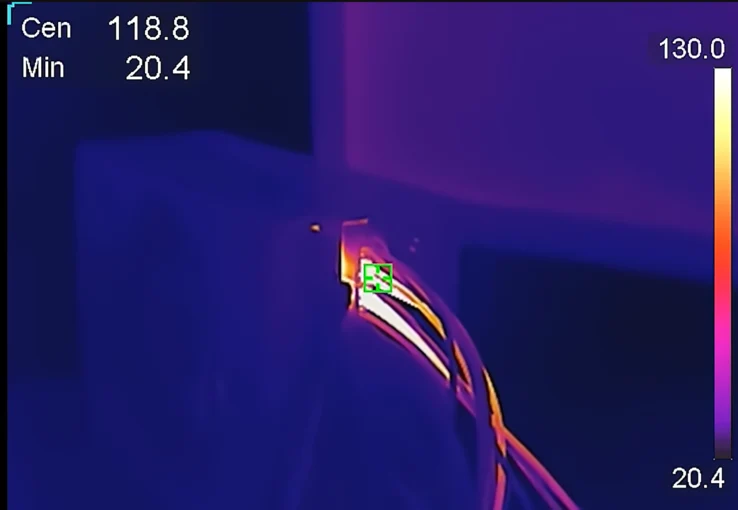
    Using a cable provided by Nvidia, Der8auer discovered that one cable was pushing nearly 260 Watts (22 Amperes) through a single wire, which is drastically higher than the advised range of 5-6 Amperes. Thermal images taken during the test confirmed the presence of a hot spot exceeding 100 degrees near the power supply unit (PSU). This indicates that any cable, even those supplied by the original equipment manufacturer (OEM), can fail under such conditions.

    Caution Advised

    While there may be real concerns regarding how the RTX 5090 draws power from the PSU, this is just one documented case, and it’s too soon to start blaming the hardware. Nvidia has not yet provided an official statement on the matter. It might take some time for them to respond, as they are likely preoccupied with addressing black screen problems that have arisen from a recent driver update.


  • Lenovo ThinkBook 16 G7: Over 24 Hours Battery Life with Qualcomm

    Lenovo ThinkBook 16 G7: Over 24 Hours Battery Life with Qualcomm

    Key Takeaways

    1. Microsoft Excel significantly enhances productivity across various sectors, leading to a demand for laptops designed for efficient number entry.
    2. The Lenovo ThinkBook 16 prioritizes productivity over premium features like high-quality speakers and bright displays.
    3. Strong CPU performance and impressive battery life are essential for productivity-focused laptops, which the Lenovo ThinkBook 16 excels in.
    4. Powered by the Qualcomm Snapdragon X Plus ARM processor, the laptop offers solid performance and energy efficiency, achieving over 24 hours of battery life.
    5. With a price starting well under $1,000, the Lenovo ThinkBook 16 is an affordable option for users who heavily rely on Excel for extended tasks.


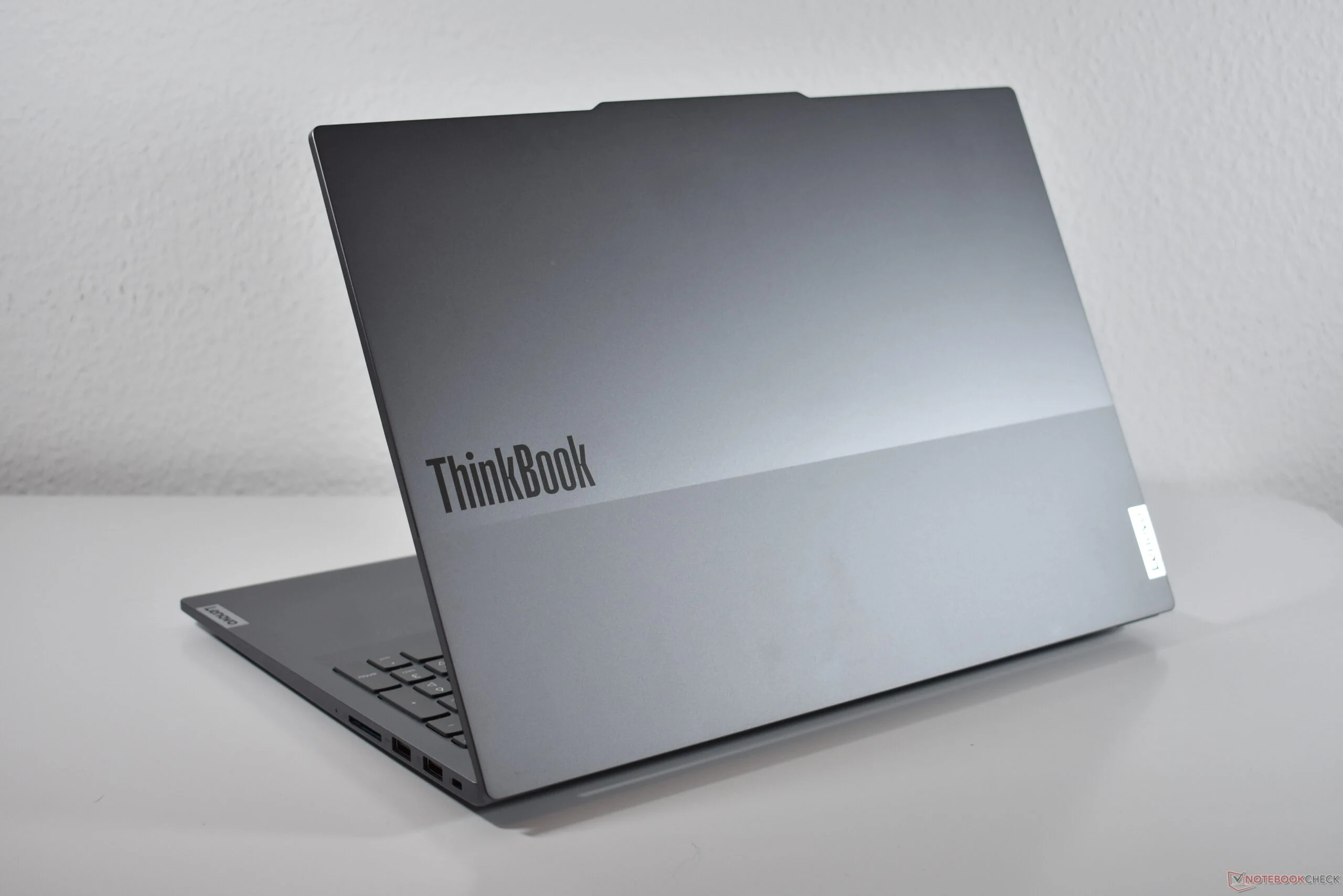
    Microsoft Excel plays a critical role in boosting productivity. Its extensive tables are vital for many sectors of the economy. This is why laptop makers focus heavily on this market, creating 16-inch laptops with a numeric keypad to speed up number entry.

    Overview of the Lenovo ThinkBook 16

    The Lenovo ThinkBook 16 perfectly represents this type of laptop. It’s clear from its design that it lacks certain features, such as high-quality speakers or a bright display with wide color range. These traits are not essential for a laptop aimed at productivity.

    Performance and Battery Life

    What’s crucial for such a device is strong CPU performance and impressive battery longevity. The Lenovo ThinkBook 16 Gen 7 QOY excels in both these aspects, as shown in our thorough evaluation.

    The laptop is powered by the Qualcomm Snapdragon X Plus ARM processor, which delivers solid performance, particularly evident during native benchmarks. Additionally, this chip is remarkably efficient: its low energy usage paired with a substantial 84 Wh battery allows the Lenovo laptop to achieve over 24 hours of battery life.

    Ideal for Extended Use

    This long battery life is perfect for extensive Excel tasks. Users can comfortably work a full day, even with extra hours, using the Lenovo ThinkBook 16 Gen 7 Qualcomm. Plus, it’s affordably priced, starting at well under $1,000 (available on Amazon). This laptop is ideal for those who prioritize efficiency and rely on Excel regularly.

    Source:
    Link

  • Lenovo ThinkPad T14s 2-in-1 Could Replace X13: Are 13-Inch Laptops Dying?

    Lenovo ThinkPad T14s 2-in-1 Could Replace X13: Are 13-Inch Laptops Dying?

    Key Takeaways

    1. Lenovo is introducing the ThinkPad T14s 2-in-1, marking the first convertible model in the ThinkPad T series in 20 years.
    2. The older ThinkPad X13 2-in-1 is being phased out in favor of larger 14-inch models, reflecting a market trend.
    3. The new ThinkPad X13 Gen 6 will still be available in clamshell form for fans of smaller laptops.
    4. The larger models offer benefits like a bigger touchpad, wider keyboard, and better cooling, but may be heavier and bulkier.
    5. The shift away from 13-inch models is seen in other brands, such as Asus discontinuing their 13-inch ZenBook laptops.


    Not long ago, there was a big leak regarding Lenovo’s PC lineup for the upcoming Mobile World Congress (MWC). This leak revealed a lot about Lenovo’s offerings for the Barcelona event in early March, including many new ThinkPad laptops, which are part of Lenovo’s business laptop series.

    New Model Introduction

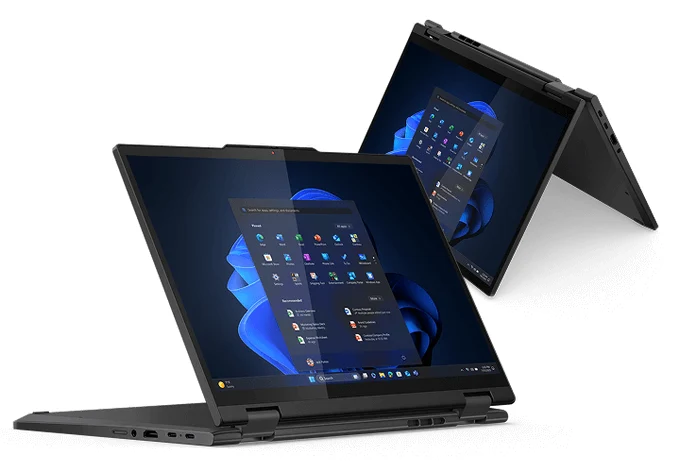
    One of the most exciting announcements is the Lenovo ThinkPad T14s 2-in-1. With this laptop, Lenovo appears to be introducing a convertible version of the ThinkPad T series for the first time in its 20-year history.

    Changes in Existing Models

    At the same time, it looks like an older model is being phased out. Previously, there was the Lenovo ThinkPad X13 2-in-1, which we recently reviewed as the X13 2-in-1 Gen 5, featuring a 13.3-inch display. This model is absent in the leak, suggesting that Lenovo is moving away from it in favor of the larger 14-inch option. This aligns with a broader trend in the market; for instance, Asus has also stopped producing ZenBook laptops with 13-inch displays, opting instead for 14-inch models.

    What’s Next for ThinkPad Fans

    Fortunately, Lenovo is not making such drastic changes. Those who prefer the smaller ThinkPads can be reassured that the leak also mentioned the new Lenovo ThinkPad X13 Gen 6, although only in its clamshell form. The removal of the convertible model would mark the end of a well-established tradition, as the first ThinkPad X series convertible launched back in 2005.

    The benefits of the larger model, aside from the increased screen size, include a more spacious touchpad and a wider keyboard, along with additional space for the cooling system and battery. However, this could lead to a larger overall size, and the weight of the Lenovo ThinkPad T14s 2-in-1 may also be greater compared to the X13 2-in-1.

    Source:
    Link

  • EndeavourOS 2025.02.08: Firefox 135, Dark Theme, Tweaks & Fixes

    EndeavourOS 2025.02.08: Firefox 135, Dark Theme, Tweaks & Fixes

    Key Takeaways

    1. EndeavourOS 2025.02.08 Mercury is based on Arch Linux and uses Linux kernel 6.13.1.arch2-1.
    2. The new ISO includes a memory test feature for EFI boot and resolves issues with BIOS/Legacy installations.
    3. A dark theme is now the default across multiple desktop environments: KDE Plasma, Gnome, Xfce, Mate, Budgie, and Cinnamon.
    4. Key packages have been updated, including automatic dark/light wallpaper settings in Gnome and a refreshed Xfce4 theme.
    5. Installation options include offline and online methods, requiring 15 GB disk space, with the online version offering more desktop environment choices.


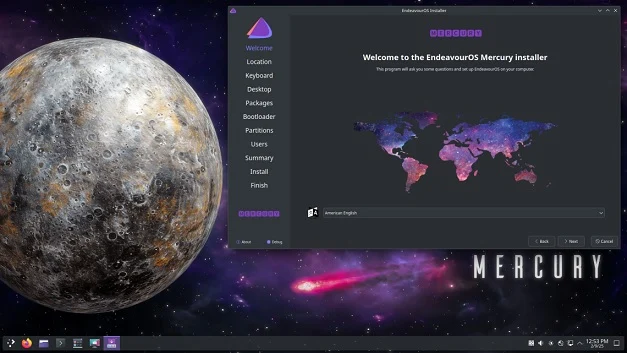
    EndeavourOS 2025.02.08 Mercury was officially presented yesterday, even though the version number hints at a release on February 8th. This distro, based on Arch Linux, utilizes the Linux kernel 6.13, or for those interested in specifics, 6.13.1.arch2-1. The latest ISO now includes a memory test feature for EFI boot, and any problems related to BIOS/Legacy installations have been resolved. Users can expect a dark theme by default across several desktop environments, including KDE Plasma, Gnome, Xfce, Mate, Budgie, and Cinnamon.

    Upgraded Packages and Themes

    Moreover, several key packages have been updated, and their version details are listed. Gnome now automatically sets both dark and light wallpapers, enhancing the user experience. The Xfce4 theme has also been refreshed to resemble the default Xfce layout more closely. Additionally, an issue within the installer that displayed duplicate entries in the EFI selection dropdown has been fixed.

    Installation Options and Requirements

    The ISO file can be downloaded from various mirrors located worldwide, which are accessible on the official page. Both offline and online installations require a disk space of 15 GB and a 64-bit dual-core processor. The offline installation needs only 3 GB of memory, while the online version requires 4 GB. A key benefit of the online installer is that it offers a wider selection of desktop environments—eight in total and one window manager, including Xfce, KDE Plasma, Gnome, Mate, Cinnamon, Budgie, lxQT, lxDE, and i3-wm, unlike the offline installer, which includes Calamares and KDE Plasma only.

    Source:
    Link

  • Lonestar Readies Freedom Lunar Data Center for Space Launch

    Lonestar Readies Freedom Lunar Data Center for Space Launch

    Key Takeaways

    1. Lonestar Data Holdings successfully tested its Freedom lunar data center with the Intuitive Machines IM-2 Athena lander in preparation for a SpaceX Falcon 9 mission in early 2025.

    2. The Freedom data center will provide Resiliency as a Service (RaaS), offering global data backup and recovery solutions while minimizing risks associated with Earth-bound disasters.

    3. The lunar data center will validate the operation of a physical facility on the moon, including tests like transmitting the song “Children of Sky” from the Starfield video game back to Earth.

    4. Additional testing will include edge computing applications, Delay Tolerant Networks (DTNs), and the use of an Automated Radiation Measurements for Aerospace Safety (ARMAS) sensor to monitor radiation levels.

    5. The solar-powered data center features innovative design elements, including 8 TB of solid-state storage, a PolarFire FPGA for processing, and an exterior created using 3D printing technology by architect Bjarke Ingels.


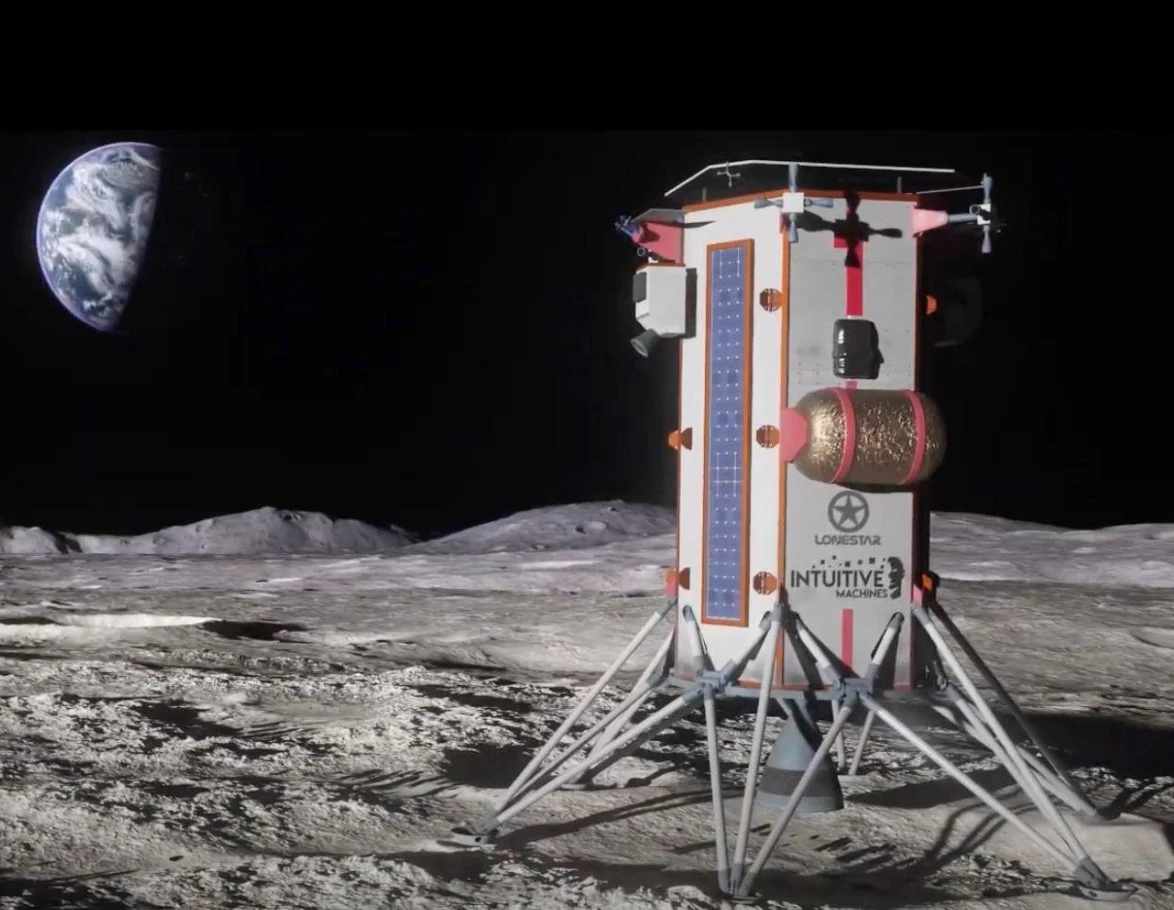
    Lonestar Data Holdings has completed a successful test connecting its Freedom lunar data center with the Intuitive Machines IM-2 Athena lander. This integration is part of the preparations for a SpaceX Falcon 9 mission scheduled for the first quarter of 2025, which aims to deploy the first physical data center on the moon. Interested viewers can check out Lonestar’s presentation video available online.

    Advancing Resiliency as a Service

    The Freedom data center is set to introduce Resiliency as a Service (RaaS) for clients on Earth, offering global data backup and recovery solutions. By situating data centers on the moon, the risks associated with natural disasters, theft, and conflicts on Earth can be significantly minimized.

    Testing Capabilities from Lunar Surface

    The first data center will serve to validate the functionality of operating a physical facility on the moon for data storage and various enterprise needs, including non-disclosure agreement clients. Among the tests planned, the center will transmit the song “Children of Sky” from the popular Bethesda video game Starfield back to Earth. Gamers can enjoy the song by accessing the game, which is available for Xbox on Amazon.

    Exploring Additional Applications

    Additional applications related to edge computing will also undergo testing. Delay Tolerant Networks (DTNs) will be examined as part of a project by Vint Cerf and the Solar System Internet initiative. An Automated Radiation Measurements for Aerospace Safety (ARMAS) sensor will be utilized to gather real-time data on radiation levels affecting the data center. Understanding this information is vital, as high-energy radiation in space can severely damage electronics and data storage devices without adequate shielding.

    Innovative Design and Specifications

    The solar-powered facility will be cooled naturally and equipped with 8 TB of Phison solid-state storage. The Freedom data center will utilize a PolarFire FPGA for processing tasks at the edge. Its exterior, made using 3D printing technology, was designed by renowned Danish architect Bjarke Ingels from BIG.

    Lonestar Data Holdings, Lonestar Data Holdings press release, Liberty Ventures on YouTube

    Lonestar’s Data Center is primed for lunar deployment: Intuitive Machines and Lonestar finalize testing and installation of the data center payload.

    Source:
    Link