Category: Computers

  • Baseus Unveils 100W Fast Charging Power Bank with Dual Cables

    Baseus Unveils 100W Fast Charging Power Bank with Dual Cables

    Key Takeaways

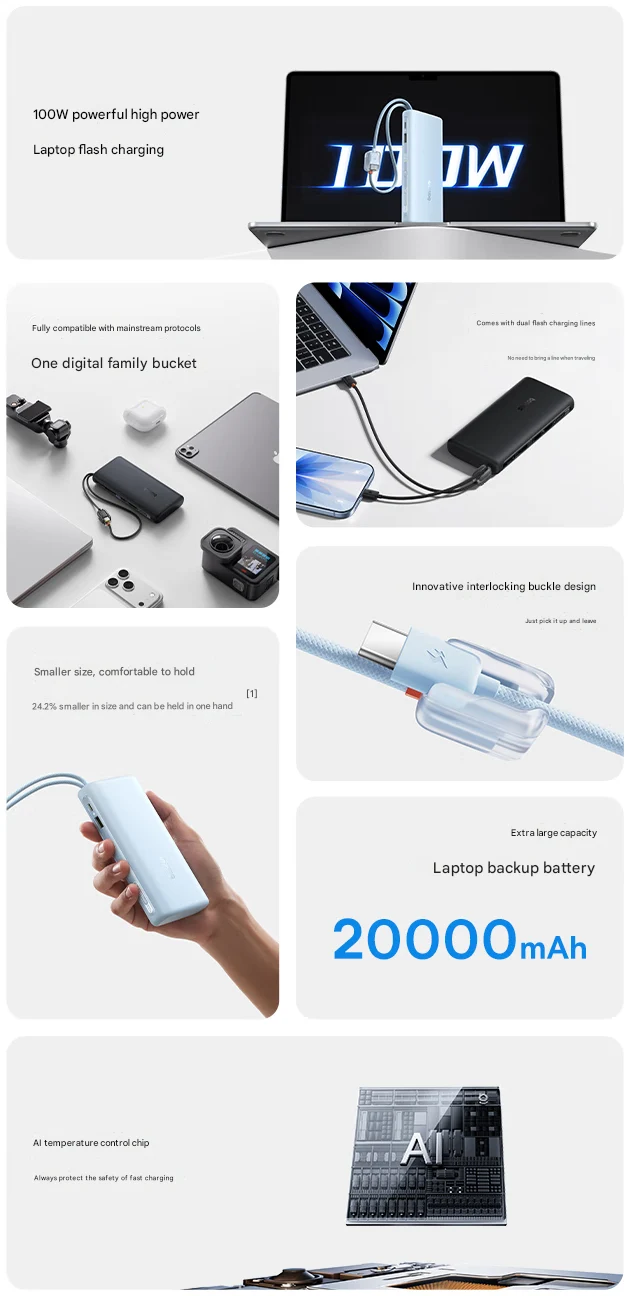
    1. The Baseus EnerFill FC41 power bank has a large capacity of 20,000mAh, capable of charging laptops and demanding devices.
    2. It supports multiple charging protocols, including SCP, AFC, FCP, QC, PD, UFCS, and PPS, making it compatible with a wide range of devices.
    3. The power bank features fast charging capabilities, delivering 100W output, and can charge a 13-inch MacBook Air to 36% in just 30 minutes.
    4. It includes dual built-in USB-C cables, allowing for the simultaneous charging of four devices and a design that prevents cable tangling.
    5. The EnerFill FC41 is compact, 24.2% smaller than typical chargers of its capacity, and is priced at CNY 199 (about $28), with a global release expected soon.


    Baseus has launched a new power bank in China, named the EnerFill FC41. It features a substantial battery capacity of 20,000mAh, which enables it to charge laptops and other power-hungry gadgets. Additionally, it supports a variety of charging protocols.

    Compatibility and Charging Protocols

    Baseus highlights that this power bank is compatible with numerous charging standards, including SCP, AFC, FCP, QC, PD, UFCS, and PPS. Such extensive compatibility means it can be used with almost any device, even low-powered items like earbuds.

    Quick Charging Capabilities

    The power bank is also designed for fast charging. It supports 100W fast charging, allowing it to charge a 13-inch MacBook Air to 36% in merely 30 minutes. Another significant feature of the EnerFill FC41 is its dual built-in USB-C cable.

    This unique design increases the travel-friendliness of the fast-charging power bank compared to standard portable chargers. With the addition of two extra ports, the built-in Type-C cables enable the EnerFill FC41 to charge four devices simultaneously. Moreover, Baseus has incorporated a buckle design to prevent the integrated cables from getting tangled or dangling.

    Design Features and Price

    Regarding its design, Baseus claims that this new 100W power bank is 24.2% smaller than typical portable chargers with similar capacity. It’s also said to be lightweight enough for users to easily hold it with one hand.

    Among the other impressive features of the cost-effective 20,000mAh power bank are an AI temperature control chip, a built-in digital display, and 65W self-charging support (Baseus 100W charger currently priced at $29.97 on Amazon). The EnerFill FC41 is priced at CNY 199, approximately $28, in China. There’s no information on a global release yet, but it is expected to make an international appearance soon.

    Source:
    Link


  • Ohio State Researchers Transform Shiitake Mushrooms into Memory Cells

    Ohio State Researchers Transform Shiitake Mushrooms into Memory Cells

    Key Takeaways

    1. Researchers at Ohio State University converted shiitake mushrooms into memory cells using an Arduino microcontroller.
    2. The mushrooms were cultivated, dehydrated, and their mycelium networks were utilized to store electrical charges as memristors.
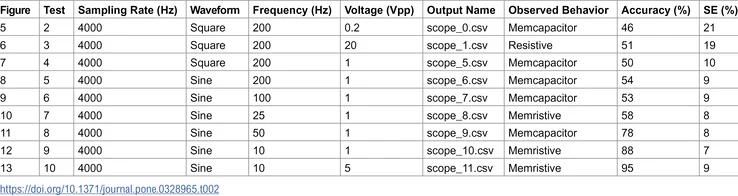
    3. Testing showed the mushrooms’ memory performance varied, achieving accuracy rates of 46 to 95 percent depending on conditions.
    4. Fungal memristors produce less waste than traditional silicon memory and are safer for disposal.
    5. DIY enthusiasts can create their own mushroom storage devices using an Arduino UNO R4 and dried shiitake mushrooms.


    Researchers from Ohio State University have managed to convert shiitake mushrooms into memory cells, all controlled by an Arduino microcontroller board. This innovative study received partial funding from the Honda Research Institute.

    Growing the Mushrooms

    Initially, the researchers cultivated four large shiitake mushrooms from spores using a culture designed for fast growth. After a week of exposure to direct sunlight, they then dehydrated the mushrooms into round discs.

    Creating the Memory Circuit

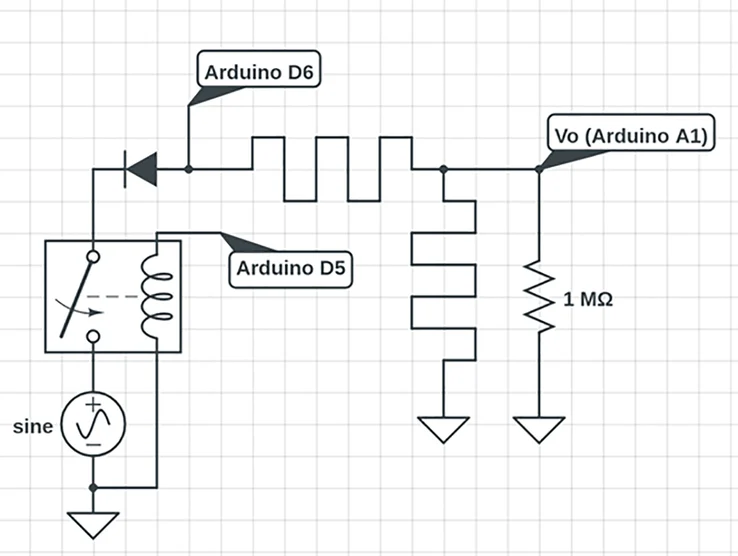
    To make a basic voltage test memory circuit, an Arduino UNO microcontroller board was utilized along with some simple wires, resistors, and additional components. The team took advantage of the conductive mycelium networks found within the porous structure of the fungi, allowing them to conduct and store electrical charges, which enabled the mushrooms to function as memristors or non-volatile memory cells. Once two mushrooms were linked together and rehydrated with a light mist of aerosolized deionized water, testing commenced to activate their memristor abilities.

    Testing the Performance

    During the tests, the Arduino board generated square or sine wave voltages to be applied to the mushrooms, while their state was monitored at a baud rate of 56k. The accuracy of the readouts varied between 46 to 95 percent, depending on the waveform type, voltage, frequency, and other factors, with the best results coming from a 10Hz 5V sine wave. The researchers also examined single read/write operations, yielding results between 88 and 96 percent.

    The fungal memristors generated significantly less waste compared to conventional silicon-based memory and can be disposed of safely without contributing toxic waste to landfills. However, since the system was observed for less than two months, the durability of the data stored in the mushrooms remains uncertain.

    DIY Opportunities

    For those curious about creating their own shiitake mushroom storage device at home, an Arduino UNO R4 and a pack of dried shiitake mushrooms are available for purchase on Amazon. Additionally, fans of Star Trek can explore another application of mycelium networks by watching Star Trek: Discovery, where the Spore Drive is featured.

    Sustainable memristors from shiitake mycelium for high-frequency bioelectronics are now a reality!

    Source:
    Link


  • Aaeon Boxer Fanless Mini PC: 5 Ethernet Ports, 96GB Memory

    Aaeon Boxer Fanless Mini PC: 5 Ethernet Ports, 96GB Memory

    Key Takeaways

    1. Aaeon launched the Boxer-6649-RAP, an industrial mini PC with 13th Gen Intel Raptor Lake processors.
    2. The mini PC supports up to 96 GB of DDR5 RAM and includes multiple storage options (one M.2 slot and one 2.5″ drive bay).
    3. It features five Ethernet ports and operates without a fan, making it suitable for quiet environments.
    4. The Boxer-6649-RAP is priced at $1,345 for the basic model, targeting industrial applications rather than budget consumers.
    5. An alternative option is the Minisforum UM880 Plus, priced around $518 for more consumer-friendly needs.


    Aaeon has introduced a new product in the realm of industrial mini PCs called the Boxer-6649-RAP. This mini PC is equipped with the 13th Gen Intel Raptor Lake processors and features an impressive array of connectivity, including five Ethernet ports.

    Processor and Memory Options

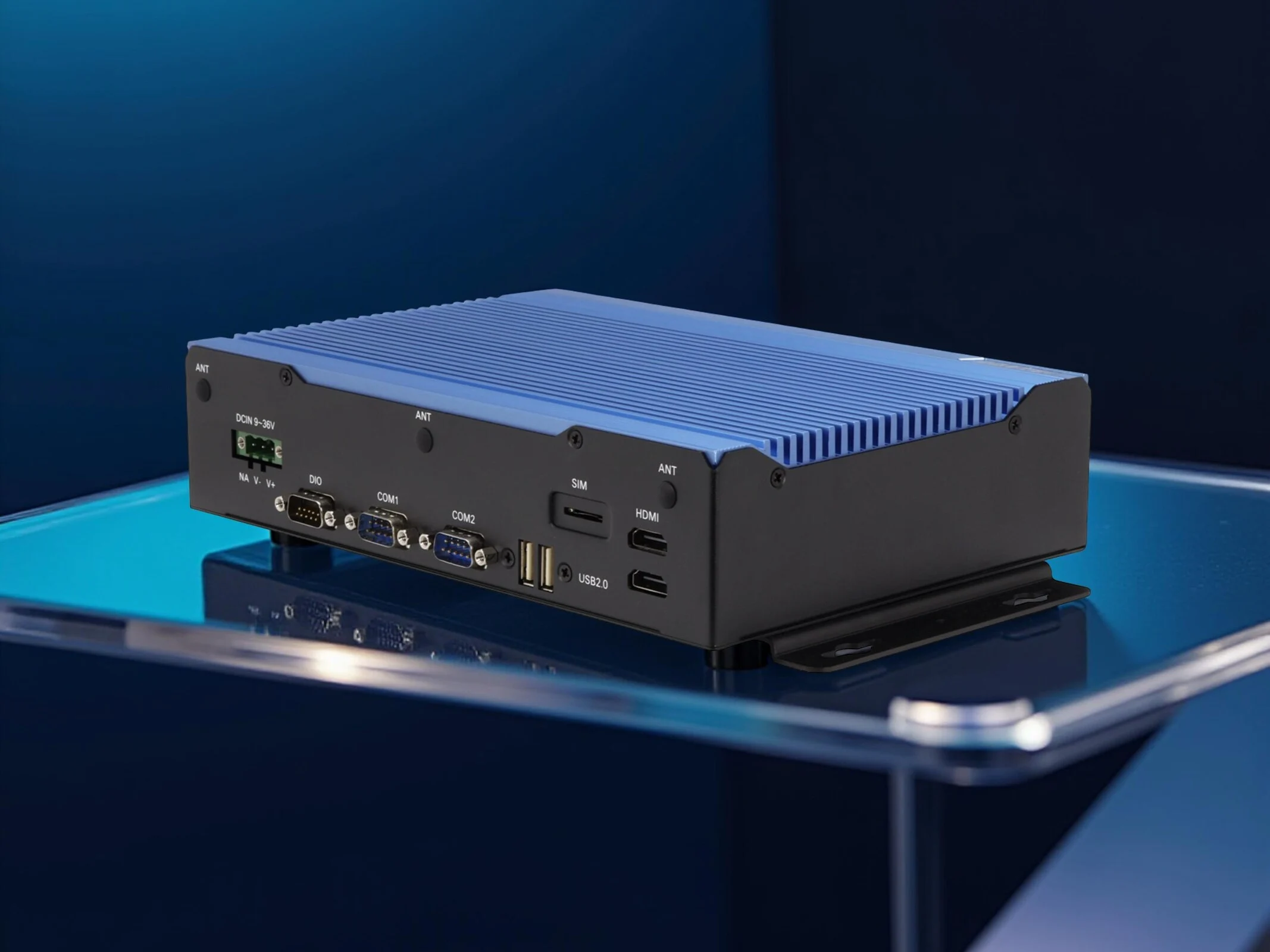
    The processor choices are restricted to 28W CPUs from the Raptor Lake lineup. This includes the 8-core Intel Core i3-1320PE, the 12-core Core i5-1340PE, and the 14-core Core i7-1370PE options. The device has two SODIMM slots that can support a maximum of 96 GB of DDR5 RAM. For storage, it offers one M.2 2280 slot and a 2.5″ drive bay. Weighing in at 2.26 liters, this mini PC operates without a fan, making it ideal for quiet use in sensitive settings. Here’s a list of the ports included:

    No GPU Options and Pricing

    As expected due to its compact and fanless design, there are no options for separate graphics cards. The Boxer mini PC is priced at $1,345 for the basic model, which suggests it’s not aimed at the budget-conscious buyer. This device is mainly designed for industrial applications, such as real-time analysis of video streams, and it is currently available for sale on Aaeon’s official online store.


  • xFusion FusionXSpark AI Mini-PC with Nvidia GB10 SoC Launch

    xFusion FusionXSpark AI Mini-PC with Nvidia GB10 SoC Launch

    Key Takeaways

    1. Nvidia DGX Spark has prompted OEMs like Dell, MSI, and xFusion to reveal new products, including the xFusion FusionXSpark.
    2. The FusionXSpark features a compact design with dimensions of 150 mm x 150 mm x 50 mm and weighs 1.2 kg.
    3. It is powered by the Nvidia GB10 SoC, featuring a 20-core CPU, a GPU with 6,144 CUDA cores, 128 GB RAM, and storage options from 1 TB to 4 TB.
    4. Customization options include personalized signatures and ambient lighting, but software support is limited to Nvidia’s DGX OS.
    5. Pricing for the FusionXSpark is not disclosed, but it is expected to be similar to Nvidia’s DGX Spark model, which costs around $4,000.


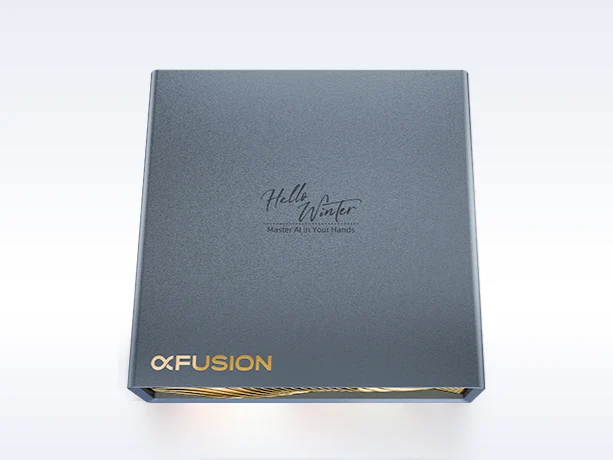
    With the release of Nvidia DGX Spark, numerous original equipment manufacturers (OEMs) have begun to showcase their offerings. Major companies like Dell and MSI have already unveiled their products, and now smaller brands, such as xFusion, are joining in. The xFusion FusionXSpark features the same design as other DGX Spark systems, boasting a chassis size of 150 mm x 150 mm x 50 mm and weighing in at 1.2 kg.

    Specifications and Performance

    In terms of specifications, it runs on the Nvidia GB10 SoC, which has a 20-core CPU and a GPU equipped with 6,144 CUDA cores. The RAM is set at 128 GB, while storage options vary from 1 TB to 4 TB. The I/O options include a 10 Gb/s Ethernet connection, four USB-C 4.0 ports, an Nvidia ConnectX port for linking multiple FusionXSpark units, and an HDMI 2.1a port.

    Customization Features

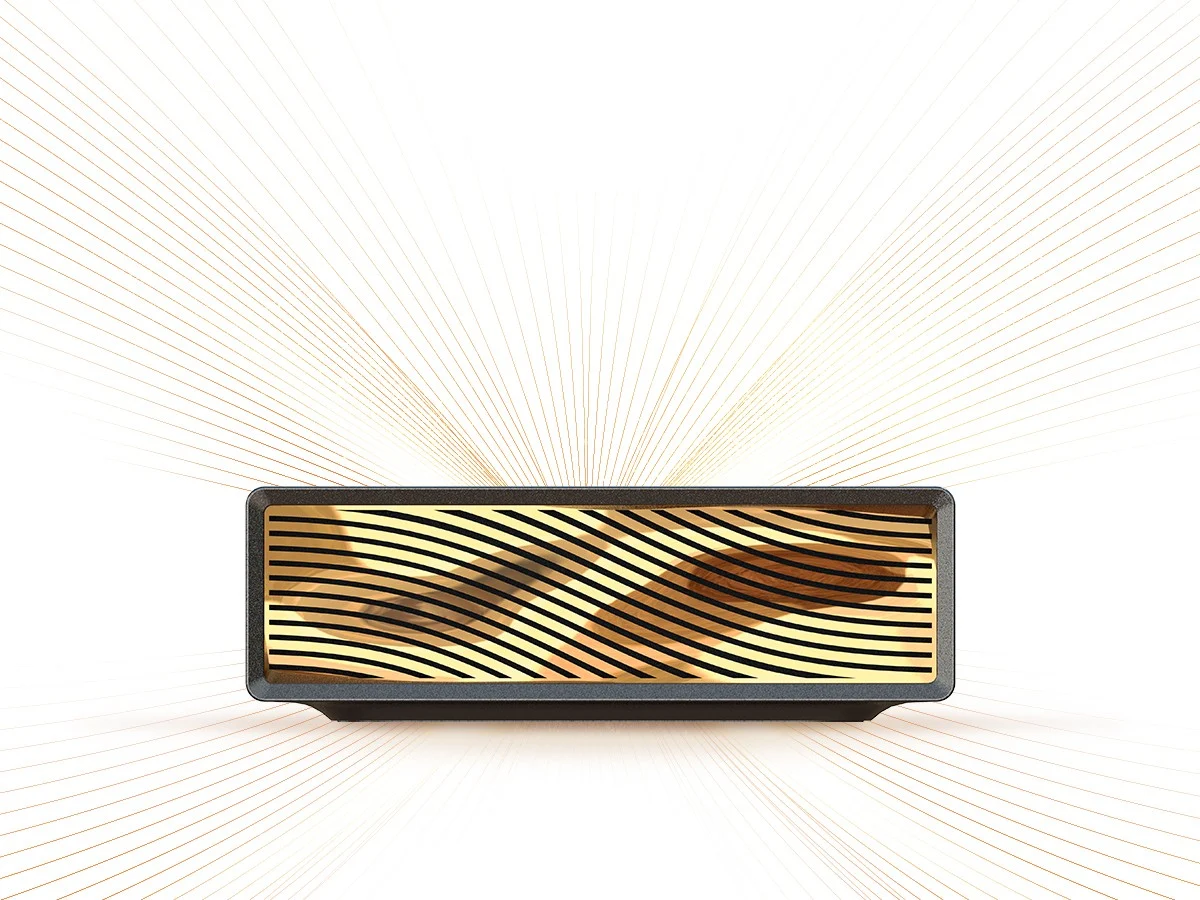
    What sets the FusionXSpark apart from its competitors are the customization choices available to users. Customers can personalize their units with a unique signature and ambient lighting, enhancing the aesthetic appeal of their AI machine. However, the software aspect is not as flexible, with operating system support limited to Nvidia’s DGX OS.

    xFusion has not disclosed the exact price for the FusionXSpark, and interested buyers will need to reach out to their sales team for that information. Nvidia’s DGX Spark model is priced at approximately $4,000, so it’s reasonable to expect that the pricing for similar models will be in the same ballpark.


  • High Core Temperatures Slow Down HP ZBook X G1i 16 Performance

    High Core Temperatures Slow Down HP ZBook X G1i 16 Performance

    Key Takeaways

    1. The 2025 ZBook G1i 16 replaces the 2024 ZBook Power 16 G11, featuring new Intel and Nvidia processors while keeping the same chassis design.

    2. The Core Ultra 7 265H processor reaches high temperatures, peaking at 104 C during performance testing, indicating potential cooling issues.

    3. The processor’s clock speed drops from 3.6 GHz to 3 GHz to manage temperature, highlighting limitations in the cooling system.

    4. For users seeking better performance, the thicker ZBook Fury G1i 16 offers superior cooling and faster processors compared to the sleeker G1i 16.

    5. The ZBook G1i 16 is ideal for users who prioritize a slim design, whereas performance-oriented users may prefer the ZBook Fury model.


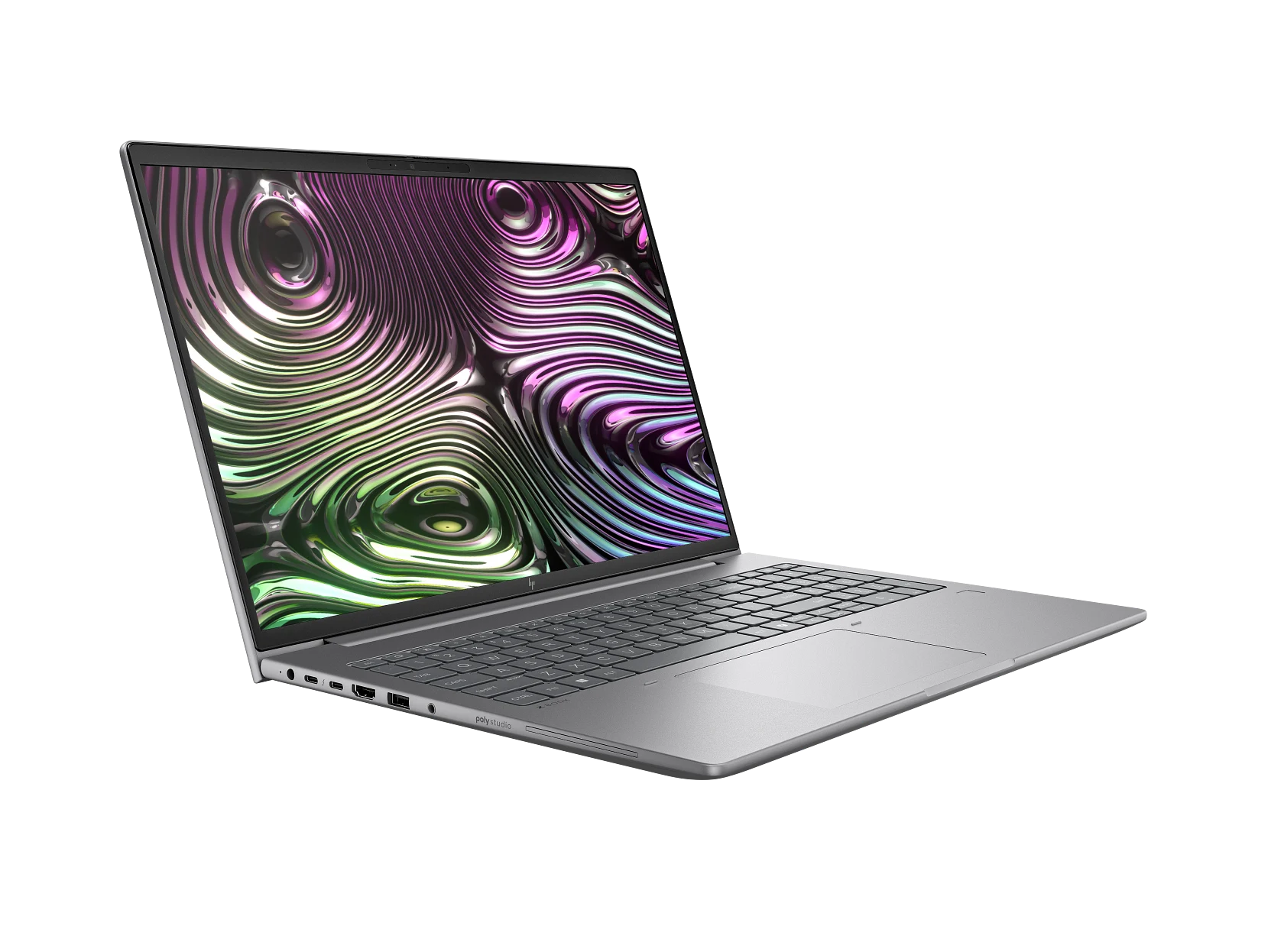
    The 2025 ZBook G1i 16 has taken the place of the 2024 ZBook Power 16 G11, featuring new processor choices from Intel and Nvidia. Although the shift in name might appear significant, both models maintain the same chassis design and physical attributes. The new CPU, in particular, could have performed even better if the system had come with a more powerful cooling system.

    Performance Testing

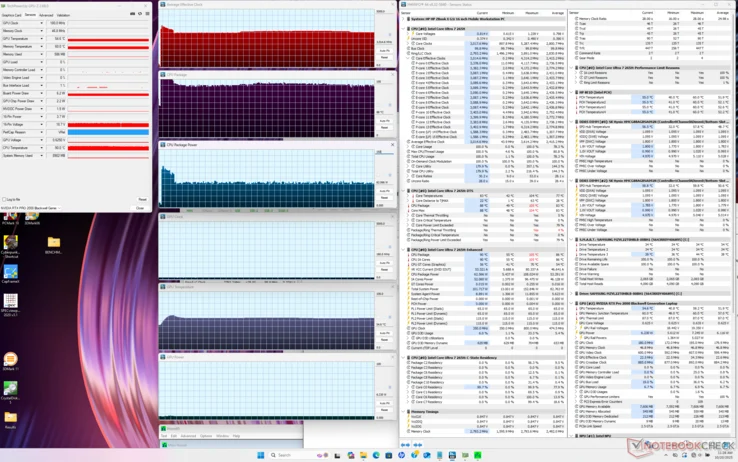
    In our tests with Prime95 on the ZBook G1i 16, the Core Ultra 7 265H processor quickly reached a concerning 104 C, while averaging a clock speed of 3.6 GHz and a power consumption of 108 W. Soon after, it would drop down to 3 GHz and 66 W to keep the core temperature at a more manageable 90 C. Ideally, maintaining the higher 3.6 GHz clock speed for longer periods at a cooler temperature would have been preferable, particularly for an H-series laptop. However, it seems the cooling system is being pushed to its limits with the Arrow Lake-H processor.

    Options for Performance Seekers

    HP does provide the thicker and heavier ZBook Fury G1i 16, which boasts superior cooling and faster Arrow Lake-HX processors, making it a better option compared to the sleeker ZBook G1i 16. Hence, those who are serious about performance might want to consider upgrading to the ZBook Fury, while the ZBook G1i 16 caters to users who prefer a slimmer design over maximum Turbo Boost capabilities.


  • ESA Swarm Discovers Rapid Change in Earth’s Magnetic Field

    ESA Swarm Discovers Rapid Change in Earth’s Magnetic Field

    Key Takeaways

    1. Swarm has achieved the longest uninterrupted magnetic field measurement from space since its launch in November 2013.
    2. The South Atlantic Anomaly is expanding and now covers an area comparable to continental Europe.
    3. A region southwest of Africa is experiencing a rapid decline in magnetic strength, raising concerns since 2020.
    4. Areas of stronger magnetic fields have been identified in the southern hemisphere and two locations in the northern hemisphere, with varying strengths over time.
    5. Understanding the Earth’s magnetic field is crucial for space safety as it protects us from cosmic radiation and solar particles.


    Since it launched in November 2013, Swarm has been observing the Earth’s magnetic field. This satellite constellation is made up of three identical satellites. It has now set a new record for the longest uninterrupted magnetic field measurement from space.

    Discoveries About the South Atlantic Anomaly

    The satellite constellation has uncovered new information regarding the South Atlantic Anomaly, a region where the Earth’s magnetic field is considerably weak. Swarm’s observations indicate that this weak area has been steadily expanding from 2014 to 2025, growing to a size comparable to continental Europe.

    Notable Weakening in Another Region

    While the expansion of this weak area is alarming, Swarm also identified a different region southwest of Africa that has shown an even faster decline in magnetic strength. This area has seen a more rapid decrease in the Earth’s magnetic field since 2020, raising further concerns.

    Areas of Stronger Magnetic Strength

    Swarm’s data also highlighted regions with stronger magnetic fields. The southern hemisphere has one such area, while the northern hemisphere has two—one near Canada and another around Siberia. Over time, the magnetic field in Siberia has intensified, while the one in Canada has diminished.

    The information gathered by Swarm is vital for scientists as they seek to comprehend the Earth’s magnetic field more thoroughly. With this data, they can explore the reasons behind the variations in magnetic strength in specific locations. The Earth’s magnetic field plays a crucial role in shielding us from cosmic radiation and charged particles emanating from the Sun, making its understanding essential for space safety. These findings have been shared in the journal Physics of the Earth and Planetary Interiors.


  • Blackview GamiBook 8: 16-inch Laptop with AMD Ryzen 7 & 32GB RAM

    Blackview GamiBook 8: 16-inch Laptop with AMD Ryzen 7 & 32GB RAM

    Key Takeaways

    1. Blackview has launched a new laptop, the GamiBook 8, priced starting at $779, with additional shipping and import costs.
    2. The laptop features a 16-inch IPS display with a resolution of 1920 x 1200 pixels and a brightness of up to 330 nits.
    3. It is powered by an AMD Ryzen 7 7735HS processor, with options for 16GB or 32GB of DDR5 RAM, upgradeable to 64GB.
    4. Storage options include a built-in M.2 2280 SSD of either 512GB or 1TB, and it has multiple connectivity ports including USB Type-C and HDMI.
    5. The GamiBook 8 operates on Windows 11, has a 1MP webcam, a 57Wh battery with 65W fast charging, and a design that allows the display to open fully to 180 degrees.


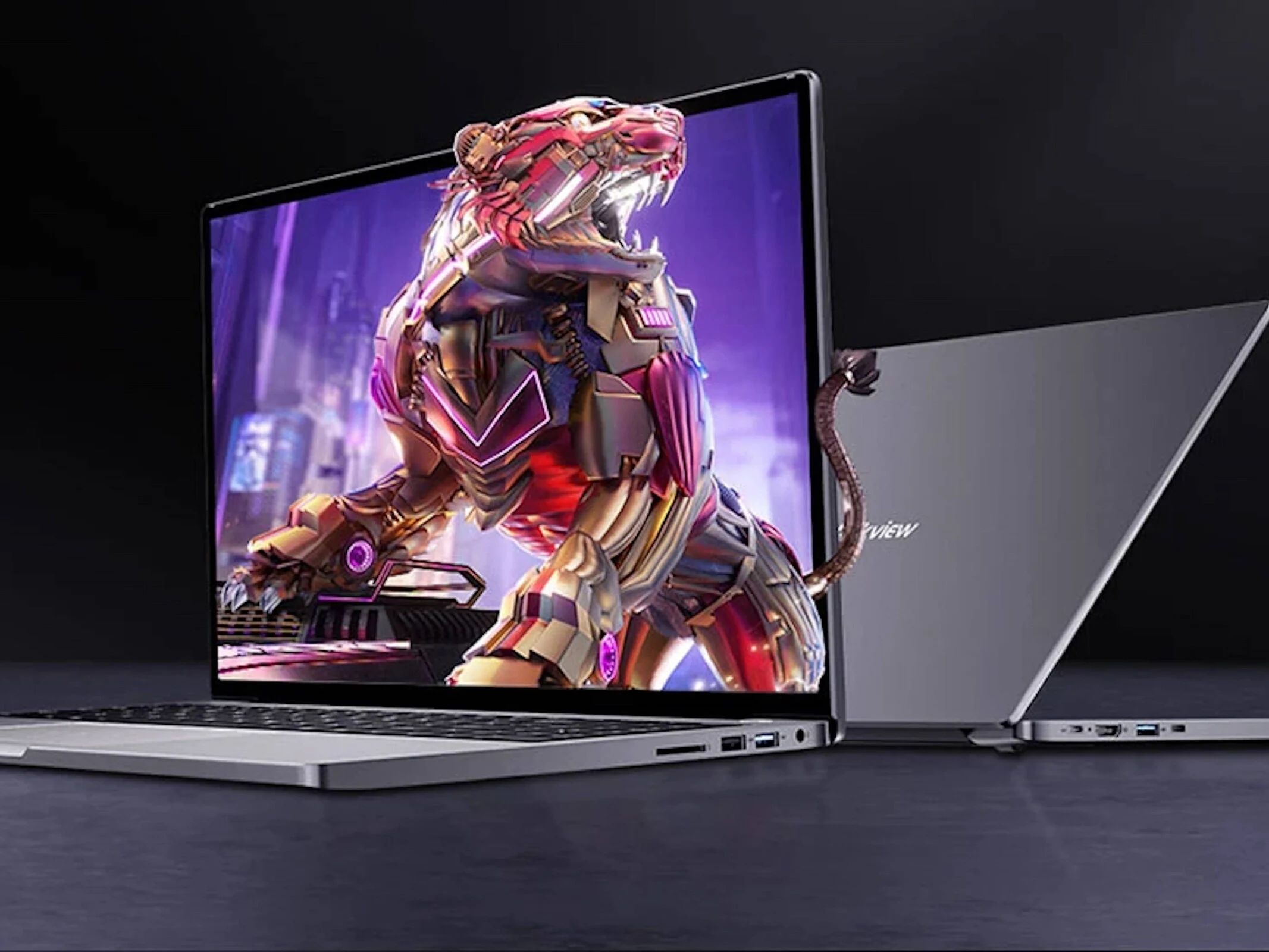
    The brand Blackview is widely recognized for its tough smartphones and tablets, but they have now introduced a new laptop named the GamiBook 8. This device can be purchased through the official Blackview online store, with prices starting at $779. Additional costs for shipping, taxes, and possible import duties will apply, and navigating warranty claims for defects could prove to be challenging.

    Specifications and Design

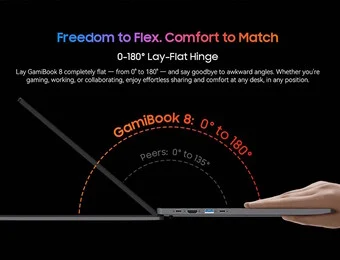
    This laptop has a weight of nearly 4 lbs and dimensions of approximately 14.2 x 9.6 x 0.75 inches. It features a 16-inch IPS display boasting a resolution of 1920 x 1200 pixels and can reach brightness levels of up to 330 nits. Blackview claims a screen-to-body ratio of 88%, and the hinge allows the display to open fully to 180 degrees, making it flat on surfaces like tables.

    Performance and Connectivity

    Under the hood, the GamiBook 8 is driven by an AMD processor, specifically the AMD Ryzen 7 7735HS. It comes with options of either 16GB or 32GB DDR5 RAM, which can be upgraded to 64GB after the initial purchase. The built-in M.2 2280 SSD provides storage capacities of either 512GB or 1TB, with two USB Type-C ports available for connecting external storage. Other connectivity features include HDMI 2.1, USB 2.0, USB 3.2 Gen 1, and an SD card slot. Additionally, the 16-inch Blackview laptop features a 1MP webcam, a 57Wh battery that supports 65W fast charging, and it operates on Windows 11 right out of the box.

    Conclusion

    In conclusion, Blackview’s GamiBook 8 offers a solid combination of performance and design for users looking for a new laptop option. With its competitive pricing and range of features, it might be worth considering for anyone in the market for a new device.


  • iVanky Launches 23-in-1 Thunderbolt 5 Docking Station for Triple Monitors

    iVanky Launches 23-in-1 Thunderbolt 5 Docking Station for Triple Monitors

    Key Takeaways

    1. iVanky’s FusionDock Max 2 is priced at $399.99, with a discount code bringing it to $366.98, making it competitive in the market.
    2. The dock features 23 connectivity ports, including three Thunderbolt 5 ports, an HDMI 2.0 port, and various USB ports.
    3. It is designed specifically for Apple Silicon MacBooks and does not support Intel-based Macs or Windows computers.
    4. Only MacBook models with M1 Max, M2 Max, or M3 Max chips can support triple-monitor setups; others are limited to fewer displays.
    5. The dock can supply up to 140 W of power for charging, suitable for a 16-inch MacBook Pro, and includes a built-in fan for cooling.


    iVanky has introduced a new Thunderbolt 5 docking station aimed at creative professionals and serious multitaskers. The FusionDock Max 2 offers more connection options than the Anker Prime Docking Station and the CalDigit TS5, all while being priced similarly.

    Pricing and Availability

    Customers can find the FusionDock Max 2 on Amazon for $399.99. By applying the code PRIORITY10, the price drops to $366.98, making it a more budget-friendly choice compared to its rivals. However, it’s important to note that, unlike the earlier FusionDock Pro 3, this version is specifically designed for Apple Silicon MacBooks (along with Mac Studio and Mac mini) and will not work with Intel-based Macs or Windows computers.

    Connectivity Features

    In contrast to many Thunderbolt 5 docks, the FusionDock Max 2 connects to the host via two Thunderbolt 5 ports. This setup allows for a total of 23 connectivity ports, which include three downstream Thunderbolt 5 ports for external displays, SSDs, and other high-speed peripherals. Additionally, it features an HDMI 2.0 port, five 10 Gbps USB-C ports, one 10 Gbps USB-A port, three 5 Gbps USB-A ports, three USB 2.0 ports, dual 3.5 mm audio jacks, optical audio, a 2.5 Gbps LAN port, and SD/TF 4.0 slots.

    Display Output Limitations

    It’s important to mention that while the dock supports triple-monitor setups, only MacBook models equipped with M1 Max, M2 Max, or M3 Max chips can handle three external displays. MacBooks with Apple Pro chips (as well as the base M4) can only support dual 6K displays at 60 Hz, while base models of M1, M2, and M3 are limited to just one external display at 6K and 60 Hz.

    Power Specifications

    On the power side, the dock can supply up to 140 W to the host, which is sufficient for charging a 16-inch MacBook Pro with M4 Max, in addition to 30 W via USB-C for smartphones or other devices. The dock’s design features an aluminum body with a floating style and includes a built-in fan to keep it cool, even during demanding tasks.


  • Intel Panther Lake Leak Unveils New iGPU Naming Scheme

    Intel Panther Lake Leak Unveils New iGPU Naming Scheme

    Key Takeaways

    1. Intel’s new Panther Lake processors have unknown names, with leaks suggesting Core Ultra X9 388H and Core Ultra X7 358H models.
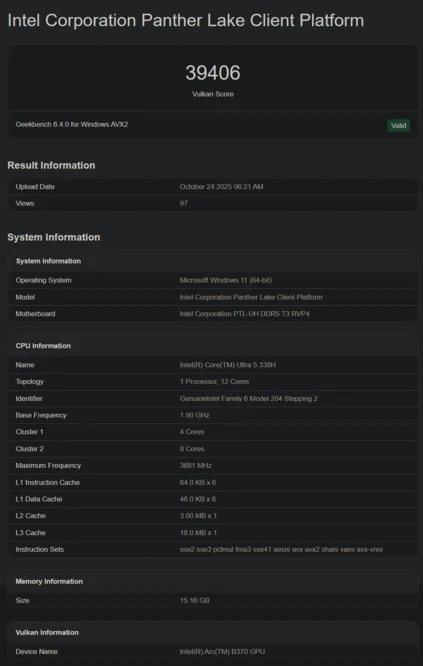
    2. The Core Ultra 5 338H has been identified on Geekbench, featuring a new integrated GPU called Arc B370.
    3. The Arc B370 GPU scored 39,406 on Geekbench’s Vulkan benchmark, showing a 45% performance increase over the previous Arc 130V.
    4. Intel claims a 50% performance improvement for integrated GPUs in the Panther Lake series.
    5. The Core Ultra 5 338H is noted to have 12 CPU cores arranged in a two-cluster configuration, with suggestions of a mix of P-cores, E-cores, and LPE-cores.


    Even though Intel has shared a lot about its new Panther Lake processors, the actual names of these chips are still unknown. So far, leaks have pointed to at least two models: Core Ultra X9 388H and Core Ultra X7 358H. Now, we are getting our first look at a non-X version.

    Core Ultra 5 338H Appears

    The Core Ultra 5 338H has been spotted on Geekbench with a brand-new integrated GPU: Arc B370. The name might be misleading since the “B” suggests it is built on the Xe2 Battlemage design rather than the Xe3 Alchemist. It’s also possible that Geekbench has mistakenly identified the GPU in what looks to be an early version of a laptop.

    Performance Insights

    Regardless, the Arc B370 achieved a score of 39,406 in Geekbench’s Vulkan benchmark. For comparison, the previous Arc 130V managed a score of 27,209 in the same test, indicating that the new chip is around 45% faster. This is quite close to Intel’s claimed 50% performance improvement for iGPUs in Panther Lake.

    Additional Specifications

    Finally, the listing reveals that the Core Ultra 5 338H features a total of 12 CPU cores. Geekbench categorizes it as a two-cluster configuration in an 8+4 arrangement. Nonetheless, an earlier leak suggested it would combine 4 P-cores, 4 E-cores, and 4 LPE-cores, which seems more likely.


  • MSI Launches New Mid-Range Mini PC with 10-Core Intel CPU

    MSI Launches New Mid-Range Mini PC with 10-Core Intel CPU

    Key Takeaways

    1. MSI has introduced the Cubi 5 1M mini PC, powered by Intel Core 100U processors, targeting budget-conscious customers with moderate needs.
    2. The Cubi 5 1M features Intel Core 3 100U, Core 5 120U, and Core 7 150U processors, with the top-tier models offering 10 cores and 12 threads.
    3. Benchmark results show the Core 7 150U is comparable to a Ryzen 5 7530U, while the Core 3 100U performs similarly to a Ryzen 5 5560U but is 30% slower than the Core 7.
    4. The mini PC supports up to 64 GB of DDR5-5200 memory and has storage options via an M.2 2280 slot and a 2.5-inch drive bay.
    5. The Cubi 5 1M is compact at 0.83 liters, with pricing details yet to be announced.


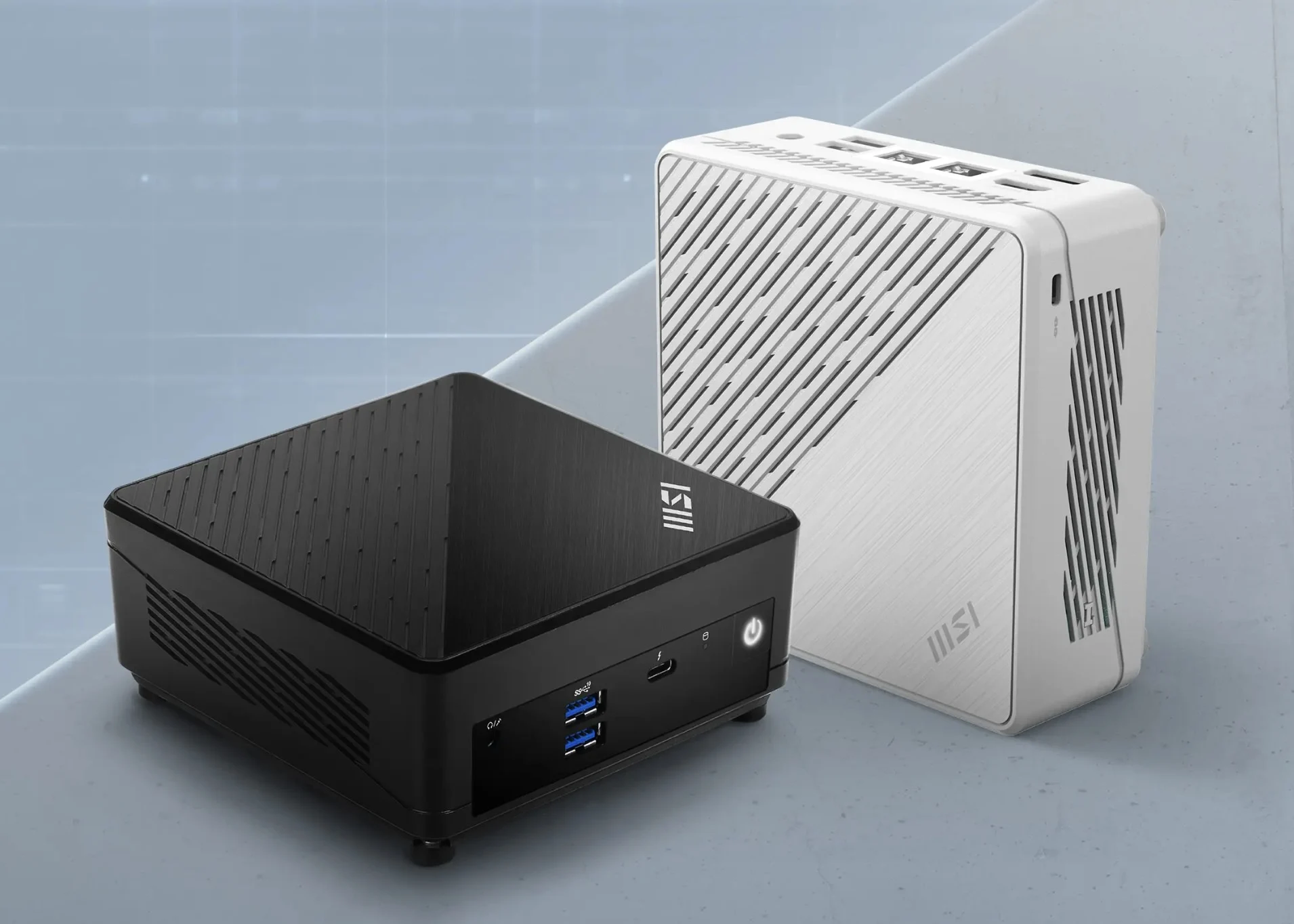
    Just a couple of days ago, MSI unveiled the AMD-powered Cubi Z AI 8M mini PC. Now, the company has introduced another mini PC under the Cubi name, called the Cubi 5 1M. This new mini PC is powered by Intel Core 100U processors and aims to provide good performance for customers who are budget-conscious and have moderate needs.

    Technical Specs

    The Cubi 5 1M mini PC will feature the Intel Core 3 100U, Core 5 120U, and Core 7 150U processors. The top-tier Core 7 150U and Core 5 120U both come with 10 cores and 12 threads, while the Core 3 100U offers 6 cores and 8 threads. Benchmark results suggest that the Core 7 150U is comparable in power to a Ryzen 5 7530U. On the flip side, the lower-end option is expected to perform similarly to a Ryzen 5 5560U, but it falls about 30% behind the Core 7 150U.

    Performance Overview

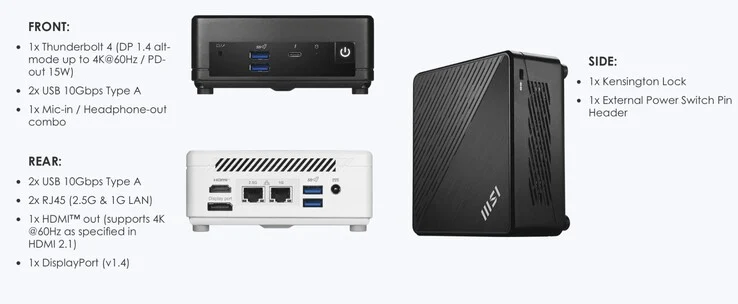
    Simply put, the Raptor Lake-U chips should handle light office tasks and media consumption quite well, but users with more demanding computational needs might want to consider higher-end systems, like the Minisforum UM880 Plus (currently priced at $518 on Amazon). The Cubi 5 mini PC can support up to 64 GB of DDR5-5200 memory, while storage is managed through an M.2 2280 slot and a 2.5-inch drive bay. The connectivity options available are as follows:

    Weighing in at just 0.83 liters, the MSI Cubi 5 1M mini PC is very compact. The pricing details are currently not disclosed, but more information should be released soon.

    Conclusion

    MSI’s latest launch, as highlighted by TechPowerUp, keeps expanding the Cubi line of mini PCs.