Category: Artificial intelligence

  • Microsoft Boosts Copilot AI with Personalized Podcasts and More

    Microsoft Boosts Copilot AI with Personalized Podcasts and More

    Key Takeaways

    1. Customized Podcasts: Copilot can generate personalized podcasts based on user interests, enhancing entertainment and learning through audio.

    2. Deep Research Capability: The AI can perform in-depth research and tackle complex questions step-by-step, similar to human reasoning, using various web sources.

    3. Real-Time Assistance: Copilot offers real-time help by observing users’ environments, aiding Windows users with desktop management, file organization, and task completion.

    4. Memory and Personalization: With user permission, Copilot remembers past conversations and personalizes experiences, offering summaries, reminders, and suggestions.

    5. Task Management Features: The new Actions feature allows Copilot to assist with booking flights, making reservations, and other tasks to simplify users’ lives.


    Microsoft has made enhancements to its Copilot AI chatbot, adding new features that boost its capability to respond to inquiries, entertain users, and retain all the information it has discussed.

    Customized Podcasts and Deep Research

    Now, Copilot can generate tailored podcasts based on users’ personal interests and topics, which is great when someone wants to be entertained or learn through audio. The AI is also equipped to perform in-depth research, meaning it can handle complex questions by working through issues step-by-step, similar to how a human might approach them. It uses information from various sources on the web and its ability to mix different answers together to produce useful reports.

    Real-Time Assistance for Users

    For those using mobile devices, the AI can observe the user’s environment in real-time, helping to answer questions. Windows users get an extra benefit as the AI can view their desktop, assisting them in adjusting settings, managing files, searching for information, and engaging with content to help users complete tasks and projects.

    Remembering Conversations and Personalization

    Copilot is now capable of remembering every chat and interaction, with the user’s permission, along with all relevant information. This feature enables the AI to create pages that summarize personal thoughts and notes on various discussions and projects. Users are also able to personalize the AI’s avatar for a more customized experience.

    Moreover, the chatbot can automatically provide reminders and suggestions based on what it has learned about the user’s life. This includes the ability to search for deals on items that users wish to purchase. The new Actions feature allows the AI to handle tasks like booking flights and making dinner reservations for the user.

    Microsoft Copilot is available for free on the Windows 11 operating system, Edge web browser, smartphone apps, and online platforms. Readers who are unfamiliar with using Copilot can check out a guide available on Amazon before trying the AI chatbot on any computer that runs Windows 11, such as the Surface Laptop Copilot+ PC available on Amazon.

    Source:
    Link
  • Microsoft 365 Copilot Introduces AI Agents for Business Tasks

    Microsoft 365 Copilot Introduces AI Agents for Business Tasks

    Key Takeaways

    1. Microsoft introduced two new AI reasoning agents, Analyst and Researcher, to its 365 Copilot service for business users.
    2. These AI agents can perform tasks similar to entry-level data analysts and business consultants, offering 24/7 virtual assistance.
    3. Microsoft 365 Copilot enhances efficiency by accessing corporate emails, data, and approved external sources to generate reports and analyze metrics.
    4. The Analyst agent uses a customized version of OpenAI o3-mini to evaluate data and create reports, while the Researcher agent focuses on advanced research and search functionalities.
    5. Access to these AI agents requires a subscription to Microsoft 365 Copilot, costing $30 per month in addition to a qualifying Microsoft 365 plan.


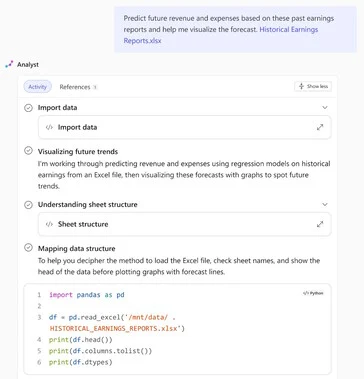
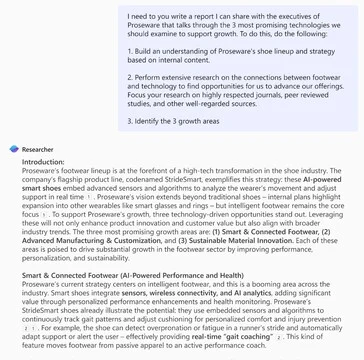
    Microsoft has introduced two fresh AI reasoning agents to its 365 Copilot service – Analyst and Researcher. These agents carry out tasks akin to those performed by entry-level data analysts and business consultants, leveraging cutting-edge large language models (LLMs).

    Benefits for Business Users

    Business users can take advantage of virtual assistants that are accessible around the clock, which could potentially perform tasks quicker and at a reduced cost compared to human assistants. However, it’s important to note that users must still verify the work produced by these AI agents.

    Features of Microsoft 365 Copilot

    Microsoft 365 Copilot is a service designed for businesses that employs AI across its features to enhance efficiency. This service has the capability to access corporate emails, data, and files, as well as approved external data sources. The new AI agents can tap into all this information to respond to prompts, assess company metrics, and create reports.

    Details on the AI Agents

    The Analyst AI agent uses a tailored version of OpenAI o3-mini, equipped with Python programming skills to evaluate corporate data. It can summarize its discoveries in reports, complete with figures and visuals. Each action is tracked, and all references are connected, enabling users to confirm the results.

    On the other hand, the Researcher AI agent employs a modified version of OpenAI o3 that comes with enhanced research abilities, along with integration into 365 Copilot and advanced search functionalities. Recent progress in AI technologies allows chatbots to address intricate issues by utilizing both internal and external business data, producing well-structured reports. Users can offer feedback and additional prompts to enhance the report quality.

    Subscription Information

    To access these agents, a subscription to Microsoft 365 Copilot is necessary, costing $30 per month in addition to a qualifying Microsoft 365 plan. Readers interested in exploring the various features of Microsoft 365 and Copilot can find more information in this book available on Amazon.

    Source:
    Link


  • OpenAI Launches Accessible “Ghibli” Image Generator for All Users

    OpenAI Launches Accessible “Ghibli” Image Generator for All Users

    Key Takeaways

    1. OpenAI’s new image generator resembles Studio Ghibli art and is now available to all users, but free users are limited to three creations daily.

    2. The “Ghibli” trend has emerged on social media, with users creating and sharing “Ghibli-fied” versions of portraits, causing a spike in image generation requests.

    3. There is ongoing debate about copyright issues related to AI-generated images, with concerns about the legality of using copyrighted material for training models.

    4. Privacy experts have raised concerns that OpenAI may collect high-quality image data through this trend, but this remains speculative.

    5. Some users have faced errors related to copyright issues when generating images, while others continue to share their creations without problems.


    OpenAI has released its new image generator, which has already made headlines for resembling the art from Studio Ghibli. Now, this feature is accessible to all users on the platform.

    Although the company has not made an official statement, a previous post on X by CEO Sam Altman hinted that free users will be limited to three image creations each day.

    The Ghibli Trend

    Since its launch in March, the image generator has sparked the current “Ghibli” phenomenon on social media, where users are posting “Ghibli-fied” versions of their portraits or others’ because, well, why not?

    This trend has gained so much popularity that Altman commented on their “GPUs are melting” due to the overwhelming number of requests for image generations.

    Legal Discussions Around AI

    This surge has led to a fascinating debate online regarding copyright issues and AI responsibilities when it comes to potential infringements.

    In an interview with TechCrunch, intellectual property attorney Evan Brown mentioned that the generator functions in “a legal grey area.” You can’t take legal action for someone copying a style, but you can pursue a case against the use of copyrighted material to train image generation models. This matter is currently hotly contested in courts, as the question of whether training models with copyrighted content falls under fair use is still unresolved.

    Privacy Concerns

    Some privacy experts have speculated that this could be OpenAI’s strategy for collecting high-quality image data. However, it’s still just a theory at this point. If you decide to join the trend, be sure not to share any personal details or images.

    A number of users on Reddit have mentioned encountering error messages indicating that GPT could not produce the images “due to copyright and intellectual property concerns.” However, these reports seem to vary, as many others continue to share their Ghibli-inspired images across social media platforms.

    Source:
    Link

  • Raspberry AI Cuts Costs with Virtual Fashion Photoshoots

    Raspberry AI Cuts Costs with Virtual Fashion Photoshoots

    Key Takeaways

    1. Cost and Time Efficiency: Raspberry AI’s platform reduces costs and time by eliminating the need for real models, locations, and products in fashion photography.

    2. Background Generator: The new Background Generator allows users to create customized backgrounds in seconds, enhancing creativity and minimizing travel emissions.

    3. On-Body Visualization: This feature enables designers to style garments on AI-generated models, facilitating immediate feedback and adjustments without the need for real models.

    4. 3D Avatar to Photorealism: Users can transform avatar images into realistic models, allowing for customization in pose, clothing fit, and attitude.

    5. High-Quality Imagery: Despite the push for AI-generated content, the importance of capturing high-quality images with professional equipment remains essential for some creatives.


    Raspberry AI has introduced three exciting features to enhance its online platform for generating fashion lifestyle photography. The software eliminates the need for real models, locations, or products, significantly cutting down costs, licensing fees, and the time associated with traditional photoshoots that require booking models and sites.

    New Background Generator

    One of the new features is the Background Generator, which addresses the time-consuming task of finding suitable locations for fashion photography. Since the hours of sunlight are limited, it can be challenging to get the right outdoor shots. However, this feature allows creatives to create any background they imagine in just seconds for virtual photoshoots, day or night. Users just enter a description of the desired background, and the AI produces the visuals. This not only saves time but also reduces the environmental impact by cutting down on travel emissions to real locations.

    On-Body Visualization for Designers

    The service already enables designers to quickly render realistic clothing and luxury items from sketches, eliminating the need for expensive prototypes. They’ve now added the On-Body Visualization feature, which allows garments to be styled on AI-generated models that can be posed however the user wants. This means no more expenses related to hiring real models or dealing with their breaks for meals and rest. Designers can instantly see how their clothing designs look and fit on bodies, which helps in making quick design adjustments.

    3D Avatar to Photorealism Feature

    The third feature introduced is the 3D Avatar to Photorealism option. This capability transforms any avatar image, like those made with the Clo 3D garment design software, into lifelike models that resemble real humans. Users can modify these virtual models in terms of pose, clothing fit, and even the attitude they convey.

    For fashion creatives who prefer working with real people and locations for their photoshoots, it’s important to capture high-quality images. A professional camera, such as this Canon model available on Amazon, can ensure that the best possible photos are taken.

    Raspberry AI Expands Its Gen-AI Platform for Fashion Creatives with New Tools for Creating Visual Marketing Content

    Source:
    Link


  • Musk’s xAI Acquires X for $33 Billion in Stock Deal

    Musk’s xAI Acquires X for $33 Billion in Stock Deal

    Key Takeaways

    1. Elon Musk’s AI firm xAI acquired X for $33 billion, valuing the company at $45 billion after accounting for $12 billion in debt.
    2. X has over 600 million active users and has seen an increase in stock price since its launch in 2006.
    3. xAI, founded in 2023, aims to “understand the universe” and its Grok AI is now among the top three AI models globally.
    4. xAI received $6 billion in Series C funding, allowing for an upgrade of their supercomputer, Colossus, to 200,000 Nvidia Hopper GPUs.
    5. The acquisition may change how Grok accesses public data on X, raising concerns for users about the potential use of their data by AI.


    Elon Musk’s AI firm, xAI, has bought X for $33 billion in a deal entirely made with stock. This amount reflects a valuation of $45 billion, taking into account $12 billion in debt. In 2022, Musk acquired Twitter for $44 billion in cash, later rebranding it to X.

    User Engagement and Growth

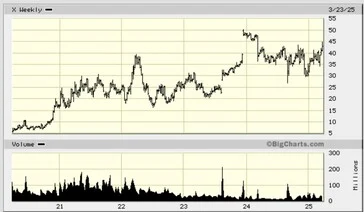
    Musk pointed out that X boasts more than 600 million active users and remains a favored site since its debut in 2006. The stock price of the company has also seen an increase in recent years.

    Milestones for xAI

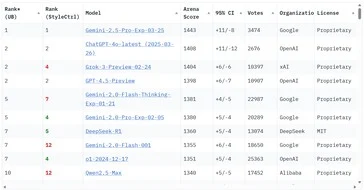
    Founded in 2023 with private funding, xAI aims to “understand the universe.” Its Grok AI has surged up the Chatbot Arena Leaderboard, now ranking among the top three AI models globally. Grok was developed on a supercomputer named Colossus, which features 100,000 Nvidia Hopper GPUs.

    In December 2024, the company secured $6 billion in Series C funding from a variety of investors such as Blackrock, Kingdom Holdings, Morgan Stanley, and Sequoia Capital. This influx of capital will enable xAI to upgrade Colossus to a 200,000 Nvidia Hopper GPU supercomputer.

    Implications for Data Access

    Currently, Grok has the ability to access public posts on X, and the recent acquisition may alter the data access for xAI’s AI, as Musk said, “Today, we officially take the step to combine the data, models, compute, distribution and talent.” Users worried about the permanent use of their X data by AI might want to consider switching to alternative social media networks and deleting their X accounts.

    For those interested in exploring new applications with the open-source Grok AI model, a powerful Nvidia GPU is available for purchase on Amazon.

    Source:
    Link


  • DeepSeek Launches Enhanced V3 AI Model Just 3 Months After Release

    DeepSeek Launches Enhanced V3 AI Model Just 3 Months After Release

    Key Takeaways

    1. DeepSeek introduced the DeepSeek-V3-0324, an updated version of its V3 AI large-language model with improved performance and reduced hardware requirements.
    2. The V3 model is a non-reasoning AI designed for quick answers, featuring 685 billion parameters, making it one of the largest publicly available LLMs.
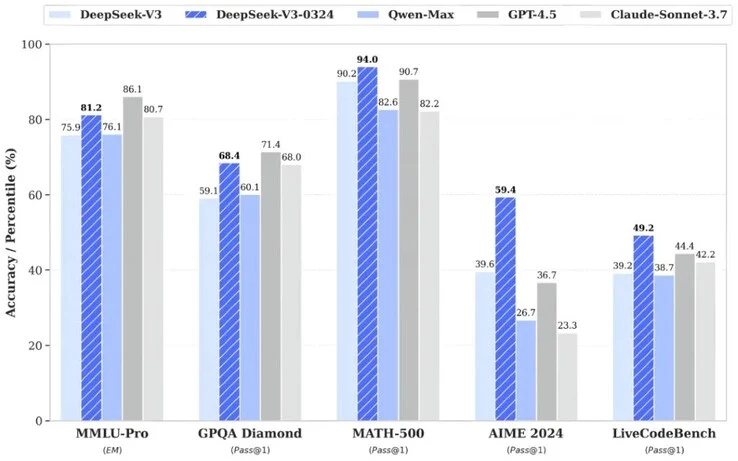
    3. The updated model scored between 5.3% and 19.8% higher on AI benchmarks compared to its predecessor, competing well with other AIs like GPT-4.5 and Claude Sonnet 3.7.
    4. Enhanced capabilities include improved web page design, user interface creation for online games, and better skills in Chinese searching, writing, and translating.
    5. To run the full DeepSeek-V3-0324 model, users need 700 GB of storage and Nvidia A100/H100 GPUs, while smaller versions can operate on a single Nvidia 3090 GPU.


    DeepSeek, a Chinese artificial intelligence firm, has introduced the DeepSeek-V3-0324, an updated iteration of its V3 AI large-language model (LLM), which was first unveiled in December 2024. This V3 model astonished many due to its significantly reduced hardware needs for training, quicker training durations, and lowered API expenses, while still delivering high performance compared to rival AIs like OpenAI’s GPT models.

    Key Features of the V3 Model

    The revised V3 model is classified as a non-reasoning AI, which means it focuses on providing quick answers without taking extra time to ponder complex issues, in contrast to DeepSeek’s R1 model. With a massive size of 685 billion parameters, it ranks among the largest publicly accessible LLMs. Users can leverage the latest model under the MIT License.

    DeepSeek-V3-0324 has shown improvements, scoring between 5.3% and 19.8% higher on AI benchmarks compared to the previous V3 version. Its performance stands alongside other leading AIs, including GPT-4.5 and Claude Sonnet 3.7.

    Enhanced Capabilities

    The updated model brings several enhancements. One notable upgrade is its enhanced ability to design attractive web pages and user interfaces for online games. Additionally, its skills in searching, writing, and translating in Chinese have seen significant improvements.

    For those interested in testing the complete 685B DeepSeek-V3-0324, it is necessary to have at least 700 GB of available storage and several Nvidia A100/H100 GPUs. However, smaller and distilled versions of the model can be operated on a single GPU, like the Nvidia 3090 (available for purchase on Amazon).

    Source:
    Link


  • Amazon Introduces Interests AI for Personalized Shopping Tips

    Amazon Introduces Interests AI for Personalized Shopping Tips

    Key Takeaways

    1. Amazon has launched Interests AI, an assistant that finds products based on user-described interests.
    2. The AI uses a language model to convert detailed user descriptions into targeted product searches.
    3. Users can create and customize multiple prompts to refine their product searches.
    4. Interests AI operates 24/7, automatically notifying users of new products that match their criteria.
    5. Access to the Interests feature is currently available to a select group of US users, with broader availability expected soon.


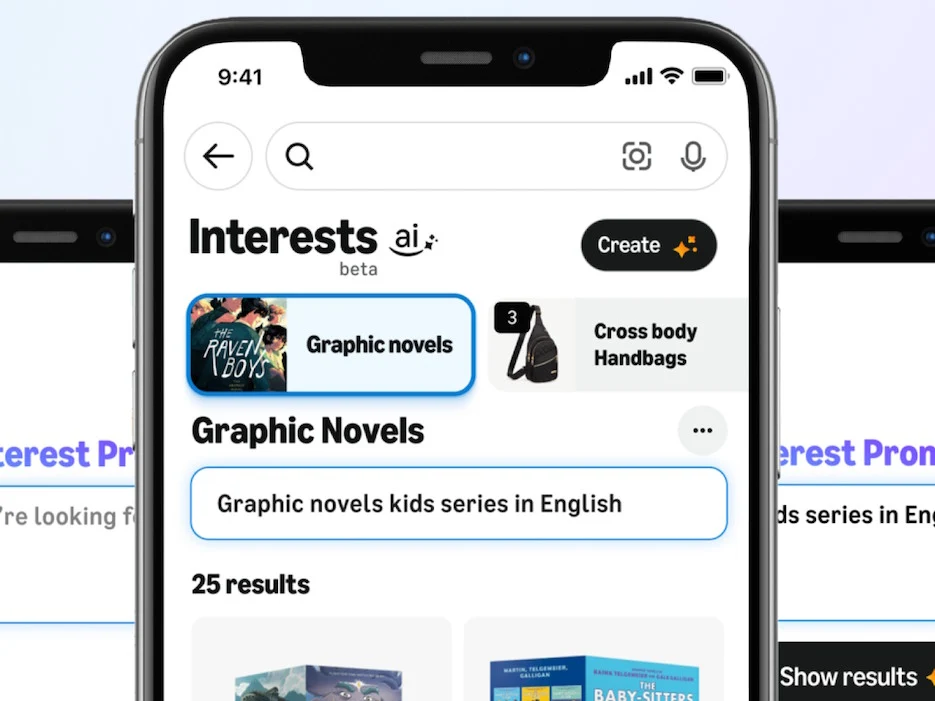
    Amazon has introduced its Interests AI, a clever assistant that automatically looks for new products based on what users describe as their interests.

    How It Works

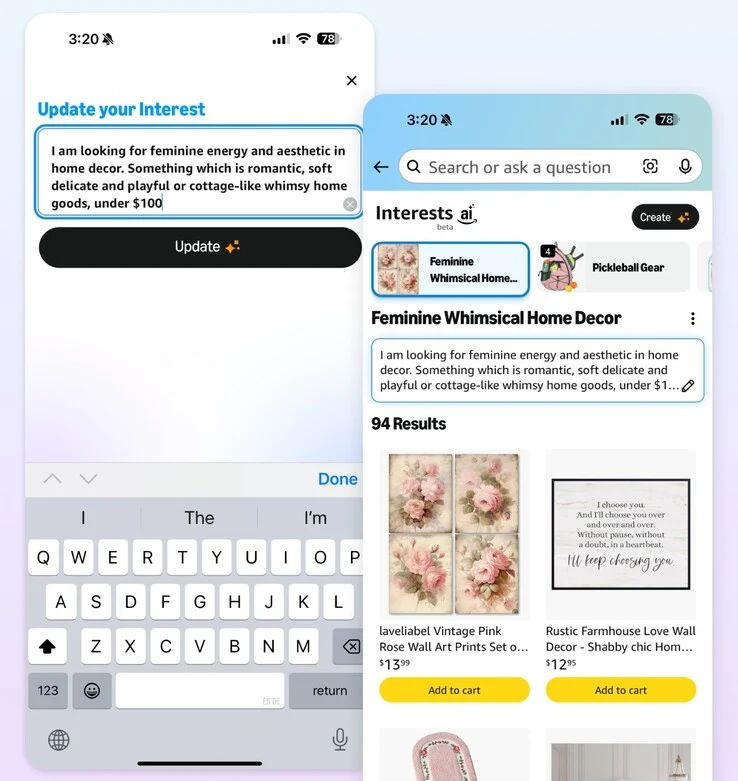
    The Interests AI relies on a large language model designed to convert descriptive user inputs into product searches. Users can narrow down the products by providing multi-sentence descriptions detailing what they want. This may include specific colors, price limits, and design preferences.

    Customizable Prompts

    Users can create multiple prompts, each of which can be refreshed with new specifications and descriptions of what they are searching for on Amazon. The AI is active around the clock, continuously searching for new products that align with the prompts and notifying users about the latest finds, significantly reducing the need for manual searches.

    Those who wish to explore the Amazon Interests AI can open the Amazon app on their smartphones or navigate to the Amazon website using their mobile browsers. By tapping the “Me” tab in the Amazon Shopping app, they can check if the “Interests” feature is available. A select group of US users will have immediate access, while others will gain access in the months to come.

    Amazon’s Announcement

    Amazon’s AI-driven ‘Interests’ function automatically discovers new products that align with your interests and hobbies.

    Source:
    Link


  • GPT-4o Can Generate Images with Near-Perfect Text

    GPT-4o Can Generate Images with Near-Perfect Text

    Key Takeaways

    1. GPT-4o now features image generation that allows for precise text rendering, improving the quality of visuals created from textual prompts.
    2. The model uses an interactive approach for dynamic image creation, enabling users to modify images step-by-step based on their ideas.
    3. Users can merge elements from different images and produce clear text, marking a significant advancement over previous AI image generation technologies.
    4. GPT-4o can handle 10-20 elements in a scene, surpassing competitors that typically manage only 5-8, making it easier to visualize complex ideas.
    5. Despite its advancements, limitations like bottom cropping, hallucinations, and challenges with non-Latin scripts still exist.


    OpenAI’s GPT-4o, which was introduced nearly a year ago, just received a significant update: it now includes image generation with incredibly precise text rendering. This new capability allows users to create intricate, high-quality visuals from textual prompts and engage in conversation to adjust these images until they align with their ideas—no more nonsensical signs or strange letters that earlier AI models produced.

    Dynamic Image Creation

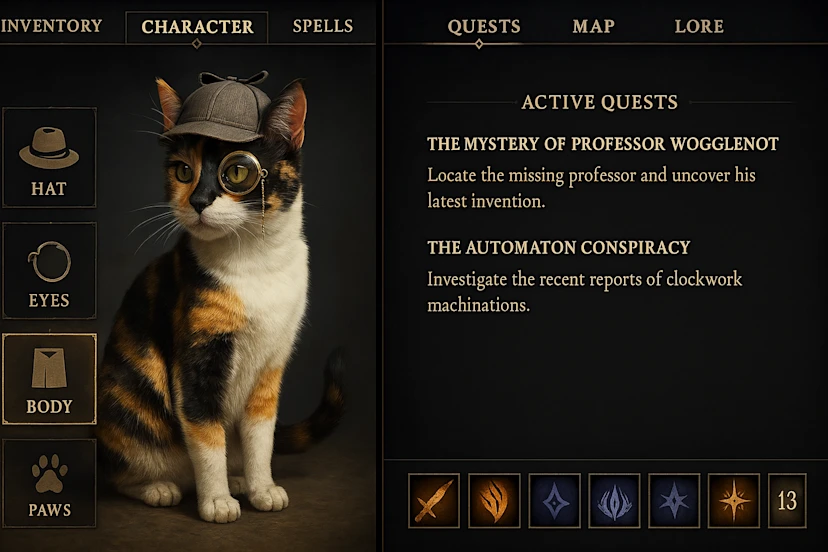
    Unlike traditional methods of generating images by simply refining a single prompt, GPT-4o employs a more interactive technique. You begin with a straightforward request—like a cat—and then discuss modifications to capture your vision: perhaps adding a detective hat, a monocle, or any other detail you desire.

    Step-by-Step Modifications

    OpenAI provides examples that illustrate this process: users can construct and alter scenes incrementally, merging elements from various images into a single, unified result. The model excels at producing clear text on signs or items, a significant improvement over the distorted outputs of past AI image generation technologies.

    Impressive Capabilities

    Importantly, OpenAI acknowledges some selective showcasing—many images are labeled as “best of 2” or “best of 8″—but the outcomes remain impressive, particularly given the very user-friendly interface. GPT-4o can even start with your own photo and apply changes, managing 10-20 elements in a scene while competitors struggle with just 5-8. Just last week, I tried to recreate a scene from The Count of Monte Cristo, and it was quite challenging. Now, with GPT-4o’s image generation, not only will the images produced feature readable text, but it will also be significantly easier to turn your imagination into reality.

    Some Limitations

    However, it’s not without its flaws. OpenAI points out issues like bottom cropping, persistent hallucinations, difficulties with non-Latin scripts, and problems when exceeding 20 objects. Still, the capacity to create intricate, text-filled images using simple English distinguishes GPT-4o from its predecessors. If you’re working on a poster design, this tool offers the accuracy and flexibility that older models could only wish for.


  • Simplify Your Vacation Planning with Google Search and Maps Updates

    Simplify Your Vacation Planning with Google Search and Maps Updates

    Key Takeaways

    1. AI Overviews in Search: Users can create detailed travel itineraries for specific destinations with suggestions for activities, images, and reviews, shareable via Google Docs or Maps.

    2. Integrating Screenshots in Maps: Users can now integrate screenshots of locations into Google Maps, which recognizes the places and allows users to save favorites and compile lists.

    3. Personalized Travel Guides with Gemini: The Gems feature lets users create a personal AI travel assistant for recommendations on destinations, dining, and more, along with a hotel price tracking feature.

    4. Ease of Access: New features are launching in the US for English-speaking users on both mobile and desktop platforms, enhancing the planning experience.

    5. Using Lens for Travel Insights: Travelers can use Google Lens to get detailed AI Overviews by simply pointing their camera at an object and asking questions, currently available for English-speaking users.


    Those who are wanting to take a summer vacation can now find more help from Google. A bunch of new features are here to help with planning trips, booking hotels, and exploring sights. These updates are part of Google Search, Google Maps, Lens, and Gemini. One of the key improvements is in AI Overviews, which can suggest trip ideas for various countries and regions, helping users to plan their days effectively while ensuring they don’t miss any attractions they want to see during their holidays.

    AI Overviews in Search

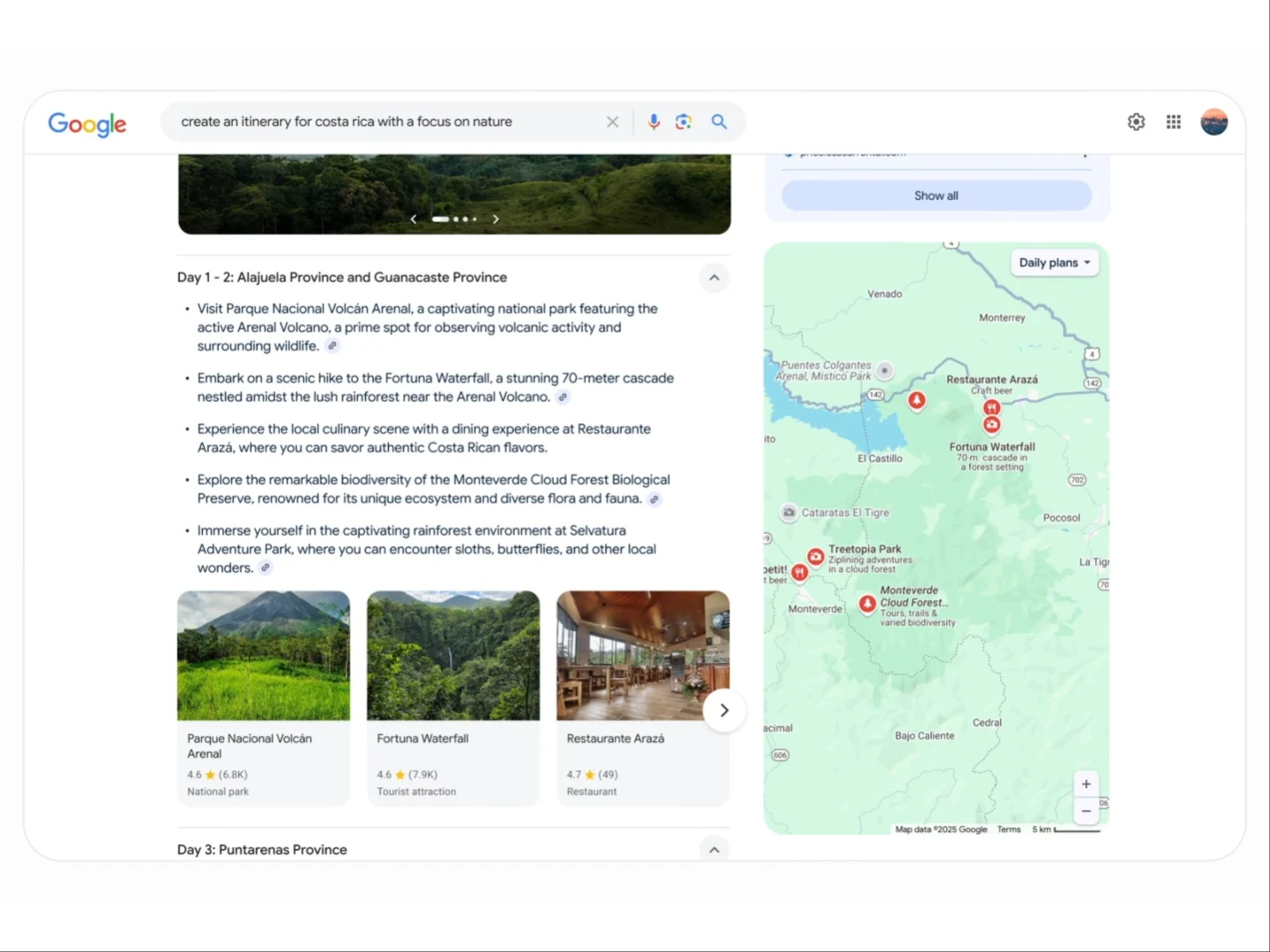
    In Search, AI Overviews can do more than just give a daily schedule; they can also provide suggestions on activities in a specific area or nation with an easy prompt like, “create an itinerary for Costa Rica with a focus on nature.” The output will feature images and reviews to help finalize the chosen spots. When finished, the itinerary can be shared via Google Docs, Gmail, or added to a Google Maps list. This new feature is launching this week in the US for English-speaking users on both mobile and desktop.

    Integrating Screenshots in Maps

    Trip planning usually means taking lots of notes and screenshots. To make this process smoother, Google has added a feature that lets users integrate screenshots into Maps, utilizing Gemini’s abilities. The places shown in the screenshots will be recognized, enabling users to save their favorites and compile a list. These locations will also appear on the map, but Maps will require access to photos for this feature. It will be available in the US on iOS next week, with Android support coming soon thereafter.

    Personalized Travel Guides with Gemini

    Moreover, the Gems feature from Gemini allows users to build their own AI expert at no cost, making it easy to have a travel assistant on their mobile devices at all times. With this tool, users can select a destination, discover dining options, receive recommendations, and much more. On top of that, Google’s hotel search is introducing a price tracking feature for selected dates and locations. This will be available this week on both mobile and desktop platforms.

    Lastly, using Lens, travelers can point their camera at an object and ask a question to receive an AI Overview filled with details and useful links. These overviews in Lens are currently available for English-speaking users.

    Google’s new features are aimed at making travel planning easier and more enjoyable for everyone.

    Source:
    Link

  • Nvidia Project G-Assist: Voice-Controlled AI for Gaming Setup

    Nvidia Project G-Assist: Voice-Controlled AI for Gaming Setup

    Key Takeaways

    1. Project G-Assist AI helper enhances gaming and system settings for RTX desktop users using voice and text commands.
    2. Compatibility is limited to RTX 30, 40, and 50 series GPUs with 12GB or more VRAM.
    3. Activation can be done using the Alt+G shortcut, enabling features like GPU overclocking and game launching.
    4. The assistant may cause a slight temporary decrease in GPU performance while engaged.
    5. Future updates may include support for laptop GPUs and potentially for GPUs with less than 12GB VRAM.


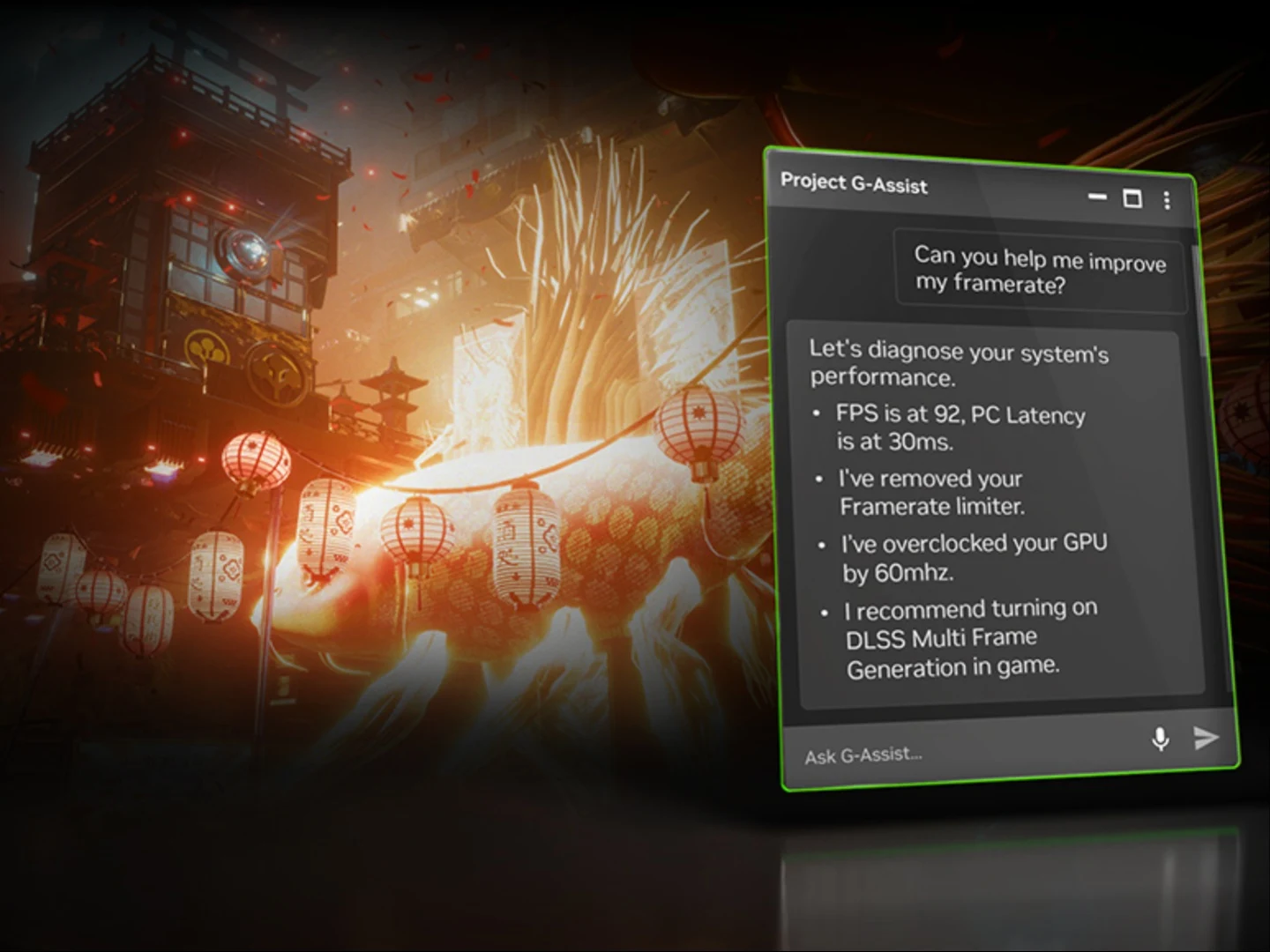
    Nvidia’s Project G-Assist AI helper is now ready to use in the Nvidia app. Initially revealed at Computex 2024, this assistant aims to enhance gaming and system settings for RTX desktop users. It can apply overclocks, start games, and manage various peripheral settings, all done with simple voice and text commands. However, it’s worth noting that this feature is limited to RTX GPUs with 12GB or more VRAM and may slightly affect GPU performance, but this is just a temporary issue.

    Specific GPU Compatibility

    Currently, the Project G-Assist AI helper is exclusive to RTX 30, 40, and 50 series desktop GPUs. It operates using a third-party Small Language Model (SLM) that runs locally on your device. Due to its design, it is not suited for general conversations but is focused on specific tasks. Since it utilizes local GPU resources, users might experience a minor decrease in rendering rate or inference completion speed for a brief moment when the assistant is engaged, which means you could notice a slight drop in performance during gaming or running demanding applications.

    Activation and Functionality

    To activate G-Assist, you can use the Alt+G shortcut and request actions like optimizing graphics settings or monitoring temperatures. It supports a range of functions, including providing information on Nvidia tech, GPU overclocking, launching games, saving gameplay clips, checking for driver updates, and more. Additionally, the assistant has the ability to control peripheral and room lighting through a plugin, but this is only for compatible devices.

    There is a wide array of capabilities that this SLM already possesses, which can be explored further here.

    Future Developments

    At this time, G-Assist is limited to desktop RTX GPUs, with laptop GPU support expected in a future update. Nvidia has not indicated whether it will extend support to GPUs with less than 12GB VRAM, particularly since the new RTX 5060 and 5060 Ti versions will feature 8GB VRAM options.

    Source:
    Link