
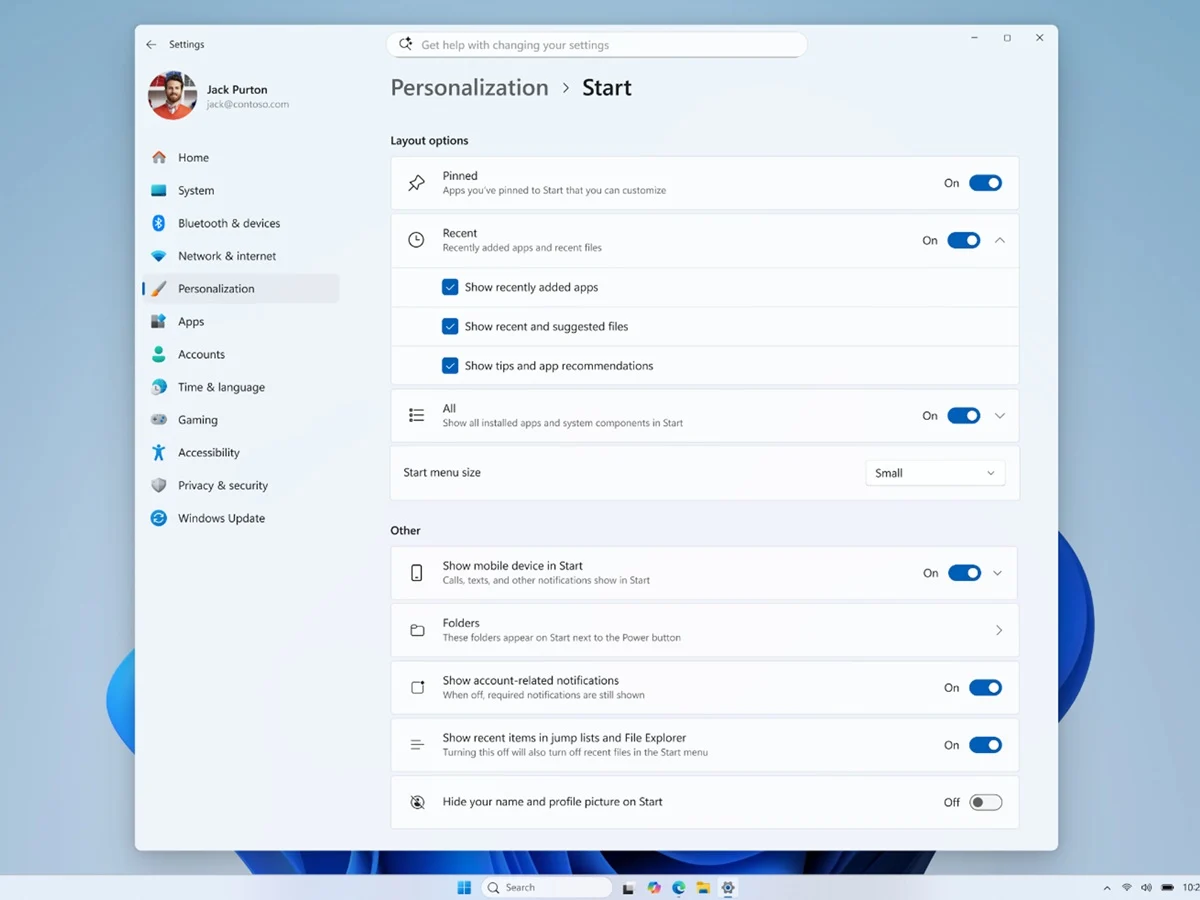
– Windows 11 Start menu now has size presets (Small, Large, Automatic) for the first time.
– Users can independently toggle visibility of Pinned, Recent, and All apps sections.
– Account name and profile image can be hidden for privacy on shared machines.
– Windows Search adds substring matching for partial file name searches.
– Modern loading spinners replace legacy animations across boot and shutdown states.
Start Menu Finally Gets User Controls After Five Years
Microsoft has released Windows 11 Insider Preview Build 26300.8553 to the Experimental channel, and after nearly five years of treating the Start menu as a fixed design statement, the company is finally opening it up to user control. The build, published May 29, 2026, delivers a modular Start menu with size controls, section-level visibility toggles, and privacy options for hiding account identity. These are changes Windows users have requested since Windows 11 launched in 2021 with a layout that stripped out Live Tiles, fixed the taskbar to the centre, and removed most of the spatial flexibility from its predecessor.
New Size and Layout Presets for Customization
The headline addition is a Size and Layout submenu with three presets: Small, Large, and Automatic. Automatic acts as the default and adjusts the menu proportionally based on display configuration. Previously, the Start menu had a single fixed size with no user-adjustable controls. This is a huge step forward for people who prefer a more compact or spacious interface, and it finally address a complaint thats been around since day one of Windows 11.
- Small preset compresses the grid
- Large preset expands for more pins
- Automatic adapts to screen resolution
Section Toggles and Privacy Improvements Arrive
Section-level visibility is the other major change. Right-clicking anywhere on the Start menu now reveals a Customize sections option, with checkboxes to independently toggle Pinned apps, the newly renamed Recent section, and All apps. Microsoft has officially renamed the former Recommended section to Recent across both the Start menu and the Settings app. Users who have never used it can remove it entirely. The account name and profile image are also now hideable, addressing a long-standing privacy concern for shared and enterprise machines. This is a big deal for folks who share there computer with others.
Different Build for Beta Channel Without Start Changes
Build 26220.8544, released simultaneously to the Beta channel, does not include the Start menu changes. Its additions are focused on system polish and search improvements. Modern loading spinners replace legacy animations across Boot, Logon, Restart, and Shutdown states with consistent solid donut-style indicators. Windows Search gains substring matching, allowing users to find files using partial words from within compound file names — searching “april” will now surface files named MeetingNotesApril. A new Windows Ready Print toggle in Settings lets users control whether newly added printers default to the Internet Printing Protocol rather than legacy drivers.
Known Issue Affecting AMD Machines
Microsoft flagged a known issue affecting AMD machines with System Guard support. Devices in the Windows Insider Program with that configuration will not be offered the Experimental Future Platforms build this week. The 26300.8553 Experimental build itself is not affected, but AMD Insiders should verify their channel before updating. This is a typical hiccup for early builds, but it could cause confusion for users who automaticly expect the latest version.
Timeline for Broader Release and Insider Choices
These Start menu controls are Experimental channel only for now. Features that receive positive feedback in this channel typically reach Beta within two to three months, with general availability likely in the 26H2 release later in 2026. Insiders on the 26H1 branch have until June 5, 2026, to decide whether to stay on that branch, as returning to 25H2 requires a clean install. So if you want these features sooner, you might want to switch channels, but be careful about the rollback restrictions.
Leave a Reply