Tag: Thermal Throttling

  • MSI Cubi AI+ 3MG: 60% Faster, But Could Be Better

    Key Takeaway

    – Core Ultra 9 386H is over 60% faster in multi-thread performance than last-gen Lunar Lake.
    – Power consumption only increases by ~8% for a significant performance-per-watt gain.
    – Turbo boost lasts only ~20 seconds before throttling due to the small form factor.
    – The same CPU runs 20-25% faster in larger laptops like the Razer Blade 16.
    – The new Cubi NUC is a major improvement but doesn’t fully utilize the CPU’s potential.


    MSI’s New 2026 Cubi NUC: A Panther Lake Powerhouse in a Tiny Box

    The latest 2026 Cubi NUC from MSI ships with an H-series Panther Lake CPU to replace the Lunar Lake CPU on last year’s model. Panther Lake can run substantially faster than last generation Lunar Lake options as the same CPU in the 2026 Cubi NUC can also be found on gaming laptops like the Razer Blade 16. On the MSI mini PC, however, some compromises have been made for the smaller form factor.

    Raw Performance vs. Last Year: A Massive Leap Forward

    As shown by the comparison graphs below, the Core Ultra 9 386H CPU in the Cubi NUC AI+ 3MG is over 60 percent faster than the Core Ultra 7 258V in the Cubi NUC AI+ 2MG in terms of raw multi-thread performance. Power consumption would be just a few watts more as well and so the significant performance advantage requires just a small 8 percent uptick in power requirements for superior performance-per-watt.

    • CPU: Intel Core Ultra 9 386H (Panther Lake, 6P+8E+2LPE, up to 5.0 GHz)
    • Graphics: Intel Arc integrated (up to 8 Xe cores)
    • Memory: Dual-channel DDR5-6400 (soldered, up to 64 GB)
    • Storage: 1x M.2 2280 PCIe 4.0 x4, 1x M.2 2230
    • Ports: 2x Thunderbolt 4 (USB-C), 2x USB-A 3.2 Gen2, 1x HDMI 2.1, 1x DisplayPort 1.4, 1x 2.5GbE LAN, 3.5mm audio jack
    • Dimensions: 0.88 x 4.6 x 4.4 inches (22.4 x 117 x 112 mm)
    • Base Power: 35W (configurable up to 65W)
    • Pricing: Starting at $879 (barebone), $1,149 (16GB/512GB config)

    Thermal Throttling: The Small Form Factor’s Achilles’ Heel

    The issue arises when comparing the new MSI mini PC to laptops sporting the same Core Ultra 9 386H CPU. The Razer Blade 16, for example, runs 20 to 25 percent faster than the MSI due to its much larger form factor and more capable cooling solution. Meanwhile, the same CPU in the MSI can only sustain Turbo Boost clock rates for about 20 seconds before needing to throttle as exemplified below by the initial spikes in CineBench R15 xT scores and power consumption when running Prime95.

    Performance Ceiling: What Could Have Been

    The 2026 Cubi NUC AI+ 3MG is indubitably a huge improvement over its predecessor, but it could have been even faster given what the Core Ultra 9 386H is capable of on other machines. While the mini PC delivers exceptional single-threaded speed and outpaces any previous Lunar Lake competitor by a wide margain, its sustained multithreaded performance is hamstrung by the chassis’s thermal constraints. For bursty workloads or everyday productivity, the Cubi NUC is a dream; for extended rendering or encoding tasks, you’ll see performance drop off after the first few seconds.

    Owners should also note that the soldered memory means no upgrades later, so choose your configuration wisely from the start. The fan noise under load is moderate but noticable, hovering around 35 dB at head height. Overall, this is a impressive step forward for the Cubi line, but enthusiatsts waiting for a true desktop-class experience in a NUC might still be left wanting a little more ceiling.
    Sources
    • Bleak Future for Snapdragon 8 Elite Gen 6 Phones

      Key Takeaway

      – The Oppo Find X9 Ultra overheats and throttles severely under load, halving its performance in 3DMark stress tests.
      – Its predecessor, the Find X8 Ultra, handled heat better and sometimes outperformed the new model in sustained benchmarks.
      – The Snapdragon 8 Elite Gen 5 chip’s high clock speeds (up to 4.6 GHz) generate excessive waste heat that passive cooling cannot manage.
      – Passive cooling in thin flagship phones is reaching its limits, raising concerns for future chips like the Snapdragon 8 Elite Gen 6 (expected >5 GHz).
      – In everyday use the throttling may not be noticeable, but it shows that raw SoC gains are negated by thermal constraints.


      First Impressions of the Find X9 Ultra

      Our assessment of the Find X9 Ultra offers little to critisize about of the current flagship smartphone, as Oppo has put together a complete package that is hard to beat (prices start at around $1,300 as an import). However, compared with our last year’s review, it becomes clear that even the Find X9 Ultra, with its built-in Snapdragon 8 Elite Gen 5, has its problems with thermal output.

      Thermal Throttling Becomes a Problem

      In our review, the Oppo phone sometimes throttled massively due to the high waste heat resulting from the Qualcomm SoC’s high clock speed of up to 4.6 GHz. In the 3DMark stress tests, the performance of the Find X9 Ultra was halved. This means that the final big hope in the smartphone market for taming the Snapdragon 8 Elite Gen 5 has fizzled out.

      Comparing Heat Management With Last Year

      Last year, with the Find X8 Ultra, Oppo was one of the few manufacturers, if not the only one, to get the heat problem of modern Qualcomm SoCs well under control. This level of cooling performance is unfortunately no longer available in the current generation. This even means that the Find X9 Ultra can deliver less performance in the 3DMark stress tests than its predecessor. Due to the significant drop in performance after a short time, the increase in SoC power of the Snapdragon 8 Elite Gen 5 compared to the previous year’s Snapdragon 8 Elite has evaporated. In some cases, the Find X8 Ultra achieved 20 percent higher values in the Wild Life stress test than its successor.

      The Gap With Samsung Flagships

      The discrepancy with a Samsung Galaxy S26 Ultra is even more serious. Is this a problem in everyday use? Probably not, but it highlights the increasingly severe challenges smartphone manufacturers face when relying on passive cooling systems to dissipate the substantial heat generated, in this case by the Oryon CPU cores, within such thin chassis of flagship phones.

      What This Means for Future Chips

      Since the cooling performance of the successor to the Find X8 Ultra is now also reaching its limits, this does not bode well for the Snapdragon 8 Elite Gen 6, which is expected to clock well above 5 GHz. At the latest with our review of the Find X9 Ultra, it becomes clear that hopes for passively cooled smartphones are fading – they simply cannot cope with the massive heat output, let alone make the additional performance usable in everyday scenarios


    • Smartphone with Extremely Long Battery Life: Our Surprising Review

      Smartphone with Extremely Long Battery Life: Our Surprising Review

      Key Takeaway

      – Excellent long-running battery: about 23 hours in Wi‑Fi use despite a smaller 7,500 mAh battery, outperforming many peers.
      – Strong real-world efficiency: effective processor and energy management deliver sustained performance for daily use with minimal charging needs.
      – Thermal throttling under load: noticeable heating and reduced performance during prolonged high-load tasks, limiting gains in demanding scenarios.


      Overview and Battery Life Remark

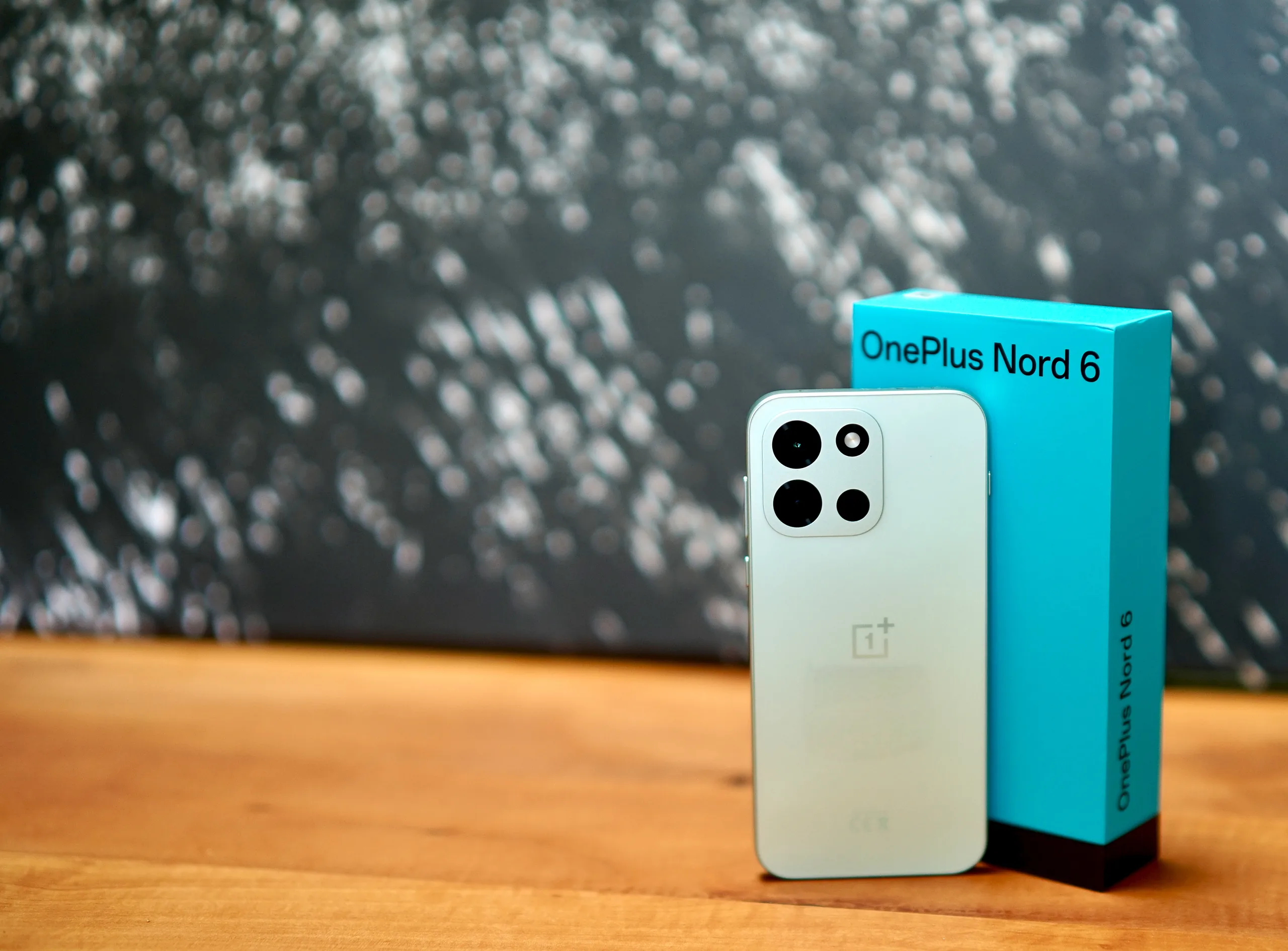
      The OnePlus Nord 6 impresses in the long-term test with a remarkable battery life of over 23 hours in Wi-Fi mode, although a smaller 7,500 mAh battery was installed compared to the Chinese version. This is a real surprise and clearly sets the device apart from many of its competitors. Different markets get different battery capacities, yet the endurance remains notably strong, suggesting smart power management and a balanced hardware approach to keep the running time solid across typical usage scenarios.

      European Variant Battery Specs

      The European model of the OnePlus Nord 6 has a 7,500 mAh battery, which is a significant reduction compared to its Chinese counterpart (OnePlus Turbo 6) with 9,000 mAh. Nevertheless, the device achieved a runtime of exactly 23 hours and 7 minutes in the WLAN web surfing test. This shows that efficiency plays a key role alongside raw capacity, allowing the phone to punch above its weight in daily tasks and light browsing sessions despite the smaller cell.

      Comparative Performance

      This is not only impressive in itself, but also significantly outperforms similarly priced models, such as the Nothing Phone (4a) with 5,080 mAh, which only achieves 18 hours. The Nord 6 thus demonstrates that a longer endurance isn’t just a factor of bigger batteries but also how well the system uses power during operation, keeping screens bright and processors busy without draining too fast.

      Thermal and Throttling Observations

      However, a serious weakness becomes apparent during longer load tests: The casing heats up considerably under high load, which we classify as problematic in the test. After a few minutes of intensive use, the system noticeably throttles the performance to prevent overheating. This thermal behavior can limit sustained performance in games or heavy multitasking, potentially affecting user experience in demanding sessions.

      Everyday Usability and Real-World Use

      In an everyday scenario, where a user runs video streams in high resolution for several hours or plays demanding games, this could lead to a noticeable drop in performance. For the typical user who mainly uses the smartphone for social media, messaging and occasional video streaming, the battery performance is more than sufficient. A commuter who is on the move for two hours a day can easily use the device for several days without having to reach for the charging cable. Even with intensive use, such as taking photos and editing images, the battery lasts for a full working day.

      Efficiency versus Capacity

      The combination of an efficient processor and good energy management ensures that the theoretical values are actually noticeable in everyday use. The OnePlus Nord 6 proves that an outstanding runtime is also possible with a reduced battery. The 23 hours in the Wi-Fi test are a strong argument for anyone who values long operating times.

      Bottom Line and Practical Takeaway

      However, you should be aware of the thermal limits, which can lead to performance losses in intensive applications. For the average user, however, the device is an excellent choice that offers a good balance between energy efficiency and performance. We explain what other aspects make the OnePlus Nord 6 a good choice in our eyes in our detailed test.


      Sources
      • Redditor Calls MSI Thin 15 Purchase a Major Mistake

        Redditor Calls MSI Thin 15 Purchase a Major Mistake

        Key Takeaways

        1. User Dissatisfaction: A Reddit user expressed deep frustration with the MSI Thin 15, calling it the “worst decision” and feeling ridiculed by friends.

        2. Performance Issues: The laptop experiences significant thermal throttling, with temperatures reaching the 90s, limiting its performance despite having decent specifications like the Intel Core i5-12450H and Nvidia RTX 3050.

        3. Community Feedback: Many users echoed the original poster’s concerns, highlighting issues like inconsistent performance and weak chassis durability, particularly due to the single fan cooling system.

        4. Historical Problems: MSI has faced criticism before for thermal issues in its budget gaming laptops, with previous models like the GF63 Thin exhibiting similar performance compromises.

        5. Mixed Reviews: While some defended the Thin 15 as a decent budget option with suggestions for improvement, reviews indicated it is better suited for casual use rather than high-performance gaming.


        A Reddit user named u/Ok_Mortgage_8452 has sparked quite a conversation in the r/GamingLaptops community after they shared their strong dissatisfaction with the MSI Thin 15. Known for giving solid laptop advice, the user confessed that selecting the Thin 15 was “the worst decision I’ve made,” stating that they’ve become the “laughing stock” among their friends.

        Model and Specifications

        While the specific model isn’t mentioned, the details shared suggest that the user likely has the MSI Thin 15 B12UC-1439 or something similar. They confirmed using a laptop equipped with an Intel Core i5-12450H processor and an Nvidia GeForce RTX 3050 graphics card. They remarked: “Temps are in the 90s and stays above 88 during boost mode. But it throttles. I tried turning off the boost, but the i5’s base clock is 2 GHz.”

        Community Reactions

        The post sparked a flurry of replies, with many users expressing similar frustrations. Issues discussed included thermal throttling, inconsistent performance, and weak chassis durability. A number of users pointed out that the RTX 3050 in this model operates with a limited 45W TGP, using a single fan for cooling, which can lead to performance issues during gaming or creative tasks.

        Previous Issues with MSI

        This isn’t the first time MSI’s budget gaming laptops have been criticized for thermal issues. An earlier post on Reddit noted that the GF63 Thin started throttling after just 15-20 minutes of gaming, leading the user to adjust power settings to stabilize performance.

        Similarities Between Models

        Although the GF63 Thin belongs to an older generation, it shares characteristics with the newer Thin 15, such as lightweight design, single-fan cooling, and low-wattage GPUs like the RTX 3050. While they aren’t exactly the same, both models are aimed at budget-conscious consumers and seem to exhibit comparable thermal and performance compromises.

        Defenses and Workarounds

        In spite of the negative feedback, some users defended the Thin 15 as a reasonable budget option. Suggestions for improvement included undervolting, repasting thermal paste, and utilizing laptop cooling pads. Others pointed out the lightweight design as a notable advantage in this price range.

        Reviews and Performance

        Reviews from websites like Tech Critter and Laptop Media reflect these mixed opinions. The chassis is described as having moderate rigidity, with aluminum on the lid and upper base giving it a somewhat more premium feel than expected at this price point. During tests, keyboard temperatures and fan noise were reported to be within acceptable limits, indicating decent thermal and acoustic performance for everyday tasks.

        The RTX 3050 GPU maintained a consistent 45W power draw during extended gaming, suggesting reliable performance within the laptop’s thermal limits. However, as highlighted in the reviews, this system is not designed for high-performance use and is better suited for casual tasks and light to moderate gaming instead of prolonged, intensive sessions.

        Conclusion

        The thread concludes with the user pondering about the discrepancy between their expectations and reality. Some responses offered solutions, while others shared their own disappointments. Posts like these may not offer definitive conclusions but often influence how others make purchasing decisions in the future.

        Source:
        Link

      • Samsung to Bring Back Manual Thermal Throttling in One UI 7

        Samsung to Bring Back Manual Thermal Throttling in One UI 7

        Samsung Galaxy phone users who want the ultimate gaming experience might find a recent leak regarding the new One UI 7 update intriguing.

        New Feature Discovery

        Chuvn8888, a trusted source known for accurate info on Samsung updates, has revealed that One UI 7 might include a hidden feature allowing users to completely turn off thermal throttling. Thermal throttling is a safety measure that automatically reduces the processor’s speed when the device’s internal temperature rises too high. This process helps prevent overheating, which can harm parts of the phone and reduce its overall lifespan. However, this feature can also cause performance drops during graphically intensive tasks, like gaming.

        Developer Options Insight

        According to Chuvn8888, the forthcoming Samsung skin will feature a distinct “Disable Thermal Throttling” toggle located in the Developer Options menu. This section usually consists of advanced settings not designed for everyday users, as changing these options can result in unintended results. This isn’t the first time Samsung has explored such a feature. One UI 6 previously had a similar option but required users to access the Samsung Device Health Manager Service via a third-party application. Samsung eventually eliminated this workaround, indicating some reluctance to allow users to bypass the thermal throttling protections.

        Uncertain Future

        The leak indicates that One UI 7 might bring back this capability. However, it’s crucial to note that Developer Options are aimed at experienced users and contain settings that could negatively affect the phone’s stability if not managed correctly. Moreover, One UI 7 is still in the works, and there is no certainty that this specific feature will make it to the final version. Even if it does, users should be cautious about completely disabling thermal throttling.

        While the temptation to enhance performance is easy to understand, skipping the phone’s built-in safety measures could result in overheating problems. This could, in turn, shorten the device’s lifespan and possibly lead to hardware issues.


        Image 1
      • Google Tensor G4 Throttling Test Shows Over 50% Performance Loss

        Google Tensor G4 Throttling Test Shows Over 50% Performance Loss

        Google’s efforts with its custom silicon have consistently faced criticism over issues related to thermal management and sustained performance. Recent reports indicate that the Pixel 9 Pro XL’s Tensor G4 might be particularly vulnerable to these problems.

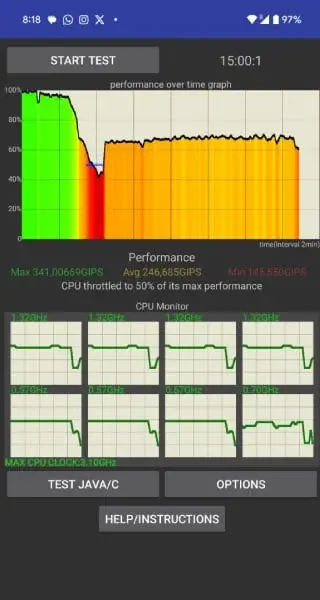
        A user on X, known as @callmeshazzam, revealed alarming results from a CPU throttling test conducted on their pre-ordered Pixel 9 Pro XL. The benchmark indicated that the Tensor G4 could lose up to 50% of its processing capability when under prolonged stress.

        Stress Test Observations

        The test monitored the frequency of all eight CPU cores within the Tensor G4. After merely three minutes of intense usage, throttling appeared to commence. The performance continued to decline until about four minutes in, with the CPU estimated to have lost nearly 60% of its potential power.

        The raw data from the test showed that the Tensor G4 reached a peak of 341 GIPS (giga instructions per second), with an average of 246.6 GIPS. At its most extreme throttling point, the chip reportedly fell to just 145.5 GIPS—only 42.6% of its peak ability. Following this dip, the performance seemed to recover partially, stabilizing at roughly 65% of its maximum capacity.

        Performance and Frequency Insights

        Examining the frequency chart from the test, the Tensor G4’s performance cores dropped to a low of 1.32 GHz, while the efficiency cores fell to a minimum of 570 MHz. Although Google has not officially disclosed the Tensor G4’s specifications, Geekbench results suggested one core could reach 3.1 GHz, with three cores at 3.6 GHz, and four efficiency cores at 1.95 GHz.

        It’s critical to understand that instructions per second (GIPS) isn’t the most thorough performance measure, and stress tests are designed to push devices to their utmost limits. In everyday usage, performance degradation is likely to be less severe. However, these preliminary reports imply that Google may still need to enhance the thermal management of the Tensor G4 in the Pixel 9 Pro XL.

        Google Tensor G4 Throttling Test Shows Over 50% Performance Loss