Tag: SteamOS

  • Lenovo Legion Go 2 Leak: Cheaper Gaming Handheld Models Coming

    Lenovo Legion Go 2 Leak: Cheaper Gaming Handheld Models Coming

    Key Takeaways

    1. The Legion Go S is the first non-Valve handheld device to feature SteamOS, priced at $699.99 on Amazon.
    2. The SteamOS version is over 15% cheaper than the Windows version, but the latter is currently being offered at a lower price due to delays.
    3. Lenovo is planning to release a SteamOS edition of the Legion Go 2 at CES 2026, maintaining similar specifications to the Windows version.
    4. The upcoming SteamOS version will likely include an AMD Ryzen Z2 Extreme processor, 32 GB of LPDDR5X RAM, and up to 2 TB of storage.
    5. Pricing details for the SteamOS variant remain unclear, but it is expected to be less than the current Legion Go 2 price of $1,099.


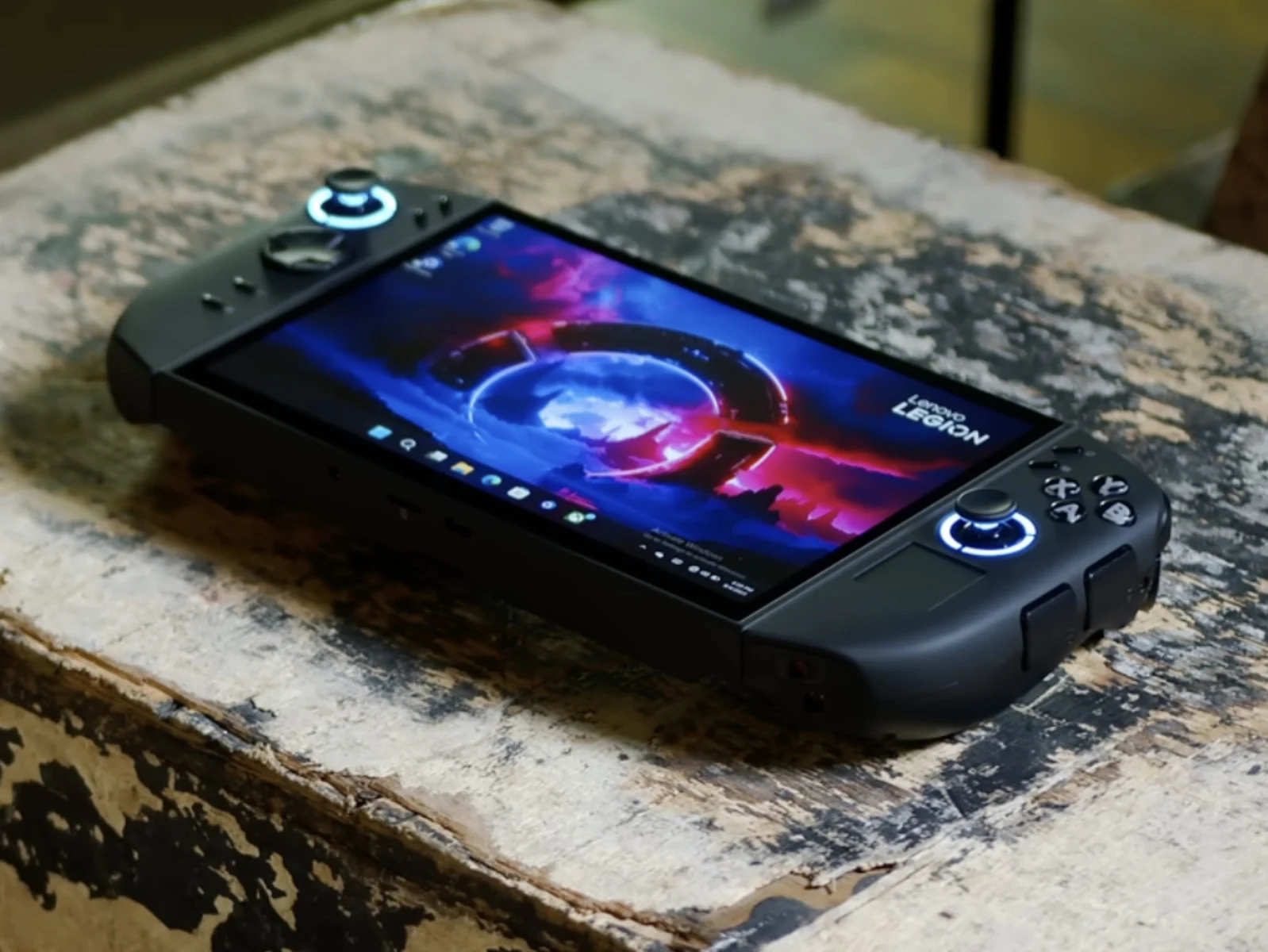
    At the beginning of the year, the Legion Go S became the first handheld device, which isn’t from Valve, to come with SteamOS (currently available for $699.99 on Amazon). This version has a unique Nebula Nocturne color and includes a special Steam shortcut, setting it apart from the Windows 11 model.

    Pricing Differences

    What’s more significant is that Lenovo has set the price of the SteamOS version to be more than 15% lower than its Windows version. However, the arrival of the SteamOS model was delayed so long that the Windows version was already being offered for much less than the listed price of the SteamOS variant.

    Upcoming SteamOS Version

    Despite this, Lenovo is reportedly working on a SteamOS edition of the Legion Go 2. As per Windows Latest, this new model is expected to launch next month at CES 2026 in Las Vegas. The specifications are said to remain the same, featuring an 8.8-inch OLED screen and a 74 Wh battery, similar to the original Windows version.

    Hardware Specifications

    Additionally, Windows Latest mentions that the ‘powered by SteamOS’ version will come with ‘up to’ an AMD Ryzen Z2 Extreme processor, along with 32 GB of LPDDR5X RAM and 2 TB of storage. This suggests that Ryzen Z2 configurations with either 16 GB or 32 GB of RAM may be offered too. While details about pricing and availability are still unclear, it’s expected that the SteamOS variant will cost less than the current Legion Go 2 price of $1,099, or the $1,349 for the Ryzen Z2 Extreme model.

    Source:
    Link


  • CheckMag Steam Machine: Best Community Concept Designs

    CheckMag Steam Machine: Best Community Concept Designs

    Key Takeaways

    1. Valve’s Steam Machine features a cube-like design, runs on SteamOS, and supports Proton for game compatibility, with a price tag of $743.
    2. The device includes magnetic, interchangeable front panels, allowing for creative expression through custom designs, such as LED displays and popular franchise themes.
    3. Community members have shared humorous and nostalgic designs, like a GameCube-themed skin and a mockup resembling Marvel’s Kingpin, reflecting the desire for dynamic and recognizable aesthetics.
    4. Dbrand is set to release a premium Companion Cube skin, indicating potential for cohesive, collectible accessories that align with popular franchises.
    5. Challenges remain, including limitations on interactive front panels and potential legal barriers for official franchise skins, but there’s a clear demand for unique third-party accessories.


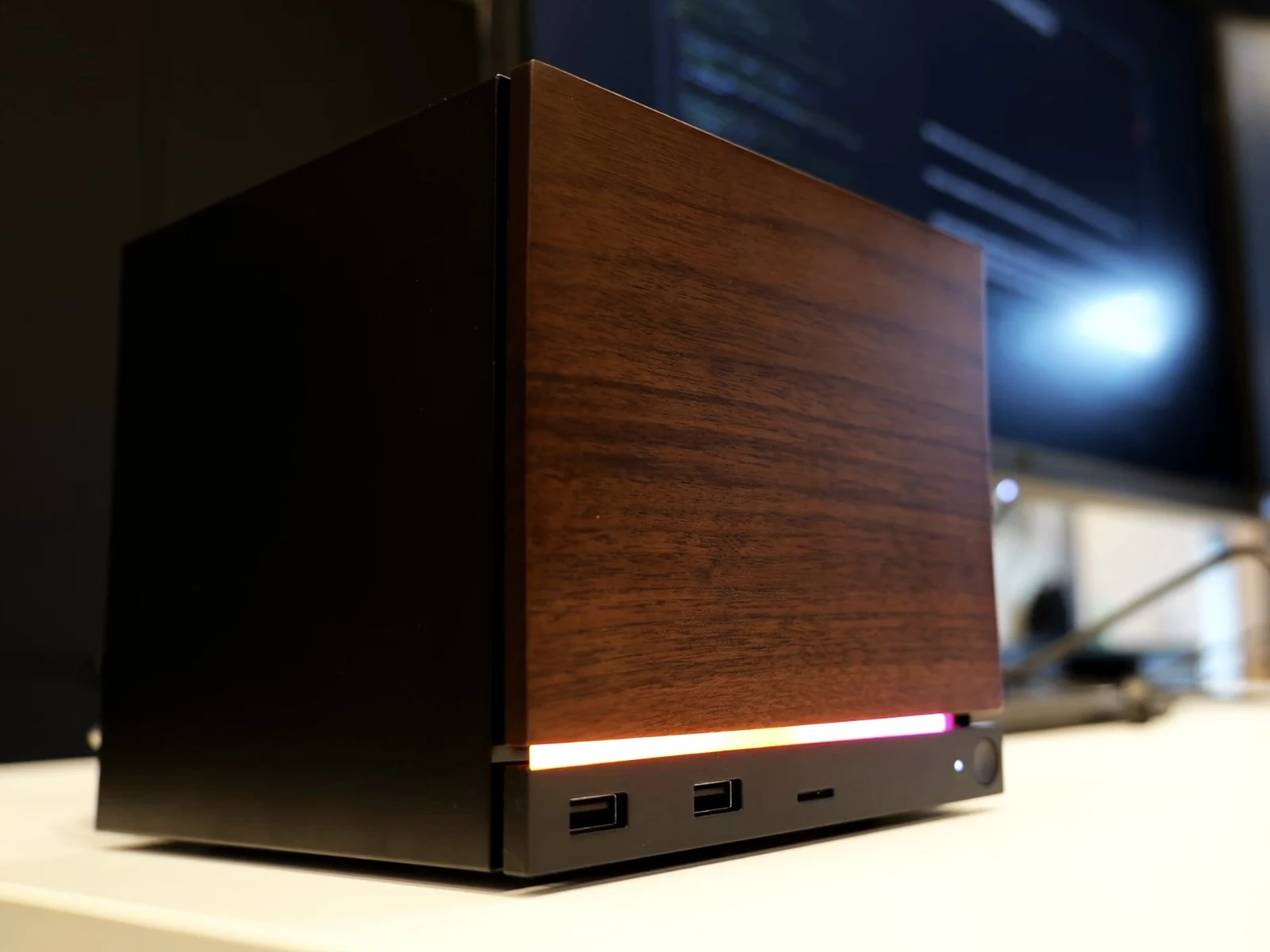
    Valve’s latest Steam Machine made its debut this week, sparking a flurry of online chatter. The cube-like design, emphasis on SteamOS, and the potential for interchangeable front panels have not only captured attention but also ignited a wave of humorous responses from the community. Artists and modders have taken to Reddit to share creative renderings and skin concepts, transforming what appears to be a simple black box into a vibrant expression of individuality.

    The Device Specs

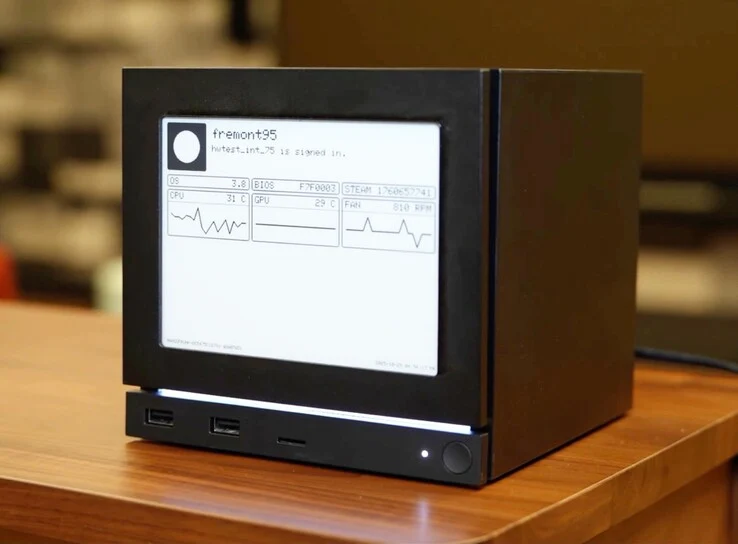
    Diving deeper, the actual device is a compact cube aimed at living room use, operating on SteamOS and supporting Proton for game compatibility. It features microSD for easy library transfer with the Deck, which is currently priced at $743 on Amazon. The machine includes magnetic, interchangeable front panels, one of which displayed an e-ink test screen. This straightforward hardware setup provides a basic framework for creators to work with, allowing for either artistic designs or functional displays. Here’s a look at eight standout community designs and what they suggest about the Steam Machine’s potential future.

    Creative Expressions

    One imaginative concept transforms the machine’s front into a fully functional dot-matrix LED display, reacting to sound. This is a clever nod to early 2000s desktop visualizers and modern smart speakers. It shows that users desire more than just static skins—they want dynamic features that make the cube seem alive next to their TV.

    In another idea, a pixel-art Minecraft skin turns the cube into a block from the game. This design is both visually appealing and functional, as the low-resolution texture is easily recognizable from a distance. It indicates that popular franchises with iconic designs could inspire official skins that players would actually buy, rather than just create for fun. This could be a straightforward win for a skin manufacturer.

    Fun Concepts

    A design likening the Steam Machine to Marvel’s Kingpin is among the most amusing concepts. It’s simplistic yet incredibly funny, as it looks like Kingpin’s head was meant to be placed there. This version of Kingpin is inspired by his portrayal in “Spider-Man: Into the Spider-Verse,” and fans of the film will appreciate how comically true to the comic it is.

    Another mockup illustrates the front of the cube as an active Steam interface, showcasing the Store page and highlighting featured games and promotions. While it may not be feasible at this time, it demonstrates that users are eager for front panels that serve a purpose rather than remain idle. This design unintentionally affirms Valve’s choice to explore display-based fronts.

    Nostalgic Designs

    A purple GameCube-themed Steam Machine gained traction for its obvious appeal. The shape closely resembles that of the GameCube, and the design captures nostalgic elements beautifully, including controller ports, vents, and the signature purple color associated with Nintendo’s console. This illustrates how quickly fans connect new devices with classic designs that still hold significant cultural value.

    One user envisioned the iconic red Valve wheel on the front of the machine, and it actually looks appealing. This is a clever play on the company’s name and branding. While it’s unlikely to become a real accessory, it highlights the Steam Machine’s flat surfaces, making it easy to attach physical props. It wouldn’t be surprising if quirky front-panel knobs emerged as a new category on Etsy.

    More Polished Ideas

    In a more refined approach, Dbrand has teased a Companion Cube skin set to launch alongside the Steam Machine in 2026. This design reimagines the cube as a Portal-themed Companion Cube, complete with a coordinating controller in soft greys and pastel blues. Compared to more humorous designs, this concept showcases what a premium themed bundle could look like should Valve or a partner decide to create one. The polished execution demonstrates that the machine’s design can accommodate cohesive, franchise-aligned accessories that feel collectible instead of gimmicky.

    One design features the cube wrapped in a pink-and-black checkerboard pattern reminiscent of the missing texture from Source Engine games. Anyone who’s played a modded Source map would recognize this instantly. It’s a humorous nod to Valve’s engine history, and the simple geometric pattern fits the cube nicely. This skin manages to look bold while still being clean, and the joke would likely resonate with even casual gamers.

    The Challenges Ahead

    However, there are limitations to consider. Many designs envision interactive or high-refresh-rate front panels, but Valve’s current e-ink tests suggest low-power, low-refresh options are more realistic for launch. Although the company has confirmed that this add-on is only for internal testing and won’t be sold commercially, legal and licensing barriers could restrict many official franchise skins unless Valve collaborates with rights holders. Still, the demand for third-party skins and unique front covers is clearly evident, presenting a practical opportunity for accessory creators.

    This lively conversation is already happening on the r/Steam subreddit!

    Source:
    Link



  • Valve Bets on Proton and Game Library for Steam Machine Success

    Valve Bets on Proton and Game Library for Steam Machine Success

    Key Takeaways

    1. Valve aims to succeed with the new Steam Machine by focusing on software improvements, learning from past failures.
    2. The introduction of Proton allows gamers to play Windows games on Linux, expanding the new Steam Machine’s game library.
    3. The first Steam Machine struggled due to a limited game selection, affecting both gamers and developers negatively.
    4. Valve is confident that Proton will enhance the appeal of the new Steam Machine, similar to the success of the Steam Deck.
    5. Enhancements to SteamOS, including ray tracing and 4K support, aim to provide a superior gaming experience and position the Steam Machine as a potential console alternative if priced attractively.


    Valve has great expectations for its upcoming Steam Machine and aims to achieve the success that the initial version failed to realize. Two of its senior engineers believe that the current model can provide a true living-room gaming PC experience, and it’s not just about the hardware.

    Software Makes the Difference

    Yazan Aldehayyat, in an interview with Rock Paper Shotgun, shared that the key factor is the software. He mentioned that the first Steam Machine struggled to gain popularity among gamers because there weren’t enough compatible games available for its Linux-based SteamOS. Aldehayyat stated, “We learned from the first Steam Machines that we needed to make our developers’ lives a lot easier.”

    A New Game Catalogue

    Things have improved significantly, thanks to Proton, which allows gamers to play Windows games on Linux systems. This development means that the new Steam Machine is launching with an extensive game library right from the start.

    Pierre-Loup Griffais, Aldehayyat’s teammate, pointed out that the first-generation Steam Machine did not succeed in attracting players or developers, primarily due to the limited number of games. This created a catch-22 scenario where developers hesitated to invest in the platform, while gamers stayed away because of the narrow game selection.

    Confidence in Proton

    Griffais is optimistic that Proton will change the game in Valve’s favor. He cites the success of the handheld Steam Deck, which operates on the same SteamOS.

    Valve has made several enhancements to SteamOS to improve performance in desktop settings, including features like ray tracing and improved responsiveness. The company claims that the Steam Machine can handle up to 4K resolution at 60 fps during gameplay.

    On another note, Valve acknowledges that other elements could contribute to the new Steam Machine’s success. The company suggests that it can be a viable console alternative if the pricing is attractive enough.

    Source:
    Link


  • Steam Deck Update: New Low-Power Mode Enables Background Downloads

    Steam Deck Update: New Low-Power Mode Enables Background Downloads

    Key Takeaways

    1. Users can now download content on the Steam Deck while in power-saving mode.
    2. Downloads continue in the background when the power button is pressed.
    3. The Steam Deck automatically switches to off-screen download mode when idle.
    4. The new feature is currently in the beta version of SteamOS but will be available for all users soon.
    5. The Steam Deck is the only console that can update games in the background, helping to reduce screen burn-in.


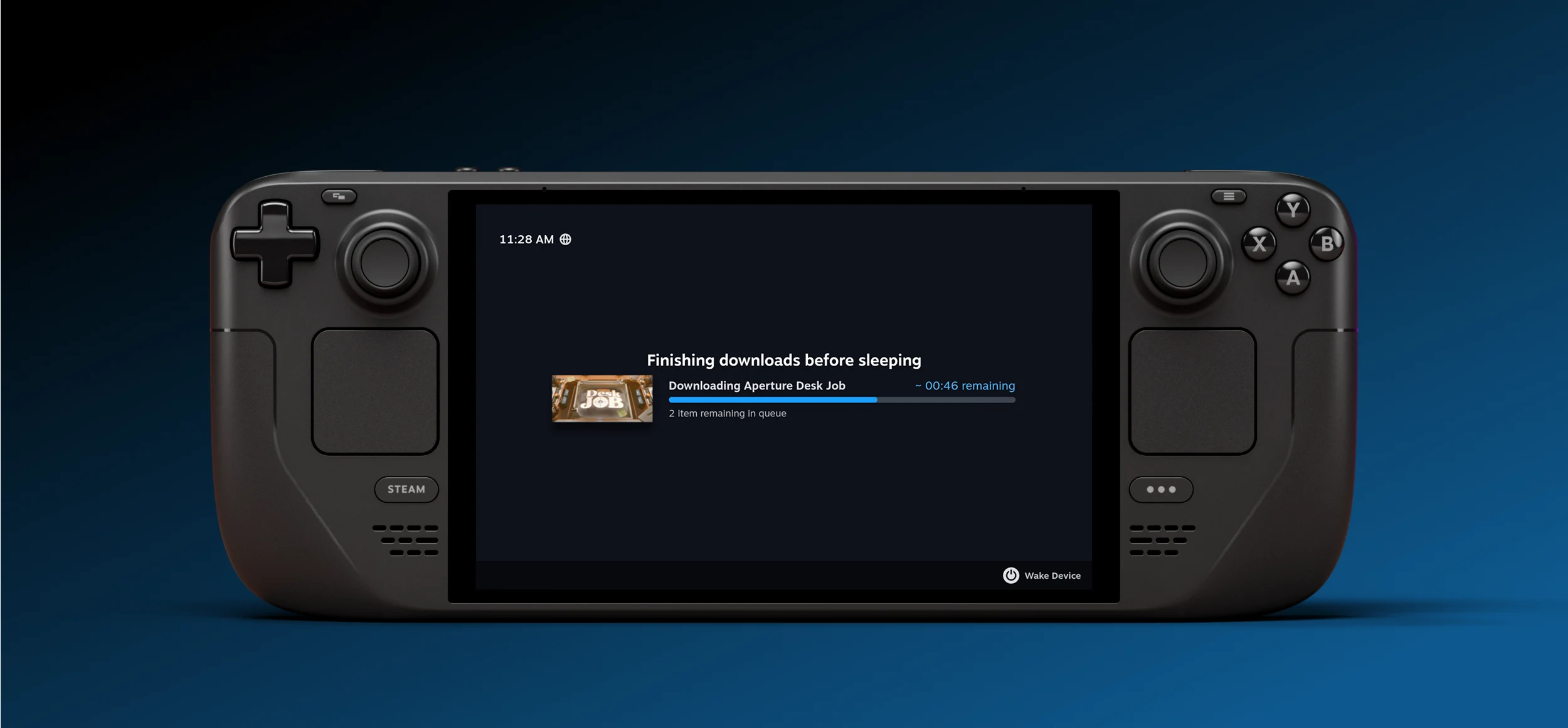
    Valve has quietly introduced what might be one of the top enhancements for the Steam Deck’s user experience. Now, users are able to download content even when the device is in power-saving mode. In the past, it was necessary to keep the console active for the entire duration of downloads, which could take several days if the internet connection was slow. By default, off-screen downloads are turned on whenever the Steam Deck is plugged into a power source. Yet, users can activate this feature for battery mode through the settings.

    Downloading Made Easier

    When a download is in progress and the power button is pressed, an additional option will appear allowing the download to continue running in the background. Moreover, if the Steam Deck is idle while downloads are active, it will automatically switch to this mode. If the battery percentage goes below 20%, the console will enter sleep mode. Currently, this feature is exclusive to the beta version of SteamOS, but it’s expected to be available for all users soon.

    Keeping Games Updated

    In essence, the Steam Deck stands out as the only console capable of updating games in the background. It’s worth noting that Steam was among the first applications to integrate this feature on desktop platforms, so it makes sense for them to include it on this new device form. This update will be particularly beneficial for Steam Deck OLED users by lowering the chances of screen burn-in.

    Source:
    Link


  • Asus ROG Xbox Ally X: YouTuber Installs Bazzite Linux for SteamOS

    Asus ROG Xbox Ally X: YouTuber Installs Bazzite Linux for SteamOS

    Key Takeaways

    1. The Asus ROG Xbox Ally X features a gaming-optimized version of Windows 11, marking a significant upgrade from the previous model.
    2. SteamOS’s growing popularity has prompted Microsoft to enhance Windows 11 for better gaming performance, as seen with the launch of similar devices like the Lenovo Legion Go S.
    3. Initial attempts to install the Linux distribution Bazzite on the Ally X faced technical issues, including BitLocker encryption preventing SSD formatting.
    4. While Bazzite improved responsiveness and navigation, some hardware features and controls were unresponsive, indicating the need for further optimization.
    5. Performance tests showed that while Linux provided a smoother interface, it did not significantly outperform Windows 11 in raw gaming performance.


    We just got our hands on the Asus ROG Xbox Ally X for a review, and it clearly looks like a big step up from the previous model, the ROG Ally X. This latest handheld, which is Xbox-branded, comes with Windows 11 already installed—more specifically, a version that’s tweaked for gaming. However, some users still lean towards Linux-based systems like SteamOS for a smoother, more console-like feel.

    A Shift in Focus

    You could say that SteamOS has jolted Microsoft into action. It might even explain why Windows 11 got such a gaming-centric update, especially since SteamOS is gaining popularity among original equipment manufacturers (OEMs). For example, Lenovo recently teamed up with Valve to launch the Lenovo Legion Go S, which comes equipped with SteamOS.

    Testing the Waters

    To check if the ROG Xbox Ally X could match that experience, YouTuber Dawid Does Tech Stuff tried installing Bazzite, a Linux distribution inspired by Fedora and closely resembling SteamOS. Their aim was to see if Asus’s new handheld could provide a smoother interface and better performance without depending on Windows.

    They grabbed the Bazzite image for the Ally series from the official site and used Rufus to create a bootable USB. The first installation attempt hit a snag with an “unknown error.” After some investigation, they realized that BitLocker encryption was stopping the SSD from being formatted. After turning off the encryption and dividing the SSD into two partitions for dual-booting, they moved on to install Bazzite.

    Initial Challenges

    When the ROG Xbox Ally X first booted into Bazzite, none of the controller inputs worked. After a few moments, the system started recognizing them, although several buttons, including the menu keys, remained unresponsive. They manually reassigned inputs through Steam’s interface, which gave them partial control back.

    Even with these troubles, the YouTuber quickly noticed a major boost in responsiveness. “It almost feels like I’ve decalcified its brain,” they remarked, explaining how menus opened instantly, inputs felt quick, and navigation was way smoother than on Windows 11. Still, some essential hardware features—like RGB lighting around the thumbsticks, power mode controls, and Armoury Crate integration—completely stopped working.

    Performance Testing

    Dawid conducted performance tests in Cyberpunk 2077 and Shadow of Mordor. In Cyberpunk, he struggled to get the performance overlay to show up until he installed MangoHUD, later switching to Steam’s tool. Initially, the game displayed a blank resolution field, but he figured it was running at 1080p. Overall, gameplay felt smoother, with slightly better frame rates and lower input lag compared to Windows 11.

    Shadow of Mordor acted as a more dependable benchmark, accurately detecting the display resolution. Frame rates were almost identical on both operating systems, indicating that while Linux enhanced interface fluidity, it didn’t provide a considerable edge in raw performance.

    After switching back to Windows and rebooting into Bazzite again, Dawid discovered that the controls had stopped working once again, only to miraculously function normally the next day, with RGB lighting oddly back on.

    Conclusion

    At this point, based on the YouTuber’s experience, installing a Linux gaming distro like Bazzite on the ROG Xbox Ally X doesn’t seem like a wise move. The video clearly shows that Bazzite still requires a lot of optimization for the latest Xbox-branded handheld to work well. If you’re considering trying it out yourself, it’s probably best to hold off for a bit, given that these new handheld devices have only just been released.

    Source:
    Link


  • Lenovo Legion Go 2 Leak Suggests Possible SteamOS Version

    Lenovo Legion Go 2 Leak Suggests Possible SteamOS Version

    Key Takeaways

    1. The Lenovo Legion Go 2 was initially expected to have a SteamOS version, but Lenovo announced no definitive plans for it.
    2. The Legion Go S is available in both Windows and SteamOS versions, with the SteamOS version reportedly performing better.
    3. A leaked image suggests the Legion Go 2 may run on SteamOS, but it lacks a dedicated Steam button.
    4. There is no official confirmation yet about the release of the SteamOS version for the Legion Go 2.
    5. If the SteamOS version is not officially released, users may still install SteamOS on their devices independently.


    When the Lenovo Legion Go 2 prototype was first shown at CES 2025, it was mentioned that it operates on Windows. Since the Legion Go S debuted in both Windows and SteamOS versions (check out our review of the Windows model), it seemed logical to think that the Legion Go 2 would follow suit upon its release. Unfortunately, Lenovo quickly dashed those expectations by announcing that there were no definitive plans to offer the Legion Go 2 with SteamOS.

    The Current Situation

    Several months have gone by since that announcement, and both versions of the Legion Go S (the 16GB + 512GB model is currently available on Amazon for $649.99) are now readily available in stores. Given that comparisons have indicated the SteamOS version performs better than the Windows one, it wouldn’t be too surprising if Lenovo had a change of heart. Recent evidence suggests that might indeed be the case, or at least it looks that way.

    Leaked Evidence

    A leaked official image from Evan Blass (@evleaks on X) shows the Legion Go 2 running on SteamOS. This image implies that this version of the Legion Go 2 boots with SteamOS pre-installed. However, it’s important to mention that unlike the Legion Go S with SteamOS, this version does not feature a Steam button (you can read our review for more details).

    It’s definitely thrilling to see Lenovo possibly reconsidering its position, even if there hasn’t been any official confirmation yet. It remains unclear whether the SteamOS version will be launched at the same time as the Windows version or if it will come out later. If Lenovo decides against releasing a SteamOS version for the Legion Go 2, users may still be able to install SteamOS on their own devices, similar to what can be done with the original Legion Go.

    Source:
    Link


  • Old $100 iMac Plays Hades II at 60 FPS & Forza Horizon 5 at 90 FPS

    Old $100 iMac Plays Hades II at 60 FPS & Forza Horizon 5 at 90 FPS

    Key Takeaways

    1. A 2019 Intel-powered iMac was successfully transformed into a gaming machine using SteamOS, highlighting the potential of older hardware.
    2. The iMac features an Intel Core i5-7500 CPU and an AMD Radeon RX 560X GPU, which are crucial for running modern games effectively.
    3. Installation of SteamOS on the iMac was mostly straightforward, though it required a USB sound card due to internal audio issues.
    4. The system achieved impressive gaming performance, running titles like Marvel vs. Capcom Infinite and Forza Horizon 5 at playable frame rates.
    5. The project demonstrates that outdated technology can still be relevant and functional with the right software configurations, challenging the need for constant upgrades.


    Breathing new life into old technology, a 2019 Intel-powered iMac that was purchased for just $100 from Craigslist has been seen running modern games quite impressively, all thanks to SteamOS. In a recent video on their channel, the YouTuber demonstrated how smoothly the 2019 Intel-powered iMac they found online for $100 can handle contemporary games like Marvel vs. Capcom Infinite, Forza Horizon 5, and many others. The outcome is, I must admit, quite astonishing.

    The Hardware Behind the Magic

    The 2019 iMac under discussion is equipped with an Intel Core i5-7500 CPU, which is a quad-core processor featuring four threads and a 3.8GHz boost clock. However, the creator pointed out that they observed the CPU frequency only reaching 3.6GHz.

    Additionally, the iMac is fitted with an AMD Radeon RX 560X that comes with 4GB of GDDR5 VRAM, based on the Polaris 21 GPU architecture. The YouTuber emphasized that for any of their followers wanting to run SteamOS on their old iMac, having an AMD GPU is crucial. Models that rely on Intel HD Graphics will struggle to run SteamOS effectively, the creator noted.

    Installation and Performance

    More specifically, ETA PRIME was utilizing SteamOS Holo version 3.7.13, and the iMac had 8GB of RAM. While it’s possible to upgrade the RAM in this particular iMac, the YouTuber mentioned that disassembling the device to reach the RAM slot is quite a laborious task.

    To install SteamOS, ETA PRIME used the Steam Deck recovery image and placed it onto the iMac’s 32GB SSD partition, which is part of Apple’s Fusion Drive setup. Although the installation was mostly easy, there were some quirks, such as the internal audio not functioning, requiring a USB sound card, and issues with mapping Bluetooth controllers.

    Game Testing Results

    Interestingly, the creator also tried out the Simple Decky TDP Control plugin, typically intended for handheld devices like the Steam Deck, to regulate CPU power limits on the iMac. Even though the i5-7500 is a 65W chip, they adjusted the TDP limit to 40W to maintain thermal stability, allowing for performance mode and CPU boost to enhance gaming outcomes.

    Despite these constraints, the system managed to run a surprising array of games. Marvel vs. Capcom Infinite performed well at 900p medium settings, staying close to 60 FPS. Hades II maintained a steady 57-60 FPS at 1080p high settings, while Forza Horizon 5, running at 900p very low settings, occasionally exceeded 90 FPS but generally remained between 50-60 FPS due to the limited 4GB of VRAM.

    Older and less demanding games such as Left 4 Dead 2 and Portal exceeded 100 FPS on high settings. Even Cyberpunk 2077 was somewhat playable at 720p low settings, where the frame rate fluctuated between 35-50 FPS without FSR. Activating FSR 3 frame generation didn’t greatly enhance performance and instead caused severe ghosting, leading the YouTuber to describe the gameplay as “odd.”

    In conclusion, ETA PRIME determined that while this setup may not be perfect for everyone, it’s still a fantastic way to breathe new life into old Apple hardware. It’s remarkable how much potential can be extracted from outdated technology—if only the software is configured correctly. Especially in 2025, where upgrading to the latest technology has become, if not a norm, then certainly a type of peer pressure, pushed by everyone from our friends to corporations we may never encounter.

    Make sure to watch the complete detailed video from ETA PRIME on gaming with the 2019 iMac running SteamOS, linked below.

    Source:
    Link


  • XDO Stax Mini-PC with SteamOS: Gaming Benchmarks Tested

    XDO Stax Mini-PC with SteamOS: Gaming Benchmarks Tested

    Key Takeaways

    1. The XDO Stax is a modular mini-PC that supports SteamOS but has limited expandability, lacking an external GPU option.
    2. The main unit features an AMD Ryzen 5 6600U or Ryzen 7 7840U processor, with performance constraints for demanding games due to the absence of a dedicated GPU.
    3. The Stax can run games like Cyberpunk 2077 smoothly at Full HD, while Elden Ring requires a lower resolution of 900p for fluid gameplay.
    4. It includes one USB-C port with Power Delivery, one M.2 2242 SSD slot, and two RAM slots supporting up to 6,400 MHz LPDDR5 memory.
    5. The version with Ryzen 7 7840U, 16 GB RAM, and 512 GB SSD is priced at $335, down from $390, with global free shipping offered by PicoPC.


    Featuring support for SteamOS, the XDO Stax is a mini-PC that can be stacked and modular, which might remind some of a similar device we’ve previously discussed. Recently, YouTuber ETA Prime put out a detailed video showing how well SteamOS operates on the Stax. While it’s labeled as modular, the Stax has significant limitations in its flexibility. For example, it currently does not offer an external GPU option and can only be expanded using a detachable base unit, which provides extra I/O ports, such as two 2.5 Gbit/s Ethernet ports, an HDMI output, two USB 3.2 Gen 1 ports, two USB 2.0 ports, plus a single M.2 2280 slot connected through four PCIe 3.0 lanes.

    Main Unit Features

    The core unit comes equipped with one fully functional USB-C port and another USB-C port that supports Power Delivery. The Stax can be set up with either an AMD Ryzen 5 6600U or a Ryzen 7 7840U processor; however, there are no options for a dedicated GPU, which constrains its performance for more demanding games. Nonetheless, ETA Prime showed that Cyberpunk 2077 can run pretty smoothly at Full HD on SteamOS, whereas Elden Ring necessitates lowering the resolution to 900p to keep gameplay fluid. The main unit has one M.2 2242 SSD slot and two RAM slots that can support up to 6,400 MHz LPDDR5 memory. With dimensions of 100 x 100 x 67 mm (3.9 x 3.9 x 2.6 in), the version featuring a Ryzen 7 7840U, 16 GB of LPDDR5 RAM, and a 512 GB SSD is currently on sale at PicoPC for approximately $335, down from its initial price of $390. PicoPC claims to provide free shipping globally, but potential buyers should check the company’s shipping policy first.

    Source:
    link

  • SteamOS Beta Expands Support for Lenovo Legion Go S Handheld

    SteamOS Beta Expands Support for Lenovo Legion Go S Handheld

    Key Takeaways

    1. The Lenovo Legion Go S is a strong competitor to the Valve Steam Deck due to its SteamOS compatibility.
    2. SteamOS beta update allows direct customization of joystick RGB settings through the Steam client.
    3. The update includes bug fixes for the system file browser and high contrast mode.
    4. Recent enhancements support third-party handhelds, including improved compatibility for the Asus ROG Ally X display and controllers.
    5. The Lenovo Legion Go S is available for $649.99 on Amazon (Windows version) and $599.99 at Best Buy (SteamOS version).


    The Lenovo Legion Go S has shown to be a remarkable gaming handheld in our latest device review, with its SteamOS compatibility making it a strong rival against the Valve Steam Deck. Windows users typically rely on Lenovo Legion Space to customize features such as the joystick RGB settings, whereas Linux users had to depend on unusual methods involving Decky Loader plugins and terminal commands.

    New Features in SteamOS

    In the latest SteamOS beta update (you can find the patch notes here), Valve has introduced the option to modify the RGB LEDs on the joysticks of the Legion Go S directly through the Steam client. You can access these new settings by navigating to Settings→Customisation. The update also includes various bug fixes addressing issues with the system file browser and high contrast mode.

    Enhancements for Gaming Devices

    The inclusion of RGB controls may appear to be a simple enhancement for SteamOS, but it emphasizes the growing compatibility for devices like the Lenovo Legion Go S and other gaming handhelds from third parties. Previous improvements to the third-party handheld experience featured enhanced support for the Asus ROG Ally X display and its controllers, as well as frame-rate caps for VRR displays. Additional updates for the Legion Go S included features such as charge rate limits, a SteamOS compatibility indicator, built-in firmware updates for controllers, and a repair tool for both the Legion Go S and Steam Deck.

    Where to Buy

    You can find the Windows-based Lenovo Legion Go S on Amazon for the current price of $649.99 or the SteamOS version of the Legion Go S at Best Buy for a current price of $599.99.

    Source:
    link

  • Rog Ally Z1 Extreme Gets 80Wh Battery Upgrade for Longer Life

    Rog Ally Z1 Extreme Gets 80Wh Battery Upgrade for Longer Life

    Key Takeaways

    1. The ASUS ROG Ally is a popular and affordable handheld gaming device, but it has a limited battery life of about 2 hours during gameplay due to a 10W consumption.

    2. Users have explored battery modifications, such as upgrading from a 40Wh to an 80Wh battery, to enhance the device’s longevity, with significant improvements reported.

    3. A user reported that after upgrading to an 80Wh battery and using SteamOS, standby time increased to around 8 hours, with over 6 hours of playtime at lower power settings.

    4. Comparisons show that while the modified ROG Ally performs well on SteamOS, the ROG Ally X with a similar battery offers different performance metrics, indicating potential efficiency differences between the operating systems and hardware.

    5. iFixit provides a detailed DIY guide for upgrading the ROG Ally’s battery, requiring basic tools and careful handling, with the project estimated to take 2–3 hours.


    The ASUS ROG Ally stands out as one of the most sought-after and budget-friendly handheld gaming devices on the market today, serving as a straightforward entry point for both PC and handheld gaming enthusiasts. Nevertheless, a notable drawback of the ROG Ally Z1 Extreme is its limited battery life. With a consumption of about 10W, users can expect roughly 2 hours of gameplay.

    Battery Mods for Improved Longevity

    Over time, numerous ROG Ally users and creators have explored battery modifications to extend the life of their handheld gaming machines, addressing the single significant concern with this otherwise impressive gadget. Recently, a mod was shared on Reddit by user u/BetweenInkandPaper, who upgraded their ROG Ally Z1 Extreme’s battery from 40Wh to 80Wh, using a battery sourced from AliExpress. It’s important to note that the modified ROG Ally in question is equipped with SteamOS rather than Windows 11, which inherently provides a notable boost in energy efficiency.

    Enhanced Performance After Upgrade

    After the upgrade to an 80Wh battery, u/BetweenInkandPaper reported significant enhancements in battery performance. While using SteamOS, the standby duration has increased to about 8 hours. The user noted that with DeckyTDP capped at 30W, the APU is restricted to 30 watts, but the overall system consumes around 40W due to other components like the display and fans, yielding roughly 2 hours of active playtime. When operating at a lower 15W TDP, with a total power draw of about 11W, they claim the Ally can last over 6 hours.

    Comparing Battery Efficiency

    These figures are quite remarkable, maybe even a bit too good to be true. In a thorough comparison by The Phawx, the ROG Ally X, which features a similarly sized 80Wh battery and a more efficient APU, as shown in the YouTuber’s analysis, offers around 4–5 hours of standby time, 6 hours at 15W TDP, and 3 hours at 30W TDP when running Windows 11. Conversely, the Redditor asserts that their modified OG Ally on SteamOS achieves approximately 8 hours of standby, exceeding 6 hours at 15W, and about 2 hours at 30W.

    The discrepancies, particularly in standby and light usage scenarios, don’t quite align. This could stem from SteamOS being considerably lighter and more power-efficient compared to Windows. Furthermore, The Phawx points out that the Ally X consumes less total system power at the same TDP, suggesting better efficiency at the hardware level. Whether the differences are due to the operating system, adjustments, or optimizations in hardware is hard to determine, but it’s a fascinating observation worth noting.

    DIY Battery Upgrade Instructions

    For those interested in enhancing their ROG Ally’s battery from 40Wh to 80Wh, iFixit has released a comprehensive step-by-step guide for a DIY battery modification. This procedure entails replacing the original battery with an Asus A42N1403 laptop battery and fitting a custom 3D-printed backplate to accommodate the larger battery size. The project is of moderate difficulty, estimated to take around 2–3 hours, and requires basic tools and careful handling during disassembly. You can find the complete guide on iFixit for further details.

    Source:
    Link