Tag: Raspberry Pi

  • Argon One UP: 14-Inch Raspberry Pi Laptop Now Shipping to Customers

    Argon One UP: 14-Inch Raspberry Pi Laptop Now Shipping to Customers

    Key Takeaways

    1. Argon Forty has launched the Argon One UP CM5 laptop after a successful crowdfunding campaign.
    2. The laptop features a clamshell design with a keyboard, trackpad, and display, using the Raspberry Pi CM5 as its main processor.
    3. Specifications include M.2 storage, a 54 Wh battery offering 6 to 8 hours of usage, and a backlit keyboard.
    4. Initial user reviews are positive, but there are some early software issues reported.
    5. The laptop is priced at $400 and is currently out of stock on the Argon Forty website.


    Raspberry Pi fans are likely to know Argon Forty very well. This company is famous for its Pi cases and accessories and has just launched the Argon One UP CM5 laptop. After a successful crowdfunding effort, the laptop has started shipping to its backers.

    Design and Functionality

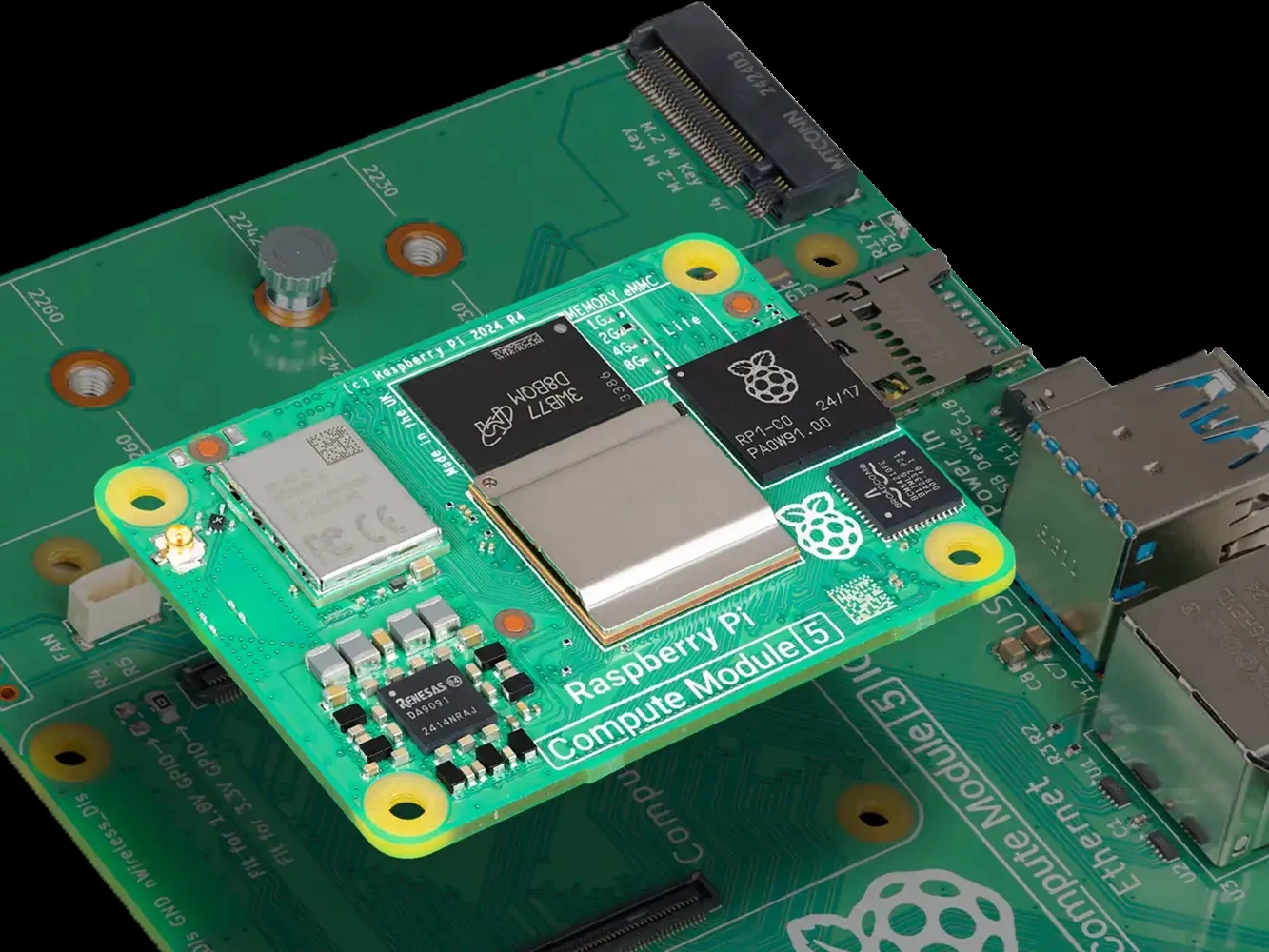
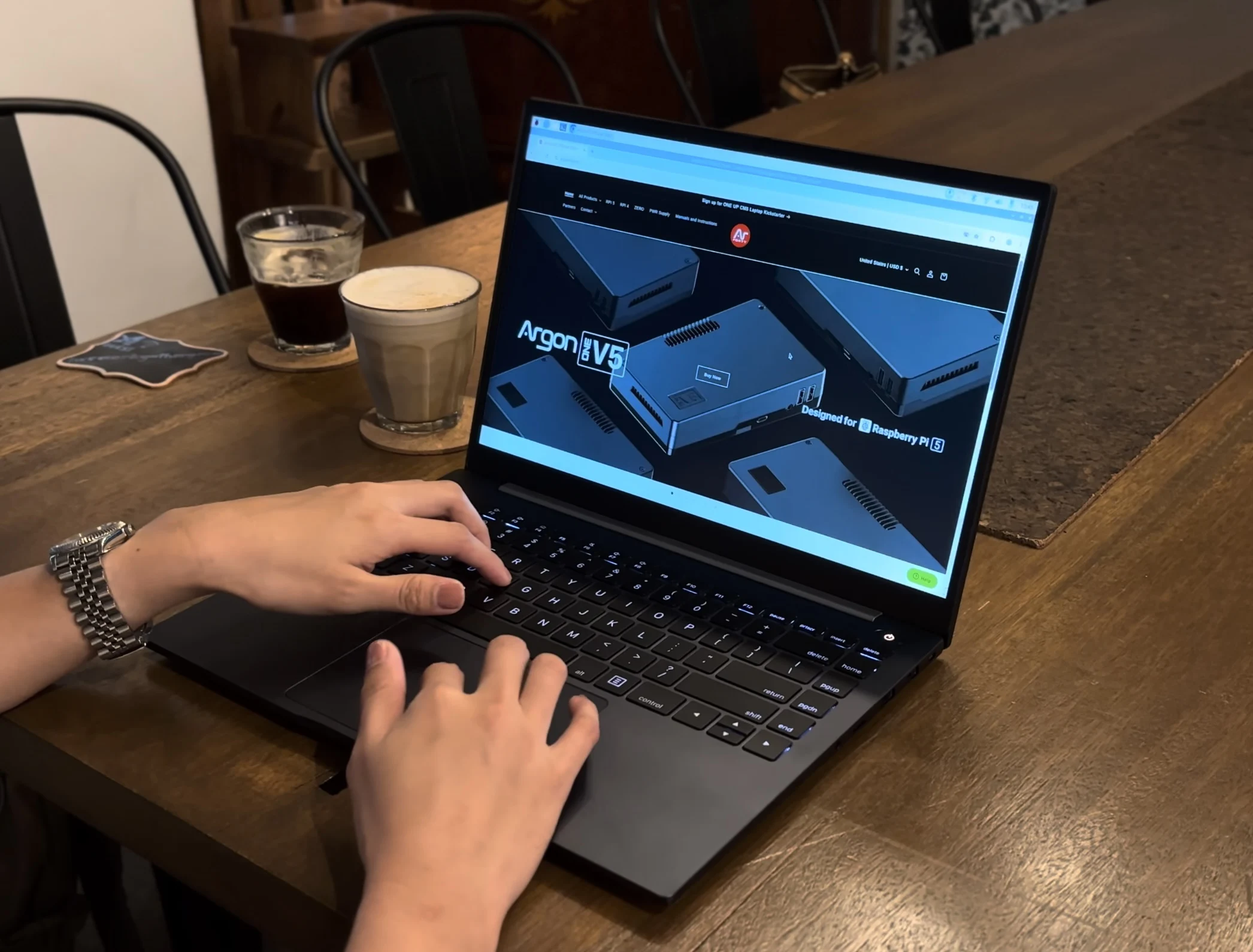
    The Argon One UP’s design is pretty straightforward—it’s a clamshell laptop with a keyboard, trackpad, and display. The Raspberry Pi CM5, which is available separately for $129 on Amazon, acts as the laptop’s main processor once it’s installed. The entire motherboard is specially crafted and comes with an active cooling system to keep it running smoothly.

    Specifications Overview

    This laptop shell includes M.2 storage, a 54 Wh battery, a backlit keyboard, and additional features as noted below:

    Clearly, the specifications show that the Argon One UP won’t compete with MacBooks or XPS machines anytime soon. However, for those wanting a Raspberry Pi-based laptop, the One UP seems to cover a lot of needs. The brand suggests that the 54 Wh battery offers between 6 to 8 hours of usage, which is only average at best.

    User Experience and Availability

    The One UP also boasts a sleek all-aluminum chassis, which is quite attractive. Initial users who have received their laptops seem to be pleased with their purchase, although there are some early issues, particularly concerning software.

    For those who missed the crowdfunding campaign but want to buy the laptop, it is available directly from Argon Forty’s website for a price of $400. As of this moment, there is no stock available, so interested buyers should stay alert for updates.

    Source:
    Link



  • Next-Gen School Smoke Detector Raises Privacy Concerns

    Next-Gen School Smoke Detector Raises Privacy Concerns

    Key Takeaways

    1. The Halo 3C smart smoke detector, commonly used in schools and public buildings, has significant security flaws due to its design based on Raspberry Pi.
    2. The investigation was initiated by a high school student who discovered the device on his school’s WiFi, highlighting a lack of awareness about IoT security in public services.
    3. The device lacks secure boot features and strong authentication methods, making it vulnerable to unauthorized access and manipulation.
    4. The duo was able to easily modify the device’s functionalities, raising concerns about potential misuse by hackers and other entities.
    5. The findings underscore the urgent need for better understanding and regulation of IoT devices to protect privacy and security in public spaces.


    Presenters Reynaldo and Nyx explored the complex inner workings of the Halo 3C smart smoke detector at this year’s DEF CON hacking conference. They discovered that this device, based on Raspberry Pi, is packed with security flaws and is widely used in schools, housing complexes, and various public buildings. Although it wasn’t their original goal, this investigation revealed alarming practices and claims from manufacturers, underlining the lack of tech knowledge in public services necessary for making smart choices about IoT devices.

    The Start of the Investigation

    The investigation kicked off when Reynaldo, a curious high school student, stumbled upon an unusual device connected to his school’s WiFi. As he dug deeper, he identified it as the Halo 3C, a “smart” smoke detector claiming to have features like vape and THC detection, along with real-time air monitoring. At first, obtaining the device for a thorough examination was too expensive, with a retail price exceeding $1200. However, when Reynaldo found it listed on eBay, he then managed to uncover its inner workings.

    What’s Inside the Halo 3C

    Inside the Halo 3C, there are various sensors, such as TVOC, PIR motion detectors, temperature and humidity sensors, CO2, particle sensors, and microphones—all powered by a Raspberry Pi Compute Module 4. Although the device is designed for commercial use, the discovery was still shocking due to its high cost and the ease with which such devices can be altered. With this newfound knowledge, Reynaldo contacted Nyx, a member of a local hacking collective, to assist with accessing the device.

    Vulnerabilities and Risks

    To their surprise, the duo found that the device had vulnerabilities that seemed almost careless on the manufacturer’s part. For example, it didn’t have any secure boot features, allowing them to easily extract the contents of the CM4 and start reverse-engineering the protocols. They also managed to gain admin access to the web interface by brute-forcing the credentials, since there were no strong authentication methods in place. Additionally, the device would accept any firmware update payload, provided the firmware file had the correct name. As a bonus, the firmware files could be downloaded for free from the manufacturer’s website.

    In the end, they were able to modify the Halo to perform various actions at their discretion. Although they didn’t discover any misuse of the microphones beyond what the manufacturer claimed, there is nothing preventing other hackers, IT administrators, or law enforcement from exploiting the device’s capabilities in ways contrary to its marketed purpose. Considering that this device is already installed in nursing homes, schools, banks, and public housing, and with one public figure referring to it as an “expert witness” in legal matters, it presents a concerning outlook on the expanding and covert IoT landscape of privacy invasion that is accessible to hackers and law enforcement.

  • UK Couple Cuts Heating Costs by 90% Using Raspberry Pi Setup

    UK Couple Cuts Heating Costs by 90% Using Raspberry Pi Setup

    Key Takeaways

    1. First Home Data Center: Terrence and Lesley Bridges from Essex are the first in the UK to heat their home using a mini data center called HeatHub.

    2. Innovative Technology: The HeatHub uses low-power Raspberry Pi boards instead of traditional high-energy Nvidia GPUs, making it more energy-efficient.

    3. Significant Cost Savings: The couple’s energy bill dropped dramatically from $492 (£375) to $52 (£40) by redirecting heat from the data center into their hot-water system.

    4. Safety Concerns: Experts warn that creating a home data center for heating can be impractical and unsafe without proper design, ventilation, and wiring.

    5. Potential for Net-Zero Emissions: If successful, distributed micro data centers like HeatHub could help the UK achieve net-zero emissions by turning computation into a household utility.


    A couple from Essex has made history as the first household in the UK to heat their entire home using a mini data center set up in their backyard shed. This unique data center system is known as HeatHub, developed by the clean-tech firm Thermify under the SHIELD project, which is overseen by UK Power Networks.

    Innovative Technology

    Typically, data centers rely on Nvidia GPUs, which are known for their high energy consumption. However, the HeatHub operates on a different principle. It employs clusters of low-power Raspberry Pi boards, configured into a compact distributed compute node.

    The couple, Terrence and Lesley Bridges, have incorporated 56 Raspberry Pi modules into their HeatHub. These modules handle basic computing tasks, including app hosting and data processing. Once the pilot phase wraps up, enterprise clients are expected to pay Thermify to utilize these distributed nodes for workload processing.

    Cost Savings

    All the heat generated by the servers is captured and redirected into the home’s hot-water system, effectively transforming it into a heating source. Consequently, their monthly energy bill has plummeted from $492 (£375) to merely $52 (£40).

    While this idea might appeal to tech enthusiasts, experts caution that creating a home data center heater is neither practical nor safe. The HeatHub trial employs professionally designed heat exchangers, controlled ventilation, load-balanced wiring, and remote server management to ensure safe operation.

    Practical Challenges

    If an individual attempts to replicate this setup, they may end up with high electricity bills due to the energy demands of the machines, likely outpacing the benefits of the heat generated.

    There are also crucial electrical load limits to keep in mind. In general, UK homes have a main fuse rating between 60–100 A, and even a modest server rack can easily surpass safe continuous draw limits without industrial-grade wiring.

    This isn’t the first instance of reusing data center heat. Earlier in 2023, a micro data center, roughly the size of a washing machine, was used to heat a public swimming pool in the UK. Nonetheless, the HeatHub represents the first trial of this kind in low-income households.

    Should it prove successful, distributed micro data centers could pave an unexpected way for the UK to achieve net-zero emissions, effectively turning computation into a vital household utility.

    Source:
    Link


  • 25-Year-Old Xbox Prototype Recreated for First-Time Playability

    25-Year-Old Xbox Prototype Recreated for First-Time Playability

    Key Takeaways

    1. Microsoft introduced the original Xbox prototype in 2000, featuring a distinctive aluminum X design.
    2. YouTuber Tito Perez successfully recreated the prototype as a working console, investing over $6,000 in its production.
    3. The replica maintains the original dimensions and design, but modernizes the hardware with USB-C power and an HDMI mod kit.
    4. An animated LCD screen has replaced the original plastic jewel, displaying a custom Xbox logo animation.
    5. The project has garnered positive feedback from viewers, with many expressing interest in recreating the prototype themselves using more affordable methods.


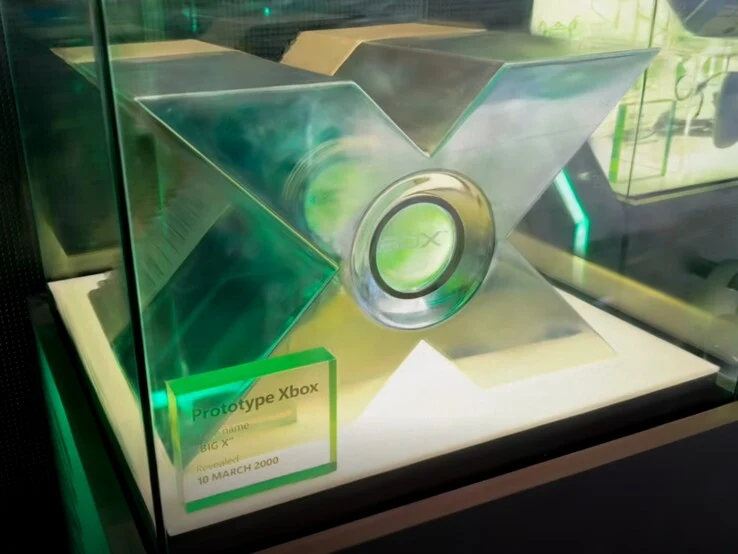
    The year was 2000. Microsoft, mostly famous for Windows and software for computers, was getting ready to dive into the gaming world. They revealed a huge aluminum X with a bright green center – an eye-catching version of the original Xbox. Even though it didn’t work, it stood out as a memorable marketing piece that distinguished the console from regular PC designs. The cost to make it was about $18,000 back then.

    A New Era for Xbox

    Fast forward twenty-five years, the Xbox prototype is back – but this time it’s a real, working console. US tech YouTuber Tito Perez, who runs the Macho Nacho Productions channel with over 380,000 subscribers, has recreated this famous design in a playable format. Perez put more than $6,000 into this venture, with $5,623 going towards CNC-milled aluminum components made by PCBWay. The case has a two-tone look: a matte finish on the back and a shiny, hand-polished front that shines at a 5,000-grit level.

    Precision in Design

    The dimensions were closely copied from the original prototype on show at the Microsoft Store in New York. CAD specialist Wesk took care of the 3D design, keeping the prototype’s unique form intact. Inside, real Xbox hardware runs the system, although it has been significantly altered. The power supply was swapped for USB-C, and an HDMI mod kit along with a SATA SSD ensures modern graphics and quicker load times. However, one drawback is that this replica can’t play physical game discs.

    Modern Tech Meets Retro Charm

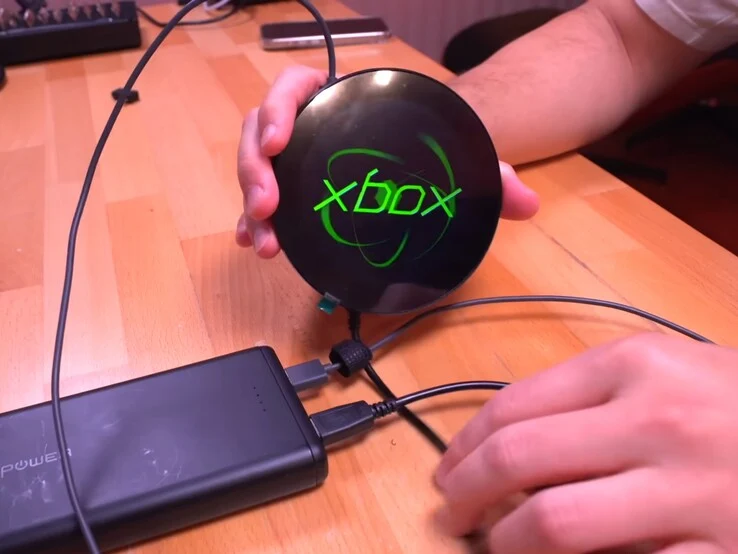
    The glowing “jewel” in the middle of the aluminum X – which was originally just a piece of green plastic with lights behind it – has been upgraded to an animated LCD screen. This new feature is powered by a Raspberry Pi Pico (which you can find for about $12 on Amazon) and now shows a custom Xbox logo animation as the console powers up. Looking to the future, this replica is anticipated to make appearances at retro gaming events and expos, bringing a slice of gaming history back into the limelight.

    In the comments section of the video, viewers are blown away, complimenting Macho Nacho for his careful attention to detail and the amazing skill shown in the build. Many also shared their desire for the CAD files to be made available, hoping to recreate the prototype on their own. Considering the expensive aluminum version, most are probably thinking about a more affordable option – like 3D printing the case and teaming it with a display and a Raspberry Pi to achieve that classic look without spending too much.

    Source:
    Link


  • Lightweight FydeOS 21.0: A Must-Have for Chromebook Fans

    Lightweight FydeOS 21.0: A Must-Have for Chromebook Fans

    Key Takeaways

    1. FydeOS has evolved from Flint OS, a fork of ChromiumOS, and is now at version 21.0 “Sunlit Epiphany.”
    2. The new release includes performance and security updates based on an upgraded ChromiumOS foundation.
    3. Enhanced search functionality in the Launcher is one of the key new features.
    4. FydeOS 21.0 is available in four versions: for PC, VMware, SBCs, and a unique “for You” edition.
    5. The OS is generally free for home users, but some premium features require payment.


    With ten years of development behind it, FydeOS has evolved from its origins as a fork of the open-source ChromiumOS. Initially, it was designed specifically for Raspberry Pi devices and was called Flint OS. The new version, FydeOS 21.0 “Sunlit Epiphany,” was released yesterday and features the latest updates for performance and security based on its ChromiumOS foundation, which has been upgraded from r132 to r138. However, there is much more included in this new release than just the core platform update.

    New Features and Improvements

    The official blog post detailing this release (check the link below the video at the article’s end) mentions several exciting highlights for FydeOS 21.0. One of the most notable changes is the improved search functionality in the Launcher.

    Versions Available for Download

    For those looking to give FydeOS a go, it is offered in four distinct versions: one for PC, one tailored for VMware, one for SBCs, and a unique “for You” edition. You can find the downloads on the corresponding webpage. FydeOS is generally available for free to home users, though there are some premium features like enhanced support and advanced control options that come with a cost.

    Source:
    Link


  • DietPi 9.17: Ultralight Debian 13 Linux for SBCs Now Available

    DietPi 9.17: Ultralight Debian 13 Linux for SBCs Now Available

    Key Takeaways

    1. DietPi is a Debian-based distribution focused on single-board computers (SBCs) and operates on over 135,000 machines worldwide.
    2. It supports a wide range of SBCs, including Raspberry Pi, PINE64, NanoPi, and Asus Tinker Board.
    3. The latest version, 9.17, is based on Debian 13 and introduces features like quicker backups and early access to the Roon Server.
    4. Users can find a complete list of supported hardware and download options, including BIOS/CSM and UEFI images.
    5. Additional improvements in this update resolve SPI storage flashing problems and enhance overall performance.


    Introduced more than ten years ago, DietPi is a Debian-based distribution that currently operates on over 135,000 machines across the globe. While it caters to PCs and virtual environments, its primary focus is on single-board computers (SBCs). The range of supported devices is extensive and features both well-known and lesser-known SBC families, including Raspberry Pi, PINE64, NanoPi, and the Asus Tinker Board. Notably, the Tinker Edge T, equipped with GC7000 Lite graphics, a quad-core processor clocked at 1.5 GHz, and memory/storage options of 1/8 GB, is now available for $87.79 on Amazon. The most recent update is derived from Debian 13 and is labeled as version 9.17.

    New Features in the Update

    As stated in the official release notes (a link is provided at the end of this article), this latest version “offers quicker and more disk space-efficient DietPi backups, a toggle for early access to the Roon Server, resolutions for SPI storage flashing problems, and additional improvements.” Here are some key points:

    Supported Hardware and Downloads

    You can view the complete list of compatible hardware devices on this page. The downloads section also features BIOS/CSM and UEFI native images, in addition to various virtual machine images, such as those for Parallels, Hyper-V, and VirtualBox, among others.

    Source:
    Link


  • LattePanda SBC: 4 x86 Cores, M.2 & PCIe in Raspberry Pi Size

    LattePanda SBC: 4 x86 Cores, M.2 & PCIe in Raspberry Pi Size

    Key Takeaways

    1. Compact Size and IO Options: The LattePanda IOTA is slightly larger than a Raspberry Pi, measuring 88mm by 70mm, but offers a wide range of IO options.

    2. Powerful Performance: It features an Intel Twin Lake N150 processor with 4 cores, capable of speeds up to 3.6GHz, and offers configurations of 8 GB or 16 GB LPDDR5 RAM.

    3. Diverse Connectivity: The board includes multiple connectivity options, such as USB 3.2 ports, Gigabit Ethernet, PCIe support, and the ability to connect to a 4K display.

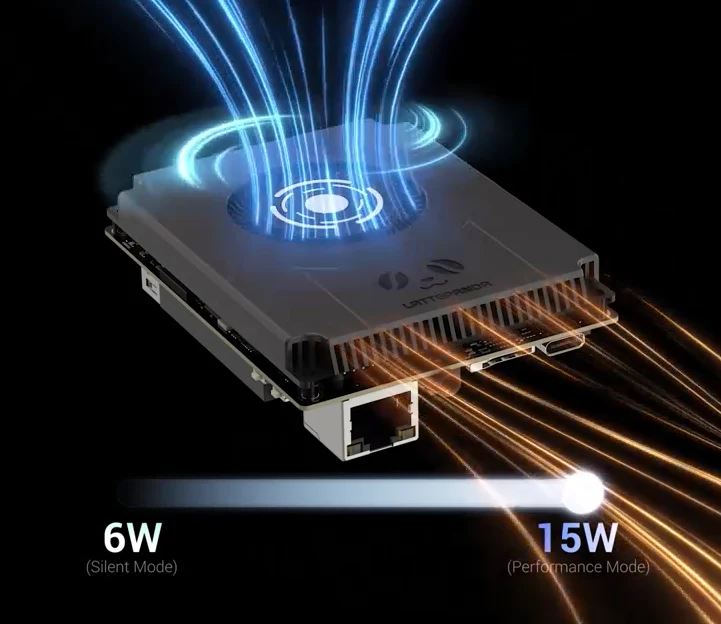
    4. Cooling and Power Options: The N150 processor has a configurable TDP of 6 to 15 Watts, allowing for flexible cooling solutions, and optional Wi-Fi modules can be added at the cost of the native M.2 slot.

    5. Potential Use Cases: It is suitable for industrial applications, server roles, and home lab setups, including tasks like running Windows or serving as a micro NAS.


    At 88mm by 70mm, the LattePanda IOTA is just a tad larger than a Raspberry Pi, but it offers an impressive selection of IO options.

    Specifications and Performance

    This board is powered by an Intel Twin Lake N150, featuring 4 cores and speeds that can hit 3.6GHz. You can choose between configurations of 8 GB or 16 GB of LPDDR5 RAM that runs at 4800MT/s, along with either 64 GB or 128 GB of onboard eMMC storage. The eMMC storage is built into the board, leaving a spare M.2 2230 slot available for extra storage, plus a USB 2.0 Micro SD slot.

    Connectivity Options

    Additionally, the board includes a standalone PCIe FPC connector that supports PCIe 3.0x, which allows you to add various components from extra M.2 storage to an external GPU, though it has similar limitations as the Raspberry Pi. You’ll find 3x 10 Gbps USB 3.2 Gen 2 Type A ports, Gigabit Ethernet, and the capability to support a single 4K display, with the option to connect another display via an eDP connector.

    In line with other development boards, the IOTA features a GPIO connector, controlled by an RP2040 MCU.

    Power and Cooling

    The Intel N150 has a configurable TDP that ranges from 6 to 15 Watts, enabling it to be cooled either passively or actively. Wi-Fi can be included as well, with choices for an Intel AX210 Wi-Fi 6E module or an Intel BE200 Wi-Fi 7 module, but opting for these will eliminate access to the native M.2 slot.

    Currently, the price is discounted to $166.80 for the 8 GB RAM and 64 GB eMMC version with a passive cooler and Wi-Fi 6E M.2 module, making the LattePanda IOTA a bit pricey. This is especially true when you look at other x86 boards from ODROID or similar models like the GMKtec MiniPC available on Amazon.

    Use Cases

    Nevertheless, the capability to run Windows with In-band ECC memory could make this device advantageous for industrial tasks or server roles where space is limited. In a home lab setup, it could also serve as a solid micro NAS when paired with an M.2-Key and SATA 3.0 expansion board.

    Source:
    Link


  • Raspberry Pi Wi-Fi Chip Accurately Measures Heart Rate Without Trackers

    Raspberry Pi Wi-Fi Chip Accurately Measures Heart Rate Without Trackers

    Key Takeaways

    – Inexpensive Wi-Fi chips, like the $5 ESP32, can track heart rates as accurately as high-end devices such as the Apple Watch 10.
    – The Raspberry Pi outperformed expectations by analyzing Wi-Fi Channel State Information (CSI) data with AI algorithms for heart rate measurement.
    – Wi-Fi channel characteristics change slightly with each heartbeat and breath, allowing for accurate pulse detection through machine learning.
    – The system can measure heart rates regardless of participants’ positions, making it versatile for various settings.
    – Researchers are expanding their work to include breathing rate detection, which could aid those with sleep apnea.


    Cheap Wi-fi chips, similar to those in a $30 Raspberry Pi, can accurately measure human pulse, rivaling clinical heart rate monitors and pricey fitness trackers like the Apple Watch.

    Pulse-Fi Study Insights

    Researchers from UCSC, who led the Pulse-Fi study, found that a basic Wi-Fi network made with a $5 ESP32 chip can track heart rates as effectively as the Apple Watch 10, which is currently on sale at $359 on Amazon. The findings show that these inexpensive devices can perform on par with much costlier options.

    The Raspberry Pi’s test results were even better, as the researchers analyzed Wi-Fi Channel State Information (CSI) data through AI algorithms to determine the heart rates of over 100 participants in the study.

    How It Works

    The Wi-Fi channel characteristics, such as phase, frequency in the environment, and amplitude, change slightly with every breath and heartbeat. These tiny variations are filtered using machine learning algorithms that eliminate other factors affecting CSI, allowing the Raspberry Pi to accurately measure the pulse of all 118 participants in the research.

    Interestingly, the Wi-Fi network was capable of detecting heart rates regardless of the participants’ positions—whether they were moving, standing, sitting, or lying down.

    Development of the System

    To accomplish this, the team had to build a database from the ground up and utilize a clinical-grade oximeter as a reference device. This helped the AI algorithms learn which changes in Wi-Fi channel frequency or amplitude were associated with a heartbeat and which were due to other interferences.

    The AI system they implemented allowed for pulse detection from a greater distance, enabling casual heart rate monitoring through Wi-Fi networks using the Pulse-Fi algorithm. In addition to heart rate detection, the UCSC researchers are now also focusing on recognizing breathing rate patterns, which could benefit individuals suffering from sleep apnea.

    Source:
    Link


  • YouTuber Creates Shocking Aimbot That Controls Muscles for Pro Play

    YouTuber Creates Shocking Aimbot That Controls Muscles for Pro Play

    Key Takeaways

    1. Basically Homeless showcased a “Neuromuscular Aim Assist” device that enhances aiming precision by stimulating muscles with electrical signals.
    2. The device uses Computer Vision to analyze game footage in real-time and send commands to control muscle contractions and trigger pulls.
    3. The technology is built on a YOLO model trained with Counter-Strike 2 gameplay, utilizing a Raspberry Pi for management.
    4. Despite achieving a response time under 100 ms, the device faced challenges like latency issues and muscle cramps, affecting its reliability.
    5. The creator considers the device a gray area in terms of cheating, emphasizing that it’s his own muscles being used.


    In a video released on August 11, 2025, American YouTuber Basically Homeless displayed his home-made “Neuromuscular Aim Assist” – a device that resembles a stun gun aimed at enhancing aiming precision. By merging a bold spirit with Computer Vision and muscle stimulation, this gadget sends signals to electrodes that cause selected muscles to contract, allowing the hand to snap to the target in mere milliseconds. Additionally, it can automatically pull the trigger when necessary.

    Understanding the Technology

    Muscles react to electrical signals from the brain. An EMS (electromyostimulation) or TENS (transcutaneous electrical nerve stimulation) device can mimic these electrical signals from the outside. By utilizing Computer Vision – which is the automated image analysis performed by a computer – the setup effectively acts like the brain, producing signals in response to happenings in the game, such as detecting an opponent in Counter-Strike 2. Basically Homeless designed his neuromuscular aim assist using a YOLO model that was trained with CS2 gameplay footage. This model evaluates the game feed in real-time and sends commands to a Raspberry Pi (which can be purchased on Amazon for $80), that manages a relay linked to the EMS/TENS device.

    Overcoming Obstacles

    The endeavor was not free of difficulties. Apart from dealing with latency problems, the YouTuber faced painful muscle cramps but still achieved notable outcomes. During his best trials, the system cut down response time to less than 100 ms – about half his normal speed and quicker than many pros. Nonetheless, the reliability of the device still fluctuates. When questioned if this gadget constitutes cheating, Basically Homeless referred to it as a gray area: “It’s my muscles – so no cheat.” Viewers found the electric shock aimbot incredibly entertaining, sharing jokes about a bleak future and making wordplay like “The results were shocking” and “That was a really stimulating video.”

    Source:
    Link


  • Maix4: Raspberry Pi 5 Expansion Module and Development Board

    Maix4: Raspberry Pi 5 Expansion Module and Development Board

    Key Takeaways

    1. The Maix4-HAT is versatile, functioning as both a Raspberry Pi expansion board and an independent unit.
    2. It features an AX650 chip with an INT4 performance of 72 TOPS and INT8 performance of 18 TOPS, focused on AI applications like image content analysis.
    3. The board includes eight A55 CPU cores, 8 GB of RAM, a USB 3.0 port, and various connectors for peripherals.
    4. It has a mini HDMI port, I2C ports, an SPI port, and a PCIe connection for Raspberry Pi linkage.
    5. The pricing is HK$ 1,174.21 (approximately $149), but it is currently out of stock on AliExpress.


    The Maix4-HAT is quite an unique system that, as the name HAT implies, can function both as an expansion board for a Raspberry Pi or as an independent unit. It features an AX650 chip, capable of achieving an INT4 performance of 72 TOPS and is said to provide 18 TOPS at INT8. The board measures 56 x 65 millimeters and can speed up various AI applications, including specialized DeepSeek models and Qwen3. The manufacturer notes that this system isn’t designed to enhance LLMs. Instead, its capabilities are geared towards image content analysis, like automatic object detection in surveillance cameras.

    Technical Features

    This board includes eight A55 CPU cores that can operate at speeds up to 1.7 GHz, along with 8 GB of RAM. There’s a USB 3.0 port for connecting additional devices, and the underside of the board features I2C ports as well as an SPI port for connecting to a monitor. For linkage with a Raspberry Pi, the PCIe connection can be found at the rear. Additionally, it has connectors for a fan and speakers, plus a mini HDMI port.

    Pricing Information

    Sipeed lists the price of the Maix4-HAT as HK$ 1,174.21 (which is around $149) on AliExpress, though it seems to be out of stock at the moment of this writing.

    Source:
    Link