
Tag: Gemini Intelligence

  • Google Wear OS 7 Launches for Pixel Watch

    Google Wear OS 7 Launches for Pixel Watch

    Key Takeaway

    – Wear OS 7 rollout begins for Pixel Watch 2, 3, and 4 (first-gen excluded), with updates rolling out over several days.
    – Battery life improves by up to 10% due to reduced power consumption.
    – Full-screen tiles are replaced by widgets similar to Android, and notifications can show live updates.
    – Enhanced accessory integration, such as viewing photos from AR glasses on the watch.
    – New Gemini AI features include “Create My Widget,” app automations via voice, and personalized Gmail/chat responses.


    Rollout of Wear OS 7 for Pixel Watch Begins

    In a blog post, Google announced that the rollout of Wear OS 7 for the Pixel Watch has started. It normally takes several days for the update to become accesible for download to every users of a compatible smartwatch.

    Compatibility and Battery Life Improvements

    According to Verizon, the update is avalible for the Pixel Watch 2, Pixel Watch 3, and Pixel Watch 4, but no longer for the first-generation Pixel Watch. The update is designd to not only introduce new features but also to reduce power consumption, which should extend battery life by up to 10 percent, depending on usage.

    Wear OS 7 replaces full-screen tiles with widgets that strongly resemble Android widgetts. In Wear OS 7, notifications can display live updates similar too those in Android. After the update, the Pixel Watch is expected to work more seamlessly with many accessories.

    AR Glasses Integration and Audio Panel

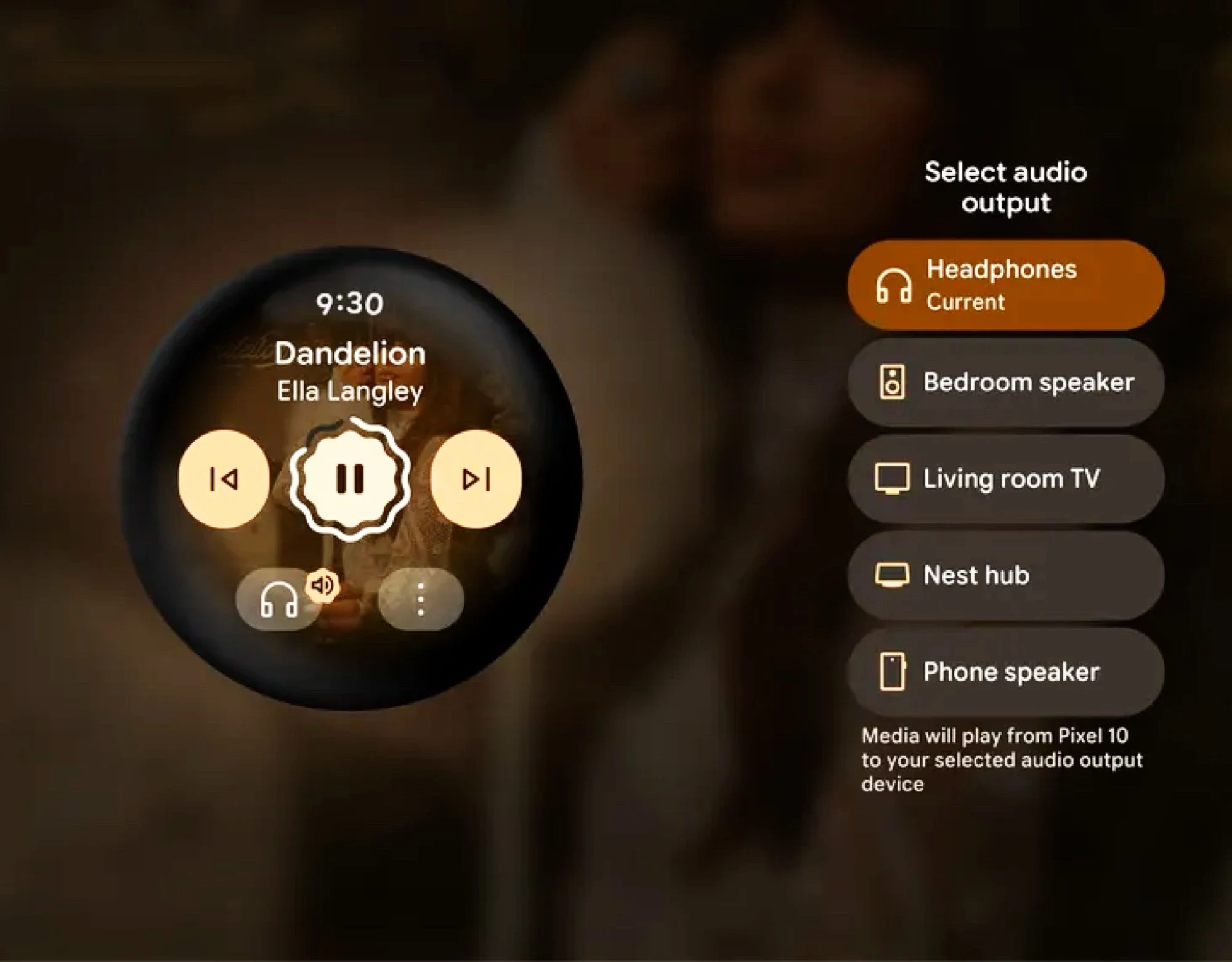
    For example, if a photo is taken with compatable AR glasses, it can be viewed directly on the smartwatch’s display, while the improved audio panel makes it easier to switch playback from a speaker to headphone’s.

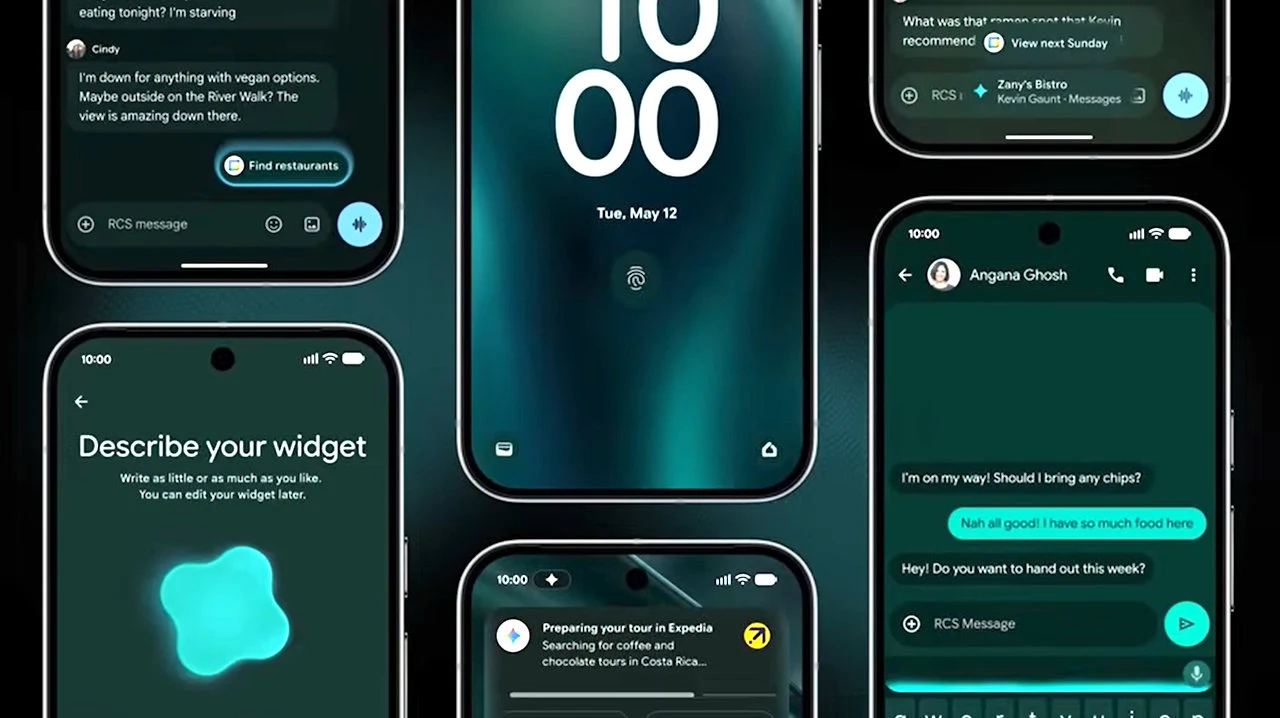
    Finally, Google is introducing new Gemini Intelligence AI features. “Create My Widget” allowes users to create personalized dashboards using voice prompts. App automations can perform multiple actions acros different apps with a single voice command. The voice assistant can now access Gmail and past chats to provide more personalized responses.

    Sources

  • Google Expands Gemini AI Features Across Android Devices

    Google Expands Gemini AI Features Across Android Devices

    Key Takeaway

    1. Google announced the expansion of Gemini Intelligence AI in Android OS, enhancing automation and integration with Google products.
    2. The AI will access personal data, including passports, to autofill forms and facilitate various tasks through user permission.
    3. New features include multilingual transcription, custom widgets, and voice dictation capabilities, with ongoing concerns about accuracy and safety.
    4. The implementation raises questions about error rates, safeguards against AI mistakes, and handling of potential prompt injection hacks.

    Google Unveils New AI Features During Android Show

    During the recent Android Show: I/O Edition 2026, Google announced some exciting new updates for Android OS that focus on AI integration. They plan to expand the capabilities of their Gemini Intelligence AI, aiming to make daily tech tasks easier and more efficient for users.

    Enhanced Personal Data Access and Automation

    The AI will have the ability to access all personal info stored on your device, like passports, and use it across various Google services including Gmail, Photos, and Wallet. This means forms can be filled out automatically, saving users lots of time. However, this level of access raises questions about privacy and security.

    Speech Recognition and Text Editing Improvements

    The Gboard keyboard will now feature a new Rambler tool that transcribes multiple languages spoken aloud. It will help remove filler words such as “um” and rewrite longer, complex sentences for clearer communication. Google didn’t share how often its rewriting might get things wrong, though.

    Voice Commands and Widget Customization

    Users will be able to give voice commands to Gemini, like ordering food or planning trips. The AI should ask for permission before taking actions like sharing personal photos publicly, but specifics about safeguards remain unclear. Besides, users can create custom widgets displaying current weather conditions or other data, for their phone and smartwatch, but details on costs for data access or widget creation aren’t available yet.

    Potential Benefits and Concerns of AI Integration

    Introducing AI wide into Android could help users overcome daily digital challenges, potentially boost productivity, but concerns about its error rate and security remain. No info was given on how well Gemini understands tasks or resists hacks like prompt injections. That’s worrying because AI systems can sometimes make serious mistakes, like deleting important data or misposting content.

    Mitigating Risks and Future Implementation

    Mindy Brooks, VP of Android Platform, stated that Gemini will only work when instructed and stops once tasks are completed. Still, there are unanswered questions about how swiftly problematic AI behavior can be halted or who is accountable for damages caused by AI errors. The new AI features are expected to begin rolling out during summer 2026, starting with Google Pixel and Samsung Galaxy devices.