Category: Software

  • YouTube Tests Community Notes Feature for Video Context

    YouTube Tests Community Notes Feature for Video Context

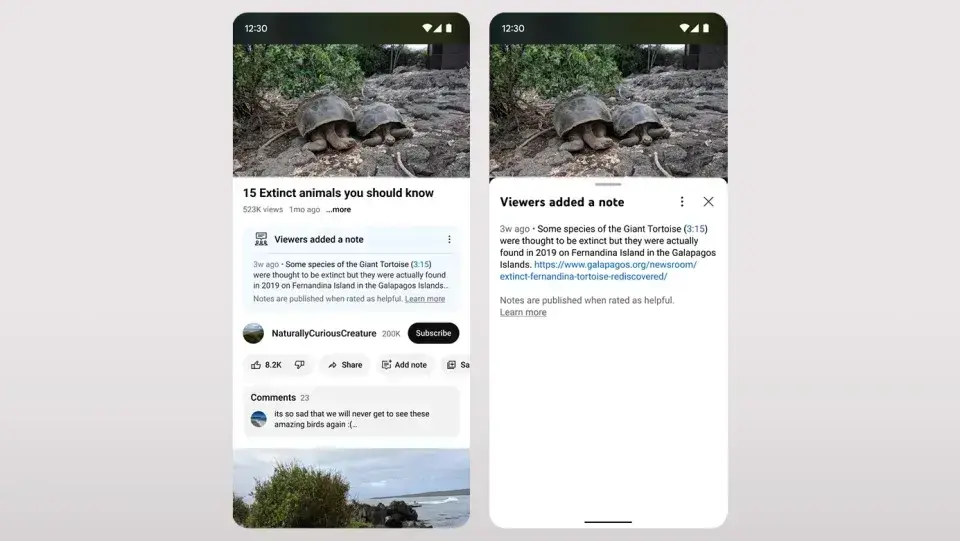
    YouTube is introducing a new feature called Community Notes to help combat misinformation by providing additional context for viewers. This initiative, inspired by a similar feature on X, allows users to contribute brief explanations or background details for specific videos.

    The pilot program is currently available to a select group of users in the United States, who will receive invitations via email or through YouTube Creator Studio. To join, users need to have an active YouTube account in good standing. During this initial phase, YouTube will use “third-party evaluators” to judge the usefulness of the submitted notes, which will help train the system to ensure only the most valuable contributions are shown publicly.

    Rating System and Algorithm

    When the pilot program expands, viewers will be able to rate the helpfulness of Community Notes using a three-tier system: “helpful,” “somewhat helpful,” or “unhelpful.” They can also specify reasons for their ratings, such as the credibility of cited sources or the clarity of the note.

    A unique “bridging-based algorithm” will decide which notes appear under videos. This algorithm favors notes that get positive ratings from a diverse group of viewers, including those with differing opinions. Although there is always a risk of misuse, YouTube aims to reduce the spread of misinformation through this approach.

    Community Notes’ Concept and Future Plans

    The idea behind Community Notes is similar to a feature that Twitter introduced during Jack Dorsey’s tenure and expanded globally under Elon Musk‘s ownership. While Twitter’s notes haven’t fully resolved accuracy issues, YouTube believes that this crowd-sourced method has potential. The pilot program will start on mobile devices for users in the United States. YouTube acknowledges there might be challenges as the system is refined, and a broader rollout in the US is anticipated in the upcoming weeks and months.

    (Via)
  • Redmi Note 11 Receives Latest HyperOS Update

    Redmi Note 11 Receives Latest HyperOS Update

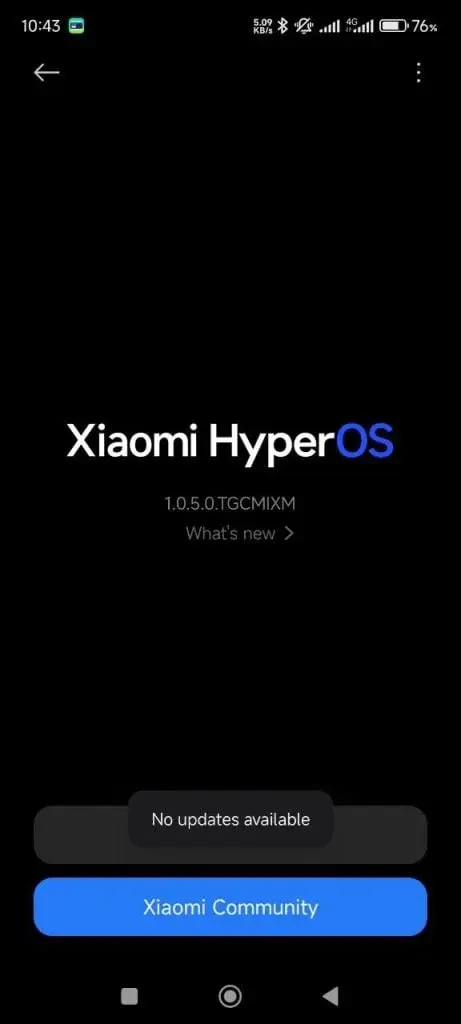
    Xiaomi’s well-loved Redmi Note 11 continues to provide its users with the latest software updates. Recently, the device received a new security update in June 2024. This HyperOS update, identified by build number OS1.0.5.0.TGCMIXM, enhances the security and performance of the device.

    Redmi Note 11 HyperOS June Update

    The June 2024 update primarily addresses security vulnerabilities. With the rise in cyber threats and security risks, mobile device security has become crucial. Xiaomi regularly releases security updates to safeguard its users’ personal data and devices. This latest patch enhances the device’s security, making it more resistant to malware and other cyber threats.

    Redmi Note 11 OS1.0.5.0.TGCMIXM

    Beyond security improvements, the new patch also includes optimizations to boost device performance. Users can expect benefits such as extended battery life, quicker app launches, and enhanced overall system stability. This ensures that users can enjoy prolonged, trouble-free usage of their devices.

    For Redmi Note 11 users, installing this update is straightforward. They can navigate to Settings / About Phone to check for the new update, then download and install it. Once the update process is complete, the device will reboot, and the new software version will be enabled.

  • Redmi Note 10S June 2024 Security Update Released in India

    Redmi Note 10S June 2024 Security Update Released in India

    The Redmi Note 10S is a well-regarded device within the popular Redmi Note 10 series. This smartphone has garnered significant attention for its technical specifications and has a large user base. The recently released June 2024 update is now being distributed for the Redmi Note 10S. This update includes the latest June security patch and enhances system optimization.

    Redmi Note 10S HyperOS June Update

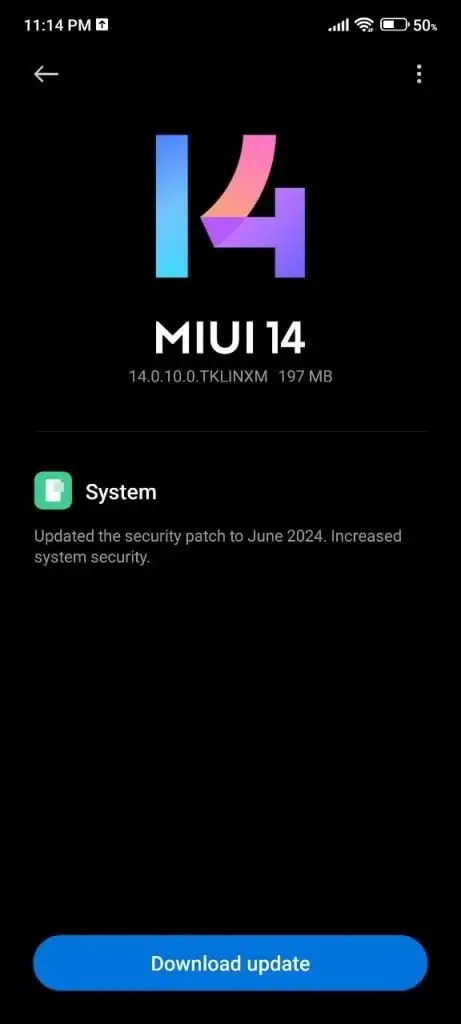
    Initially launched with MIUI 12.5 based on Android 11, the smartphone now runs MIUI 14 based on Android 13 and continues to receive updates. The June 2024 update aims to bolster the Note 10S against security vulnerabilities. It's important to note that this update is currently being rolled out in India. The build number for the new MIUI update on the Redmi Note 10S is V14.0.10.0.TKLINXM.

    Redmi Note 10S V14.0.10.0.TKLINXM

    Xiaomi is distributing the new MIUI 14 update to Pilot users first. Assuming no major issues arise, it is expected to become available to all users. The Note 10S, already appreciated for its features, will become even more robust with this update. Therefore, make sure to download the new updates when they become available.

  • OnePlus Nord 3 Update: Enhanced Gaming, Bug Fixes & New Features

    OnePlus Nord 3 Update: Enhanced Gaming, Bug Fixes & New Features

    OnePlus Nord 3 has received a fresh update aimed at resolving various issues and enhancing user experience. The OxygenOS 14.0.0.520 update also incorporates the latest Android security patch, addressing multiple system vulnerabilities.

    OnePlus Nord 3 OxygenOS 14.0.0.520 Update Changelog:

    System

    • Option to hide the track while drawing the Lock screen pattern to unlock your device.
    • Volume can now be adjusted in Quick Settings.
    • Floating window size can now be adjusted by dragging its bottom and swiping up to close a mini window.
    • Home screen widgets display improvements.
    • Fix for system data occupying excessive storage space.
    • Integration of the June 2024 Android security patch to enhance system security.
    • Fix for simultaneous appearance of the volume slider in Quick Settings and the physical volume button.
    • Fix for issues with using NFC-enabled payment.

    Communication

    • Fix for device not vibrating for phone calls.
    • Fix for phone numbers not displaying for call forwarding.

    Games

    • Improved gaming stability.
    • Fix for screen turning black while playing a game.

    Rollout and Manual Update Check

    The update is being gradually rolled out to users in India. If the OTA update notification hasn't appeared yet, users can manually check for it by going to Settings, selecting About Device, then OxygenOS, and finally tapping on Check for Update.

    Reporting Issues

    Indian users experiencing problems after the update can submit bug reports through the Google Dialer by dialing *#800#.

  • Nokia Unveils New Immersive Phone Call Technology

    Nokia Unveils New Immersive Phone Call Technology

    Nokia’s CEO Pekka Lundmark recently made a phone call utilizing a cutting-edge technology known as “immersive audio and video.” This innovation aims to enhance call quality by introducing a three-dimensional effect, making the listening experience more lifelike. The demonstration was conducted with Stefan Lindström, Finland’s Ambassador of Digitalisation and New Technologies.

    Nokia anticipates their 3D calling technology will soon set the industry standard. They are urging network providers, chipset manufacturers, and handset makers to adopt and integrate this immersive calling feature into their products.

    A Step Towards Realistic Communication

    The objective of this new technology mirrors Google’s Project Starline, albeit with fewer prerequisites. The CEO’s demonstration showcased the future of voice communication, akin to his participation during the introduction of 2G calling.

    For years, the core technology and output of voice calls have remained mostly unchanged. Initially, calls employed heavy compression to minimize file size for transmission. Despite the current infrastructure’s capability to handle high-quality, multi-channel audio, we still rely on monophonic systems. Nokia’s 3D audio-based immersive calling represents a significant advancement in calling technology.

    A Leap in Live Voice Calling

    Nokia’s innovation will not only enhance auditory experience but also allow users to visualize the caller’s environment. “It is the biggest leap forward in the live voice calling experience since the introduction of monophonic telephony audio used in smartphones and PCs today,” stated Jenni Lukander, Nokia’s president.

    This new calling method’s advantage lies in its simplicity; it doesn’t necessitate special audio equipment to experience the 3D effect. A stereo microphone setup, common in most modern smartphones, is sufficient to create this immersive experience.

    Practical Demonstration and Future Prospects

    For those concerned about transmission, the demonstration used a standard 5G-enabled smartphone. As shown in the image above, CEO Pekka Lundmark was holding a Pixel device. Besides one-on-one calls, this immersive technology can also be applied to conference calls.

    Nokia plans to license this new technology and make it publicly accessible within a few years.

  • iOS 18: Advanced AI Features Might Miss Launch, Says Ming-Chi Kuo

    iOS 18: Advanced AI Features Might Miss Launch, Says Ming-Chi Kuo

    Just before the WWDC24 event, industry analyst Ming-Chi Kuo shares his insights about iOS 18 and Apple’s forthcoming announcements. There have been ongoing discussions about Apple integrating AI features into its future devices. Kuo confirms that the company is set to reveal several AI advancements. The WWDC24 keynote session is scheduled to begin at 10:30 PM IST on June 10 (today).

    AI Integration in iOS 18

    Kuo anticipates that Apple will embed robust functionalities throughout iOS 18 and its system applications. Siri, Apple’s AI assistant, is expected to receive a significant upgrade, as previously reported. However, Kuo points out that the capabilities of on-device AI functions will be constrained by the 8GB memory size, which is insufficient for the large language model. To address this, Apple plans to merge local and server-side LLMs for its AI features.

    Phased Rollout of Server-Side AI

    Interestingly, Kuo does not view Apple’s AI advancements as a breakthrough in the field. Nonetheless, he predicts that Apple’s substantial investment in machine learning and artificial intelligence over recent years will yield benefits in the long run. His research indicates that the shipment volume of the iPhone 16 series in Q2 2024 might be slightly lower compared to the same period last year.

    The server-side LLMs require more time to train compared to smaller on-device models. Kuo suggests that the more sophisticated server-dependent features may be introduced in phases rather than being fully launched with the iPhone 16 series. Advanced AI features are expected to be available on the iPhone 15 Pro models and newer, alongside the iPhone 16 series.

    Apple's AI Partnerships

    There have been reports about Apple’s collaborations with OpenAI and Google for server-side AI features. However, Kuo downplays the significance of these partnerships. He believes that Apple’s cooperation will primarily focus on the “encapsulation model” for user and application interaction.

    In conclusion, Kuo asserts that post-WWDC24, Apple will no longer be viewed as a company lagging behind in the AI race.

  • Siri in iOS 18: Discover New AI Features Enhancing Performance

    Siri in iOS 18: Discover New AI Features Enhancing Performance

    Apple's annual Worldwide Developers Conference (WWDC) is a breeding ground for rumors about upcoming software updates, and this year, Siri, Apple’s digital assistant, has been at the forefront. A recent leak from Apple Insider, reportedly from sources close to Apple’s AI projects, provides the clearest insight yet into Siri’s upcoming features for various iPhone apps.

    Enhanced Natural Language Understanding

    The leak indicates that Apple has been concentrating significantly on improving Siri’s ability to understand natural language commands. The tech giant has been training Siri with intentionally vague user requests, such as “I want to make a blog” or “I’m feeling nostalgic right now.”

    The goal is to move Siri beyond requiring specific syntax for tasks. Ideally, users won’t have to use precise commands like “turn on the coffee machine,” but can instead say something more natural like, “Hey Siri, I want some coffee.”

    Integration with Built-In iPhone Apps

    The leak also outlines Siri’s integration with no fewer than 18 built-in iPhone apps. Here are some of the most noteworthy highlights:

    • Camera: Siri will be able to handle voice commands for camera control. Users can switch between video and photo modes, set a shutter timer, and toggle between front and rear cameras using voice commands.
    • Mail: For the Mail app, Apple is adopting a page from Gmail by using machine learning to automatically classify emails. Additionally, Siri will manage tasks like composing, sending, and scheduling emails, marking emails as junk, setting reminders, summarizing emails, and creating “smart replies.”
    • Photos: Apple might introduce a suite of photo editing features powered by generative AI. Features could be similar to those on Pixel phones, such as removing unwanted objects from photos, filling in gaps using generative AI, searching for specific photos based on people or animals in them, and applying AI-powered filters.
    • Safari: Siri integration in Safari could offer webpage summaries, akin to the functionality provided by Google’s Gemini on Android. Users can also expect voice commands for creating new tab groups and opening private tabs.
    • Voice Memos: Siri will enable completely hands-free voice memo recording. Users can instruct Siri to create a new recording, begin speaking, stop the recording, assign a specific name, and even move it to a designated folder – all through voice commands.

    Gradual Rollout

    Apple Insider’s report reveals nearly everything Siri will offer in upgrades, so it’s worth a read for those seeking full details.

    Regarding the launch, Apple leak specialist Mark Gurman notes that not all these features will be available immediately. While some might be announced at WWDC, their actual release could be staggered until 2025 via software updates.

  • Apple Could Reveal Dedicated Passwords App at WWDC

    Apple Could Reveal Dedicated Passwords App at WWDC

    We are just a few days away from Apple’s annual WWDC (Worldwide Developer Conference) that kicks off on Monday, June 10. The tech giant is anticipated to reveal the next-generation operating system for its iPhones, iPads, Macs, and more. A recent report from Bloomberg’s Mark Gurman suggests that Apple may introduce a new Passwords app on iOS 18, iPadOS 18, and macOS 15. This means Apple could potentially compete with well-known services like LastPass, 1Password, and Dashlane.

    Apple may introduce a dedicated Passwords app at WWDC

    Currently, Apple’s iPhones, iPads, and Macs have a passwords feature, but it is hidden deep within the Settings app. Users need to go through a three-step process to access it. A standalone Passwords app would address this issue, making it more accessible, especially for those new to the Apple ecosystem.

    The existing passwords feature in Settings can store logins, passwords, support one-time passcodes, share passwords, and more. These capabilities will be included in the dedicated Passwords app as well. It will be powered by Apple’s iCloud Keychain service, which syncs credentials across all devices.

    New Features and Compatibility

    Gurman reports that the Passwords app will organize user logins into categories such as accounts, Wi-Fi networks, and passkeys. It will also be compatible with Windows devices and the Vision Pro headset. The app is expected to support verification codes and function similarly to Google Authenticator. Additionally, it will allow importing passwords from other services like LastPass and 1Password.

    WWDC Announcements

    Apple is anticipated to announce the new Passwords app on June 10 at WWDC. It will be part of a series of announcements, with iOS 18 expected to take the spotlight, focusing significantly on AI features. Official details are expected to be revealed on Monday.

  • iOS 18 AI Features Exclusive to iPhone 15 Pro, Not Older Models

    iOS 18 AI Features Exclusive to iPhone 15 Pro, Not Older Models

    Apple has been developing a range of AI features for the upcoming iPhone 16 series and beyond, which were anticipated to be available to older models with the iOS 18 update. However, according to Mark Gurman, the more sophisticated AI features will only be accessible on the iPhone 15 Pro and iPhone 15 Pro Max.

    Limited AI Features for Older iPhones

    Mark Gurman suggests that while the basic AI functions in iOS 18 will operate on-device, the more advanced features will necessitate more processing power and will depend on Apple’s servers.

    Previous reports indicate that Apple is also creating chips for its servers to manage these advanced AI features. Additionally, there are mentions of the company’s plans to utilize its M series chips in servers to process AI tasks.

    The restriction of cloud-based AI features to fewer iPhones could be due to the current limited infrastructure. Similar strategies have been adopted by Samsung and Google, who have also reserved many of their advanced AI capabilities for newer models.

    iOS 18 AI Features

    The iOS 18 update is expected to incorporate AI features such as notification summarization (termed Greymatter Catch Up), object removal from photos, an overhauled notes app with speech-to-text and summarization capabilities, among others. Siri will also gain new abilities, like opening specific documents, deleting emails, and summarizing articles.

    AI Features for Older Models

    Most text-based AI functionalities are likely to be considered basic features that can run on-device. Therefore, recent iPhone models eligible for iOS 18 (including the iPhone 11 series and above, iPhone XS, iPhone XS Max, iPhone XR, iPhone SE 2nd and 3rd generations) might receive these features. However, it remains unclear which specific features will be available on-device.

    Moreover, Gurman indicates that there could be some on-device AI features that only the iPhone 15 Pro models and later are capable of handling. These functionalities might not be available on older models and the non-Pro iPhone 15 models equipped with the A16 Bionic chip.

    AI Features in iPadOS 18 and macOS 15

    iPadOS 18 and macOS 15 are also set to receive some AI features. Gurman notes that the minimum requirement for macOS and iPadOS devices will be an M1 chip or later. Consequently, Intel-powered Mac devices will not support these features, which is understandable given that Intel chips and older iPhone Bionic chips lack the necessary NPU to run on-device LLMs.

  • OnePlus 11R Update: New Animations, May 2024 Security Patch

    OnePlus 11R Update: New Animations, May 2024 Security Patch

    OnePlus has recently released a significant update for its devices, bringing numerous changes and enhancements to the operating system and UI. This update, named OxygenOS 14.0.0.800, is currently being rolled out to Indian users of the OnePlus 11R. The detailed list of changes is provided below.

    OnePlus 11R OxygenOS 14.0.0.800 Update Changelog

    New Smooth Animations

    • Introduces wallpaper zoom and seamless icon transitions during app launch and exit for an enhanced visual experience.
    • Adds a bounce animation effect at the bottom of the notification drawer and optimizes the layer effects of Quick Setting icons and widgets for a more natural and delicate visual effect.
    • Enhances transition animations for Home screen icons and widgets and adds wallpaper zoom animations upon device unlock.
    • Adds wallpaper zoom animations and gradual brightness transitions when the screen is turned on or off.
    • Optimizes background colors and Gaussian blur effects in Quick Settings, Notification drawer, Home screen drawer, and Global Search.
    • Improves transition animation when the Lock screen clock and buttons disappear upon device unlock.
    • Optimizes animations for entering and exiting Global Search for a smoother and more consistent visual experience.

    New Touch Control Experience

    • Adds a transition animation when swiping in from one side of the screen to exit an app before it starts up.
    • Introduces a transition animation when swiping in from one side of the screen to go back to the previous page before a new page is opened.
    • Adds a transition animation when swiping inward from a side of the screen or swiping up to exit an app in landscape mode.
    • You can now tap the lower right corner of a large folder to view more apps.
    • Allows you to pull down app icons in large folders and then open an app in just one move.
    • Improves touch control responsiveness, making tapping and swiping on the Home screen and Recent tasks screen faster and more stable.
    • Enhances touch responsiveness for app usage scenarios, such as when opening and closing apps, entering and exiting recent tasks, or swiping on the gesture guide bar to switch between apps.
    • Optimizes animations when using large folders, making dragging apps on the Home screen smoother.

    System

    • Adds a horizontal layout for the Lock screen clock.
    • Volume adjustment is now possible in Quick Settings.
    • You can choose not to show the track when drawing the Lock screen pattern to unlock your device.
    • Fingerprint unlock can now be used without waking up the screen.
    • You can now create photo collages without frames in Photos.
    • Adds a “Partial screenshot” option in the Smart Sidebar.
    • Pressing and holding the Volume Down button now turns the flashlight on when the screen is off.
    • Introduces the “app-specific volume” feature to adjust the volume for individual apps based on your needs.
    • You can adjust the size of a floating window by dragging its bottom and swipe up to close a mini window.
    • Improves the volume bar’s design for ease of use and visual consistency.
    • Integrates the May 2024 Android security patch to enhance system security.

    The update is initially being rolled out to a limited number of devices in India, with a broader release expected soon. If you haven’t yet received the OTA update notification on your device, you can manually check for it by navigating to Settings > About Device > OxygenOS and tapping on Check for Update.