Category: Software

  • Instagram Tests Unskippable Ads Called “Ad Breaks”

    Instagram Tests Unskippable Ads Called “Ad Breaks”

    Social media users were taken aback recently when Instagram announced it’s experimenting with unskippable ads within the app. Screenshots of this new feature, called “ad breaks,” have been making rounds online. These ad breaks feature a countdown timer, effectively halting users’ ability to scroll through their feed until the ad concludes.

    Value for Advertisers

    This approach by Instagram mirrors the ad strategy used by the free version of YouTube, which requires viewers to watch ads before and sometimes during videos. The shift seems logical for Instagram, given its transformation into a video-centric platform through features like Stories and Reels, diverging from its original photo-sharing focus.

    Though Instagram has not provided detailed information, a Meta spokesperson confirmed the tests to TechCrunch, mentioning that the company is investigating “formats that can drive value for advertisers.” They stressed that these are merely tests and any changes based on the results will be communicated.

    User Reactions

    The news was first revealed by Instagram user Dan Levy, who posted a screenshot encountering an unskippable ad. Levy criticized the move, calling it “bonkers.” Additional details were shared via a Reddit post, noting that clicking the ad break’s information icon displays a message explaining it as “a new way of seeing ads on Instagram,” and users might have to watch it before continuing to browse.

    Public Sentiment

    Unsurprisingly, the reactions have not been overwhelmingly positive. Levy’s post gained attention as it was re-shared by other social media accounts. While Instagram hasn’t specified the locations where the test is running or its global reach, screenshots indicate that the ad breaks appear within the in-app feed during video post viewing. It is also unclear whether content creators will have any say over these ad placements. The company might be aiming to increase ad revenue. For now, it remains a test, but it’s a development that frequent Instagram users should monitor.


    Instagram Tests Unskippable Ads Called

    (Via)

  • iOS 18: Easily Remove Unwanted Objects from Photos Before Sharing

    iOS 18: Easily Remove Unwanted Objects from Photos Before Sharing

    Apple may soon introduce on-device and cloud-based AI features to iOS 18 for the iPhone 16 series, following in the footsteps of Google, Samsung, Huawei, and other Android OEMs. The heart of Apple's AI strategy for iOS 18, known as Project Greymatter, will integrate these features across core apps and services like Safari, Notes, and Photos.

    New AI Features in iOS 18

    One of the standout features is 'Greymatter Catch Up,' a notification summarization tool that allows users to listen to summaries of recent notifications via Siri. Additionally, Apple plans to introduce AI-powered photo editing and other features.

    iOS 18 Generative Playground

    Apple is reportedly working on a new object-erasing photo editing feature. This generative AI tool can recognize and remove unwanted objects from images, filling the space with AI-generated content that blends seamlessly with the surroundings. This feature is similar to what is already available on Pixel, Galaxy, and Huawei devices.

    Apple has also developed an "internal application" called Generative Playground, which may allow users to experience this AI-powered photo editing feature. This tool might be integrated into iMessage for easy sharing. iOS 18 could also offer the capability to generate personalized emojis.

    The new operating system will include an automated response generation feature based on large language models (LLMs). This feature will intelligently consider factors like names, calendar events, locations, and times when generating responses. Siri is also being improved to offer more natural and smooth text-to-speech functionality for a better user experience.

    Major Improvements to the Notes App

    The Notes app will receive a significant upgrade with iOS 18 and macOS 15, incorporating text-based generative AI capabilities like speech-to-text conversion and summarization. Users will be able to record audio directly from the Notes app, convert it to text, and summarize it. This could make it easier to access information from an entire meeting or lecture.

    Apple is expected to announce these developments at the upcoming WWDC conference, which will take place from June 10 to June 14.

  • Android 15 Instant Hotspot Not Compatible with Samsung Devices

    Android 15 Instant Hotspot Not Compatible with Samsung Devices

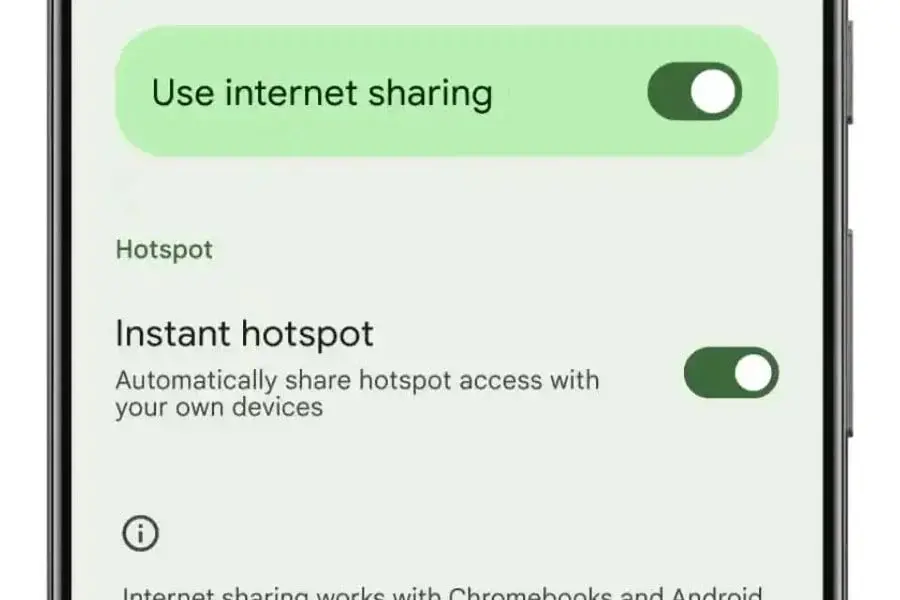
    As Android 15 gears up for its launch later this year, Google is making final adjustments to its new features. One notable addition is Instant Hotspot, a handy tool that enables Android tablets and Chromebooks to effortlessly connect to a phone’s hotspot. However, recent findings indicate that this feature will not be accessible on Samsung Galaxy devices.

    Instant Hotspot enhances the ease of connecting your tablet or Chromebook to your phone’s internet. When nearby and lacking Wi-Fi, a prompt will appear on your device, urging you to connect to the phone’s hotspot. It’s a straightforward and user-friendly experience.

    Familiar Territory for Galaxy Users

    For those using Galaxy devices, this might seem recognizable. Samsung’s One UI already includes a similar function named Auto Hotspot. Both features serve the same purpose of linking your tablet or Chromebook to your phone’s internet.

    The main distinction is in compatibility. Google’s Instant Hotspot is compatible with any Android tablet and Chromebook, whereas Samsung’s Auto Hotspot is restricted to Galaxy devices that are part of the same Samsung account or family group.

    Impact on Galaxy Users

    Although Samsung users have been benefiting from Auto Hotspot for some time, the lack of Instant Hotspot in Android 15 won’t significantly impact their experience. If you exclusively use Samsung Galaxy devices, you won’t miss out on the advantages of Instant Hotspot.

    However, if you were looking forward to using Auto Hotspot with other Android tablets or Chromebooks, you might be disappointed when Android 15 is released.

    Speculations on Feature Exclusion

    The reason why the Instant Hotspot feature won’t be available on Galaxy devices remains unclear. The feature is part of Google Play Services, which is accessible on all Google-certified Android devices, including Samsung’s.

    Samsung probably chose to exclude this feature due to its overlap with their existing Auto Hotspot. Nonetheless, with the introduction of Instant Hotspot, the practicality of Auto Hotspot seems somewhat diminished.

  • iOS 18 to Introduce New Text Effects for Apple Messages

    iOS 18 to Introduce New Text Effects for Apple Messages

    Apple is set to revamp the iMessage experience with the upcoming iOS 18! The tech giant is rumored to be adding even more dynamic text effects that could enhance messaging, even when communicating with Android users.

    Here’s what we know so far:

    Animated Text

    Say farewell to static text messages. iOS 18’s iMessage might enable you to animate individual words within a sentence. Picture sending a “Happy Birthday” with the word “Happy” bursting in a shower of confetti, or a “Congrats” accentuated by shimmering fireworks. According to MacRumors, these effects would surpass the current whole-message animations like balloons and confetti showers.

    Cross-Platform Compatibility

    This is where things get intriguing. While iMessage currently restricts fancy effects to iPhone users, Apple’s confirmation of RCS messaging support in iOS 18 hints that these new text effects could also be sent and viewed on Android devices. RCS (Rich Communication Services) is a messaging standard designed to bridge the gap between SMS and iMessage features.

    Beyond these text effects, rumors also suggest that iOS 18’s iMessage could utilize Apple’s expanding AI capabilities in exciting ways. Imagine asking iMessage to generate an image based on your description, and then seamlessly sending it within your message.

    With the official iOS 18 reveal expected at WWDC (Apple’s Worldwide Developers Conference) coming up soon, we shouldn’t have to wait long for confirmation of these features and more.

  • WhatsApp Tests New “Favorite Chats” Filter for Android Beta Users

    WhatsApp Tests New “Favorite Chats” Filter for Android Beta Users

    WhatsApp, the widely-used messaging app, is introducing a new feature for its Android beta testers – a favorite chats filter. This update, version 2.24.12.7, is designed to improve the user experience by making it easier to access their most important conversations and groups.

    Organize Your WhatsApp Chats with a New Filtering Feature

    WhatsApp encourages all beta testers to download the latest update from the Google Play Store to try out this new feature. Although it might not be available to everyone right away, it is gradually being released to more users over the next few days.

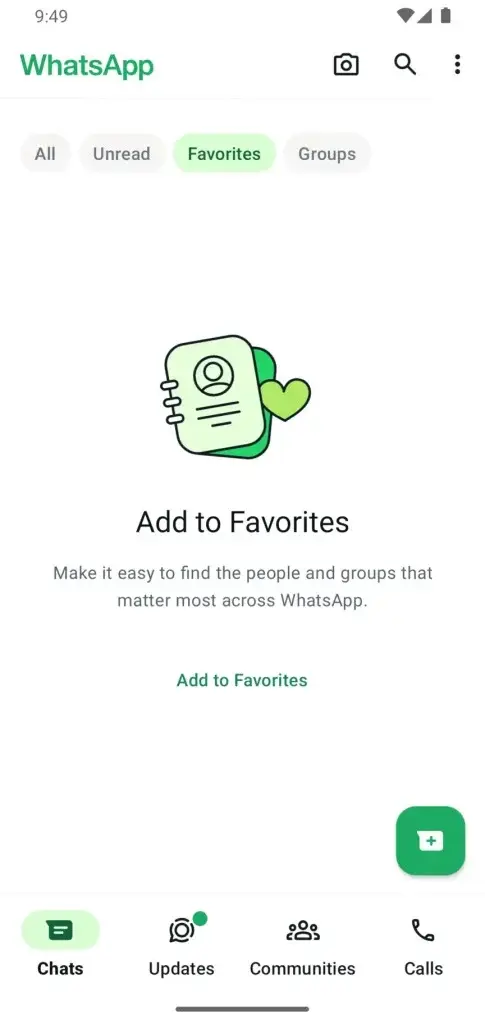
    Previously available for the calls tab, this feature is now being extended to the chats tab. Beta testers who have installed the latest update can now use a new filter to quickly find their favorite chats, including both individual contacts and groups. This represents a significant step towards prioritizing and organizing the most relevant conversations within the app.

    Easy Management of Favorite Chats

    To make this feature even more user-friendly, favorites can be added directly within the chats tab or through a dedicated “Favorites” section in the app settings. This section allows users to manage their favorite chats by adding, removing, or reordering contacts and groups. Additionally, chats can be added to favorites directly from the chat info screen, simplifying the process significantly.

    This new feature is expected to increase user efficiency by providing quick access to frequently contacted chats and groups. It will save users time by removing the need to scroll through numerous conversations to find the most important ones. Furthermore, the feature will enhance the overall organization within the app, allowing users to keep their most important chats easily accessible.

    Continuous Improvement and Current Challenges

    The introduction of the favorite chats filter aligns with WhatsApp’s ongoing efforts to improve user experience and meet the evolving needs of its users. As this feature is currently in beta testing, it is expected to undergo further refinements based on user feedback before being made available to a broader audience.

    WhatsApp is currently facing several challenges. Recently, Apple removed the app from the Chinese store, and the Indian government is in a dispute with the company over chat encryption.


    WhatsApp Tests New
  • Windows 11 24H2 Drops Support for AC-3 Dolby Digital Audio Codec

    Windows 11 24H2 Drops Support for AC-3 Dolby Digital Audio Codec

    Microsoft has recently announced in a quarterly support document that starting with version 24H2, Windows 11 will no longer support the AC-3 audio codec. This codec, also known as Dolby Digital, is used for multi-channel audio or surround sound. Despite this change, OEMs will still have the option to pre-install the AC-3 codec.

    Impact on Media Player and Streaming Platforms

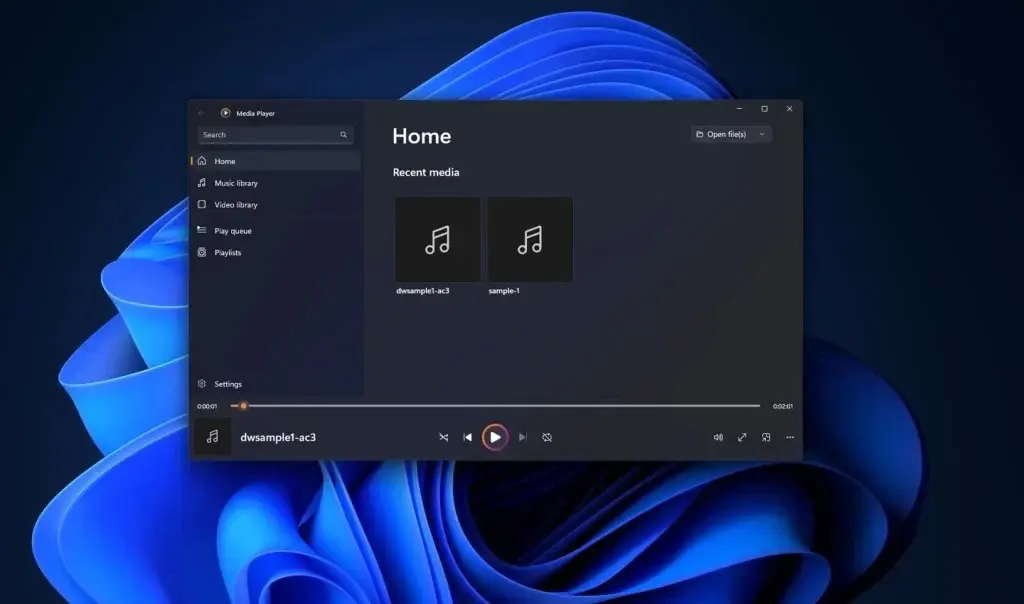
    With this update, users will no longer be able to open files that use the AC-3 codec with the Media Player in Windows 11 24H2. It's worth noting that most streaming platforms and media companies are moving away from the AC-3 encoder, as it is being phased out.

    Additional Codec Packs from Microsoft Store

    For those who still need to access files with the AC-3 codec, there are options available. Users can manually install the codec from the Microsoft Store or opt for a third-party player such as the MPV player that supports the codec.

    Other Exclusions in Windows 11 24H2

    In addition to the AC-3 encoder, the upcoming Windows 11 24H2 will reportedly exclude other features such as Cortana, WordPad, and Steps Recorder.

    Release Timeline

    The Windows 11, version 24H2 (Build 26100.712) was made available in the Release Preview Channel on May 22. It is expected to be released to the general public later this year, likely around September or October.

    Included Codecs in Windows 11 24H2

    The following audio and video codecs will be included in Windows 11 24H2:

    • Audio Codecs: MPEG-1, MPEG-2 Audio (MP3, MP2), Advanced Audio Coding (AAC, M4A), Free Lossless Audio Codec (FLAC), Apple Lossless Audio Codec (ALAC), Waveform (WAV), Windows Media Audio (WMA), 3GP, 3G2, Adaptive Multi-Rate (AMR)
    • Video Codecs: MPEG-4, H.264, H.263, VC-1, Windows Media Video (WMV), DV, VP8, Motion JPEG

    Installable Codec Packs from Microsoft Store

    For additional codec support, users can install various codec packs from the Microsoft Store. These include:

    • MPEG-2 Video Extensions
      • Adds support for MPEG-1 and MPEG-2 video formats.
    • HEVC Video Extensions
      • Adds support for HEVC (H.265) video format.
    • VP9 Video Extensions
    • Adds support for VP9 video format.
    • AV1 Video Extensions
      • Adds support for AV1 video format.
    • Web Media Extensions
      • Adds support for OGG audio and video formats, including the OGG container format, the Vorbis audio codec, and the Theora video codec.
  • Nothing Phone (2a) Update: Nothing OS 2.5.6 New Features & Fixes

    Nothing Phone (2a) Update: Nothing OS 2.5.6 New Features & Fixes

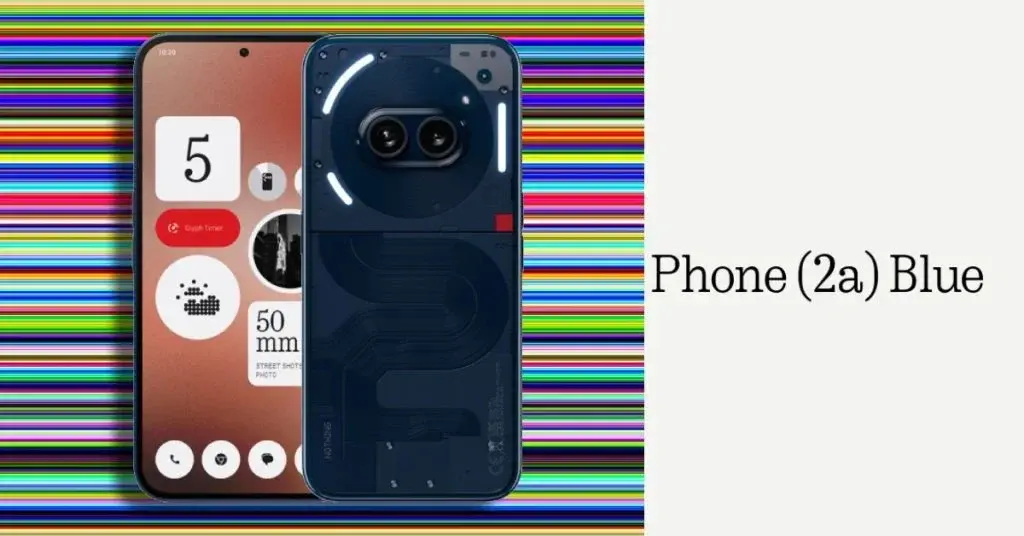
    Nothing has released a new update for the Phone (2a) called Nothing OS 2.5.6. This new update is 115MB in size and includes new features, camera enhancements, and several bug fixes.

    New Features

    A “Hide Navigation Bar” feature has been added for a more immersive user experience. This can be accessed via “Settings > System > Gestures > Navigation mode > Gesture navigation settings > Hide navigation bar”. Additionally, long-pressing a widget now reveals more options, making it more consistent with other home screen actions. There is also a new option to allow or disable vibrations for other calls and notifications during an ongoing call.

    Improvements

    The Google security patch has been updated to May 2024, and the camera's auto HDR detection logic has been optimized.

    Bug Fixes

    The update resolves certain compatibility issues with Android Auto. It also addresses the problem where the screen does not automatically turn on after using the Power Button to turn it off during an incoming call. Some issues with the ChatGPT widget have been fixed, and the problem where the notification panel narrows when receiving certain notifications has been resolved. Overall system stability has been optimized as well.

    The update is being rolled out globally. If you haven’t received the OTA notification yet, you can manually check for it by going to Settings > System > System Update.

  • Huawei P50 Pro Gets HarmonyOS 4.2: New Lock Screen Themes

    Huawei P50 Pro Gets HarmonyOS 4.2: New Lock Screen Themes

    Huawei P50 Pro users, get ready to personalize your phones and enjoy enhanced functionality with the official HarmonyOS 4.2 update. This update introduces a collection of interactive lock screen themes to boost creativity.

    Fresh Interactive Themes

    The update enhances system security with the latest patch. Here are some of the new themes:

    • Geometric Party: Create a dynamic display with triangular shapes that respond to your touch.
    • Geometric Sticker: Arrange colorful stickers or geometric shapes for a unique, interactive look.
    • Mood Party: Use a variety of cute emoticons that can be customized for a personalized experience.
    • Mood Sticker: Liven up your lock screen with over 1500 mood emojis and popular emoticons, allowing for ever-changing themes.

    Enhanced Security and Visuals

    The update isn't just about aesthetics. It optimizes the visual experience of certain applications and strengthens system security with the latest May 2024 security patch.

    New Functionalities

    Additionally, new functionalities enhance the user experience. These include automatic WLAN network connection switching, improved app permissions management for device direction access, and a Bluetooth device recording toggle. HarmonyOS 4.2 also brings support for the new Xiaoyi smart assistant, which includes an AI writing assistance function for the Xiaoyi input method.

  • Windows Recall Runs on Snapdragon Notebook with 3.4GB RAM

    Windows Recall Runs on Snapdragon Notebook with 3.4GB RAM

    Microsoft recently introduced its new Copilot+ PCs, featuring an innovative capability called Windows Recall. Although Microsoft designed this feature to be exclusive to these machines due to specific hardware needs, some tech-savvy individuals have already discovered ways to enable it on older devices.

    Ingenious Workaround

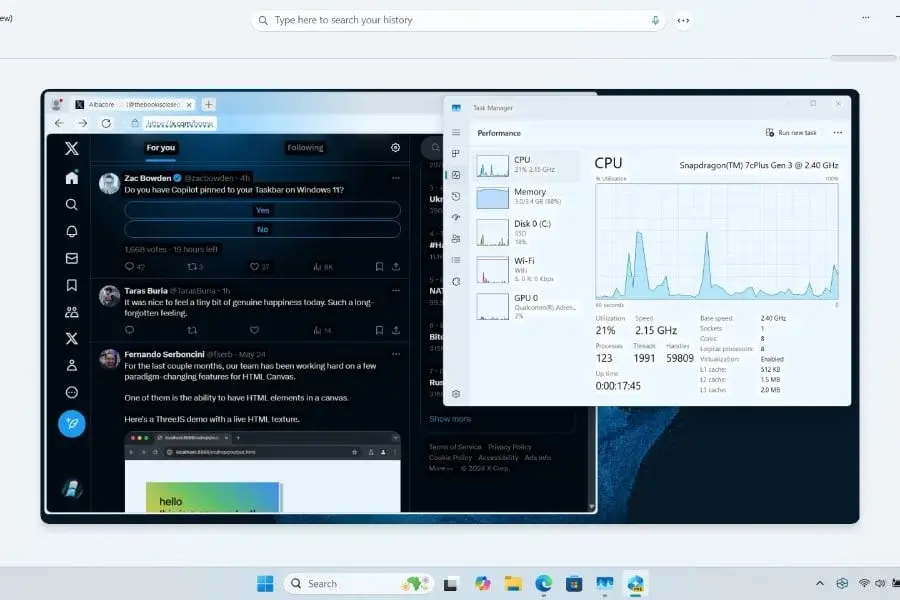
    A user named Albacore, known as @thebookisclosed on X, successfully managed to run Recall on a non-Copilot+ device with rather modest specifications. The device he used is a Samsung Galaxy Book Go 2, powered by an ARM-based Snapdragon 7c+ Gen 3 processor and only 3.4GB of RAM.

    This achievement is particularly noteworthy given that the Snapdragon 7cx on the Go 2 lacks a dedicated Neural Processing Unit (NPU) and does not meet the 16GB RAM requirement that Microsoft specifies for Recall. Despite these constraints, Albacore claims the feature performs “surprisingly good.”

    Detailed Guide Coming Soon

    Albacore has also promised to release a comprehensive guide for Surface Pro X users and others on the Windows on ARM platform, enabling them to access Windows Recall.

    As for those using x86 machines, the wait might be a bit longer since the current developer ML models are primarily ARM64 packages. However, there’s hope that x86 PCs will eventually get the Recall feature as well.

    Privacy Concerns

    The concept of Recall is both fascinating and concerning. Microsoft assures that all processing and data remain on the device, but the idea of the OS continuously recording user activity can be unsettling for some.

    Fortunately, Microsoft offers options for those who are uncomfortable with this feature. Users can either opt-out of snapshots or disable the feature entirely.

    Availability

    Recall is set to officially launch with Windows 11 version 24H2, which is currently available in the public Release Preview Channel. This means it’s just one step away from being released to the general public.

  • Google Invests $350M in Flipkart, Offers Cloud Services

    Google Invests $350M in Flipkart, Offers Cloud Services

    E-commerce giant Flipkart, owned by Walmart in India, is set to receive a new influx of capital as Google joins the list of investors. Google is anticipated to invest nearly US$350 million (around RMB 2.54 billion) in Flipkart, securing a minority stake. This investment is part of a larger funding round spearheaded by Walmart. However, the deal is still pending regulatory approval and the finalization of terms between the two companies.

    Walmart's Continued Investment

    Beyond just the investment, Google will also offer cloud services to Flipkart. This cloud partnership aims to bolster Flipkart’s digital infrastructure and support its growth plans. Flipkart views this collaboration as a strategic move to "scale its business and modernize" its operations. Reports suggest that this investment is a segment of Flipkart’s nearly $1 billion funding round initiated in 2023. Walmart has already taken a leading role, having invested $600 million last year.

    Flipkart's Market Position

    Currently, Flipkart maintains a leading position in the Indian e-commerce market, with competitors like Amazon and Meesho trailing behind. Google’s investment underlines its dedication to the Indian market, following its earlier commitment of $10 billion (around RMB 72.5 billion) in Indian companies back in 2020. This commitment is further evidenced by Google’s prior investments in Jio Platforms ($4.5 billion) and Airtel ($1 billion).