Category: Computers

  • GPD Win Max 2 2025 Now Available: AMD Ryzen 9 HX, 64GB RAM

    GPD Win Max 2 2025 Now Available: AMD Ryzen 9 HX, 64GB RAM

    GPD has recently introduced the upgraded Win Max 2, which was initially revealed on December 6. Now, Droix has entered the market by selling the Win Max 2 2025 on its websites for both the UK and US. For those interested, the Win Max 2 2025 is still available for direct order through Indiegogo.

    RMA Process Differences

    This leads to GPD likely needing to have RMA units shipped back to China, a process that can be pricey and take a long time. In contrast, Droix provides RMAs through its UK and US warehouses. Additionally, Droix is recognized for its top-notch customer support and warranty options.

    Pricing and Specifications

    However, these benefits come with a higher cost, as Droix has already covered the import fees from China. The current pricing for the Win Max 2 2025 starts at $1,077.95, taxes included, or £1,215.95, featuring an AMD Ryzen 7 8840U APU, 32 GB of RAM, and 1 TB of storage. Alternatively, the more advanced model, equipped with a Ryzen AI 9 HX 370, 64 GB of RAM, and a 2 TB SSD, is priced at $1,491.95 (£1,694.95).

    Model Comparison

    It’s important to note that the Ryzen 7 also supports the Win Max 2 2024, which is currently priced at $1,364.95 on Amazon. The Win Max 2 2025 offers enhancements such as faster RAM, an additional USB 4 port, a slightly brighter screen, and better cooling solutions. For more detailed information on the hardware updates between GPD‘s 2024 and 2025 models, check out our article on the launch of the Win Max 2 2025.

    Source: Link


    Image 1
    Image 1
  • Windows 10 Support Ends in 2025: Upgrade to ChromeOS Flex Now

    The end of Windows 10 support is coming soon in October 2025, allowing users some time to decide on their next steps. Many computers from the last 5-6 years, particularly those with Intel Core 8000 or AMD Ryzen 3000 processors, should be eligible for a free upgrade to Windows 11. For PCs or laptops that can’t be upgraded due to outdated hardware or if there’s no upgrade planned, users can either switch to a different operating system or delay the end of support for a maximum of three years by paying an annual fee. If they choose the latter, Microsoft will keep providing security updates.

    Options for Users

    While it’s technically possible to install Windows 11 on computers that don’t meet Microsoft’s minimum requirements, the experience may be far from smooth. Updates and error-free performance are not guaranteed, making this option quite impractical.

    Linux distributions like Ubuntu, Fedora, and Mint, as well as ChromeOS Flex, are viable alternatives to consider. We’ll focus on ChromeOS Flex. We tested it on a decade-old Lenovo ThinkPad L540, which recently underwent a retrofitting process (the article is in German, but readers can use translation tools in their browsers).

    Features of ChromeOS

    ChromeOS is a streamlined operating system from Google, primarily designed for cloud services and applications, especially Google’s own (like Docs, Sheets, and Gmail). Over time, support for native and Android apps has been introduced, broadening its functionality. However, ChromeOS Flex is a more limited version that doesn’t support Android apps. On the bright side, Google offers it at no cost.

    Typically, ChromeOS comes installed on Chromebooks, Chromeboxes, or Chromebases, but ChromeOS Flex is meant for installation on existing hardware. This lightweight OS can breathe new life into older computers, although it doesn’t fully replicate the Windows 10 experience.

    Installation Process

    According to Google, “ChromeOS Flex is designed to support the most common PCs and Macs from the last decade, but it is only officially supported on certified models.” While there’s a large list of certified devices, non-certified ones aren’t automatically ruled out. Users can test compatibility by running the ChromeOS Flex installation medium without needing to install it. Note that ChromeOS Flex supports only x64 hardware, while the full ChromeOS accommodates ARM architecture.

    Our test device, the ThinkPad L540, isn’t on the certified list, but its 14-inch counterpart, the ThinkPad L440, shares the same platform. This means that all hardware in the L540 is supported, including a recently added LTE modem.

    The ChromeOS Flex image comes in a ZIP folder (no need to unpack), which can be written to a USB stick (minimum 8 GB) using the “Rufus” tool to create a bootable drive. Alternatively, Google offers the Chromebook Recovery Utility, which is an extension for the Chrome browser, not a standalone app.

    Booting and Installation

    To use the USB stick, insert it into the target computer, power it on, access the boot menu (by pressing F12 for the ThinkPad L540), and start the system from the USB. If this fails, disabling Secure Boot in the BIOS settings may help. The USB can be utilized for direct installation or as a live system without installation. In either case, an internet connection and a Google account are necessary.

    Important: During installation, the entire hard drive of the target computer will be wiped clean. Therefore, running another operating system alongside it is not an option.

  • T-Keyboard S3 Pro: Modular Mini Keyboard with Rotary Control

    T-Keyboard S3 Pro: Modular Mini Keyboard with Rotary Control

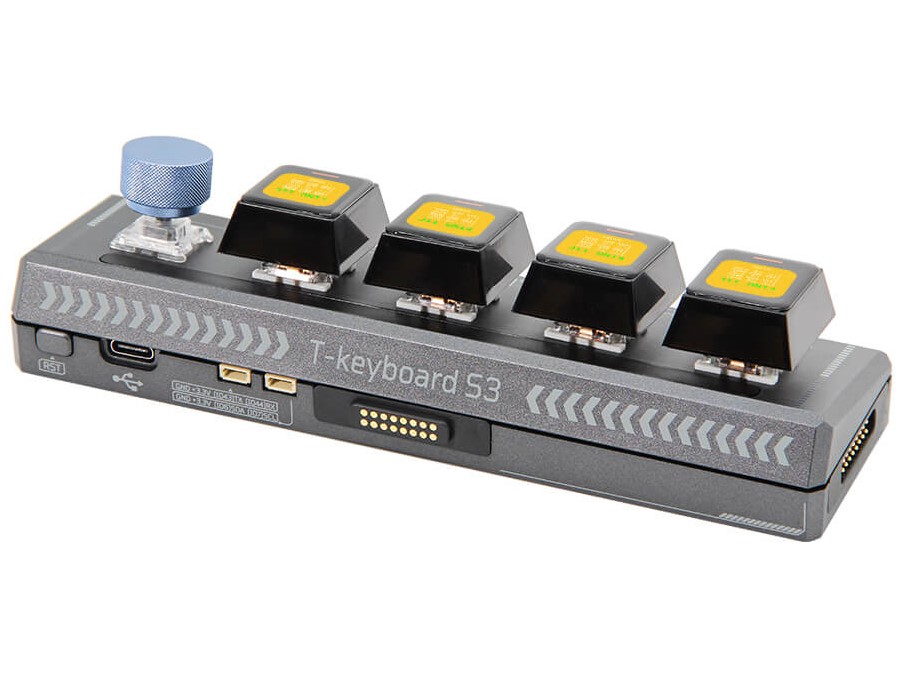
    The T-Keyboard S3 Pro is a versatile macro keyboard made by LilyGo, designed to be customized and set up according to user needs. The company aims to cater to more advanced users, emphasizing products that stand out due to their flexibility and modular design.

    Variants Available

    The T-Keyboard S3 Pro comes in two different models. One is the host version that connects to a PC, while the other is the slave version. Unlike the slave model, the host version features four keys and a rotary dial instead of five keys. This rotary control is often missing in many keyboards but is quite helpful for tasks like image editing, allowing users to quickly and accurately adjust settings such as brightness and saturation.

    Connection and Configuration

    Modules link together using magnetic connectors, which makes them easy to set up and dependable. LilyGo claims that you can connect up to six devices, though there are some limitations, particularly regarding the brightness of the RGB LEDs. The keycaps include unique screens that measure 0.85 inches diagonally and have a resolution of 128 x 128. While some configuration is necessary for users, LilyGo offers sample code to assist with this process.

    Pricing Information

    The T-Keyboard S3 Pro is priced at $60, while the slave version is available for $50, both sold directly from the manufacturer.

    If you’re looking for an alternative, you might want to check out the SIKAI CASE Programmable Macro Keyboard on Amazon.

    Source: Link


    Image 1
  • GMK Evo-X1: Pre-Order Minisforum EliteMini AI370 with Ryzen 9 HX

    GMK Evo-X1: Pre-Order Minisforum EliteMini AI370 with Ryzen 9 HX

    The Evo-X1 is ready for pre-order now. GMKtec first hinted at it last October, planning for a launch by the end of November. Yet, the original schedule didn’t quite work out, but this mini PC is still one of the first to include the Ryzen 9 AI HX 370 processor.

    Pricing and Discounts

    This new Zen 5 mini PC starts at $920 with a pre-order discount, rising to $970. To take advantage of these lower prices, you must enter the coupon code EVOX1EB30 at checkout. It’s not clear how long this coupon will be valid, and GMKtec hasn’t announced when the regular sale will kick off.

    Unique Features

    One major plus for the GMK Evo-X1 is its OCuLink port, which isn’t found on other models like the Minisforum EliteMini AI370 or Beelink SER9. This makes the Evo-X1 a better choice for those interested in setting up an eGPU.

    Gaming Performance

    Thanks to its Radeon 890M integrated GPU, this mini PC can run most AAA games smoothly at good graphics settings. Therefore, you won’t necessarily need an eGPU unless you’re aiming to play on a display with a resolution higher than 1080p (the Acer Nitro KG241Y is currently $94.99 on Amazon).

    In addition to the OCuLink port, the GMK Evo-X1 has USB4, dual Ethernet ports, one HDMI 2.1, one DisplayPort 2.1, and four USB 3.2 Gen 2 Type-A ports. For wireless options, this Zen 5 mini PC supports Bluetooth 5.2 and WiFi 6. Other notable features are a TDP of up to 65W, two M.2 slots that support storage up to 4TB, and a stylish design.

    Source: Link


    Image 1
  • Intel Core Ultra 200S Performance Issues Linked to PPM Package

    Intel Core Ultra 200S Performance Issues Linked to PPM Package

    Intel has disclosed the findings from its inquiry into the performance issues that arose during the launch of its Core Ultra 200S (Arrow Lake-S) processors in October. A total of five distinct problems impacted the performance of the platform. So far, Intel has resolved four of these issues, and the remaining one is expected to be fixed by January 2025.

    Key Findings from the Investigation

    The investigation commenced on October 26, revealing a significant issue: a missing Performance & Power Management (PPM) package. This absence led to unpredictable behavior, where CPUs failed to schedule tasks properly, performance fluctuated when cores were turned off, and memory latency occasionally surged to twice its normal level. Intel estimates that this single issue resulted in a performance reduction ranging from 6 percent to 30 percent, depending on the specific tasks being performed.

    Additional Issues Identified

    Another problem stemmed from the Intel Application Performance Optimizer (APO), which failed to function correctly due to the missing PPM package. As a result, the anticipated improvements in gaming performance were not realized, leading to declines between 2 percent and 14 percent. Furthermore, systems experienced crashes when users attempted to launch games that utilized Easy Anti-Cheat, a problem linked to compatibility issues with Windows 11 24H2.

    The review units also exhibited inconsistencies in the BIOS setup. Important features such as PCIe Resizable BAR, compute tile ring frequency, and memory controller ratios were not uniformly configured, contributing to an additional performance drop of around 2 percent to 14 percent, contingent on the application and BIOS configurations.

    Steps Toward Resolution

    Intel has already addressed the majority of these issues. The problems with the PPM and APO were resolved in Windows 11 build 26100.2161 (KB5044384). Epic Games has introduced a new driver for Easy Anti-Cheat, and updated BIOS versions for Intel Z890-based motherboards have also been rolled out.

    The final component that needs attention is a performance optimization package, which will require firmware updates and is slated for release in January 2025. These updates will contain Intel microcode version 0x114 and Intel CSME Firmware Kit 19.0.0.1854v2.2 or newer. Once these updates are applied, gamers should see slight but useful performance improvements across several titles.

    Intel intends to provide a comprehensive performance report at CES 2025, including detailed benchmarks and comparative analyses. Additionally, the company has put in place new protocols to help prevent similar issues from arising in the future.

    Source: Link

  • Petbrick 65 Mechanical Keyboard: Perfect for Cat Lovers

    Petbrick 65 Mechanical Keyboard: Perfect for Cat Lovers

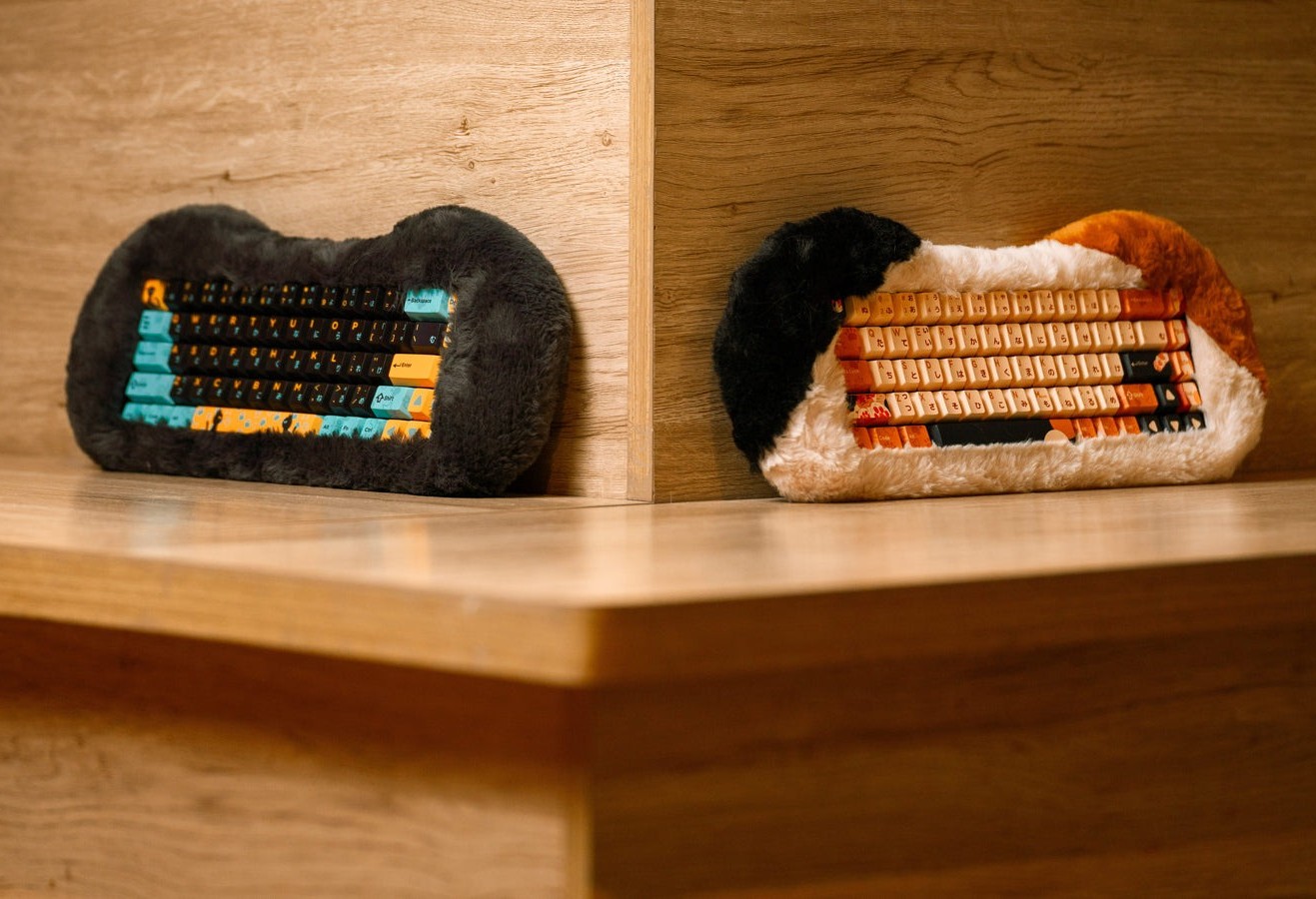
    In 2020, Angry Miao introduced the Cyberboard, a keyboard drawing inspiration from the Tesla Cybertruck. Now, its branch, Dry Studio, has unveiled a new keyboard that takes cues from cats, in a way. Named the Petbrick 65, this mechanical keyboard is designed to be pettable, featuring a detachable fluffy outer shell.

    A Unique Concept

    Dry Studio claims that the Petbrick 65 is the world’s first fluffy custom mechanical keyboard that you can actually pet. Priced at $239, it aims to appeal to cat lovers who have dealt with their feline friends lounging on their keyboards, interrupting their work. With the Petbrick 65, users can enjoy the soothing experience of petting a cat without the interruptions that come with a real one.

    Handcrafted and Soft

    The fluffy outer layer attaches to the keyboard with magnets and is crafted by hand from a washable fabric. Dry Studio mentions that this shell is produced by a toy factory with years of expertise, giving it a texture reminiscent of a stuffed toy.

    Advanced Features

    The keyboard incorporates Angry Miao’s Leaf-Spring mount and features an eight-layer build that includes a sandblasted POM plate, IXPE 8 switch pad, and two layers of ultra-low-density EPDM sound-dampening foam. It also boasts a unique Crystal Pink switch created by Dry Studio and customizable RGB lighting options.

    The Petbrick 65 can operate in both wired and wireless modes, connecting via Bluetooth or 2.4GHz wireless technology. It is equipped with a 5,000mAh battery, although the duration of a single charge remains unspecified. This keyboard comes in two colors, Calico and Odd-eye, both featuring cat-themed keycaps.

    Future Developments

    Dry Studio has indicated that additional colors will be released in the future. While these upcoming options will also have a removable fluffy outer shell, they won’t carry a cat-themed design.

    Source: Link


    Image 1
    Image 1
  • Qualcomm Prevails in Arm Chip Licensing Legal Dispute

    Qualcomm Prevails in Arm Chip Licensing Legal Dispute

    Qualcomm has won an important court case against Arm Holdings, a British chip design company. The focus of the lawsuit was whether Qualcomm violated a licensing deal after purchasing the startup Nuvia in 2021. It was claimed that Nuvia’s chip designs were derived from Arm’s technology, and Arm contended that Qualcomm should pay a higher royalty after the acquisition.

    Jury Decision Favoring Qualcomm

    The jury ultimately decided in favor of Qualcomm on the key issue, determining that the company’s main processor chips were properly licensed under its agreement with Arm. This is a big win for Qualcomm, allowing it to keep selling its chips, including those that use Nuvia’s technology.

    Ongoing Uncertainties

    However, the decision wasn’t completely straightforward. The jury did not reach a unanimous conclusion on whether Nuvia violated its licensing terms with Arm prior to being acquired by Qualcomm. This leaves some unanswered questions about the case, and it’s possible that this part might be retried later on.

    Judge Maryellen Noreika, who oversaw the trial, suggested both sides attempt to mediate their disagreement to prevent another trial. “I don’t believe either party had a definitive win or would have had a clear win if this case is heard again,” Noreika commented.

    Stock Market Reactions

    Even with the mixed ruling, the result provides some relief for Qualcomm. The company’s stock went up by 1.8% in after-hours trading after the announcement. Conversely, Arm experienced a drop in its shares by 1.8% in extended trading.

    The legal conflict between Qualcomm and Arm has drawn significant attention from the tech sector, as it affects the wider chip market. Arm licenses its chip designs to many firms, including competitors of Qualcomm. The verdict from this case could influence future licensing agreements between Arm and its partners.

    Source: Link

  • Crypto Miner Purchases $240M Wind Farm for Low Energy Costs

    Crypto Miner Purchases $240M Wind Farm for Low Energy Costs

    Mara, a U.S. cryptocurrency mining company, has disclosed its purchase of a wind farm located in Hansford County, Texas. This step is a significant achievement in the firm’s commitment to sustainability. The wind farm boasts an interconnection capacity of 240 megawatts (MW) and a nameplate wind capacity of 114 MW, which will be crucial in the company’s efforts to enhance renewable energy usage in its data centers.

    A Strategic Move

    The acquisition, totaling $240 million, fits into Mara’s strategy of transforming underused renewable resources into economic benefits, aiming for nearly zero energy costs. This purchase is not just a financial move; it is a step towards a more sustainable future.

    Renewable Energy Goals

    The newly obtained wind farm is set to provide 100% renewable energy to a data center that Mara plans to establish at the same location. This data center will operate solely on the 114 MW capacity from the wind farm, allowing it to enjoy zero-marginal energy costs, which will greatly lower operational expenses.

    Fred Thiel, the Chairman and CEO of Mara, highlighted the strategic significance of this acquisition. He stated, “This acquisition serves as a blueprint for how the energy and data center sectors can collaborate to create long-term value while advancing sustainability initiatives.”

    Future Plans

    This wind farm purchase also fits well with the company’s intentions to merge renewable energy with its expanding data center framework. This merger aims to cut down carbon emissions and decrease bitcoin production costs through vertical integration. Much of the power that fuels the company’s data centers is sourced from the grid, wind farms, and flare gas.

    Source: Link

  • ASUS NUC 14 Pro AI: Copilot+, Intel Arc GPU, Wi-Fi 7, Thunderbolt 4

    ASUS NUC 14 Pro AI: Copilot+, Intel Arc GPU, Wi-Fi 7, Thunderbolt 4

    ASUS has revealed the ASUS NUC 14 Pro AI, a compact PC made for activities that need AI processing, gaming, and edge computing. This device runs on Intel Core Ultra processors (Series 2) and comes with Microsoft Copilot+, merging high performance with efficiency in a small form factor.

    Features of the ASUS NUC 14 Pro AI

    The ASUS NUC 14 Pro AI is powered by Intel Core Ultra 9 processors that integrate CPU, GPU, and NPU technologies. This setup can achieve up to 120 platform TOPS (Tera Operations Per Second) and 48 NPU TOPS, which is three times more AI performance than previous versions. Its Intel Arc GPU uses Xe2 Architecture, offering up to 67 TOPS, and includes XeSS and XMX AI engines, which improve gaming experiences and content creation.

    Design and Connectivity

    Built for ongoing usage, the device includes advanced thermal management and security features like Secure Boot, TPM, and fingerprint recognition. With a 0.6-liter size and a height of 34mm, it’s perfect for Internet of Things (IoT) and edge computing applications. The design allows for tool-free access, making upgrades quite simple.

    Connectivity is robust, featuring Wi-Fi 7, Bluetooth 5.4, and dual Thunderbolt 4 ports that ensure fast data transfer and compatibility. Plus, the ASUS Control Center and Windows Autopilot make it easy to deploy and integrate into IT setups.

    Specifications and Storage Options

    The NUC 14 Pro AI offers various configurations with Intel Core Ultra 5multiple I/O ports

    Pricing and Availability

    Details on pricing and availability will be provided at a later date, and customers interested can reach out to ASUS representatives for additional information.

    Source: Link


    Image 1
  • O.MG Cable Explained: Why It’s Hard to Detect with X-Ray

    O.MG Cable Explained: Why It’s Hard to Detect with X-Ray

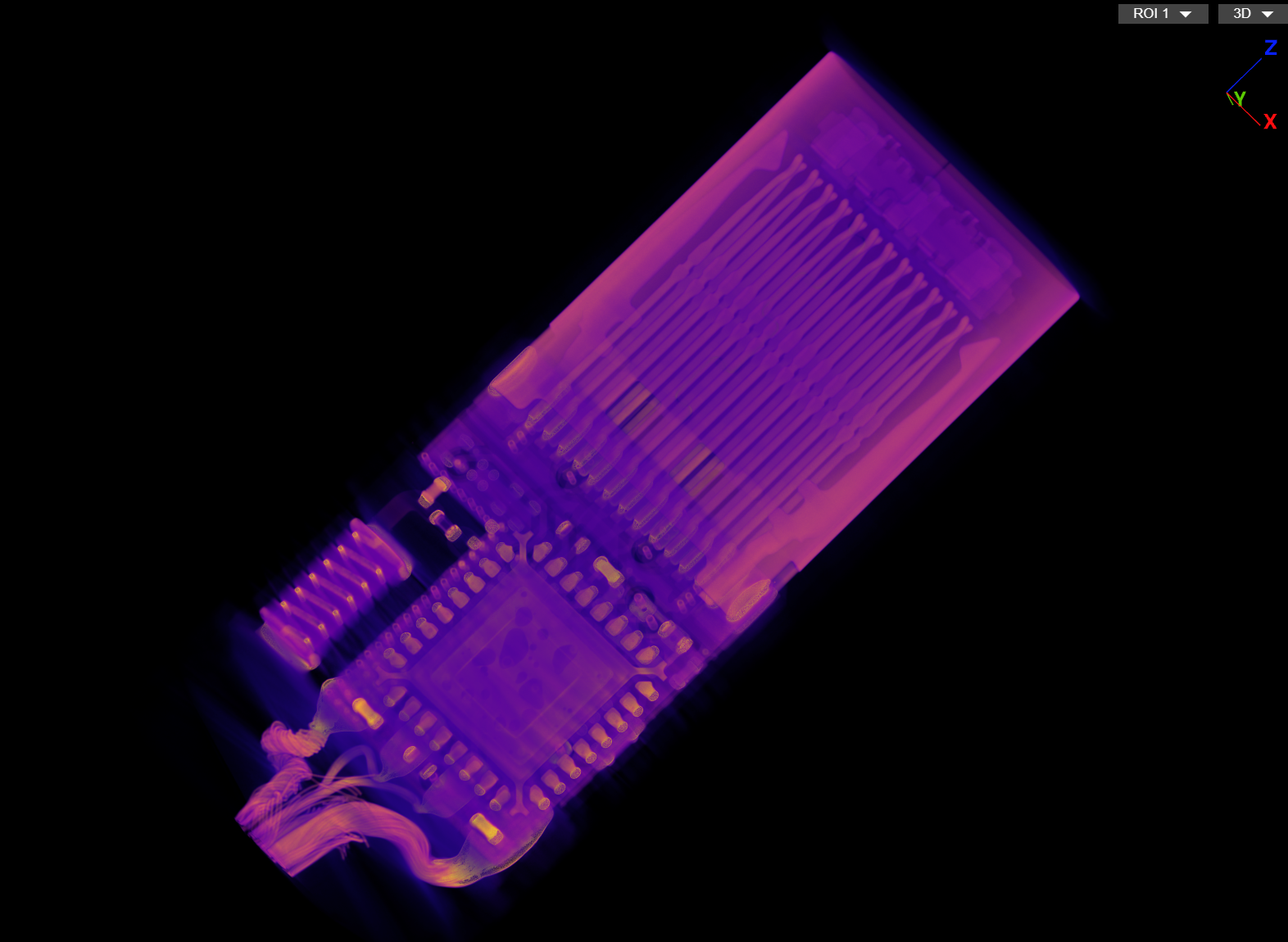
    Lumafield, a firm that focuses on imaging electronics and components, has recently performed a CT scan on the well-known O.MG cable. The findings illustrate how advanced hackers can trick unsuspecting users. When examined more closely, the O.MG cable, which looks like a typical USB-C cable, is actually a multifunctional device for cyber criminals. They can utilize it to take control of smartphones and computers, steal private information, or introduce malware.

    Hidden Technology Unveiled

    The CT scans from Lumafield expose the concealed technology within the connector. A small microchip and antenna are ingeniously concealed in the standard-sized USB-C plug, which allows hackers to remotely access and manipulate the devices connected. Lumafield has shared these scans online for those who are curious.

    Today’s Thunderbolt and USB-C cables are intricate designs that contain electronics and chips to manage data transfer, power supply, and other features. Even an X-ray image may not clearly indicate if a cable has been altered. The extra electronics found in the O.MG cable are so tiny and well-integrated that they are nearly indistinguishable from the regular components.

    The Rising Threat

    A few months back, we shared (in German only) the hazards linked to the O.MG cable and similar devices. Hackers are increasingly adopting a long-term approach, dedicating time and resources to projects that may yield results years down the line. This emphasizes the necessity of staying alert and recognizing the risks involved.

    Counterfeit products that resemble the genuine article are continuously emerging on Amazon and other online storefronts. For the average person, it is nearly impossible to tell apart manipulated cables from safe ones. We can only cross our fingers and hope that no hacker is currently peddling cables with hidden backdoors on Amazon.

    Source: Link


    Image 1
    Image 1