Category: Computers

  • Lenovo ThinkCentre Neo 55q Gen 6 with AMD Ryzen AI Launch

    Lenovo ThinkCentre Neo 55q Gen 6 with AMD Ryzen AI Launch

    Key Takeaways

    1. Compact Design: The Lenovo ThinkCentre neo 55q Gen 6 is lightweight (1.13 kg) and can be easily mounted behind monitors, making it suitable for small workspaces.

    2. Eco-Friendly Materials: The desktop includes 85% post-consumer recycled plastic in its bezel and is available in sustainable color options, Luna Grey and Eclipse Black.

    3. High Performance: Users can configure the device with up to an AMD Ryzen 5 processor, 64GB of DDR5 RAM, and a 2TB PCIe Gen SSD, supporting up to three 4K monitors.

    4. Software Features: It runs on Windows 11 Pro or Linux, includes Lenovo Vantage for system optimization, and offers ThinkShield security features for data protection.

    5. Affordability and Support: Starting at $499, the ThinkCentre neo 55q Gen 6 will ship in plastic-free packaging and comes with 24/7 access to Lenovo’s Premier Support Plus program.


    The Lenovo ThinkCentre neo 55q Gen 6 is one of three new AI desktop PCs that Lenovo has recently unveiled. It is alongside the ThinkCentre neo 55a Gen 6 All-in-One desktop and the ThinkCentre neo 55s Gen 6 mini desktop.

    Compact and Versatile Design

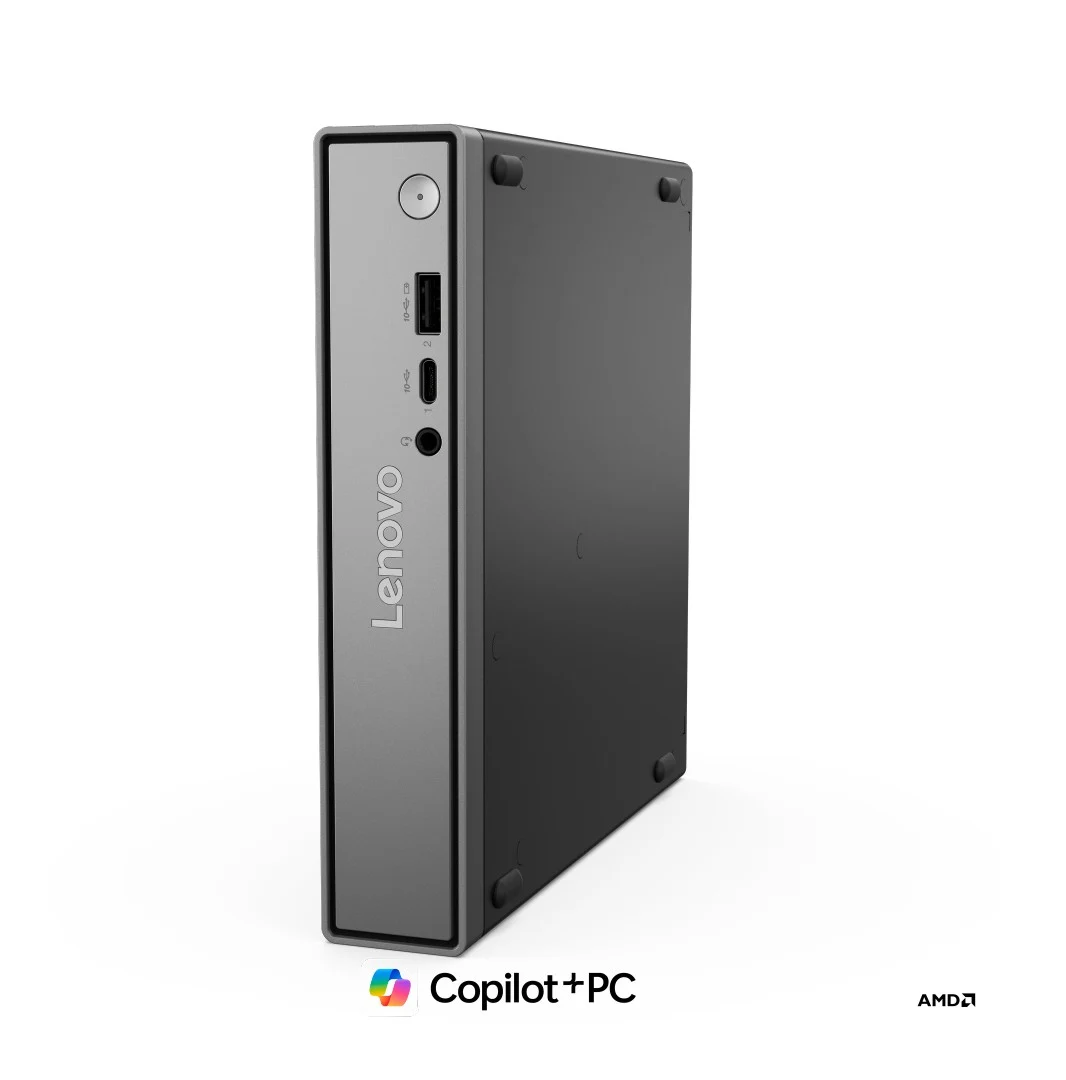
    With dimensions of 7.2 inches in length and a weight of approximately 1.13 kg (2.49 lbs), the ThinkCentre neo 55q Gen 6 is compact enough to be mounted directly behind a monitor, though not in the same way as the Acer Chromebox Mini CXM2. This design is ideal for users who have limited workspace. It can be positioned beneath your monitor or set up either vertically or horizontally next to it.

    Environmentally Friendly Features

    The device comes in Luna Grey and Eclipse Black color options and includes 85% post-consumer recycled plastic in its bezel. Additionally, it has rubber feet that help it stay in place when positioned horizontally.

    In terms of specifications, the ThinkCentre neo 55q Gen 6 is equipped with an AMD Ryzen processor featuring an integrated NPU (up to 50 TOPS). It’s worth noting that Lenovo also provides a Snapdragon X X1-26-100 version and an Intel Core 7 240H version of the ThinkCentre Neo 50q.

    Powerful Performance Options

    According to the spec sheet, users can configure this desktop with up to a Ryzen 5 AI 300 series processor, as much as 64GB of DDR5 RAM (5,600MHz, 2x SODIMM), and a maximum of 2TB PCIe Gen SSD. The device supports connections to up to three 4K monitors for effective multitasking.

    The front features include 1x USB 3.2 Gen2 Type-A port, 1x USB 3.2 Gen2 Type-C port, along with a microphone/headphone combo jack. At the back, you’ll find an RJ45 port that can reach speeds of 1 Gigabit, along with 1x USB 3.2 Gen2 port, 3x USB 2.0 ports, 1x HDMI 2.1 port with TDMS, and 1x Display Port. Furthermore, it supports Wi-Fi 7 and Bluetooth 5.4 and comes with a 90W power supply. An additional COM, HDMI, VGA, DP, or LAN port can be added since the ThinkCentre neo 55q Gen 6 has an extra punch-out port.

    Software and Support

    The ThinkCentre neo 55q Gen 6 offers a choice between Windows 11 Pro or Linux. With Windows, users can enjoy Microsoft’s Copilot+ PC experience. Lenovo Vantage is also included to assist with monitoring system performance, optimizing software and hardware, scheduling updates, and customizing settings.

    Lenovo has integrated its ThinkShield security along with a fTPM or Discrete Trusted Platform Module (dTPM) 2.0 chip meant for password and data encryption. Moreover, Lenovo will provide its Premier Support Plus program, which gives users 24/7 access to expert technicians.

    The starting price for the ThinkCentre neo 55q Gen 6 is $499, but details on when it will be available for purchase are not yet provided. It will ship in plastic-free packaging and is expected to include a vertical stand, similar to its Snapdragon and Intel versions.

  • Lenovo ThinkCentre Neo 55s Gen 6: Compact AMD PC with Desktop GPU

    Lenovo ThinkCentre Neo 55s Gen 6: Compact AMD PC with Desktop GPU

    Key Takeaways

    1. Lenovo launched the ThinkCentre neo 55s Gen 6, a budget-friendly small form factor PC with solid specifications.
    2. The PC can be equipped with a Ryzen 7 APU, along with options for Ryzen AI 5 330 and Ryzen AI 7 350 processors.
    3. Users can choose between AMD Radeon RX 6400 or Nvidia RTX 3050 graphics cards for low to moderate GPU tasks.
    4. It supports up to 64 GB of DDR5 RAM and features two M.2 slots for 1 TB SSDs, along with a variety of ports.
    5. The starting price is $479, and it includes features like a 260 W PSU and support for WiFi 7.


    Lenovo has launched a new small form factor PC that comes with a budget-friendly price and solid specifications, the ThinkCentre neo 55s Gen 6. This compact machine can be fitted with a Ryzen 7 APU. While the press release didn’t detail the processor choices, the spec sheet from Lenovo’s database indicates that the offerings will include the Ryzen AI 5 330 and Ryzen AI 7 350 from the AI 300 series.

    GPU Options

    Users can choose to combine the APU with either the AMD Radeon RX 6400 or the Nvidia RTX 3050 desktop GPU. These graphics cards are both entry-level but will enable the ThinkCentre neo 55s Gen 6 to manage low to moderate GPU-intensive tasks.

    Memory and Storage

    The company points out that this small PC can be set up with as much as 64 GB of DDR5 RAM using its two UDIMM slots. In terms of storage, the SFF computer features two M.2 slots, each capable of accommodating up to 1 TB SSD (like the 1 TB Crucial P310 which is currently priced at $69.99 on Amazon). Despite the compact 8.2-liter design, it offers a good variety of ports.

    Additional Features and Pricing

    Among the notable features of this SFF PC is its integrated 260 W PSU, support for WiFi 7, and the ability to add a 3.5-inch HDD. Regarding pricing, the ThinkCentre neo 55s Gen 6 is available starting at $479. For more details, check out the video below.


  • Lenovo Lecoo Air 16: Lightweight 16-Inch Laptop with Number Pad

    Lenovo Lecoo Air 16: Lightweight 16-Inch Laptop with Number Pad

    Key Takeaways

    1. Lenovo has launched the Lecoo Air 16, a new lightweight Windows laptop available only in China.
    2. The Lecoo Air 16 weighs only 1 kg and features a magnesium alloy build, making it lighter than many 15-inch and 16-inch laptops.
    3. The laptop has a slim design, measuring just 10 mm at its thinnest point, and includes a 2.5K, 120 Hz IPS display.
    4. It comes with 32 GB of RAM, 1 TB of storage, and a 60 Wh battery, along with full-sized HDMI and USB Type-A ports.
    5. Priced at CNY 4,999 (approximately $702), the device is powered by Intel’s Meteor Lake Core Ultra 5 125H processor, which has limitations in graphics performance and energy efficiency compared to newer models.


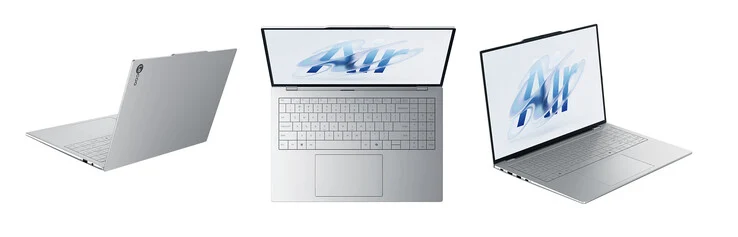
    Lenovo has launched a new Windows laptop after updating its ThinkPad lineup last month at IFA 2025 in Berlin. This time, they’re focusing on their Lecoo brand, which is available solely in China.

    A Lightweight Design

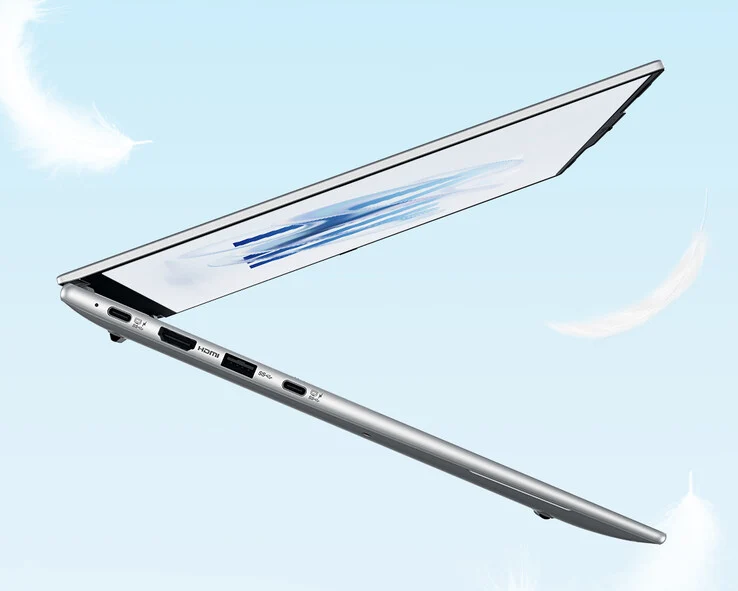
    The new Lecoo Air 16 features a housing that’s significantly lighter than other 16-inch laptops or even 15-inch models. For comparison, the current MacBook Air 15 is priced at about $1,149 on Amazon and weighs just a bit over 1.5 kg. In contrast, the Lecoo Air 16 weighs only 1 kg, thanks to its magnesium alloy build.

    Impressive Specifications

    Additionally, the Lecoo Air 16 measures just 10 mm at its thinnest point. The laptop is equipped with a 2.5K, 120 Hz IPS display and includes a 60 Wh battery along with a zero-lattice keyboard that features a built-in number pad. As depicted in the images above and below, Lenovo has also included full-sized HDMI and USB Type-A ports.

    The Lecoo Air 16 is priced at CNY 4,999 (approximately $702) in China, boasting 32 GB of RAM and 1 TB of storage. However, the laptop is powered by Intel’s Meteor Lake Core Ultra 5 125H processor. This 14-core chip struggles with graphics-intensive tasks and energy efficiency compared to the newer Core Ultra 5 225H and its AMD Strix Point counterparts. There hasn’t been any announcement regarding a global launch yet.

    Lenovo via Lonely City Hardware

    Source:
    Link


  • Zotac ZBox Magnus EN Mini-PC Launches with RTX 5060 Ti GPU

    Zotac ZBox Magnus EN Mini-PC Launches with RTX 5060 Ti GPU

    Key Takeaways

    1. Zotac has launched the ZBox Magnus EN, featuring Intel’s Core Ultra 7 255HX processor with 20 cores.
    2. The mini-PC includes an Nvidia GeForce RTX 5060 Ti GPU with 16 GB of GDDR7 VRAM, housed in a compact 2.65-litre chassis.
    3. It supports DDR5 RAM and has two M.2 slots for PCIe 4.0 SSDs, along with multiple Thunderbolt 4 and DisplayPort outputs.
    4. The ZBox Magnus EN is priced at approximately $1,966 in China and starts from €1,600 (around $1,865) in Europe.
    5. The Magnus EA model is not yet available, but other Strix Halo mini-PCs are currently on the market.


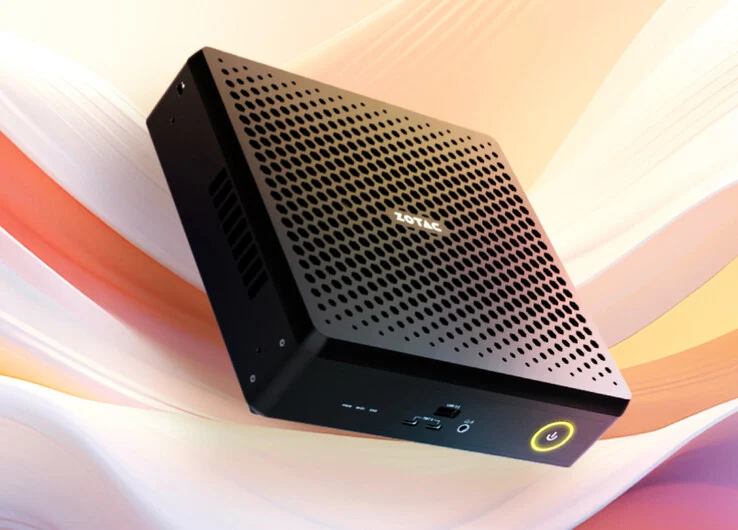
    Zotac has officially launched the ZBox Magnus EN, which was first shown in May along with the Magnus One and the AMD Strix Halo-based Magnus EA. It’s important to note that the Magnus EA is still not available. However, there are several Strix Halo mini-PCs currently for sale, such as the GMKtec EVO-X2, which we reviewed earlier this year and comes with 64 GB of RAM.

    Specifications Overview

    In contrast to others, the ZBox Magnus EN is powered by Intel’s Alder Lake-HX series, specifically the Core Ultra 7 255HX. This chip has a total of 20 cores and runs at a 55 W TDP. It does include a 4-Core Arc iGPU, which is not very powerful. Fortunately, Zotac has added an Nvidia GeForce RTX 5060 Ti desktop GPU that contains 16 GB of GDDR7 VRAM, all fitting snugly into a compact 2.65-litre chassis.

    Memory and Storage Features

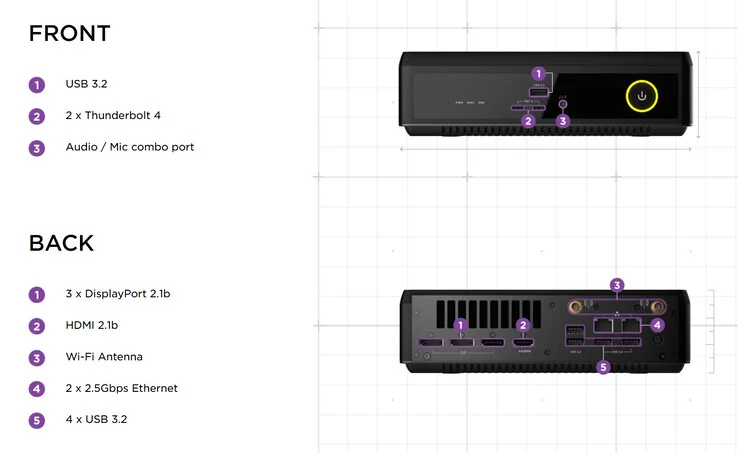
    The ZBox Magnus EN supports either DDR5-5600 SODIMM RAM or DDR5-6400 CSODIMM. It also has two M.2 2280 slots that can handle PCIe 4.0 x4 SSDs. Additionally, this mini-PC is loaded with both front and rear I/O options, featuring two Thunderbolt 4 ports along with three DisplayPort 2.1b outputs. Theoretically, this allows the ZBox Magnus EN to display natively at 4K and 240 Hz without needing to use Display Stream Compression (DSC), but only if paired with a compatible monitor like the MSI MPG 322URX (currently priced at $1,083 on Amazon).

    Pricing and Availability

    In China, the ZBox Magnus EN is being sold as a barebones unit for CNY 13,999 (approximately $1,966). European retailers are also starting to offer the same setup starting from €1,600, which is around $1,865. As of now, there has been no announcements regarding pricing or availability in other regions.

    Source:
    Link


  • Anker Prime Docking Station: 14 Ports & Triple Display Launch in EU

    Anker Prime Docking Station: 14 Ports & Triple Display Launch in EU

    Key Takeaways

    1. Anker’s 14-in-1 Prime Docking Station supports triple-monitor setups and is priced at €349.99 in Europe.
    2. The docking station features 14 ports, with USB-C ports offering fast charging and high-speed data transfer, including an upstream Type-C port that delivers up to 140W.
    3. It includes an integrated cooling fan and ActiveShield 3.0 technology for stable performance under heavy loads.
    4. Users can control the dock via an app, which allows for device tracking, display adjustments, and diagnostics, along with a smart display for real-time port information.
    5. The dock has a total output rating of 160W, with a single port capable of providing 100W, and features a stylish design.


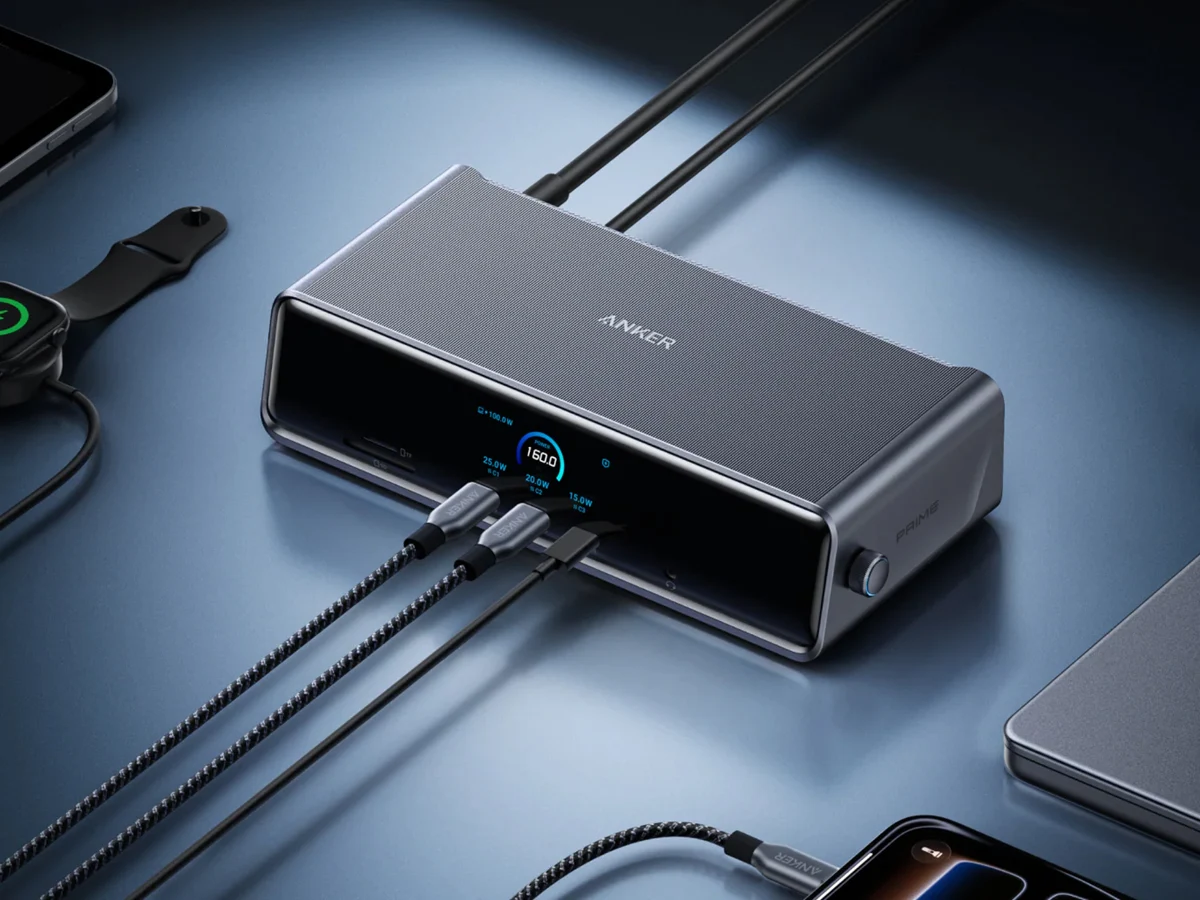
    Anker has launched its 14-in-1 Prime Docking Station that supports triple-monitor setups in early September 2025. Just a short time after its introduction in the US, the dock is now available in Europe, with a starting price of €349.99.

    Docking Station Features

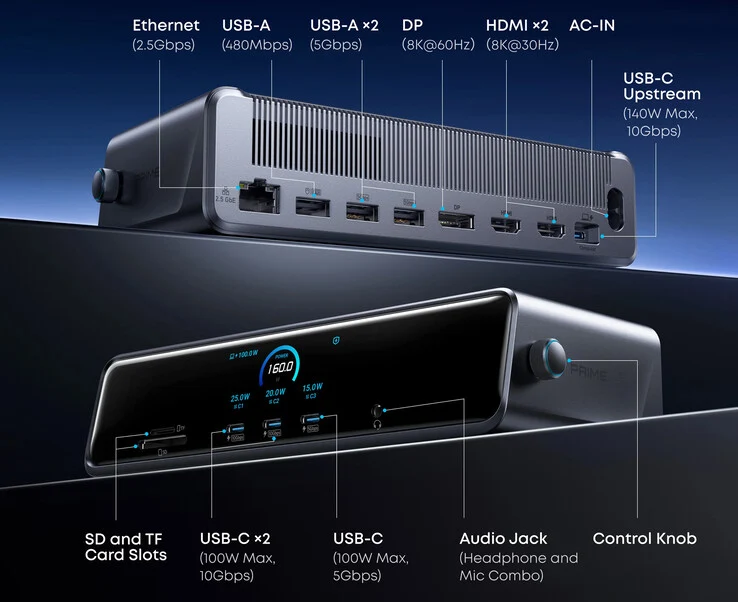
    As detailed earlier, this docking station boasts a total of 14 ports, which include a variety of options for connectivity. The firm emphasizes that all USB-C ports are capable of fast charging and high-speed data transfer. Notably, the upstream Type-C port can deliver up to 140W of full functionality. The dock also supports triple-display output, with the ability to manage a single 8K Max output.

    Cooling and Performance

    One impressive feature of the Anker 14-in-1 dock is its integrated cooling fan, which works alongside the ActiveShield 3.0 technology to provide stable performance even under heavy loads. Anker also points out the built-in power supply unit (PSU), which helps maintain a tidy setup.

    User Control and Design

    Users can take advantage of app control, which allows them to keep track of all connected devices, adjust display settings, and run diagnostics. The Prime Docking Station 14-in-1 also includes a smart display that provides real-time information about the ports in use.

    Additional features include a 100W output for a single port, a total output rating of 160W, along with a stylish design. For further details on this new Anker dock, check out the video linked below.


  • Cheap Korean Thermal Paste May Damage Your CPU – Beware!

    Cheap Korean Thermal Paste May Damage Your CPU – Beware!

    Key Takeaways

    1. Corrosion Risks: The SGT-4 thermal paste may cause significant corrosion on copper parts of coolers and processors, backed by user reports from South Korea.

    2. Chemical Composition: The paste contains PDMS and acetoxy-crosslinked RTV silicone, which releases acetic acid during drying, leading to oxidation of copper surfaces.

    3. Strong Odor: A strong vinegar-like smell is a warning sign of the paste’s potential danger and corrosive properties.

    4. High Stickiness and Low Performance: The thermal paste exhibits unusually high stickiness after application and lower thermal conductivity than advertised by the manufacturer.

    5. Lack of Transparency from Manufacturer: Amech has not adequately addressed concerns about corrosion, focusing instead on compliance with RoHS and REACH standards, leading to customer dissatisfaction.


    The SGT-4 thermal paste, made by the Korean company Amech, has become quite popular due to its cheap price – which is currently about $7 for 4 g on Amazon. But last year, German hardware expert Igor Wallossek had already expressed worries on his site, Igor’s LAB, that this paste might harm computer hardware. New user feedback from South Korea seems to back up his concerns, showing significant corrosion on the copper parts of coolers and processors.

    Warning Signs

    One of the first signs that this thermal paste might be dangerous is its strong smell, resembling vinegar. Wallossek pointed out in a chemical analysis last year that the paste includes PDMS (polydimethylsiloxane) and acetoxy-crosslinked RTV silicone. This mix releases acetic acid as it dries, which can oxidize copper surfaces and create long-term contact issues. Additionally, the paste has shown to have unusually high stickiness after being applied and provided much lower thermal conductivity than what the manufacturer claimed.

    User Reports

    Reports of damage can be found on the South Korean forum Quasarzone, where multiple users have mentioned corroded coolers, worn CPU labels, and, in some instances, health issues from the evaporating acetic acid. One user inspected the damage under a microscope and described it as “anthill-like corrosion structures,” which matches the chemical processes Igor Wallossek had talked about before. Coolers that have untreated copper surfaces seem to be especially at risk, while those with nickel plating are more resistant.

    Manufacturer’s Response

    Amech’s response to these issues has been lacking in transparency, as they only pointed to their existing RoHS and REACH compliance, which does not address the product’s corrosive properties. The company has also faced backlash for how they communicate with customers. In the comments on Wallossek’s latest article, users have shown strong dissatisfaction and have suggested more reliable alternatives like Thermal Grizzly Kryonaut or Arctic MX-6 (8 g for $9).

    Source:
    Link


  • Fujitsu FMV UX-K3: The World’s Lightest Laptop with Core Ultra 7

    Fujitsu FMV UX-K3: The World’s Lightest Laptop with Core Ultra 7

    Key Takeaways

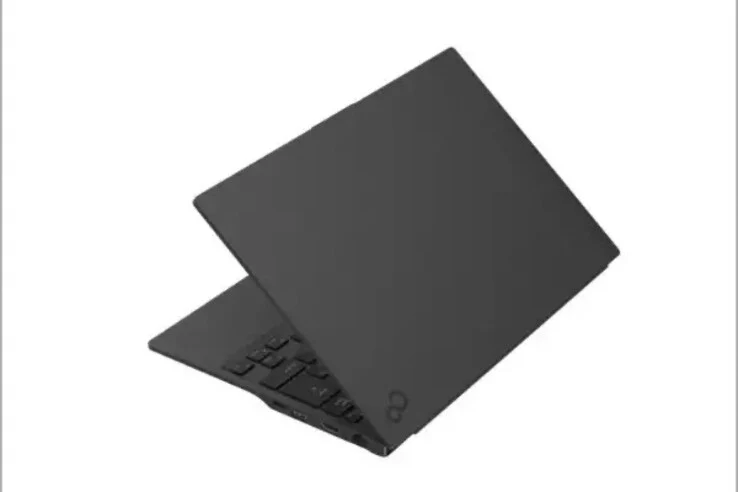
    1. The Fujitsu FMV UX-K3 is lightweight at 1.4 lbs and slim at 0.7 inches thick, making it one of the lightest laptops available.
    2. The laptop has a limited battery capacity of 31Wh, allowing for about seven hours of video playback.
    3. It features an Intel Core Ultra 7 255U processor with a boost clock speed of 4.8GHz, along with 16GB of RAM and a 512GB SSD.
    4. The 14-inch IPS display has a resolution of 1920 x 1200 pixels and a brightness level of 400 nits, and it includes a 1080p webcam with a privacy shutter.
    5. The Fujitsu FMV UX-K3 is priced at approximately $1,860 and is primarily available in Japan, with limited availability elsewhere.


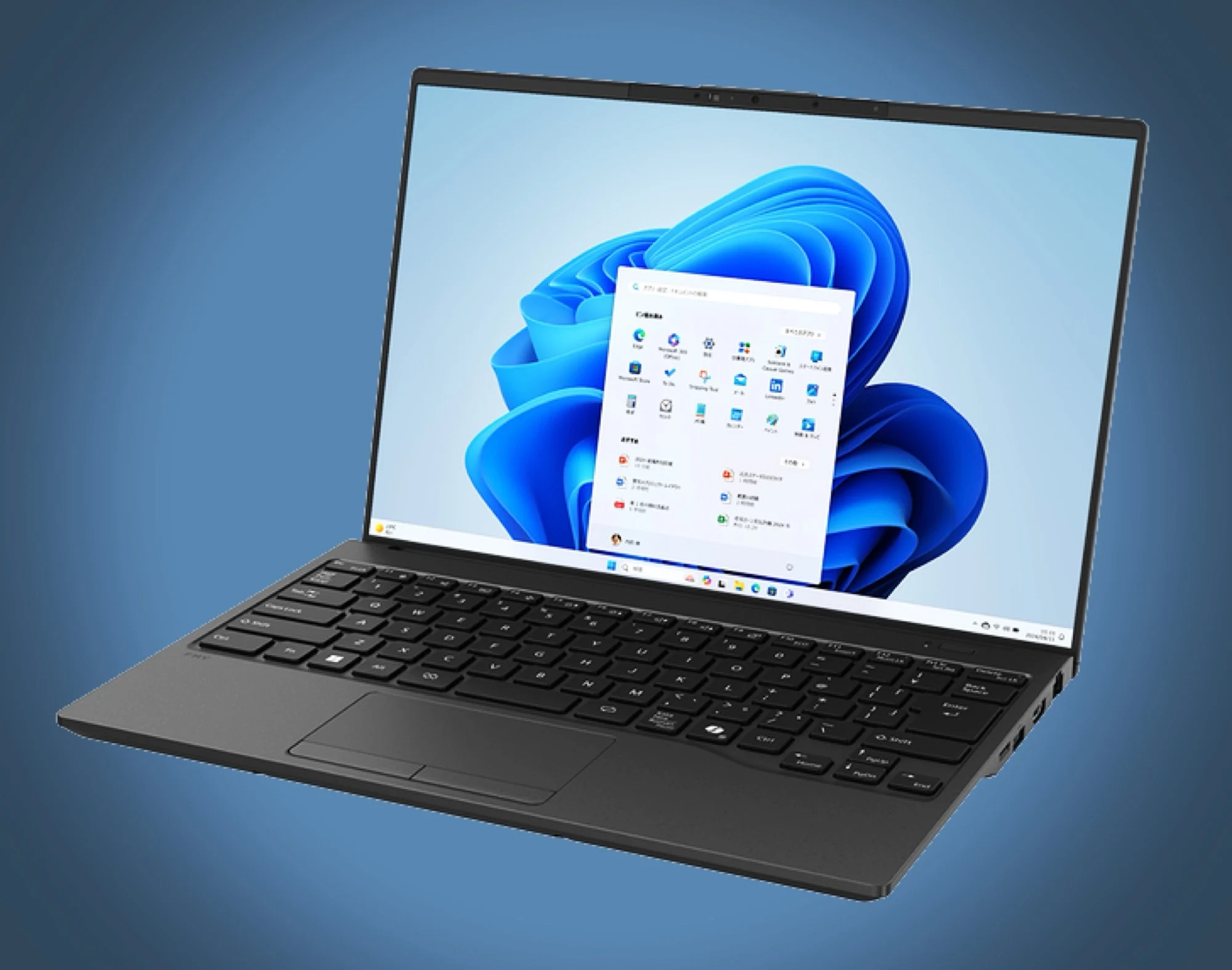
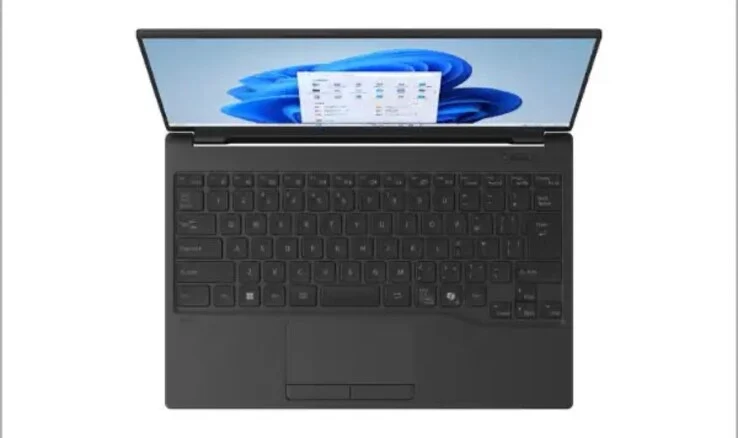
    The Fujitsu FMV UX-K3 is designed with a chassis that combines carbon and a magnesium-lithium alloy. Because of this unique construction, the laptop is lightweight at just 1.4 lbs and has a slim profile of only 0.7 inches thick. This puts it on par with the previous year’s Dynabook Lifebook WU5/J3, both sharing the title of the lightest laptop in the world.

    Battery Life Considerations

    One of the main trade-offs for Fujitsu is the battery capacity. It only provides 31Wh, which limits video playback to about seven hours. The laptop charges through USB-C with a power output of up to 65 watts, and the accompanying power adapter is also quite light, weighing in at merely 0.33 lbs. Regardless of the battery limitations, the laptop should deliver solid performance thanks to its Intel Core Ultra 7 255U processor, which features two performance cores and ten efficiency cores, reaching boost clock speeds of 4.8GHz.

    Additional Specs and Features

    In terms of additional specifications, this ultrabook comes with 16GB of RAM and a 512GB SSD. The 14-inch IPS display boasts a 16:10 aspect ratio and a resolution of 1920 x 1200 pixels, with a brightness level of 400 nits. On top of that, Fujitsu has included a 1080p webcam with a privacy shutter, along with WiFi 7 and Bluetooth 5.4 support. The laptop is equipped with a variety of ports, including USB-C, two USB-A, HDMI, Ethernet, a 3.5mm headphone jack, and a microSD card reader, making it quite flexible for users.

    Pricing and Availability

    The Fujitsu FMV UX-K3 ultrabook can be found at the FMV Store Japan for about $1,860. In Europe and various other places, the Fujitsu FMV laptops are generally only accessible through import from Japan.

    Source:
    Link


  • Anker Prime 160W Charger with Smart Touch Display Launches in Europe

    Anker Prime 160W Charger with Smart Touch Display Launches in Europe

    Key Takeaways

    1. Anker’s Prime 160 W fast charger is now available in Europe for €129, along with other products like a 3-in-1 wireless magnetic station and a Prime Power Bank.
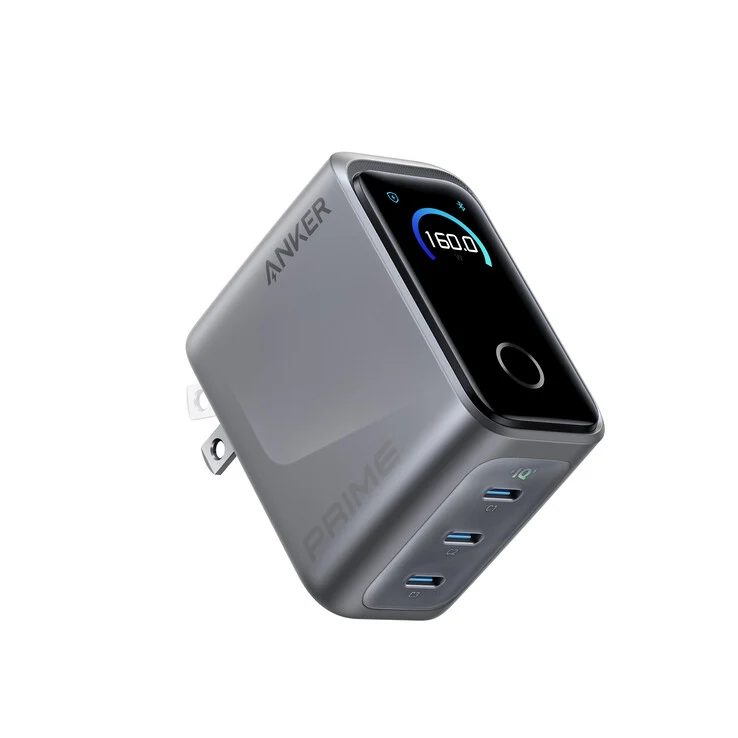
    2. The compact charger measures 2.56 x 2.05 x 1.38 inches and weighs about 220 grams, providing a maximum output of 160 W through three USB-C ports.
    3. It features a smart touch display for real-time power output and can be controlled via the Anker companion app, offering various charging modes.
    4. Users can choose power delivery options of 100 W, 30 W, and 30 W or 70 W, 70 W, and 20 W for flexible charging across multiple devices.
    5. The charger includes advanced safety technology, ActiveShield 4.0, with temperature monitoring, and can charge a MacBook Pro 16 from 0 to 50% in 24 minutes.


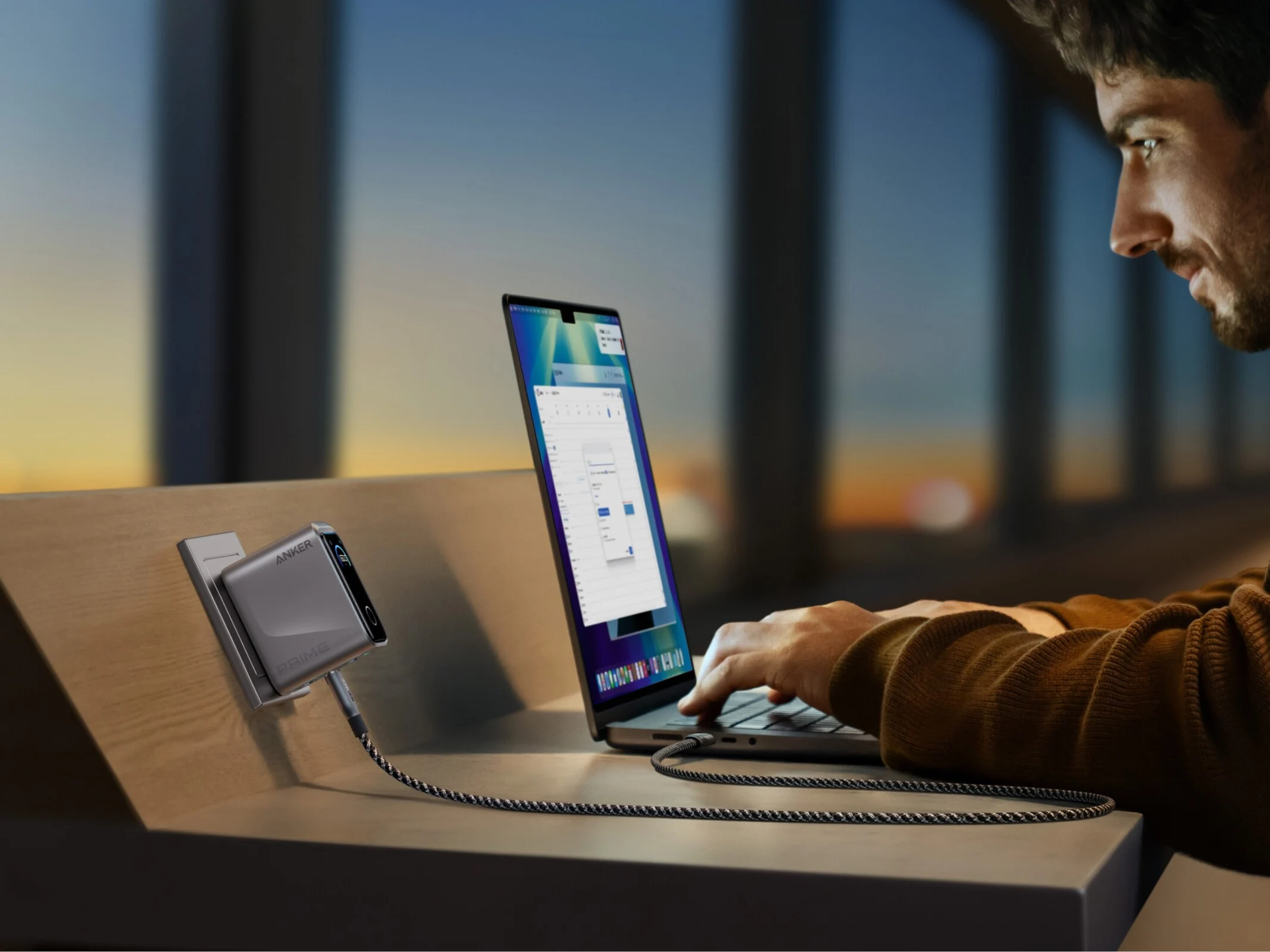
    Following its introduction in the United States, Anker’s latest Prime 160 W fast charger is now ready for sale in European regions. The charger is available for €129, and customers can buy it from Anker’s official site or on Amazon. In addition to the Prime 160 W charger, Anker also offers a 3-in-1 wireless magnetic station, the Prime Power Bank (26K, 300 W), and a 14-in-1 Prime docking station in Europe.

    Compact Design

    Described as being the size of an AirPods case, the compact charger measures 2.56 x 2.05 x 1.38 inches (65 x 52 x 35 mm) and weighs approximately 220 grams (0.48 lbs). This wall charger is claimed to provide a maximum output of 160 W through its three USB-C ports. For power distribution, in three-port mode, the outputs are 100 W from C1, and 30 W each from C2 and C3. If you switch to single-port mode, each port can deliver up to 140 W.

    Smart Features

    Additionally, the charger comes with a smart touch display that shows real-time power output for each port and allows users to switch between different charging modes. It is also compatible with the Anker companion app, which enables app-based controls. Users can toggle between two power delivery options: 100 W, 30 W, and 30 W or 70 W, 70 W, and 20 W for three devices. This flexibility lets you select the power output that best suits your needs. The app also includes features like adjustable screen brightness, a sleep timer, and settings for different languages.

    Advanced Safety Technology

    On the tech side, the portable charger is outfitted with ActiveShield 4.0, which includes a three-dimensional temperature monitoring system. Furthermore, Anker has shared some impressive claims regarding the charger’s performance. They state that this charger can boost a MacBook Pro 16 from 0 to 50% in just 24 minutes.


  • Affordable HP OmniBook 5 14: OLED Laptop with a Catch

    Affordable HP OmniBook 5 14: OLED Laptop with a Catch

    Key Takeaways

    1. OLED Advantages: OLED displays offer richer colors and superior black levels, making them appealing to users despite higher costs.
    2. Affordability: The HP OmniBook 5 14 is one of the most affordable laptops with OLED technology included as a standard feature.
    3. Processor Performance: The laptop runs on a Qualcomm Snapdragon processor, which provides quieter operation and extended battery life but may struggle with app compatibility and performance.
    4. Display Limitations: The OLED screen has basic specs compared to higher-end models, with a resolution of 1200p, 60 Hz refresh rate, and 300 nits brightness.
    5. Visibility Issues: The lower brightness level can lead to noticeable reflections, especially in well-lit indoor environments.


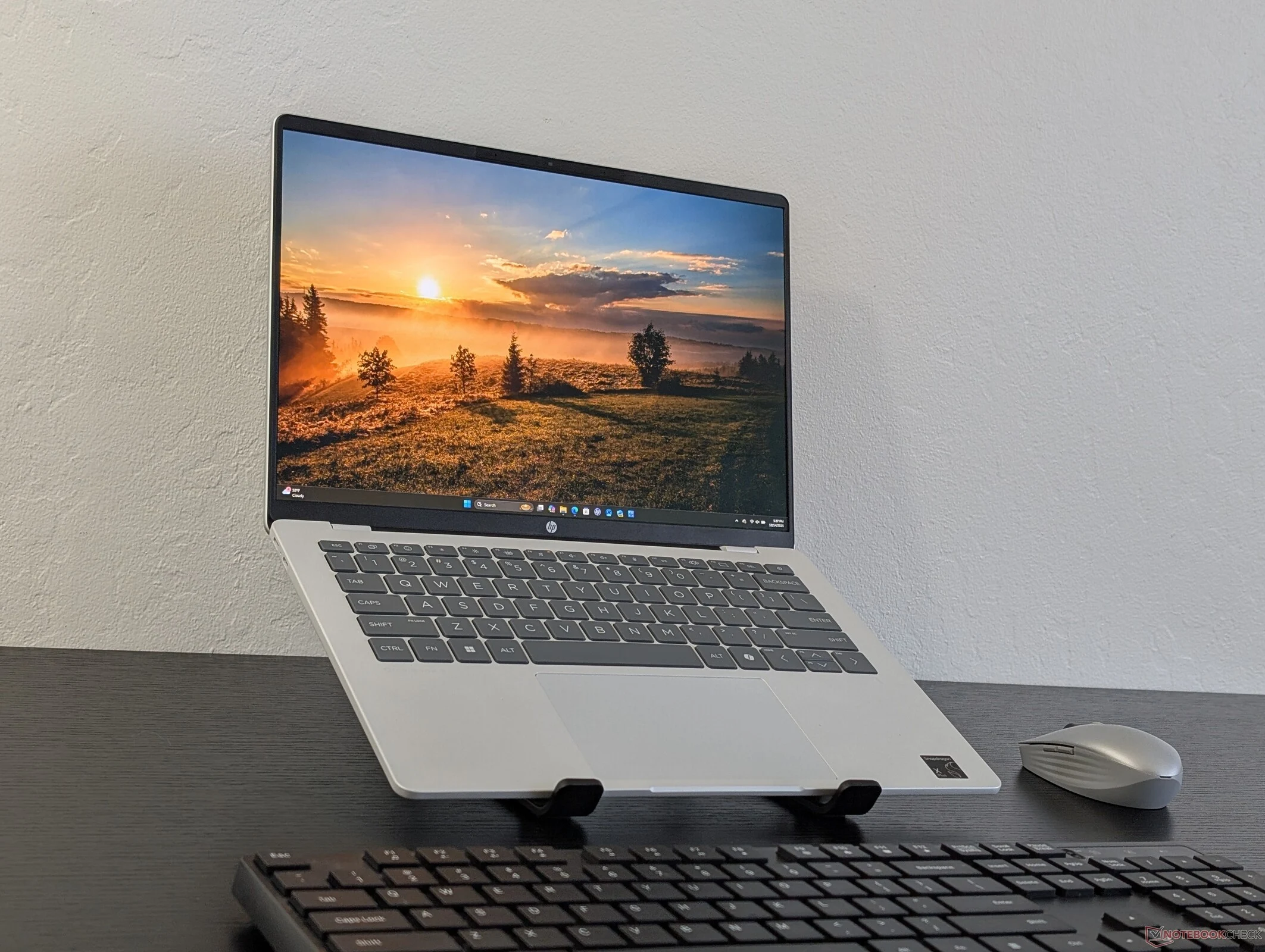
    When deciding between OLED and IPS displays, many people tend to lean towards OLED due to its richer colors and superior black levels. It’s worth noting that laptops featuring OLED technology are often on the more expensive and premium side. The newly released HP OmniBook 5 14 stands out as one of the most affordable 14-inch laptops with OLED included as a standard feature. However, there are a few important points to consider.

    Performance Considerations

    To start, the laptop runs on a Qualcomm Snapdragon processor, making it a Windows ARM device. This setup can bring some advantages over conventional Intel or AMD options, such as quieter operation and extended battery life. Yet, users may find that performance and app compatibility are hit or miss. Programs that aren’t specifically designed for ARM will need to be emulated, which can lead to slower performance.

    Display Limitations

    Moreover, the OLED screen on this model is quite basic when stacked against the more advanced OLED displays found in higher-end laptops. Although users of the OmniBook 5 14 still enjoy the vibrant P3 color gamut and deep black levels, it misses out on features like enhanced refresh rates, elevated resolutions, and Windows HDR support. The display is limited to 1200p resolution, 60 Hz refresh rate, and 300 nits brightness, which pales in comparison to the 2K or 4K, 120 Hz, and over 500 nits brightness offered by more expensive OLED models, such as those in the HP Spectre line. The lower brightness level is particularly disappointing, as reflections can be much more visible on the OmniBook 5 14, even in well-lit indoor spaces.


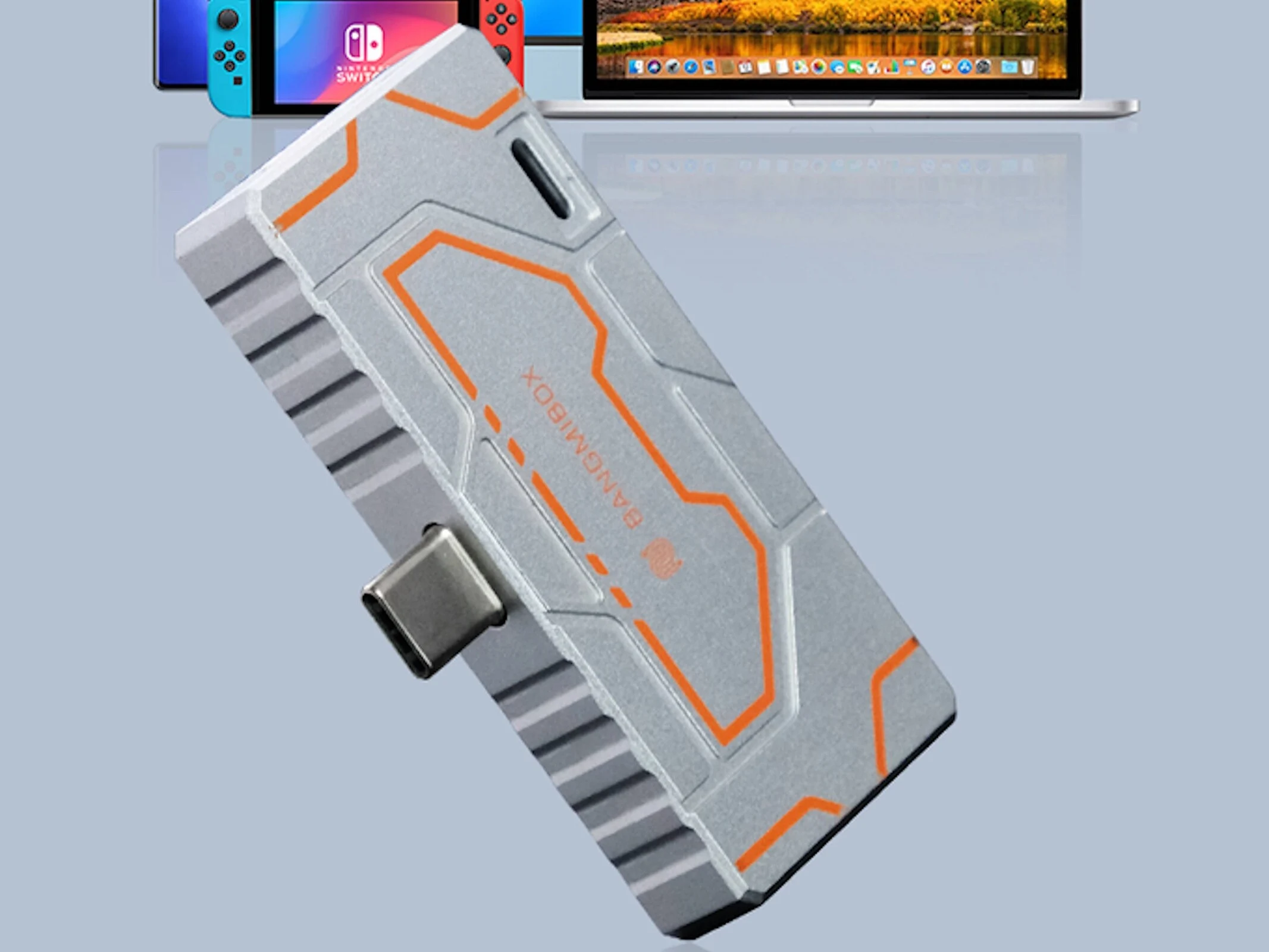
  • 3-in-1 M.2 SSD Dock: Expand Storage with USB-C & HDMI 2.0

    3-in-1 M.2 SSD Dock: Expand Storage with USB-C & HDMI 2.0

    Key Takeaways

    1. Compact storage options like the Mini 3-in-1 M.2 SSD Dock help users save money on smartphones with higher storage capacities.
    2. The dock allows users to install their own M.2 2230 SSD with capacities of 1, 2, or 4 terabytes.
    3. It connects to smartphones via USB-C and includes an HDMI 2.0 port for 4K image output at 60 Hz.
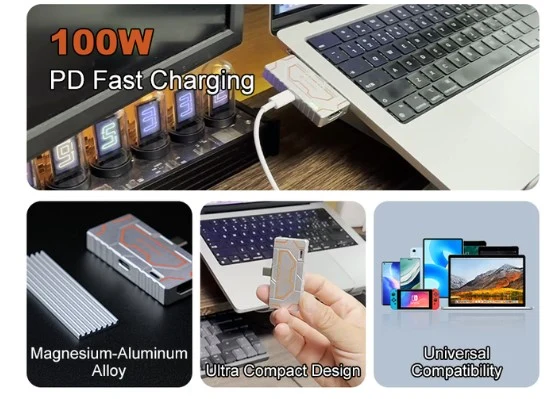
    4. The device supports USB PD charging up to 100 watts and is designed for heat dissipation with its magnesium-aluminum alloy body.
    5. The ‘Super Early Bird’ pledge starts at $89, offering a 36% discount, but carries risks typical of crowdfunding campaigns.


    Compact options for easy smartphone storage expansion are often discussed here at Notebookcheck, and many of these can be found on Amazon. These devices can really help save money for users who don’t want to buy smartphones with higher storage options. They are especially important for those who take a lot of photos or record videos frequently, as the storage in most smartphones can be quite limited. One such product, the Mini 3-in-1 M.2 SSD Dock, is currently being offered through a crowdfunding campaign. This device does not come with built-in storage; instead, users can install their own M.2 2230 SSD using PCIe and NVMe technology. It can only support one SSD with capacities of one, two, or four terabytes. The stated speed is 10 GBit/s.

    Connection and Features

    Users can connect the device to a smartphone using a USB-C connector, which allows the smartphone to be held in hand even while the dock is attached. An HDMI 2.0 port is also provided, enabling the output of 4K image content at 60 Hz. It’s important to note that the device must support these features. Similarly, USB PD charging is supported by the docking solution, offering up to 100 watts. The unit weighs 54.5 grams and is 10 millimeters in thickness, encased in a magnesium-aluminum alloy body, which the manufacturer asserts helps with “heat dissipation during prolonged high-speed operations.”

    Pricing and Risks

    Backers need to pledge at least $89 for the ‘Super Early Bird’ offer, which includes the device at a 36% discount from the supposed retail price. Shipping fees are not factored into this amount. As usual, crowdfunding campaigns come with certain risks, including the chance that the device may not reach the market or perform as expected.

    Source:
    Link