Category: Artificial intelligence

  • Microsoft Edge’s Copilot Mode: AI that Researches and Shops

    Microsoft Edge’s Copilot Mode: AI that Researches and Shops

    Key Takeaways

    1. Microsoft has launched Copilot Mode in the Edge browser for Windows and Mac, integrating AI assistance directly into the browsing experience.

    2. The AI operates in five modes: Search and Chat, Ask Copilot, Think Deeper, Research, and Action, with quick response times varying by mode.

    3. In Search and Chat mode, the AI can analyze open tabs and provide tailored suggestions based on user activity.

    4. The Action mode allows the AI to perform tasks independently, while capturing screenshots and user data during the process.

    5. Initial tests revealed limitations, such as slow performance and difficulty with certain tasks, raising concerns about data privacy and responsibility for the AI’s actions.


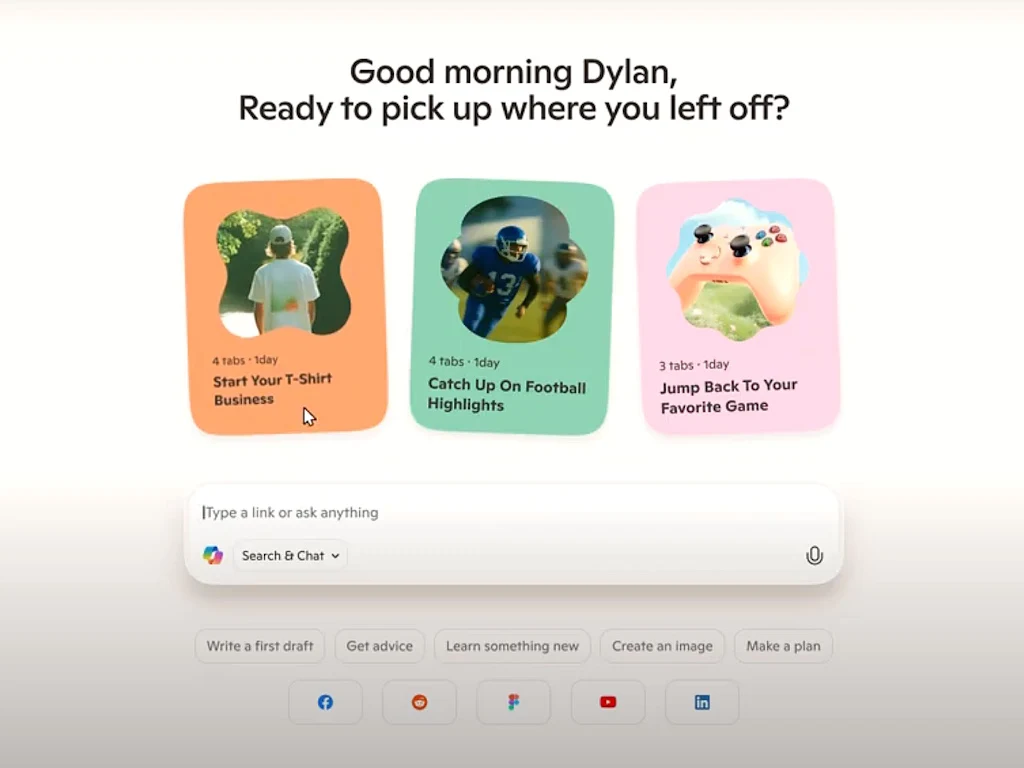
    Microsoft has introduced a new feature called Copilot Mode in its Edge web browser for both Windows and Mac users. This experimental setting includes an AI that is built right into the browsing experience. Every time a user opens a new tab, a prompt window appears, giving them the chance to ask the AI for assistance. The AI can search the internet for information, observe user activity, and handle tasks independently to help with various online activities.

    AI Modes Available

    The AI operates in five distinct modes: Search and Chat, Ask Copilot (which gives quick answers in 2-3 seconds), Think Deeper (around 30 seconds), Research (approximately 10 minutes), and Action. Currently, these features are available for free when users log in with a Microsoft account, but this could change down the line.

    The Ask, Think, and Research modes function in a way similar to other well-known AI chatbots like ChatGPT. Users can either type or voice their queries, and the AI will search the web to provide answers.

    Understanding Search and Chat

    With the Search and Chat mode, the AI can view the content in all open tabs within Edge. This capability allows the AI to offer insights and suggestions based on the user’s tabs. For instance, if users are looking at various swimsuits, they can inquire what the AI thinks about their selections.

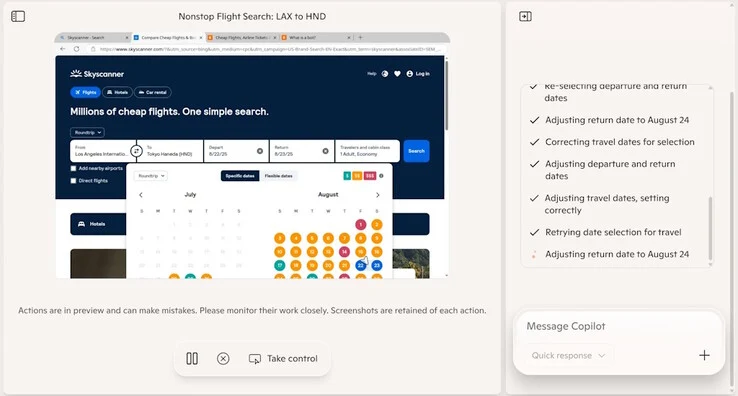
    In Action mode, Copilot acts like a personal assistant — it goes online, searches, engages with websites, and gathers information. Users will see the AI performing tasks in a virtualized browser environment, and they have the option to interrupt or take control at any time. It’s important for users to note that Copilot Mode captures screenshots of every step in Action mode and collects typed or spoken data during these interactive sessions. When personal history and credentials features are implemented in the future, the AI will also acquire this sensitive information as it works on tasks by itself.

    Limitations of the AI

    During initial tests, the AI struggled with some straightforward tasks, such as selecting a date range for flights, and its performance was quite slow in this experimental mode. There’s uncertainty about who would be held responsible for any unintended actions taken by the AI, like unauthorized credit card purchases.

    While Microsoft claims it adheres to data privacy protocols, there remains a risk that personal information could be exposed or compromised. Users who are concerned about potential AI risks might consider using sandboxed browsers without AI (like the one available on PortableApps.com) or even switching to Linux instead of Windows (which can be downloaded from Ubuntu, and there are guides to help with its usage).

    Source:
    Link

  • Giant Mirror to Redirect Space Light Back to Earth

    Giant Mirror to Redirect Space Light Back to Earth

    Key Takeaways

    1. Reflect Orbital aims to launch a massive mirror into space to redirect solar energy back to Earth, addressing the limitation of solar panels that can’t collect sunlight at night.
    2. The mirror will be made from mylar, a thin yet durable material, and is designed to continuously capture solar energy.
    3. The project involves advanced technology to precisely direct sunlight to specific locations on Earth for energy generation and lighting.
    4. Planned services include channeling sunlight to solar power stations at night and illuminating areas in need of light, similar to existing projects like the mirror in Viganella, Italy.
    5. Reflect Orbital’s long-term goal is to deploy 57 mirrors in low Earth orbit, creating an artificial constellation of satellite reflectors.


    Space is a huge and mostly unexplored area due to many physical factors. However, a startup aims to change this by launching a massive mirror into our solar system to redirect solar energy back to our planet.

    The Vision Behind the Project

    The exciting initiative is led by Reflect Orbital, a company based in California. Their goal is ambitious, especially since solar energy is already harnessed in various ways across the globe using solar panels. Yet, these panels have one major limitation: they can’t collect sunlight at night.

    Innovative Technology to Capture Energy

    To tackle this issue, the startup plans to deploy a satellite equipped with a large mirror that can continuously capture solar energy, day and night. The mirror is crafted from mylar, a material made from polyester, known for its incredibly thin yet highly durable surface.

    Aiming for Precision and Control

    But the project doesn’t stop there. While it’s common to send satellites into orbit these days, there is a crucial step that needs to be addressed. The mirror must be able to reflect sunlight toward specific locations on Earth to provide a substantial amount of energy. This calls for impressive technological capabilities, similar to those seen in AI-controlled satellites utilized in NASA missions.

    In this phase, two key services are already planned: energy and lighting. The first service involves channeling sunlight to solar power stations during nighttime, enabling solar panels to generate electricity when the sun isn’t shining. The second service focuses on illuminating areas on Earth that require specific lighting, much like the village of Viganella in Italy, which benefits from a mirror situated on a hill.

    Long-Term Ambitions

    It’s important to highlight that the startup has ambitious long-term goals. They aim to launch 57 mirrors into an orbit of 600 km, forming an artificial constellation of satellite reflectors in low Earth orbit. If they succeed, this could have significant implications across various sectors.

    Source:
    Link

  • Surge in Gray-Market Repairs for Banned Nvidia H100 and A100 GPUs

    Surge in Gray-Market Repairs for Banned Nvidia H100 and A100 GPUs

    Key Takeaways

    1. Emerging Repair Market: A profitable repair market for high-end Nvidia GPUs has developed in Shenzhen, driven by scarcity due to U.S. export bans.

    2. Impact of U.S. Restrictions: The U.S. has banned sales of the H100 and A100 GPUs to China, claiming they could aid military AI research, leading to increased demand for maintenance services.

    3. Essential Maintenance: Regular maintenance of these GPUs is crucial as many have been in continuous operation, resulting in higher failure rates and the need for repairs.

    4. Repair Costs: Repair prices range from ¥10,000 to ¥20,000 (approximately $1,400–2,800), reflecting the complexity of the work and the rarity of the hardware.

    5. Geopolitical Context: Despite U.S. concerns and legislative efforts to track high-end GPUs, the demand in China’s AI sector for maintaining these restricted products continues to thrive.


    Surging demand in China for maintainance of high-end Nvidia graphics processors—despite Washington’s export ban—has led to a small yet profitable repair market in Shenzhen. Around a dozen specialized workshops are now promoting their ability to fix and revive H100 and A100 accelerators. According to industry insiders who spoke to Reuters, these devices have come into the country through gray-market avenues.

    A Market Born from Scarcity

    This market only thrives because the hardware is both rare and essential. In September 2022, the United States prohibited sales of the H100 to China and also restricted its predecessor, the A100. U.S. officials claimed that these advanced GPUs could speed up military AI research. Although Nvidia eventually produced a less powerful H20 silicon that meets the restrictions, Chinese research institutions and cloud service providers still desire the more capable H100 for training large language models.

    Importance of Maintenance

    Maintaining these chips has become crucial. Many of them have been operating continuously in data centers for an extended period. Consequently, failure rates are increasing. Typical lifespans of two to five years mean that power-delivery circuits, high-bandwidth memory modules, and cooling fans require regular maintenance. One long-time graphics-card expert mentioned that it launched a separate subsidiary in late 2024. This new entity now refurbishes up to 500 AI GPUs each month, testing each repair in a 256-node server environment that replicates customer clusters.

    Pricing for Repairs

    Prices indicate both the rarity and the intricacy of the work. Shops charge between ¥10,000 and ¥20,000 (around $1,400–2,800) per card. This amounts to about 10 percent of the original price of the unit, covering repairs from solder-reflow tasks to HBM replacement. An equivalent eight-way H20 server officially sells for well over ¥1 million (≈ $139,000). Traders report that a B200-equipped chassis can be sold for more than ¥3 million (≈ $418,000).

    Washington’s worries extend beyond smuggling issues. This year, bipartisan bills have been introduced that would require tracking the location of high-end accelerators after sale, aiming to curb illegal activities. Nvidia asserts that only the company and its authorized partners can deliver comprehensive technical support. The company cautions that using restricted products without updated firmware and software is “a non-starter.” Still, business in Shenzhen remains active. Currently, China’s AI companies see worth in keeping illicit silicon operational—despite the geopolitical challenges.

    Source:
    Link

  • AI-Powered Satellite Completes Space Mission Autonomously

    AI-Powered Satellite Completes Space Mission Autonomously

    Key Takeaways

    1. AI is becoming integral in daily life and space missions, exemplified by NASA’s autonomous satellite.
    2. The Dynamic Targeting technology allows the satellite to analyze cloud coverage and make decisions on image capturing.
    3. The satellite can skip taking pictures when the sky is cloudy, conserving time, bandwidth, and storage.
    4. This advancement leads to more usable data, improving scientists’ ability to monitor natural disasters.
    5. AI in space missions enhances data collection and analysis, potentially revolutionizing scientific observations and responses.


    Artificial intelligence is rapidly evolving and has become an integral part of various aspects of daily life. But it doesn’t stop there—AI is also making its mark in space. A recent mission, led by NASA, showcased a satellite that operated entirely autonomously, marking a significant leap in technology.

    Advancements in Technology

    The technology known as Dynamic Targeting was utilized by NASA’s Jet Propulsion Laboratory (JPL) in early July. This innovative approach was integrated into a satellite, roughly the size of a briefcase, created by Open Cosmos. It also featured a machine learning processor designed by Ubotica.

    During this impressive mission, the satellite moved to scan 500 kilometers ahead of its original orbit to take an image. After capturing the photo, Ubotica’s AI stepped in to analyze it and assess the cloud coverage.

    Decision-Making in Action

    Based on the analysis, the satellite had two choices. If the sky was clear, it would rotate back to take a more detailed picture of the Earth’s surface. Conversely, if the sky was filled with clouds, it would skip taking pictures to conserve time, bandwidth, and storage space.

    Although we are still far from having spacecraft that can navigate autonomously at high speeds in space, this advancement is a substantial step forward for scientists. As Ben Smith from JPL puts it, “If you can be smart about what you’re taking pictures of, then you only image the ground and skip the clouds. This technology will help scientists get a much higher proportion of usable data.”

    Implications for Research

    Currently, scientists must sift through many images sent from satellites because they are programmed to capture numerous shots, even those that may not be useful. Therefore, this significant advancement in AI has the potential to assist scientists in monitoring natural disasters, such as wildfires or eruptions, more swiftly than existing satellite technologies allow.

    In conclusion, the use of artificial intelligence in space missions is paving the way for more efficient data collection and analysis, which could revolutionize the way scientists observe and respond to critical events on Earth.

    Source:
    Link

  • Keenon XMANF1: The Versatile Humanoid Robot Unveiled

    Keenon XMANF1: The Versatile Humanoid Robot Unveiled

    Key Takeaways

    1. Keenon holds a 40.4% market share in automatic food delivery and 22.7% of total shipments in the service robot sector.
    2. The company introduced the XMANF1 at the World Artificial Intelligence Conference (WAIC) as a new service robot designed to assist in tasks typically performed by humans.
    3. The XMANF1 requires support from additional robots like the Keenon M104 and T10 to operate effectively in healthcare and service environments.
    4. The robot’s mobility may be compromised due to attachments that replace its legs, raising concerns about its movement capabilities.
    5. There is currently no information on the pricing or availability of the XMANF1.


    Keenon has established itself as a significant player in the service robot sector, boasting a 40.4% market share in automatic food delivery and 22.7% of total shipments across the entire market.

    Introduction of the XMANF1

    The company is currently participating in the World Artificial Intelligence Conference (WAIC), which will run until July 29, 2025, to unveil its newest innovation, the XMANF1. This robot is designed to move similarly to the Unitree R1, although it doesn’t have the same flair for tricks like somersaults. Instead, the company claims that the XMANF1 can perform tasks typically done by human service or healthcare employees.

    Dependency on Additional Robots

    However, it appears that the XMANF1 requires support from additional robots with specific functions to be fully operational. For instance, the Keenon M104 logistics robot is said to be necessary for the XMANF1 to operate in healthcare environments, while the T10 delivery robot is needed for it to serve as a bartender.

    Some attachments seem to replace the robot’s legs, which could hinder its movement, casting doubts on its mobility as a key selling point. This reliance might place service providers, and possibly users, in a dependent situation on Keenon and its ecosystem in real-life applications.

    Pricing and Availability

    In contrast to the R1, there is currently no information available about the pricing or availability of this new humanoid robot at the time of this writing.

    Source:
    Link


  • Upcoming WhatsApp Feature to Enhance Chat Convenience

    Upcoming WhatsApp Feature to Enhance Chat Convenience

    Key Takeaways

    1. WhatsApp is developing a new feature called Quick Recap to summarize multiple chats using AI.
    2. Users will be able to select up to five chats to receive an AI-generated summary of unread messages.
    3. The feature will maintain end-to-end encryption, ensuring chat content remains private and secure.
    4. Chats with Advanced Chat Privacy will be excluded from the Quick Recap feature for added protection.
    5. Quick Recap is currently not available, with a phased rollout expected for beta testers before reaching the stable app version.


    WhatsApp is gearing up to enhance user experience, as per recent findings from the WhatsApp tracker WABetaInfo. The messaging platform is working on a feature named Quick Recap, which employs artificial intelligence to summarize multiple chats simultaneously. This innovation aims to assist frequent users in quickly catching up on unread messages.

    New Feature Development

    WABetaInfo, known for its analysis of beta versions, reports that this feature is currently being developed for the Android beta version 2.25.21.12. Users will soon have the option to select up to five chats from their chat tab. By clicking on a new Quick Recap icon, they will get an AI-generated summary of unread messages. This feature is anticipated to be particularly beneficial for individuals who manage numerous group or personal chats, such as professionals or community managers.

    Privacy and Security

    A major highlight of this new feature is its commitment to maintaining end-to-end encryption. As stated by SmartDroid.de, WhatsApp utilizes a method called private processing technology. This ensures that the AI analysis occurs in a secure environment, meaning that neither WhatsApp nor Meta can access the chat content or the summary results. Interestingly, chats that have Advanced Chat Privacy will be excluded from this feature by design, offering additional safety for sensitive discussions.

    Availability Timeline

    Currently, Quick Recap is not available to users in any version of the app, either regular or beta. While there’s no confirmed release date yet, a phased rollout is anticipated. Initially, the feature will likely be available to a select group of beta testers and then gradually widen its reach to more beta users. Eventually, it will be included in the stable version of the app.

    Source:
    Link


  • Elon Musk Plans to Revive Vine with AI Integration

    Elon Musk Plans to Revive Vine with AI Integration

    Key Takeaways

    1. Artificial intelligence is increasingly integrated into daily life, with tools like ChatGPT, Grok, and Gemini gaining popularity.
    2. Elon Musk plans to revive Vine by incorporating artificial intelligence, aiming to create a platform focused on AI-generated content.
    3. Vine was a pioneering short-video platform that helped many comedians gain fame before its shutdown in 2017 due to competition from Snapchat and Instagram.
    4. Musk’s xAI company may face challenges in developing video generation templates for the AI-driven Vine.
    5. User reactions to AI in social media are mixed, raising concerns about misinformation and the platform’s potential success or failure.


    Artificial intelligence is becoming more and more a part of our everyday life. With tools like ChatGPT, Grok, and Gemini, it can be tough to keep track. Elon Musk’s upcoming initiative won’t make it any simpler, as he aims to bring back the well-known Vine platform by incorporating artificial intelligence.

    A Look Back at Vine’s Impact

    For younger folks, Vine was a platform that was truly ahead of its time. It was bought by Twitter just before it launched in 2012 and allowed countless content creators to upload short videos that could be up to seven seconds long and loop endlessly. This flexibility let everyone choose their own video themes to gain views, leading to many of today’s top comedians achieving great success on this platform.

    The Fall and Future of Vine

    Unfortunately, as Snapchat and Instagram gained popularity, Vine struggled to keep its unique appeal, and Twitter decided to shut it down in 2017. Fast forward to 2022, and Elon Musk expressed his interest in bringing the platform back to life. Just three years later, he tweeted: “We’re bringing back Vine, but in AI form.”

    This revival could mark a significant change in Vine’s journey by featuring content created solely by artificial intelligence. While this might seem unexpected, companies like Meta and OpenAI are already testing this technology with Meta AI, which can create images. OpenAI also appears to be envisioning a social media platform that is heavily integrated with AI, as reported by The Verge.

    Challenges Ahead for Musk

    Despite the excitement around Vine’s potential return, Elon Musk may face several challenges. His xAI company currently does not provide templates for video generation, indicating that significant development work may be needed soon. Additionally, Grok, although it has its issues, might also find a place on this new-age platform.

    One key question remains in many people’s minds: what do users really want? Some are intrigued by artificial intelligence, while others are not keen on seeing it in their social media. Misinformation is already widespread on some platforms, and this new project could worsen that problem. It will be interesting to see how users respond; if the reaction is negative, Vine may face yet another shutdown.

    Source:
    Link

  • Shanghai AI Conference Begins with 800 Exhibitors Amid US Restrictions

    Shanghai AI Conference Begins with 800 Exhibitors Amid US Restrictions

    Key Takeaways

    1. The World Artificial Intelligence Conference (WAIC) will feature over 800 companies showcasing more than 3,000 AI products, including 40 large language models and 60 intelligent robots.

    2. Premier Li Qiang will emphasize the need for a global governance framework for AI to prevent fragmented regulations that could favor a few powerful states or corporations.

    3. The conference occurs amidst US restrictions on advanced chips, yet local companies like DeepSeek are achieving significant innovations that rival top US systems.

    4. Major Chinese firms like Huawei and Alibaba will dominate the exhibition, alongside Western companies such as Tesla and Amazon, highlighting a mix of established and start-up players.

    5. The WAIC serves as both a technology exhibition and a diplomatic forum, with potential implications for future global AI regulations and competition.


    Shanghai’s World Artificial Intelligence Conference (WAIC) kicks off this weekend, boasting the largest exhibitor lineup in its history. The organizers are anticipating participation from over 800 companies, presenting more than 3,000 AI products. This includes 40 large language models, 50 AI devices, and 60 intelligent robots.

    Keynote Address

    Premier Li Qiang is set to give the keynote speech, where he will advocate for a global governance framework that balances technological advancement with security concerns. He points out that fragmented regulations could make AI an “exclusive game” for a small number of states or corporations. To address this, he has suggested the creation of a new organization to coordinate standards, especially for countries that are still developing.

    Event Context

    The conference takes place amid ongoing US restrictions on advanced chips and manufacturing tools, which began during the Trump era and have since become stricter. Despite these supply issues, local innovations have emerged: DeepSeek, based in Hangzhou, revealed a cost-effective model this year that competes with top US systems. Nvidia’s CEO Jensen Huang has recently commended AI models from DeepSeek, Alibaba, and Tencent, labeling them as “world-class.”

    Show Highlights

    The show floor will be dominated by major Chinese players like Huawei and Alibaba, while Western companies such as Tesla, Alphabet, and Amazon also have a presence. Start-ups add diversity to the event; for example, Unitree, a humanoid-robot company, will showcase its newest bipedal designs.

    As national AI strategies continue to diverge, the three-day WAIC serves as both a technology exhibition and a diplomatic meeting point. The impact of Li’s appeal for unified regulations could significantly influence the future of the global AI competition.

    Source:
    Link

  • AI Cyberattacks: How LLMs Plan and Execute Operations Autonomously

    AI Cyberattacks: How LLMs Plan and Execute Operations Autonomously

    Key Takeaways

    1. Large language models (LLMs) can imitate network breaches similar to real attacks when enhanced with advanced planning skills.
    2. LLMs can autonomously penetrate networks, identify weaknesses, and execute complex attacks without human assistance.
    3. The study indicates that sophisticated AI can adapt to changing network conditions and make independent decisions.
    4. There are serious cybersecurity risks, as malicious actors could misuse LLMs for automated and widespread attacks.
    5. LLMs also have potential benefits, enabling businesses to develop and test cybersecurity strategies through simulations to identify vulnerabilities.


    A recent investigation directed by Brian Singer, who is pursuing a PhD in electrical and computer engineering at Carnegie Mellon University, has shown that large language models (LLMs) can imitate network breaches that are strikingly similar to actual attacks. This is particularly true when these models are enhanced with advanced planning skills and tailored agent frameworks.

    Key Findings of the Study

    In this investigation, the LLMs were able to penetrate corporate networks, discover weaknesses, and execute complex attacks all without any human help. The findings highlight that sophisticated AI models can do more than just simple tasks; they can also make decisions on their own and adapt to changing network conditions.

    Implications for Cybersecurity

    This raises both serious dangers and possible advantages for the field of cybersecurity. On one hand, bad actors might take advantage of these technologies to make their attacks more automated and widespread. Conversely, businesses and security experts could leverage LLMs to create and evaluate cybersecurity strategies, like running simulations to find potential vulnerabilities before they can be exploited.

    The details of this study can be found on Anthropic’s research website, and a preprint of the paper is also accessible on arXiv. These documents provide important information about the techniques and consequences of this innovative and challenging research regarding AI-driven cyberattacks.

    Source:
    Link

  • Nvidia B200 Shipments to China Surpass US Export Restrictions

    Nvidia B200 Shipments to China Surpass US Export Restrictions

    Key Takeaways

    1. Nvidia’s B200 AI processors are still being shipped to China despite U.S. export restrictions, revealing the ineffectiveness of current regulations.
    2. A new reseller, “Gate of the Era,” has emerged, facilitating around $400 million in transactions of B200 hardware through various channels.
    3. Demand for restricted GPUs like the B200 and H100 is driven mainly by smaller Chinese companies and third-party datacenter operators, rather than major tech firms.
    4. The introduction of Nvidia’s lower-spec H20 chip has reduced some demand for the B200, as customers consider this compliant option.
    5. Supply chains are evolving, with Southeast Asian countries serving as staging areas for shipments to China, prompting discussions of further regional export controls by Washington.


    Shipments exceeding $1 billion of Nvidia’s leading B200 artificial-intelligence processors have still made their way to China in the three months following Washington’s stricter export limitations, highlighting how ineffective the current restrictions are. The B200, which is the same graphics processing unit (GPU) used by companies like OpenAI, Google, and Meta for training sophisticated models, is a specialized electronic circuit built for swift image and data processing. Even though it’s officially banned in the Chinese market, it has become a key part of a vibrant gray market for high-end U.S. chips.

    Emergence of New Resellers

    Documents from the Financial Times show that a reseller based in Anhui, known as “Gate of the Era,” has quickly become a significant player in this trade. Established in February, the company obtained at least two large shipments of B200 racks, each containing eight GPUs along with necessary components and software. Estimates suggest that the company has facilitated around $400 million in hardware transactions through both direct and indirect channels. The market prices have varied between RMB 3 million and 3.5 million (approximately US$489,000) for each rack, a decrease from over RMB 4 million (around $560,000) in mid-May. These prices remain about 50% higher than similar offerings in the U.S.

    Market Dynamics and Demand

    Distributors are promoting B200, H100, and other restricted GPUs on platforms like Douyin and Xiaohongshu, arranging on-site tests before customers pick up the hardware. One intermediary compared the situation to a “seafood market.” There is a good supply as long as buyers are okay with the lack of Nvidia’s official support.

    Since major Chinese tech firms risk their global compliance programs by using illegal hardware, demand is primarily from smaller domestic companies, third-party datacenter operators, and entities already blacklisted by the U.S. The reintroduction of Nvidia’s lower-spec H20—a version of Nvidia’s AI chip designed with reduced capabilities to comply with export regulations—has lessened some of the demand pressure. Resellers are noting a decrease in B200 transactions as customers consider this sanctioned option.

    Evolving Supply Chains

    Nevertheless, the supply chain is still adapting. Industry professionals have mentioned that Southeast Asian locations, especially Thailand and Malaysia, are acting as temporary staging areas. This has led Washington to consider imposing more regional controls in the upcoming quarter. Even if these routes were to close, distributors claim that new channels through less-restricted European regions are already being utilized, highlighting the financial incentives that continue to facilitate the flow of advanced U.S. AI silicon into China, despite ongoing rounds of export regulations.

    Source:
    Link