

Key Takeaways
1. Wootility V5.1.0 enhances user experience with improved intuitiveness and new features for the Wooting 80HE keyboard.
2. The update introduces RGB effects visualization, allowing users to customize backlighting without looking away from the keyboard.
3. A new profile drop-down menu option simplifies the process of importing keyboard profiles.
4. UI enhancements include a continuous Rapid Trigger indicator and a JIT option for ModTap, improving multi-key functionality.
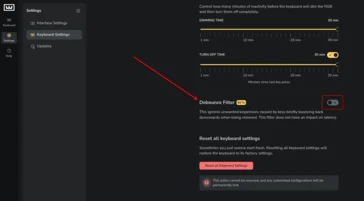
5. The debounce feature reduces unintended inputs on larger keys, enhancing performance without affecting latency.
When we took a look at the Wooting 80HE, we highlighted Wootility, its superb browser-based setup tool, for being user-friendly, packed with features, and very adjustable. Now, with the launch of Wootility V5.1.0, Wooting has improved Wootility to make it more intuitive, while also adding new capabilities to enhance the user experience with the 80HE.
New Features in Update
After the introduction of Wootility v5 in February of this year, Wooting has rolled out a fresh batch of features in the 5.1.0 update. At the top of the list is the cool new RGB effects visualisation within the RGB effects studio, alongside new debounce filters to prevent key chatter on highly sensitive keys. Additionally, a new choice was added to the profile drop-down menu, making it easier and clearer to import profiles.
Wooting mentions in the update notes that the RGB visualisation feature is designed to simplify the customization of your keyboard, effectively eliminating the need to glance down at your keyboard while adjusting the backlighting settings. We tried this feature on our Wooting 80HE, and it proved to be a very useful way to visualize options without diverting your gaze from the keyboard. It’s also fascinating as a method to preview changes to the backlighting effects without disrupting the previously saved settings on your keyboard.
User Interface Enhancements
Several UI updates have also been included in the latest version, such as an indicator for continuous Rapid Trigger, which allows you to see most of the actuation point adjustments for all keys at a single glance.
Moreover, Wooting introduced a JIT (just-in-time) option for ModTap users, which significantly simplifies the use of functions like shift-enter or LayerTap. There’s no longer a need to wait for the modifier timer to finish before activation. With this feature enabled, as soon as you press another key while holding down a key with ModTap, the modifier on that key will trigger, sending both the modifier and the second keystroke to your PC.
We also tested this on the 80HE, utilizing ModTap on the space bar (shift when held, space when tapped), and we noticed a big improvement in accuracy, reducing the adjustment time associated with similar key bindings.
Debounce Improvements
The key debounce feature introduced in v5.1.0 might not be a revolutionary change if you only use your keyboard for typing, but it will lessen unintended inputs on larger keys, like the space bar. This is particularly helpful if you’re using your gaming keyboard with all keys set to an actuation distance of around 0.1 mm. Wooting stated that this new debounce function will minimize double inputs without impacting latency, suggesting they’re using a mix of input timing and travel distance to identify false inputs.
Source:
Link


Leave a Reply