Tag: Linux Gaming

  • Linux Gains Nvidia Reflex and AMD Anti-Lag on Any GPU

    Linux Gains Nvidia Reflex and AMD Anti-Lag on Any GPU

    Key Takeaway

    – Nvidia Reflex 2 and AMD Anti-Lag 2 are now hardware-agnostic via Korthos Software’s low_latency_layer, allowing use on GPUs from different vendors (including Intel).
    – Benchmarks suggest these Linux implementations can outperform native Windows versions in some cases.
    – Setup requires basic Linux terminal know-how (installing packages and creating a build directory), with instructions on Korthos’ GitHub to guide users.
    – The project is led by Nicolas James, highlighting a notable Fedora of FOSS gaming and potential compatibility with SteamOS/Steam Deck through manual installation.

    Big news for Linux gamers, especially eSports players: Nvidia Reflex 2 and AMD Anti-Lag 2 can now be used in a hardware-agnostic manner, meaning that these proprietary technologies can now be used on GPUs from opposing vendors, including Intel GPUs, thanks to Korthos Software’s low_latency_layer. Even better, some benchmarks reflect these technologies actually working better than the native Windows versions, taking a pain point of Linux gaming and turning it into a genuine strength. Setting it up does require some basic knowledge of how to use a Linux terminal, including installing packages and making a build directory, but the instructions on Korthos’ GitHub page for the project should make that process a simple matter.

    Background and developer

    It’s a truly impressive feat from Korthos Software—or specifically, Nicolas James, the only known developer of low_latency_layer. In a statement made to Phoronix, Nicolas James stated that the project was started earlier this year “because I was frustrated with the state of Anti-Lag 2 on Linux. If you’re not aware, the Mesa AL2 implementation had some issues with stability and was disabled by default. On top of this, I tested the latency improvement of the Mesa implementation and found that it wasn’t doing as much as the proprietary version on Windows. I like my FPS games and my AMD machine but I love Linux, and it seemed like they weren’t compatible.”

    Developer insights

    He continues, “After AL2 was working, I noticed there was nothing stopping a similar implementation of the Nvidia equivalent […] They are just device extensions that any Vulkan layer can intercept. […] My testing was done using a 540 Hz monitor which has Nvidia Reflex Analyzer. It involved me clicking a button and writing down the values I get into a spreadsheet, which can get pretty tedious. I have tested The Finals, Counter-Strike 2, Cyberpunk 2077, Resident Evil Requiem, Marvel Rivals and Overwatch 2.”

    Implications and reach

    All told, it’s a pretty genius solution from Nicolas James, and a truly admirable achievement for FOSS gaming at large. This also means, of course, that Steam Machine and Steam Deck should be able to utilize low_latency_layer if users manually install it, making it possible to use an improved AMD Anti-Lag 2 or Nvidia Reflex on any supported game under SteamOS.

    What to expect next

    • Availability across more hardware and platforms as integration matures.
    • Potential changes in benchmarking results compared to native Windows implementations.
    • User community contributions and longer-term maintenance for compatibility.

    Sources
  • Proton-CachyOS 11 boosts Linux gaming with OptiScaler integration

    Proton-CachyOS 11 boosts Linux gaming with OptiScaler integration

    Key Takeaway

    – OptiScaler integration simplifies enabling upscaling by using environment variables, reducing manual file injections into game prefixes.
    – The release updates Proton Experimental base and includes miscellaneous fixes and QoL improvements (HDR handling, mouse pointer behavior, H.264 playback).
    – Advanced users still have the option for manual OptiScaler installation for deeper customization, though the feature remains work-in-progress.

    OptiScaler enters Proton-CachyOS 11.0-20260506 with upscaling enhancements

    This release marks a notable shift for Linux gamers as the OptiScaler feature gets integrated into the Proton-CachyOS line, specifically version 11.0-20260506. The announcement highlights that the Proton compatibility layer has been updated to a newer base, labeled Proton Experimental, while the upscaling integration takes center stage as the main highlight of the update. The tone from the developers also notes that OptiScaler is still a work in progress, which means users may experience some quirks or moments where it does not perform exactly as hoped in every scenario.

    What OptiScaler actually does and why it matters

    In practical terms, OptiScaler redirects one upscaling backend to another, but it demands that the game itself supports some form of upscaling technology like FSR, XeSS, or DLSS. For the games that do offer such support, OptiScaler opens doors for experimentation and could potentially deliver better performance or smoother visuals than before. The integration aims to reduce manual tinkering and let players enable the feature via simple environmental variables rather than stuffing files into game prefixes, though advanced users still retain the option to install manually for deeper customization.

    How users enable and customize OptiScaler in this release

    With the update, enabling OptiScaler becomes more straightforward for typical users, thanks to an environmental-variable approach. This means you can flip the option on or adjust parameters without altering core game files. However, those who want or need extra control can still perform manual installation steps if they prefer to fine-tune how OptiScaler interacts with specific game prefixes and setups. The overall goal is to streamline the process while preserving flexibility for power users.

    Beyond OptiScaler: fixes and quality-of-life improvements

    Beyond the core upscaling feature, the Proton-CachyOS 11.0-20260506 release includes a broad set of fixes and usability improvements. Notable items include simplified HDR handling, improved mouse pointer behavior, and remediation of previously broken H.264 playback. These refinements aim to deliver a smoother gaming experience across supported titles and configurations, reflecting ongoing maintenance and user feedback as a central focus of the project.


    Sources

  • Rocknix Adds Official Steam Support for Android Handheld Devices

    Rocknix Adds Official Steam Support for Android Handheld Devices

    Key Takeaway

    1. Rocknix now supports Steam, allowing playback of Linux and PC games via Proton.
    2. Support is limited to certain Qualcomm-based devices, excluding newer models like AYN Odin 3 and Konkr Pocket Fit Elite.
    3. Steam support is available in Nightly builds and is expected to improve over time.
    4. Installing the OS on internal memory enhances game and Steam performance.
    5. Compatibility issues may arise with RTX, DirectX 12 games, and requiring specific launch arguments for some titles.

    Steam Support Comes to Rocknix

    The folks who made Rocknix, a Linux based OS mainly for old-school gaming handhelds, just announced that now the OS can run Steam. This is pretty cool because it means gamers can access a wide variety of Linux and PC games through Proton, making it more versatile for gaming on handhelds.

    Device Compatibility and Limitations

    Right now, support is with Qualcomm powered handhelds only. The current compatible models include some from brands like AYN, Ayaneo, and Retroid. Sadly, newer gadgets with Snapdragon 8 Elite or Dragonwing Q8, like the AYN Odin 3 and Konkr Pocket Fit Elite, are not on the list yet. The supported devices are listed on official sources for those interested.

    Usage Tips and Known Issues

    Since Steam support on Rocknix is only accessible through the Nightly builds, expect some bugs at first, but hopefully those will get fixed in future updates. Rocknix also suggests installing the OS directly onto the device’s internal memory because it makes Steam start faster, and game installs and launches quicker too.

    Game Compatibility and Launch Settings

    About games compatibility, it is said that some with RTX features might not run smoothly. Also, certain DirectX 12 games that refuse to boot may need a special launch argument to get running. Helldivers 2 also needs a specific launch argument, while titles like Counter-Strike 2 require users to enable DRM and Vulkan support along with Wayland client libraries in EmulationStation’s advanced options. More detailed instructions on how to set up Steam in Rocknix can be found in the original source.

    Sources
  • Linux Gaming in 2025: Radeon 9070 XT vs RTX 5080 FPS Battle

    Linux Gaming in 2025: Radeon 9070 XT vs RTX 5080 FPS Battle

    Key Takeaways

    1. Performance Comparison: The AMD Radeon 9070 XT generally performed better on Linux than Windows at 1080p, while the Nvidia GeForce RTX 5080 had a slight edge on Windows.

    2. Resolution Impact: At 1440p ultrawide, the RTX 5080 outperformed the 9070 XT on Windows, but performance differences lessened on Linux, affecting frame stability.

    3. Ray Tracing Effects: Ray tracing did not significantly impact the performance of the 9070 XT on both operating systems, while the RTX 5080 struggled more on Linux.

    4. Linux Improvements: The 9070 XT achieved nearly 98% of its Windows performance on Linux at 1080p, indicating significant improvements in Linux gaming.

    5. Nvidia Performance Decline: The RTX 5080 only managed about 84% of its Windows performance at 1080p on Linux, highlighting a larger performance gap compared to the Radeon 9070 XT.


    When it comes to gaming in 2025, gamers have a ton of options, especially in the PC gaming world. You can choose between Windows 11 or a Linux gaming distribution like Nobara 42, teamed up with either an AMD or Nvidia graphics card. With so many possibilities, it can be tough to figure out the best match between an operating system and a GPU. Fortunately, the YouTube channel Ancient Gameplays has done the heavy lifting to find the performance differences between Windows 11 and Linux using an AMD Radeon 9070 XT and an Nvidia GeForce RTX 5080.

    Testing Setup

    The YouTuber ran tests on 15 games at both 1080p and 1440p ultrawide resolutions using an AMD Ryzen 7 9700X with 32GB DDR5 RAM clocked at 6200MHz. The games included popular titles like The Witcher 3 and Cyberpunk 2077, tested with and without ray tracing enabled.

    Performance Analysis

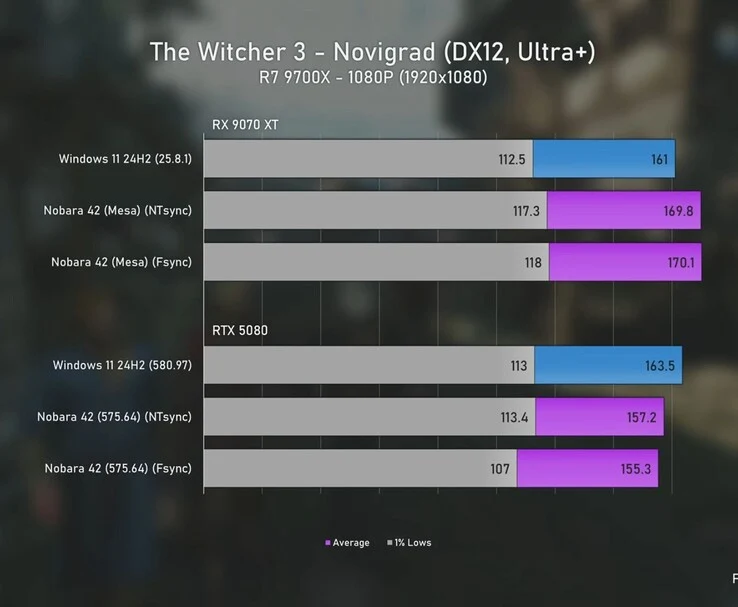
    In The Witcher 3 at 1080p, the Radeon 9070 XT (currently priced at $749 on Amazon) performed a bit better on Linux, hitting an average of over 170 FPS, compared to 161 FPS on Windows. On the other hand, the RTX 5080 dropped slightly on Linux, scoring around 155 to 157 FPS, while it managed 163 FPS on Windows.

    When the resolution increased to 1440p ultrawide, the RTX 5080 (currently $999 on Amazon) took the lead with 116 FPS on Windows, which is about 17 percent faster than the 9070 XT’s 99 FPS. However, on Linux, that advantage diminished, and frame stability suffered, with 1% lows dipping to as low as 50 FPS. The 9070 XT lost a few frames on Linux but still performed reasonably well with an average of about 91 FPS.

    Ray Tracing Results

    Turning on ray tracing didn’t significantly change the performance for the 9070 XT. At 1080p, it remained steady on both operating systems, even showing smoother lows on Linux in some tests. The RTX 5080, by contrast, matched the 9070 XT on Windows at around 98 FPS but struggled on Linux, where its averages fell into the low 80s.

    At 1440p ultrawide, the RTX 5080 finally excelled with 88 FPS on Windows, extending its lead over the 9070 XT, which averaged 75 FPS. On Linux, the disparity grew larger, with the 5080 reaching nearly 77 FPS, while the 9070 XT lagged behind at 64 FPS.

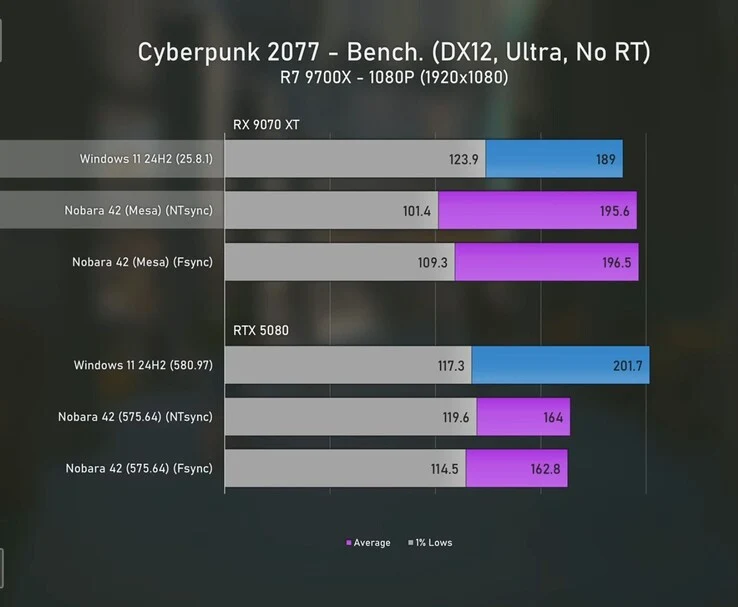
    In Cyberpunk 2077, the Radeon 9070 XT actually ran quicker on Linux at 1080p, averaging nearly 196 FPS against 189 FPS on Windows, even though its 1% lows dropped from 124 FPS to 101 FPS. The RTX 5080 performed better on Windows with an average of 202 FPS but fell to about 163 FPS on Linux, also experiencing lower 1% lows.

    Comparison at Higher Resolutions

    At 1440p ultrawide, the 9070 XT recorded 101 FPS on Windows but jumped to 131 FPS on Linux, while its 1% lows fell into the low 50s. The RTX 5080 achieved 116 FPS on Windows and around 89 FPS on Linux, with its 1% lows also dropping below its Windows performance. The tester reran the game multiple times, and the unusual 29% increase for the 9070 XT on Linux was consistent throughout.

    With ray tracing enabled, the 9070 XT again showed better averages on Linux at 138 FPS versus 131 FPS on Windows, although its 1% lows were halved. The RTX 5080 scored 142 FPS on Windows and about 121 FPS on Linux. At 1440p ultrawide, the 9070 XT fell from 73 FPS on Windows to the mid-50s on Linux, while the 5080 maintained 86 FPS on Windows and just over 71 FPS on Linux.

    Final Thoughts

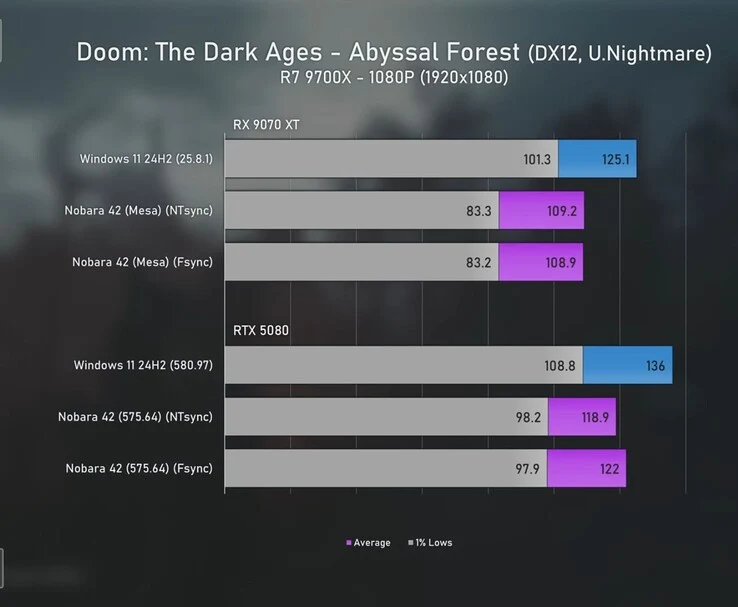
    In Doom: The Dark Ages at 1080p, the Radeon 9070 XT hit 125 FPS on Windows with 1% lows at 101, while on Linux it averaged around 109 FPS with lows of about 83. The RTX 5080 was even faster, achieving 136 FPS on Windows and about 119 FPS on Linux, but its 1% lows dropped from 109 on Windows to roughly 98 on Linux.

    At 1440p ultrawide, the 9070 XT averaged 74 FPS on Windows with lows near 60 FPS, while on Linux it dropped to about 65 FPS with lows under 50. The RTX 5080 again proved quicker, scoring 86 FPS on Windows with 1% lows at 71 FPS, compared to about 78 FPS on Linux where 1% lows were around 54 FPS.

    Across the two resolutions, the RTX 5080 emerged as the stronger performer, maintaining higher averages in both Windows and Linux, even though it lost more ground in 1% lows when shifting to Linux compared to the 9070 XT.

    The YouTuber assessed more games in the video, which you should definitely check out. In the overall findings, they concluded that Linux is no longer the underdog it used to be. Across 17 games, the Radeon 9070 XT surprisingly came close to its Windows performance, achieving 98% at 1080p and 95% at 1440p ultrawide. In simpler terms, unless you’re after the absolute highest frame rates, the differences are hardly noticeable.

    The YouTuber also noted that Nvidia’s RTX 5080 didn’t keep up quite as well, managing only about 84% of its Windows performance at 1080p, yet it remained steady at 1440p with just a slight 1% decline. A few years back, such results on Linux would’ve been unimaginable, as drivers and optimizations lagged way behind Windows. Now, with platforms like Bazzite and SteamOS boosting Linux gaming into the mainstream, the gap is closing quickly, and in some instances, it’s even flipping the narrative.

    Source:
    Link


  • Why Linux is Growing Popular Among Gamers

    Why Linux is Growing Popular Among Gamers

    Key Takeaways

    1. Linux’s gaming market share on Steam has reached 2.89%, showing growth from 2.57% the previous month.
    2. The Steam Deck, a handheld device running SteamOS (a Linux version), is a major factor in increasing Linux’s popularity among gamers.
    3. SteamOS is the most popular Linux distribution among Steam users, accounting for 28% of Linux gamers.
    4. Software improvements, particularly with Proton 10.0, enhance game compatibility and performance on Linux.
    5. While Windows maintains a dominant market share, Linux is gaining traction and becoming a more viable gaming platform.


    Linux, which is an open-source operating system that has been popular with tech lovers, developers, and IT pros, is also attracting gamers now. This change is seen in the recent hardware and software survey from Steam, which indicates that 2.89% of all Steam users are playing games on Linux. Windows still holds a massive market share at 95.23%, but Linux is inching closer to that 3% mark for the first time, showing a growth of 0.32% from the previous month. In comparison, macOS has a share of 1.88%.

    The Rise of Steam Deck

    The main reason for Linux’s popularity among gamers is Valve’s handheld device, the Steam Deck (priced at $475 on Amazon). It operates on SteamOS, a Linux version based on Arch. Linux has distinct benefits for mobile gaming, like extended battery life, reduced resource consumption, and sometimes, better performance when compared to Windows. Among Linux users on Steam, SteamOS is the leading distribution, making up 28%. Other well-liked options include CachyOS (one of the top gaming-oriented distros), Fedora 42, Nobara Linux, Bazzite, and Nitrux.

    Software Improvements

    In addition to hardware, advancements in software are also helping Linux’s rise. With Proton 10.0, the newest update for the Windows compatibility tool, many games now run smoother and have better compatibility on Linux. This makes it easier for newcomers and brings the gaming experience closer to what players expect on Windows. Even though Windows will probably continue to be the top platform for gamers in the near future, the Steam survey highlights a noticeable trend: Linux is no longer just a side option.

    Source:
    Link


  • EA Cancels Apex Legends Linux Version Over Anti-Cheat Issues

    EA Cancels Apex Legends Linux Version Over Anti-Cheat Issues

    EA has decided to end support for the Linux version of Apex Legends. This means that Steam Deck users will need to install Windows if they want to enjoy the game, a situation that also impacts the rising number of Linux gamers. The company claims this move is aimed at combating cheaters, who they say tend to favor Linux distros rather than Windows. EA shared this information in a post on X:

    Cheating Issues on Linux

    The Linux operating systems’ open nature makes it appealing for cheaters and those who develop cheats. It is true that cheats on Linux are more difficult to detect, and the data indicates a growing trend that demands significant attention from EA’s team, especially considering the relatively small size of the Linux platform. There are even instances where cheats designed for Windows are being used on Linux to make detection more challenging.

    Easy Anti Cheat and Its Implications

    Apex Legends employs Easy Anti Cheat (EAC), which is a service running at the kernel level that identifies unauthorized modifications to the game’s files. Although it might be simpler to bypass this system on Linux, restricting access to an entire platform seems a bit too harsh and almost inept. EA claims that only a limited number of players will be affected, but those individuals are losing access to a game they enjoy along with any in-game skins they previously acquired. It would be best if EA considered providing refunds to those impacted, but there has been no announcement regarding that so far.

    The Future for Apex Legends Players

    With this decision, the future for Linux users who want to play Apex Legends looks bleak. Many gamers feel frustrated that they have to jump through hoops to continue playing a game they love. The community is left hoping for a resolution or at least some compensation for their losses. For now, it seems like the situation is still developing, and players will have to wait to see how EA addresses their concerns.