Tag: Lenovo ThinkPad T14 Gen 7

  • Office Laptops 2026: The Battery Life Standard Today

    Office Laptops 2026: The Battery Life Standard Today

    Key Takeaway

    – Schenker Connect 15 (E26) has the shortest battery life among 2025 office laptops, lasting only 6.6 hours.
    – The office laptop average is 13 hours; top performers like the Lenovo ThinkPad T14 Gen 7 reach 18 hours.
    – Battery size alone does not explain poor runtime—competitors with similar or smaller batteries last longer.
    – Current office laptops should aim for at least 10 hours in the Wi-Fi test to be competitive.
    – Schenker needs to optimize idle power consumption to improve runtime from its efficient processor and standard battery.


    Battery life verdict on the Schenker Connect 15

    The Schenker Connect 15 (our review) lasts around 6.6 hours without power in our Wi-Fi test. Is that still acceptable? After all, there are now ARM-based models that can run for 24 hours without needing a power outlet. And newer x86 devices are working hard to catch up. But what does the target battery life for business laptops look like in 2026?

    How we test and compare runtimes

    To find out, we compare the battery life of the 10 most recently tested office notebooks. To find out, we compare the battery life of the 10 most recently tested office notebooks. We use our Wi-Fi test as the baseline. In this test, the display brightness is reduced to 150 nits, and a script makes the browser load various changing websites, sometimes including video content.

    The Schenker is the worst performer

    The comparison shows: the Schenker Connect 15 (E26) has the shortest battery life of all office laptops tested this year in the Wi-Fi test. The average in the office class, measured across all devices and not just the last 10, is close to 13 hours. Our Connect 15 only manages about half of that and is therefore a clear runtime loser among current office laptops.

    Top performers in the office class

    Among the last 10 devices, however, there was none that lasted 24 hours in the test. The top performer is the Lenovo ThinkPad T14 Gen 7 with 18 hours. The Lenovo ThinkPad T16 Gen 5 (15.8 hours), the Asus ExpertBook Ultra (16.1 hours), and the HP EliteBook 6 G1q 14 (15.9 hours) also perform very well. Only the EliteBook 6 uses an ARM processor, while the other two also achieve strong runtimes with Intel or AMD CPUs.

    Battery capacity is not the only factor

    However, the bar chart comparison and its labels below also show that battery size alone cannot explain the Connect 15’s result. Its battery capacity is 55 Wh. That is below average, and five competitors have a similar battery size. The HP 255 offers only 41 Wh, yet lasts almost 2 hours longer than the Connect.

    What should buisness laptops aim for in 2026?

    Looking at the last 10 office devices we tested this year, a pattern emerges: current office laptops should reach at least 10 hours in our Wi-Fi test. That would still place a laptop below the overall average. In particular, the Schenker Connect 15 is not well positioned here despite its standard battery. Schenker should optimize the idle power consumption that we criticized in the review, because in theory more runtime should be achievable from the battery and the efficient processor.
    Sources
    • Lenovo ThinkPad T14 Gen 7 Screen Downgrade: RAM Crisis Impact

      Key Takeaway

      – Tech sector prices rising due to datacenter boom and component shortages.
      – PC makers cut costs by using cheaper, lower-quality components.
      – Lenovo ThinkPad T14 Gen 7 base model costs €450 more than its predecessor.
      – Low-end screen covers only ~60% sRGB, offering poor color accuracy.
      – Best option for customers may be buying the older Gen 6 model while available.


      Rising Tech Prices Hit Laptops Hard

      Prices are climbing across the tech world, all thanks to the boom of datacenters and the chaos in supply chains for memory, SSDs, and processors. This price hike is a nightmare for PC builders. Who actually wants to fork out more cash for a laptop that cost way less just last year? It is a really though situation for everyone.

      How Manufacturers Soften the Blow

      One trick to ease the pain is for companies to cut corners on cheaper parts. They might stick in slower CPUs, smaller SSDs, or less RAM, while also fitting terrible screens. This is becoming a common theme, and its not a great look for consumers who expect quality.

      A perfect example of this is the Lenovo ThinkPad T14 Gen 7 we recently looked at. We tested the most basic version you can buy in Germany, and it starts at around €1,600. That is approximately €450 more expensive than the last generation base-model, the ThinkPad T14 Gen 6 Intel, which is a big jump for a new model.

      • Screen size: 14-inch
      • Resolution: WUXGA (1,920 x 1,200)
      • Brightness: 400 cd/m²
      • Color gamut: Only about 60% sRGB

      The Cheap Screen Problem

      What gives it away as a low-cost screen is the colour gamut. It covers a measly 60 percent of the sRGB range, so colours look washed out and inaccurate. For a laptop at this price, that is a major letdown, and it makes photo editing or watching videos less enjoyable.

      To be fair, Lenovo offered the exact same screen on the old model too. However, it was rarely used in consumer configurations. Nearly every T14 Gen 6 you could buy in Germany came with a better 500 cd/m² display that hit 100% sRGB, so most people got a decent panel.

      Current Configuration Situation

      Now, almost all configurations under €2,000 have this inferior screen as standard. This is a frustrating situation for customers. There is basically no perfect solution without compromises, except maybe grabbing an older Lenovo ThinkPad T14 Gen 6 while it is still available.

      Sources
      • Intel Lunar Lake dominates battery life: ThinkPad T14 Gen 7 vs Gen 6

        Key Takeaway

        – Panther Lake laptops are now available, not just announced.
        – Panther Lake is more efficient than Arrow Lake, but less efficient than Lunar Lake.
        – Lunar Lake remains Intel’s most efficient laptop CPU for battery life.
        – The Lenovo ThinkPad T14 Gen 7 (Panther Lake) achieved over 18 hours in a Wi-Fi test.
        – The T14 Gen 7 couldn’t beat the older T14 Gen 6 (Lunar Lake), which ran over 19 hours with a smaller battery.


        New Intel Panther Lake Laptops Hit Shelves

        Back when Intel announced their 2026 Panther Lake CPU platform for laptops, there was one simple promise: Same efficiency as the older Lunar Lake series, but with a better performance. Lunar Lake was, thus far, Intel’s most efficient laptop CPU, although limited in performance. Everyone was eager to see if this would hold up in real world usage.

        Testing The Promises

        With more and more Panther Lake laptops coming to the market, and being actually available now, we are able to test this promise against reality. Indeed, Panther Lake does appear to be more efficient than the older Arrow Lake CPU series, but it appears Lunar Lake is still the CPU to beat when it comes to battery life. The newer chip just cant quite match the power sipping nature of its predecessor.

        Lenovo ThinkPad T14 Gen 7 Review

        We recently reviewed the new Lenovo ThinkPad T14 Gen 7. This Lenovo ThinkPad business laptop is powered by Panther Lake. In the case of our review unit, we were able to test the basic version with eight cores and an Intel Core Ultra 5 325, a comparable chip to Lunar Lake. In our testing, the system did well, as it achieved just over 18 hours in the Wi-Fi/websurfing test, at 150 cd/m² screen brightness. This is definately a strong result for a modern ultabook.

        However, it could not quite beat its predecessor. The older Lenovo ThinkPad T14 Gen 6 Intel with Lunar Lake ran over 19 hours in the same test – with a smaller 57 Wh battery to boot, as Lenovo uses a bigger 60 Wh battery in the T14 G7. That means the older machine got more runtime even with less battery capacity wich is a pretty impressive feat.

        Final Verdict on Efficiency

        The bottom line is: Panther Lake does well when it comes to battery life, easily beating the AMD variant of the T14 Gen 6 – but even its smaller variants can not quite match the efficiency of Lunar Lake. For those who prioritise maximum runtime, the previous generation still seems to be the better choice. Detailed specifications and pricing for the Lenovo ThinkPad T14 Gen 7 include an Intel Core Ultra 5 325 processor, 8 cores, and a 60 Wh battery.

        Sources
        • ThinkPad T14 Gen 7: Keyboard Issue Finally Fixed

          ThinkPad T14 Gen 7: Keyboard Issue Finally Fixed

          Key Takeaway

          – Lenovo reduced the keyboard width on 14-inch ThinkPads from 28.5 cm to 27.5 cm starting with the T14 Gen 3.
          – This shrink harmed European ISO layouts, shrinking frequently used keys like “Ü” and “Ä” to just 13 mm instead of the standard 16 mm.
          – After years of complaints, Lenovo redesigned the keyboard for the T14 Gen 7.
          – The fix: a less wide Enter key allowed two of the previously shrunken keys to return to the standard 16 mm width.


          ThinkPad keyboards are well known for their comfort, but ever since the Lenovo ThinkPad T14 Gen 3 came out in 2022, European ThinkPad users in particular had a complaint. That specific model brought not only the return to narrower 16:10 screens, but also a new, slightly narrower keyboard layout.

          Changes to Keyboard Dimensions

          In total, Lenovo reduced the width of their keyboard on 14-inch models from 28.5 cm to 27.5 cm. The extra one cm was gained by shrinking keys at the right edge of the keyboard. On US-ANSI style layouts, the ones with the small enter key, this worked well, as pretty much all keys still had a normal size and only special keys were slightly smaller.

          Impact on European-ISO Layouts

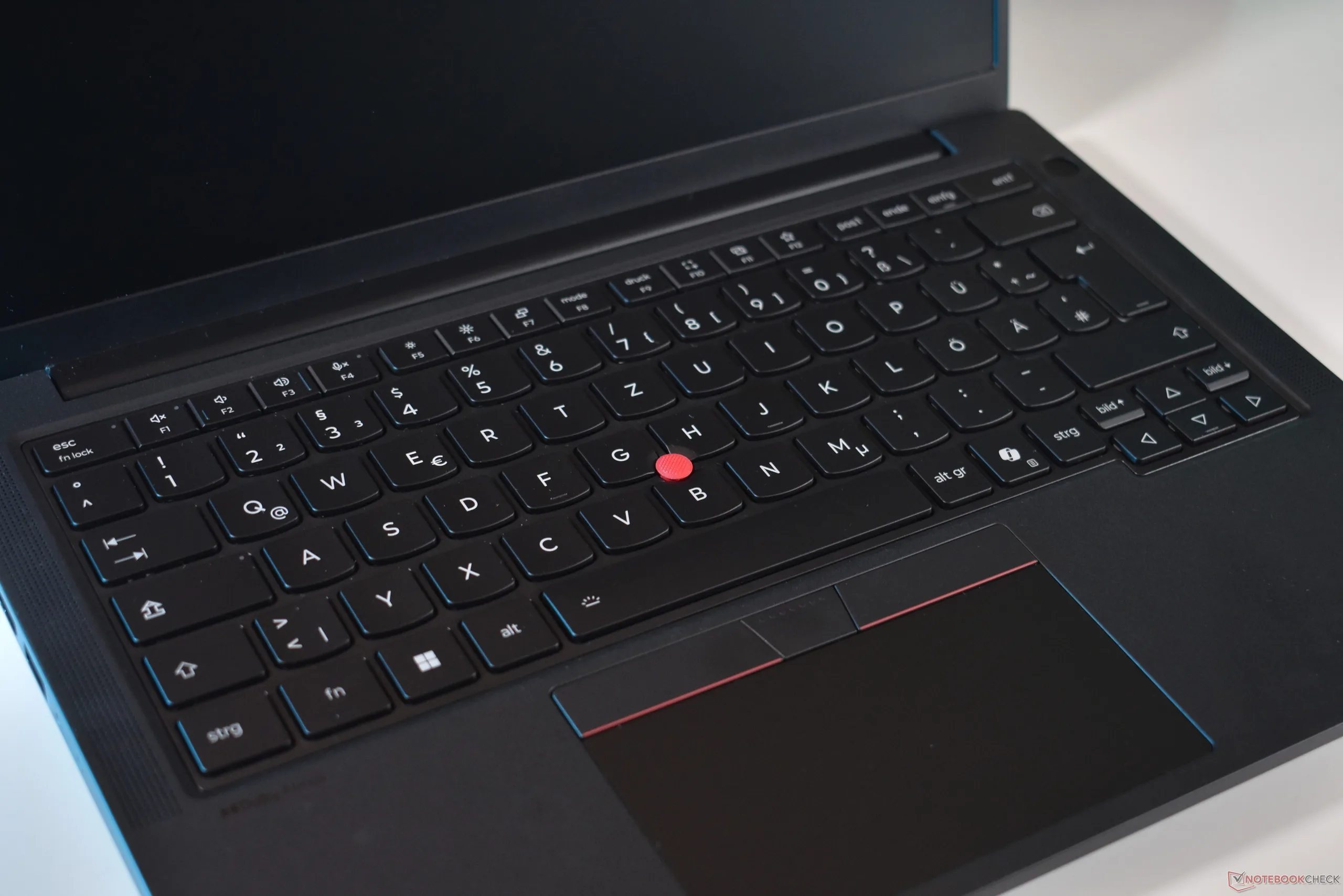
          On European-ISO layouts, though, this meant that the four keys to the left of the big Enter key were shrunken down, being only 13 mm wide instead of the standard key-cap size of 16 mm. This hit especially some countries like Germany hard, where frequently used “Umlaut” keys, like “Ü” and “Ä” were shrunken.

          After four years and much complaining, it seems Lenovo has finally listened. With the new Lenovo ThinkPad T14 Gen 7, which we recently reviewed, Lenovo changed their European ISO layout. The new model has a less wide Enter key, which means that Lenovo was able to increase the width of two of the formerly shrunken keys could be increased to the standard width – in the case of the German layout we used, the frequently used “Ü” and “Ä” keys are bigger.

        • ThinkPad T14 Gen 7 Linux Compatibility: Works and Not Works

          ThinkPad T14 Gen 7 Linux Compatibility: Works and Not Works

          Key Takeaway

          – Linux compatibility is strong on ThinkPad T14 Gen 7, with core input devices (touchpad, TrackPoint, fingerprint, webcam) working out of the box.
          – Initial Linux Mint live boot requires enabling 3rd party CAs; most essential hardware still needs post-boot tweaks.
          – Some components lack out-of-the-box support on Linux, notably Wi‑Fi, Bluetooth, stereo speakers, microphones, and certain function keys (F4–F7, F10–F12).


          ThinkPads may run Windows out of the box in most cases, but the black business laptops from Lenovo are also a popular choice in the Linux community.

          In this piece we explore the practicalities of running Linux on ThinkPads, especially Lenovo devices, and the way their hardware tends to play with Linux ecosystems. The claim that ThinkPads are Linux friendly is a talking point we wanted to test, and the results here reflect a hands-on approach using real hardware and software builds.

          Setup and initial boot

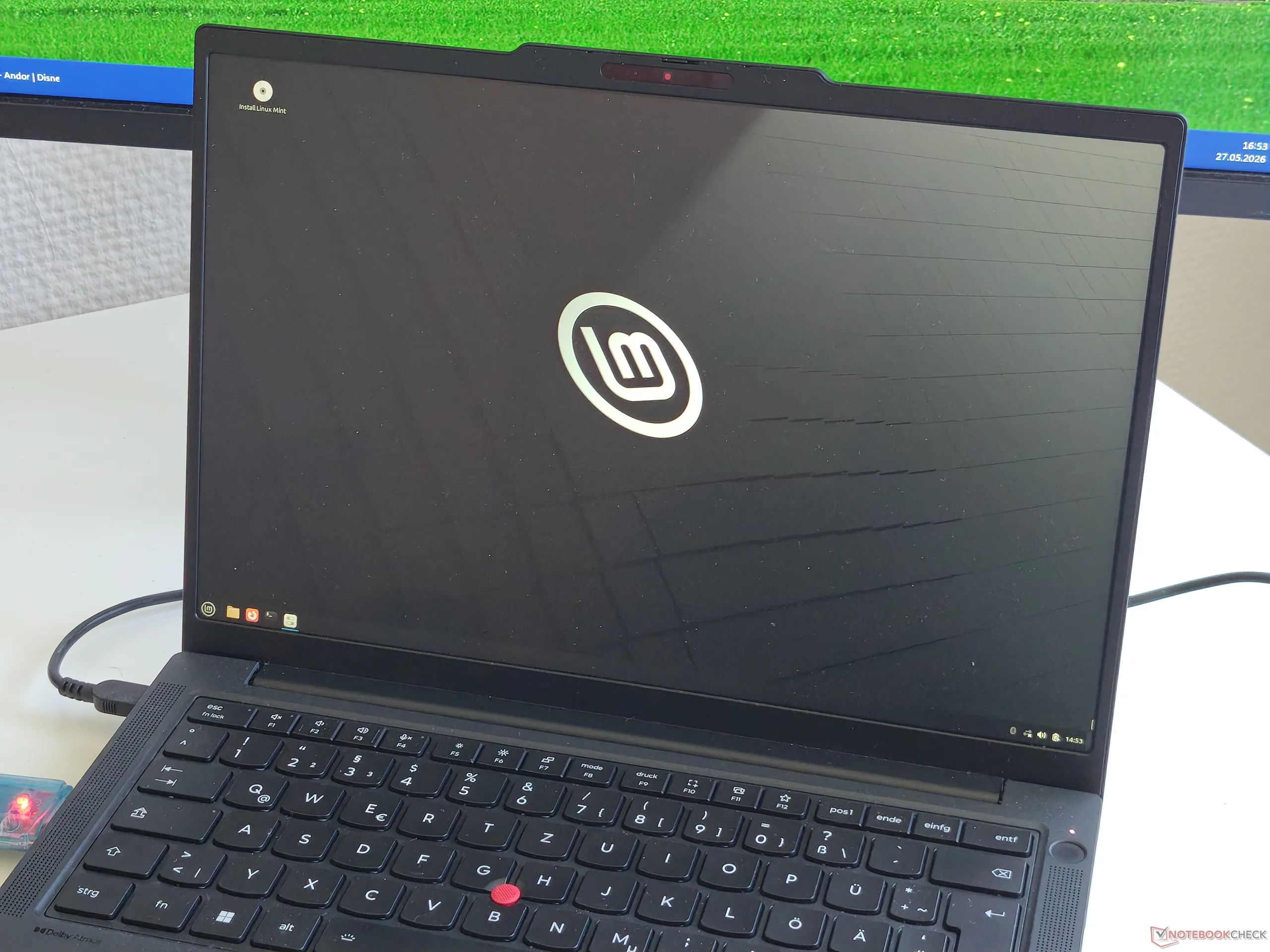
          So, we grabbed the Lenovo ThinkPad T14 Gen 7 we recently reviewed, downloaded a Linux Mint ISO and created a Live USB Stick. After enabling 3rd Party CAs, the system booted up with no issues. The process was described in straightforward terms, with emphasis on the steps required to get the environment running from external media without preinstalled drivers getting in the way.

          Hardware compatibility check

          With Linux Mint booted up, we did a quick check for hardware compatibility issues. First thing we noted was that neither Wi-Fi nor Bluetooth worked out of the box. RJ45-Ethernet, however, does, so it is possible to put get the ThinkPad laptop online. The writeup keeps the tone practical, focusing on what components behave as expected and which ones need a workaround or additional drivers to function.

          Peripherals and input devices

          Another feature that does work out of the box: The touchpad and the TrackPoint pointing stick. The same is also true for the fingerprint reader and the webcam. However, the stereo speakers are not functioning, as the system does not recognize them – and neither do the microphones or the FN functions of the F4 to F7 and F10 to F12 keys. These notes highlight the gaps and potential fixes an user might explore to improve the experience down the line.

          Overall takeaway and and user questions

          Overall, these are issues experienced users can probably easily work out, especially since at least the touchpad and TrackPoint work out of the box. Which system do you prefer on your system: Linux or Windows? And which other Linux tests do you wish us to do? Tell us in the comments!

          Sources
          • Lenovo ThinkPad T14 G7 & T16 G5: Intel Core Ultra X7 Laptops

            Lenovo ThinkPad T14 G7 & T16 G5: Intel Core Ultra X7 Laptops

            Key Takeaways

            1. RAM Innovations: Introduction of LPCAMM2 memory standard allows for faster LPDDR5X RAM and supports upgradeable RAM with Intel Panther Lake X7 CPUs.

            2. Modular RAM Benefits: T14 Gen 7 and T16 Gen 5 are the first mainstream laptops with user-replaceable RAM and fast ARC GPUs, enhancing performance and repairability.

            3. Improved Repairability: Modular USB-C ports and easily removable battery design contribute to high repairability, earning a perfect 10/10 score from iFixit.

            4. Design Changes: New wider bar-hinge design reduces screen bezels, integrates Wi-Fi antennas into the hinge, and allows for one-handed opening.

            5. Color and Material Updates: Introduction of new aluminum display lid for T16 Gen 5 and dark blue option for T14 Gen 7, though the new color may be prone to smudging.


            Work laptops usually seen as reliable but not very thrilling. At the Mobile World Congress 2026, Lenovo presented two innovative business laptops that aim to shift this perception, offering features that could attract a variety of users: the Lenovo ThinkPad T14 Gen 7 and ThinkPad T16 Gen 5. We had the opportunity to test both devices at the event.

            RAM Innovations

            Currently, RAM is a hot subject, and not for good reasons—particularly due to its high costs. Lenovo made a bold move with the new T series by introducing the LPCAMM2 memory standard. This new memory type replaces the conventional SO-DIMM RAM format, allowing for the use of more efficient LPDDR5X RAM that delivers much faster performance.

            Modular RAM Benefits

            Although LPCAMM2 is pricier right now, Lenovo’s choice makes sense: This RAM type is necessary to support the Intel Panther Lake X7 CPUs with upgradeable RAM, as these processors demand quick LP memory. Consequently, the T14 Gen 7 and T16 Gen 5 are unique as the only laptops available that combine fast ARC GPUs with 12 Xe3 units and user-replaceable RAM. The Panther Lake CPUs will operate at a 30 W TDP in the new T series, which is an increase from what older models in the T series could manage.

            Mainstream Adoption

            Previously, the only laptops using LPCAMM2 were part of the ThinkPad P1 / T1g (available on Amazon) series, which is a high-end workstation line. Thus, the T14 G7 and T16 G5 are the first mainstream laptops to feature this technology. For those who prefer the traditional SO-DIMM option, it’s still available: Purchasing Lenovo ThinkPad laptops with the AMD Ryzen AI 400 option provides users with two SO-DIMM slots instead.

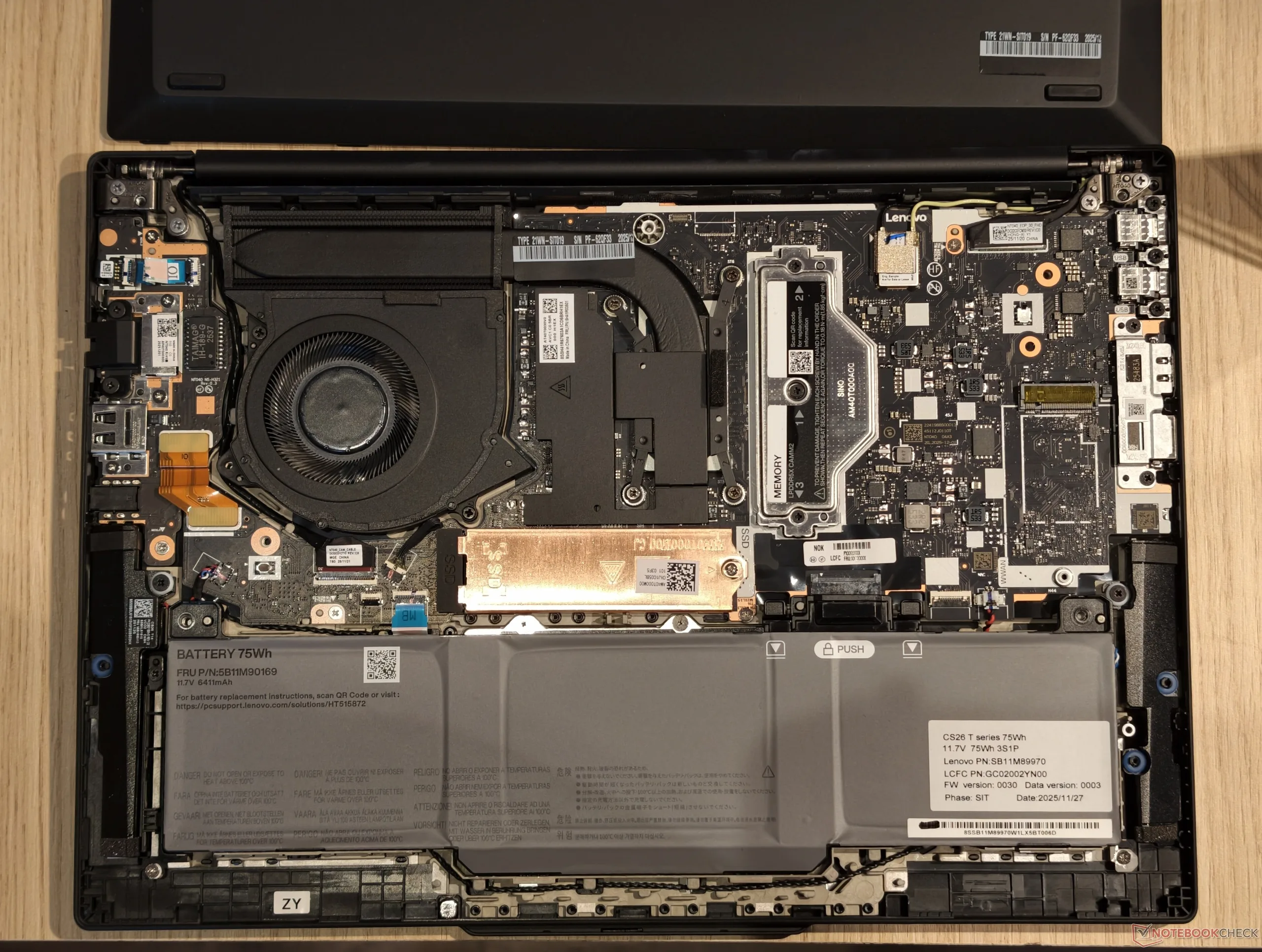
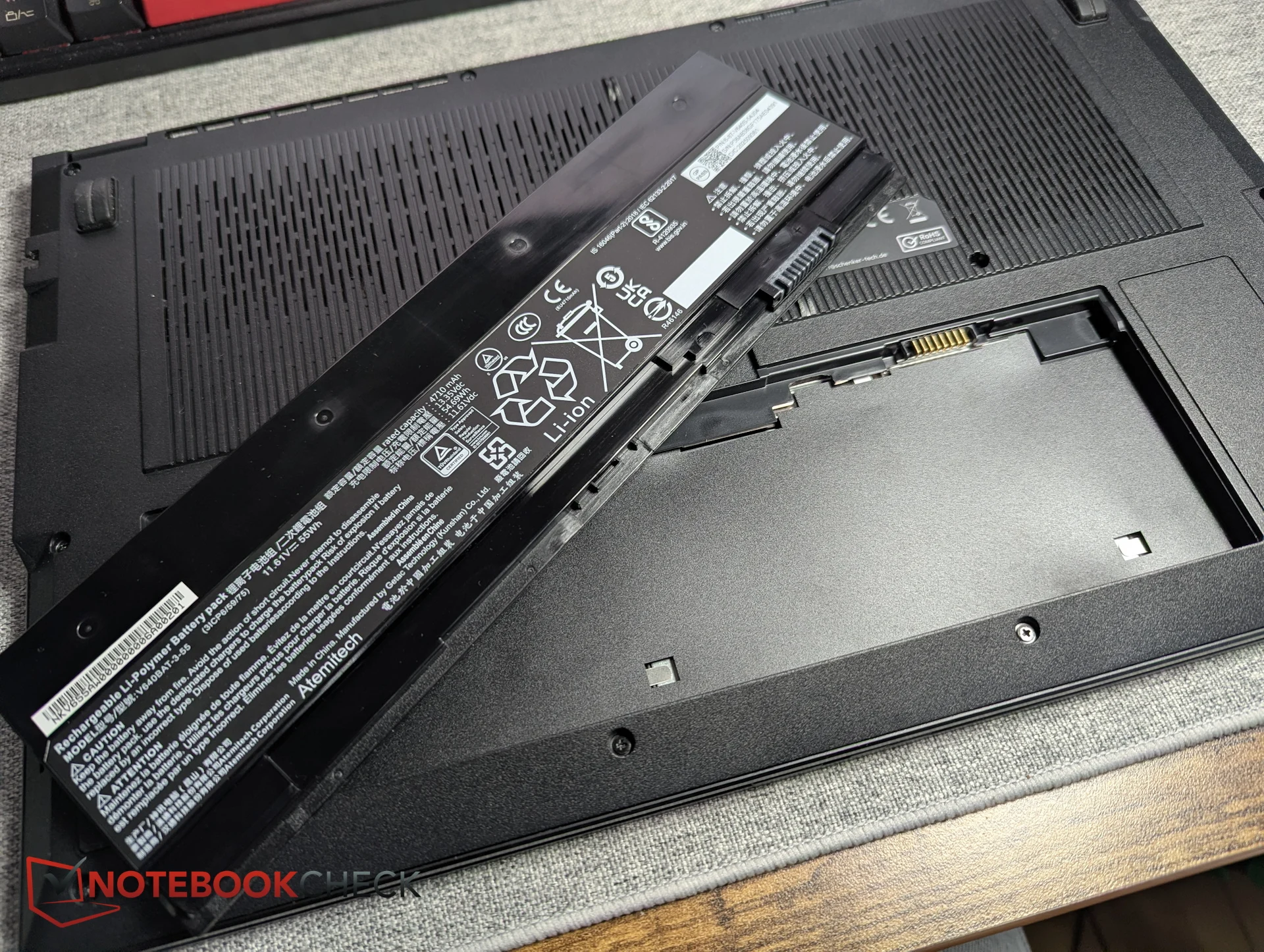
            Lenovo could have opted to solder the LP RAM, but they chose the modular LPCAMM2 solution for better repairability. Overall, the ThinkPad T series is embracing modularity more than ever, as not just the RAM is modular. When the bottom cover is taken off, the battery can be easily removed by pressing two small release tabs, eliminating the need for tools.

            Improved Repairability

            Moreover, the essential USB-C charging ports are now modular and replaceable by users. Lenovo has even separated the fan from the heatsink, so users can clean the fan without needing to reapply thermal paste to the CPU. They’ve included some thoughtful details too: Once the last screw of the bottom cover (the center screw between the hinges) is removed, the cover pops off in the middle section automatically—no spudger required. It’s no wonder the T14 Gen 7 and T16 Gen 5 received a perfect 10/10 on the iFixit repairability score.

            Design Changes

            At first glance, the new T series seems similar to the previous models, but there are many subtle modifications: The screen lid is flat again, and the Lenovo logo has a fresh design. A more significant change is the wider bar-hinge design adopted by the T14 Gen 7 and T16 Gen 5, which allows for smaller screen bezels since the Wi-Fi antennas are now integrated into the hinge rather than being placed at the top of the screen. Additionally, new hinges make it possible to open the laptop with one hand.

            Color and Material Updates

            Lenovo is also taking a new approach with colors and materials. The ThinkPad T16 Gen 5 features a new aluminum metal display lid, which felt solid during our hands-on experience, while the ThinkPad T14 Gen 7 is also available in a dark blue option. This new hue is more understated compared to the previous grey option. Lenovo claims this color was chosen as it was the most favored by users, just edging out a dark red option. While the dark blue looked appealing, the material seemed prone to smudging, an ongoing issue with ThinkPads.

            Keyboard Modifications

            Changes to the ThinkPad keyboard haven’t been well received by long-time users, and Lenovo has made another alteration. The typing feel and key travel remain unchanged, but the keyboard’s design has been updated, featuring centered printing and a new font. This is the only modification we found questionable, as the previous font was perfectly fine. The new font even appears slightly less usable, with smaller lettering and thinner lines that are less readable. Unfortunately, this change seems to be affecting the entire ThinkPad lineup.

            For more details regarding the specifications and release date of the new T series ThinkPads, we covered that in our article about the announcement of the T14 Gen 7 and T16 Gen 5.

            Source:
            Link