Tag: HP

  • High Core Temperatures Slow Down HP ZBook X G1i 16 Performance

    High Core Temperatures Slow Down HP ZBook X G1i 16 Performance

    Key Takeaways

    1. The 2025 ZBook G1i 16 replaces the 2024 ZBook Power 16 G11, featuring new Intel and Nvidia processors while keeping the same chassis design.

    2. The Core Ultra 7 265H processor reaches high temperatures, peaking at 104 C during performance testing, indicating potential cooling issues.

    3. The processor’s clock speed drops from 3.6 GHz to 3 GHz to manage temperature, highlighting limitations in the cooling system.

    4. For users seeking better performance, the thicker ZBook Fury G1i 16 offers superior cooling and faster processors compared to the sleeker G1i 16.

    5. The ZBook G1i 16 is ideal for users who prioritize a slim design, whereas performance-oriented users may prefer the ZBook Fury model.


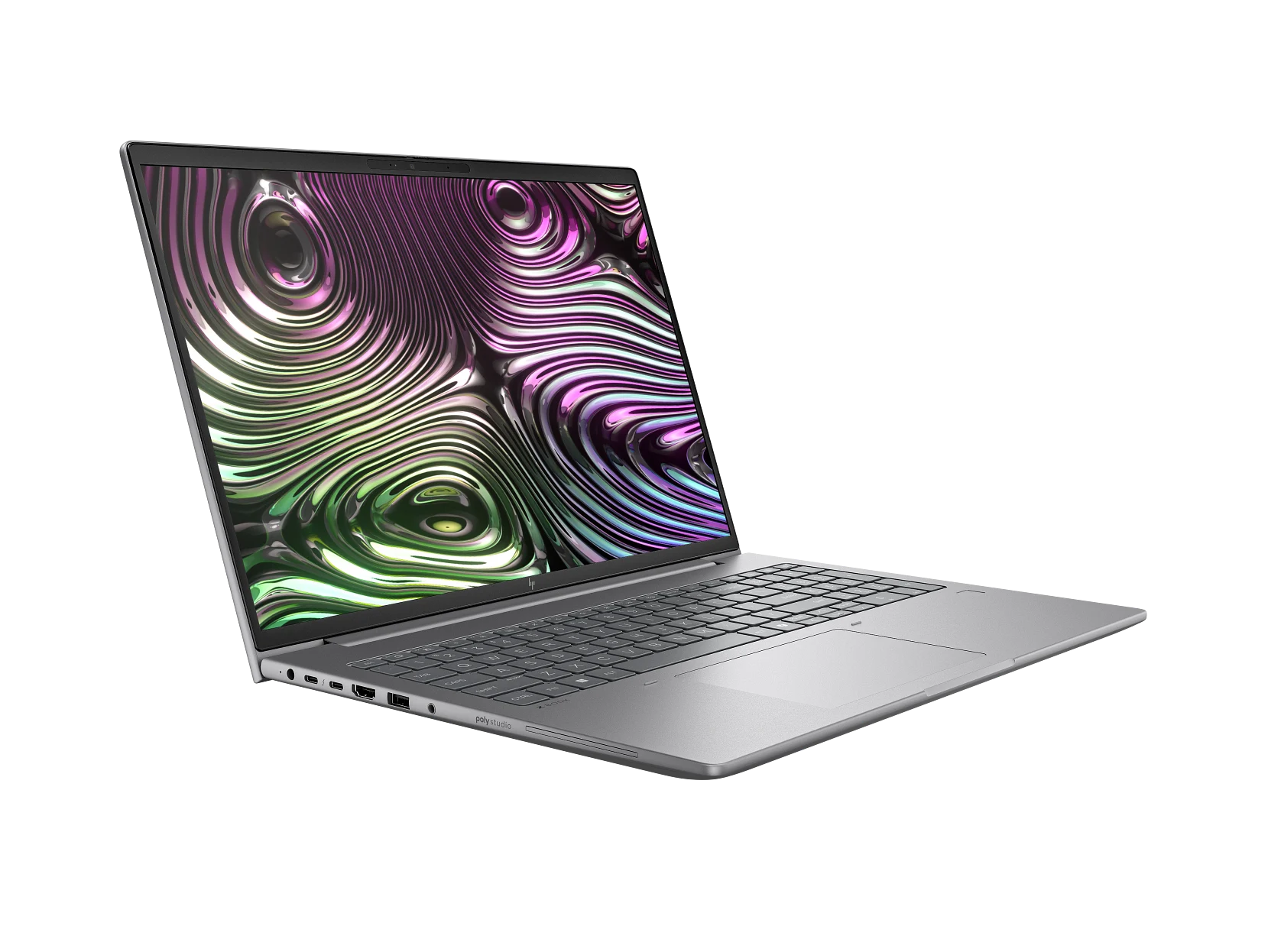
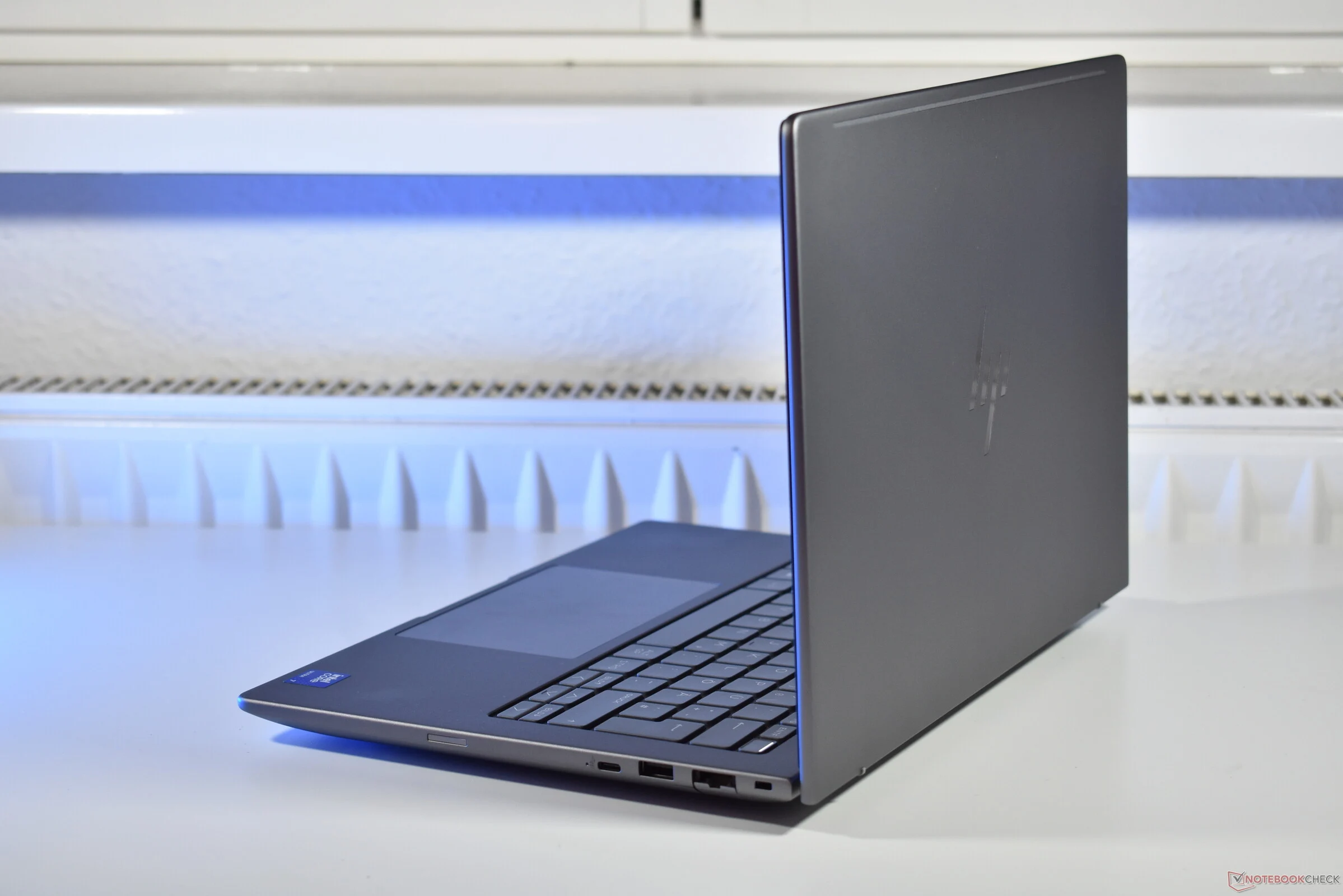
    The 2025 ZBook G1i 16 has taken the place of the 2024 ZBook Power 16 G11, featuring new processor choices from Intel and Nvidia. Although the shift in name might appear significant, both models maintain the same chassis design and physical attributes. The new CPU, in particular, could have performed even better if the system had come with a more powerful cooling system.

    Performance Testing

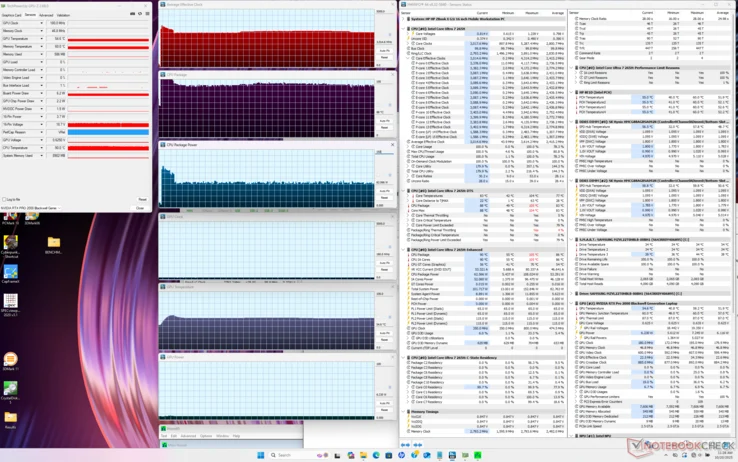
    In our tests with Prime95 on the ZBook G1i 16, the Core Ultra 7 265H processor quickly reached a concerning 104 C, while averaging a clock speed of 3.6 GHz and a power consumption of 108 W. Soon after, it would drop down to 3 GHz and 66 W to keep the core temperature at a more manageable 90 C. Ideally, maintaining the higher 3.6 GHz clock speed for longer periods at a cooler temperature would have been preferable, particularly for an H-series laptop. However, it seems the cooling system is being pushed to its limits with the Arrow Lake-H processor.

    Options for Performance Seekers

    HP does provide the thicker and heavier ZBook Fury G1i 16, which boasts superior cooling and faster Arrow Lake-HX processors, making it a better option compared to the sleeker ZBook G1i 16. Hence, those who are serious about performance might want to consider upgrading to the ZBook Fury, while the ZBook G1i 16 caters to users who prefer a slimmer design over maximum Turbo Boost capabilities.


  • HP Revives RJ45 Ethernet Port in New Business Models

    HP Revives RJ45 Ethernet Port in New Business Models

    Key Takeaways

    1. The shift from wired internet connections to wireless connectivity has become prevalent with advancements like Wi-Fi 7.
    2. Wired connections, such as Ethernet, are still considered more stable, reliable, and secure despite the rise of wireless options.
    3. HP has removed RJ45-Ethernet ports from many of its recent business laptops, including the EliteBook and ZBook series.
    4. HP is reintroducing RJ45-Ethernet ports in some of their 2025 laptop models, indicating a change in strategy.
    5. Buyers should check specifications for Ethernet port availability when purchasing HP laptops, as it varies by model.


    With the rise of Wi-Fi 7 and constant mobile connectivity, usually through smartphones, it’s hard to believe that we once relied on cables for internet access. Back in the early 2000s, having a modem or RJ45-Ethernet port was essential for every PC and laptop to get online.

    The Shift from Wired to Wireless

    Nowadays, the modem port has become a thing of the past. While Wi-Fi has become the standard way to connect to the internet, wired connections are still regarded as the most stable, reliable, and secure option. However, many laptops today no longer include Ethernet ports, and even some business-focused laptops are following suit.

    HP’s Changing Approach

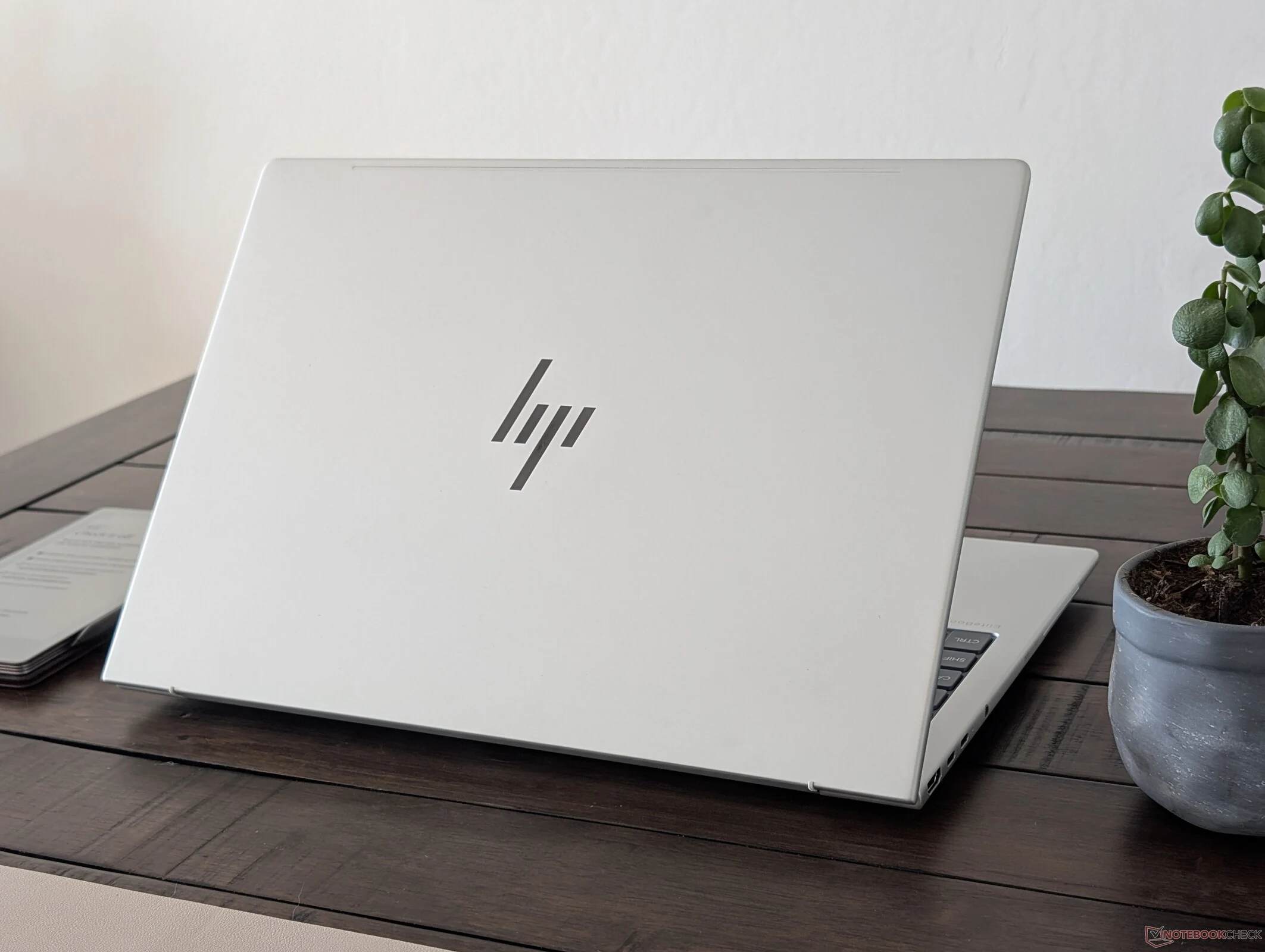
    HP, a major player in the business laptop market, has removed the RJ45-Ethernet port from many of its EliteBooks and some entry-level HP ZBook workstations. For instance, the HP EliteBook 845 G11 and HP ZBook Firefly G11 (which can be found on Amazon) from last year do not feature RJ45 connectivity.

    A Return to RJ45

    It looks like HP is reconsidering this decision, as RJ45 is making a comeback in their 2025 models, at least in some cases. Our recent evaluation of the HP ZBook 8 G1i 14, which succeeds the HP ZBook Firefly G11, shows that it now includes an RJ45-Ethernet port once again. However, when we reviewed the HP EliteBook 8 G1a 14, which shares a similar design, the space for the RJ45 Ethernet on the right side of the chassis was just left vacant.

    In conclusion, RJ45 is reappearing on HP’s business laptops, but only in certain models. If this feature is crucial for you, it’s wise to verify the specifications before making a purchase.

    Source:
    Link


  • HP EliteBook 865 G10 vs EliteBook 8 G1a: Key Upgrades Explained

    HP EliteBook 865 G10 vs EliteBook 8 G1a: Key Upgrades Explained

    Key Takeaways

    1. The 2025 EliteBook 8 G1a 16 features a slimmer design while maintaining the same battery capacity as its predecessor.
    2. Improvements include a larger clickpad and key font for enhanced usability.
    3. The number of USB-C ports has increased, making the laptop more future-proof and easier to charge.
    4. The new Ryzen AI 7 Pro 350 Zen 5 CPU offers performance similar to last year’s Ryzen 9 Pro 7940HS, primarily benefiting tasks that use Co-Pilot+ or the enhanced NPU.
    5. Overall, upgrades focus on design and ergonomics rather than significant performance boosts.


    The 2025 EliteBook 8 G1a 16 is a notable upgrade from the previous EliteBook 865 G10, featuring both new internal components and a revamped external look. Overall, the changes are mostly beneficial, which is not always the case when companies try to implement too many upgrades at once. HP has successfully made this model slimmer while keeping the battery capacity the same. Additionally, the clickpad size and key font have been enlarged for better usability. The number of USB-C ports has increased as well, making it easier to charge and ensuring it is more future-proof. These small improvements contribute to a more pleasant user experience over time.

    Performance Updates

    One update, however, is less impressive than we anticipated. The Ryzen AI 7 Pro 350 Zen 5 CPU takes the place of last year’s Zen 4 Ryzen 9 Pro 7940HS in the EliteBook 865 G10, but benchmark tests indicate that both perform similarly in terms of multi-thread and graphics performance. Unless your tasks depend on Co-Pilot+ or the enhanced NPU, you’ll find the performance levels of these two laptops to be quite comparable. Customers might lean toward the EliteBook 8 G1a 16 mainly for its enhanced design and better ergonomics.

  • HP EliteBook X G1i 14: Exceptional Battery Life Among Elite Models

    HP EliteBook X G1i 14: Exceptional Battery Life Among Elite Models

    Key Takeaways

    1. The HP EliteBook X G1i 14 boasts impressive battery life, lasting over 18 hours of continuous WLAN browsing at 150 nits brightness.
    2. Users can choose between a 56 Wh or 68 Wh battery, allowing for a balance between weight and runtime.
    3. The new Lunar Lake CPU enhances performance-per-watt, contributing to longer battery life compared to older processors.
    4. The device is limited to 1200p60 or 1600p120 IPS displays, which helps regulate power consumption compared to higher resolution OLED displays.
    5. Battery life is affected by the choice of battery size and display resolution, with lower configurations yielding better runtime.


    HP often promotes “AI” as a major feature of its new EliteBook X G1i 14 subnotebook, but the focus might be better placed on the device’s battery life. The runtimes are quite remarkable for such a compact design. Our evaluations show that the device can endure over 18 hours of continuous WLAN browsing at a brightness of 150 nits, outlasting many competitors and even other recent models like the EliteBook Ultra G1i 14 or EliteBook X G1a 14 AI.

    Factors Behind Battery Longevity

    The impressive battery life of the EliteBook X G1i 14 is due to three key reasons. To begin with, users can choose between a smaller 56 Wh or a larger 68 Wh battery, depending on whether they prioritize lighter weight or extended runtimes. The unit we tested is equipped with the larger battery to enhance its endurance.

    The Impact of the Lunar Lake CPU

    Another significant reason is the new Lunar Lake CPU, designed to enhance performance-per-watt far better than earlier processors. In fact, competing laptops featuring Lunar Lake chips, like the Dell Pro 14 Premium, also demonstrate longer battery life compared to most devices running on Meteor Lake or older models.

    Resolution Choices Affecting Power Consumption

    Lastly, a noteworthy aspect is that the EliteBook X G1i 14 is limited to either 1200p60 or 1600p120 IPS displays, while the EliteBook Ultra G1i 14 offers an option for 1800p OLED. By restricting the model to lower resolution IPS screens, power usage can be more effectively regulated since OLED displays are known for their greater energy needs.

    All three reasons mentioned contribute to the EliteBook X G1i 14’s exceptional runtimes. However, it’s important to note that battery life will decrease if the device is configured with the smaller battery and/or the higher resolution 1600p120 display.

    Source:
    Link

  • HP OmniBook 5 & 6 Launched: Snapdragon X Plus and OLED Display

    HP OmniBook 5 & 6 Launched: Snapdragon X Plus and OLED Display

    Key Takeaways

    1. Budget-Friendly Windows-on-Arm Laptops: HP introduced the OmniBook 5 14 and OmniBook 5 16, focusing on affordability and extended battery life using Snapdragon X Plus SoCs.

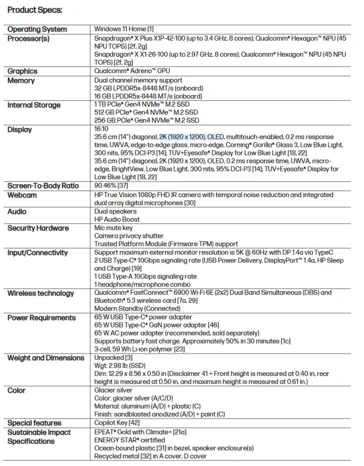
    2. Display Features: The OmniBook 5 16 has a 16-inch 2K OLED display with a 0.2 ms response time and 95% DCI-P3 color gamut, while the 14-inch version shares similar specs.

    3. Performance Customization: Both models offer customizable processors (Snapdragon X Plus X1P-42-100 or X1-26-100) with options for 8 cores, memory (up to 32 GB DDR5), and storage (up to 1 TB SSD).

    4. Connectivity and Security: They feature Wi-Fi 6E, Bluetooth 5.3, multiple USB ports, a 3.5 mm audio jack, and a 1080p IR camera with a privacy shutter.

    5. Pricing and Release Date: The OmniBook 5 14 starts at $799, and the OmniBook 5 16 starts at $849, both available in July in Glacial Silver.


    HP recently revealed two budget-friendly Windows-on-Arm laptops during Computex. The OmniBook 5 14 and OmniBook 5 16 prioritize extended battery life over raw performance, utilizing energy-efficient Snapdragon X Plus SoCs. These devices are certified with Windows Copilot+ and feature a specific key for activating the virtual assistant. Additionally, HP includes a 1080p IR camera along with a privacy shutter for enhanced security.

    Display and Design

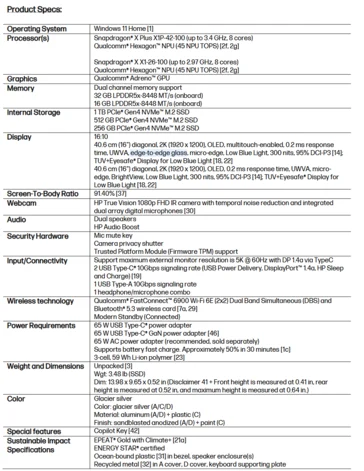
    The HP OmniBook 5 16 sports a 16-inch 2K (1920 x 1200) OLED display with an impressive 0.2 ms response time and 95% DCI-P3 color gamut coverage. It also comes with Corning Gorilla Glass for the touch-enabled variant. The HP OmniBook 5 14 matches these specifications in a sleeker 14-inch design. Other than size, the laptops share the same specifications, including a 59 Wh Li-ion battery that allows for 65 Watts fast charging.

    Performance Options

    Customers can customize the OmniBook 5 16 and OmniBook 5 14 with a Snapdragon X Plus X1P-42-100 or a Snapdragon X1-26-100. Both processors feature 8 cores, but the former can reach speeds of up to 3.4 GHz, while the latter is capped at 2.9 GHz. Options for memory and storage are available in 32/16 GB DDR5-8448 and 1 TB/512 GB/256 GB PCIe Gen4 SSDs. Connectivity includes Wi-Fi 6E, Bluetooth 5.3, two 10 Gbps USB Type-C ports, one USB Type-A port, and a 3.5 mm combo audio jack.

    Pricing and Availability

    The HP OmniBook 5 14 will be available for purchase in July, starting at $799. The HP OmniBook 5 16 will also launch at the same time, with a base price of $849. Both models are offered in a single color option: Glacial Silver.

    Source:
    Link


  • North America Sees Surge in Desktop and Laptop Sales Amid Tariffs

    North America Sees Surge in Desktop and Laptop Sales Amid Tariffs

    Key Takeaways

    1. High tariffs on imports from China, reaching a minimum of 145%, are causing consumers to stock up on electronic devices, potentially leading to higher prices and lower supplies.
    2. Major companies like Dell, HP, and Lenovo are postponing laptop shipments to the US due to tariff impacts, while recent data shows significant increases in sales of desktops and laptops in North America.
    3. The International Data Corporation (IDC) reported a 7.6% revenue increase in the personal computer market, with laptop sales up by 26.9% and desktop sales up by 35.3% in Q1 2025 compared to Q1 2024.
    4. Both businesses and consumers are motivated to upgrade IT systems ahead of the end of Microsoft’s security support for Windows 10 in October 2025, pushing upgrades for devices that cannot run Windows 11.
    5. Despite strong sales in the PC hardware market, consumer confidence is declining, and a contraction in the market is expected in the second half of 2025, with the US gaming sector experiencing revenue drops.


    With a lot of parts made in China, high tariffs are making people stock up on electronic devices. The minimum tariffs of 145% on imports from China could lower supplies and make prices go higher. Some companies, like Dell, HP, and Lenovo, have started to postpone shipping laptops to the US. Recent data from the International Data Corporation (IDC) shows big jumps in sales of desktops and laptops in North America.

    IDC’s Role in Market Monitoring

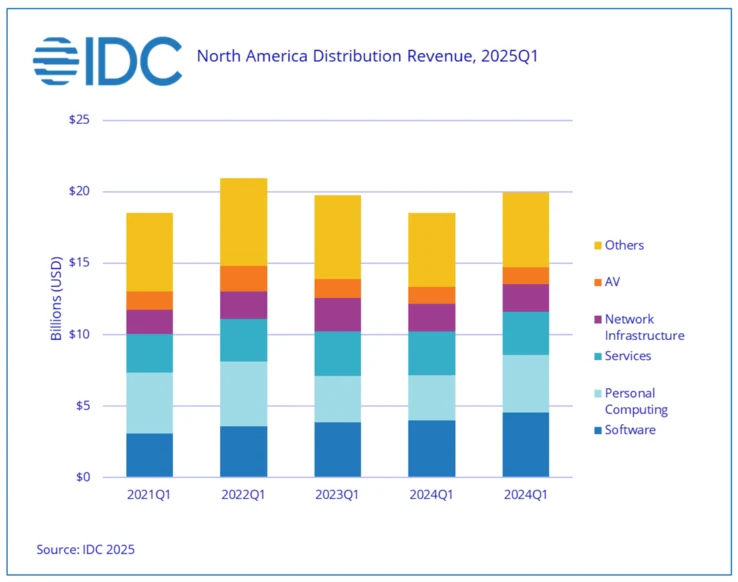
    The IDC keeps track of sales of personal computers, software, services, and network infrastructure items. In the first quarter of 2025, total revenue rose to $19.9 billion, which is a 7.6% increase from the same time in 2024. The biggest growth was seen in personal computers, which include laptops and ready-made desktops. Laptop sales surged by 26.9%, desktop sales went up by 35.3%, and workstation sales climbed by 49.3% compared to Q1 2024. The graph below seems to have a mistake, as the right column should read “2025Q1”.

    Corporate and Consumer Reactions

    Companies felt a strong need to upgrade their IT systems to lessen the impact of tariffs. However, even regular consumers have acted fast. Another reason is that Microsoft will stop providing security updates for Windows 10 PCs in October 2025. Those whose devices can’t run Windows 11 might have hastened their plans to upgrade.

    Consumer Spending Trends

    Recent consumer spending data from March shows significant increases in retail sales. Yet, consumer confidence has taken a hit, with little progress seen in the negotiations about tariffs between China and the US. The IDC’s report mentioned that “market contraction should be expected in the second half of 2025.” It’s hard to believe that shoppers will keep buying expensive laptops and desktops at the same pace.

    On the other hand, while the PC hardware market is thriving, the US gaming sector faced downturns in March. Circana reported a 6% drop in revenue from video game software, hardware, and accessories compared to March 2024. Consoles and gaming accessories took the biggest hits, suggesting that consumers might be focusing more on work than fun. Still, strong pre-order sales for the Nintendo Switch 2 could help boost revenue significantly.

    Source:
    Link


  • GeForce RTX 5090 Laptops vs. Desktop RTX 4070 Ti Performance

    GeForce RTX 5090 Laptops vs. Desktop RTX 4070 Ti Performance

    Key Takeaways

    1. Major companies like Razer and HP are releasing gaming laptops with GeForce RTX 5090 graphics.
    2. The mobile RTX 5090’s performance is closer to the desktop RTX 4070 Ti Super than to the desktop RTX 5090.
    3. The mobile RTX 5090 has more unified shaders and cores than the desktop RTX 4070 Ti Super but performs lower due to a much lower TGP.
    4. In real gaming scenarios, the mobile RTX 5090 can perform similarly to the desktop RTX 4070 Ti Super in high-demand games at 4K settings.
    5. The mobile RTX 5090 offers better performance-per-watt compared to its raw performance, despite being more aligned with older desktop components.


    Major companies such as Razer and HP have started to deliver their newest gaming laptops that come with GeForce RTX 5090 graphics. Although performance has improved compared to the mobile RTX 4090, the difference between it and the desktop RTX 5090 is quite large and arguably more pronounced than the difference between the mobile RTX 4090 and the desktop version. Our benchmark tests indicate that the mobile RTX 5090 is more similar to the desktop RTX 4070 Ti Super, as evidenced by the graphs below. The 3DMark results show only a small percentage difference between these two GPUs.

    Performance Expectations

    It’s a bit disappointing to see that the mobile RTX 5090 has more unified shaders, TMUs, ROPs, RT cores, and tensor cores than the desktop RTX 4070 Ti Super, yet it doesn’t perform as well. The main issue here is the much lower TGP of the mobile chip, which means that the GPU clock rates are roughly half of those found in the desktop versions. Hence, the theoretical performance is only in the low 30 TFLOPS range, compared to around 40 TFLOPS for the desktop RTX 4070 Ti.

    Gaming Performance

    However, there is a silver lining for the mobile RTX 5090 when it comes to playing real games, rather than just relying on synthetic benchmarks like 3DMark. Titles like Final Fantasy 15, Cyberpunk 2077, Black Myth: Wukong, and Alan Wake 2 at 4K with maximum settings show performance levels that are comparable to a desktop RTX 4070 Ti Super, despite the significant differences in TGP, according to our findings. This doesn’t even factor in any benefits from DLSS4 or MFG features, which would further widen the performance gap favoring the mobile RTX 5090. Therefore, laptop users can at least rely on the better performance-per-watt of the mobile RTX 5090, even if its raw performance is more in line with a last generation desktop component.

    Source:
    Link

  • HP Open to Developing SteamOS Handheld Gaming Device

    HP Open to Developing SteamOS Handheld Gaming Device

    Key Takeaways

    1. HP is not entering the handheld gaming PC market due to limitations with the Windows operating system.
    2. Josephine Tan, HP’s Senior Vice President, expressed frustration with the current Windows experience in handheld devices.
    3. HP is open to the idea of creating a handheld device that runs on Valve’s SteamOS, which has gained popularity.
    4. The likelihood of HP launching a SteamOS handheld is low, as Lenovo is currently the only partner for SteamOS devices.
    5. Microsoft is working on improving the Windows experience for handheld PCs, leading companies to wait for better software before considering new partnerships.


    While several major PC brands like Lenovo, Asus, and MSI have jumped into the world of handheld gaming PCs, HP is still on the sidelines. In a recent chat, they shared their reasons for not unveiling their own device, and what it might take to change that.

    Windows Limitations

    In an interview with XDA, Josephine Tan, the Senior Vice President and Division President of Gaming Solutions at HP, explained that the main reason for HP’s absence in the handheld gaming PC market is due to the current limitations of Windows. During the recent HP Amplify event, she mentioned, “If you look at Windows, I struggle with the experience myself.” She noted that Windows lacks the smooth experience of just turning on a handheld and picking up where you left off, unlike the Nintendo Switch.

    Exploring SteamOS

    When asked if HP would consider creating a gaming handheld that runs on Valve’s SteamOS, Tan seemed receptive to the idea. This isn’t too surprising, given how well the Steam Deck has performed in the handheld gaming sector, largely due to its user-friendly software. Currently, the Steam Deck is the only handheld available with SteamOS, but this is set to change soon with Lenovo’s Legion Go S (SteamOS version) already up for pre-order.

    Future Possibilities

    However, the likelihood of HP launching a handheld that uses SteamOS appears low. Valve disclosed earlier this year that Lenovo was the sole partner to produce a SteamOS device. This suggests that, even with the benefits of SteamOS, not all manufacturers are keen to adopt it. Even Lenovo has indicated that its upcoming Legion Go 2 will operate on Windows instead of SteamOS.

    Additionally, Microsoft is actively working to enhance the Windows experience on handheld PCs. This means that companies might be biding their time, hoping for an improved software experience rather than pursuing a new partnership with Valve.

    Source:
    Link

  • Monitor Prices May Rise 5% as Manufacturers Stockpile Panels

    Monitor Prices May Rise 5% as Manufacturers Stockpile Panels

    Key Takeaways

    1. Leading monitor manufacturers are increasing their inventory of display panels to prepare for potential tariffs from China, possibly reaching three million units.
    2. Monitor prices may rise by around five percent due to increased system costs resulting from tariffs.
    3. Second-tier brands face significant pressure, with limited bargaining power and rapidly decreasing prices, while top brands manage tariff effects better.
    4. Demand for monitor panels is rising, with first-quarter 2025 shipments expected to exceed those of the previous quarter, despite challenges in securing enough monitor panels.
    5. Broader industry trends show companies considering relocating production to Vietnam and Taiwan, though these areas may face their own tariff challenges.


    Leading monitor manufacturers are preparing for possible retaliatory tariffs from China on U.S. products by increasing their inventory of display panels, with estimates suggesting they may reach three million units. Experts predict that monitor prices could rise by approximately five percent due to the overall rise in system costs.

    Impact on Second-Tier Brands

    The brands that are not as well-known are under the most pressure, as they have limited bargaining power in a highly competitive market and are facing rapidly decreasing prices. These companies may find themselves paying more to secure their production capacity, while top brands like Dell, HP, and Samsung Electronics can utilize their greater production capabilities to better manage the effects of the tariffs.

    Trends in Panel Demand

    Demand for monitor panels has been increasing steadily since late 2024, and shipments for the first quarter of 2025 are expected to surpass those of the previous quarter. This upward trend seems to be holding even during typically slow months, partly due to a spike in LCD TV panel prices earlier. Given that panel manufacturers often focus on producing TV panels (which yield higher profits), securing enough monitor panels is becoming increasingly difficult.

    Overall, the market demand may rise by two to three million units, but the direction this takes will depend on how each brand approaches sourcing amid the changing geopolitical landscape. Larger companies are already ramping up both their panel and system inventories to mitigate the impact of higher tariffs from the U.S.

    Broader Industry Changes

    It’s not only monitor manufacturers that are feeling the effects of these developments. Wider industry trends indicate that companies such as ASRock are considering moving their production to Vietnam and Taiwan. However, these regions come with their own set of challenges, such as potential semiconductor tariffs that could reach up to 100 percent—part of a larger effort to alter global manufacturing dynamics.

    Source:
    Link

  • HP Unveils Snapdragon X Elite-Powered EliteBook Ultra G1 AI PC

    HP Unveils Snapdragon X Elite-Powered EliteBook Ultra G1 AI PC

    HP has rolled out another AI-powered PC, the EliteBook Ultra, featuring the Snapdragon X Elite chipset. This article delves into the specs and features of the HP EliteBook Ultra G1q. For details on the OmniBook X, click here.

    HP EliteBook Ultra G1q Specifications and Features:
    The laptop sports an "atmospheric blue" hue, measuring 14.22mm in thickness and weighing 1.349kg. It includes a 14" 2.2K (2240 x 1400) IPS touchscreen with an anti-glare finish. The display reaches a brightness of 300 nits, offers 100% sRGB coverage, and has Low Blue Light certification. It also features a backlit full-size keyboard with HP Imagepad, color-coordinated with the laptop.

    Performance-wise, this model is driven by the Snapdragon X Elite X1E-78-100 chipset. It integrates 12-Qualcomm Oryon CPU cores that can achieve speeds up to 3.4GHz, an Adreno GPU (3.8 TFLOPS), and Qualcomm’s Hexagon NPU for AI functionalities. The energy-efficient chipset allows for lightweight designs with minimal heat dissipation requirements.

    AI Capabilities and Memory

    Thanks to its AI abilities, the laptop offers features like background blur and virtual backgrounds for video calls, along with temporal noise reduction. It comes with 16GB of LPDDR5X-8400MHz soldered memory and options for either 512GB or 1TB PCIe Gen 4 NVMe TLC M.2 SSD storage.

    Audio and Battery

    The EliteBook Ultra G1q is equipped with four stereo speakers and dual microphones supported by Poly Studio. It also includes a 5MP webcam for video conferencing. The laptop is powered by a 59 Whr battery and includes a 65W Type-C fast charger.

    Connectivity Ports

    For wired connectivity, the laptop includes:

    • 1 x USB Type-C (40Gbps)
    • 1 x USB Type-C (10Gbps)
    • 1 x USB Type-A 3.2 Gen1
    • 3.5mm audio port (headphone/mic combo)

    Pricing and Availability

    The 512GB storage variant of the EliteBook Ultra G1q is now available for pre-order on HP’s website, priced at $1699 (roughly 12,300 Yuan).