Tag: Android 15

  • Galaxy A26 5G Leaks with Faster Exynos Processor

    Galaxy A26 5G Leaks with Faster Exynos Processor

    Samsung is preparing to release its next set of budget and mid-range smartphones. After the Galaxy A16 was introduced, we have recently seen designs for the Galaxy A36 5G. Now, the Galaxy A26 has surfaced unofficially on Geekbench.

    Geekbench Appearance

    The smartphone appeared on the benchmark site with the model number SM-A266B. According to Samsung’s naming conventions, this indicates that it’s the Galaxy A26, and the listing verifies that it will support 5G connectivity. However, the most intriguing aspects are what’s happening internally.

    Processor Insights

    The Galaxy A26 appears to come equipped with an Exynos 1280 processor, referred to by the codename S5E8825. While this isn’t unexpected, what is surprising is the clock speed. The Exynos 1280 usually operates at a maximum of 2.4GHz for its performance cores, but the Geekbench entry hints that the A26 might see a slight boost to 2.6GHz. This could indicate that Samsung is trying to push the chip to its limits, or it may reflect a more effective manufacturing process that enables higher speeds without causing overheating.

    Specifications and Features

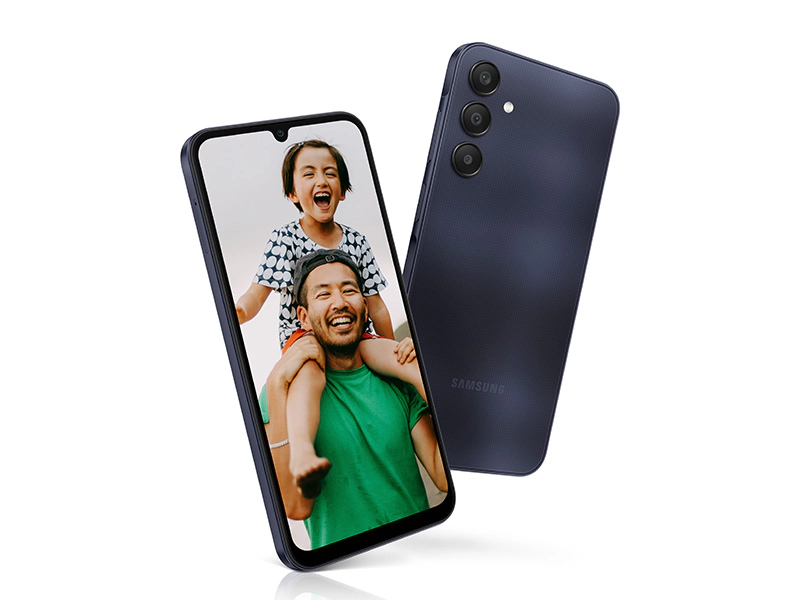
    In addition to the processor, the listing shows that the device will have 6GB of RAM, which seems like a fair baseline for a mid-range phone in 2024. Other details remain unclear, but it would be great if Samsung could take inspiration from the Galaxy A36 and provide the A26 with an Infinity-O display. The outdated U-shaped notch seen in the Galaxy A25 is no longer appealing.

    Camera specifications are currently uncertain. Given that the Galaxy A25 features a 50MP primary sensor and an 8MP ultra-wide camera, it wouldn’t be shocking to see these specs carried over. The same applies to the 5,000mAh battery and 25W fast charging – if it’s working well, why change it?

    Software Expectations

    The software aspect might be the most significant improvement. The A26 is listed with Android 15 on Geekbench, hinting that it could come with this version pre-installed. It’d be even better if Samsung could provide six major Android updates, similar to what the Galaxy A16 offers.

    With the Galaxy A26 still not officially announced, it remains difficult to predict the exact launch date or location.

    Image 1
  • OPPO Unveils ColorOS 15: Enhancing Simplicity and Performance

    OPPO Unveils ColorOS 15: Enhancing Simplicity and Performance

    At the OPPO Developer Conference 2024, OPPO showcased ColorOS 15, which is based on Android 15 and tailored for the Chinese audience. This new version emphasizes user-friendliness, system efficiency, and customization possibilities, aiming to create a harmonious blend of aesthetics and practicality.

    New Look and Feel

    ColorOS 15 comes with a fresh design that is labeled as “super light and more comfortable.” The revamped interface uses natural light and shadow effects to enhance the user experience. This design is crafted to be both attractive and user-friendly, concentrating on subtle improvements rather than drastic changes.

    The visual aspects, like motion effects and app transitions, have been polished to ensure a smoother experience when navigating. Whether you’re using gestures or switching apps, the system aims to deliver a more fluid and responsive interaction.

    Boosted Performance and Gaming

    With the introduction of the new Lightning Engine, OPPO has notably enhanced system performance, increasing responsiveness by 18% and stability by 40%. This should lead to quicker load times and enhanced multitasking capabilities.

    For gamers, ColorOS 15 includes a special mode that can achieve frame rates of up to 116.7 FPS. This feature ensures smoother gameplay as well as improved video calls, especially during demanding tasks.

    Intelligent Features for Daily Life

    One eye-catching feature in ColorOS 15 is Snap-and-Ask, which enables users to capture images of objects or scenes and receive real-time information through the camera. This makes it simpler to gather information quickly without the hassle of a manual search.

    The update also brings in various AI-driven features. Virtual avatars can help with tasks like language learning and storytelling, while AI Image Enhancement tools can significantly improve photo quality by removing blurriness or unwanted reflections with a mere tap.

    Enhancements for Productivity and Privacy

    For users aiming for better productivity, the AI Office Suite introduces useful tools for managing documents, including format conversion and quick summaries. The AI Voice Summary function can capture and condense essential points from meetings or audio files, making it easier to remember crucial details.

    ColorOS 15 further prioritizes privacy with enhanced encryption via its Trusted Execution Environment (TEE), securing data transfers between the cloud and the device. Features like Smart Clipboard Protection and Calendar Write Permissions give users better control over their data, minimizing unnecessary access to personal information.

    Personalization Options for Users

    With ColorOS 15, users can customize their devices using dynamic themes applicable throughout the system, from the lock screen to the wallpaper. The redesigned Control Center provides easier access to vital functions like Wi-Fi and media controls with just a single tap.

    The system also features Dual App Split-Screen Mode, allowing users to run two applications simultaneously. This capability makes multitasking more efficient, providing greater flexibility when transitioning between apps.

    File Management and Sharing Improvements

    The update enhances file sharing through OPPO Share, which is now compatible with iPhones. This allows for quick transfers of files, photos, and videos among devices, even across different platforms.

    ColorOS 15 also adds Automatic SMS Cleanup, which identifies and deletes expired verification codes from messages, helping users maintain an organized inbox.

    Launch Information

    ColorOS 15 is set to be released in China this coming November. Details regarding its global rollout will be shared soon.


    Image 1
    Image 1
    Image 1
    Image 1
    Image 1
    Image 1
  • Android 15 Update Issues Affecting Instagram Performance

    Android 15 Update Issues Affecting Instagram Performance

    Google has started to roll out the Android 15 update for its Pixel smartphones. However, this newest version seems to be causing issues with certain apps, particularly Instagram. Users who have already tried the Android 15 update are reporting problems, so here’s a summary of what you should know.

    Problems with Instagram After the Update

    A user on Reddit pointed out that the Android 15 update may be causing difficulties for the Instagram app (Via PhoneArena). The user mentioned that the update is making it hard to use the app effectively. On the Redditor’s Pixel 9, “Iamnotindanger” reported that they couldn’t swipe through Stories. This isn’t just a one-off problem; another user, “TheNewtBeGaming,” experienced similar issues with key features of Instagram not responding properly.

    Issues with the Android 15 OS

    It appears that Instagram Stories are freezing, which is making swipe gestures unresponsive for many users. Several other Redditors have come forward sharing the same frustrations while using Instagram. For now, the best advice is to report these issues to Instagram directly. Also, check if your Instagram app is up to date, as older versions may not work well with the new Android release.

    Keeping Apps Updated

    Remember, it’s important to keep all your apps up to date on your smartphone. This helps avoid conflicts with newer software updates and sometimes includes vital security improvements. In other news, Motorola recently unveiled its official plan for the Android 15 rollout, but surprisingly, the list doesn’t include devices launched in 2024. Meanwhile, Vivo has announced its Android 15-based OriginOS 5 custom skin, along with a list of compatible devices. Additionally, a mockup of Samsung’s Galaxy S25 Ultra was revealed last week, showcasing the future flagship running on the One UI 7 custom interface.

  • Motorola’s First Device Gets Android 15 Beta Update

    Motorola’s First Device Gets Android 15 Beta Update

    Stable Android 15 has begun its rollout for Pixel devices, and now Motorola has joined in by releasing the Android 15 beta for the Motorola Edge 50 Fusion in India.

    What’s New in Android 15?

    News came from an X user named “Beta,” who shared the changelog for the update. This update is said to enhance the device’s speed, intelligence, and security. The changelog mentions smoother animations, improved app performance, alerts for screen recording, and easier language switching among its features.

    Even though the changelog doesn’t detail many new features in Android 15, it is expected to include App Archiving and the Private Space feature that Google has integrated into the core Android system. For those who are not aware, the app archiving feature allows users to save storage space without removing apps or losing their data. Instead, it replaces the app with an archived APK. Conversely, the Private Space feature is somewhat like Samsung’s Secure Folder found in OneUI, allowing users to create a separate area for sensitive apps and files.

    How to Join the Beta Program

    For users eager to experience Android 15 ahead of others, they can check if their devices are eligible for the beta program. To do this, visit www.google.com/android/beta and look for the “Your eligible devices” section, where it should list devices linked to the email account that qualify for the Android 15 beta.

    There is no current information about the rollout for the other models in the Edge 50 series, but we anticipate that it will start soon.

    Motorola Edge 50 Fusion Specifications

    Motorola introduced the Edge 50 Fusion in India this past May, featuring the Snapdragon 7s Gen 2 processor, a 5,000mAh battery, and support for 68W fast charging. The device sports a 6.7" P-OLED screen that can reach up to 1600 nits of peak brightness. Currently, the 12GB/256GB variant is available on Flipkart for Rs 23,999 (approximately US$280).


    Image 1
  • Samsung Mid-Range Phone 2025 First Geekbench Results Revealed

    Samsung Mid-Range Phone 2025 First Geekbench Results Revealed

    Samsung introduced its mid-range Galaxy A35 5G smartphone in March this year, and now it seems the company is gearing up for its next iteration. The Galaxy A36 has surfaced on the performance benchmarking platform, Geekbench, revealing some intriguing details about its specifications and software.

    Galaxy A36 5G on Geekbench

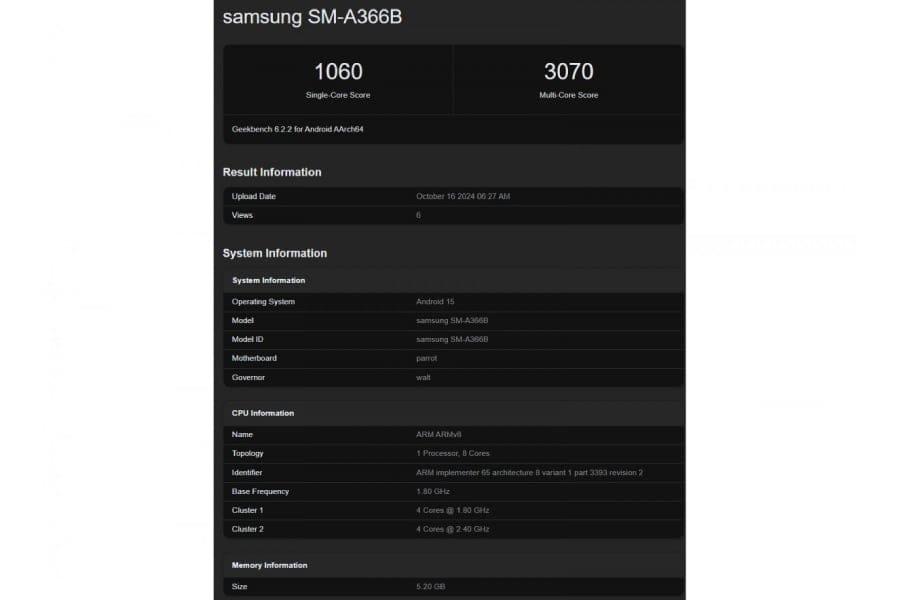
    The device is listed under the model number SM-A336B. Following Samsung’s usual naming conventions, it’s safe to say this is indeed the Galaxy A36 5G. The device has completed several tests on the benchmark, and while one of its performance scores is available below, the most exciting news is that Samsung appears to be testing the smartphone with Android 15 already installed.

    Android 15 and Release Timing

    Recently, Google launched Android 15 for its Pixel devices, and Samsung is anticipated to release its version alongside the Galaxy S25 series in January. If the Galaxy A36 launches with Android 15 out of the box, it’s likely to debut soon after the S25 series, potentially around the same time as the Galaxy A35. Moreover, it is expected that the Galaxy A36 will receive up to six years of Android and security updates, mirroring what even the entry-level Galaxy A16 5G provides.

    The benchmark indicates the device has 6GB of RAM, although there may also be an 8GB variant available at launch.

    Chipset Details and Performance

    As for the processor, the details are still a bit murky. The benchmarks show an octa-core CPU configuration, consisting of four high-performance cores clocked at 2.4GHz and four efficiency-focused cores at 1.8GHz. Graphics duties are managed by an Adreno 710 GPU. This suggests that the chip might be either the Snapdragon 6 Gen 3 or the Snapdragon 7s Gen 2, both manufactured using Samsung Foundry’s 4nm technology.

    Earlier this month, we were the first to disclose that Samsung had begun development on the Galaxy A36. We found two models in the IMEI database: SM-A366B/DS and SM-A366U. The first model is the global variant with dual SIM capabilities, as indicated by the “/DS” suffix, while the latter is intended for the US market.

  • Stable Android 15 Now Available on Pixel Devices: What’s New

    Stable Android 15 Now Available on Pixel Devices: What’s New

    Following the release of AOSP, Android 15’s stable version is now being made available for the Pixel 6 series and newer devices, which includes both Pixel foldables and the Pixel tablet. This update brings along several new features like Theft Detection Lock, Private Space, and App Archiving. Users who have compatible devices can check for the update by navigating to Settings > About phone > System updates.

    Exciting New Features

    Have you heard about Samsung’s Secure Folder? Well, Google has introduced a similar function in Android 15. This feature allows users to create a distinct area on their device to store sensitive applications, protected by an additional layer of authentication.

    Moreover, Android 15 offers App Archiving, a feature that takes inspiration from iOS. This allows users to remove and restore an app’s installation along with its cached files, directly from the Settings app. It’s a handy way to free up storage space when necessary.

    Enhanced Security Measures

    One of the key new additions is the Theft Detection Lock feature, which automatically locks your phone if it gets stolen. But what’s the method for detecting theft?

    Image: Google
    “Through on-device machine learning, Theft Detection Lock can analyze various signals from the device to identify possible theft attempts. If the system detects a theft attempt when your device is not locked, it will secure your screen to prevent unauthorized access,” Google stated.

    Improved User Experience

    With Android 15, users can also easily share their screens without the fear of unintentionally showing sensitive information like notifications, OTPs, and login screens that have passwords. When you perform the back swipe gesture, a preview of the next page will appear. This allows you to quickly decide whether to navigate to that screen or not.

    Additionally, there’s a new feature designed for larger screen devices, enabling users to pair two commonly used apps in split-screen mode. This functionality is notably inspired by Samsung’s OneUI.

    However, it’s worth mentioning that Pixel devices aren’t the first to receive these features. Vivo has already launched its Android 15-based Funtouch OS 15 skin for the iQOO 12.


    Image 1
  • Oppo Find X8 Pro Camera Control Button: Key Features Explained

    Oppo Find X8 Pro Camera Control Button: Key Features Explained

    The Oppo Find X8 series will be revealed on October 24, and the Find X8 Pro is bringing an interesting new camera control button. This feature is similar to the Capture button found on the iPhone 16 series but comes with its own unique benefits. Early photos hinted at the button’s existence, but detailed information about its features was scarce until recently.

    Camera Control Button Insights

    A company representative has shared details about how this pressure-sensitive button functions and what it can do to enhance the user experience.

    Key Features of Find X8 Pro’s Camera Control Button

    Quick access to the camera:
    By simply double-tapping the button, users can quickly open the camera app. While Android phones usually have a camera shortcut on the lock screen, getting to it often requires pressing the power button or double-tapping the screen first. This new button simplifies the process, making it faster and more user-friendly.

    Zoom adjustments:
    Users can easily change the zoom level by swiping on the button. This feature is especially handy for individuals who often take photos with one hand, making it easier to zoom in or out, particularly when the phone is in landscape mode.

    Improved underwater photography:
    The camera control button also enhances underwater photo-taking capabilities. As a flagship device in 2024, the Find X8 Pro boasts an IP69 rating for dust and water resistance, allowing users to shoot photos or videos underwater to a certain depth. Typically, touch controls can struggle in wet conditions, but this physical button ensures smooth camera operation even when the device is submerged.

    In addition, the button’s smart placement on the bottom left of the phone makes it easy to reach, whether the user holds the phone horizontally or vertically.

    Models in the Oppo Find X8 Series

    The Oppo Find X8 series includes three models: Find X8, Find X8 Pro, and Find X8 Ultra. The first two models are set to launch this month, both featuring the new Dimensity 9400 chipset and operating on Android 15 with ColorOS 15. The Find X8 Ultra, however, is anticipated to be released in Q1 2025, equipped with the powerful Snapdragon 8 Elite chip.

  • Motorola Android 15 Update Roadmap: Moderate Support Ahead

    Motorola Android 15 Update Roadmap: Moderate Support Ahead

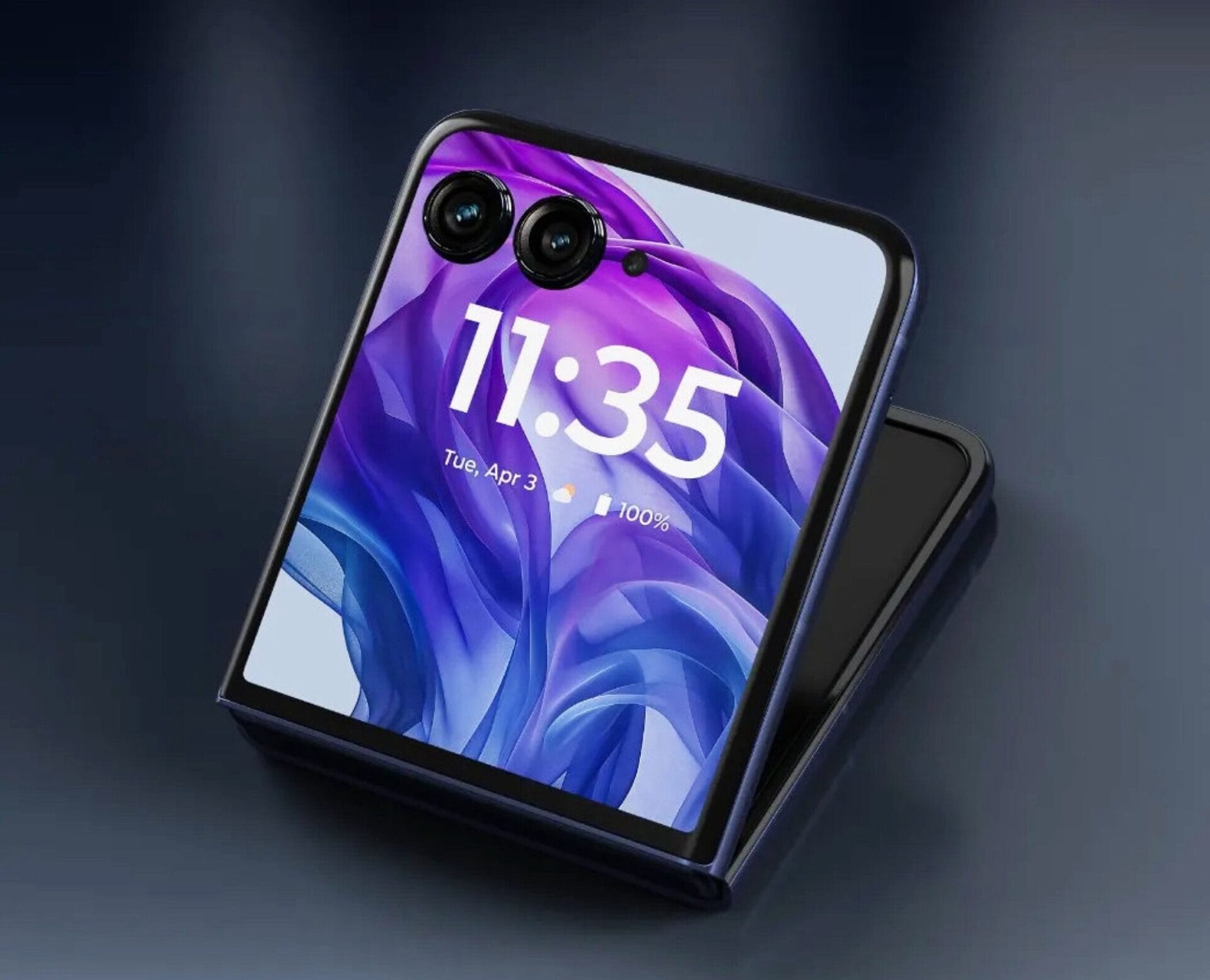
    While both Samsung and Google vow to provide Android updates for a minimum of seven years for their top-tier devices, Motorola’s approach to updates is not as favorable for customers. Even high-end devices like the Motorola Razr 50 Ultra are limited to just three major Android updates. In contrast, many smartphones in the Moto G lineup typically receive one significant Android update along with three years of security patches.

    Signs of Improvement

    Nonetheless, there are indications that Motorola might be looking into extending their support periods in the future. For instance, the ThinkPhone 25, similar to the Motorola Edge 50 Neo, is set to get Android updates for five years. Additionally, Motorola has confirmed the list of smartphones that will upgrade to Android 15, though this list may grow to include more devices. Users should look forward to receiving updates for the following smartphones:

    New Features in Android 15

    Android 15 brings several new features, such as the option to record only a specific section of the screen, enhanced volume controls, and fresh ways to navigate PDF files. A new feature called "Private Space" enables users to keep apps and data in a password-protected area. The widget preview option can now utilize user data to display how a widget will appear when added to the home screen. Moreover, the innovative "Theft Detection Lock" can automatically secure a smartphone if it is forcibly taken from the user’s grasp.

    Motorola via Ytechb’

  • Nothing OS 3.0 Preview: New UI, AI App Management, and Features

    Nothing OS 3.0 Preview: New UI, AI App Management, and Features

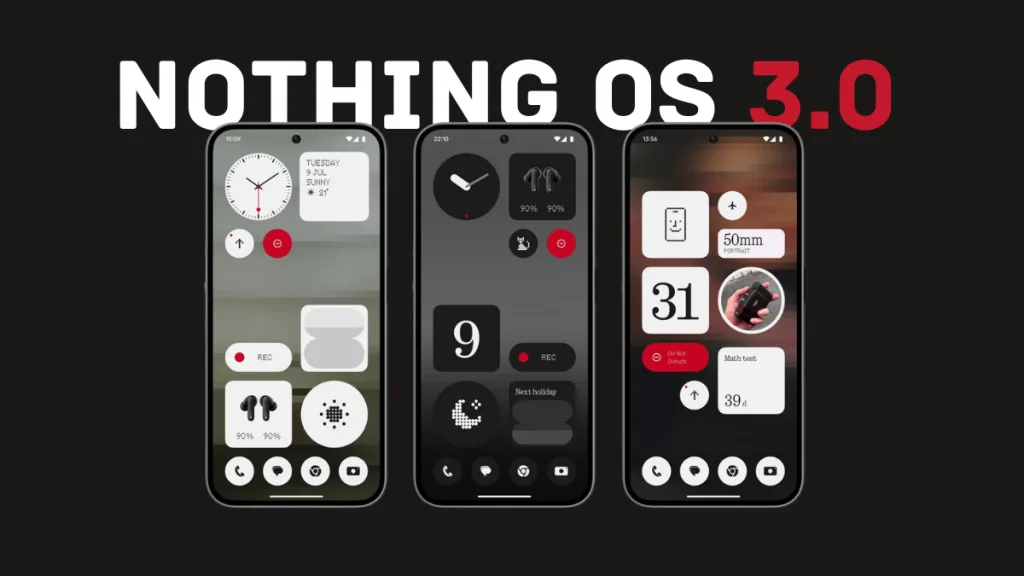
    Nothing has officially kicked off the open beta for Nothing OS 3.0, which is built on Android 15. Users of Phone (2a) can join the beta right away, while Phone (2) users will have access to it in November. In December, the beta will also be available for Phone (1), Phone (2a) Plus, and CMF Phone 1.

    Features Overview

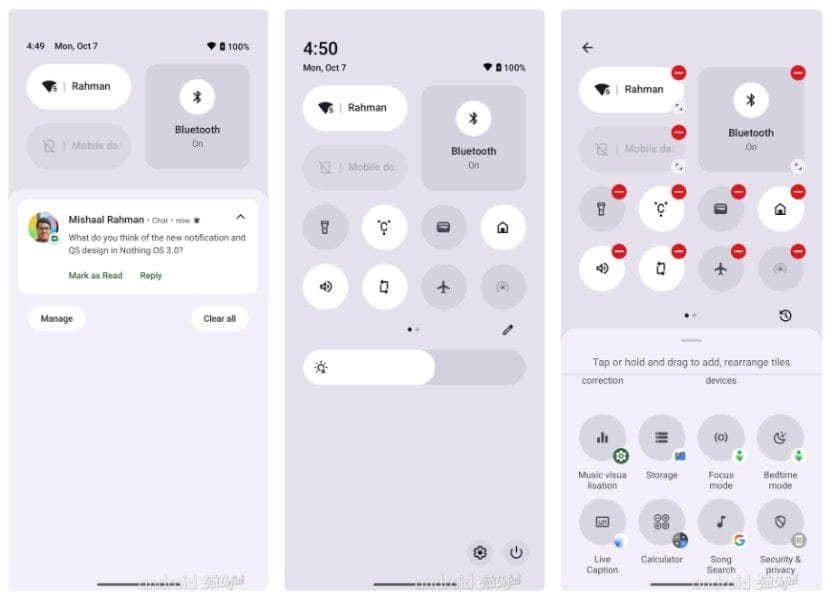
    The company hasn’t shared many specifics about the updates and enhancements, but Mishaal Rahman from Android Faithful got a sneak peak at Nothing OS 3.0. His insights suggest that the new OS includes a major redesign of the user interface, along with smarter app organization and several feature improvements.

    User Interface Changes

    One of the most striking updates in Nothing OS 3.0 is the revamped user interface. The notification and Quick Settings panel has undergone a visual transformation, adopting a more polished and dynamic look. While it maintains a familiar stock Android vibe, Nothing has blended in its distinct design style to offer a unified and visually appealing experience. The Quick Settings tiles are now resizable, providing users with enhanced customization and flexibility.

    Navigation Improvements

    The Settings app has been restructured to enhance navigation and make it easier to access. Important features are grouped into specific sections, simplifying the process of locating desired settings. Furthermore, Nothing has added a new “Special features” category, which includes options for gestures, RAM optimization, and game mode.

    Enhanced Customization

    Customization choices have been broadened. Users can alter the system font, have greater flexibility for customizing the lock screen, and utilize AI-driven app drawer organization. The Smart App Drawer uses artificial intelligence to sort apps by usage, delivering a more intuitive and tailored experience.

    App Management Features

    Moreover, the pop-up view that allows users to open apps in a floating window now includes buttons at the top to minimize or close the tab.

    Inheriting Android 15 Features

    Since Nothing OS 3.0 is based on Android 15, it automatically includes several new features rolled out by Google. These enhancements feature the capability to archive apps to free up storage, modify color contrast for better accessibility, conduct basic device diagnostics, and set the Google Home Favorites page as the screensaver.

    Additional Functionalities

    In addition, Nothing OS 3.0 provides a quick shortcut for accessing lock screen customization, supports partial screen sharing during recording or casting, and has native passkey support. The update also introduces some minor tweaks, such as a “Current” card in the wallpaper picker that displays the user’s active wallpaper and opens the wallpaper editor upon tapping.

    For an in-depth look at Nothing OS 3.0, you can refer to the original article from Android Faithful. Remember, this is just the initial beta, so additional features are expected to come in future updates.


    Image 1
    Image 1
    Image 1
  • Nothing OS 3.0 Release Date, Supported Devices, and Features

    Nothing OS 3.0 Release Date, Supported Devices, and Features

    Apart from having a unique look, Nothing phones are known for offering an amazing software experience. Indeed, Nothing OS 2.5 was regarded as one of the finest custom skins built on Android 14. Therefore, there are high hopes for Nothing OS 3.0, which will be based on Android 15.

    The company has revealed the eagerly awaited Nothing OS 3.0, providing information about both the beta and stable releases, along with the new features and enhancements it will include.

    Release Timeline for Nothing OS 3.0

    Nothing OS 3.0, which is based on Android 15, was officially launched on September 24 through the firm’s YouTube channel. Although there wasn’t a detailed roadmap provided, Nothing confirmed that the open beta will be available in early October 2024, and if all goes well, the stable version should start rolling out in December.

    The Nothing Phone (2a) Plus, Nothing Phone (2a), and Nothing Phone (2) are expected to be the first devices to receive the Android 15-based Nothing OS 3.0 update, followed by CMF Phone 1 and the Nothing Phone (1).

    Devices Eligible for Nothing OS 3.0

    • Nothing Phone (2a) Plus
    • Nothing Phone (2a)
    • Nothing Phone (2)
    • Nothing Phone (1)
    • CMF Phone 1

    Nothing has promised three Android upgrades for all its smartphones, except the CMF Phone 1, which is limited to two OS upgrades. The Nothing Phone (1) is the oldest device on this list, originally released with Android 12. Therefore, Android 15 will be its last OS update.

    New Features in Nothing OS 3.0

    Here’s a look at the new features and enhancements coming with Nothing OS 3.0:

    1. Nothing Gallery App
      The introduction of the Nothing Gallery app is confirmed in Nothing OS 3.0. Users had been asking for it for quite a while, and the company finally heeded their requests. As demonstrated during the launch, the new Nothing Gallery app opens a photo immediately when the user taps on it. The app employs artificial intelligence (AI) to identify important moments in your photos, showcasing them in larger thumbnails for easy visibility. It also features AI image segmentation to spotlight the main object and separate it from the rest of the image in thumbnails, making it simpler to locate. Nothing acknowledges the lengthy transition time from Camera to Google Photos. The transition to the Nothing Gallery is said to be 1.4 seconds quicker, and HDR and portrait effects processing will be up to 25% faster. More automatic AI image categorization, natural language search, and various other AI features will also be added in the future, including AI upscaling, Super Resolution, and AI image generation capabilities.
    2. Customizable Lock Screen
      The lock screen in Nothing OS 3.0 offers many more customization options. You can choose from various clock faces, some inspired by Apple’s iOS, while others are entirely original. Users can tap the widget area and enable Expand widget mode to add additional widgets to the expanded area.
    3. New Animation Features
      Nothing OS 3.0 introduces some exciting animations. The fingerprint animation is now enhanced, with dots that move and expand outward when your finger is pressed down. The charging animation is also updated. Utilizing the dot design language that Nothing is known for, the dots shift from the bottom to the top when you plug in the charger, creating a more visually appealing effect than before. Additionally, the Weather app now features an animated icon in a dot matrix style.
    4. Revamped Quick Settings
      Nothing OS 3.0 significantly upgrades the Quick Settings panel. It appears cleaner than in the past and aligns with Nothing’s design language. Initially, the sizes of the Wi-Fi and Bluetooth icons have been noticeably reduced to fit more icons. OS 3.0 allows users to adjust tile sizes, similar to home screen widgets. Some tiles present extra options when enlarged; for instance, the 1×2 audio tile enables you to set the sound profile to vibrate or mute. Active tiles will now turn red, allowing for quick differentiation from inactive ones. While it’s a subtle change, the red accent enhances the overall aesthetic. Lastly, a brightness slider has been included.
    5. App Pinning and Smart Categorization
      Nothing OS 3.0 introduces practical changes to the app drawer for faster access to your essential apps. It now allows you to pin your favorite apps at the top of the app drawer, potentially saving you a significant amount of time. Another handy feature in Nothing OS 3.0 is app categorization, referred to as Smart Drawer. Drawing inspiration from iOS, this feature organizes your apps into various categories automatically. You’ll find a row with four AI-suggested apps, followed by categorized app groups.
    6. Redesigned Settings Menu
      The Settings app in Nothing OS 3.0 has a fresh new look. The Network & Internet and Connected devices sections have been resized and arranged horizontally, similar to other options, which adds a sense of fluidity to the menu. Each option now has a small gap separating them. Another modification sees the Dot Matrix text replaced with Roboto, a highly readable font, applied throughout the system.
    7. New Widgets and Sharing Options
      Nothing phones currently have over 20 widgets, and the company plans to expand this range further, allowing users to access more information without opening the apps. In Nothing OS 3.0, a new countdown widget is introduced. This widget allows you to track time leading up to a specific date or to display the year’s progress, or even your birthday. The new software also features Shared Widgets, enabling you to share widgets with others. It’s a fun way to show your fitness progress or screen time with someone else.

    Potential Android 15 Features

    The above features are those developed by Nothing’s team; however, the next upgrade may include additional features as part of Android 15. Nothing hasn’t disclosed which features from Android 15 will be included in the upcoming upgrade, but some possibilities are:

    1. Private Space
      Android 15 introduces a Private Space feature that helps keep your data and apps secure from others, adding an extra layer of privacy. Activities within the Private Space are hidden from other users on the device, making it a safe zone for sensitive apps like dating or financial ones.
    2. Theft Detection Lock
      This feature is especially useful in Android 15, designed to prevent data theft in case someone tries to snatch your phone. Using Google’s AI, the theft detection lock identifies when your phone has been taken from you and locks the device automatically to safeguard your information. If the thief manages to perform a factory reset, they can’t activate the device again without the Google account credentials used initially.
    3. App Archiving
      Android 15 will facilitate the uninstallation of unnecessary apps while keeping user data intact. This is akin to offloading apps on iPhones, ensuring no data loss; users can resume where they left off once they reinstall or unarchive the app. Android already offers app archiving through the Google Play Store, but Android 15 will integrate this feature at the OS level, allowing users to archive and restore apps, even those installed outside the Google Play Store.

    Nothing OS 3.0 appears to be an exciting update. What new feature(s) are you most excited about? Feel free to share your thoughts in the comments below!