
Key Takeaways
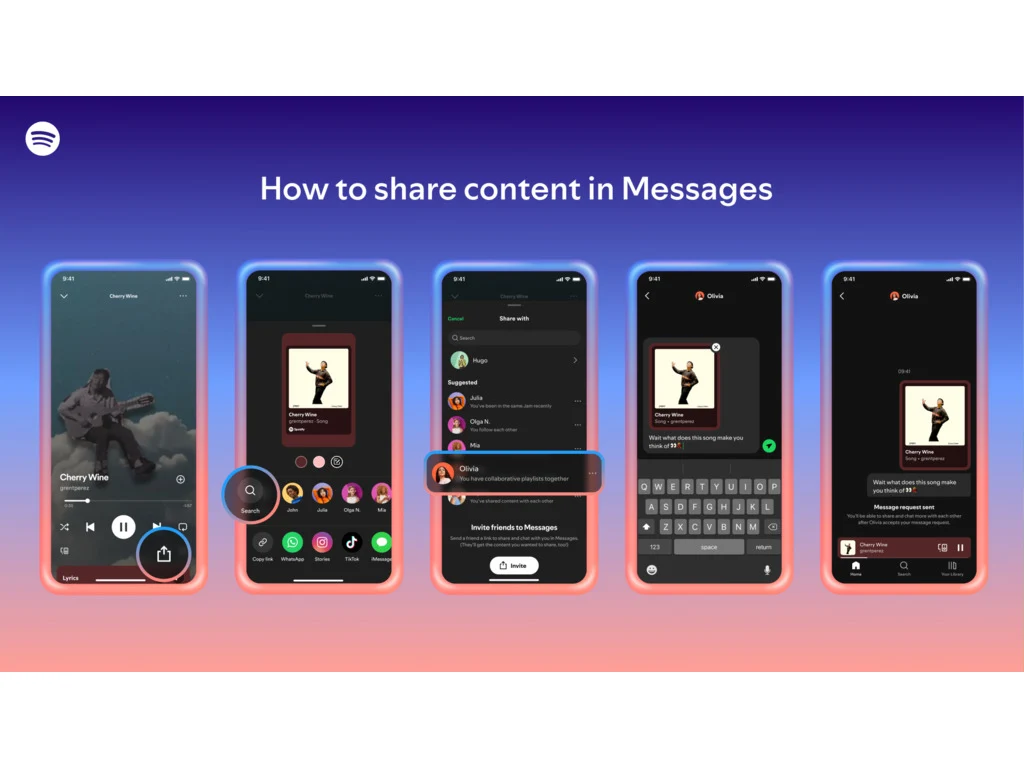
1. Spotify is launching a new Messages feature for users to share content directly within the app, similar to social media direct messaging.
2. The Messages feature is available to both free and premium users aged 16 and above, allowing easy sharing of music, podcasts, and audiobooks.
3. Users can find Messages by clicking their profile picture, with suggestions based on past interactions and shared playlists.
4. External sharing options remain available, with Messages intended to enhance, not replace, these integrations.
5. Safety features include the ability to accept or decline message requests, report inappropriate behavior, block users, and secure conversations with encryption.
Spotify is enhancing its social features by introducing Messages, a new way for users to share content directly within the app. This comes after the company previously experimented with social features through Inbox, which was available from 2010 until its closure in 2017.
A Familiar Approach
Messages takes a more direct route, similar to the direct messaging options found on social media platforms like Instagram and WhatsApp. This feature enables users to share music, podcasts, or audiobooks straight from the app. However, users can still share content on other platforms if they choose to do so.
User Accessibility
The Messages feature will be accessible to both free and premium users aged 16 and above. To initiate a message, you can send a request or connect with people you have already chatted with. After your request is accepted, sharing content will be easy and smooth. You can also include emojis in your messages.
Finding Messages
To find Messages, just click on your profile picture in the top left corner. You’ll receive suggestions based on factors like whether you’ve previously shared Spotify content with that person, if you’ve participated in Jams, Blends, or collaborative playlists, or if you are part of a Family or Duo plan together.
Spotify emphasizes that external sharing is still possible and that Messages are intended to enhance these integrations, not to replace them.
Safety Features
For user safety, you have the option to accept or decline message requests and to report any inappropriate behavior. You can also block users or disable Messages entirely in the settings. These conversations are secured with “industry standard encryption,” and the platform will actively monitor chats for any unlawful or harmful content, with moderators reviewing reported conversations.
Source:
Link


Leave a Reply