
Key Takeaways
1. NotebookLM simplifies document analysis by quickly providing specific details from uploaded files with just one command.
2. The AI focuses on analyzing documents rather than searching online, offering features like audio summaries, flashcards, and quizzes to support learning.
3. Enhanced chat functionality allows for longer inputs and saves chat history, enabling multi-layered conversations without losing context.
4. The AI provides nuanced responses by examining sources from various angles and allows users to personalize the chat experience based on their goals.
5. Users can assign specific roles to the AI, tailoring its responses to functions like a tough examiner or a creative game master.
Whether it’s the endless PowerPoint show from the previous meeting, the lengthy “summary” of important points from a college lecture, or the transcript from the latest court session, anyone looking for specific details in these documents often had to spend a lot of time. But now, things are changing. With Google’s AI assistant, NotebookLM, many of these boring tasks can be simplified: just one command is needed, and the AI can sift through various uploaded files, usually providing results in mere seconds.
Focus on Document Analysis
Unlike other Google AI tools, NotebookLM doesn’t aim to find information online; instead, it concentrates on examining uploaded documents. The AI also aims to support learning, offering features like audio summaries, flashcards, and quizzes.
Enhanced Features and Capabilities
Following the recent addition of Google’s newest AI image generation tool, “Nano Banana,” the system has seen further backend enhancements. Thanks to new Gemini models, the chat functionality has been greatly improved.
For instance, it now allows much longer inputs (up to one million tokens, which is about eight times the previous context window), and it can sustain extensive, multi-layered conversations without losing the context. A handy feature is that the chat history is saved, making it easy to pick up conversations later. However, chats involving shared notebooks will still be kept private.
Nuanced Responses and Personalization
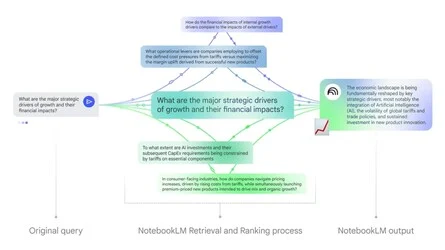
Another exciting update is how the system handles inputs. Rather than just trying to answer a user’s question and potentially missing vital context, the AI now examines the sources from various angles. This should lead to more detailed and nuanced responses.
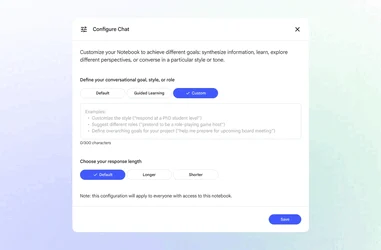
Moreover, users can now personalize the chat experience, meaning how the AI replies can be adjusted. For example, an “overarching goal” can be set for the notebook, which could help in studying for an exam, preparing for a presentation, or just diving deeper into a specific subject. The style and depth of the answers can also be tailored.
Role Definition and Future Updates
Additionally, users can now assign roles to the AI. For example, NotebookLM can take on the persona of a tough academic examiner or a creative game master.
As per Google, most of these new features are currently available, with certain functionalities like conversation history storage expected to roll out in the upcoming weeks.
Source:
Link
Leave a Reply