Tag: NotebookLM

  • Google’s NotebookLM Update Boosts Power for Role-Playing Games

    Google’s NotebookLM Update Boosts Power for Role-Playing Games

    Key Takeaways

    1. NotebookLM simplifies document analysis by quickly providing specific details from uploaded files with just one command.
    2. The AI focuses on analyzing documents rather than searching online, offering features like audio summaries, flashcards, and quizzes to support learning.
    3. Enhanced chat functionality allows for longer inputs and saves chat history, enabling multi-layered conversations without losing context.
    4. The AI provides nuanced responses by examining sources from various angles and allows users to personalize the chat experience based on their goals.
    5. Users can assign specific roles to the AI, tailoring its responses to functions like a tough examiner or a creative game master.


    Whether it’s the endless PowerPoint show from the previous meeting, the lengthy “summary” of important points from a college lecture, or the transcript from the latest court session, anyone looking for specific details in these documents often had to spend a lot of time. But now, things are changing. With Google’s AI assistant, NotebookLM, many of these boring tasks can be simplified: just one command is needed, and the AI can sift through various uploaded files, usually providing results in mere seconds.

    Focus on Document Analysis

    Unlike other Google AI tools, NotebookLM doesn’t aim to find information online; instead, it concentrates on examining uploaded documents. The AI also aims to support learning, offering features like audio summaries, flashcards, and quizzes.

    Enhanced Features and Capabilities

    Following the recent addition of Google’s newest AI image generation tool, “Nano Banana,” the system has seen further backend enhancements. Thanks to new Gemini models, the chat functionality has been greatly improved.

    For instance, it now allows much longer inputs (up to one million tokens, which is about eight times the previous context window), and it can sustain extensive, multi-layered conversations without losing the context. A handy feature is that the chat history is saved, making it easy to pick up conversations later. However, chats involving shared notebooks will still be kept private.

    Nuanced Responses and Personalization

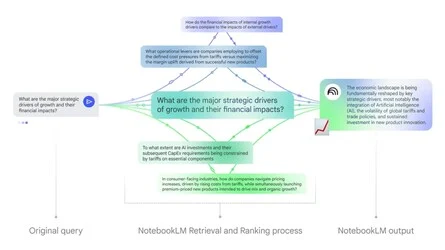
    Another exciting update is how the system handles inputs. Rather than just trying to answer a user’s question and potentially missing vital context, the AI now examines the sources from various angles. This should lead to more detailed and nuanced responses.

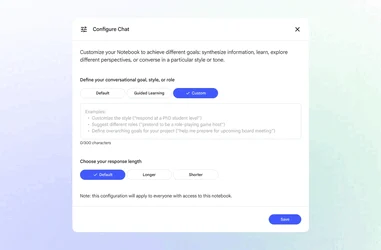
    Moreover, users can now personalize the chat experience, meaning how the AI replies can be adjusted. For example, an “overarching goal” can be set for the notebook, which could help in studying for an exam, preparing for a presentation, or just diving deeper into a specific subject. The style and depth of the answers can also be tailored.

    Role Definition and Future Updates

    Additionally, users can now assign roles to the AI. For example, NotebookLM can take on the persona of a tough academic examiner or a creative game master.

    As per Google, most of these new features are currently available, with certain functionalities like conversation history storage expected to roll out in the upcoming weeks.

    Source:
    Link


  • NotebookLM App for iOS and Android Launching Soon

    NotebookLM App for iOS and Android Launching Soon

    Key Takeaways

    – Google introduced NotebookLM, an AI tool for summarizing documents and answering questions.
    – A mobile app for NotebookLM is expected but no release date or platforms have been announced.
    – The app may have limited initial access in certain countries before a broader rollout.
    – The Audio Overview feature will soon support multiple languages and explore various formats.
    – Excitement is growing among users for the upcoming mobile app and enhanced features.


    It has been nearly two years since Google introduced NotebookLM, a tool that utilizes AI to facilitate learning. This innovative AI Notebook allows users to upload their documents, which it can then summarize or respond to questions about. Additionally, Google enhanced the tool last year by adding a feature called Audio Overview, enabling NotebookLM to convert uploaded documents into an audio dialogue resembling a podcast with two hosts. Despite its usefulness, NotebookLM is currently only accessible as a web application, though changes are expected soon.

    Upcoming Mobile App Announcement

    Recently, a post on X from the official NotebookLM account indicated that a mobile app is on the horizon. This announcement was made as a quoted reply to a user who praised NotebookLM for its effectiveness as a study aid. However, the post did not specify when the app will be released or which platforms will receive it first.

    Limited Initial Release

    Once the NotebookLM app becomes available, it may initially have limited access in certain countries before expanding to a broader audience. Despite this potential limitation, the upcoming mobile app has generated excitement among users who find the tool beneficial.

    Multilingual and Enhanced Features

    In other news, NotebookLM has announced that the Audio Overview feature will soon support languages beyond English. They’re also exploring various hosts, voices, and show formats. However, there is no specified timeline for when these new features will be implemented.

    Source:
    Link

  • OpenAI’s ChatGPT Projects Compete with Google’s NotebookLM

    OpenAI’s ChatGPT Projects Compete with Google’s NotebookLM

    OpenAI has introduced a new feature called Projects for ChatGPT, which helps users arrange their chats and files into organized groups. This tool is designed to make it easier for users to manage multiple conversations, files, and personalized instructions for the AI all in one place.

    Availability of Projects

    This feature is currently accessible to subscribers of ChatGPT Plus, Pro, and Teams. However, those subscribed to ChatGPT Enterprise and Edu will not be able to use it until January 2025.

    Features and Capabilities

    ChatGPT Projects works seamlessly with the newly added Canvas, advanced data analysis, image generation through DALL-E, and web searches. Users can include various file types, and the AI will maintain the context of these documents while answering questions.

    The tool is capable of processing large documents, including research papers, emails, and reports. However, it does not yet allow importing files from Google Drive or Microsoft’s OneDrive. OpenAI has stated that Projects are intended for personal use only and cannot be shared with others “at this time.” Users can also transfer their existing chats into a Project.

    Comparison to Competitors

    If this sounds a bit like something you’ve heard before, that’s because it’s OpenAI’s version of Google’s well-liked research and organization tool, NotebookLM. Google has recently rolled out features like the ability to engage with AI hosts during audio summaries and a new premium offering known as NotebookLM Plus for both organizations and individuals.

    Source: Link

  • Open NotebookLM: Convert PDFs to Podcasts with Open Source

    Open NotebookLM: Convert PDFs to Podcasts with Open Source

    For those who are new to Google’s AI project, NotebookLM serves as a research assistant platform that allows users to upload documents. It utilizes Gemini 1.5 pro to prioritize notetaking when interacting with the information extracted from these documents. NotebookLM summarizes all uploaded documents in the user’s notebook and enables users to pose questions regarding the content. After processing the data, NotebookLM provides answers along with relevant citations from the uploaded files. One of its standout features is the capability to create podcasts based on the uploaded documents. The podcasts, generated by Gemini, feature AI-curated information and consist of audio discussions between two speakers about the topics found in the materials, with segments lasting between five and thirty minutes. However, some users might hesitate to upload their content to a proprietary large language model (LLM), which is where Open NotebookLM presents a different option.

    A User-Friendly Alternative

    Open NotebookLM offers a simple and user-friendly interface, constructed using various open-source and text-to-speech technologies to convert PDFs into podcasts. For PDF processing, it employs Llama 3.1, which has a character limit of 100,000. While it may not match Gemini’s capabilities, MeloTTS delivers reliable text-to-speech performance, allowing users to modify the AI’s tone to be either "fun" or "formal." Furthermore, Open NotebookLM is compatible with just over ten languages, including Spanish, French, and German among its selections. Users can currently experiment with the project on Chua’s Hugging Face page or compile it locally using the resources provided on the project’s GitHub repository.

    Accessing the Project

    Gabriel Chua can be found on both Hugging Face and GitHub, where users can explore the Open NotebookLM project further.