Tag: Winlator

  • Winlator 10.1 Update Enhances Windows Game Emulator for Android

    Winlator 10.1 Update Enhances Windows Game Emulator for Android

    Key Takeaways

    1. Improved performance through the shift to native code and updates to the VortK graphics driver.
    2. New features including an updated Box64 to version 0.3.6 and a “performance” preset for efficiency.
    3. Enhanced controller support, including MIDI input/output and a virtual CD-ROM drive.
    4. New control options with on-screen touch control profiles and the ability to import optimized profiles for specific games.
    5. Compatibility improvements and resolution of issues with Steam Client startup.


    Winlator developer brunodev85 has released a fresh update for the Android Windows game emulator. The new version, v10.1, brings a range of new features and enhances performance and compatibility.

    Improved Performance

    A key change in this update is the shift of certain parts of the app to native code, which should result in better gaming performance. Along with modifications to the VortK graphics driver, users can expect an overall improved emulation experience with this Android Windows game emulator.

    New Features and Updates

    In Winlator 10.1, several essential components have been updated. The Box64 has been upgraded to version 0.3.6, and users now have access to a “performance” preset designed for optimal efficiency.

    Enhanced Controller Support

    Winlator 10.1 now includes support for external media controllers. It features a specific option for MIDI input/output, allowing for greater versatility. Users can also set up a virtual CD-ROM drive within the emulator. Additionally, the new active Windows side menu simplifies the process of switching between multiple open windows.

    Control Options

    Changes have also been made in the input and control area. One significant update is the inclusion of new control types and on-screen touch control profiles. This means that players can now import optimized on-screen profiles tailored for specific games. However, using a physical controller, such as the GameSir G8 Plus priced at $79.99 on Amazon, will still provide a superior gaming experience.

    Other Improvements

    Finally, Winlator 10.1 addresses issues with Steam Client startup and offers improvements in compatibility. For more details about the latest version of this Windows games emulator for Android, be sure to check out the complete changelog available from brunodev85 on GitHub.

    Source:
    Link

  • GameNative: Easy Windows Game Emulation on Android Devices

    GameNative: Easy Windows Game Emulation on Android Devices

    Key Takeaways

    1. Winlator is a popular emulator for running Windows games on Android, requiring a good smartphone and adjustments for optimal performance.
    2. GameNative, based on Pluvia, outperforms it by supporting DRM-protected games that Pluvia cannot run.
    3. GameNative offers native support for Steam, simplifying the process of playing Windows games on Android devices.
    4. The emulator includes an on-screen keyboard, controller overlay, and cloud save support, but cannot run games needing an external launcher.
    5. While it has more features than Pluvia, GameNative is not completely stable and may have issues with certain games.


    Winlator is a well-known emulator for Windows games on Android, and it has gotten to a point where it can smoothly run many big-name games. To have the best experience, though, you’ll need a good smartphone and some adjustments to the emulator. GameNative makes this easier by providing a setup that is pretty simple.

    Improvements Over Pluvia

    This application is based on Pluvia and uses Winlator as its backend. One of the key reasons it outshines Pluvia is its ability to support games that have DRM. This means that this Windows emulator for Android can run a lot of games that Pluvia usually cannot.

    Native Steam Support

    Another significant benefit of GameNative is that it can run Steam natively. This means users don’t have to put in much effort to start playing Windows games on their Android devices.

    Additionally, the emulator includes an on-screen keyboard and a controller overlay (the GameSir G8 Plus is curr. $79.99 on Amazon), alongside various performance enhancements. It even offers cloud save support, but it’s important to know that it cannot run games needing an external launcher.

    Stability Considerations

    While GameNative has more features compared to Pluvia, it is still not completely stable. Users might encounter some problems when trying to emulate certain Windows games. You can download the app for free from its official GitHub repository, and there’s a Discord server that can be useful for tips and guidance.

    Source:
    Link

  • Winlator: Windows Game Emulator Development Restarts After Break

    Winlator: Windows Game Emulator Development Restarts After Break

    Key Takeaways

    1. Winlator is a top emulator for running Windows games on Android, popular among users for its performance with classic AAA titles.
    2. For optimal gaming, it’s recommended to use upper-mid to high-end phones and a physical controller like the 8Bitdo Ultimate.
    3. Development was paused in April 2025 due to backlash over malware allegations, though the creator claimed all versions are clean.
    4. A hotfix was released before the pause to address false positive virus detections, but development faced challenges from user concerns.
    5. The pause announcement has been removed, indicating a potential return to development, with the community expressing optimism for future updates.


    Winlator stands out as one of the top emulators for running Windows games on Android devices. Thanks to its active user base, this emulator can effectively run a variety of classic AAA titles. For the best gaming experience, it’s often suggested to use a phone that is upper-mid to high-end, along with a physical controller like the 8Bitdo Ultimate smartphone controller, which is currently priced at $39.50 on Amazon. It’s also important to mention that the emulator is quite versatile, and the on-screen controls work decently too.

    Development Pause Announced

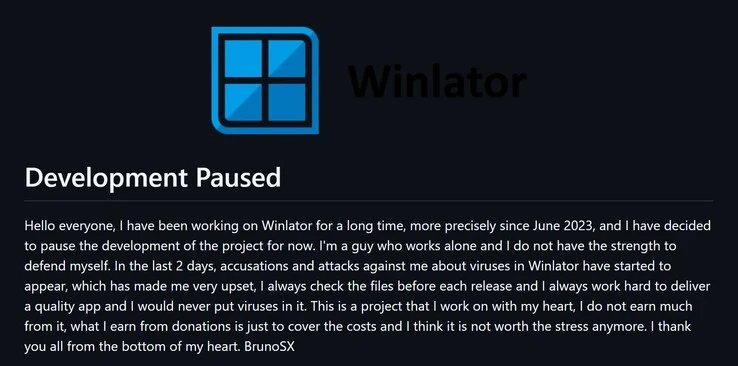
    However, the progress of this Windows emulator for Android took an unexpected turn in late April 2025 when its creator, BrunoSX, declared a sudden halt in development. This was mainly due to the backlash he received over allegations that the app contained malware and viruses.

    In his announcement, BrunoSX stated that all versions of Winlator were, in fact, clean, and he had released a hotfix right before the pause. According to some users on the subreddit, this hotfix eliminated the “false positive” virus detection, yet the developer reported that many users were making it difficult to continue with development.

    Positive Changes Ahead

    The good news is that the pause announcement has just been taken down from Winlator’s GitHub page. This recent update to the readme hints that BrunoSX has come back from his short break. Although the app hasn’t received any updates since the last news, the change suggests that a new version could be coming soon.

    The community’s response to this update has been largely optimistic, with many expressing hope for what’s next. Nevertheless, some individuals still worry about the previous virus alerts concerning Winlator. It remains to be seen if BrunoSX will tackle these worries in upcoming updates for the Windows emulator.

    Source:
    Link

  • Windows Game Emulation on Android Stalls as Winlator Dev Pauses

    Windows Game Emulation on Android Stalls as Winlator Dev Pauses

    Key Takeaways

    1. Game emulation on mobile devices, particularly Android, is growing in popularity with advanced emulators like Winlator for Windows games.
    2. Winlator has received multiple updates since its June 2023 launch and is stable enough to support various AAA games, though a powerful smartphone and a physical controller are recommended for the best experience.
    3. Development of Winlator has been temporarily halted by its creator, BrunoSX, due to user allegations of including viruses in the emulator.
    4. Previous instances of emulator development being halted due to user complaints and accusations have occurred, such as with AetherSX2, which faced severe backlash and threats.
    5. Concerns about the legitimacy of Winlator’s safety persist, as some users claim it may contain viruses, raising doubts about the transparency of the developer’s announcements.


    Game emulation on mobile devices has gained significant popularity since developers began creating advanced and refined emulators for Android. One noteworthy example is Winlator, which allows users to emulate Windows games using Wine and Box86/Box64.

    Recent Updates and Stability

    Winlator was launched in June 2023, and since its release, it has undergone numerous updates. Currently, it is stable enough to support a variety of AAA games. To achieve the optimal gaming experience, it is often necessary to use a smartphone with a powerful SoC and a physical controller, such as the Razer Kishi Ultra, priced at $99.99 on Amazon.

    Development Halted

    Recently, BrunoSX, the developer behind Winlator, announced on the emulator’s GitHub page that development has been temporarily suspended. This decision comes in response to allegations and attacks directed at the developer over the last few days.

    BrunoSX stated that users have accused him of including viruses in Winlator, a claim he has firmly denied. He assured users that every release is thoroughly scanned for viruses. The developer also emphasized his commitment to providing a clean and high-quality application.

    Previous Instances of Development Issues

    This isn’t the first time an Android gaming emulator has experienced a sudden halt in development due to user accusations. For instance, in 2023, the creator of AetherSX2 decided to stop work on the PS2 emulator for Android, mainly due to relentless demands, impersonations, and complaints. This developer even received death threats.

    Fortunately, AetherSX2 has been succeeded by NetherSX2, a project led by the community. In the case of Winlator, some users on a Reddit thread claim that the emulator is indeed infected with viruses. It raises the question of whether BrunoSX was entirely honest in his recent announcement. There is also a chance that this project may face a dead end since it is not a completely open-source initiative.

    Source:
    Link