Tag: Google Chrome

  • Google Chrome Update: Gemini 3 AI Introduces Auto Browse Feature

    Google Chrome Update: Gemini 3 AI Introduces Auto Browse Feature

    Key Takeaways

    1. Gemini 3 enhances information processing by integrating directly into the browser interface.
    2. Users in supported regions can access AI features in the latest Google Chrome versions without needing extensions.
    3. The auto-browse feature quickly summarizes webpage content as it loads.
    4. The sidebar allows users to extract tables and make comparisons across open tabs.
    5. The launch in Europe may face delays due to regulatory changes related to the DMA and the AI Act.


    The rollout of Gemini 3 is aimed to process information more efficiently. By integrating at the system level, this model understands the context of the open tabs and directly addresses queries in the browser interface. Consequently, experimental methods from Project Disco, where open tabs are turned into personalized web applications, are being incorporated into Google Chrome.

    Short Overview

    In regions that support it, like the US, users can access these features via the latest stable versions of Google Chrome. Those eligible can activate the AI functionalities through settings found under experimental features or by clicking the Gemini icon located in the address bar. There’s no need to manually install any extensions.

    Features and Functionality

    The auto-browse feature recognizes how a webpage is structured as it loads and quickly supplies a summary. Users can also utilize the sidebar to extract tables or make comparisons across various tabs. The system modifies the detail level according to the context at hand, such as for technical specs or instructions. As for a specific launch date in Europe, that information hasn’t been disclosed yet. However, it is anticipated that the launch will face delays due to necessary regulatory changes related to the DMA and the AI Act.

    Source:
    Link



  • Google Chrome Updates Ending for Some Macs This July

    Google Chrome Updates Ending for Some Macs This July

    Key Takeaways

    1. Chrome version 150 will be the last version compatible with macOS 12 Monterey for Macs made before 2018.
    2. Users with Intel Macs launched before 2017 must upgrade to a new Mac or switch to another browser for updates.
    3. Firefox can run on macOS 10.15 Catalina, while Brave and Opera will support macOS 12 Monterey longer.
    4. All Apple Silicon Macs are currently supported by macOS 13 Ventura.
    5. New Apple Silicon Macs, like the M5 MacBook Pro, are available for purchase, starting around $1,449.


    Folks using Google Chrome on Macs made before 2018 are about to face a bit of a tough situation. A new update from Google’s support page for Chrome has revealed that Chrome version 150 will be the final version to work with macOS 12 Monterey.

    Options for Older Mac Users

    With macOS 13 Ventura not being compatible with Macs launched before 2017, users with older devices will need to either fork out cash for a new Mac or start using another web browser if they want to access the latest features and security updates. The Intel Macs that are officially supported by macOS Ventura include:

    It’s important to mention that all Apple Silicon Macs are supported at this moment. If users want to keep using their outdated Intel Macs, they might consider Firefox, as it can run on macOS 10.15 Catalina. Other browsers like Brave and Opera will still support macOS 12 Monterey for a while longer.

    Source:
    Link


  • AI-Powered Chrome Password Manager for Enhanced Security

    AI-Powered Chrome Password Manager for Enhanced Security

    Key Takeaways

    1. Google Chrome has launched an AI-driven password manager that identifies weak passwords and offers an automatic password change feature.
    2. The “change it for me” feature automates the process of creating and saving strong passwords without requiring extra user input.
    3. This new functionality enhances security by quickly replacing unsafe passwords, especially benefiting users of Chrome’s built-in password manager.
    4. The automatic password change feature is limited to websites that have integrated the necessary systems, with initial partners including Spotify, Duolingo, Coursera, and H&M.
    5. Users of third-party password managers may face challenges, as the feature only works with Chrome’s password manager, and Google aims to transition to more secure options like passkeys in the future.


    Google Chrome has launched a new AI-driven password manager that identifies weak passwords. Soon, Google says, users will be able to utilize the “change it for me” feature on compatible websites. When this option is clicked, the browser automatically starts a process that (1) opens the site in the background, (2) creates a strong new password, (3) saves that password in the password manager, and (4) logs the user back in seamlessly.

    Background Automation

    This entire operation happens in the background, meaning users don’t need to enter any extra details. The newly created password isn’t shown to users, but they can access it any time through Chrome’s password manager.

    Enhancing Security

    This new functionality is designed to make the sometimes annoying task of updating passwords much easier. Automation boosts security, allowing unsafe passwords to be replaced more swiftly. It’s especially useful for those who rely on Chrome’s built-in password manager.

    However, the automatic password change feature is only functional on websites that have this option available. Initial partners for this service include Spotify, Duolingo, Coursera, and H&M. Website owners must integrate the necessary systems to enable this feature.

    Limitations for External Managers

    Users relying on third-party password managers might face some challenges, as the password changes will only take place in Chrome’s own password manager and won’t sync with those external tools.

    Google’s vision for the future is to eventually replace passwords with more secure options like passkeys. The rollout of AI-assisted password changes within Chrome Password Manager marks progress towards that goal. While passkeys are not widely adopted yet, this new feature is seen as a temporary fix to enhance user security.

    Source:
    Link


  • Facebook Accused of Spying on Users Even When App Is Closed

    Facebook Accused of Spying on Users Even When App Is Closed

    Key Takeaways

    1. Facebook is facing controversy for how it manages personal information, specifically regarding data transfer from Google Chrome to the Facebook app.
    2. Facebook’s tracking tools collect unique browser identifiers, allowing access to users’ complete browsing history, even in private mode or after deleting cookies.
    3. Over 5.8 million websites use the tracking tool “Pixel Meta,” with a similar method employed by Yandex on over 3 million sites.
    4. The tracking technique violates Android’s usage regulations, and Google has confirmed that measures are being taken to address the issue.
    5. Meta attributed the issue to a “communication error” with Google policies, while Yandex claims it does not collect sensitive information.


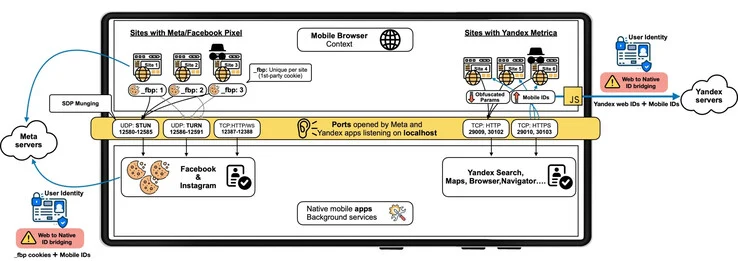
    Facebook is currently embroiled in a significant controversy regarding the way it manages personal information. Several specialists from the IMDEA Networks Institute have discovered pieces of code that facilitate the transfer of data from Google Chrome to the Facebook app, aiming to recover and scrutinize potentially sensitive data.

    Simple but Concerning Technique

    Delving deeper into the matter, the method appears rather straightforward. Facebook’s tracking tools, found on numerous websites with the intention of analyzing innocuous elements like ad effectiveness, collect the unique identifier of your web browser. This information is then sent to the Meta app installed on your device. Consequently, even if you’re not logged into Facebook via Chrome, the app can still access your complete browsing history. Alarmingly, this also holds true when you’re using private browsing or have deleted your cookies.

    Widespread Use of Tracking Tools

    The IMDEA Networks Institute estimates that more than 5.8 million websites utilize this tracking tool known as “Pixel Meta.” Additionally, Yandex, a search engine from Russia, reportedly employs a similar method, with tracking algorithms present on over 3 million sites.

    Violations of Android Rules

    Even if you don’t feel personally affected by this recent revelation, it’s crucial to recognize that it breaches Android’s usage regulations, as reported by Ars Technica. The sharing of data is governed by various rules on the Android platform.

    Ars Technica reached out to Google for their take on the situation, and the American tech giant confirmed that the tracking technique used by Meta’s affiliate contravenes their guidelines. Reportedly, measures are already in the works to curb further misuse. Since the unveiling of this troubling finding, no interactions between Google Chrome and the Facebook app have been detected.

    Meta and Yandex Respond

    In closing, Meta has commented on the issue, citing a “communication error regarding the application of certain Google policies.” On the other hand, Yandex claims it does not gather sensitive information and emphasizes that its practices help enhance the personalization of its services.

    Source:
    Link


  • Google Chrome’s New Security Feature Safeguards Your Home Network

    Google Chrome’s New Security Feature Safeguards Your Home Network

    Google Chrome’s Ongoing Battle for Security

    Google Chrome continues to reign as the most widely used web browser globally, boasting a market share of nearly 70%. Despite the availability of default browsers on operating systems like Mac, Windows, and iOS, many users still opt for Chrome. However, this popularity comes with a downside – Chrome is a prime target for cyberattacks. In response to this threat, Google is intensifying its efforts to bolster Chrome’s security features, prioritizing privacy enhancements to safeguard users’ online activities.

    Enhancing Security with “Private Network Access Checks for Navigation Requests”

    Navigating the web can expose users to various risks, with malicious websites posing a significant threat. To address this concern, Google is introducing a new security feature aimed at safeguarding devices connected to your home network through Chrome. This feature, known as “Custom Network Access Controls for Browsing Requests,” will actively monitor websites attempting to access your private network, permitting only those deemed safe by the system.

    The feature will conduct thorough assessments to determine the origin and security of requests seeking to communicate with your private network. Additionally, it will verify your device’s authorization to access the private network. Google is currently collaborating with developers to validate websites as secure sources, laying the groundwork for the feature’s effectiveness.

    Future Outlook and Deployment

    Although the new security feature has not been integrated into any Chrome version as of yet, it is anticipated to be included in Chrome 123 or 124 for both desktop computers and Android devices. With the rise of the smart home concept and the increasing vulnerability of connected devices like door locks to cyber threats, Google’s proactive approach is poised to significantly enhance users’ security in an evolving digital landscape.

    Google’s commitment to fortifying Chrome’s security features reflects its dedication to ensuring a safer online experience for users worldwide. By staying ahead of emerging threats and implementing robust privacy measures, Google is setting a precedent for web browsers in the fight against cyberattacks.

    Details:

    • Feature: Custom Network Access Controls for Browsing Requests
    • Expected Release: Chrome 123 or 124 for desktop computers and Android devices

    By prioritizing security and privacy, Google is reinforcing Chrome’s position as a trusted web browser, empowering users to browse the internet with confidence in the face of evolving cybersecurity challenges.

  • Google Chrome Users in India Receive Urgent Security Warning from Indian Government

    Google Chrome Users in India Receive Urgent Security Warning from Indian Government

    Google Chrome, undoubtedly the world’s most popular web browser with a 66% market share. Many of us use this browser for various activities, from daily tasks to work. However, this popularity comes with its share of problems. A security vulnerability in a platform with millions or even billions of users jeopardizes not only individuals or companies but even the security of nations. For this reason, the Indian government has issued a high severity warning to Google Chrome users, advising them to promptly update their browsers due to multiple high-risk vulnerabilities. Here are the details…

    Indian Government Alerts Chrome Users: Update Immediately to Close Vulnerabilities

    CERT-In, the Indian government’s cybersecurity agency, has issued a “high severity” warning concerning various vulnerabilities found in Google Chrome. These security flaws, if exploited, may allow remote attackers to execute malicious code on a user’s computer. In other words, hackers could take control of systems or steal sensitive data.

    The security advisory issued by CERT-In notes that remote attackers can exploit these vulnerabilities by persuading unsuspecting victims to visit specially crafted web pages. After visiting these pages, the security flaws will be triggered, allowing attackers to launch unnoticed attacks on unaware users.

    This security vulnerability allows attackers to exploit memory errors in the Side Panel Search feature, potentially leading to arbitrary code execution or bypassing security measures.

    Users should be cautious when browsing the internet, especially when visiting unfamiliar or suspicious websites. Avoid clicking on links from untrusted sources and refrain from interacting with unwanted emails or messages.

  • New Security and Performance Features Enhance Google Chrome’s Browsing Experience

    New Security and Performance Features Enhance Google Chrome’s Browsing Experience

    Google Chrome: Prioritizing Safety and Performance

    Google continues to enhance its Chrome browser with new features to ensure productivity and keep up with current trends. In its latest updates, Google announced the End of Tracking Cookies to protect users' personal data and introduced the Create Theme feature with AI capabilities for improved customization. With these developments, Google Chrome prioritizes safety and performance to provide users with a better browsing experience.

    Updates for a Safer Browsing Experience

    Google aims to create a safer and more efficient web browsing environment. To achieve this, Google has implemented several useful changes to the Chrome browser. Some of these updates have already been rolled out, while others will be available soon. Let's take a closer look at the details:

    Proactive Safety Check

    Chrome's Safety Check now operates seamlessly in the background, sending proactive alerts to users. Users will receive notifications when their passwords have been compromised, when their browser versions are outdated, or when their site permissions require attention. These alerts can be easily accessed through the three-dot menu, allowing users to take immediate action against suspicious sites.

    Furthermore, Chrome Browser now automatically revokes site permissions, such as access to location or microphone, for sites that haven't been visited in a while. Additionally, the process of turning off notifications from websites has been streamlined for user convenience.

    Smarter Performance Controls

    In addition to safety enhancements, Chrome introduces new performance controls to optimize browsing efficiency. Building upon last year's Memory Saver mode, Chrome now provides more detailed insights. Users can hover over tabs to view comprehensive information about the amount of memory being utilized. Moreover, users can specify certain sites to always remain active, ensuring a smoother browsing experience. To activate Memory Saver Mode, users can navigate to the performance section in settings and toggle the Memory Saver option for an optimized performance experience.

    Surprisingly, Chrome will soon introduce the ability to save work groups, allowing users to free up memory and organize their browsing experience more efficiently. This feature will be accessible across multiple devices and can be toggled by simply clicking on the "Save Group" option.

    Future Developments: AI Model Gemini

    Excitingly, Google Chrome is set to support the new AI model, Gemini, in the first few months of 2024. This integration will enable even smarter and more helpful features within the Chrome browser.

    With these continuous updates, Google Chrome strives to provide users with a secure, efficient, and personalized browsing experience. By prioritizing safety and performance, Google ensures that Chrome remains at the forefront of web browsing technology.

  • Firefox and Edge Users Experience Slow Load Times due to YouTube’s Ad Blocker Crackdown

    Firefox and Edge Users Experience Slow Load Times due to YouTube’s Ad Blocker Crackdown

    YouTube’s Battle Against Ad-Blockers: Google Slows Down Browsers to Punish Users

    In its ongoing battle against ad-blocking programs, YouTube has taken a new approach to discourage users from blocking ads. The company insists that users who do not wish to see ads should pay for its Premium service. To enforce this, YouTube has started issuing warnings to users who have ad-blockers enabled. However, it seems that the measures taken by YouTube are disproportionately affecting users who use browsers other than Chrome, putting them in a difficult position.

    Slower Loading Times for YouTube Videos on Non-Chrome Browsers

    Google Chrome is the most popular web browser worldwide. However, there are still a significant number of users who prefer alternative browsers for various reasons. Unfortunately, YouTube’s recent measures against ad-blockers seem to be causing slower loading times for videos on browsers other than Chrome. Upon investigation, it was discovered that Google had introduced a deliberate five-second delay specifically for users of Firefox and Edge when visiting YouTube.

    Technical Necessity or Deliberate Measure?

    While some users speculate that this delay is a deliberate attempt to discourage the use of ad-blockers, Google denies these allegations. According to Google, the delay is a technical necessity to ensure that ads can still be loaded and displayed properly. However, it remains unclear how long Google intends to continue implementing this delay.

    The Impact on Users

    The introduction of this delay has put users of Firefox and Edge in a difficult position. Those who rely on ad-blockers to enhance their browsing experience now face slower loading times when accessing YouTube. This has sparked frustration among users who feel that their choice of browser should not affect their ability to block ads.

    In conclusion, YouTube’s battle against ad-blockers is intensifying, with the company implementing measures to discourage users from blocking ads. While Google claims that the five-second delay on YouTube is a technical necessity, users of non-Chrome browsers are experiencing slower loading times. As the battle between YouTube and ad-blockers continues, it remains to be seen how this issue will be resolved and whether alternative browser users will be able to enjoy ad-free YouTube browsing without any penalties.

    Source: 1, 2