Tag: Gamesir X5s

  • Windows Game Emulator for Android with Steam Support Now on Google Play

    Windows Game Emulator for Android with Steam Support Now on Google Play

    Key Takeaways

    1. GameHub, developed by GameSir, is a notable player in the Android Windows game emulator market, previously known as GameFusion.
    2. Recent updates have introduced Steam support, making it easier to install PC games on Android devices.
    3. GameHub is now available on the Play Store, providing users with enhanced security measures compared to sideloading from the website.
    4. The Play Store version is limited to Steam games, while the version on the GameHub website supports non-Steam titles.
    5. Game performance may vary; some games require adjustments, and a high-end smartphone is recommended for demanding titles. A physical mobile controller is suggested for better gameplay.


    The Android Windows game emulator market features a few main contenders, and one notable player is GameHub. This tool comes from the accessory brand GameSir and was first launched under the name GameFusion before its rebranding. Since it first hit the scene, this PC game emulation software has seen regular updates, with Steam support being a standout feature.

    New Features and Easy Access

    With its latest updates, GameSir has implemented support for Steam downloads, simplifying the process of installing PC games on an Android device. Getting the Windows game emulator on a smartphone has become much more straightforward than it used to be.

    In the past, users had to sideload the emulator from the GameHub website, which wasn’t overly complicated, but now that it’s available on the Play Store, users benefit from the added security measures that Google has put in place on their platform.

    Limitations of the Emulator

    It’s important to point out that the version found on the Play Store is specifically designed for playing PC games on Android devices via Steam, adhering to the store’s regulations. In contrast, the version available on the official GameHub website supports non-Steam titles as well.

    Another aspect to consider is that the Android PC game emulator doesn’t guarantee an optimal experience for every game. Some titles might require adjustments, and more demanding games may not run well without a high-end smartphone. Many users also suggest using a physical mobile controller for a better gaming experience, such as the GameSir X5s, currently priced at $44.99 on Amazon. You can check the video below for more details about GameHub.

    Source:
    Link


  • New GameHub Update Enhances PC Game Emulation and Steam on Android

    New GameHub Update Enhances PC Game Emulation and Steam on Android

    Key Takeaways

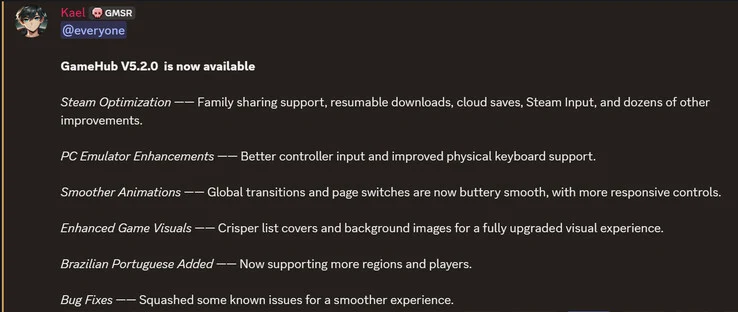
    1. GameHub v5.2 introduces optimizations for Steam, including support for family sharing and improved cloud saves.
    2. Enhanced compatibility with controllers and physical keyboards for better gameplay experience.
    3. Revamped global animations for smoother transitions and more responsive controls.
    4. Updated visual elements with sharper list covers and appealing background images.
    5. New language support for Brazilian Portuguese and bug fixes for a more stable emulation experience.


    It didn’t take long for GameHub to gain traction in the Android emulation world. Alongside its emphasis on mobile performance for PC game emulation, one of the standout features of the app is its regular updates. Speaking of which, the developers have rolled out a new update for the emulator app. Named version 5.2, it introduces several important changes.

    Steam Enhancements

    According to the changelog, optimizations for Steam are among the key improvements. The new version adds support for family sharing, which is a welcome addition. Users can also pause and resume their sessions, benefit from improved cloud saves, and enjoy other enhancements related to Steam.

    Improved Controller Support

    Another significant update is the enhanced compatibility with controllers (GameSir X5s currently priced at $44.99 on Amazon). The newest iteration of the Android PC emulator also improves support for physical keyboards, which many mobile gamers find useful during gameplay.

    Smoother Animations and Visuals

    GameSir has also mentioned that the team revamped the global animations, resulting in smoother transitions throughout the app. This change is expected to provide users with more responsive controls. Additionally, the visual aspects of games have been updated, offering sharper list covers and more appealing background images.

    Moreover, the latest version of the Android PC emulator now supports Brazilian Portuguese, addresses some existing bugs, and aims to provide a more stable emulation experience overall. If you’re interested in checking out the update, GameSir’s GameHub v5.2 can be downloaded from their official website.


  • How to Configure GameSir X5s to Wake Up Nintendo Switch 2

    How to Configure GameSir X5s to Wake Up Nintendo Switch 2

    Key Takeaways

    1. The GameSir X5s is a Bluetooth telescopic game controller compatible with Android, iOS, Nintendo Switch, and the upcoming Switch 2.
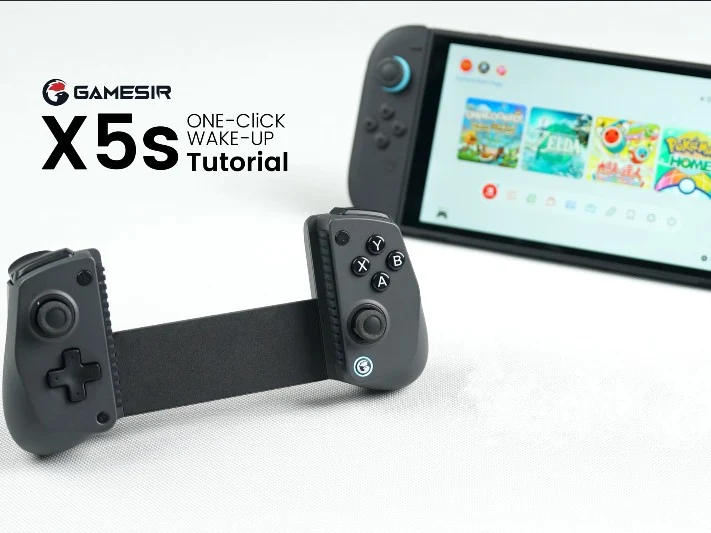
    2. A recent update allows users to turn on the Switch 2 using the controller with a one-click wake-up feature.
    3. To enable the one-click wake-up feature, users must update the controller to firmware version 1.13 via the GameSir app.
    4. The GameSir X5s is available on Amazon for $49.99.
    5. If the controller becomes unpaired or connected to a different device, the setup for the wake-up function must be repeated.


    The GameSir X5s is a Bluetooth telescopic game controller that works with both Android and iOS systems. It was announced in late August and is also able to connect with the Nintendo Switch and the upcoming Switch 2. Recently, the company has rolled out an update that allows users to turn on the Switch 2 using the controller.

    Update Requirements

    To use the one-click wake-up feature, you must update your GameSir X5s controller. It can be found on Amazon for a price of $49.99. The update is done via the GameSir app, which can be downloaded from the Google Play Store for Android devices or from the App Store for iPhones and iPads. Make sure to update the controller to firmware version 1.13.

    Setup Instructions

    Once the update is finished, you can enable the one-click wake-up function by following these instructions. This feature should always work as long as the controller remains paired with the Switch 2. If it gets unpaired or connected to a different device, you will have to set it up again.

    Source:
    Link


  • GameSir X5s Mobile Wireless Controller Supports Nintendo Switch

    GameSir X5s Mobile Wireless Controller Supports Nintendo Switch

    Key Takeaways

    1. GameSir launched the new telescopic X5s controller, designed for smartphones and smaller tablets, priced at $49.99 in the US and £49.99 in the UK.
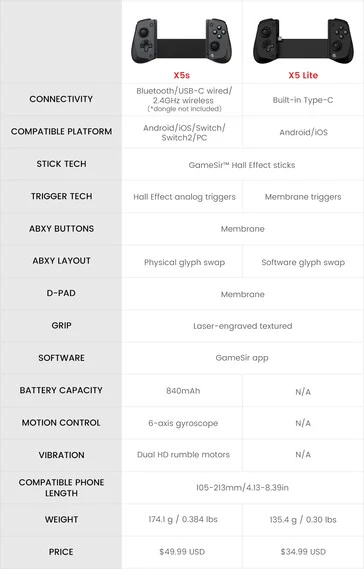
    2. The X5s offers improved features over the X5 Lite, including Bluetooth and 2.4 GHz connectivity, but does not come with a 2.4 GHz dongle.
    3. The controller is compatible with Nintendo’s Switch and Switch 2 consoles, enhancing its usability.
    4. Key specifications include Hall effect analog triggers, 6-axis gyroscopic controls, dual rumble motors, and an 840 mAh battery.
    5. The X5s is available at retailers like Amazon and Best Buy, in addition to GameSir’s own retail site.


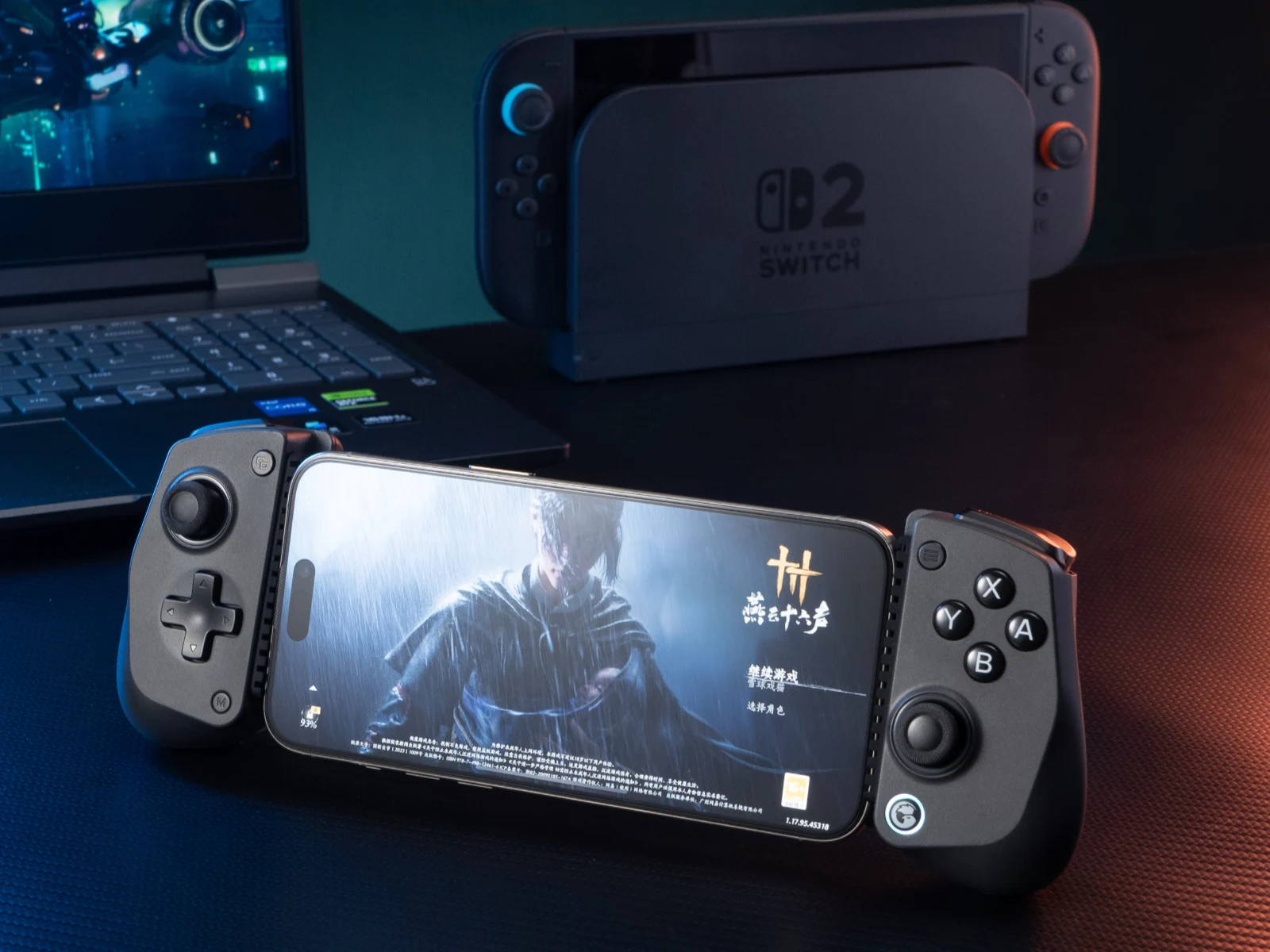
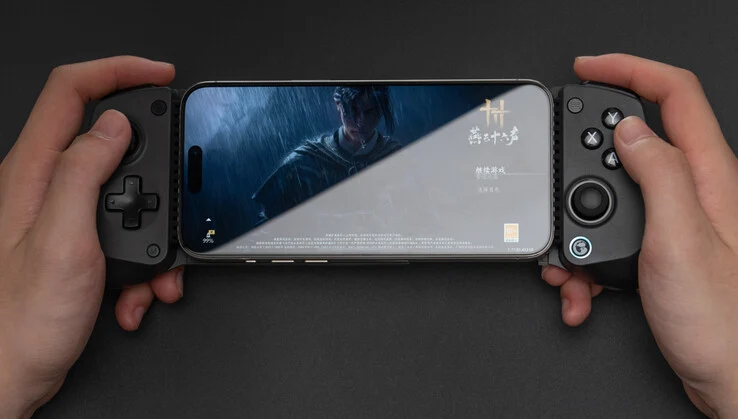
    GameSir has launched a new device just days after showcasing a special edition of its Tarantula Pro controller (currently priced at $69.99 on Amazon). Unlike the traditional Tarantula Pro, the newly released GameSir X5s is designed to be telescopic, catering specifically to smartphones and smaller tablets.

    Improved Features

    The X5s brings several enhancements when compared to the X5 Lite. Notably, the X5s supports both Bluetooth and 2.4 GHz connectivity, a feature that the Lite version does not offer. However, it’s worth mentioning that GameSir has opted not to include a 2.4 GHz dongle in the package. Additionally, the X5s is compatible with Nintendo’s Switch and Switch 2 consoles, expanding its usability.

    Specifications and Performance

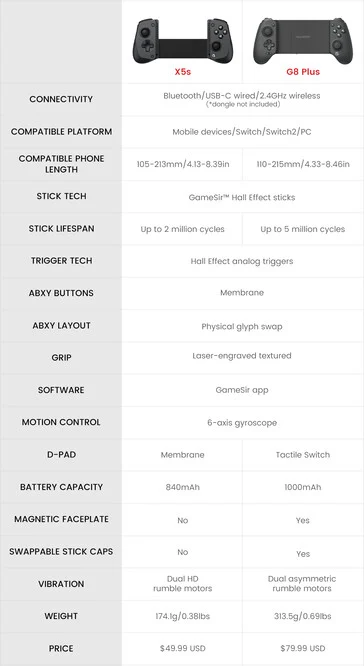
    The X5s is equipped with Hall effect analog triggers, 6-axis gyroscopic controls, dual rumble motors, and an 840 mAh battery. It also shares some similarities with the G8 Plus in various aspects, although it does have a few shortcomings to account for the differences in their pricing. For further details, check the comparison table below.

    The GameSir X5s is now available for $49.99 in the US and £49.99 in the UK. At its launch, GameSir is making this new telescopic mobile controller available through retailers such as Amazon and Best Buy, in addition to its own retail site. For more information, visit GameSir’s website.

    Source:
    Link


  • Gamesir X5s Controller: Ditch Nintendo Switch 2’s Drift-Prone Joy-Cons

    Gamesir X5s Controller: Ditch Nintendo Switch 2’s Drift-Prone Joy-Cons

    Key Takeaways

    1. The Gamesir X5s is a new telescopic mobile controller compatible with Windows, Android, iOS, and primarily promoted for the Nintendo Switch 2.
    2. It connects via Bluetooth 5.3 or 2.4GHz wireless, featuring a built-in battery, unlike the Gamesir X5 Lite which connects via USB-C and draws power from the device.
    3. The controller supports devices between 110mm to 213mm in length and includes adjustable Hall Effect triggers, thumbsticks, a six-axis gyroscope, and ALPS linear motors for HD rumble effects.
    4. The button layout is Xbox-style (‘ABXY’) but can be switched to match the Nintendo Switch’s layout.
    5. The Gamesir X5s is priced at CNY 269 (approximately $37/€32) in China, with a potential increase in price for other regions.


    Just a little while after the launch of the Gamesir X5 Lite telescopic controller, Gamesir has quietly released a new version named the Gamesir X5s. This controller works with Windows, Android, and iOS devices, but Gamesir mainly promotes it for the Nintendo Switch 2.

    Connection Features

    The Gamesir X5s, similar to the Gamesir X5 Lite, is a telescopic mobile controller. Nonetheless, a major distinction between these two models is how they connect. The new Gamesir X5s can connect through Bluetooth (Bluetooth 5.3) or 2.4GHz wireless to a device. This functionality means it includes a built-in battery. In contrast, the Gamesir X5 Lite, which can be found on Amazon for $34.99, connects via a USB-C port to the device. While this connection method results in lower latency, it also means that the controller relies on the power from the connected device.

    Compatibility and Features

    The X5s mobile controller is designed to work with devices that are between 110mm to 213mm in length, such as the Vivo X200, Xiaomi 15 Ultra, Lenovo Legion Y700 tablet, and the Nintendo Switch 2. It features adjustable Hall Effect triggers, Hall Effect thumbsticks, a six-axis gyroscope, and ALPS linear motors, similar to those found in the Switch for HD rumble effects.

    The Gamesir X5s has an Xbox-style button layout labeled ‘ABXY,’ but these buttons can be swapped to match the Nintendo Switch’s layout. GameSir claims that it has an 840mAh battery, but they did not specify how many hours of gameplay one charge will last.

    Pricing Information

    As reported by ITHome, the Gamesir X5s is available at a price of CNY 269 (approximately $37/€32) in China. However, it is likely to be priced higher once it reaches other regions.

    Source:
    Link