Key Takeaways
1. FSR 4 Activation Process: Enabling FSR 4 in Cyberpunk 2077 requires multiple steps, including using AMD’s overlay and restarting the game for the option to appear.
2. Performance Gains: Activating FSR 4 significantly boosts performance, with up to 100 FPS at native 1440p high settings compared to 80 FPS without it; various modes provide additional FPS increases.
3. Visual Quality Considerations: While Ultra Performance mode maintains decent visuals at 480p, it may introduce shimmering effects, especially with path tracing enabled.
4. Comparative Performance: FSR 3 offers slightly better performance (10-15 FPS more) than FSR 4 in Quality mode, but it can cause flickering issues on some objects.
5. Optimal Settings Recommendation: For the best experience, using FSR 4 in Quality mode at 1440p with high settings and high crowd density is recommended.
Cyberpunk 2077 has officially added support for AMD’s FidelityFX Super Resolution 4 (FSR 4), but activating this feature is not as easy as simply checking a box. According to recent tests by the YouTube channel RandomGaminginHD, FSR 4 support came with AMD’s 25.8.1 driver update, while the game’s version 2.3 update finally utilizes it. Sort of.
Steps to Enable FSR 4
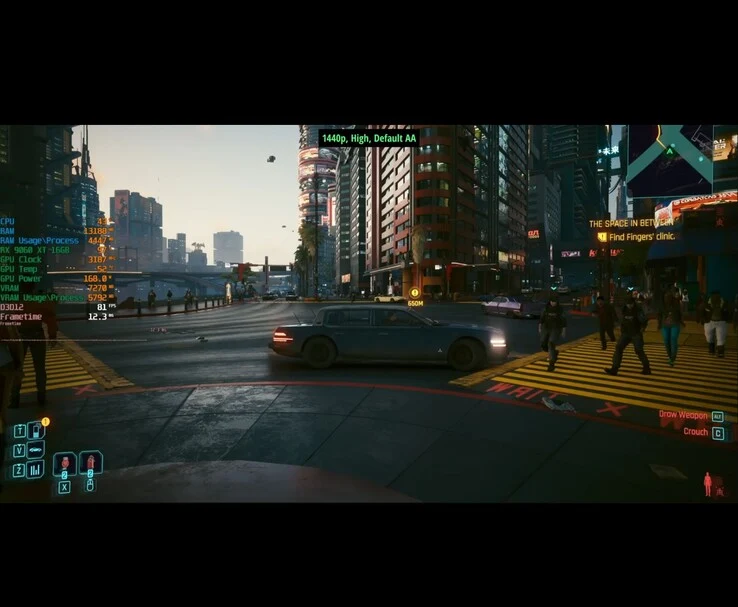
As the creator discovered, turning on FSR 4 in Cyberpunk isn’t just a straightforward process. First, you must start the game, press Alt+Z to bring up AMD’s overlay, manually enable FSR 4, and then restart the game for the option to show up in the graphics menu. Even after doing this, the sidebar may indicate it’s inactive until you load a save file, as happened during the YouTuber’s testing.
Performance Improvements Observed
After FSR 4 is activated, it demonstrates a noticeable performance scaling across different settings. On native 1440p high settings, the system, featuring an AMD Radeon RX 9060 XT 16GB and an Intel Core i7-12700F, managed about 80 FPS. Activating FSR 4 in Quality mode increased that to 100 FPS, while Balanced, Performance, and Ultra Performance modes each provided an additional 10–15 FPS boost.
Visual Quality and Limitations
Ultra Performance, which renders the game at a lower resolution of 480p, surprisingly maintained decent visual quality, according to the YouTuber’s findings. However, it did create visible shimmering on objects like fences and trees, especially with path tracing turned on. The RT Overdrive preset, featuring full path tracing, looked impressive but had difficulty reaching 30 FPS at native 1080p. The only way to approach 60 FPS was by upscaling from 480p using FSR 4, although this came with significant visual trade-offs.
In the video, a side-by-side comparison of FSR 4 and FSR 3 was made, tested in the Badlands area of Night City within Cyberpunk 2077. FSR 3 provided a small performance advantage, offering around 10–15 FPS more than FSR 4 in Quality mode, but it also caused flickering on some objects like metal poles and bushes.
Recommended Settings for Gamers
For gamers searching for the optimal experience, the YouTuber suggests using FSR 4 in Quality mode at 1440p with high settings and high crowd density. You can check out the complete video linked below from RandomGaminginHD for a better grasp of how Cyberpunk 2077 performs with FSR 4.
Source:
Link