Tag: Android Studio

  • Android developers vibe-code apps quickly in Gemini AI Studio web

    Android developers vibe-code apps quickly in Gemini AI Studio web

    Key Takeaway

    – Google AI Studio web version enables vibe coding Android apps using Gemini AI without any software installation.
    – Vibe coding allows building apps from natural language prompts, no formal programming knowledge required.
    – The web IDE includes an Android emulator for testing and supports exporting via ADB to real devices; apps can be moved to Android Studio or published to Google Play.


    Google reveals vibe coding for Android apps in web AI Studio

    At its annual I/O 2026 event, Google unveiled the ability to vibe code Android apps in the web version of Google AI Studio using Gemini AI. This new approach promises a browser‑based entry point for creating Android software without the need for traditional installations or setups, reshaping how developers might begin new projects with AI assistance.

    Web‑based Gemini AI powers the studio

    Google AI Studio for the web uses the same Gemini AI technology that powers Google’s Android Studio, the desktop IDE software traditionally used to program Android apps in Kotlin or Java. Unlike Android Studio, which requires a 1.4 GB installer to be downloaded and installed on a compatible system, no software installation is required to begin vibe coding immediately. The web platform thus lowers the barrier to entry for newcomers and accelerates initial experimentation for seasoned developers.

    How vibe coding works in practice

    Vibe coding leverages the power of modern AI chatbots to create complex code from simple prompts. Users do not need to understand how to code using a programming language, but instead, they only need to guide the AI by describing the functionality and appearance of apps like they would with any programmer. This conversational approach aims to translate user intent into functional app components with minimal friction, while still permitting iterative refinements as needs evolve.

    Browser access, emulation, and testing

    Users simply log into Google AI Studio using any compatible web browser to access a complete development environment that includes the Android phone emulator for app testing. Vibe-coded apps can also be downloaded to an Android phone using ADB (Android Debug Bridge) for testing. This setup provides an end‑to‑end workflow from idea capture through testing, all hosted in the cloud and accessible from common devices.

    Future paths for app development and distribution

    App programmers can finesse their apps by moving them to Android Studio to access broader developer features, or upload them to the Google Play Store for beta testing or publication. The integration hints at a hybrid lifecycle where AI‑built prototypes can be refined with traditional tooling before reaching end users, offering flexibility for teams balancing speed with advanced capabilities.

    Further reading and caveats

    Readers interested in vibe coding can read more about how it’s done in this book sold on Amazon.

    Sources

  • Android users can now access the Microsoft Copilot app

    Android users can now access the Microsoft Copilot app

    Microsoft Brings Copilot AI-Powered Chat Assistant to Android

    Microsoft has expanded the availability of its Copilot AI-Powered Chat Assistant to Android users. The app, which utilizes OpenAI's GPT-4 and DALL·E 3 models, offers rapid and accurate responses and is capable of generating visually appealing content from basic text inputs.

    A Versatile Assistant at Your Fingertips

    Copilot offers a range of functionalities to users. By downloading the app for free from the Google Play Store, users can draft emails, compose stories, perform language translation, proofread, and plan travel itineraries. The app also features the Image Creator, powered by DALL·E 3, which simplifies the design process by transforming text prompts into high-quality visuals.

    While Android users can now enjoy the benefits of Copilot, Microsoft has not yet confirmed plans for an iOS release. Speculation suggests that an iOS version may be launched in 2024, but no official details have been provided.

    From Bing Chat to Copilot

    Microsoft recently rebranded its Bing Chat to Copilot, aligning it with the capabilities of its ChatGPT counterpart. The Android version of Copilot mirrors the features of ChatGPT, offering chatbot capabilities, image generation, and text drafting. For iOS users who are eagerly awaiting Copilot, they can still access similar features through the Bing app. Microsoft's foray into the mobile app arena underscores Copilot's evolution into a versatile tool.

    In conclusion, Microsoft's Copilot AI-Powered Chat Assistant is now available for Android users. With its integration of OpenAI's GPT-4 and DALL·E 3 models, the app provides quick and accurate responses and the ability to generate visually appealing content. Android users can download the app for free from the Google Play Store, while iOS users can access similar features through the Bing app. As Copilot continues to evolve, it is poised to become an indispensable tool for users across various platforms.

  • Android 15 may bring battery health percentage feature, similar to iPhones

    Android 15 may bring battery health percentage feature, similar to iPhones

    For years, iPhone users have had the advantage of a battery health screen, a feature that Android lacked. This screen provides information about the battery's maximum capacity in comparison to its original state, giving users a clear understanding of its degradation over time. However, it seems that the tables may be turning, as there is evidence suggesting that Android 15 could introduce this much-desired feature.

    Nail Sadykov, the editor of Android Authority and Google News Telegram, recently discovered a hidden "battery health" screen in the Android 14 QPR2 beta 2 update. Although it is currently inactive, a code analysis revealed that it will display the "estimated percentage of charge the battery can currently hold compared to when it was new." In simpler terms, it is essentially the same battery health percentage feature found in iPhones.

    The availability of this feature in future Android updates remains uncertain. Android Authority speculates that it could potentially be introduced in Android 15, possibly as an exclusive feature for Pixel devices initially. However, there is always a chance that Google may abandon the idea, although recent efforts from the company suggest otherwise.

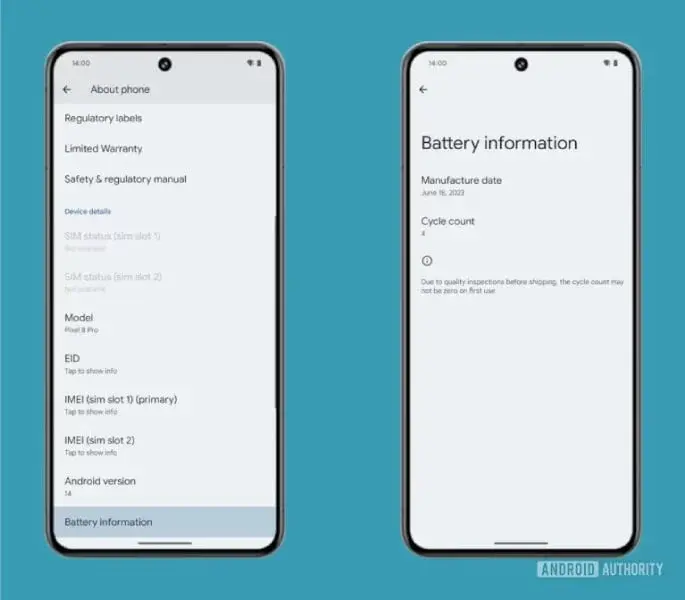
    In the latest Pixel Feature Drop, Google introduced a "battery information" screen that provides details about the battery's cycle count and manufacture date. Additionally, Android 14 empowered third-party developers with battery APIs, allowing apps to estimate battery health. These developments indicate that Google is laying the groundwork for a native battery health screen.

    The advantages of having a battery health screen are undeniable, especially for users who hold onto their phones for extended periods. With Google's announcement of seven years of updates for the Pixel 8 lineup, the battery health monitoring feature will prove to be beneficial for new Pixel owners.

    As more information about this feature emerges, we can expect further details to be revealed soon. We will keep you informed of any new developments regarding the battery health screen in Android.

  • Improved developer tools now accompany the release of the stable Android Studio Hedgehog

    Improved developer tools now accompany the release of the stable Android Studio Hedgehog

    Android Studio Hedgehog: The New IDE for Android Developers

    Android developers rejoice! The official new Integrated Developer Environment (IDE) for Android, Android Studio Hedgehog, is now available. With the release of Android Studio version 2023.1.1, developers can enjoy a host of new features and performance improvements that will enhance their app development experience.

    New Features for Enhanced App Efficiency

    Android Studio Hedgehog focuses on making app development more efficient and streamlined. One of the key features is the Power Profiler, which allows developers to calculate the app's drain on devices with a single action. Additionally, it provides recommendations for optimizing power consumption, opening up possibilities for more efficient apps.

    Upgraded IntelliJ Platform and Improved App Performance

    In the announcement post, Google product manager Sandhya Mohan shares the excitement surrounding the stable release of Android Studio Hedgehog. The IDE has been upgraded to the IntelliJ platform 2023.1, offering features designed to improve app performance and battery life. It also simplifies the process of upgrading applications to the latest Android version and enhances development speed using Jetpack Compose.

    SDK Upgrade Assistant for Seamless Compatibility

    Developers can now easily elevate the SDK level and ensure compatibility with newer Android versions, thanks to the SDK Upgrade Assistant. This tool identifies the necessary changes required to make the app compatible with the latest Android version, saving developers valuable time and effort.

    User Interface Changes for Customization

    Android Studio Hedgehog introduces new User Interface changes to enhance customization options. Developers can now choose from three different modes: compact mode, vertical and horizontal window splitting, and project tabs. These options allow developers to tailor their workspace according to their preferences and work more efficiently.

    Device Mirroring for Seamless Interaction

    The new Device Mirroring tool in Android Studio Hedgehog provides a seamless way to interact with physical Android devices without having to exit the IDE. By mirroring a device via USB or Wi-Fi, developers can test and debug their apps directly within Android Studio. Furthermore, the Running Devices window now includes the option to embed the Layout Inspector while running an application on virtual hardware or a mirrored device. This optional feature significantly improves app performance and frees up on-screen real estate.

    Download and Release Notes

    Android Studio Hedgehog is now available for download from Android developers. For more detailed information on the new features and improvements, users can refer to the release notes.

    Conclusion: A Powerful IDE for Modern App Creation

    The enhancements introduced in Android Studio Hedgehog highlight the IDE's commitment to providing developers with powerful tools. By making the app development journey more intuitive, efficient, and feature-rich, Android Studio Hedgehog aligns with the evolving needs of modern app creation. As developers dive into the updated version, they can expect an elevated experience that simplifies their workflow and enables them to create outstanding Android applications.