
Key Takeaways
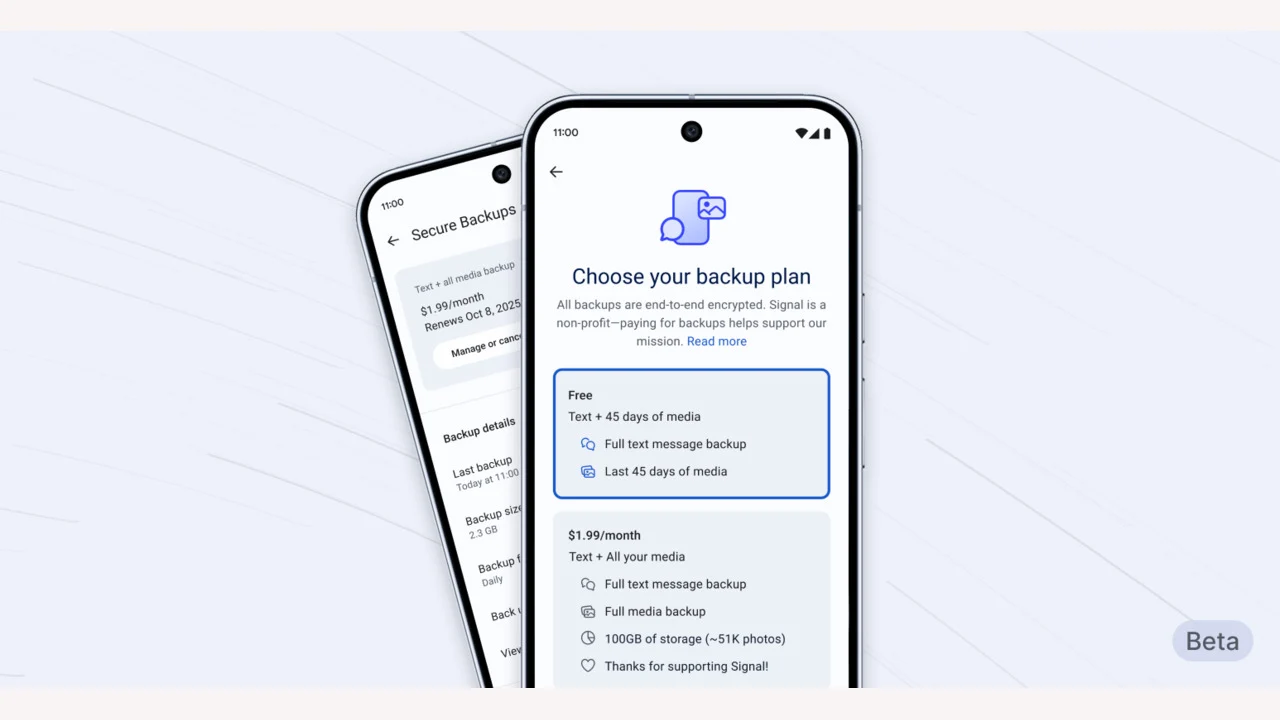
1. Signal has launched new free and paid plans for backing up messages and media, currently available only on the Android beta version.
2. The free backup option lasts for 45 days, while a $1.99 subscription allows backups of up to 100GB.
3. The subscription fee helps cover the costs of data storage and transfer, as Signal does not sell user data.
4. A unique 64-bit recovery key is created for each user, and losing this key means Signal cannot assist with message recovery.
5. Future enhancements are planned, including secure backup options and cross-platform message transfer features.
Open-source messaging platform Signal has rolled out new free and paid plans for safely backing up messages and media. This feature is optional and you must download the newest beta version on Android to access it.
Limited Release for Testing
According to Signal, restricting the launch to Android lets them “test this feature in a limited setting, before it expands to iOS and Desktop shortly.”
The free option permits users to back up all text messages and media for a period of up to 45 days. If users wish to increase this limit, they can opt for a $1.99 subscription that allows full media backups of up to 100GB.
Cost of Data Storage
Signal explained that “storing and transfering large amounts of data is costly.” As the company does not gather or sell user data, the $1.99 subscription helps them manage these expenses.
The secure backup functionality adheres to the same “zero-knowledge” principle that the company embraces. This means that all backup archives “are stored without a direct link to a specific backup payment or Signal user account.”
Recovery Key and User Responsibility
Signal creates a 64-bit recovery key on your device that isn’t shared with their servers and is the sole means to “restore access to your messages.” If you lose this key, the company cannot assist you in recovering it.
To use the new feature, you must download the latest beta version of the app from the Play Store. You will find the option to activate it in the Signal settings menu. Currently, this feature is exclusive to beta versions of the app on Android, but it will be available on all platforms soon.
Future Enhancements
The technology being utilized for the “initial version of secure backups will also provide the groundwork for more secure backup alternatives in the near future.”
Signal also hinted at adding more comprehensive options soon, such as the ability to save “a secure backup archive to a location of your choice, along with features that facilitate transferring your encrypted message history across Android, iOS, and Desktop devices.”
Source:
Link
Leave a Reply