

Key Takeaways
1. Privacy Concerns: Users are worried about Microsoft possibly scanning screenshots and sending data back to its servers, raising significant privacy issues.
2. Data Transmission Issues: Gamers are unhappy with their gaming sessions being recorded without consent, especially with the “Model training on text” feature enabled by default.
3. Performance Problems: The Xbox Game Bar may cause lower frame rates and other performance issues, particularly when AI features are activated.
4. System Resource Strain: The need for Microsoft Edge to run in the background for Gaming Copilot increases the strain on CPUs and memory, affecting performance on less powerful devices.
5. Emergence of AI in Gaming: AI assistants are becoming more common in gaming, with companies like Razer introducing new tools, but effectiveness relies on user-provided training data.
Since Microsoft has introduced its new Gaming Copilot, gamers have begun to notice unusual activity happening in the background. The concern is that to enhance AI features, screenshots might be scanned using OCR technology, with the gathered information sent back to Microsoft. However, as highlighted in a TechRadar article, the updates to Xbox Game Bar could also impact gaming performance.
Privacy Concerns Arise
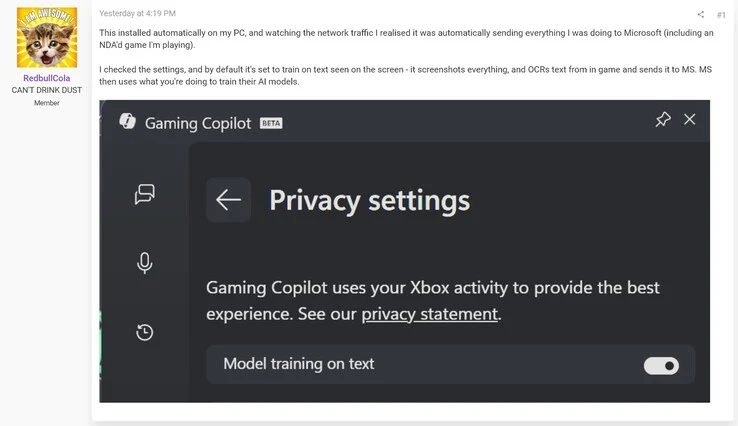
The issue first came to light when a user on the ResetEra forums posted images revealing network activity on Windows 11. It seems data is being tracked and uploaded to Microsoft’s servers. This raises significant privacy issues, but the situation could have been even more problematic. The poster was testing a game under a non-disclosure agreement (NDA), which could jeopardize their standing with the game publisher.
Questions About Data Transmission
There is currently some discussion regarding the actual data being sent from the PC. Regardless, many gamers are unhappy with their gaming sessions being recorded without their approval. To make matters worse, the “Model training on text” feature is turned on by default without any notice. Users of Windows 11 can turn off this setting in the privacy options of Gaming Copilot.
Performance Issues with Game Bar
Some gamers have been steering clear of the Xbox Game Bar entirely. The Xbox app or Game Bar may not update correctly, leading to a frustrating installation loop. Players might experience lower frame rates as the software uses more system resources to capture clips on demand. Performance drops could become even more pronounced when the Gaming Copilot AI features are in use.
Isaiah Williams from TechRadar noted a slight but noticeable decline in performance. While playing Dead as Disco, he found that average frame rates dropped from 84-89 to 80-85 with AI monitoring activated. Williams mentioned that Microsoft Edge needs to run in the background for Copilot to work, which adds extra strain on CPUs and memory. For less powerful PCs or handhelds like the ROG Xbox Ally, these additional demands can become quite significant.
AI Assistants Enter Gaming
AI assistants are quickly being incorporated into gaming applications. Razer, a manufacturer of laptops and accessories, is set to introduce a beta version of its Game Co-AI. This aims to offer players both real-time and post-match support. However, without user-provided training data sent to companies, these tools lack effectiveness. Unlike third-party software, Microsoft incorporates Gaming Copilot AI directly into the Game Bar, streamlining the process for gamers.
Leave a Reply