
Key Takeaways
1. Garmin has released beta version 15.10 for the Venu 4 smartwatch, following the initial beta version 15.08.
2. The change log for beta version 15.10 is the same as version 15.08, with no confirmed additional bug fixes at this time.
3. Key features from beta version 15.08 include the ability to power off the smartwatch without a passcode and reduced sound for starting voice notes.
4. The previous update also fixed issues with silent speakers, device reboots during calls, and notification count errors.
5. To install the update, users should go to Main menu > Settings > System > Software Update > Check For Updates.
Garmin is launching a new beta update for the Venu 4 smartwatch. This marks the second beta release for this device, which debuted in September 2025. The initial update, beta version 15.08, was made available in early October 2025.
Latest Beta Version Released
A Garmin representative shared in a recent forum post that beta version 15.10 is now accessible for Venu 4 smartwatch users (current price: $559.99 on Amazon). Interestingly, the change log linked to this announcement is the same as that for the previous beta release, version 15.08. As of now, it’s uncertain if there are any additional bug fixes in this latest version that haven’t been mentioned.
Features from Previous Update
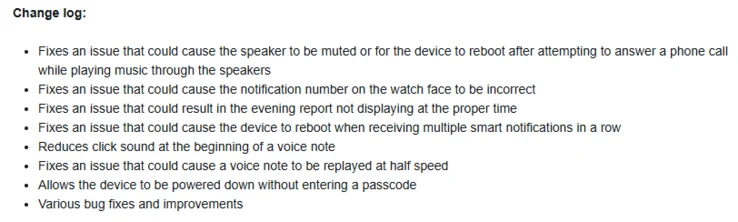
To recap the features introduced with beta version 15.08, users of the Garmin Venu 4 can now power off the smartwatch without needing to input the device passcode. Also, the sound that plays when starting a voice note has been reduced. Various bug fixes have also been included, addressing issues such as a silent speaker or the device rebooting during phone calls. Garmin has also resolved problems related to the notification count displayed on the watch, the timing in the Evening Report, and crashes triggered by receiving multiple smart notifications. The full change log is provided below.
How to Install the Update
If you belong to the Garmin Venu 4 Beta Program and want to download the version 15.10 update, navigate to Main menu > Settings > System > Software Update > Check For Updates.
Source:
Link
Leave a Reply