
Tag: smart home control

  • SwitchBot Weather Station: Daily Reports, Calendar Alerts & Smart Control

    SwitchBot Weather Station: Daily Reports, Calendar Alerts & Smart Control

    Key Takeaway

    – E Ink weather station with smart home control via Alexa/Apple/Google/Matter
    – 7.5-inch B&W display, 5,000 mAh battery for wireless use anywhere in the home
    – Syncs with up to three external sensors for CO2, temperature, humidity
    – Smart calendar for up to 5 family members (Google, iCloud, Outlook, Yahoo)
    – AI-powered daily tips, motivational quotes, and alarm clock with snooze


    New Smart Home Weather Station Released

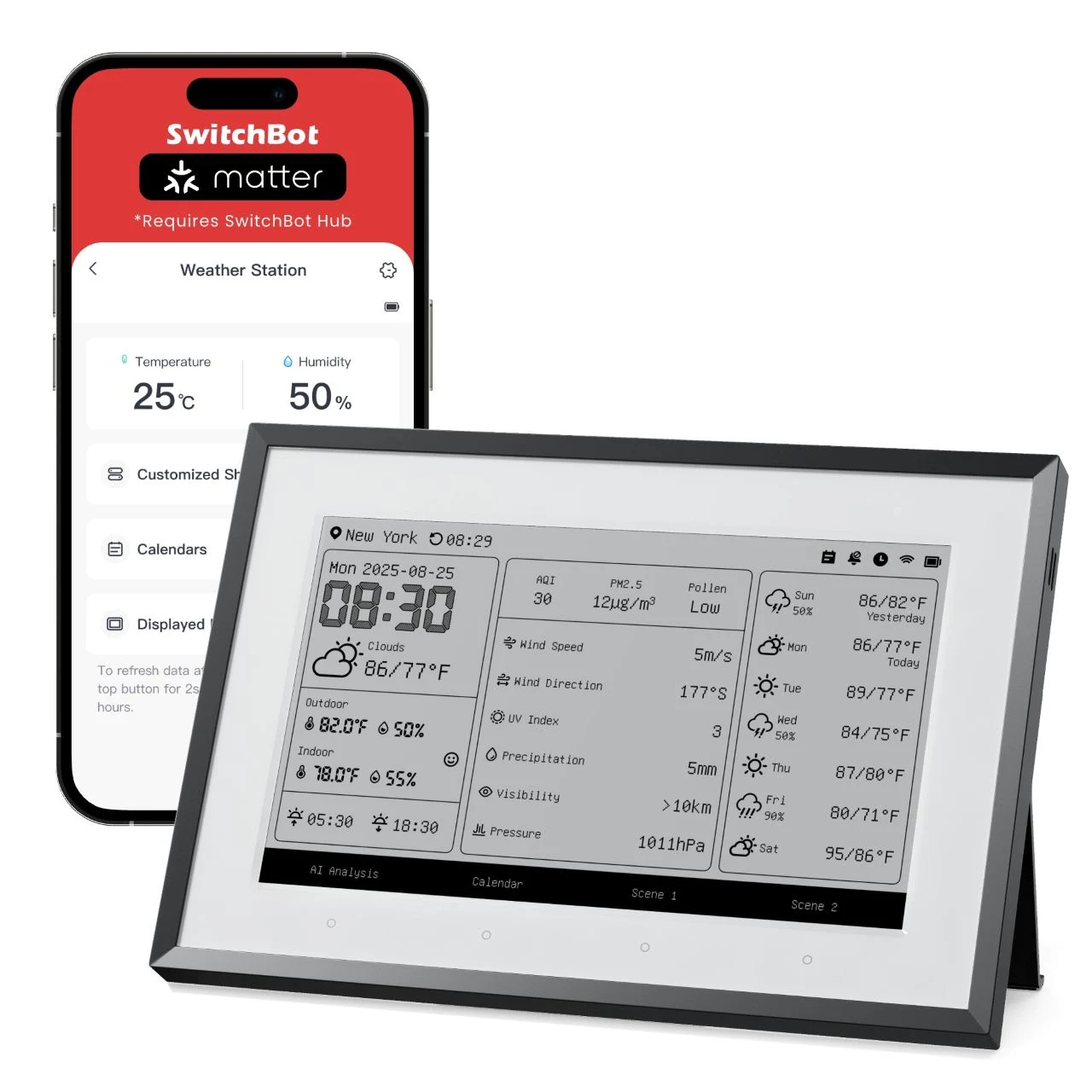
    SwitchBot has released the Weather Station, an E Ink contraption that shows weather data, calendar events and lets you control smart home gadgets. The unit can controll a smart home by using Alexa, Apple Home, Google Home, or a Matter-compatible SwitchBot Hub via a tap or even automatically based on sensor data. It basicly works like a hub for your daily schedual.

    Display and Power Specs

    The Weather Station spots a 7.5-inch black-and-white E Ink display with a resolution of 800 x 480 pixels and includes a backlight. The device is powered by a 5,000 mAh lithium battery that enables wireless use from any place inside a residence, so you don’t need to plug it in all the time. This gives alot of flexibilty on where you put it in your house.

    • Screen size: 7.5 inches
    • Resolution: 800×480 pixels
    • Backlight: included
    • Battery capacity: 5,000 mAh

    Atmospheric Data and Sensors

    Atmospheric data gets pulled from online sources or external sensors that the company sells, for example the SwitchBot Meter Pro which measures CO2 levels, temperature, and humidity. You can connect up to three such monitors to the Weather Station at once. It also gets info from the web if you dont buy extra gear.

    Calender Integration and Alarm Features

    The device has a smart calendar that can show events for upto five family members, with information synced from personal Google, iCloud, Outlook or Yahoo calendars. Users can get reminded of events with alarms, and the Weather Station can also work as a standard bedside alarm clock with a snooze function. Thats pretty handy for busy familys.

    Built-in AI offers daily outing suggestions based on the current weather and can show motivational quotes to help you start the day on a good note, like a little cheerleader on your desk.

    Pricing Details

    The Weather Station is avalible for $109.99 from the SwitchBot website or from Amazon.

  • Shelly Wall Displays: Multi-Dashboard Support Guide

    Shelly Wall Displays: Multi-Dashboard Support Guide

    Key Takeaway

    – Shelly’s Wall Display beta 2.7.0 adds support for up to five separate dashboards (variants) on select models, enabling customizable, widget-free control panels.
    – The feature aims to improve on-device control of lights, sockets, AC, and heating without a smartphone, using integrated switch actuators for direct smart home integration.
    – Only certain models (X2, X2i with 3 dashboards; XL with 5 dashboards) currently support the new views due to hardware limits; others remain on 2.6.x or pending.
    – Performance goals include faster, tidier dashboards to mitigate prior slow responses, especially with Home Assistant, though real-world results may vary.
    – If you’re on the Wall Display beta, you can try the new feature now, but you cannot downgrade back to the previous stable 2.6.2 once you switch to 2.7.0.


    Smart Home Devices And Shelly’s Continued Commitment

    On the one hand, smart home devices are becoming more widespread; on the other hand, many companies have increasingly neglected their smart home divisions in recent years, such as Google with its own voice assistant. At Shelly, however, there is no sign of this: the company is fully committed to the smart living trend. the tone stays casual yet informative as the author notes Shelly’s consistent focus despite market trends.

    Preview Of Wall Display Software Version 2.7.0

    In an announcement, the manufacturer has now provided a preview of the next software version for the Wall Display, which is available immediately in the beta phase as version 2.7.0. It enables the use of additional dashboards. Depending on the specific model, up to five different variants can now be saved. this section emphasizes the beta nature and the new capability to store multiple dashboards for later use.

    What The Dashboards Do For The Smart Home

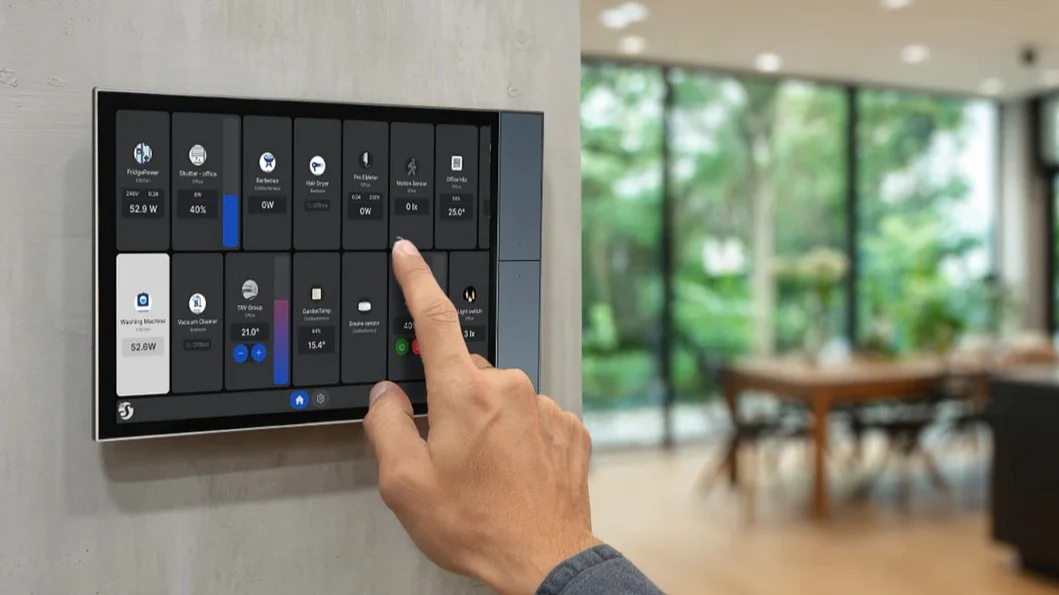
    In this context, the dashboard serves as the device’s standard display through which the smart home is controlled. Depending on the individual living situation, it allows for the clear and convenient control of lights, sockets, air conditioning units, and heating. The major advantage of a permanently installed control panel: no smartphone is needed to control devices on site. In addition, the Wall Displays feature integrated switch actuators that allow for the direct integration of additional consumers into the smart home. this paragraph explains practical benefits and hardware features in simple terms, though the writing varies in style from the previous paragraph.

    Widget Customization And Model Limitations

    In the past, adapting the dashboard with widgets was possible, but switching between different display variants was not. This is now changing with the new software. A slight downer remains: although the update is generally available, due to limited hardware capabilities, only the X2 (3 dashboards), X2i (3 dashboards), and XL (5 dashboards) models currently support the additional views. the paragraph notes the improvement plus the constraints on certain models.

    Performance Notes And Practical Questions

    Furthermore, there have been repeated reports of slow response times in the past, especially in combination with Home Assistant. Tidy and uncluttered dashboards are supposed to provide a remedy here. How (counter)productive the setup of multiple dashboards will actually be in practice remains to be seen. this section raises concerns and expectations about real-world use and efficiency.

    Pricing And Beta Availability

    The flagship “XL” model is currently priced at around $350. Other models are correspondingly somewhat cheaper. Anyone who already owns a Wall Display can test the new feature immediately by switching to the beta version. Please note, however, that a subsequent switch back to the previous, stable software version (2.6.2) is no longer possible. Those who wish to avoid this risk should be patient for a little longer until the final release. this paragraph gives concrete pricing and testing guidance, while warning about rollback limitations.


    Sources