
Key Takeaways
1. Lenovo’s ThinkPad laptops previously featured a modular Slim tip charging port, making repairs easy.
2. USB-C has replaced proprietary ports, allowing one charger for multiple devices, but USB-C ports are soldered and harder to replace.
3. The ThinkPad P1 Gen 8 is the first mobile workstation to drop the Slim tip port in favor of USB-C charging, raising repair concerns.
4. Lenovo has addressed repairability by including a modular USB-C port on the ThinkPad P1 Gen 8, allowing easy replacement.
5. The focus on sustainability in design is becoming more significant in commercial PCs, as demonstrated by Lenovo’s new model.
For a long time, Lenovo’s ThinkPad laptops featured a modular charging port. The old Slim tip charger connected to the motherboard through a detachable cable. If the charging port got damaged, it was simple to replace it.
USB-C’s Impact
Then USB-C came along and changed the game. This new charging standard made proprietary ports less relevant, allowing users to charge their laptops using a single charger for multiple devices. However, USB-C ports are not as easy to swap out since they are soldered onto the motherboard. A broken USB-C port could render the laptop useless, leading to costly motherboard replacements. Buyers of ThinkPads looking to steer clear of this issue could still opt for mobile workstations like the ThinkPad P1 Gen 7, which still features the Slim tip port, available on Amazon.
The ThinkPad P1 Gen 8
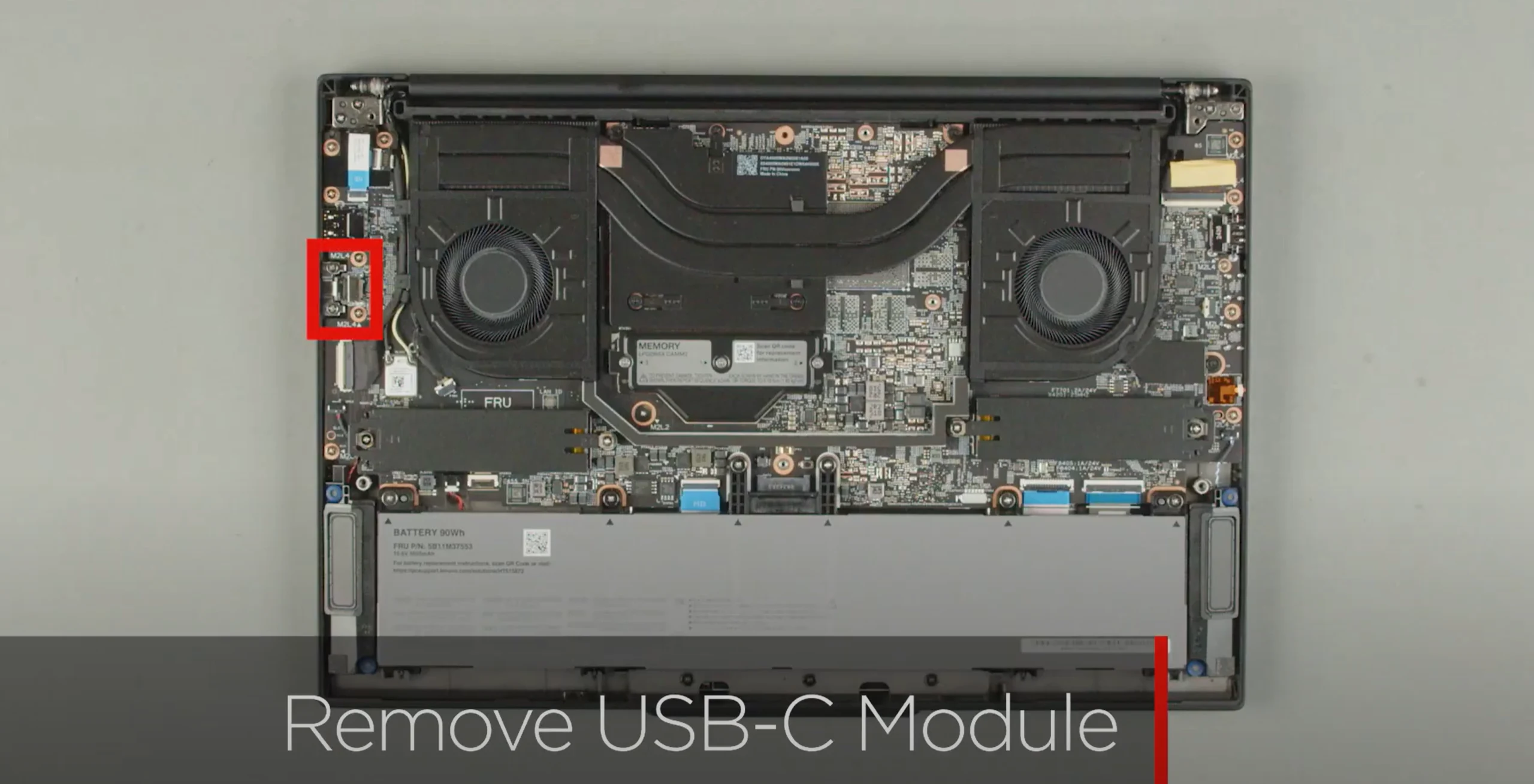
Now, the Lenovo ThinkPad P1 Gen 8 stands out as the first ThinkPad mobile workstation to forgo the Slim tip charging option, opting instead for USB-C charging. While this is a good change for user convenience, it raises questions about how easy it is to repair the device. Fortunately, Lenovo has listened to user feedback and included a modular USB-C port on this new model; the USB-C port on the right side can be replaced.
As the launch of the laptop approaches, Lenovo shared a video on their Lenovo Support YouTube channel, demonstrating how easy it is to swap out the charging port. After taking off the back cover, users will need to unscrew two screws around the USB-C port. Once these screws are out, the port can be replaced without much hassle.
A Step Towards Sustainability
While Lenovo isn’t the first company to implement such a feature, it’s encouraging to see that sustainability is becoming more important in the design of commercial PCs.
Source:
Link

