Tag: Steam Deck

  • Nvidia GeForce Now Delivers Smooth Gameplay on Steam Deck

    Nvidia GeForce Now Delivers Smooth Gameplay on Steam Deck

    Key Takeaways

    1. Cloud Gaming Access: GeForce Now allows Steam Deck users to access a wide range of PC games from various platforms, including Epic, Xbox, and Ubisoft, all from one app.

    2. Performance Consistency: The service maintained 60 FPS during gameplay, even under significant lag, with a typical ping of 45-50 milliseconds and minimal input lag.

    3. Extended Battery Life: GeForce Now offers a 50% increase in battery life on the Steam Deck, providing nearly 5 hours of gameplay compared to 3 hours with a standard game.

    4. Fast Game Load Times: Games loaded quickly, with GeForce Now often outperforming the Steam Deck in load times by 3-5 seconds, making the experience smoother.

    5. Family Account Limitations: Users with family accounts on platforms like Steam may face issues with automatic library sync, requiring potential workarounds for accessing family-shared games.


    All tests for this review were done on a Steam Deck LCD using the Southwest GeForce Now servers.

    GeForce Now on Steam Deck

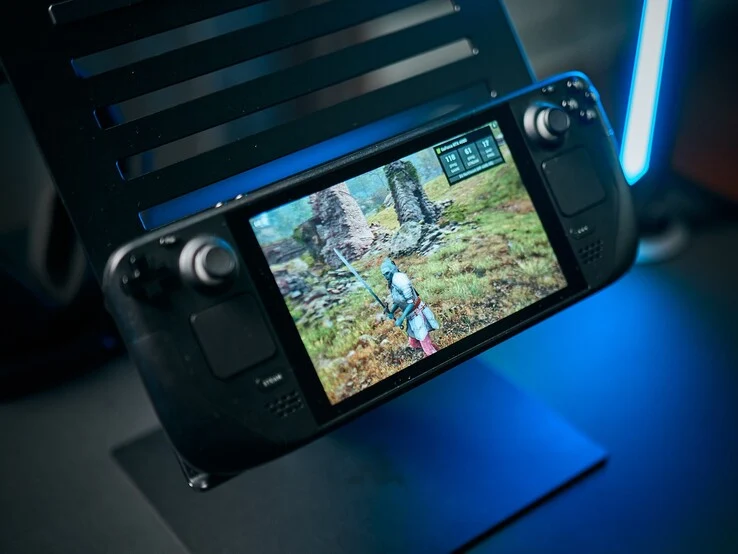
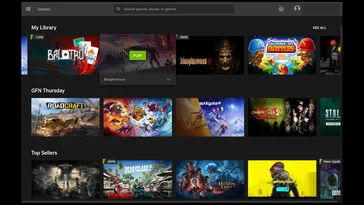
    Nvidia GeForce Now allows gamers to play all their favorite titles via the cloud, and its arrival on the Steam Deck might just transform the typical Steam Deck experience for launching games from various app stores. Users can connect their Epic, Xbox, Battle.net, Ubisoft, and Steam accounts, giving Steam Deck owners access to a large portion of the PC gaming libraries all from one application. We conducted numerous tests, assessing everything from graphics to input lag, and Nvidia performed exceptionally well across the board. The service maintained 60 FPS for every stream, even during moments of significant lag. In my own testing, I experienced a ping of 45-50 milliseconds for most of my gaming session, particularly during my Performance Day Pass, and surprisingly, I didn’t encounter any significant issues! Nvidia even sent me a warning before each stream that didn’t meet its optimal ping, but I only faced problems when my ping surpassed 60 milliseconds.

    Improved Battery Life

    Furthermore, Nvidia claims a 50% increase in battery life, and honestly, this claim holds true. With the same performance and display settings, Balatro ran for 3 hours on a full charge, whereas GeForce Now provided nearly 5 hours of gameplay. Before this review, I didn’t even know Nvidia’s GeForce Now app existed. Now, I’m genuinely thinking about getting a 6-month Performance subscription, especially with the ongoing summer sale — a fantastic deal for anyone interested in following suit.

    Game Performance and Compatibility

    During my Performance Day test on the Steam Deck, I played main titles like Genshin Impact, Marvel Rivals, Monster Hunter World, and Balatro. Each of these games consistently maintained 60 FPS, even at lower Wi-Fi speeds. In terms of input lag, I noticed no significant difference, even in the more demanding games I tried; everything felt very responsive, and without the performance overlays, I might have forgotten I was streaming. With automatic library syncing for all platforms except Epic Games Store, Nvidia GeForce Now complements my Heroic Games Launcher perfectly, filling in most gaps for PC gaming on my Steam Deck (Heroic Games Launcher manages GOG, Epic, and Amazon Prime game launches). Additionally, every game loaded quickly and smoothly during my Performance Day tests, taking no longer than a typical launch from the library. I timed both Balatro and Monster Hunter World, and Balatro only took an average of about 2.5 seconds longer than a regular launch, which feels hardly noticeable compared to the usual 5-6 seconds my Steam Deck typically requires. Unless the game is particularly demanding, GeForce Now frequently outperforms the Steam Deck by at least 3-5 seconds in load times.

    Family Account Limitations

    One downside is for users with family accounts on platforms like Steam; unfortunately, those games don’t benefit from the automatic library sync. I haven’t fully tested a workaround mentioned on Reddit, but some users in online forums have claimed success in getting games from their Steam Family Group to work by marking Family Group titles correctly for play.

    GeForce Now presents numerous advantages over alternative gaming methods, especially when compared to a standard Steam Deck experience. For heavier titles, GeForce Now can deliver faster load times and even offers potential 4K 60 FPS streaming on a TV or 1440p at 120 FPS on a monitor, enhancing what the Steam Deck typically provides. For games that are beginning to show the Steam Deck’s limitations, this app might ultimately offer a superior experience, relying solely on a stable internet connection to maximize your Steam Deck’s capabilities.

    Getting Started with GeForce Now

    For those interested in playing, visit Nvidia’s download page and scroll down to your preferred device to download and follow the instructions. For games like Genshin Impact, using the Steam Template with Keyboard (WASD) and Mouse is often more effective on the Steam Deck, with some minor adjustments needed through the tutorial. After that, head into the game’s controller settings to connect an external controller. To find the Steam Template for Keyboard (WASD) and Mouse, go to your controller settings on Steam, select community layouts, and browse templates until you locate it. I found this setup to provide the best experience compared to Nvidia’s suggested method (which was Gamepad with Mouse Trackpad, for those curious).

    I plan to dive into Baldur’s Gate 3 (a game compatible with mods) as soon as I acquire my pass, and whether you choose to get a subscription or a day pass on GeForce Now, enjoy your gaming! Also, check out our video from Notebookcheck’s Alex Wätzel via the link below!

    Source:
    Link


  • New Co-op Open-World RPG Blends Cozy Gaming and Monster Hunting

    New Co-op Open-World RPG Blends Cozy Gaming and Monster Hunting

    Key Takeaways

    1. Strong Launch: Fantasy Life i debuted on Steam on May 21, 2025, attracting over 20,000 players and reaching a peak of 49,403 concurrent players in its first week, ranking third on SteamDB’s top sellers chart.

    2. Unique Gameplay: The game combines traditional JRPG elements with resource management, colony building, and a “slow life RPG” experience, allowing players to manipulate their environments.

    3. Engaging Storyline: Players explore a mysterious island, traveling back 1,000 years, and can switch between 14 distinct roles, engaging in activities like fishing, crafting, and battling legendary creatures.

    4. Visual Style: Featuring a Nintendo-style, low-poly aesthetic, the graphics are accessible for a wide range of hardware, requiring only an Nvidia GeForce GTX 750 Ti for minimum performance.

    5. Multiplayer Options: The game supports online multiplayer for up to four players and offline multiplayer for two players, making it a suitable option for portable gaming on devices like the Steam Deck.


    Fantasy Life i: The Girl Who Steals Time made its debut on Steam on May 21, 2025, and quickly attracted a large fanbase of over 20,000 players. Within its first week, the game reached a peak of 49,403 concurrent players, as reported by SteamDB. This impressive performance placed it third on SteamDB’s top sellers chart for that week and secured the top spot for most concurrent players, all while being priced at $59.99.

    A Unique Gaming Experience

    Described by its developers as a “slow life RPG,” Fantasy Life i offers a broad range of gameplay experiences. It combines elements of traditional JRPGs, such as cooperative monster hunting and open-world exploration, with features like resource management and colony building, allowing players to manipulate their environments.

    An Engaging Storyline

    The narrative of Fantasy Life i resembles that of an isekai anime. Players step into the role of an adventurer who arrives on a mysterious island, eager to discover its secrets. This journey takes them back 1,000 years into the past, to a time when the island’s civilization flourished. Throughout their exploration, players can climb, swim, and ride various mounts, while switching between 14 distinct roles, referred to as “lives.” These roles range from relaxing activities like fishing and gathering resources to more complex tasks like crafting, cooking, and researching, as well as delving into dungeons, solving puzzles, and facing legendary creatures.

    Building Your Own World

    Players can also adopt a broader perspective by settling the island in a manner similar to colony simulation or city-building games. They have the opportunity to construct houses, design their towns, and even reshape the landscape, including moving and creating essential features like rivers and roads. Fantasy Life i also offers players substantial decoration options within their homes, providing various furniture and decor to create a personalized space.

    Visual Style and Performance

    The graphics in Fantasy Life i: The Girl Who Steals Time lean towards a Nintendo-style, low-poly aesthetic. However, there is a clear artistic vision that aligns with the overall cozy theme of the game. The simple graphics make it accessible for a wide range of hardware, with the minimum recommended GPU being an Nvidia GeForce GTX 750 Ti, which was released over ten years ago.

    Positive Reception

    Steam reviews for Fantasy Life i highlight the game’s flexibility and the abundance of engaging content. Many players commend how well the various gameplay elements come together, despite the game’s wide scope. Progression is frequently mentioned as a standout feature, with many users expressing that it feels meaningful and rewarding.

    Multiplayer Options

    Fantasy Life i: The Girl Who Steals Time allows for up to four players in online multiplayer mode, in addition to a family-friendly multiplayer option that accommodates two players for offline adventures on the same machine. With its mix of online, offline, and cooperative gameplay, along with relatively lightweight system requirements and a Platinum ProtonDB rating, it’s an ideal choice for portable gaming on devices like a Steam Deck or Lenovo Legion Go (currently priced at $699.99 from Lenovo US) or Lenovo Legion Go S (currently priced at $759.99 from Lenovo US).

    Source:
    Link

  • New 3D Co-op Metroidvania Hits 1M Sales in 2 Weeks, 80% Positive Reviews

    New 3D Co-op Metroidvania Hits 1M Sales in 2 Weeks, 80% Positive Reviews

    Key Takeaways

    1. Sales Success: Revenge of the Savage Planet sold 1 million copies within 12 days of its launch on May 20.

    2. Future Updates: Raccoon Logic Studios is working on a roadmap for future game updates, though specifics have not yet been revealed.

    3. Story and Gameplay: The game features a storyline focused on revenge in a corporate-driven future, with gameplay that includes exploration, puzzle-solving, and upgrades across four unique planets.

    4. Reception: The game has received mostly favorable reviews, holding an 80% Positive rating on Steam, praised for its entertainment value, intuitive controls, and overall gameplay experience.

    5. System Compatibility: Revenge of the Savage Planet has reasonable system requirements and is compatible with handheld devices, holding a Gold rating on ProtonDB for performance.


    Revenge of the Savage Planet just launched only 12 days ago, and it appears that the positive reviews surrounding this indie sci-fi Metroidvania were truly warranted. On May 20, Raccoon Logic Studios Inc. shared that it has sold 1 million copies of this new 3D sci-fi platformer since it debuted.

    Future Updates on the Horizon

    In a Steam News announcement confirming this accomplishment, Raccoon Logic Studios, the creators and publishers of Revenge of the Savage Planet, mentioned that the development team is currently working on a roadmap for future game updates. This means more mayhem and excitement will be arriving soon. However, Raccoon Logic has not detailed what those updates will include.

    Story Overview

    “In a future turned upside down by corporate greed and foolishness, you find yourself redundant and deserted on the distant edge of space with limited equipment and no safety net. To exact revenge on your former boss and find your way back to Earth, you’ll need to explore every corner, gather numerous upgrades, and turn over every strange alien rock.”

    This is how Raccoon Logic Studios presents the storyline of Revenge of the Savage Planet. The bright, exaggerated visuals and whimsical character design effectively reflect this narrative. Players can enjoy Revenge of the Savage Planet in single-player mode or through split-screen or online co-op, making it a fantastic option to play with family and friends.

    Reception and Reviews

    While Revenge of the Savage Planet received mostly favorable reviews from gaming and tech outlets, its Steam rating stands at an admirable—yet not astonishing—80% Positive. Many Steam users praise Revenge of the Savage Planet for its entertainment value and for how it expands upon the first game in the series. Reviewers commonly highlight intuitive controls, the design of the world and characters, the overall gameplay experience, and the progression system as notable strengths, along with a light-hearted tone.

    The gameplay resembles that of a classic 3D platformer infused with Metroidvania elements. Players will explore four distinct planets, solve various puzzles, complete quests, gather upgrades, and discover hidden secrets scattered across the landscapes. Each planet features its own unique environment, aesthetic, and local flora and fauna to engage with. Revenge of the Savage Planet adopts a third-person perspective, offering players a variety of weapons and upgrades to keep the experience engaging.

    System Requirements and Compatibility

    Revenge of the Savage Planet also has fairly reasonable system requirements and holds a Gold rating on ProtonDB, indicating it should perform well on the Steam Deck and other handheld gaming devices, such as the Lenovo Legion Go (currently priced at $699.99 from Lenovo).

    Source:
    Link

  • Revolutionary FPS Game Now Just $4 on GOG – Huge Discount!

    Revolutionary FPS Game Now Just $4 on GOG – Huge Discount!

    Key Takeaways

    1. Revitalization of the Franchise: Doom 2016 successfully reinvigorated the series with a more intense gameplay experience and a memorable main character, the Doom Slayer.

    2. Hellish Setting: The game is set on Mars during a demon invasion, featuring a storyline that can be ignored in favor of fast-paced action.

    3. Diverse Arsenal: Players have access to a wide range of weapons, including iconic ones like the Super Shotgun and functional chainsaw, adding to the satisfaction of gameplay.

    4. Distinctive Soundtrack: The soundtrack by Mick Gordon combines Djent, metal, and industrial music, enhancing the gaming experience and making it enjoyable for workouts.

    5. Affordable Gaming: Doom 2016 is available for just $3.99 on GOG, making it an accessible entry point for new players ahead of the release of its sequel, Doom: The Dark Ages.


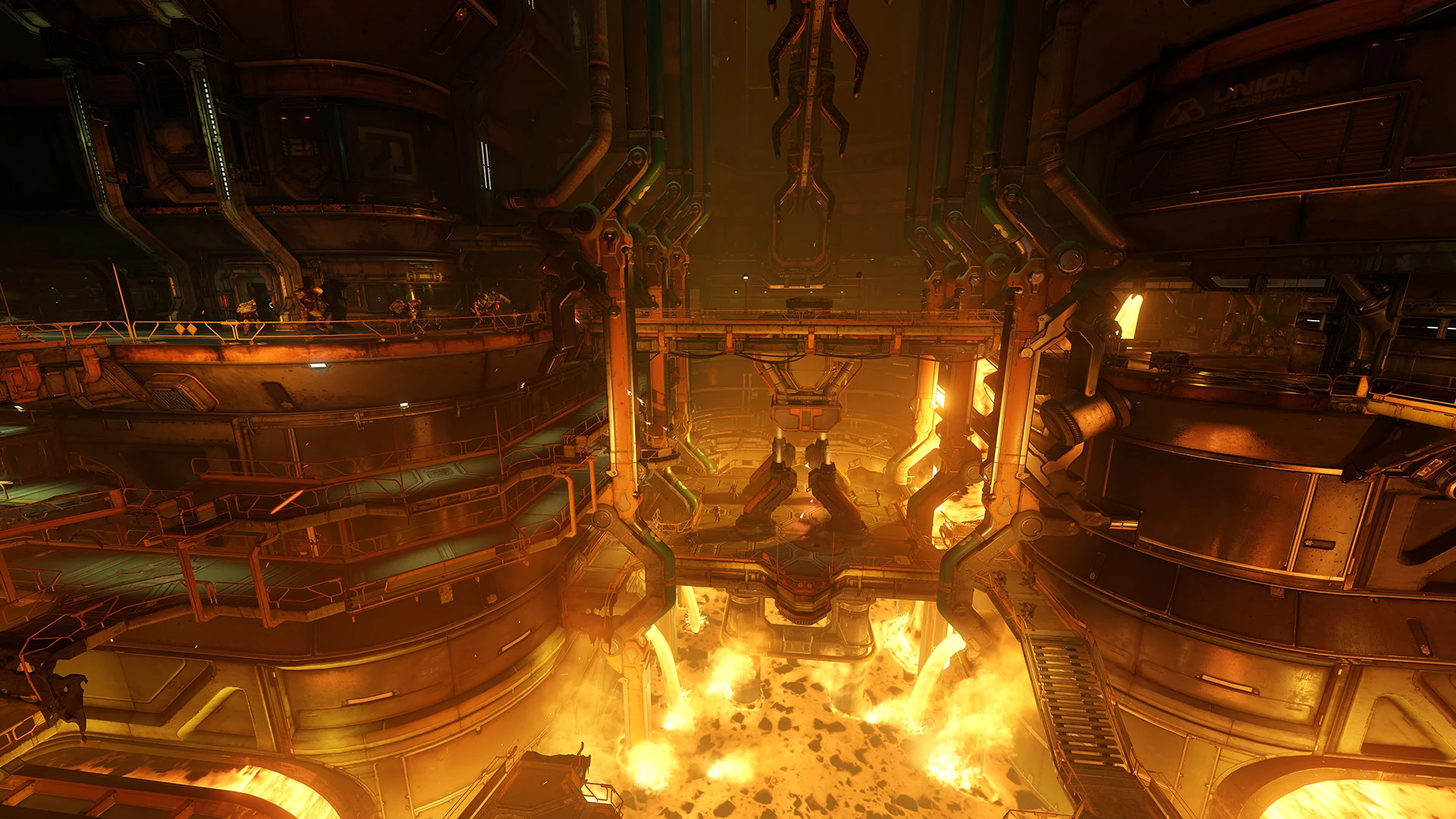
    2004’s Doom 3 was seen as a big letdown because it attempted to juggle too many ideas at once and ended up failing badly. Learning from this, idSoftware went back to the basics and spent a whole thirteen years rethinking their approach. They returned in 2016 with Doom, which was a huge hit, unlike its earlier counterpart. Now, nearly nine years later, this game can be played on practically any PC made in the last ten years, and even on handheld devices like the Steam Deck.

    Revitalizing the Franchise

    Doom (often called Doom 2016) breathed new life into the series and cranked the intensity way up. The main character, once just a forgettable hero, transformed into the Doom Slayer, a fierce demon destroyer known for his extreme brutality. From the very start, you find yourself smashing an imp’s skull into a coffin, and the level of destruction only escalates from there.

    A Hellish Setting

    Set on Mars, Doom 2016 drops you into the middle of a hellish invasion. Your mission is to put a stop to this chaos, just like you’ve done in previous installments. Unlike earlier versions of Doom, this game actually has a bit of a storyline, but you can easily choose to ignore it. After all, there are demons to take down, and you can’t let story details slow you down.

    A Diverse Arsenal

    As with its predecessors, Doom 2016 features a broad array of weapons, including iconic ones like the Super Shotgun and BFG. The chainsaw is now a functional weapon in your arsenal, and using it to shred a demon before watching it burst into ammunition is incredibly satisfying.

    A Distinctive Soundtrack

    While Doom 2016 shines as a technical marvel with its high-speed action, what truly distinguishes the game is its soundtrack. Mick Gordon’s unique mix of Djent, metal, and industrial music enhances the experience of battling through hordes of hellish creatures. Plus, it doubles as excellent workout music. Seriously, give it a try.

    Affordable Gaming

    You can grab Doom 2016 on GOG for only $3.99. Although it has been cheaper on Steam in the past, it is currently at full price there. Now is a perfect opportunity to dive into Doom 2016 if you’re new to the series. With Doom: The Dark Ages set to launch on May 15 for PC, PlayStation, Xbox, and Game Pass, you can experience the game that started it all before jumping into its sequel, Doom Eternal.

    Source:
    Link

  • Doom: The Dark Ages Performs Great on Steam Deck

    Doom: The Dark Ages Performs Great on Steam Deck

    Key Takeaways

    1. Initial Compatibility Issues: Doom: The Dark Ages wasn’t initially verified for the Steam Deck due to performance concerns, but updates have improved its playability.

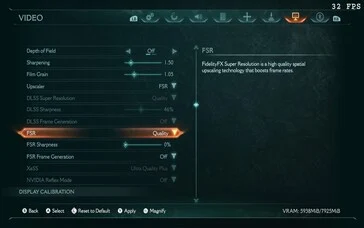
    2. Game Settings Optimization: The best performance on the Steam Deck was achieved by setting the resolution to 1,280 x 720, disabling Depth of Field and Chromatic Aberration, and using FSR Quality for upscaling.

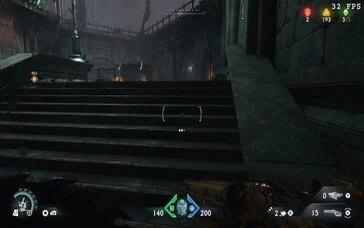
    3. Performance Metrics: The game generally runs at around 30 FPS, with occasional peaks of 42 FPS, but performance can drop below 30 FPS during intense battles.

    4. Consistent Performance in Mech Combat: Mech combat maintained a steady 30 FPS, indicating some areas of the game perform better than others.

    5. Gameplay Recommendations: Players may need to lower difficulty settings for a smoother experience, especially in later levels where enemy density increases.


    Doom: The Dark Ages isn’t verified for the Steam Deck, and a quick look at its system requirements suggests that the handheld may lack the necessary power to run the game. During my initial review, it wouldn’t even launch on my Deck OLED, but now things have changed. Thanks to an update (H/T Cary Golomb) for the Steam Deck preview channel (SteamOS 3.7.6), we can now get past the Bugsplat error and see how the game performs.

    Setting Up the Game

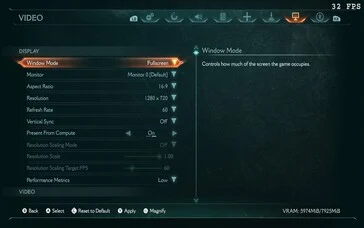
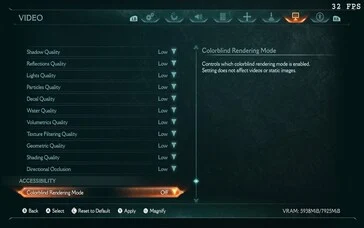
    Getting Doom: The Dark Ages to work on the Steam Deck is pretty straightforward. We adjusted the resolution to 1,280 x 720, turned off Depth of Field and Chromatic Aberration. For upscaling, we opted for FSR Quality. Switching to Balanced didn’t show much of a performance change, so either one will work fine. It’s important to disable Frame Gen as it significantly hurt performance. Everything else was set to low. We kept the game’s UI elements the same for a fair comparison with the PC.

    Performance Insights

    With these settings, we achieved a solid 30 FPS in most areas, with peaks of up to 42 FPS in less populated sections with fewer textures. However, the 30 FPS didn’t hold up during some later battles due to the high number of projectiles and monsters on screen. There were some noticeable frame drops, but it never fell below 20 FPS. Mech combat was similar, staying at a consistent 30 FPS. Switching to XeSS didn’t seem to improve things, but that’s likely due to the limited capabilities of the Steam Deck itself.

    Conclusion

    In general, Doom: The Dark Ages is somewhat playable on the Steam Deck. You might breeze through the early parts, but as you advance, expect more challenges as the density of enemies increases. If you really want to play this on the Deck, it might be a good idea to lower some difficulty settings to enhance your experience. Save the no-hit Ultra Nightmare run for a proper PC with a keyboard and mouse.


  • Steam Deck Beta Update Introduces Battery Charge Limit Feature

    Steam Deck Beta Update Introduces Battery Charge Limit Feature

    Key Takeaways

    1. Valve has introduced a battery charge limit feature in the beta update for the Steam Deck, allowing users to set a maximum charging limit.
    2. The feature helps maintain battery health by preventing charging beyond 80%, especially for devices kept plugged in or docked for long periods.
    3. Users can access the battery charge limit option through the Power section in Settings.
    4. The Lenovo Legion Go also offers a similar battery charge limit option, reflecting a trend among handheld devices.
    5. Additional updates include a new location for the Show Battery Percentage option and adjustments to Display Dim and Suspend timeout settings.


    One solution that companies have developed to improve battery life is the introduction of a battery charge limit feature. This allows users to set how much their device charges. Typically, when this feature is on, the device will stop charging at around 80%, which helps reduce the wear on the battery. Recently, Valve has included this battery charge limit feature in the latest beta update for the Steam Deck.

    New Features for Steam Deck Users

    As per the changelog, owners of the Steam Deck who are using the beta version can now set a maximum charging limit. This new feature is said to help maintain battery health over time, especially for users who keep their Steam Deck plugged in or docked for long periods. To access the battery charge limit option, users can go to the Power section in Settings. Moreover, the Lenovo Legion Go, a competing handheld device currently priced at $599.99 at Best Buy, also offers a similar battery charge limit option that can be activated in Legion Space.

    More Updates Included

    Alongside the battery charge limit feature, there have been some adjustments made to the settings. For instance, the Show Battery Percentage option is now located within the Power menu. Additionally, the settings for Display Dim and Suspend timeout have also been moved under Power. Other improvements include fixing the issue with pasting from the on-screen keyboard, as well as addressing a bug related to the DualSense Edge gyroscope.

    Source:
    Link

  • Valve Nintendo Crossover Mod Transforms Steam Deck into Switch Handheld

    Valve Nintendo Crossover Mod Transforms Steam Deck into Switch Handheld

    Key Takeaways

    1. A modder created the Steam Switch 2 by combining a damaged Steam Deck with Joy-Cons, resulting in a new handheld device.
    2. The project began after acquiring a broken Steam Deck and involved multiple prototypes before arriving at the final design.
    3. Joy-Cons connect via Bluetooth, making the setup easy without soldering or firmware changes, though charging methods are still being developed.
    4. The Steam Switch 2 functions like a Steam-powered Switch and aims to address joystick drift issues with potential Hall effect sensors.
    5. The modder plans to improve the design further and may release the project files for others to create their own versions.


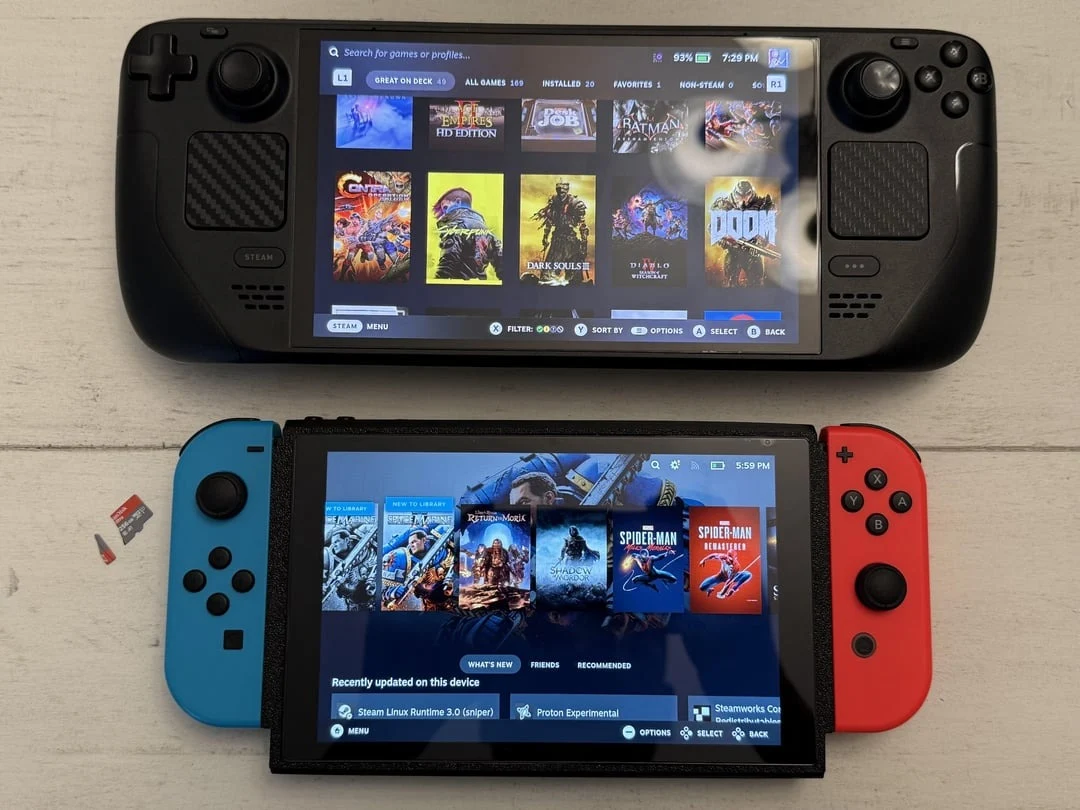
    One modder on Reddit recently breathed new life into a damaged Steam Deck (currently priced at $640 on Amazon for the OLED version), resulting in a creation that resembles a collaboration between Valve and Nintendo. This innovative device, named the Steam Switch 2, replaces the standard Steam Deck controls with actual Joy-Cons, all housed in a 3D-printed case and powered by a recycled motherboard.

    A New Creation

    The developer, u/Kanjo19, uploaded pictures of the completed project on Reddit, displaying the Steam Switch 2 next to an OLED Steam Deck for size reference. In the post, they mentioned that this project began as a solution after acquiring a broken Steam Deck, inspired by the announcement of the Switch 2. After producing six or seven prototype prints, they finally arrived at the version we see today.

    Easy Connectivity

    The Joy-Cons connect via Bluetooth, so there’s no need for soldering or firmware modifications. According to the modder, it’s “surprisingly simple to connect,” although they are still working out the charging method. They have already taken out the connector chip from a third-party Joy-Con grip and are in the process of routing 5V power from the Deck’s motherboard to establish a suitable internal charging system.

    A Functional Masterpiece

    In terms of functionality, it resembles a Steam-powered Switch more than a random mix of parts. Joy-Cons can be synced as a single controller through the Deck’s settings, and there are intentions to enhance the joysticks with Hall effect sensors to prevent drift issues.

    While it may not be the slimmest handheld on the market, that’s not the main focus. Given that it originated from a cracked screen and a non-working controller board, the Steam Switch 2 is an impressive and well-executed project. u/Kanjo19 intends to improve the design further and may even release the files later on, allowing others to attempt their own versions, too.

    Source:
    Link

  • Elder Scrolls IV: Oblivion Steam Deck Verified with High Requirements

    Elder Scrolls IV: Oblivion Steam Deck Verified with High Requirements

    Key Takeaways

    1. Bethesda has remastered The Elder Scrolls IV: Oblivion using Unreal Engine 5, featuring demanding system requirements.
    2. The game is verified for use on the Steam Deck, despite not being explicitly mentioned on the official Steam page.
    3. Minimum requirements include an AMD Ryzen 5 2600X or Intel Core i7-6800K CPU, Radeon RX 5700 or GeForce GTX 1070 Ti graphics card, and 16 GB of RAM.
    4. Playable frame rates of around 30 FPS can be achieved on the Steam Deck with adjustments.
    5. The game requires 120 GB of SSD storage, potentially necessitating the uninstallation of other games for space.


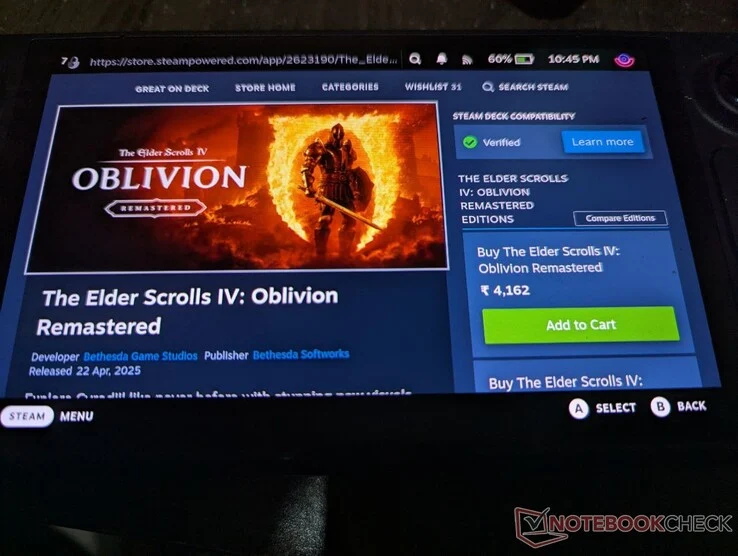
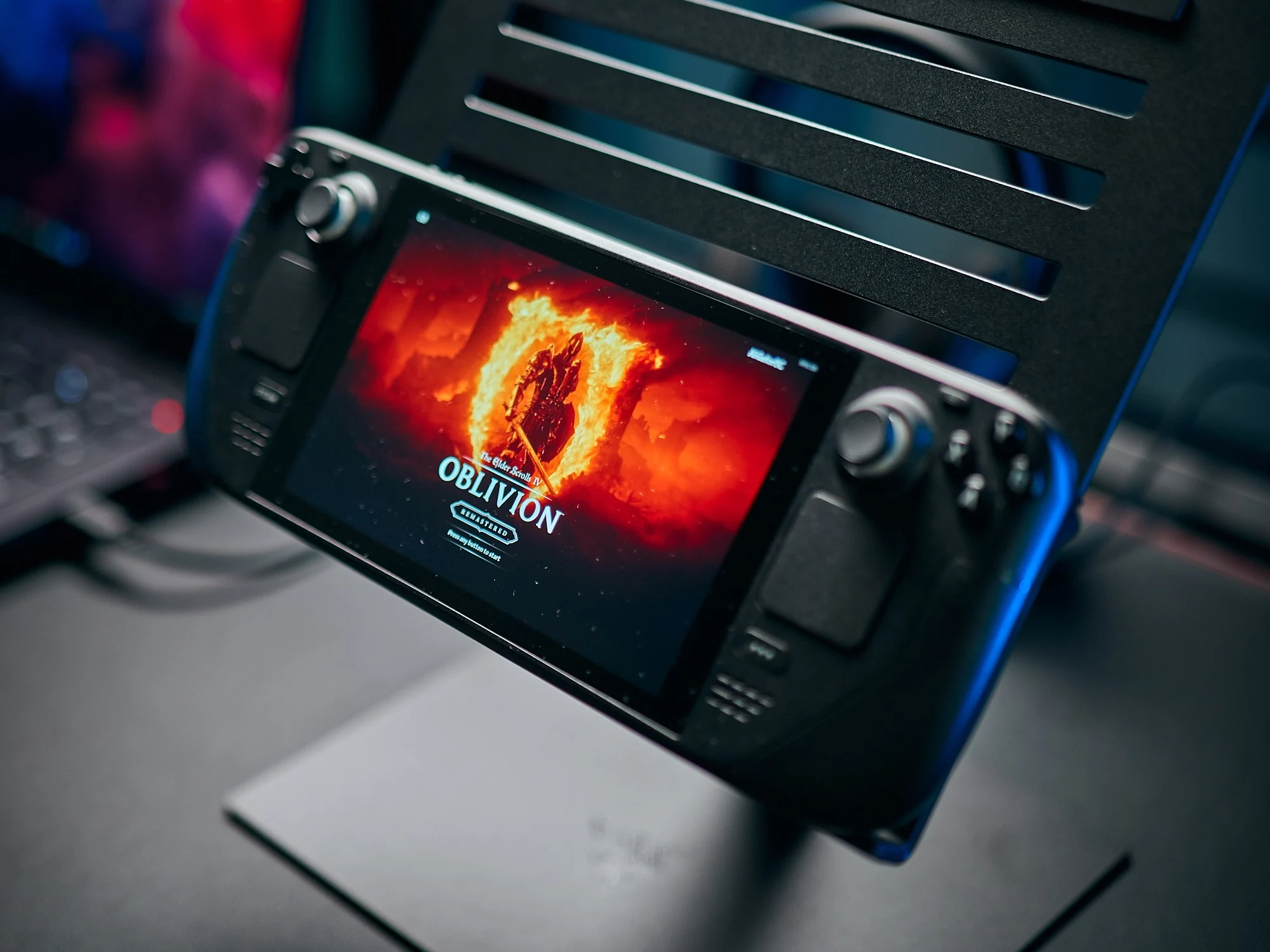
    Bethesda has finally unveiled the remastered version of The Elder Scrolls IV: Oblivion, which is powered by Unreal Engine 5. As with all games utilizing this engine, the system requirements are noticeably demanding. However, Bethesda managed to get the game operational on a Steam Deck. Although the official Steam page doesn’t clearly mention this, accessing the game on a Steam Deck reveals a green check mark, signifying that it is verified.

    Minimum Requirements

    A quick look at the minimum specifications shows that The Elder Scrolls IV: Oblivion requires at least an AMD Ryzen 5 2600X or an Intel Core i7-6800K CPU, as well as a Radeon RX 5700 or GeForce GTX 1070 Ti graphics card. Additionally, 16 GB of RAM is also necessary. This is a bit more powerful than what the Steam Deck offers, but with some adjustments, you could achieve a playable 30 FPS.

    Performance Potential

    That frame rate could likely be improved with the help of FSR and third-party applications like Decky Frame Gen or Lossless Scaling. However, a significant concern is the game’s 120 GB SSD storage requirement, which means you may need to uninstall some games to make space for Oblivion. Regardless, the achievement of getting it running on the Steam Deck is quite remarkable, and it will be fascinating to observe its actual performance.

    Source:
    Link


  • Cyberpunk 2077 on Nintendo Switch 2 Impresses Steam Deck Owners

    Cyberpunk 2077 on Nintendo Switch 2 Impresses Steam Deck Owners

    Key Takeaways

    1. Nintendo showcases Switch 2 games in docking mode for optimal visuals, but handheld performance remains uncertain.
    2. Cyberpunk 2077: Ultimate Edition maintains around 40 fps in a demo, but experience may vary with some frame rate dips.
    3. Digital Foundry suggests the Switch 2 could compete with the Steam Deck and PS4, despite concerns about power consumption in handheld mode.
    4. The Switch 2 is expected to feature the Nvidia Tegra T239 processor with DLSS support, though its impact on gameplay is still unclear.
    5. Deck Wizard’s YouTube channel provides promising footage of Cyberpunk 2077 on Switch 2, hinting at potential upscaling techniques.


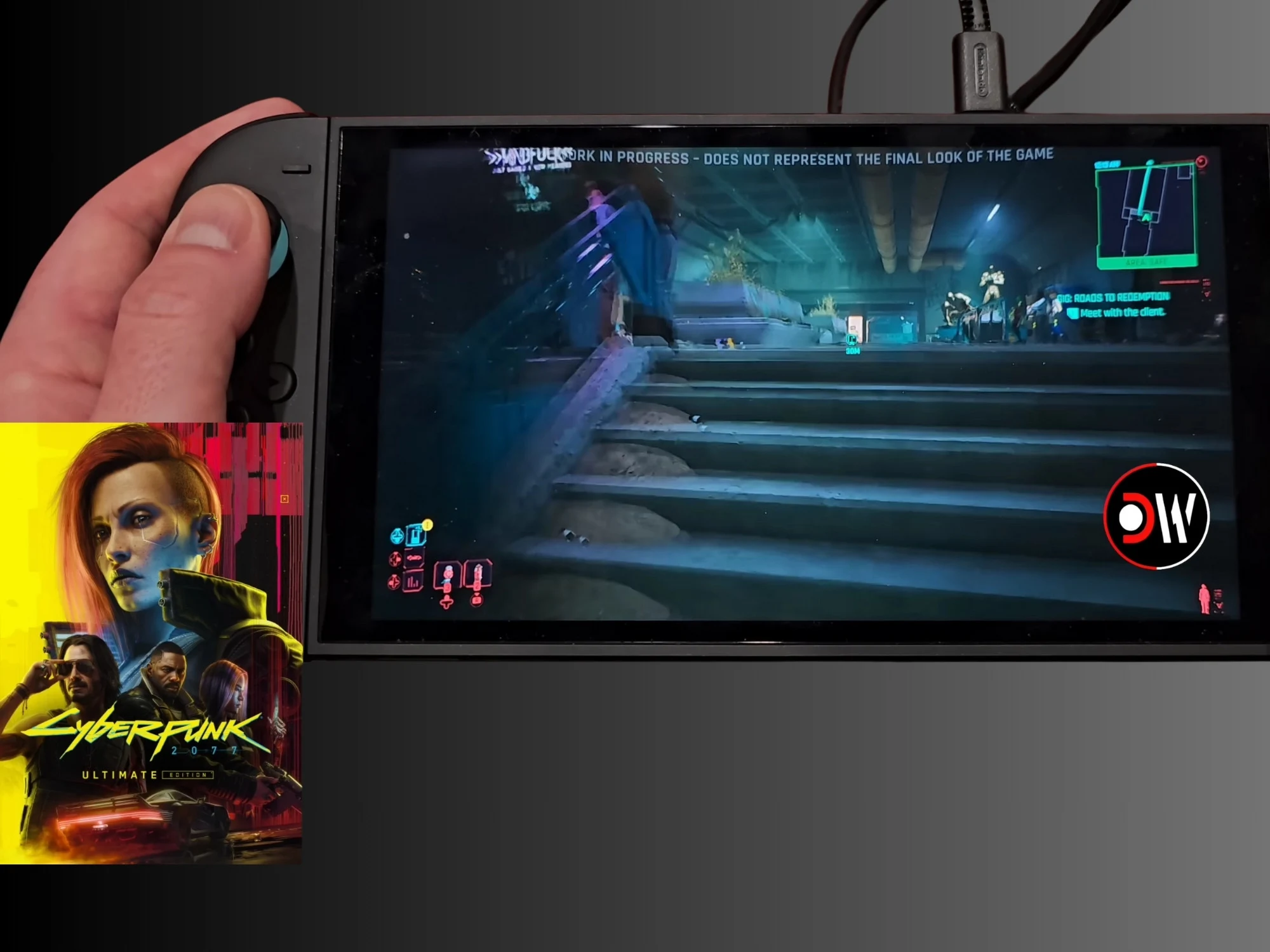
    It’s not unusual for Nintendo to show clips of Switch 2 games in docking mode. This way, the titles look their best, but how they perform in handheld mode raises questions. With a better GPU enhancing the Switch 2’s specs, playing demanding games like Cyberpunk 2077 seems feasible. Gamers can now view lots of YouTube footage from Deck Wizard that showcases the action RPG. The video indicates a more stable frame rate than what most Steam Deck players see.

    Performance Insights

    During much of the demonstration, the work-in-progress Cyberpunk 2077: Ultimate Edition maintains around 40 fps, although there are some dips. In Deck Wizard’s video, the game’s menus show that Performance Mode was active. While the other system settings for Switch 2 remain unclear, the demo has impressed some doubtful Steam Deck users.

    Cyberpunk 2077 holds a Steam Deck Verified status, meaning players can anticipate decent performance. Nevertheless, without modifications, many sessions peak at 30 fps. As gamers explore the most intricate environments, experiencing choppiness is not rare.

    Expectations vs. Reality

    The handheld demonstration of the CD Projekt Red game may surpass what was expected based on the known specs of the Switch 2. Digital Foundry made comparisons between the console and the Steam Deck using gameplay footage from the Switch 2. The site suggested that the new system could compete with Valve’s handheld PC or the PS4. However, there are worries that a lower power consumption could restrict the Switch 2 when it is not docked. Even with a resolution of 720p, the Deck Wizard video gives a hopeful first glimpse at the mobile performance of the Switch 2.

    With less than two months until its release, gamers still have questions about some essential features of the Switch 2. Most leaks indicate that it will use the Nvidia Tegra T239 processor, which will include DLSS support. It is thought that this feature has not yet played a role in other gameplay videos. Some shine in the Deck Wizard footage may suggest that some form of upscaling was in effect, which could assist Cyberpunk 2077 in reaching 40 fps.

    Source:
    Link

  • Rare Steam Deck Prototype with AMD Picasso APU Sells for $2K

    Rare Steam Deck Prototype with AMD Picasso APU Sells for $2K

    Key Takeaways

    1. A Steam Deck prototype was auctioned on eBay for $2,000, despite a listing price of $2,999.99.
    2. The prototype, completed in February 2020, featured an experimental AMD ‘Picasso’ APU, which was less powerful than the retail Aerith APU.
    3. The Picasso APU provided about half the GPU power of the Aerith, which uses an RDNA 2-based iGPU.
    4. The prototype had 8 GB of RAM and 256 GB of storage, while retail Steam Decks have 16 GB of RAM and various storage options (64 GB, 512 GB, 1 TB).
    5. The future of the prototype, designated as ‘Engineering Sample 34,’ is uncertain, and it may be showcased again later.


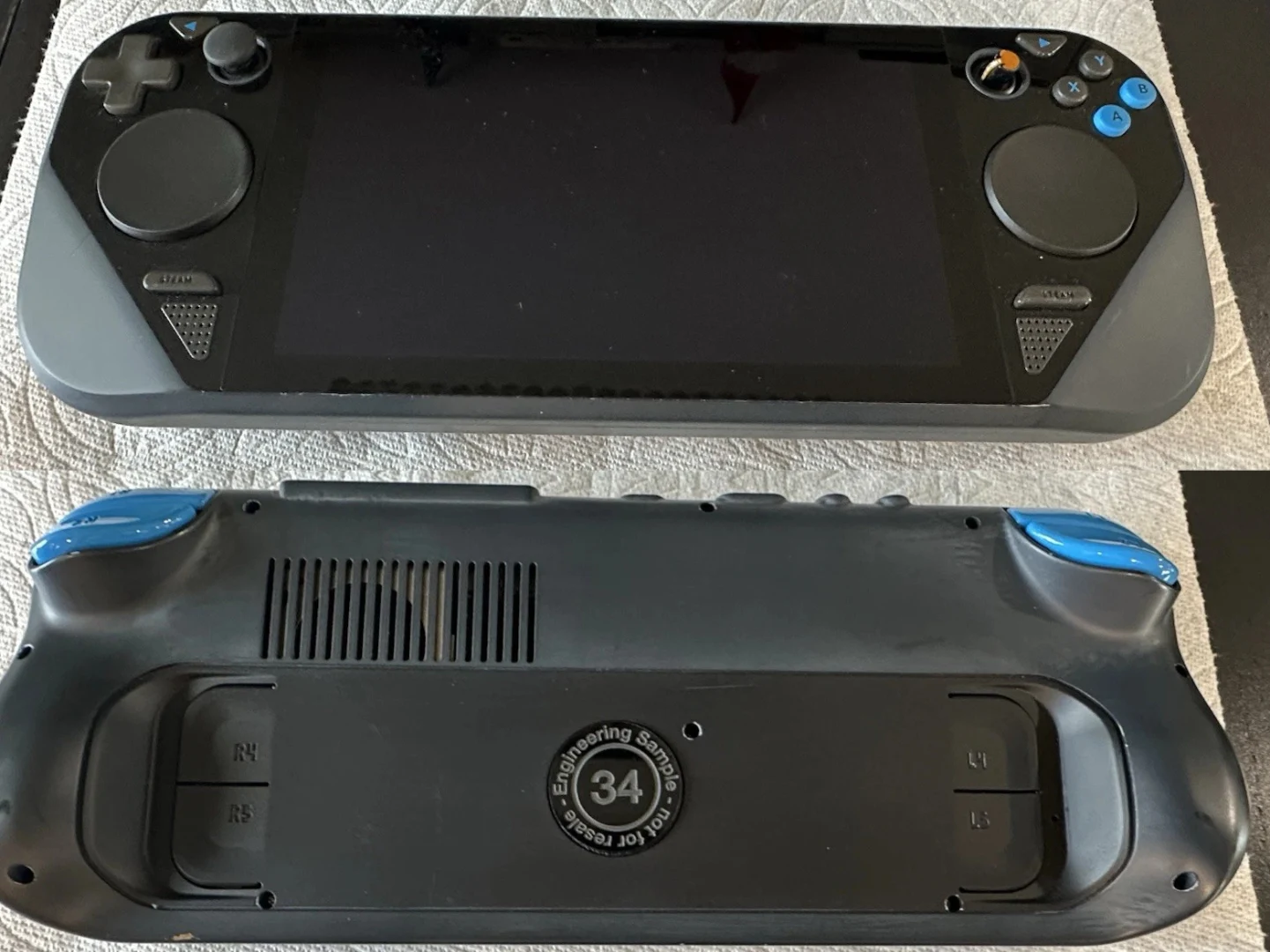
    A few years ago, Pierre-Loup Griffais posted images and a short video of some Steam Deck prototypes. Recently, one of these prototypes was auctioned on eBay in the US for a staggering $2,000. It’s important to mention that while the eBay listing indicates the final auction price was $2,999.99, an accepted Best Offer of $2,000 was actually the price paid.

    Prototype Details

    The images in the listing show that Valve completed this prototype around February 2020, which is about two years before the retail versions hit the market. The Steam Deck officially comes with two APU options: one called Aerith for the LCD models and another named Sephiroth for the OLED versions. However, Engineering Sample 34 shows that Valve was also experimenting with an AMD ‘Picasso’ APU, likely incorporating Zen CPU cores alongside Vega (GCN 5.0) iGPU cores.

    Performance Comparison

    Pierre-Loup Griffais mentioned that this Picasso APU was only providing “about half” the GPU power of Aerith, which uses an RDNA 2-based iGPU with 8 Compute Units. In comparison, newer APUs such as the Ryzen Z1 Extreme present in the Asus ROG Ally (currently priced at $599.99 on Amazon) come with 12 CUs from AMD’s advanced RDNA 3 architecture. This means that, had this prototype been released as a consumer product, it would have been quickly outdated.

    At that time, Valve was also working on the Steam Deck with 8 GB of RAM and 256 GB of storage. In contrast, all the retail units of the Steam Deck come equipped with 16 GB of RAM, and storage options include 64 GB, 512 GB, and 1 TB across both the LCD and OLED models. Where ‘Engineering Sample 34’ will go next is still uncertain, and it remains to be seen if it will appear in public again. Hopefully, we will see this prototype showcased in the future.

    Source:
    Link