Tag: Framework Laptop 16

  • Framework’s First eGPU Connects Laptop and Desktop GPUs Using OCuLink

    Framework’s First eGPU Connects Laptop and Desktop GPUs Using OCuLink

    Key Takeaway

    1. The OCuLink Dev Kit offers a high-bandwidth eGPU solution with data rates of up to 128 GT/s, surpassing Thunderbolt 4 or USB 4.
    2. The system is modular, consisting of an OCuLink cable, Expansion Bay Adapter, Graphics Module OCuLink Dock, and PCIe OCuLink Dock for flexible configurations.
    3. Compatible with the Framework Laptop 16 and potentially other devices with an OCuLink port, allowing users to connect standard desktop GPUs or laptop GPUs from Framework.
    4. Pricing details are not yet available; GPU modules are sold separately, with options including AMD Radeon and Nvidia GeForce models.

    Introduction to the OCuLink Dev Kit

    The company has rolled out a new product, the OCuLink Dev Kit, alongside the Framework Laptop 13 Pro. This innovative eGPU kit is mainly aimed at enhancing the capabilities of the Framework Laptop 16. Moreover, it is expected to be compatible with other devices featuring an OCuLink port. This setup comprises four distinct parts, giving users the flexibility to customize their experience with connected components.

    Details about Components

    The core of the kit begins with the OCuLink 8i cable, handling data speeds up to 128 GT/s, offering a considerable upgrade in bandwidth compared to traditional solutions like Thunderbolt 4 or USB 4. Next, an OCuLink Expansion Bay Adapter is designed to integrate into the Framework Laptop 16, providing an extra port for connecting external hardware seamlessly.

    Functionality of the Graphics and PCIe Modules

    For turning the laptop’s own GPU into an eGPU, the Graphics Module OCuLink Dock is used. This allows for extending graphics processing power right from the hardware inside the Framework Laptop 16. The fourth component, the PCIe OCuLink Dock, caters to users needing to connect standard PCIe devices, including typical desktop graphics cards, expanding the system’s versatility.

    Pricing, Compatibility, and Additional Information

    Framework has not disclosed exact pricing or release dates for the OCuLink Dev Kit yet, but more details will be made available on their website soon. Buyers will need to purchase specific GPU modules separately; for example, an AMD Radeon RX 7700S costs $399, while Nvidia’s GeForce RTX 5070 laptop GPU is priced at $699. If desired, standard desktop GPUs such as the Nvidia GeForce RTX 5060, which can be found for approximately $329, are also compatible, offering wider options for users.


  • Framework Laptop 16 Supports Four M.2 SSDs for 16 TB Storage

    Framework Laptop 16 Supports Four M.2 SSDs for 16 TB Storage

    The Framework Laptop 16 features an expansion bay, which was originally designed mainly for the optional AMD Radeon RX 7700S. This graphics card can be added for an extra $400 when purchasing the laptop. Now, users who don’t require the GPU can utilize the expansion bay for a different module.

    Dual M.2 Adapter Overview

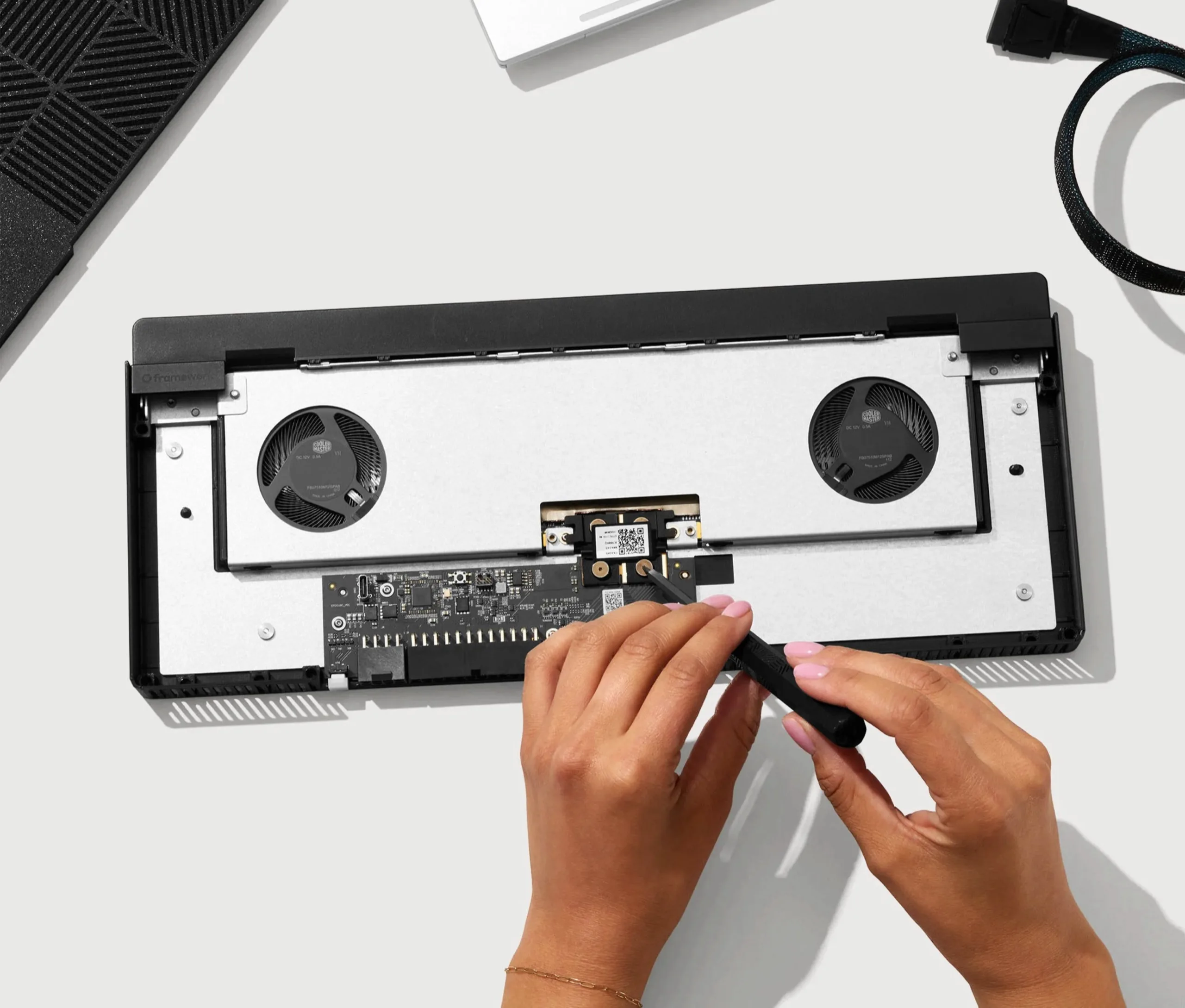
    This new module is referred to as the “Dual M.2 Adapter.” The name clearly indicates its purpose: it utilizes the PCIe interface of the expansion slot to connect two M.2 SSDs. When combined with the two M.2 slots on the mainboard of the Framework Laptop 16, users can install up to four 4 TB SSDs, allowing for a maximum storage capacity of 16 TB. Remember, compatible SSDs must be bought separately if needed.

    Pricing for SSDs

    For instance, the Crucial P3 Plus PCIe 4.0 SSD with 4 TB storage is currently priced at $244.95 on Amazon. The adapter supports all M.2 formats from 2230 to 2280. Furthermore, the dual M.2 adapter does not hinder the cooling system of the Framework Laptop 16, as the two fans are placed in the expansion slot along with the extra SSDs. You can check our in-depth review for more information about the Framework Laptop 16.

    Cost and Purchase Information

    The dual M.2 adapter for the Framework Laptop 16 can now be found in the manufacturer’s online store for just $39. As is customary, Framework provides a manual to guide users through the installation process, which should take about 15 to 30 minutes. A screwdriver is all that’s needed to complete the installation.

    Source: Link


    Image 1
    Image 1
    Image 1
  • Firebat Huan 16 Air Gaming Laptop Launches with Modular Design

    Firebat Huan 16 Air Gaming Laptop Launches with Modular Design

    One notable feature of Framework laptops is their modular structure. Take the Laptop 16, for instance; you can easily replace the AMD Radeon 7700S graphics module with an Expansion Bay Shell if you prefer a lighter, more streamlined setup. Additionally, the mainboard can be swapped out, enabling you to upgrade the processor as needed.

    A New Contender Emerges

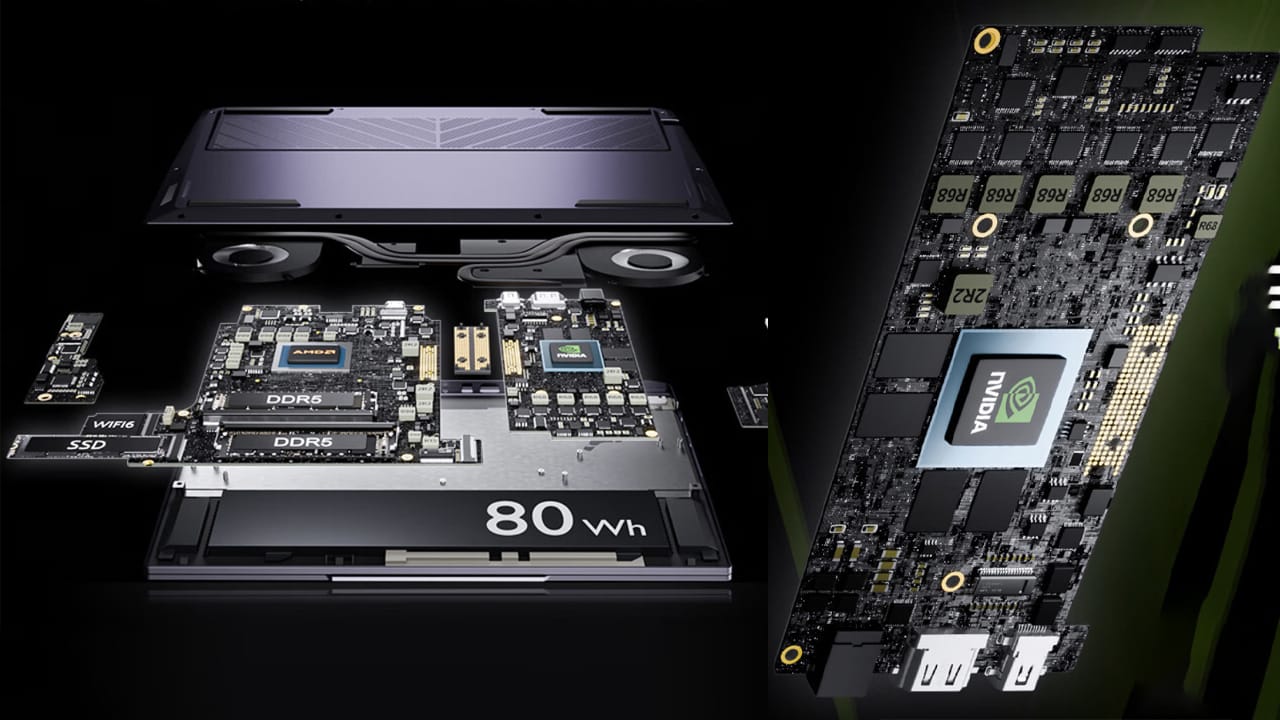
    However, it appears that Framework may have a new rival in the market. The brand Firebat has introduced its Huan 16 Air, which includes a separate GPU board. Although the company hasn’t directly stated that it’s modular, the way the boards connect through a bridge and the presence of contact points suggest that users might be able to upgrade the GPU themselves.

    Spec Comparisons

    While Firebat hasn’t provided information about which GPU boards can be interchanged, the situation is similar for Framework, as the Laptop 16 only offers the Radeon 7700S as its graphics module. Regarding the Huan 16 Air, it comes equipped with solid specifications. This gaming laptop is powered by the AMD Ryzen 7 8845HS and includes the Nvidia RTX 4060 Laptop GPU, which is rated at 140W (currently priced at $899.99 for the Dell G15 on Best Buy). It boasts a 16-inch display with a refresh rate of 240 Hz, a resolution of 2560×1600 pixels, and full 100% sRGB color coverage.

    Build Quality and Pricing

    The build quality also seems commendable, featuring a slim design along with a good selection of ports. In terms of cost, the Huan 16 Air is priced at CNY 6,999 (approximately $970). It’s worth noting that Firebat doesn’t typically offer its products outside of China. Nevertheless, reports from 孤城Hardware indicate that other Chinese brands may follow suit with similar internal designs.

    @realVictor_M on X , JD.com, 孤城Hardware via: Wccftech


    Image 1
    Image 1
    Image 1