Key Takeaways
1. Durability Improvements: The Logitech MX Master 4 aims to address some durability issues found in the previous model, the MX Master 3S, but some complaints may still persist.
2. Packaging Changes: The MX Master 4 is expected to come without a USB Type-C cable in its packaging, according to the Amazon listing.
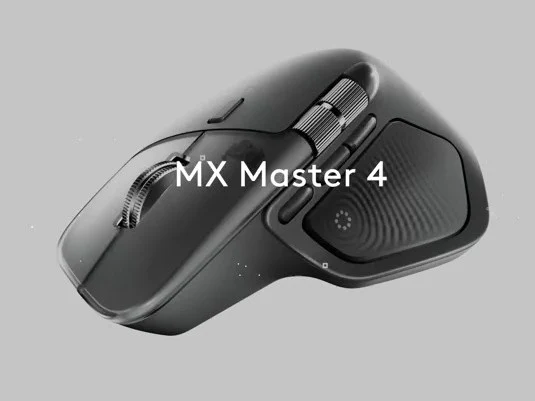
3. Design Updates: The mouse features a visual upgrade and improved build quality, including a new gesture button and a forward thumb button, but the overall design remains largely similar to the MX Master 3S.
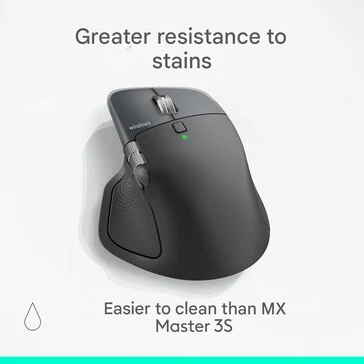
4. Material Modifications: Logitech may have changed the materials used in the MX Master 4 for better stain resistance and easier cleaning, with a potential shift from rubber to hard plastic in some areas.
5. Limited Internal Changes: There are no significant updates to internal specifications like polling rates or components, although new customizable Haptic Sense technology for the gesture control button has been introduced.
The Logitech MX Master 4 has leaked again, this time through an Amazon Italy listing, giving us an early peek at what Logitech is aiming for with their latest ergonomic mouse expected to launch later this year. Although it looks like they have tackled some durability issues, the most common complaint found in the MX Master 3S appears to still be an issue with the MX Master 4. Those in search of a high-polling rate ergonomic mouse may still need to consider other options, like the Keychron M6 8K we reviewed recently.
Changes to Packaging
It seems that Logitech has also decided to exclude the USB Type-C cable from the MX Master 4’s packaging, if we trust the Amazon listing.
Design Enhancements
The new Logitech MX Master 4 appears to offer primarily a visual upgrade and improved build quality compared to the MX Master 3S (currently priced at $109.99 on Amazon), as we previously mentioned. Besides the noticeable gesture button on the thumb rest and the new forward thumb button, there doesn’t seem to be many significant visual alterations to the mouse’s overall design. This news may please some users, while others who expected a more dramatic redesign could be disappointed.
Material Changes
Another significant change in the MX Master 4 is that Logitech may have altered the materials used, aiming to create a mouse that is simpler to clean and potentially more durable as a result. Logitech asserts that the MX Master 4 will resist stains better and be easier to maintain compared to the MX Master 3S. Whether this claim holds true is yet to be determined, but the degradation of the TPU rubber has been a long-standing issue for the MX Master series, with common reports of yellowing on white MX Master mice found on the r/Logitech subreddit.
While it remains uncertain if Logitech has replaced the rubber material on the back of the MX Master 4, the texture has definitely shifted, and the teaser video suggests it might now be made of a hard plastic. What is confirmed is that the main click buttons on the MX Master 4 will feature a textured clear hard plastic this time around.
Internal Specifications
Though the physical changes seem minimal, the internal updates appear even less significant. There’s no indication of updated polling rates or new internal components, and the battery life claim stays the same at 70 days. The Amazon listing also discloses new customizable Haptic Sense technology associated with the gesture control button and Logi Options+ software, which seems to suggest a customizable feedback option while using the gesture control button.
Source:
Link