
Tag: Epomaker

  • Epomaker Launches Compact 36-Key Gaming Keyboard with Hall Effect Switches

    Epomaker Launches Compact 36-Key Gaming Keyboard with Hall Effect Switches

    Key Takeaways

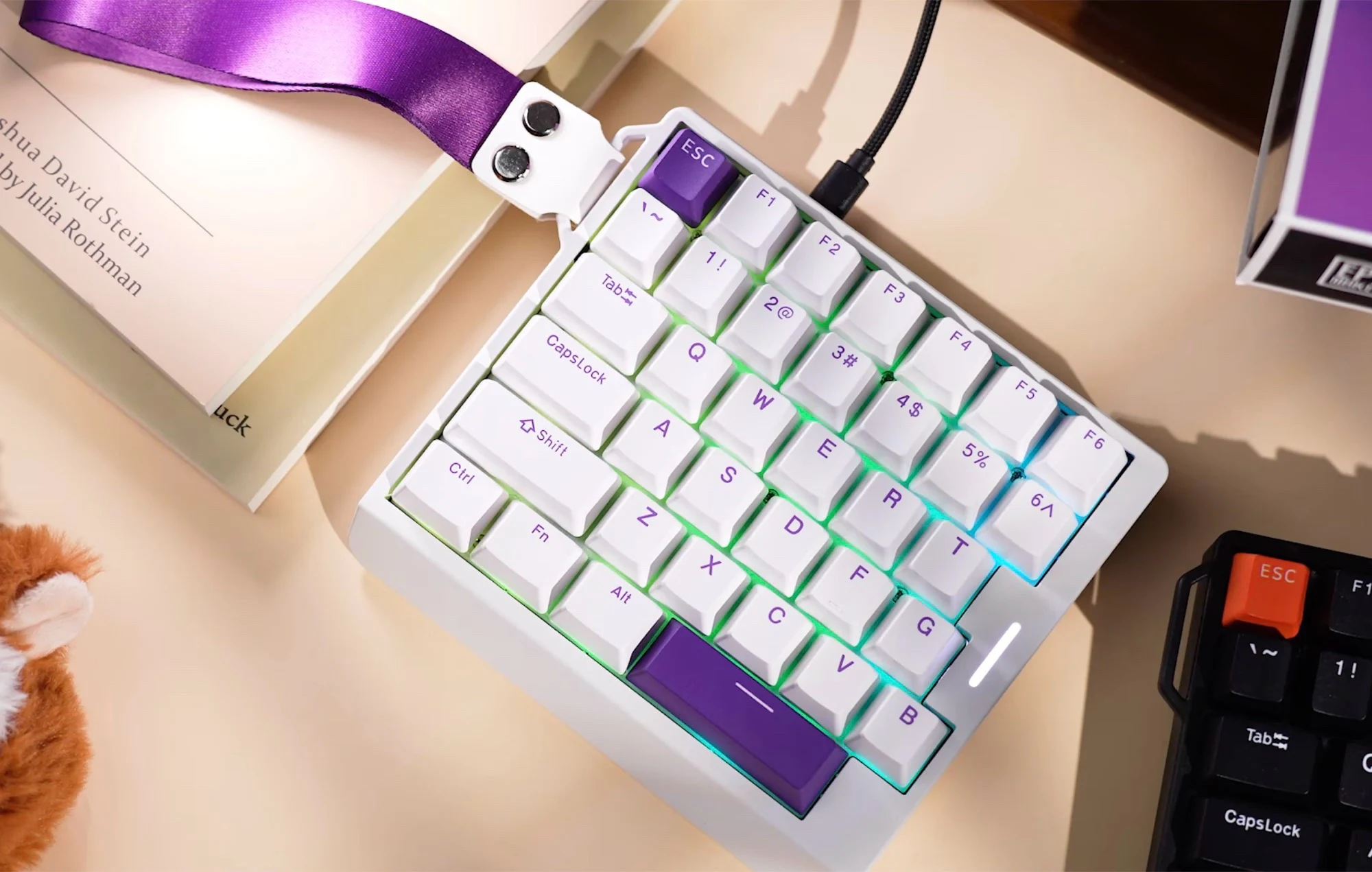
    1. The Epomaker HE30 is a compact 30% gaming keyboard with only 36 keys, designed for gamers rather than typing or general work tasks.
    2. Its small size allows for more desk space, enhancing mouse maneuverability and accuracy during gameplay, especially in shooters and strategy games.
    3. The keyboard features a sturdy build with a plastic outer shell, aluminum plate, Hall-effect switches for quick response, and adjustable trigger points.
    4. It includes RGB backlighting, PBT keycaps, and weighs 350 grams, with a wrist strap for easy portability; however, it’s wired only and lacks Bluetooth support.
    5. The HE30 is priced at $50 and officially supports Windows and Linux, but not macOS.


    The popularity of compact gaming keyboards has been growing for many years now. While a lot of gamers prefer 60 or 65% layouts, Epomaker is trying something different with their HE30, which is a 30% keyboard. This means it only has 36 keys, which is just the left side of a standard keyboard.

    Ideal for Gamers

    While the HE30 might not be the best for typing or general work tasks, it shines in gaming, especially in shooters, MOBA, or strategy games where having just 36 keys is more than sufficient. This compact design allows for more desk space, making it easier to maneuver a gaming mouse with lower sensitivity, thus enhancing accuracy during gameplay. It’s important to note that the keyboard doesn’t come with a battery or Bluetooth support, meaning it can only be used wired, achieving a polling rate of 8,000 Hz when connected via USB.

    Sturdy Build and Features

    The HE30 is constructed with a plastic outer shell and an aluminum plate, enhancing its stability. It features Hall-effect switches, which allow for a very quick key response, and you can also adjust the trigger point. The keyboard comes with RGB backlighting and PBT keycaps, which are standard features. Weighing in at 350 grams, it also includes a wrist strap for easy carrying. While Windows and Linux users are supported, macOS is not officially compatible.

    For those interested, the Epomaker HE30 gaming keyboard is priced at $50 on Amazon. More information can be found on the product’s official page.

    Source:
    Link


  • DIY Whimsical Mechanical Keyboard Project for Fun Typing

    DIY Whimsical Mechanical Keyboard Project for Fun Typing

    Key Takeaways

    1. Joe Scotto created the “ScottoT9,” a custom macro pad with a 12-key T9 layout designed for thumb typing.
    2. The device features a simple 3D printed casing, hand-wired assembly, and uses standard 5-pin MX-style mechanical switches with QMK firmware.
    3. Typing on the T9 keyboard requires multiple rapid taps for keypresses, and it includes a Tap Dance functionality for symbol entry.
    4. Scotto achieved a typing speed of 20–25 words per minute on the T9 keyboard, emphasizing the project’s novelty rather than advanced features.
    5. Plans and a build guide are available for free on GitHub, with the case and keycap bundle priced at $39.99 and the controller at $11.99.


    Joe Scotto, known for his unique and quirky approach to keyboard design, has recently created what he calls a “meme build.” His latest project is a custom macro pad that features a 12-key layout arranged in a 3×4 grid, designed to replicate the T9 keyboards from older mobile phones.

    Thoughtful Design Choices

    Even though he refers to it as a “meme build,” Scotto has clearly invested considerable effort into the design. He crafted the case and keycaps to ensure they are comfortable for thumb typing. Dubbed the ScottoT9, this device comes with a straightforward 3D printed casing and four stand-offs that secure the PCB and plate assembly. It uses standard 5-pin MX-style mechanical switches and operates on an Arduino Pro Micro RP2040 controller, utilizing the open-source QMK firmware.

    Unique Wiring Approach

    Unlike keyboards that often come with hot-swap sockets, such as the recently reviewed Epomaker Galaxy 68, ScottoT9 is entirely hand-wired. With only a handful of keys to connect to the controller, the assembly process is a straightforward diodeless setup.

    Typing on a T9 keyboard presents a different experience compared to compact models like the Epomaker TH40, which can be quite limiting. T9 keyboards demand multiple rapid taps to register a keypress. While traditional T9 setups utilized autocorrect features, Scotto opted against this, likely to avoid the complications of adding advanced functionalities. Instead, he programmed the ScottoT9 using QMK firmware and took advantage of the firmware’s Tap Dance functionality, allowing users to enter symbols by tapping a key multiple times. To input numbers or activate the shift function, users must hold down a key for a specified duration.

    Impressive Performance and Availability

    After he completed the programming and confirmed that the hardware was functioning correctly, Scotto tested the typing speed on the T9 keyboard, managing to reach around 20–25 words per minute. The symbol entry system appears especially intricate. While it’s remarkable that QMK can be manipulated to create something like the ScottoT9, Scotto himself acknowledges that the main appeal of this project lies in its novelty.

    Joe Scotto has also made free plans and a build guide available on GitHub. For those interested in purchasing, the 3D-printed case and keycap bundle are available for $39.99, while the RP2040 Pro Micro controller can be bought for $11.99 from his online shop. Keep in mind that you’ll need to source your own switches and have a soldering setup, such as the Hakko FX888DX-010BY Digital Soldering Station, currently priced at $121.92 on Amazon.

    Follow Joe Scotto on YouTube or check out his blog for more updates.

    Source:
    Link