Key Takeaways
1. The Garmin Descent X50i has received a new software update (version 5.09) four months after the previous version (4.05).
2. The update introduces a Passcode tool for added security, though it does not prevent dives from starting.
3. Users can now see connection type details for paired devices, and pairing stability for the Descent S1 buoy has improved.
4. The update supports Essential data fields on custom dive screens, allowing users to track metrics like depth and NDL time, and offers a customizable startup message.
5. The rollout of the update has reached about 20% of users so far, with no specific timeline for full distribution.
Garmin is once again updating its premium dive computer, the Descent X50i. Users of this device are currently getting the new system software version 5.09, which comes about four months after the last update that was version 4.05.
New Features and Improvements
With the introduction of system software 5.09, the Descent X50i now includes the Passcode tool, a security feature that started being available to users in early 2025. This feature, however, does not stop a dive from beginning. Another notable update is the inclusion of connection type details for paired devices. Additionally, the pairing stability for the Descent S1 buoy, which currently priced at $2,080 on Amazon Marketplace, has improved.
Enhanced Functionality
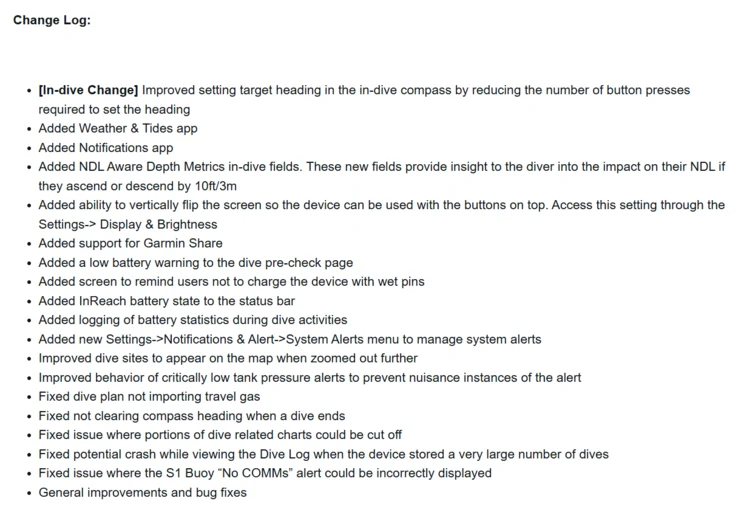
The Garmin Descent X50i also now supports Essential data fields on custom dive screens. These fields cover metrics like current depth, stop depth, and NDL time. Users have the option to create a startup message that displays on the splash screen. Furthermore, you can now view the tank volume during the pre-dive check. This update also brings a series of bug fixes that address issues related to pool mode, SubWave messages, and the Dive log. The full release notes for system software 5.09 are available below.
Update Rollout Status
According to a post on a forum by Garmin, system software 5.09 has reached about 20% of users as of now. It remains uncertain when this update will be fully rolled out. To check for updates on the watch, users can navigate to PREV > Settings > System > Check for Updates, or use the Garmin Dive App or Garmin Express Software.
Source:
Link